wooloo
Health Uyari
- License — License: MIT
- Description — Repository has a description
- Active repo — Last push 0 days ago
- Low visibility — Only 6 GitHub stars
Code Uyari
- network request — Outbound network request in scripts/bundle-herdr.sh
Permissions Gecti
- Permissions — No dangerous permissions requested
Bu listing icin henuz AI raporu yok.
Native macOS client for Herdr: manage coding agent sessions with a live terminal, file explorer, editor and Git tools.
wooloo


A native macOS home for your coding agents.
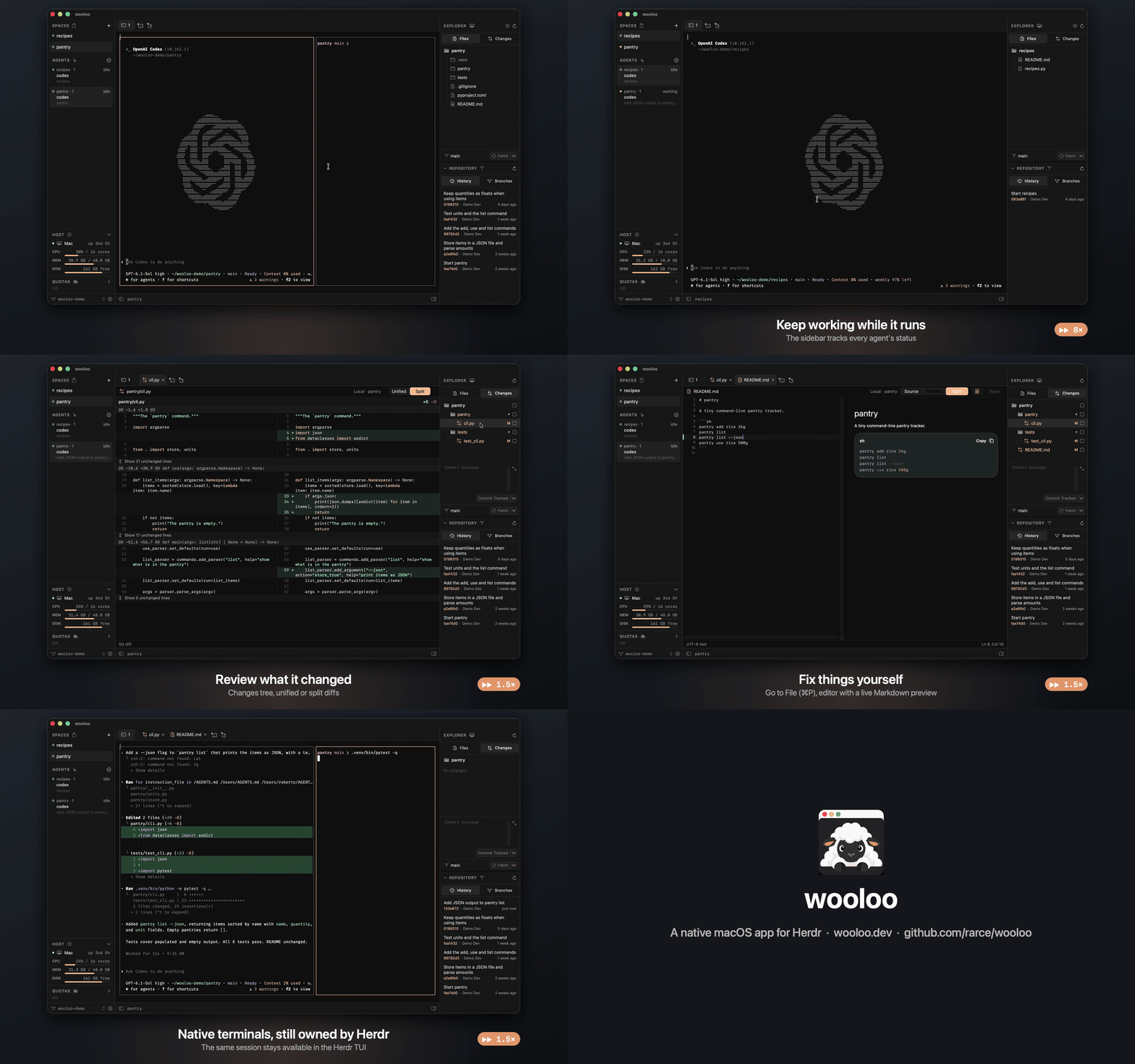
A real session with the Codex CLI, recorded in one take. Waiting and typing are sped up where the video says so. MP4 version.
wooloo is a Mac app for Herdr, the server that runs and organizes coding agent sessions. It is for developers who work with several agents at once, use a mouse alongside the keyboard, and want some of the convenience of an IDE without leaving an environment built around their agents.
Herdr keeps owning the processes, layout and terminal state, so the same sessions stay available from the Herdr TUI. wooloo renders them natively and sends your input back.
wooloo is an independent project, not affiliated with or endorsed by Herdr, Anthropic or OpenAI.
Status: early preview (0.x), not notarized yet. Expect rough edges and breaking changes. See
TODO.mdfor known issues and planned work.
Features
Agents and sessions
- Spaces, tabs and split panes follow Herdr's workspace, tab, pane and agent model. Create, rename, close and zoom them from the sidebar, tab row, context menus, menu bar or command palette.
- The Agents section shows every agent with its Space, tab, summary and status, and can be filtered to the selected Space.
- Alerts when an agent finishes or needs input: Herdr's sounds, in-app toasts or system notifications, with unread marks until you look at the pane.
- The connected host's CPU, memory, disk and uptime, local or over SSH.
- Optional Claude Code and Codex plan usage in the sidebar (see Agent quotas).
- A session picker for any Herdr session on the machine.
- Remote access to the Herdr session over SSH, through a Cloudflare Tunnel (see Remote access).
Terminal
- Live terminal surfaces over Herdr's binary client endpoint: colors, text attributes, cursor, alternate-screen apps and Herdr's inline PNG and RGB images, drawn with Core Text at Herdr's frame rate.
- Direct typing with control and option chords, paste, and dropped file paths. Mouse clicks, drags and the wheel reach programs that enable mouse reporting.
- Drag split borders to resize panes, select and copy text, and Command-click links.
- Herdr's prefix (
ctrl+bby default) and direct key bindings, read from and edited in the sameconfig.toml.
Files and editor
- An explorer for the selected Space, local or on an SSH machine saved in Herdr. It works like Zed's project panel: compact folder chains, Git status colors, ignored files, keyboard navigation, multi-selection, drag and drop, in-place create and rename, trash, and undo and redo of file operations. Folders with more than 200,000 files are listed only up to that count, and Go to File says so.
- Go to File (⌘P) with fuzzy matching and
:line:column, and a command palette (⇧⌘P) for app, editor and explorer actions. - Editor tabs built on CodeEditSourceEditor: syntax highlighting, find and replace, Git change bars beside line numbers, conflict-checked atomic saves, and Zed-style multiple cursors (⌥-click, ⌥-drag column selection, ⌘D, ⌃⌘G or ⌃⌘D, ⇧⌘L, ⌥⌘↑/↓, ⌘U and ⇧⌘U to undo and redo selection changes), and optional line wrapping (View > Wrap Lines).
- Reopen a Space with its document tabs, order, active editor, selections and scroll position. Unsaved edits and untitled drafts are backed up locally under
~/Library/Application Support/wooloo, including SSH documents, and restored without saving them into the project. Backups are written after a short pause while editing and completed before quitting; closing a dirty tab still asks before discarding its contents. - Markdown preview with Mermaid diagrams, and Jupyter notebooks rendered with their saved output.
- Native image previews for PNG, JPEG, GIF, WebP, HEIC/HEIF, AVIF, TIFF, BMP, and ICO in local and SSH Spaces, using macOS decoders. Includes zoom, fit, actual size, pixel dimensions, transparency checkerboard, and reload; each tab keeps its zoom and position. Previews are read-only, limited to 50 MiB, and decode at most 4096 pixels per side. Multi-frame images show their first frame.
- Native PDF previews for local and SSH files up to 50 MiB, with page navigation, zoom, page/width fitting, text search (⌘F and ⌘G), password unlocking, and reload. Each tab keeps its page and zoom. PDF previews and form fields are read-only; search uses existing PDF text rather than OCR.
- Project-wide search and replace.
Git
- A Changes tree with stage checkboxes, a branch bar and a commit editor.
- Unified or split diffs with syntax colors.
- Repository History (with each commit's files and diffs), branches, and worktrees: add a worktree from a branch, or remove one with Git's normal check that refuses dirty worktrees.
Settings
- Guided sections for Herdr's terminal defaults, worktrees, appearance, notifications, headless size and shortcuts, plus a full TOML editor. Saving validates with
herdr config check, refuses to overwrite outside changes, and reloads the running session. - One theme shared by the interface, editor and terminals, with adjustable text sizes.
Agent quotas
Unofficial. This section uses Claude Code's and Codex's own sign-ins against endpoints that Anthropic and OpenAI do not document for third-party apps. It is not endorsed by either company, may conflict with their terms, and can stop working at any time. Use it at your own risk.
The QUOTAS section is off until you agree to a dialog that lists what it reads and where it sends it. The section's Turn On Quotas… button and its context menu open the same dialog; Cancel (or Escape) leaves it off, and nothing is read before you choose Turn On. Agreeing is per machine: agreeing for this Mac does not read an SSH machine's sign-ins when the explorer moves there, and an SSH machine whose target changes is asked about again. Copies that had QUOTAS on in 0.3.1 or earlier ask again once. Once on, every two minutes while a window is active, wooloo:
- reads Claude Code's sign-in from
~/.claude/.credentials.json, or else from the Keychain itemClaude Code-credentials(macOS asks you to allow wooloo the first time); - reads Codex's sign-in from
${CODEX_HOME:-~/.codex}/auth.jsonand the rate limits in its newest session logs; - sends those tokens to the usage endpoints that Claude Code (
api.anthropic.com/api/oauth/usage) and the Codex CLI (chatgpt.com/backend-api/wham/usage) use themselves.
When the explorer points at an SSH machine you agreed for, wooloo reads that machine's sign-ins (its files, or its Keychain through security if it is a Mac) instead of this Mac's, and the requests still leave from your Mac. wooloo keeps the tokens in memory only, never refreshes them, and never writes or logs them. Turn Off Quotas in the section's context menu turns it off on every machine.
While wooloo is signed ad hoc, macOS ties an "Always Allow" on Claude Code's Keychain item to one build, so it may ask again after each update.
Remote access
This puts your Mac's SSH login on the internet. What is published is this Mac's SSH server (Remote Login,
localhost:22), not only Herdr: anyone who reaches the tunnel's address can try to sign in to any account allowed to use SSH. Before turning it on, allow only key authentication: add a file such as/etc/ssh/sshd_config.d/100-keys-only.confwithPasswordAuthentication noandKbdInteractiveAuthentication no, then turn Remote Login off and on again. wooloo never changes SSH, firewall, Keychain or sharing settings for you.
Settings → Remote Access (also in the command palette) publishes this Mac's SSH server through a Cloudflare Tunnel, so an SSH client elsewhere can reach the Herdr session without opening a port. Clients still sign in with SSH, then run Herdr's own commands (remote-api-bridge, terminal session control).
What wooloo checks before starting the tunnel, and what it does not:
Checked: that something answers on
localhost:22, and which sign-in methods sshd offers your account. wooloo runssshto127.0.0.1offering no credential (no key, agent or password), and sshd answers with the methods it would accept.cloudflaredalso connects from this Mac, so sshd treats tunnel clients like this check. The attempt may appear in sshd's log as a failed sign-in.Key-only (for example only
publickey): the tunnel starts.Passwords accepted (
passwordorkeyboard-interactive), or the methods could not be learned: nothing is published until you choose Start Anyway. That is your decision, not a check, and the status keeps saying the tunnel runs without verified key-only SSH.Sign-in without any credential: wooloo refuses to publish.
Not checked: other accounts on this Mac (sshd's
Match Userrules can differ per account), whether Cloudflare Access protects a named tunnel, changes to sshd after the tunnel started, and the strength of your keys or passwords.Start the tunnel when wooloo opens starts it only after a key-only check, since nobody is there to confirm anything else.
Needs
cloudflared(brew install cloudflared) and Remote Login (System Settings → General → Sharing).Quick tunnel: no Cloudflare account; a new
*.trycloudflare.comaddress on every start. Anyone who learns it reaches your SSH login.Named tunnel: create a tunnel in Cloudflare Zero Trust with a public hostname whose service is
ssh://localhost:22, then paste its hostname and token (kept in the Keychain, passed tocloudflaredthrough its environment). It can sit behind Cloudflare Access, with a service token for clients.Other computers connect with
cloudflaredinstalled:ssh -o ProxyCommand="cloudflared access ssh --hostname %h" user@host.While the tunnel runs, wooloo also shows a QR code for a companion Android app that is not published yet.
The tunnel is wooloo's own
cloudflaredprocess: it stops when wooloo quits, and can start when wooloo opens.Updates and the Keychain. wooloo is signed ad hoc for now, and macOS trusts an ad hoc app's access to a Keychain item for that exact build. After each update, macOS may ask again to let wooloo read the named tunnel's token. A tunnel set to start when wooloo opens on an unattended Mac stays down until someone answers that prompt.
Privacy
The wooloo app has no analytics or telemetry. (The website, wooloo.dev, counts visits with Google Analytics; that is the site, not the app.) The app talks to the Herdr server on this Mac, to SSH machines you saved in Herdr, and over the network only to:
- GitHub, at build time, to download the pinned Herdr binaries and Swift packages;
- GitHub, to check for and download updates, once a day if you allow automatic checks;
- your Git remotes, when you fetch, pull or push;
- web images that a Markdown file you preview links to;
- Anthropic's and OpenAI's unofficial usage endpoints, when you turn on QUOTAS;
- Cloudflare, when you turn on Remote Access.
Requirements
- To run: macOS 14 or later, Apple silicon or Intel. Herdr 0.9.3 is included in the app; an existing Herdr 0.9 or later installation can also be used. Git is optional, for the Git features.
- Coding agents are separate. wooloo runs whatever agent CLI you have installed (Claude Code, Codex and others) inside Herdr's terminals; it does not include them. Each agent's CLI, account and subscription are your own and are set up with that agent.
- To build: macOS 15.6 or later with Xcode 26 (one vendored package needs Swift 6.2).
Install
Download wooloo-<version>.zip from the latest release, unzip it and drag wooloo.app to /Applications in Finder. The build is universal (Apple silicon and Intel). Until a downloaded app has been moved in Finder, macOS runs it from a temporary read-only copy (App Translocation), which shows up as a second wooloo that cannot be deleted while it is open.
The app is not notarized yet (it is signed ad hoc), so Gatekeeper blocks the first launch. Either open it once, then go to System Settings → Privacy & Security, click Open Anyway, click Open Anyway again in the confirmation and enter your password or use Touch ID; or remove the quarantine flag:
xattr -dr com.apple.quarantine /Applications/wooloo.app
Check the download against the SHA-256 in the release notes (shasum -a 256 wooloo-<version>.zip), or build from source below.
From 0.2.0 on, wooloo updates itself from the GitHub releases with Sparkle: wooloo → Check for Updates…, or automatically once a day if you allow it when asked on the second launch. Updates are installed only when signed with the project's EdDSA key, and they skip the Gatekeeper prompt of the first install. Version 0.1.0 has no updater; download 0.2.0 or later once by hand.
First run
- Open wooloo. The setup window offers the included Herdr; keep Use included Herdr.
- Choose Folder… and pick a project folder. wooloo creates your first Space there, with a terminal.
- In that terminal, start an agent CLI you have installed, for example
claudeorcodex. It appears in the sidebar's Agents section; its changed files show in the explorer and the Changes tree, where you can open their diffs and edit them.
Quitting wooloo leaves Herdr and your agents running; the next launch reconnects to them.
Build and run
git clone https://github.com/rarce/wooloo.git
cd wooloo
xcodebuild -project wooloo.xcodeproj -scheme wooloo -configuration Debug -destination 'platform=macOS' build
The project signs ad hoc ("Sign to Run Locally"), so no developer account is needed. Keep a signature: macOS refuses notification permission to an unsigned app. You can also open wooloo.xcodeproj in Xcode and run the wooloo scheme on My Mac.
The first build downloads the pinned Intel and Apple Silicon Herdr binaries and verifies their SHA-256 hashes. They are cached under build/herdr/0.9.3 and bundled as a signed universal helper. You can prepare this cache in advance with sh scripts/bundle-herdr.sh --prepare; subsequent builds work offline with the package and runtime caches present.
On a fresh install, a setup wizard lets you choose a folder and creates the first Space in an app-managed wooloo session. It installs the included Herdr under ~/Library/Application Support/wooloo/runtime/herdr/0.9.3, so no download, Homebrew, developer tools, or administrator password is needed at runtime. A user launchd job starts the server when wooloo opens and keeps it running when the app quits. It is not registered to start at login. Herdr's normal config.toml and named-session storage are used; existing configuration is preserved.
You can instead choose an existing Herdr executable and connect to a running session. Set Up Herdr… in the sidebar session picker opens the wizard again. Runtime updates ship with wooloo; a compatible server already running is reused, and setup never stops its panes.
To try the app without touching your main Herdr session, or to run the tests, see CONTRIBUTING.md.
Uninstall
The Herdr server that wooloo starts keeps running after you quit wooloo, so your terminals survive. To remove everything:
# Stop the server (this ends its terminals) and unload its launchd job.
for plist in ~/Library/Application\ Support/wooloo/runtime/services/*.plist; do
  launchctl bootout "gui/$(id -u)" "$plist"
done
# Remove the runtime, document backups and settings, then delete the app itself.
rm -rf ~/Library/Application\ Support/wooloo ~/Library/Caches/dev.wooloo.app
defaults delete dev.wooloo.app
# Only if you used a named tunnel in Remote Access:
security delete-generic-password -s dev.wooloo.remote-access
Herdr's own configuration (~/.config/herdr) is shared with the Herdr CLI and is left in place; the wooloo session's data is under ~/.config/herdr/sessions/wooloo if you want to remove it too.
Design notes
Research and plans written while building wooloo. They describe how parts work or could work, not features to rely on.
- Herdr connection: sockets, events and the client endpoint
- Terminal performance: pipeline, benchmarks and baselines
- SwiftTerm evaluation: why the terminal is drawn natively
- Git and file editing: local and SSH implementation
- Jupyter notebook rendering: how saved notebook output is shown
- Herdr plugins: a plan for integrating Herdr plugins; wooloo does not support them yet
Contributing
Bug reports, ideas and pull requests are welcome. See CONTRIBUTING.md, and report security issues privately as described in SECURITY.md.
License
wooloo is released under the MIT License. It includes third-party software under their own licenses; see THIRD_PARTY_NOTICES.txt, also available in the app under wooloo → Third-Party Notices.
Yorumlar (0)
Yorum birakmak icin giris yap.
Yorum birakSonuc bulunamadi