claude-notch
Health Gecti
- License — License: NOASSERTION
- Description — Repository has a description
- Active repo — Last push 0 days ago
- Community trust — 17 GitHub stars
Code Gecti
- Code scan — Scanned 12 files during light audit, no dangerous patterns found
Permissions Gecti
- Permissions — No dangerous permissions requested
Bu listing icin henuz AI raporu yok.
Approve Claude Code from your Mac's notch. A native SwiftUI menu-bar app that surfaces Claude Code permission prompts, questions, cost and context usage, no tabbing back to the terminal.

ClaudeNotch
Approve Claude Code without leaving your work.
ClaudeNotch puts every Claude Code permission prompt, question, and notification
right in your Mac's notch. Read the diff, allow or deny with one key, and stay in
your editor, no more tabbing back to the terminal every few seconds.







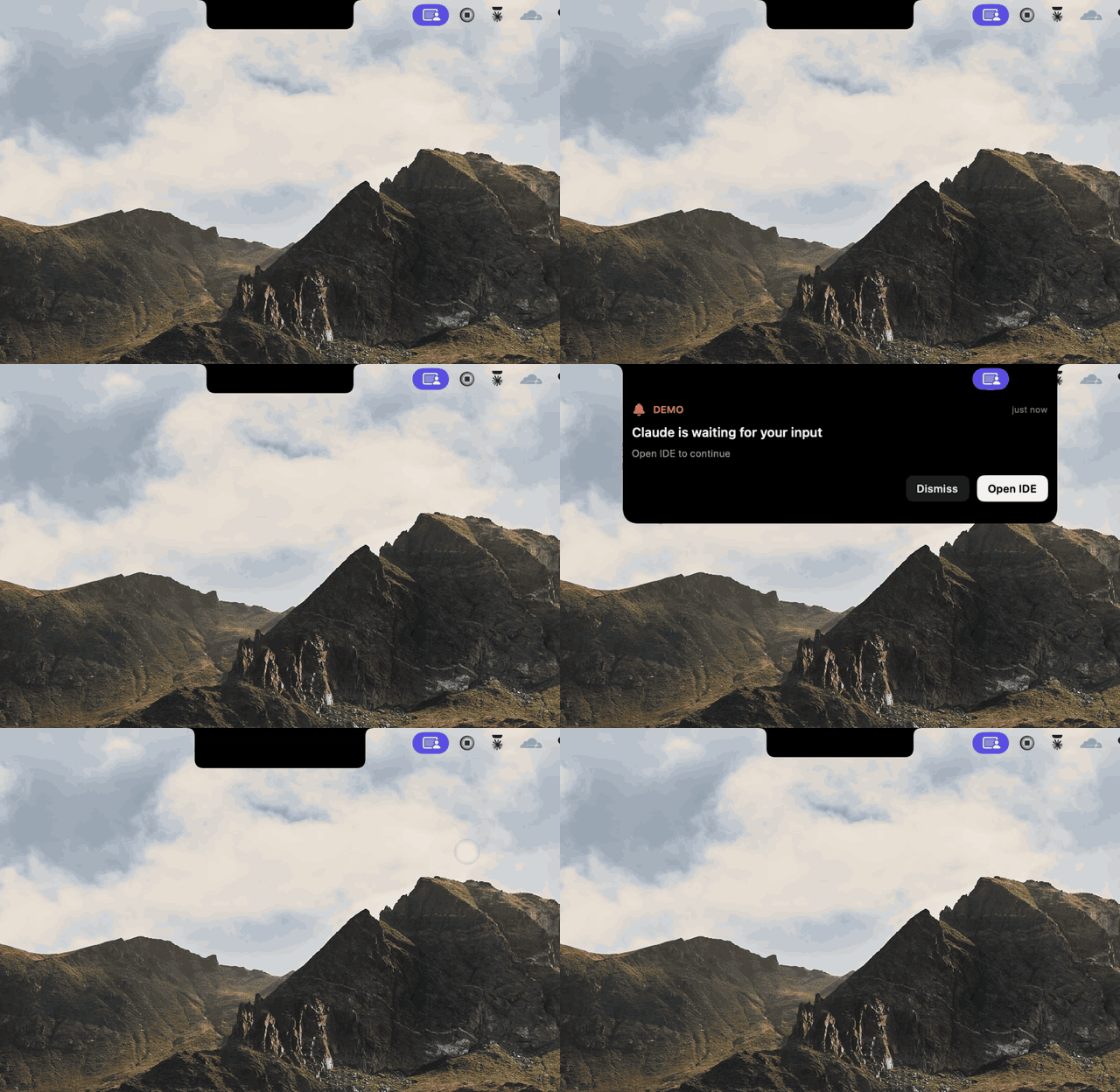
What is ClaudeNotch?
When you use Claude Code, it constantly stops to
ask permission, "Can I run this command?", "Can I edit this file?" Every prompt
pulls you back to the terminal and breaks your flow.
ClaudeNotch is a tiny macOS menu-bar app that surfaces those prompts in a
Dynamic-Island-style overlay at the top of your screen. The notch quietly
expands with the command (or a diff of the change), you click Allow or
Deny, or just tap a key, and your keyboard pops right back to where you
were. You never switch apps.
It runs entirely on your machine, talks to Claude Code through its official hook
system, and shows no Dock icon, just a small bell in your menu bar.
🎬 In motion
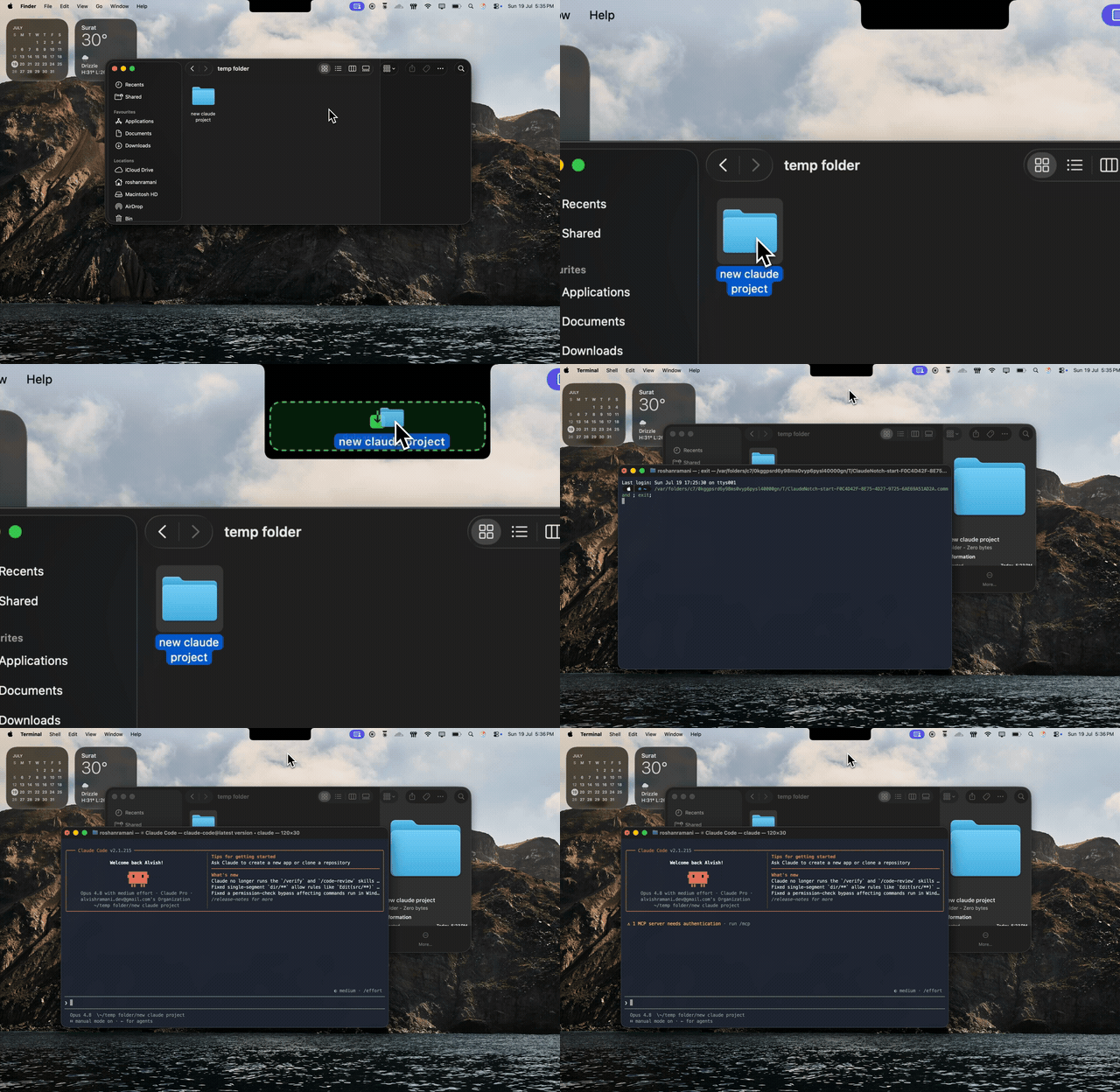
Start a session from the notch: drag a project folder onto the notch and a Claude Code session opens in that directory. No terminal, no cd.
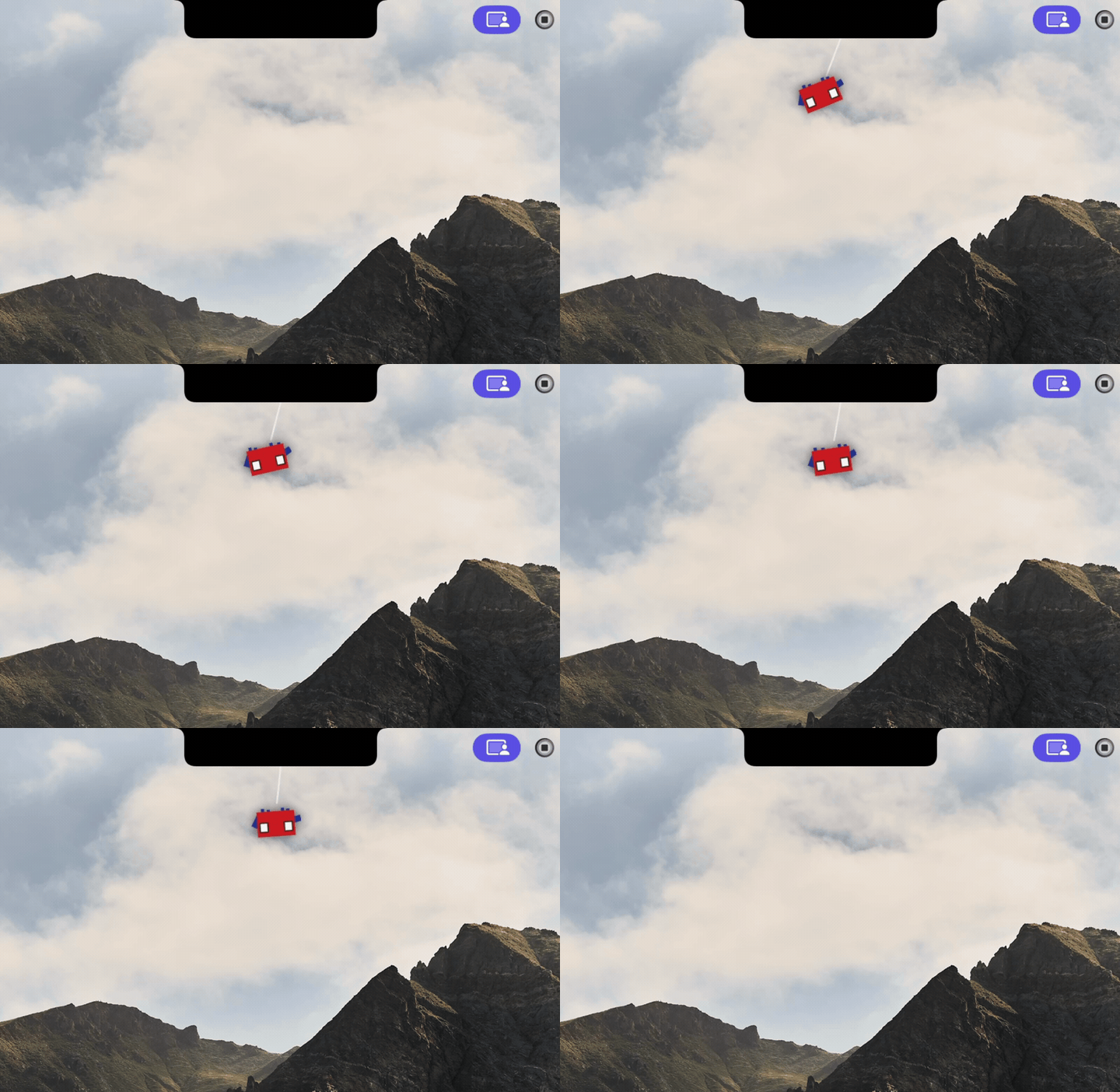
A pet that reacts to your session: the mascot lives in the notch and animates around what Claude is doing.

Little moments of delight: playful touches that make the notch feel alive while you work.
✨ Features
| 🛡️ Permissions in the notch | When Claude wants to run a command or edit a file, the notch unfurls with Allow, Deny, and Always Allow. Resolve it and your keyboard jumps straight back to the terminal. |
| 🟥🟩 See the diff first | Edit and Write requests show a red/green diff right inside the card, so you know exactly what's about to change. |
| ⚠️ Guardrails for risky commands | Dangerous ones like rm -rf, sudo, and force-push get a red warning. Confirm them with Touch ID (or Face ID), or a press-and-hold button when Touch ID is off, so nothing irreversible slips through by accident. |
| 💬 Deny with a reason | Not just no. Tap the note button on a prompt to tell Claude what to do instead (say "use ripgrep, not grep"), and it adapts rather than just stopping. |
| ❓ Answer Claude's questions | AskUserQuestion prompts arrive as tappable options, with a type-your-own field for when none of them fit. |
| ↩️ Reply when a task finishes | The "done" card has a Reply button that opens a composer pointed right at that session, so you can send a follow-up without switching windows. |
| ⚡ Live activity + progress | While Claude works, the notch shows what it's doing right now (the active tool and its target) and a progress bar as it works through a task list. |
| 📊 Context + cost meter | Each session shows how full Claude's context window is and a running cost estimate, so you get a heads-up before it pauses to compact. |
| 💸 Spending caps + alerts | Set a budget per session and per day. As you near a cap the session's cost figure warms orange then red, and a card warns you at 80% and again at 100%, so a long run never quietly runs up a bill. (Costs are estimates from public pricing, so treat the caps as a guardrail.) |
| 📈 Claude usage, broken down | A Claude Usage menu shows your tokens and estimated cost for today and the last 7 days, by model and by project (priciest repos first), plus a 7-day token sparkline and your prompt-cache savings. |
| 🪟 Many sessions at once | Run several Claude sessions side by side. The notch tracks each one separately, with its own status, project, and latest reply. |
| ✉️ Send a message from anywhere | Press ⌥⌘N to open a quick composer. Send a note to your running session, or start a fresh one in a recent project. |
| 🕘 Activity history | Click the notch for a timeline of everything you've allowed, denied, or answered. |
| ✅ Smart always-allow | Approve a tool for the whole session, or just one exact command. Your rules stick around between launches. |
| 📁 Start Claude in any folder | Launch Claude Code in any project straight from the menu bar, or jump back into a recent one. |
| 🐾 Pet Mode | The Claude mascot lives in your notch. While nothing is happening it peeks out, looks around, hangs off the corner, strolls along the edge, and naps after a quiet spell, then hops with sparkles when a task finishes. It watches your cursor and leans toward it, holds still to be petted, and boops when you click it. Boop it five times fast. It never appears over an active session or a card you're reading, it respects Reduce Motion, and the Pet Mode menu item turns it off. |
| 🏷️ Personalise the notch title | Pick what the notch calls itself from the Notch Title menu, keep Claude, track the active project name, or type your own custom label. It updates live and sticks between launches. |
🚀 Install
The easy way (recommended)
- ⬇ Download ClaudeNotch.dmg
- Open the DMG and drag ClaudeNotch into Applications.
- Double-click ClaudeNotch. macOS Sequoia 15 and later will block the
first launch because the app isn't notarized through Apple's paid Developer
program. Click Done on the warning, then open System Settings → Privacy
& Security, scroll to the Security section, and click Open Anyway next
to ClaudeNotch. You only do this once. (On macOS Sonoma and earlier you can
still right-click → Open to bypass.) - A small bell icon appears in your menu bar. Click it → Setup to
wire up the Claude Code hooks. Done!
💡 Skip the warning entirely: install with Homebrew (see below).
ClaudeNotch is ad-hoc signed (no Apple Developer ID at all), which macOS
treats more leniently than an unnotarized Developer ID app, Homebrew
casks in that tier launch straight away with no Gatekeeper prompt,
confirmed on a clean install with Gatekeeper and SIP both enabled.
Tip: To launch automatically on startup, click the menu-bar bell →
Launch at Login.
With Homebrew
One line:
brew install --cask rawsun007/tap/claudenotch
Build from source (for developers)
Click to expandRequires macOS 13+, Swift 5.9+ (xcode-select --install), and jq (brew install jq).
git clone https://github.com/rawsun007/claude-notch.git
cd claude-notch
./build.sh        # produces ClaudeNotch.app
./install.sh      # copies to /Applications, wires Claude Code hooks, launches
Want your macOS permission grants (Accessibility) to survive every rebuild? Run
this once before building, it creates a stable self-signed identity so the app's
signature stops changing:
./tools/make-signing-cert.sh
🎮 Try it in 30 seconds
After installing, you don't even need Claude Code to see it work:
Click the menu-bar bell → Demo: tool permission. The notch should expand
with a sample command and Allow / Deny buttons.
Then, with a real session:
- Open Claude Code in any project.
- Ask it to run a command, write a file, or edit something.
- The notch expands at the top of your screen with the details and buttons.
Whatever you click is what Claude does next, no need to switch back.
ClaudeNotch surfaces the prompts that matter: command runs, file writes and
edits, plan approvals, to-do updates, and AskUserQuestion. Quiet tools like
searching files use Claude Code's normal flow, so you're not pestered for every
little thing. And if ClaudeNotch isn't running, Claude Code just shows its own
prompt as usual, so nothing breaks.
⌨️ Keyboard shortcuts
| Key | Action |
|---|---|
| Enter | Allow the current permission (or confirm the focused card) |
| Esc | Deny / dismiss the current card |
| ⌥⌘N | Open the quick message composer from anywhere |
| ⌘↩ | Send the message in the composer (plain Enter inserts a newline) |
Keyboard control needs macOS Accessibility permission (System Settings →
Privacy & Security → Accessibility). The app will prompt you the first time.
🔒 Privacy
Everything stays on your machine. ClaudeNotch talks to Claude Code over a
localhost-only connection (127.0.0.1) and never sends your prompts,
commands, or code anywhere. No accounts, no telemetry, no servers.
🧠 How it works
Claude Code  ──▶  PreToolUse hook  ──▶  POST /permission  ──▶  ClaudeNotch
                                                                    │
                                                          notch shows the card
                                                                    │
                                                            you click Allow
                                                                    │
                                          {"decision":"allow"}  ◀───┘
                                                    │
                                                    ▼
                                          Claude Code runs the tool
The hook holds the connection open while it waits for your click. If anything
goes wrong, app not running, timeout, missing dependency, it safely falls back
to Claude Code's own prompt, so there's no way to get stuck.
❓ FAQ
Is it free?
Yes, free for personal and any noncommercial use, and the full source lives right
here on GitHub. Commercial use isn't allowed without permission, if you want to
sell it or make money from it, ask me first.
Why does macOS warn me on first open?
It isn't notarized through Apple's paid program yet. Right-click the app → Open
once, and you're set from then on.
Does it send my data anywhere?
No. Everything runs locally over a localhost hook. Nothing leaves your machine.
Which AI tools does it support?
Claude Code today. Support for more agents may come as the project grows.
Can I uninstall the hooks?
Yes, your settings.json is backed up during setup, and there's an uninstall
script (below) to remove everything cleanly.
🧹 Uninstall
~/.claudenotch/bin/uninstall-hooks.sh        # unwire from Claude Code
rm -rf /Applications/ClaudeNotch.app ~/.claudenotch
🛠️ For the curious: project layout
Click to expandSources/ClaudeNotch/
main.swift : boots as a menu-bar accessory app (no Dock)
AppDelegate.swift : wires window, menu bar, HTTP server, hotkey
AppState.swift : app state, live sessions, frontmost tracking
NotchView.swift : the SwiftUI notch UI + animations
NotchShape.swift : the concave "Dynamic Island" shape
NotchWindowController.swift : borderless panel that follows your screen
KeyboardMonitor.swift : Enter/Esc handling without stealing focus
GlobalHotkey.swift : the ⌥⌘N composer shortcut
MouseTracker.swift : hover detection over the notch
EventServer.swift : localhost HTTP server + blocking permission
ClaudeUsageReader.swift : context + cost meter from session transcripts
ToolPreviewParser.swift : diff/danger preview for a tool call
BiometricAuth.swift : Touch ID / Face ID confirm for dangerous commands
MenuBarController.swift : the menu-bar bell and its menu
HookInstaller.swift : wires/unwires Claude Code hooks in-app
TerminalAutomator.swift : types into your session + "Start Claude in folder"
OnboardingView.swift : first-run setup flow
OnboardingState.swift : permission checks for onboarding
OnboardingWindowController.swift : the onboarding window
UpdateChecker.swift : checks GitHub for new releases
Persistence.swift : saves your always-allow rules, history & stats
bin/ : the Claude Code hook scripts
build.sh : builds ClaudeNotch.app
install.sh : installs to /Applications + wires hooks
tools/ : DMG builder, icon generators, signing cert, releaser
Localhost endpoints (for tinkering):
| Endpoint | What it does |
|---|---|
POST /permission |
Blocks until you click; returns {"decision":"allow|deny|ask","reason":"…"} |
POST /question |
Blocks until you answer; returns your picks (or a typed answer) |
POST /notification |
Sticky orange "needs your input" card |
POST /stop |
Sticky green "task done" card |
POST /activity |
Updates the live "what Claude's doing" strip |
POST /prompt |
Records your prompt and marks the session thinking |
POST /task |
Task created/completed, for the per-session progress meter |
POST /sessionend |
Drops a finished session from the notch |
POST /pretool |
Brief blue thinking pulse |
POST /ping |
Liveness check |
👋 Made by Roshan Ramani
If ClaudeNotch saves you a few context switches, a ⭐ on the repo means a lot.


Found a bug or have an idea? Open an issue, feedback welcome.
📄 License
PolyForm Noncommercial License 1.0.0 © 2026 Roshan Ramani.
Free to use, modify, and share for personal, educational, and other noncommercial
purposes. Commercial use is not permitted without a separate license, if you'd
like to use ClaudeNotch commercially or build a paid product on it, please
reach out first. See
LICENSE for full terms.
Yorumlar (0)
Yorum birakmak icin giris yap.
Yorum birakSonuc bulunamadi