gsearch
Health Uyari
- License — License: MIT
- Description — Repository has a description
- Active repo — Last push 0 days ago
- Low visibility — Only 8 GitHub stars
Code Uyari
- network request — Outbound network request in packages/gsearch-core/src/gsearch_core/camoufox_backend.py
Permissions Gecti
- Permissions — No dangerous permissions requested
Bu listing icin henuz AI raporu yok.
Real Google Search for AI agents, over MCP. Self-hosted, no API key. Real URLs, AI Overview and People also ask as typed JSON. Uses a real Firefox (Camoufox) on your IP or any proxy.





Quick start · How it compares · What you get · How it works · Proxies · Performance · FAQ
Real Google Search for your AI agent. No API key. Self-hosted. Over MCP.
Your agent calls google_search and gets Google's actual results page as typed JSON: every link resolved to
its real URL, plus the AI Overview, People also ask and related searches. A real Firefox
(Camoufox) runs Google's page as it is, on your own IP or through any
proxy you already have.
Why: plain HTTP gets a JavaScript wall, automated Chrome got a CAPTCHA 2 out of 2 times in our test, and
Google's official Custom Search API closes on 1 January 2027. Other search MCP servers either aren't Google's
index (Brave, Tavily, Exa, DuckDuckGo) or charge per query (SerpApi, Bright Data).
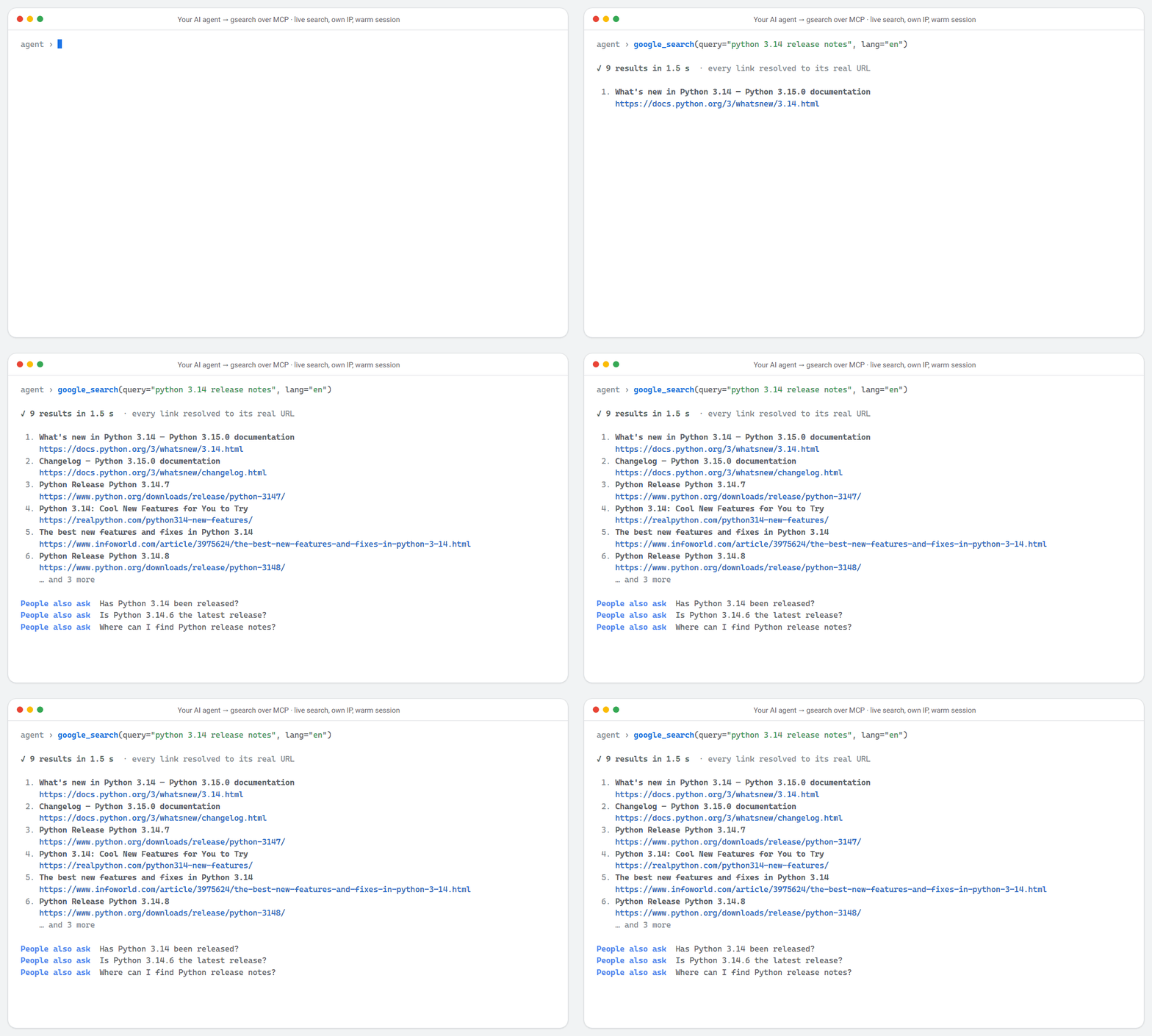
A real, live call on a home IP with a warm session, rendered from the recorded result; the wait shown is the measured time. MP4
🚀 Quick start
uv tool install gsearch-agent                         # or: pipx install gsearch-agent
gsearch setup                                         # downloads the browser once (~1 GB), prints your MCP config
claude mcp add gsearch --scope user -- gsearch-mcp    # or any MCP client, below
Then just ask: "Search Google for what asyncio is and give me the top three links", "What do people also
ask about asyncio?", "Find asyncio pages on python.org from the past year."
Without a proxy, gsearch uses your own IP, at most 20 searches an hour. For more, add a proxy in any format:
claude mcp add gsearch --scope user -e GSEARCH_PROXY="gate.example.com:7000:user-sid-{sid}:password" -e GSEARCH_DATA_LIMIT_MB=1000 -- gsearch-mcp
gsearch setup prints this block with the full path of gsearch-mcp filled in. Use the full path if your
client doesn't find the command.
{
  "mcpServers": {
    "gsearch": {
      "command": "gsearch-mcp",
      "env": { "GSEARCH_PROXY": "optional, any format", "GSEARCH_DATA_LIMIT_MB": "1000" }
    }
  }
}
Claude Desktop: claude_desktop_config.json. Cursor: ~/.cursor/mcp.json, or .cursor/mcp.json in a
project.
No install, with uv: use "command": "uvx", "args": ["gsearch-agent"], after fetching the browser once
with uvx --from gsearch-agent gsearch setup.
Settings in a file: put them in a .env (see .env.example) and setGSEARCH_ENV_FILE to its absolute path instead.
[!NOTE]
Automated access to Google Search may breach Google's Terms of Service. Read
Legal and responsible use before running live searches.
🆚 How it compares
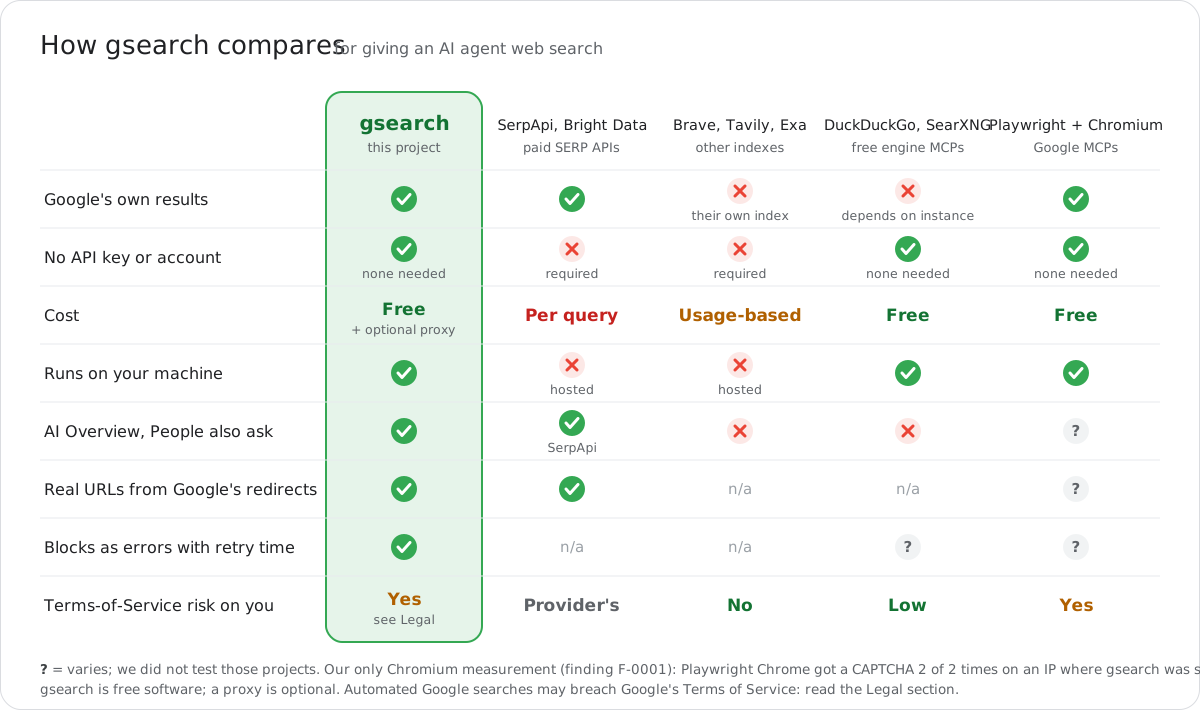
| gsearch | SerpApi, Bright Data | Brave, Tavily, Exa | DuckDuckGo, SearXNG MCPs | Playwright + Chromium Google MCPs | |
|---|---|---|---|---|---|
| Google's own results | ✅ | ✅ | ❌ their own index | ❌ / depends on the instance | ✅ |
| API key or account | none | required | required | none | none |
| Cost | free (+ your proxy, optional) | per query | usage-based plans | free | free |
| Runs on your machine | ✅ | ❌ hosted | ❌ hosted | ✅ | ✅ |
| AI Overview, People also ask | ✅ | ✅ (SerpApi) | ❌ | ❌ | varies |
| Google's redirect links resolved to real URLs | ✅ | ✅ | n/a | n/a | varies |
| Blocks reported as errors with a retry time | ✅ | n/a | n/a | varies | varies |
| Terms-of-Service risk is yours | yes (Legal) | the provider's | no | low | yes |
"Varies": we did not test those projects. Our only Chromium measurement is
F-0001: Playwright Chrome was sent to a CAPTCHA 2 of 2
times on an IP where gsearch was served. Read Legal before running live searches.
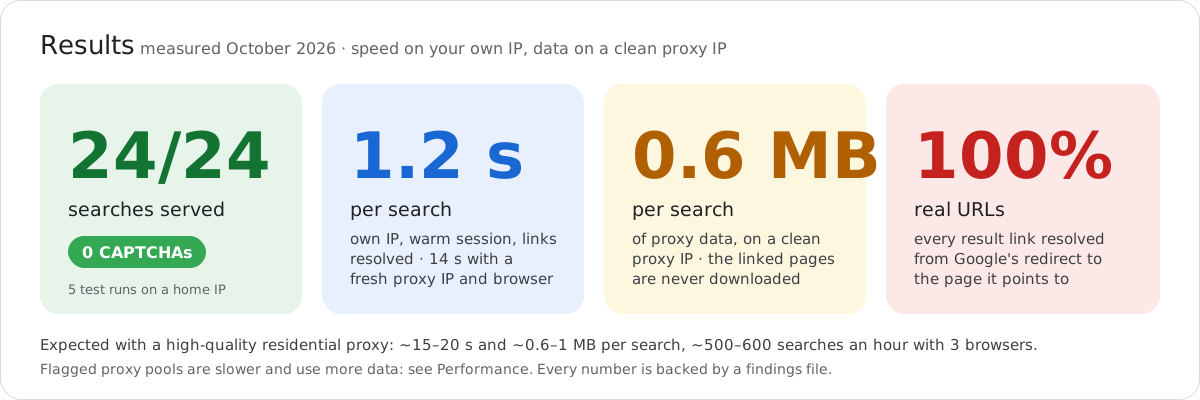
Measured in October 2026: F-0014, F-0006, F-0011, F-0012, F-0001; 14 s and 0.6 MB on a clean proxy IP: F-0015. Flagged proxy pools are slower: see Performance.
✨ Why gsearch
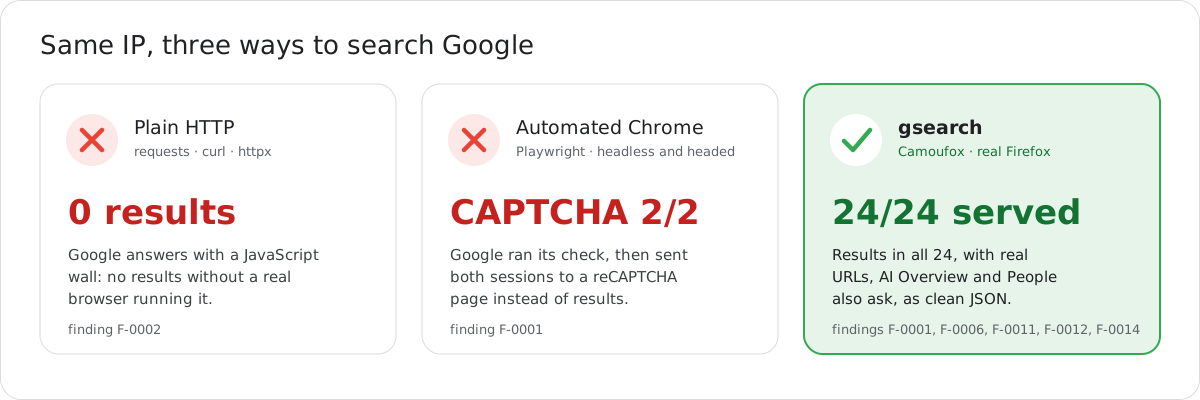
Google's official search API is closed to new customers and shuts down on 1 January 2027
(F-0005). gsearch is built for AI agents instead:
- 🦊 A real browser, not a scraper. Camoufox, a hardened Firefox, runs Google's page as it is, with a
real-device fingerprint and a locale that matches its IP. - 🔗 Real URLs. Google hides result links behind
/gotoredirects. gsearch resolves every one to the
page it points to, without loading that page. - 🤖 Built for agents. One MCP server, two tools, typed JSON. Blocks come back as clear errors with
retry_after_s, never as empty results, and every string is flagged as untrusted web content. - 🌍 Any proxy, any format. Rotating residential, static VPS or datacenter lists, HTTP, HTTPS or SOCKS5,
in any common layout. Every byte is counted, with a hard data limit. - 🎯 Nothing to tune. Two settings. Everything else is fixed to what worked best in testing.
- 📊 Honest numbers. Every claim in this README links to a write-up of how it was measured.
📦 What your agent gets
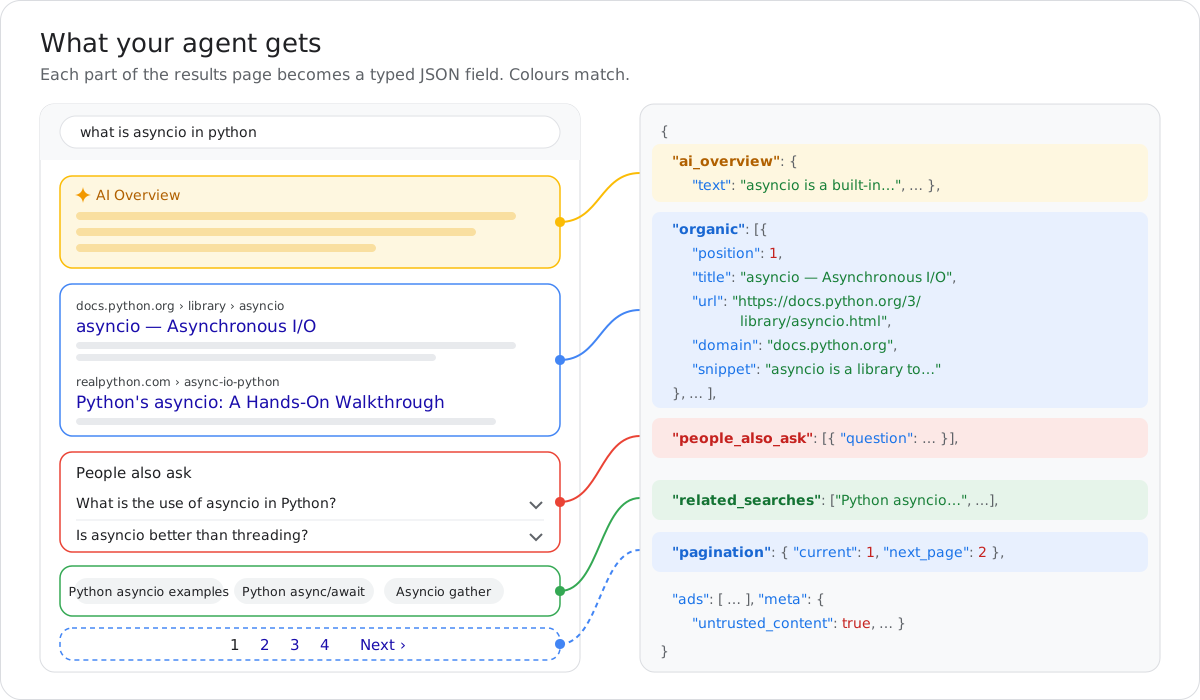
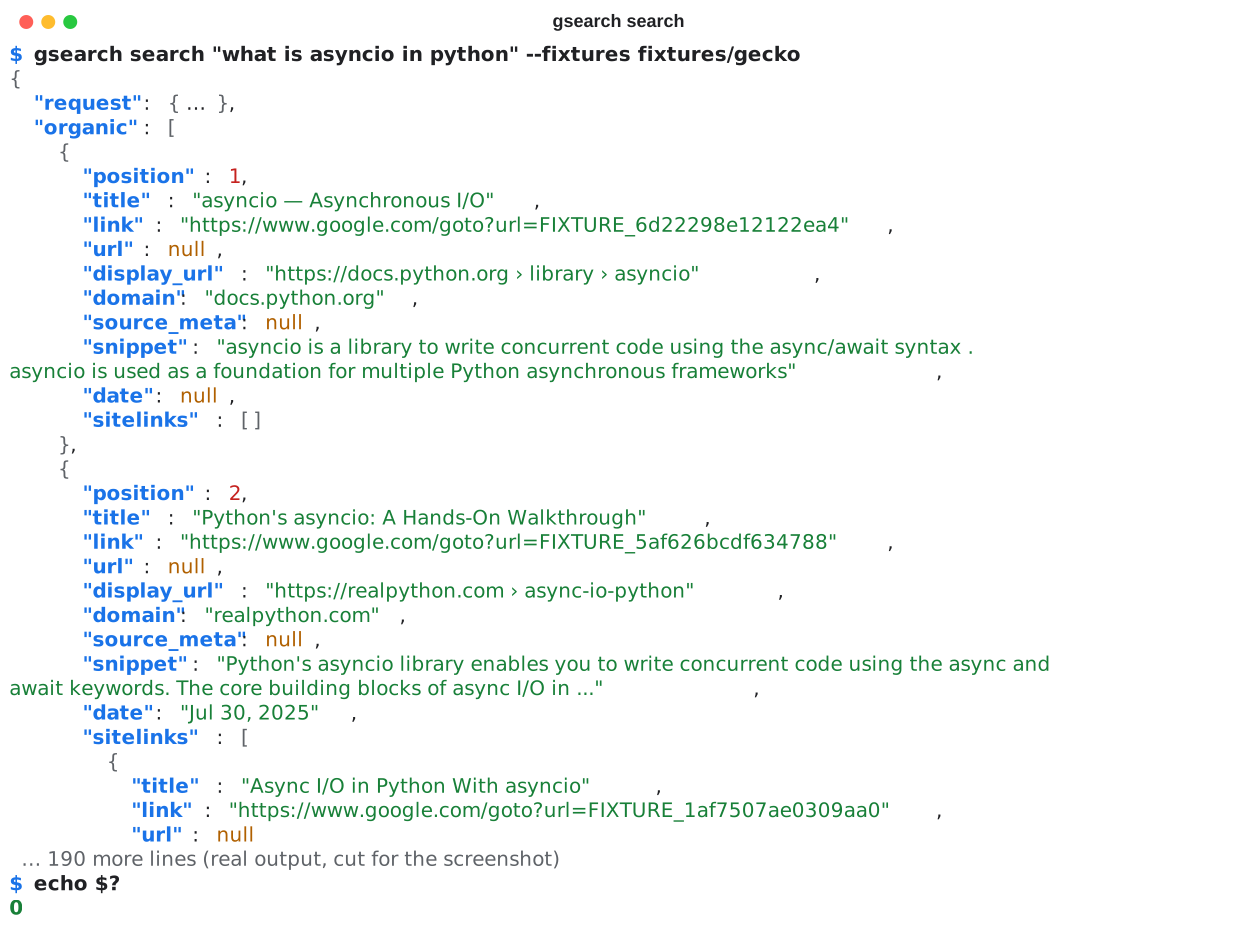
Real output from a saved results page (offline demo mode, where url stays null; a live search fills it):
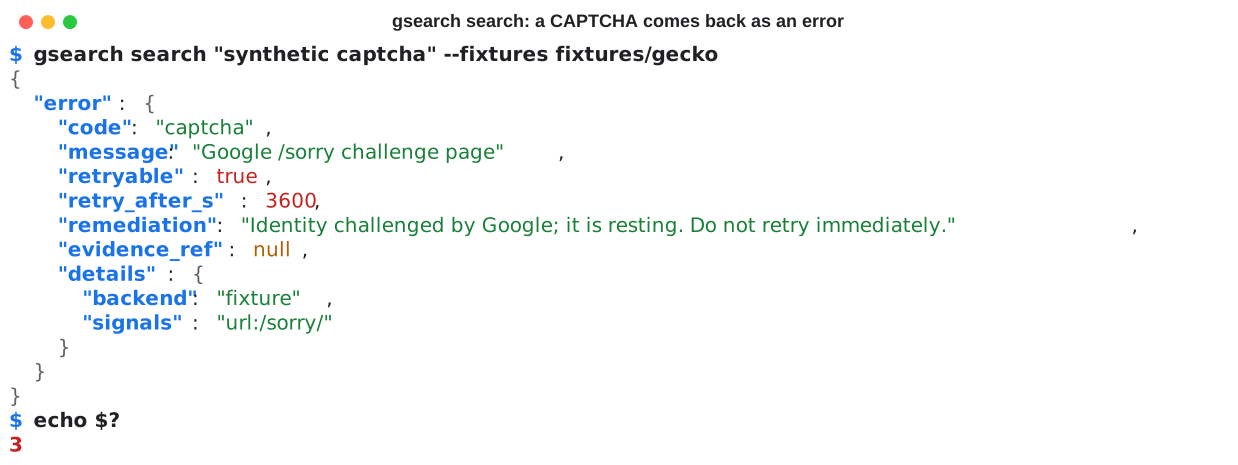
A block is never an empty list. It comes back as an error that says what happened and how long to wait:
| Field | What it holds |
|---|---|
organic[].url |
The real destination of each result, resolved from Google's /goto redirect in the same session. |
organic[].title, snippet, date, domain, display_url |
What the result shows, as text. link keeps the exact link Google served. |
organic[].sitelinks, source_meta |
A result's sub-links, and what Google shows instead of a URL on forum and video results (2 years ago). |
ai_overview |
The AI Overview text and its sources, when Google shows one. |
people_also_ask, related_searches |
The questions and related queries on the page. |
ads |
Text ads, when the market serves them. |
pagination |
Current page and next page. Ask for more results with page. |
meta.untrusted_content |
Always true: every string is third-party web text (see prompt injection). |
Error codes: captcha, soft_block, hard_block, consent_wall, js_gate, rate_limited,parse_drift, network, proxy, backend_unavailable, invalid_request. The full JSON Schema is inserp.schema.json.
🔍 How it works
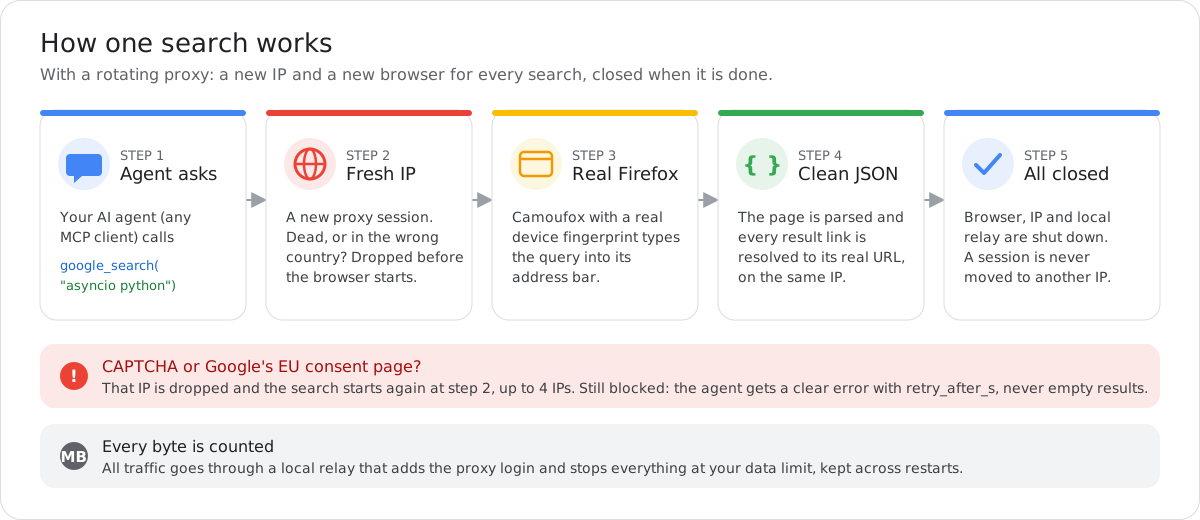
- Like a person. A visible window, because headless sessions were challenged far more often on proxy IPs
(F-0015). The query is typed into the address
bar. WebRTC is off, so your own IP can't leak around the proxy. - Never forged. gsearch never generates or alters Google's tokens: the browser runs the page as it is.
- Cheap links. Links are resolved on the same IP with the same cookies and a TLS fingerprint matching the
browser's (F-0011,
F-0013). - Runs on servers. On a Linux machine without a screen, the browser uses a virtual display
automatically (sudo apt install xvfb).
🌍 Proxies
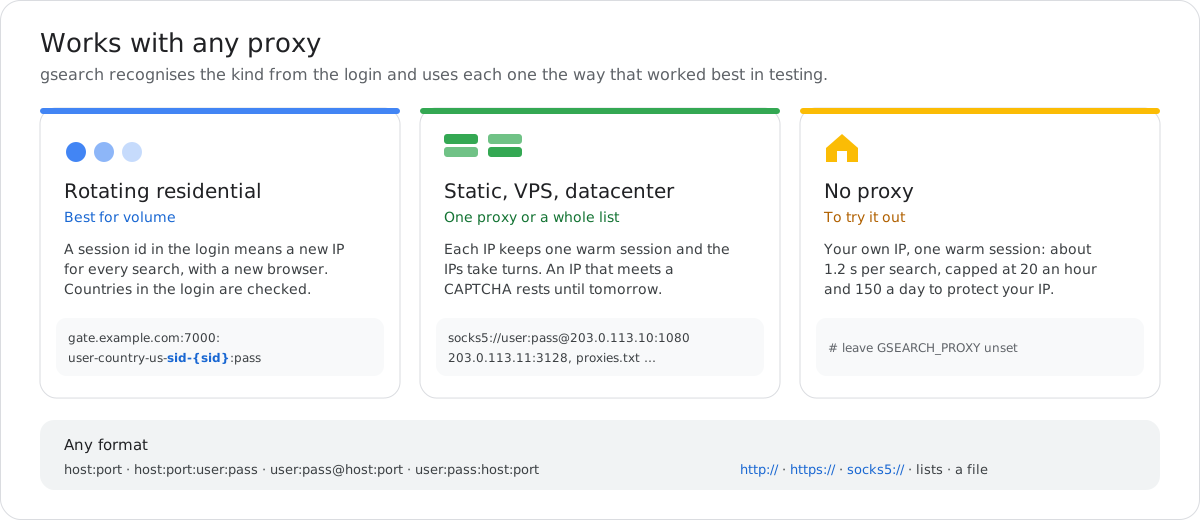
# rotating residential: {sid}, or your provider's sid-…, session-…, sessid-… part, gives a new IP per search
GSEARCH_PROXY=gate.example.com:7000:user-country-us-sid-{sid}:password

# static proxies (VPS, datacenter, ISP): one or many, separated by commas, spaces or new lines
GSEARCH_PROXY=socks5://user:[email protected]:1080, http://203.0.113.11:3128

# or a file with one proxy per line
GSEARCH_PROXY=/path/to/proxies.txt
- Rotating: a new IP and a new browser for every search, up to 3 at once. A blocked IP is replaced, up to
4 IPs per search.country-xxorcc-xxin the login is checked, and exits elsewhere are dropped. - Static: each IP keeps one warm session, and the IPs take turns. Each IP has its own budget (20 searches
an hour, 150 a day) and rests until midnight after a CAPTCHA, so ten IPs allow up to about 200 searches an
hour. - Data: every byte goes through a local relay that counts it, and
GSEARCH_DATA_LIMIT_MBstops
everything at your limit, across restarts.
[!TIP]
Check your proxy provider's acceptable-use policy. Many forbid using their network on sites whose terms
prohibit automated access, and forbid solving CAPTCHAs.
📊 Performance
Proxy quality decides speed and cost. Many residential IPs are already flagged by Google. Each flagged
IP costs a browser launch (about 0.7–1 MB and 20 s) before the next one is tried.
| Expected with a high-quality rotating proxy | Measured on a low-quality pool (F-0015) | |
|---|---|---|
| Fresh IPs served by Google | ~85% or more (assumed) | 1 in 3 to 1 in 5 |
| Time per search | ~15–20 s (14 s measured on a clean IP) | 40–75 s |
| Proxy data per search | ~0.6–1 MB (0.6 MB measured on a clean IP) | 4.7–6.3 MB |
| Searches per hour (3 browsers) | ~500–600 | ~72 |
| 1,000 searches | ~0.6–1 GB, under 2 hours | ~5–6.5 GB, ~14 hours |
Without a proxy, a warm session on your own IP takes ~1.2 s per search, with every link resolved and 0
CAPTCHAs in testing (F-0014), capped at 20 searches an
hour to protect your IP. Static proxies have not been benchmarked yet.
Measure your own proxy within your data limit:
python tools/benchmark.py -n 10
🛠 Reference
Settings (five in total; most people need the first two)| Setting | What it does |
|---|---|
GSEARCH_PROXY |
Your proxies, in any format above, or a file listing them. Unset: your own IP. |
GSEARCH_DATA_LIMIT_MB |
Stop all proxy traffic at this many MB, counted across restarts. Unset: no limit. |
GSEARCH_ENV_FILE |
Absolute path of your .env. Needed in MCP client configs. If set, the file must exist. |
GSEARCH_FIXTURES_DIR |
Answer from saved pages instead of Google (demos and tests). |
GSEARCH_STATE_DIR |
Where budgets, the data meter and saved block pages live. Default: %LOCALAPPDATA%\gsearch or ~/.local/share/gsearch. |
Everything else is fixed to what worked best in testing: a new IP per search with rotating proxies, a
visible browser, address-bar search, real-device fingerprints, 4 attempts per search, always resolving URLs,
and a 10-minute cache for repeated queries.
| MCP tool | Arguments | Returns |
|---|---|---|
google_search |
query, and optionally page (1–50), lang (en, fr, …), country (us, …), time_range (h, d, w, m, y), site (a domain) |
The JSON above plus a short text summary, or an error result on a block. |
google_search_status |
none | Proxy data used against the limit, IPs used and blocked, and the cache. Never contacts Google. |
gsearch search "query" [--page N] [--lang xx] [--country xx] [--time-range h|d|w|m|y] [--site domain]
gsearch search "query" --fixtures fixtures/gecko     answer from saved pages (offline, from a clone of this repo)
gsearch parse page.html                              parse any saved Google results page
gsearch schema                                       print the JSON Schema
gsearch identity check                               home-IP browser's fingerprint matches its IP (no Google traffic)
gsearch setup                                        download the browser once and print the MCP config
Exit codes: 0 results, 2 usage or settings error, 3 blocked or other error, 4 Google changed its
layout.
import asyncio
from gsearch_core.client import SearchClient
from gsearch_core.config import fetcher_from_env
from gsearch_parse.models import SearchRequest

async def main() -> None:
    fetcher, _live = fetcher_from_env()      # reads the settings and .env
    result = await SearchClient(fetcher).search(SearchRequest(query="what is asyncio in python"))
    print(result.model_dump_json(indent=2))  # SearchResponse or SearchError
    await fetcher.aclose()

asyncio.run(main())
To call it over MCP from your own code, the way an agent does, seeexamples/mcp_client.py.
| You see | What it means | What to do |
|---|---|---|
captcha on most searches |
Your proxy's IPs are flagged by Google. | Try another pool or country. Measure with tools/benchmark.py. |
captcha with hours to wait, no proxy |
Your own IP was challenged and rests until midnight. | Wait, or add a proxy. |
rate_limited |
Every IP is at its hourly or daily budget (own IP or static proxies). | Wait retry_after_s, or add proxies. |
proxy: no usable exit in 4 draws |
Four IPs in a row were dead or in the wrong country. | Check the country part of the login, and the provider. |
proxy: proxy data limit reached |
GSEARCH_DATA_LIMIT_MB is used up. |
Raise it, or delete proxy_bytes.json in the state folder to count from zero. |
parse_drift |
Google changed its page layout. | Update gsearch, or see CONTRIBUTING.md. |
GSEARCH_ENV_FILE=… does not exist |
The settings path is wrong. | Use an absolute path. gsearch refuses to start rather than fall back to your own IP. |
the Camoufox browser is not installed |
The browser has not been downloaded yet. | Run gsearch setup once. |
| Browser windows open | Expected with a proxy: visible sessions are challenged far less. | On a server without a screen, install Xvfb and they run on a virtual display. |
When the browser hits a block or an error, the page is saved with a screenshot in the state folder'sevidence/, and the error's evidence_ref points to it.
❓ FAQ
Do I need a proxy? No. Without one, gsearch uses your own IP with a warm session (~1.2 s per search),
capped at 20 searches an hour and 150 a day to keep your IP clean. For volume, use a proxy.
Which proxy should I buy? A rotating residential proxy with sticky sessions (a session id in the
username). Quality matters more than price: run tools/benchmark.py on a small plan before buying more.
How much proxy data does a search use? About 0.6 MB on a clean IP. Flagged IPs cost more, because each
one is a wasted browser launch. Set GSEARCH_DATA_LIMIT_MB so you can never overspend.
Does it solve CAPTCHAs? No. A blocked IP is dropped and a fresh one is tried. gsearch ships no CAPTCHA
solver and never forges Google's tokens.
Can it run on a server? Yes. On Linux without a screen, install Xvfb and the browser runs on a virtual
display.
Which agents work with it? Any MCP client: Claude Code, Claude Desktop, Cursor and others. You can also
use the CLI or call it from Python.
📜 Legal and responsible use
- Google's Terms of Service restrict automated access to Google Search. Running this tool against Google
may breach those terms, whatever this project's license says. - Litigation risk is real and current. In Google v. SerpApi (N.D. Cal., filed 2025-12-19), Google argues
that solving its SearchGuard JavaScript challenge by automated means is circumvention under DMCA §1201.
gsearch runs that challenge in a real browser and does not forge or alter tokens, but the complaint also
targets automated browsers. See docs/DESIGN.md (D-004). - No CAPTCHA solver is shipped, wired in or recommended. A CAPTCHA rests the identity and is reported as an
error. - Get legal advice for your jurisdiction and use case before running live searches. The parser
(gsearch_parse) only reads HTML you already have. - Limits are on by default and cannot be bypassed from the CLI or MCP. Don't use proxies to hammer
Google. - No personal-data harvesting. Don't profile people, scrape people-search results or collect personal
data at scale. Keep caches short-lived and don't republish raw results. - On a block, back off. CAPTCHAs and rate limits come back as errors with
retry_after_s. gsearch never
tries to defeat the challenge.
Prompt injection
Every title, snippet, URL and question in a result is untrusted third-party text from the open web, and
may contain instructions aimed at your agent. The tool descriptions say so, every response carriesmeta.untrusted_content: true and an MCP untrusted_content flag, and the text summary ends with a
warning. Treat results strictly as data.
🤝 Contributing
Tests never contact Google: the parser is tested against saved pages, and the browser against a local fake
Google. Pull requests are welcome: pick a
good first issue, see the
roadmap, and start with
CONTRIBUTING.md and docs/DESIGN.md.
If gsearch saves you time, a ⭐ helps other people find it.
License
MIT. Camoufox (MPL-2.0) is installed from PyPI as a dependency and is never vendored.
Yorumlar (0)
Yorum birakmak icin giris yap.
Yorum birakSonuc bulunamadi