smarttune-cli
Health Gecti
- License — License: MIT
- Description — Repository has a description
- Active repo — Last push 0 days ago
- Community trust — 21 GitHub stars
Code Gecti
- Code scan — Scanned 12 files during light audit, no dangerous patterns found
Permissions Gecti
- Permissions — No dangerous permissions requested
Bu listing icin henuz AI raporu yok.
SmartTune CLI — Multi-platform flight log analysis & tuning advisor (ArduPilot + Betaflight + PX4)
Offline flight log analysis, built agent-first from day one
One command from raw log to tunable PID/FFT/MagFit parameters — no special flights needed




ArduPilot · Betaflight · PX4
Quick Start ·
For Agents ·
Commands ·
Output Formats ·
Architecture
Pip-install SmartTune, point it at a flight log, and your agent comes back with exact parameter deltas — not vague "try lowering P."
Every output is structured JSON or Markdown. No TUI, no blocking prompts, no ANSI escape codes to strip. The CLI was designed from day one to be invoked by an LLM agent as a subprocess tool — OpenClaw, Hermes, QwenPaw, Codex, Claude Code. Any agent that can shell out tosubprocess.run()can use it.Under the hood: ArduPilot step-response analysis replicates WebTools PIDReview.js via Wiener deconvolution. Betaflight blackbox logs are parsed by a 1000+ line pure-Python decoder (no C extensions, no Node.js). All three platforms output to one
FlightDatadataclass so analyzers work identically across APM/BF/PX4. The 6-layer knowledge base is plain JSON — agents can read rules and propose new ones by editing~/.smarttune/knowledge/.
Install
pip install git+https://github.com/raylanlin/smarttune-cli.git

# With all platform extras
pip install "git+https://github.com/raylanlin/smarttune-cli.git#egg=smarttune[all]"

# Development
git clone https://github.com/raylanlin/smarttune-cli.git
cd smarttune-cli
pip install -e ".[dev,all]"
Requires Python 3.9+
For Agents
SmartTune was designed specifically for LLM agent tool-calling workflows. Every aspect of the CLI follows agent-friendly principles:
| Principle | Implementation |
|---|---|
| Deterministic output | No interactive prompts, no TUI, no progress bars when piped to files. Same input → same output. |
| Structured by default | JSON output via MCP server (smarttune_analyze_log). Markdown/HTML via CLI --report md|html. No parsing fragile ANSI-escaped terminal dumps. |
| Self-describing | stune platforms lists available adapters. Error codes are standardized (E10xx–E50xx). Exit codes are meaningful. |
| Fail-fast & isolated | Single-module failure doesn't abort the full analysis. Each module gets its own try/except block. |
| Config-free | Zero config files needed. Everything is flags or auto-detected. No env vars required. |
| Offline-first | No network calls. No API keys. No rate limits. Safe for isolated/air-gapped environments. |
| Machine-recommendable | Tuning suggestions include confidence scores and reasoning, not just parameter values. Agents can weigh multiple recommendations. |
What agents can learn through SmartTune
SmartTune isn't just a tool agents call — it's how agents learn the craft of flight controller tuning:
| Skill | How SmartTune teaches it |
|---|---|
| PID tuning intuition | Step-response analysis with confidence scores. Agents learn which overshoot/rise-time patterns call for higher Kp vs. damping. |
| Frequency-domain reasoning | FFT spectra with peak detection. Agents learn to distinguish vibration sources (prop/ motor/ frame resonance) from the spectrum shape. |
| Filter design logic | Notch and low-pass filter recommendations with Bode plots. Agents see the tradeoff between filtering and phase lag. |
| Platform differences | ArduPilot vs Betaflight parameter conventions. ParamRef maps between them — agents learn to translate tuning knowledge across platforms. |
| Safety awareness | All recommendations are capped at ±20%. Agents learn conservative tuning by default. |
| Rule-based reasoning | The 6-layer knowledge base is plain JSON. Agents can read, understand, and even propose rule changes by writing to their user layer. |
What agents can do with SmartTune
- Batch analysis — analyze hundreds of logs with a loop; JSON output per file
- Auto-tuning — feed recommendations back into a flight controller via MAVLink or CLI
- Fleet monitoring — aggregate vibration/PID metrics across multiple aircraft
- CI/CD integration — run
stune analyzeas part of a pre-flight validation pipeline - Collaborative diagnosis — have the agent compare logs from before/after a crash
MCP Server (Model Context Protocol)
SmartTune includes a read-only MCP server that lets LLM agents call analysis tools directly — no shell, no subprocess, no arbitrary file writes.
Install with MCP support:
pip install -e ".[all,mcp]"
Run the MCP server:
smarttune-mcp          # stdio transport (for agent frameworks)
# or
python -m smarttune.mcp_server
Available MCP tools:
| Tool | Purpose |
|---|---|
smarttune_list_platforms |
List supported platforms, extensions, and capabilities |
smarttune_log_quality |
Parse a log and return quality score, data availability, validation issues |
smarttune_analyze_log |
Run full analysis (PID + FFT + MagFit + hardware) and return structured JSON or Markdown |
All tools are annotated readOnlyHint=True, destructiveHint=False, idempotentHint=True.
Security boundary:
- No shell execution — library calls only
- No arbitrary file writes — results are returned inline
- No parameter mutation — no MAVLink writes, no firmware flashing
- Path validation — allowed roots, extensions (
.bin,.log,.bbl,.bfl,.ulg), file size limits, symlink resolution - Configurable via environment variables:
export SMARTTUNE_MCP_ALLOWED_ROOTS="/path/a:/path/b"
export SMARTTUNE_MCP_MAX_FILE_MB="300"
OpenClaw / Claude Desktop configuration:
{
  "mcp": {
    "servers": {
      "SmartTune": {
        "command": "smarttune-mcp",
        "args": [],
        "env": {
          "SMARTTUNE_MCP_ALLOWED_ROOTS": "/home/user/.openclaw/workspace/files/inbox:/home/user/.openclaw/workspace/files/output:/tmp",
          "SMARTTUNE_MCP_MAX_FILE_MB": "300"
        }
      }
    }
  }
}
Quick Start
# Full analysis (auto-detect platform)
stune analyze -i flight.bin

# With charts (human-friendly)
stune analyze -i flight.bbl --visual

# Per-module deep dive
stune pid -i flight.bin -a roll --visual
stune fft -i flight.bin --visual
stune magfit -i flight.bin
stune sysid -i flight.bin -a pitch
stune hardware -i flight.bin

# Export to Markdown report
stune analyze -i flight.bin --report md -o report.md

# Export to HTML report
stune analyze -i flight.bin --report html -o report.html

# List supported platforms
stune platforms

# For JSON output, use the MCP server (see "For Agents" above)
Output Formats
SmartTune supports multiple output formats, each designed for a specific consumption mode:
| Format | Use Case | Example |
|---|---|---|
| Terminal | Human inspection in the shell | stune analyze -i flight.bin |
| JSON | Agent/script consumption | MCP: smarttune_analyze_log(log_path="flight.bin") |
| Markdown | Reports, READMEs, documentation | stune analyze -i flight.bin --report md -o report.md |
| HTML | Visual reports with embedded charts | stune analyze -i flight.bin --report html -o report.html |
Note: JSON output is available through the MCP server. The CLI currently supports
--report mdand--report html. A--format jsonCLI flag is planned for a future release.
JSON output example
{
  "platform": "ArduPilot",
  "timestamp": "2026-05-03T22:30:00",
  "pid": {
    "roll": {
      "rating": "GOOD",
      "confidence": 0.87,
      "kp": {"current": 0.12, "recommended": 0.14, "reason": "Slight oscillation at 8 Hz"},
      "ki": {"current": 0.05, "recommended": 0.05, "reason": "No steady-state error"},
      "max_overshoot_pct": 8.2,
      "rise_time_ms": 85,
      "settling_time_ms": 210
    }
  },
  "fft": {
    "vibration": {
      "level_rms": 2.1,
      "grade": "EXCELLENT"
    },
    "peaks": [
      {"freq_hz": 47.5, "magnitude_db": -12.3, "source": "propeller"}
    ]
  }
}
Commands
stune analyze
Full-spectrum analysis: PID + FFT + MagFit + hardware — all in one pass.
stune analyze -i flight.bin                           # Auto-detect
stune analyze -i flight.bbl --platform betaflight      # Force platform
stune analyze -i flight.bin --visual                   # With charts
stune analyze -i flight.bin --report md -o report.md   # Markdown export
stune analyze -i flight.bin --report html -o report.html  # HTML export
stune pid
PID step-response analysis with per-axis tuning recommendations.
stune pid -i flight.bin                                # All axes
stune pid -i flight.bin -a roll                        # Single axis
stune pid -i flight.bbl --visual                       # Betaflight
stune fft
Frequency-domain vibration analysis with notch filter suggestions.
stune fft -i flight.bin                                # Full spectrum
stune fft -i flight.bin --visual                       # With spectrum plot
stune magfit
Magnetometer calibration — hard/soft iron offset, coverage, field strength.
stune magfit -i flight.bin # ArduPilot only
stune sysid
ARX system identification — natural frequency and damping ratio.
stune sysid -i flight.bin -a roll                      # Single axis
stune sysid -i flight.bin -a pitch --na 4 --nb 3       # Custom order
stune hardware
Full hardware configuration report: firmware version, sensors, battery, parameters.
stune hardware -i flight.bin
stune hardware -i flight.bbl
stune filter
Filter chain analysis with Bode plots.
stune filter -i flight.bin --gyro-filter 40 --visual
stune filter -i flight.bin --auto                     # Auto-derive from params
stune platforms
List all available platform adapters and their capabilities.
stune platforms
Supported Platforms
| Platform | Log Format | Parser | Status |
|---|---|---|---|
| ArduPilot | .bin / .log (DataFlash) |
pymavlink | ✅ Full support |
| Betaflight | .bbl / .bfl (Blackbox) |
Pure Python | ✅ Full support |
| PX4 | .ulg (ULog) |
pyulog | 🔲 Coming in v2.x |
Auto-Detection
SmartTune identifies your log format from file headers — no --platform flag needed:
| Bytes | Platform |
|---|---|
0xA3 0x95 |
ArduPilot DataFlash |
H Product:Blackbox |
Betaflight Blackbox |
| ULog magic | PX4 ULog |
Architecture
┌─────────────────────────────────────────────┐
│  CLI Layer                                   │
│  stune analyze / pid / fft / ...            │
│  --report md / html                          │
└──────────────────┬──────────────────────────┘
                   │
┌──────────────────┤  ┌───────────────────────┐
│                  │  │  MCP Server (stdio)    │
│                  │  │  smarttune-mcp         │
│                  │  │  JSON / Markdown out   │
│                  │  │  Read-only · No shell  │
│                  │  └───────────┬───────────┘
│                  │              │
│  ┌───────────────▼──────────────▼────────────┐
│  │  Services Layer (shared)                   │
│  │  services/analysis.py · services/serialize │
│  └───────────────┬──────────────────────────┘
│                  │
┌──────────────────▼──────────────────────────┐
│  Platform Adapter Layer                      │
│  ArduPilot · Betaflight · PX4               │
│  Parsers → FlightData (unified IR)          │
└──────────────────┬──────────────────────────┘
                   │
┌──────────────────▼──────────────────────────┐
│  Analysis Engine (platform-aware)            │
│  PID / FFT / SysID / MagFit / Filter / HW   │
│  Per-platform modules:                       │
│    ardupilot/  → WebTools-aligned FFT        │
│    betaflight/ → Wiener deconvolution FFT    │
│    px4/        → stubs                       │
│  BF: Feedforward · RPM Filter · D-term      │
│  Protocol-based interface constraints        │
└──────────────────┬──────────────────────────┘
                   │ AnalysisResult + ParamRef
┌──────────────────▼──────────────────────────┐
│  Knowledge Base (6-layer deep merge)         │
│  common → platform → user → Pro             │
│  JSON-based rules — inspectable & editable   │
└──────────────────┬──────────────────────────┘
                   │
┌──────────────────▼──────────────────────────┐
│  Output Layer                                │
│  Terminal (Rich) / JSON / Markdown / HTML    │
│  ParamRef → platform-native parameter names  │
└─────────────────────────────────────────────┘
Knowledge Base
A 6-layer deep-merge rule engine powers all tuning recommendations. Each layer overrides the previous:
| # | Layer | Location | Editable |
|---|---|---|---|
| 1 | Common physics rules | smarttune/knowledge/rules/common/ |
❌ Built-in |
| 2 | Platform rules | smarttune/knowledge/rules/{platform}/ |
❌ Built-in |
| 3 | User common | ~/.smarttune/knowledge/common/ |
✅ |
| 4 | User platform | ~/.smarttune/knowledge/{platform}/ |
✅ |
| 5 | Pro common | smarttune-knowledge-pro (optional) |
🔒 |
| 6 | Pro platform | smarttune-knowledge-pro (optional) |
🔒 |
Rules are standard JSON files. Add a file, restart the command, and the engine picks it up. No compilation, no database, no setup.
Development
# Install with dev dependencies
pip install -e ".[dev,all]"

# Run tests
pytest tests/ -v                              # 96 tests, 1.5s
pytest tests/test_bbl_parser.py -v            # BBL parser only
pytest tests/test_betaflight_analyzers.py -v  # BF-specific analyzers

# Lint
ruff check smarttune/
black --check smarttune/
Adding a New Platform
- Create adapter — Subclass
PlatformAdapter, implementparse(),detect(),map_param_to_platform() - Add knowledge rules — Drop JSON files in
smarttune/knowledge/rules/{platform}/ - Register — Use
@registerdecorator
@register
class MyPlatform(PlatformAdapter):
    name = "myplatform"
    ...
stune platforms will auto-discover it.
Agent Stack Integration
SmartTune is designed to work with any LLM agent framework. Here's how it fits:
| Framework | Integration |
|---|---|
| OpenClaw | smarttune-mcp as an MCP server — structured JSON output, read-only, no config needed |
| Claude Code / Codex | MCP server or shell tool call — stune analyze -i log.bin --report md |
| Hermes Agent | Deterministic output, safe for agent-in-the-loop tuning workflows |
| Custom agents | pip-installable, importable Python API via smarttune.services.analysis |
Agents call stune, get structured tuning recommendations, and can act on them. No TUI to navigate, no prompts to answer, no fragile screen-scraping.
Examples
Terminal Output
Platform: Betaflight
╭──────────────────────────────────────────────────────────────────╮
│ PID Step Response Analysis                                       │
╰──────────────────────────────────────────────────────────────────╯

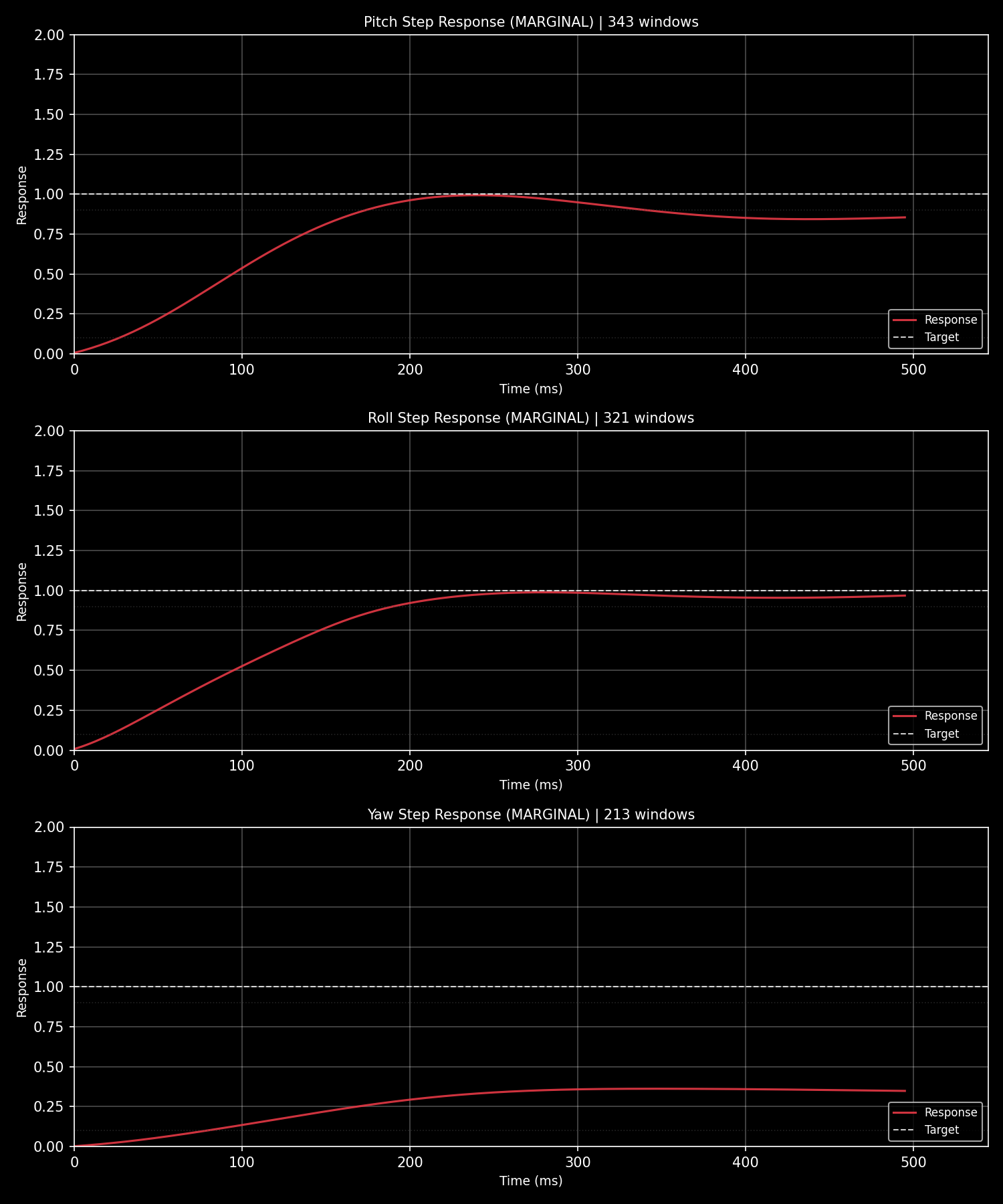
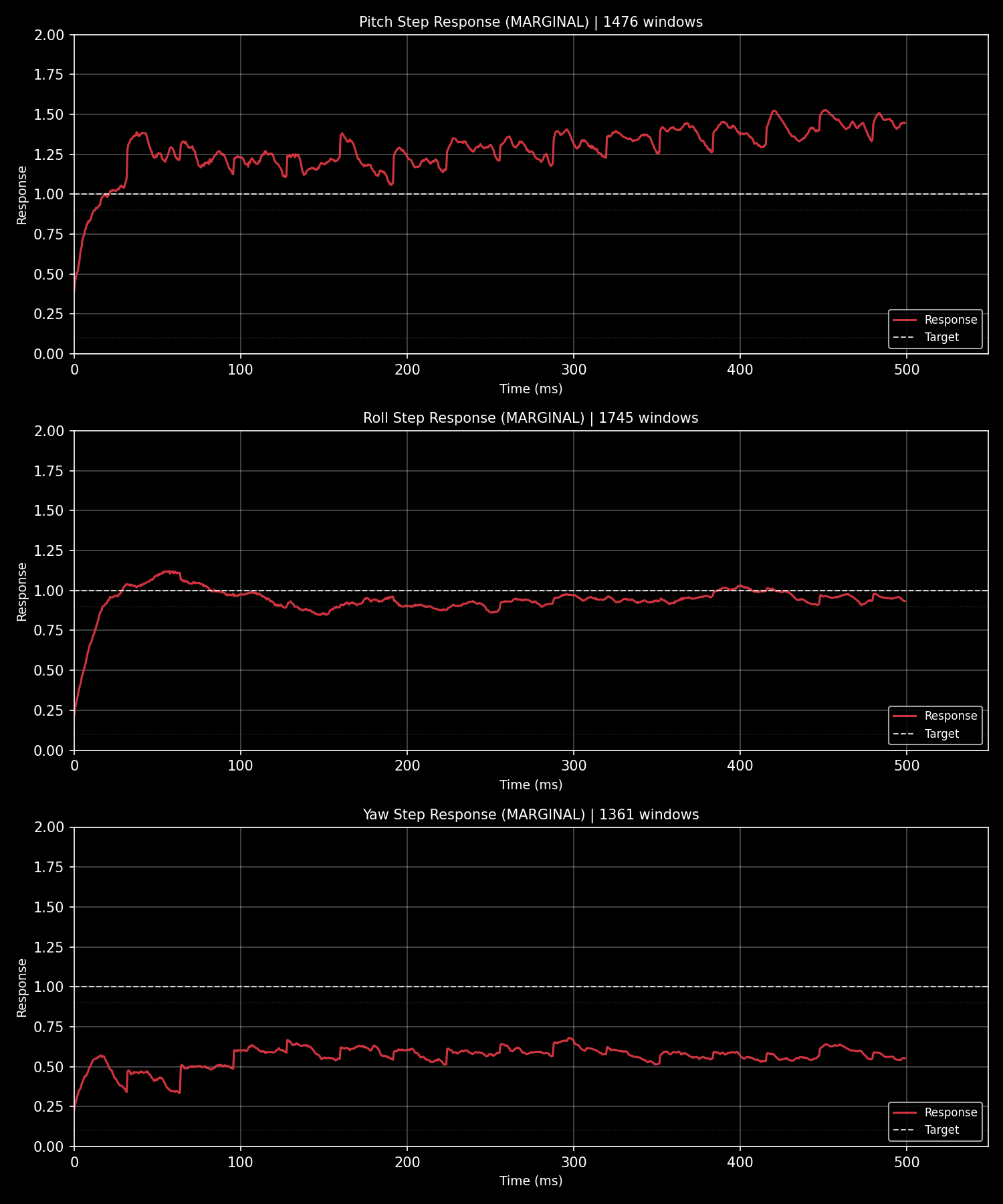
  PITCH: MARGINAL  (steps: 4)
  ROLL:  MARGINAL  (steps: 1)
  YAW:   MARGINAL  (steps: 1)
  Overall: MARGINAL

╭──────────────────────────────────────────────────────────────────╮
│ FFT Vibration Analysis                                           │
╰──────────────────────────────────────────────────────────────────╯
  Vibration: MARGINAL (10.0 m/s²)
  Freq (Hz)    Amplitude (dB)    Source
       93.7             -46.5    motor
    → gyro_notch1_hz: 93.7
    → gyro_lowpass_hz: 40
    → acc_lpf_hz: 10

✓ Analysis complete!
PID Step Response
ArduPilot (DataFlash .bin log):
Betaflight (Blackbox .bbl log):
Agent Analysis Report
When an AI agent analyzes a flight log through SmartTune, it produces a structured diagnostic report like this:
ArduPilot Flight Log Analysis Report
Log: 2026-04-26 13-46-44.bin | Duration: 995s | Platform: ArduPilot
1. PID Step Response Analysis
| Axis | Rating | Rise Time | Overshoot | Settling | Oscillations |
|---|---|---|---|---|---|
| Roll | MARGINAL | -1ms | 0.0% | 510ms | 8 |
| Pitch | MARGINAL | -1ms | 0.0% | 510ms | 4 |
| Yaw | MARGINAL | -1ms | -1.0% | -1ms | - |
Roll Axis Recommendations:
| Parameter | Current → New | Change | Reason |
|---|---|---|---|
ATC_RAT_RLL_D |
0.0036 → 0.0040 | +10% | Reduce oscillation (8 cycles) |
ATC_RAT_RLL_I |
0.115 → 0.144 | +25% | Eliminate steady-state error (99.8%) |
ATC_RAT_RLL_P |
0.115 → 0.104 | -10% | Reduce oscillation |
Pitch Axis Recommendations:
| Parameter | Current → New | Change | Reason |
|---|---|---|---|
ATC_RAT_PIT_I |
0.115 → 0.144 | +25% | Eliminate steady-state error (99.8%) |
ATC_RAT_PIT_D |
0.0036 → 0.0040 | +10% | Reduce oscillation (4 cycles) |
ATC_RAT_PIT_P |
0.115 → 0.104 | -10% | Reduce oscillation |
Yaw Axis: No changes needed — parameters already acceptable.
2. FFT Vibration Analysis
Rating: EXCELLENT (0.5 m/s²)
Current filter settings:
| Parameter | Value |
|---|---|
INS_GYRO_FILTER |
60 Hz |
INS_ACCEL_FILTER |
10 Hz |
| Notch filters | None enabled |
Vibration levels are excellent. No additional filtering required.
3. Magnetometer Calibration
Fitness: 567.98 mGauss — BAD
Issues detected:
| Issue | Threshold | Actual |
|---|---|---|
| Hard iron offset (max |OFS|) | 600 | 625 |
| Soft iron anomaly (DIA_X/Y/Z) | — | 0.300 |
| Motor interference (max |MOT|) | 100.0 | 200.0 |
| Flight coverage | — | No attitude variation |
Recommendations:
- Remove hard iron interference sources (speakers, magnets)
- Optimize soft iron layout (battery/motor placement)
- Recalibrate with proper flight pattern: yaw > 300°, pitch/roll > ±30°
Summary
| Module | Status | Action |
|---|---|---|
| Vibration | ✅ Excellent | Hardware is solid |
| PID | ⚠️ Marginal | Increase I and D gains on Roll/Pitch, reduce P slightly |
| Compass | ❌ Bad | Recalibrate before precision flight |
The agent interprets SmartTune's structured JSON output, adds context, and produces a human-readable summary — bridging the gap between raw data and actionable tuning advice.
For Humans
Yes, the terminal output is also beautiful. Rich-powered tables, progress bars, color-coded diagnostics — everything you'd expect from a modern CLI. But the architecture underneath is agent-first.
# Human-friendly terminal output (default)
stune analyze -i flight.bin

# Machine-parseable via MCP server
# smarttune_analyze_log(log_path="flight.bin", response_format="json")
Roadmap
| Phase | Content | Status |
|---|---|---|
| v1.x | ArduPilot full support | ✅ |
| v2.0 Phase 1 | Multi-platform architecture | ✅ |
| v2.0 Phase 2 | Betaflight BBL parser + analytics | ✅ |
| v2.1 | Platform-specific analyzers + Protocol constraints | ✅ |
| v2.2 | Full English docs, CLI --help, OpenClaw SKILL.md | ✅ |
| v2.x | PX4 ULog adapter | 🔲 |
| v3.0 | Tool-calling manifest, plugin system, web UI | 🔲 |
Author
Raylan LIN — @raylanlin
Built and maintained by a pilot who builds ArduPilot firmware (ParallelFC, self-learning PID, STM32H7 custom FC boards) and teaches his AI agent to tune better than he does.
License
MIT — see LICENSE for details.
smarttune-knowledge-pro is a separate closed-source tuning knowledge base with proprietary tuning rules and industry experience.
For commercial collaboration — custom tuning knowledge bases, fleet-level expertise integration, or enterprise tuning rule development — reach out at [email protected].
Yorumlar (0)
Yorum birakmak icin giris yap.
Yorum birakSonuc bulunamadi