cli-dispatch
Health Warn
- License — License: MIT
- Description — Repository has a description
- Active repo — Last push 0 days ago
- Low visibility — Only 5 GitHub stars
Code Fail
- process.env — Environment variable access in plugins/cli-dispatch/scripts/__tests__/ag-transcript-parse.test.mjs
- process.env — Environment variable access in plugins/cli-dispatch/scripts/__tests__/cp-stream-parse.test.mjs
- process.env — Environment variable access in plugins/cli-dispatch/scripts/__tests__/cx-stream-parse.test.mjs
- process.env — Environment variable access in plugins/cli-dispatch/scripts/__tests__/oc-stream-parse.test.mjs
- rm -rf — Recursive force deletion command in plugins/cli-dispatch/scripts/__tests__/takeover-cmd.test.mjs
- process.env — Environment variable access in plugins/cli-dispatch/scripts/__tests__/takeover-cmd.test.mjs
- execSync — Synchronous shell command execution in plugins/cli-dispatch/scripts/__tests__/takeover-integration.test.mjs
- fs.rmSync — Destructive file system operation in plugins/cli-dispatch/scripts/__tests__/takeover-integration.test.mjs
- process.env — Environment variable access in plugins/cli-dispatch/scripts/__tests__/takeover-integration.test.mjs
- network request — Outbound network request in plugins/cli-dispatch/scripts/__tests__/takeover-integration.test.mjs
Permissions Pass
- Permissions — No dangerous permissions requested
No AI report is available for this listing yet.
DeepSeek destekli Claude Code'u delege işçi olarak çalıştıran Claude Code plugin (marketplace + skill + komutlar)
cli-dispatch
🌐 Languages: English · Türkçe
Use DeepSeek, Gemini, OpenAI Codex, OpenCode (via OpenRouter), or GitHub Copilot as delegated workers inside Claude Code. Claude Code's built-in subagent tool only supports Anthropic models — cli-dispatch adds portable wrappers so you can hand tasks to any of the five from inside your existing claude session.
ℹ️ Multi-backend delegation hub. Five worker backends today — DeepSeek (commands
/cli-dispatch:ds-*), Antigravity/Gemini (/cli-dispatch:ag-run, wrappersag-agent/ag-stream), Codex (/cli-dispatch:cx-run, wrapperscx-agent/cx-stream), OpenCode (/cli-dispatch:oc-run, wrappersoc-agent/oc-stream), and GitHub Copilot (/cli-dispatch:cp-run, wrapperscp-agent/cp-stream). You pick which to install at setup. All five write to the same session layout, sosessions/watchwork across all. The DeepSeek wrapper/config paths keep theclaude-dsname (that backend's name).
📝 Write-up (Turkish): cli-dispatch: a plugin that makes Claude the boss and DeepSeek the worker — Medium

Demo — install the plugin, run
/cli-dispatch:setupto pick and configure your backend(s), then delegate tasks with/cli-dispatch:ds-run/ag-run/cx-run/oc-run/cp-runor theds-/ag-/cx-/oc-/cp-runnersubagents. The worker generates; Claude Code watches live and verifies.
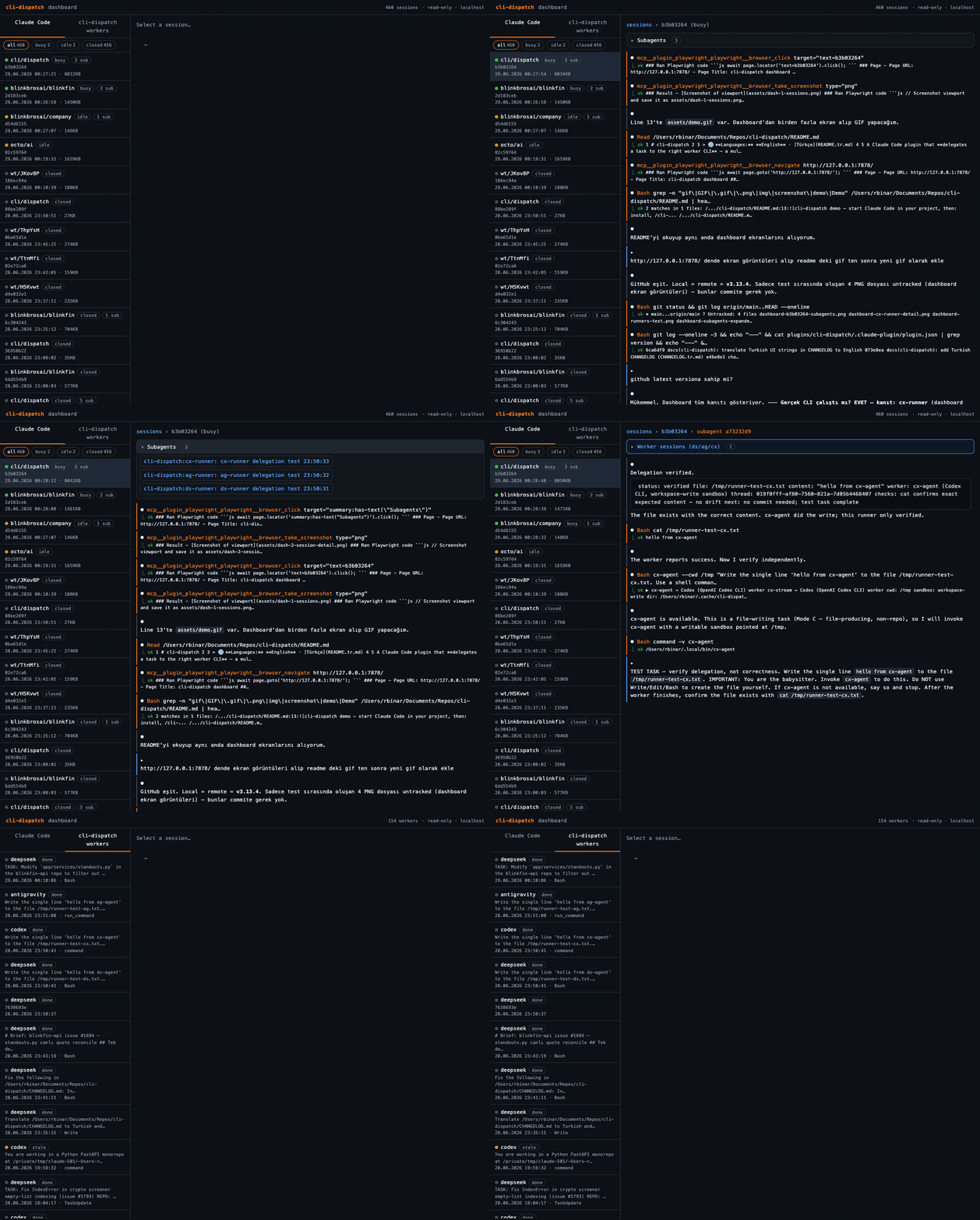
Dashboard (
/cli-dispatch:dashboard) — live view of all Claude Code sessions, subagents (ds/ag/cx/oc/cp-runner), and the worker CLI sessions they spawned. Shows status, task, and per-backend trace in real time.
Install
⚠️ These commands are slash commands and must be run from inside the Claude Code CLI (not in a normal terminal/shell). First type
claudeto start a Claude Code session, then enter the commands at that session's prompt.
Before you start — you need:
claudeCLI installed and on yourPATH~/.local/binon yourPATH— check:echo $PATH | grep -q local && echo ok || echo 'add: export PATH="$HOME/.local/bin:$PATH" to ~/.zshrc'- API key/auth for your backend: DeepSeek (platform.deepseek.com/api_keys) · Antigravity uses Google OAuth (
agylogin, no key) · Codex uses ChatGPT OAuth (codex login, no key) · OpenCode uses an OpenRouter API key (paste yourself — openrouter.ai/keys, no OAuth) · Copilot usesgh auth loginorCOPILOT_GITHUB_TOKEN/GH_TOKENplus an active GitHub Copilot subscription
Run the commands one at a time, in order — don't paste them all at once. Send each command, wait for the result, then move to the next:
Step 1 — Add the marketplace:
/plugin marketplace add rbinar/cli-dispatch
If an "Enter marketplace source" box opens, type only the source into it (not the command):
rbinar/cli-dispatch
Step 2 — Install the plugin (after the marketplace is added):
/plugin install cli-dispatch@cli-dispatch
The format is
plugin-name@marketplace-name; since both arecli-dispatchthe name repeats, which is normal.
Step 3 — Enable the plugin:
The install output says Run /reload-plugins to apply. This step is required for the commands (/cli-dispatch:ds-*) to be recognized:
/reload-plugins
If you still get "Unknown command: /cli-dispatch:setup" after reload, fully quit Claude Code and reopen it. You can verify
cli-dispatchis installed and enabled with the/plugincommand.
Step 4 — Run setup (after the plugin is enabled):
/cli-dispatch:setup
/cli-dispatch:setup first asks which worker backend(s) to install — DeepSeek, Antigravity (Gemini), Codex, OpenCode, Copilot, or all (--backends all or --backends deepseek,antigravity,codex,opencode,copilot). If a selected backend's underlying CLI (claude/agy/codex/opencode/copilot) turns out to be missing, install.sh can attempt to auto-install it for you — pass --install-missing (opt-in, default off; npm preferred where available, curl | bash vendor installers as fallback). Setup only adds this flag after asking your explicit approval and showing exactly which CLIs are missing and which commands will run; it never automates auth (sign-in, API keys) — see CHANGELOG.md for details. For DeepSeek it installs the wrapper to ~/.local/bin/claude-ds and creates a ~/.config/cli-dispatch/config skeleton; if the key is still empty, setup automatically opens the config in your platform's default editor (macOS open, Linux xdg-open, WSL explorer.exe, Windows notepad). Add your DeepSeek API key yourself in the opened file:
# ~/.config/cli-dispatch/config
DEEPSEEK_API_KEY="sk-..."     # your own DeepSeek key
DS_MODEL="deepseek-v4-pro"
DS_FLASH_MODEL="deepseek-v4-flash"
Want a different editor? Set the
CLI_DISPATCH_EDITORenvironment variable (e.g.CLI_DISPATCH_EDITOR="code"; the legacyCLAUDE_DS_EDITORis still honored). If auto-open fails, open the file manually:${EDITOR:-nano} ~/.config/cli-dispatch/config.
For the Antigravity (Gemini) backend, setup installs ag-agent/ag-stream instead. It needs the agy CLI (curl -fsSL https://antigravity.google/cli/install.sh | bash) plus script (pseudo-TTY) and node; auth is via Google sign-in (run agy once) or a GEMINI_API_KEY. Native Windows: DeepSeek only — use WSL for the Antigravity backend. agy proxies multiple model families — pick one with ag-agent --model "<name>" (or the AG_MODEL config default): Gemini 3.1 Pro (High), Claude Opus 4.6 (Thinking), GPT-OSS 120B (Medium), … (run agy models for the exact list; default Gemini 3.5 Flash (High)).
For the Codex (OpenAI Codex CLI) backend, setup installs cx-agent/cx-stream. It needs the codex CLI (≥ 0.142.3: npm i -g @openai/codex, brew install --cask codex, or curl -fsSL https://chatgpt.com/codex/install.sh | sh) plus node; auth is via codex login (ChatGPT/OAuth — no API key needed for personal use) or CODEX_API_KEY (takes precedence) or OPENAI_API_KEY. Select a model with cx-agent --model <name> (or the CX_MODEL config default; blank = codex's own default): gpt-5.5 (default), gpt-5.4, gpt-5.4-mini (fast/cheap, subagents), gpt-5.3-codex-spark (run /model inside codex for the live list). Key advantage: cx-agent --read-only activates codex's real OS-level sandbox (macOS Seatbelt / Linux bwrap+seccomp) — a kernel-enforced hard-block on all file writes, not just tool-layer restriction.
For the OpenCode (via OpenRouter) backend, setup installs oc-agent/oc-stream. It needs the opencode CLI (npm i -g opencode-ai) plus node. Auth is an OpenRouter API key (OPENROUTER_API_KEY) pasted by you — same auto-open-editor mechanism as DeepSeek's key (Claude/the installer never writes the key value itself). Model selection: setup asks (via a multiple-choice question) for a default model from 2-3 curated free-tier OpenRouter slugs (e.g. google/gemma-4-31b-it:free) or a custom slug, writing it to OC_MODEL in the config; override per-call with oc-agent --model <bare-slug> (no openrouter/ prefix needed — oc-stream adds it). List live models with OPENROUTER_API_KEY=<key> opencode models openrouter. Key caveat: unlike Codex's cx-agent --read-only (a real OS-level, kernel-enforced sandbox), OpenCode has no sandbox at all — no OS-level or tool-level write-deny. --auto (always used internally) auto-approves every permission prompt because a headless run has no TTY to answer prompts — this is a functional requirement, not a safety feature. Isolation is via git worktree only (same posture as the Antigravity backend). Native Windows: not supported — OpenCode is Unix-only (macOS/Linux/WSL) for v1.
For the GitHub Copilot backend, setup installs cp-agent/cp-stream. It needs the copilot CLI (npm i -g @github/copilot, brew install --cask copilot-cli, or curl -fsSL https://gh.io/copilot-install | bash) plus node and Node 22+. Auth is COPILOT_GITHUB_TOKEN > GH_TOKEN > GITHUB_TOKEN; cli-dispatch automatically reuses gh auth token as GH_TOKEN when available. An active GitHub Copilot subscription is required. Model selection: set CP_MODEL in the config or override per-call with cp-agent --model <slug> (examples: gpt-5.4, auto). Current model list is only visible interactively via /model in the copilot TUI (auth required) or GitHub Copilot docs — slugs change over time. Reasoning effort: cp-agent --effort low|medium|high maps to Copilot's --reasoning-effort=<level>. Key caveat: like OpenCode, Copilot has no sandbox at all — no OS-level or tool-level write-deny. --allow-all-tools --no-ask-user is always used internally for headless runs; it is a functional requirement, not a safety feature. Isolation is via git worktree only. Native Windows: not supported — Copilot is Unix-only (macOS/Linux/WSL) for v1.
DeepSeek key: https://platform.deepseek.com/api_keys
/cli-dispatch:setup now has a final step that offers, via a yes/no-style question, to write a standing "prefer delegating to these runners" reminder into your global or project CLAUDE.md, so you don't have to re-explain your delegation preference every session (idempotent/marker-guarded so re-running setup won't duplicate it).
Updating
Update the plugin from inside Claude Code, then reload (run one at a time):
/plugin update cli-dispatch
/reload-plugins
/plugin update fetches the newest version from the marketplace; /reload-plugins applies it
to the running session (without a full restart). Verify with /cli-dispatch:status.
ℹ️
/plugin updaterefreshes the commands/skills only — it does not reinstall the
worker wrappers in~/.local/bin. After an update that changes a wrapper (e.g. a new
on-disk field), re-run/cli-dispatch:setuponce to reinstall them.
▶️ Watch the update demo (mp4) —
/plugin updatethen/reload-pluginsinside Claude Code.
Dashboard
/cli-dispatch:dashboard
A local, read-only web dashboard over data that already lives on disk. It lists active
Claude Code CLI sessions (all projects, busy ones pinned on top); click a session to see
its flow (messages / tool calls / results), the subagents it spawned, and click a
subagent to drill into its flow (nested by spawn depth). A second panel shows the
cli-dispatch worker delegations (DeepSeek / Antigravity / Codex / OpenCode / Copilot) with their state + flow.
Busy sessions auto-refresh.
It reads ~/.claude/projects/** (Claude Code transcripts), ~/.claude/sessions/*.json (live
busy/idle), and ~/.cache/cli-dispatch/sessions/** (workers). Notes:
- The only long-running process the plugin starts. It binds
127.0.0.1only, is
read-only by default, and never touches your config/keys. An opt-in human-takeover
action on a worker's detail view exposes a narrowly-scoped, authenticated write path to
already-owned worker sessions only (kill the headless process, attach a PTY terminal) — no
general shell, no arbitrary command. Stop the dashboard with the printedkill <pid>(or
Ctrl-C if you runcli-dispatch-dashboardyourself in a terminal). - The Claude Code on-disk transcript format is internal and may change across versions; the
dashboard renders unknown shapes defensively. - A Config tab edits the cli-dispatch config file right in the browser. Secret fields (API keys) are write-only — never echoed back once saved — and shown with a masked preview (e.g.
sk-e78f...ea1b, first 6 + last 4 chars) so you can confirm which key is set without exposing it. Non-secret fields like*_MODELand*_MODELScan be viewed and edited directly.
Usage
You use cli-dispatch from inside Claude Code — two ways:
- Slash commands (table below) — typed at the
claudesession's prompt. - Natural language — say "do this with deepseek", "run this with codex", "delegate this to gemini"; the skill kicks in and Claude Code runs the work on the matching backend.
| Command | What it does |
|---|---|
/cli-dispatch:setup |
Pick backend(s) + install + config skeleton + smoke test |
/cli-dispatch:dashboard |
Open the local web dashboard — Claude Code sessions → flow → subagents → flow, + worker panel |
/cli-dispatch:ds-run <task> |
Delegate a task to DeepSeek (session-tracked; worktree isolation for repo tasks) |
/cli-dispatch:ag-run <task> |
Delegate a task to Antigravity (Gemini) (same workflow) |
/cli-dispatch:cx-run <task> |
Delegate a task to Codex (OpenAI) (real read-only sandbox; same session layout) |
/cli-dispatch:oc-run <task> |
Delegate a task to OpenCode (OpenRouter) (no sandbox — worktree isolation only; same session layout) |
/cli-dispatch:cp-run <task> |
Delegate a task to GitHub Copilot (no sandbox — worktree isolation only; same session layout) |
/cli-dispatch:sessions |
List past/active sessions (all backends; shows a backend column) |
/cli-dispatch:ds-sessions / ag-sessions / cx-sessions / oc-sessions / cp-sessions |
Same list, filtered to just DeepSeek / Antigravity / Codex / OpenCode / Copilot |
/cli-dispatch:watch <id> |
Show a session's live status (cost-aware; any backend) |
/cli-dispatch:resume <id> <prompt> |
Continue a worker session with a follow-up prompt (auto-detects backend) |
/cli-dispatch:kill <id> |
Stop a running worker session (SIGTERM + state → killed) |
/cli-dispatch:clean |
Remove stale worker dirs (running-but-dead); dry-run by default, --remove to delete |
/cli-dispatch:clean-schedule |
Schedule a daily auto-clean via the OS scheduler (launchd / cron / Scheduled Tasks); status / uninstall too |
/cli-dispatch:status |
Check install/key/CLI status for all backends |
/cli-dispatch:ds-status / ag-status / cx-status / oc-status / cp-status |
Same check, scoped to just DeepSeek / Antigravity / Codex / OpenCode / Copilot |
/cli-dispatch:balance |
Aggregate — DeepSeek balance + Antigravity quota + Codex rate limits + OpenCode credits + Copilot usage note, all at once |
/cli-dispatch:ds-balance |
Show DeepSeek account balance |
/cli-dispatch:cx-balance |
Show Codex usage / rate limits (5h + weekly % left) — native, from codex's own on-disk session records |
/cli-dispatch:ag-balance |
Show Antigravity quota (% left per model + plan) — native, via the local language-server GetUserStatus RPC |
/cli-dispatch:oc-balance |
Show OpenCode's OpenRouter paid-credit balance (total_credits - total_usage) — :free models have no quota API |
/cli-dispatch:cp-balance |
Explain Copilot usage visibility — not queryable from the CLI; use GitHub Billing |
/cli-dispatch:doctor |
Health check for all backends — PATH, API keys, CLI auth ✓/✗ |
/cli-dispatch:help |
One-screen command reference cheat sheet |
Features
All used from inside Claude Code (/cli-dispatch:ds-run <task>, /cli-dispatch:cx-run, /cli-dispatch:ag-run, /cli-dispatch:oc-run, /cli-dispatch:cp-run, or "do with deepseek/codex/gemini/opencode/copilot"):
- Five worker backends, one hub — DeepSeek (
ds-*), Antigravity / Gemini (ag-*), Codex / OpenAI (cx-*), OpenCode / OpenRouter (oc-*), GitHub Copilot (cp-*). Pick any (or all) at setup; all five write the same session layout, sosessions,watch,clean, the balance commands, and the dashboard work across every backend. - Delegate & verify — the worker generates/implements; Claude Code watches live and verifies the output. Conversation context is not shared → the task must be self-contained. The worker = doer, you = reviewer/merge owner.
- Session tracking (live watch + resume) — work is not an opaque background process; each run writes a session dir (status / progress / transcript / meta + the full prompt) and is observable and resumable. → Session tracking
--read-onlymode (Codex = real OS sandbox) —cx-agent --read-onlyactivates a kernel-enforced no-writes sandbox (macOS Seatbelt / Linux bwrap+seccomp). DeepSeek's--read-onlyis a tool-layer restriction; Antigravity, OpenCode, and Copilot have no write-deny at all (isolate them in a worktree).- agentic + worktree isolation — real repo tasks run in a throwaway git worktree; the diff is left uncommitted (review → build/test → merge is on you/Claude). Bundled helpers:
ds-/ag-/cx-/oc-/cp-worktree-run. - Per-backend runner subagents (
ds-/ag-/cx-/oc-/cp-runner) — hand the whole delegation to an isolated sub-context that picks the mode, isolates the work, verifies, and returns a short result — the management noise never enters the orchestrator. → runner subagents - Multi-candidate model selection — for
ag-/cx-/oc-/cp-runner, give 2+ candidate models in the task prompt (or set a standing list once viaAG_MODELS/CX_MODELS/OC_MODELS/CP_MODELSin the config) and the runner reasons about which one best fits, picks it, and reports why; if the prompt gives no explicit model/list, the runner checks the config list first and falls back to the single*_MODELdefault.ds-runneris not part of this — its model is fixed. - Web dashboard — a local, read-only view: Claude Code sessions → flow → subagents → flow, plus a worker panel. Pinned task/instruction, Markdown-rendered messages, stale-worker detection, live SSE updates. → Dashboard
- Cost & model visibility — the dashboard shows what each delegation actually cost (per-session/subagent token usage, per-worker total cost) and which model ran it, including a warning badge when a babysitter's own overhead is disproportionately high vs. the worker — so you can spot low-value delegations.
- Native usage / quota —
/cli-dispatch:balance(all five at once) or a per-backend*-balance; reverse-engineered from each CLI's own local data where available, no third-party tools. Copilot is explicitly not CLI-queryable. → Usage & quota - Housekeeping —
/cli-dispatch:cleanprunes stale (running-but-dead) worker dirs;/cli-dispatch:clean-scheduleautomates it daily via launchd / cron / Scheduled Tasks. - timeout safety net — a hung/runaway worker is auto-killed (with its child processes) at a runtime or idle limit; the session goes
state: error. - global MCP isolation — workers do not inherit your
~/.claudeMCP servers (playwright, etc.).
⚠️ The default mode is not a sandbox. Workers run agentic → they can write files / run bash. Isolate real repo work in a worktree; for a guaranteed "won't write files" use
--read-only(and on Codex that guarantee is kernel-enforced).
Session tracking (live watch + resume)
Delegated work is not an opaque background process: every backend's output is parsed and each task is written to a session directory (same layout for DeepSeek, Antigravity, Codex, OpenCode, and Copilot). You track what the worker is doing in a live, structured, resumable way via /cli-dispatch:sessions and /cli-dispatch:watch <id>.
Session directory: ${XDG_CACHE_HOME:-$HOME/.cache}/cli-dispatch/sessions/<id>/ (legacy claude-ds path still read as a fallback)
| File | Contents |
|---|---|
status.json |
Compact summary (state, last tool, tool counts, result preview) — the only file read to watch |
progress.log |
Terse human-readable stream (▸ Edit foo.ts, ✓ / ✗, truncated text) |
transcript.jsonl |
Raw stream-json (resume/audit; not read while watching) |
meta.json |
Prompt preview, cwd, branch, model, start/end |
prompt.txt |
The full task prompt (untruncated; shown pinned atop the worker's dashboard page) |
Cost-aware watching: progress is tracked only from the small status.json (/cli-dispatch:watch <id>); the raw transcript is not read, not tailed in a tight loop — because every read by the orchestrator spends tokens.
Requirement:
nodeis needed for session tracking/parsing (claude-code already runs in a node environment).
ds-runner subagent (keep context clean)
Instead of managing a delegation step by step yourself, you can hand the whole thing to the packaged ds-runner subagent (inside Claude Code, say "do this task with ds-runner"). It picks the mode, isolates the work, verifies (build/test for repo/code tasks), and returns a short result — the management noise never enters the orchestrator's context. The worker is always DeepSeek; Claude Code picks the subagent's own (babysitter) model by difficulty (Claude Code makes the call below internally; you don't write Agent(...) by hand):
Agent(subagent_type="ds-runner", model="haiku",  prompt="<self-contained task>")   # pure generation/analysis
Agent(subagent_type="ds-runner", model="sonnet", prompt="<repo/code task>")         # needs build/test verification
Valuable for long/agentic work, verification, or several jobs in parallel; for a simple one-shot job /cli-dispatch:ds-run is enough.
cx-runner subagent (Codex twin — keep context clean)
The Codex backend has its own parallel subagent: cx-runner. It works identically to ds-runner — picks the mode, isolates the work in a git worktree when needed, verifies (build/test for repo tasks), and returns a short result — but the worker is always Codex. The headline advantage over the other backends is Mode A: --read-only activates a real OS-level sandbox (macOS Seatbelt / Linux bwrap+seccomp), a kernel-enforced hard-block on all file writes — no worktree needed for a genuine no-writes guarantee. Inside Claude Code, say "do this task with cx-runner" or use Agent(subagent_type="cx-runner", ...).
ag-runner subagent (Antigravity twin — keep context clean)
The Antigravity backend has its own parallel subagent: ag-runner. It works identically to ds-runner — picks the mode, isolates the work in a git worktree when needed, verifies (build/test for repo tasks), and returns a short result — but the worker is always Antigravity (via agy / ag-agent). agy proxies multiple model families (Gemini, Claude, GPT — run agy models for the current list), so you can switch models without changing your delegation flow. Inside Claude Code, say "do this task with ag-runner" or use Agent(subagent_type="ag-runner", ...).
oc-runner subagent (OpenCode twin — keep context clean)
The OpenCode backend has its own parallel subagent: oc-runner. It works identically to ds-runner — picks the mode, isolates the work in a git worktree when needed, verifies (build/test for repo tasks), and returns a short result — but the worker is always OpenCode (via OpenRouter, oc-agent / oc-stream). Unlike Codex, OpenCode has no sandbox at all — no OS-level or tool-level write-deny — so worktree isolation is the only boundary (same posture as Antigravity). Model selection uses bare OpenRouter slugs with no openrouter/ prefix (oc-stream adds it automatically), e.g. oc-agent --model google/gemma-4-31b-it:free. Inside Claude Code, say "do this task with oc-runner" or use Agent(subagent_type="oc-runner", ...).
cp-runner subagent (GitHub Copilot twin — keep context clean)
The GitHub Copilot backend has its own parallel subagent: cp-runner. It works identically to ds-runner — picks the mode, isolates the work in a git worktree when needed, verifies (build/test for repo tasks), and returns a short result — but the worker is always GitHub Copilot (via cp-agent / cp-stream). GitHub Copilot has no sandbox at all — no OS-level or tool-level write-deny — so worktree isolation is the only boundary. It requires an active GitHub Copilot subscription plus gh / GH_TOKEN auth (precedence COPILOT_GITHUB_TOKEN > GH_TOKEN > GITHUB_TOKEN; cli-dispatch automatically reuses gh auth token as GH_TOKEN when available). Inside Claude Code, say "do this task with cp-runner" or use Agent(subagent_type="cp-runner", ...).
Usage & quota — native, no third-party tool
"How much of my limit is left?" — answered for every backend without installing anything
extra. Each *-balance command reverse-engineers data the CLI already keeps locally; nothing
new is sent over the network on your behalf.
Use /cli-dispatch:balance to see all five at once, or a single *-balance command per backend.
| Backend | Command | Where the number comes from |
|---|---|---|
| All | /cli-dispatch:balance |
Runs the five below in one go and summarizes each headline number side by side. |
| DeepSeek | /cli-dispatch:ds-balance |
DeepSeek's official REST balance API (/user/balance), using your DEEPSEEK_API_KEY. |
| Codex | /cli-dispatch:cx-balance |
Codex persists the backend's rate-limit payload into its own session records (~/.codex/sessions/**/*.jsonl). The command reads the newest token_count record's rate_limits → primary (5h) + secondary (7d) windows as % left + reset. No network. |
| Antigravity | /cli-dispatch:ag-balance |
The local Antigravity language server (the one the IDE/agy already run) exposes a Connect-RPC GetUserStatus endpoint. The command finds the running language_server process, reads its --csrf_token arg + listening port, then POSTs GetUserStatus → plan + per-model remainingFraction + reset. |
| OpenCode | /cli-dispatch:oc-balance |
OpenRouter's official REST endpoint (GET /api/v1/credits), using your OPENROUTER_API_KEY → total_credits - total_usage remaining. Paid-credit balance only — :free-suffixed models have separate, unauthenticated per-model rate limits with no scriptable quota API. |
| GitHub Copilot | /cli-dispatch:cp-balance |
Not queryable from the copilot CLI. /usage is session-scoped and interactive-only inside a Copilot REPL; use GitHub Billing (https://github.com/settings/billing) for actual usage/limits. |
How the two reverse-engineered ones work, concretely:
# Codex — newest rate_limits snapshot on disk (same numbers as /status in the TUI):
#   ~/.codex/sessions/**/*.jsonl  →  payload.rate_limits.{primary(5h),secondary(7d)}
#   used_percent → 100-used = % left ; resets_at (epoch) → reset time

# Antigravity — query the local language server directly (needs it running):
PID=$(ps aux | grep -i language_server | grep -i antigravity | grep -v grep | awk '{print $2}' | head -1)
CSRF=$(ps -ww -o command= -p "$PID" | sed -E 's/.*--csrf_token[ =]([^ ]+).*/\1/')
PORT=$(lsof -nP -iTCP -sTCP:LISTEN -a -p "$PID" | awk 'NR>1{print $9}' | sed -E 's/.*:([0-9]+)$/\1/' | head -1)
curl -sk -X POST "https://127.0.0.1:$PORT/exa.language_server_pb.LanguageServerService/GetUserStatus" \
  -H 'Content-Type: application/json' -H 'Connect-Protocol-Version: 1' \
  -H "X-Codeium-Csrf-Token: $CSRF" --data '{}'    # → userStatus.cascadeModelConfigData...quotaInfo
Caveats: Codex's figure is as fresh as the last interactive turn (-q/exec runs reportrate_limits:null); Antigravity's command needs the language server running (IDE open or
an agy session) — otherwise it prints a hint. Neither adds a dependency.
Under the hood (advanced)
The plugin installs portable CLIs that Claude Code invokes via Bash into ~/.local/bin — normally you don't call these, Claude Code manages them:
| CLI | What |
|---|---|
claude-ds |
Plain env wrapper (points claude at DeepSeek; no parse/session) |
claude-ds-stream |
Session-tracked variant (stream-json parse + status/progress/transcript) |
ds-agent |
One-shot synchronous wrapper: task → run → answer (stdout); progress on stderr |
ag-stream |
Session-tracked Antigravity wrapper (tails agy's on-disk JSONL transcript) |
ag-agent |
One-shot synchronous wrapper for agy: task → run → answer (stdout) |
cx-stream |
Session-tracked Codex wrapper (pipes codex's JSONL stdout through the parser) |
cx-agent |
One-shot synchronous wrapper for codex: task → run → answer (stdout) |
oc-stream |
Session-tracked OpenCode wrapper (pipes opencode's JSON stream through the parser) |
oc-agent |
One-shot synchronous wrapper for opencode: task → run → answer (stdout) |
cp-stream |
Session-tracked GitHub Copilot wrapper (pipes copilot's JSON stream through the parser) |
cp-agent |
One-shot synchronous wrapper for copilot: task → run → answer (stdout) |
If you want, you can also use them directly from the terminal (e.g. in scripts outside the plugin):
ds-agent --read-only "question"           # one shot; answer to stdout
ds-agent --cwd /tmp/x "generate a file"   # agentic, isolated dir
claude-ds-stream --resume <id> -p "…"     # continue an existing session

cx-agent --read-only -q "question"        # read-only: kernel-enforced sandbox (macOS Seatbelt / Linux bwrap)
cx-agent --cwd /tmp/x "generate a file"   # agentic, isolated dir
cx-agent --resume <thread-id> "follow-up"                # resume reuses stored context; --cwd not supported on resume

cp-agent -q "question"                    # one shot; answer to stdout
cp-agent --cwd /tmp/x "generate a file"   # agentic, isolated dir
cp-agent --effort high --model gpt-5.4 "task"
cp-agent --resume <session-id> "follow-up"
Flags (cx-agent / cx-stream): --read-only, --sandbox <mode>, --cwd <dir>, --resume <id>, --model <m>, --max-runtime/--idle-timeout, -q.
Flags (cp-agent / cp-stream): --cwd <dir>, --resume <id>, --model <m>, --effort low|medium|high, --max-runtime/--idle-timeout, -q.
(cx-runner is not one of these — it's a Claude Code subagent, not in ~/.local/bin.)
📄 Full reference for terminal install, all commands, flags, and env overrides: TERMINAL.md.
Windows
On native Windows (if you're not using WSL) the PowerShell variants kick in. DeepSeek and Codex run natively; Antigravity needs a pseudo-TTY, and OpenCode/Copilot are Unix-only v1, so install those under WSL.
/cli-dispatch:setup→ runsinstall.ps1 -Backends <deepseek,codex|all>(defaultdeepseek):- DeepSeek:
claude-ds.ps1+claude-ds-stream.ps1+ds-agent.ps1and.cmdshims into~/.local/bin, parser (ds-stream-parse.mjs) into~/.local/share/cli-dispatch. - Codex:
cx-stream.ps1+cx-agent.ps1+.cmdshims and parser (cx-stream-parse.mjs). Auth:codex login(orCODEX_API_KEYin the config). Real-s read-onlysandbox included. - The dashboard is always installed; the config is written to
~/.config/cli-dispatch/config. - Add
-InstallMissingto haveinstall.ps1attempt auto-installing a missing worker CLI (npm, or a vendor fallback) and re-check withGet-Command, falling back to the existing warning on failure — opt-in, default off; auth is never automated.
- DeepSeek:
- Repo tasks:
ds-worktree-run.ps1/cx-worktree-run.ps1— use a junction instead of a symlink fornode_modules(New-Item -ItemType Junction; doesn't require admin/developer-mode). - If WSL or Git Bash is present, the Unix
.shscripts also work.
Requirements: PowerShell 5.1+ or pwsh 7+; claude for DeepSeek, codex for Codex, on PATH.
Uninstall
For a full cleanup, in order: (1) remove the plugin, (2) delete the wrapper + config files, (3) clean up any temporary worktrees.
Step 1 — Remove the plugin and marketplace (from inside Claude Code CLI):
/plugin uninstall cli-dispatch@cli-dispatch
/plugin marketplace remove cli-dispatch
/reload-plugins
Step 2 — Delete the wrapper and config files:
# macOS / Linux / WSL / Git Bash
rm -f  ~/.local/bin/claude-ds ~/.local/bin/claude-ds-stream
rm -rf ~/.local/share/cli-dispatch ~/.local/share/claude-ds   # stream parsers (also legacy path)
rm -rf ~/.cache/cli-dispatch ~/.cache/claude-ds               # session records (also legacy path)
rm -rf ~/.config/cli-dispatch ~/.config/claude-ds             # config (incl. API key) — deleting removes the key too (also legacy path)
# Native Windows (PowerShell)
Remove-Item -Force "$HOME\.local\bin\claude-ds.ps1","$HOME\.local\bin\claude-ds.cmd","$HOME\.local\bin\claude-ds-stream.ps1","$HOME\.local\bin\claude-ds-stream.cmd" -ErrorAction SilentlyContinue
Remove-Item -Recurse -Force "$HOME\.local\share\claude-ds" -ErrorAction SilentlyContinue   # stream parser
Remove-Item -Recurse -Force "$HOME\.cache\claude-ds" -ErrorAction SilentlyContinue          # session records
Remove-Item -Recurse -Force "$HOME\.config\claude-ds" -ErrorAction SilentlyContinue
Step 3 — (Optional) clean up temporary worktrees:
If you used /cli-dispatch:ds-run or ds-worktree-run.sh, separate git worktrees may remain. Check in the relevant repo:
git worktree list          # see worktrees claude-ds opened
git worktree remove <path> # remove the ones you don't need
git worktree prune         # clean up dead records
Note: if you manually added
~/.local/binto PATH for this plugin and use nothing else from it, you can also remove that line from your shell profile (~/.zshrc,~/.bashrc, etc.). To revoke the API key on your DeepSeek account, delete it at https://platform.deepseek.com/api_keys.
Security and data
- Keys never leave your machine: any key lives in
~/.config/cli-dispatch/config(0600, outside the repo) and is never committed. The plugin/skill never writes a key anywhere; you add it. (Codex and Antigravity normally use their own OAuth sign-in — no key in the config at all.) - Data egress: the prompt and code you give a worker are sent to that backend's provider — DeepSeek, Google (Gemini/Antigravity), OpenAI (Codex), OpenRouter/OpenCode, or GitHub Copilot. Use each only if you accept that. The dashboard and
*-balancecommands are local/read-only and send nothing extra on your behalf. - Isolated work: real repo tasks run in a separate git worktree; the agentic mode doesn't touch the main checkout/other branches. Reviewing the output (diff + build/test) and merging is up to you.
- GitHub CLI (
gh) auth forwarding: on macOS,ghkeeps its token in the system Keychain, which sandboxed workers (Codex'sworkspace-write, DeepSeek, agy, OpenCode, Copilot) can't reach — so delegatedgh issue/gh pr/gh apicalls silently fail. When you're logged in (gh auth tokensucceeds) and haven't setGH_TOKEN/GITHUB_TOKENyourself, the runners export yourghtoken into the worker asGH_TOKENso itsghcalls authenticate. Copilot also uses that token path unlessCOPILOT_GITHUB_TOKENis set explicitly. The token can carry broad scopes (repo,workflow, evendelete_repo) and travels into the worker sandbox / provider context — opt out by settingCLI_DISPATCH_NO_GH_TOKEN=1./cli-dispatch:doctorreports the current state.
Architectural role
The worker (DeepSeek / Gemini / Codex / OpenCode / Copilot) = the doer (generation/implementation). You (Claude Code, Anthropic) = orchestrator + reviewer + git/merge owner. Don't trust a worker's output until you've verified it.
License
MIT — see LICENSE.
Reviews (0)
Sign in to leave a review.
Leave a reviewNo results found