svyazka
Health Warn
- License — License: MIT
- Description — Repository has a description
- Active repo — Last push 0 days ago
- Low visibility — Only 6 GitHub stars
Code Fail
- network request — Outbound network request in app.js
- crypto private key — Private key handling in app.js
- os.homedir — User home directory access in cli/agent-rules.mjs
- rm -rf — Recursive force deletion command in cli/build-app.sh
- rm -rf — Recursive force deletion command in cli/build-mac.sh
- spawnSync — Synchronous process spawning in cli/platform.mjs
- fs.rmSync — Destructive file system operation in cli/platform.mjs
- process.env — Environment variable access in cli/platform.mjs
- spawnSync — Synchronous process spawning in cli/svyazka.mjs
- fs.rmSync — Destructive file system operation in cli/svyazka.mjs
- os.homedir — User home directory access in cli/svyazka.mjs
- process.env — Environment variable access in cli/svyazka.mjs
- crypto private key — Private key handling in cli/svyazka.mjs
- crypto private key — Private key handling in core.js
- rm -rf — Recursive force deletion command in install.sh
- network request — Outbound network request in install.sh
- rm -rf — Recursive force deletion command in pack.sh
Permissions Pass
- Permissions — No dangerous permissions requested
No AI report is available for this listing yet.
Local encrypted keyring for macOS that AI coding agents (Claude Code, Codex) can use without seeing your secrets
Svyazka
A local, encrypted keyring for macOS, Windows and Linux that AI coding agents can use — without seeing your secrets.
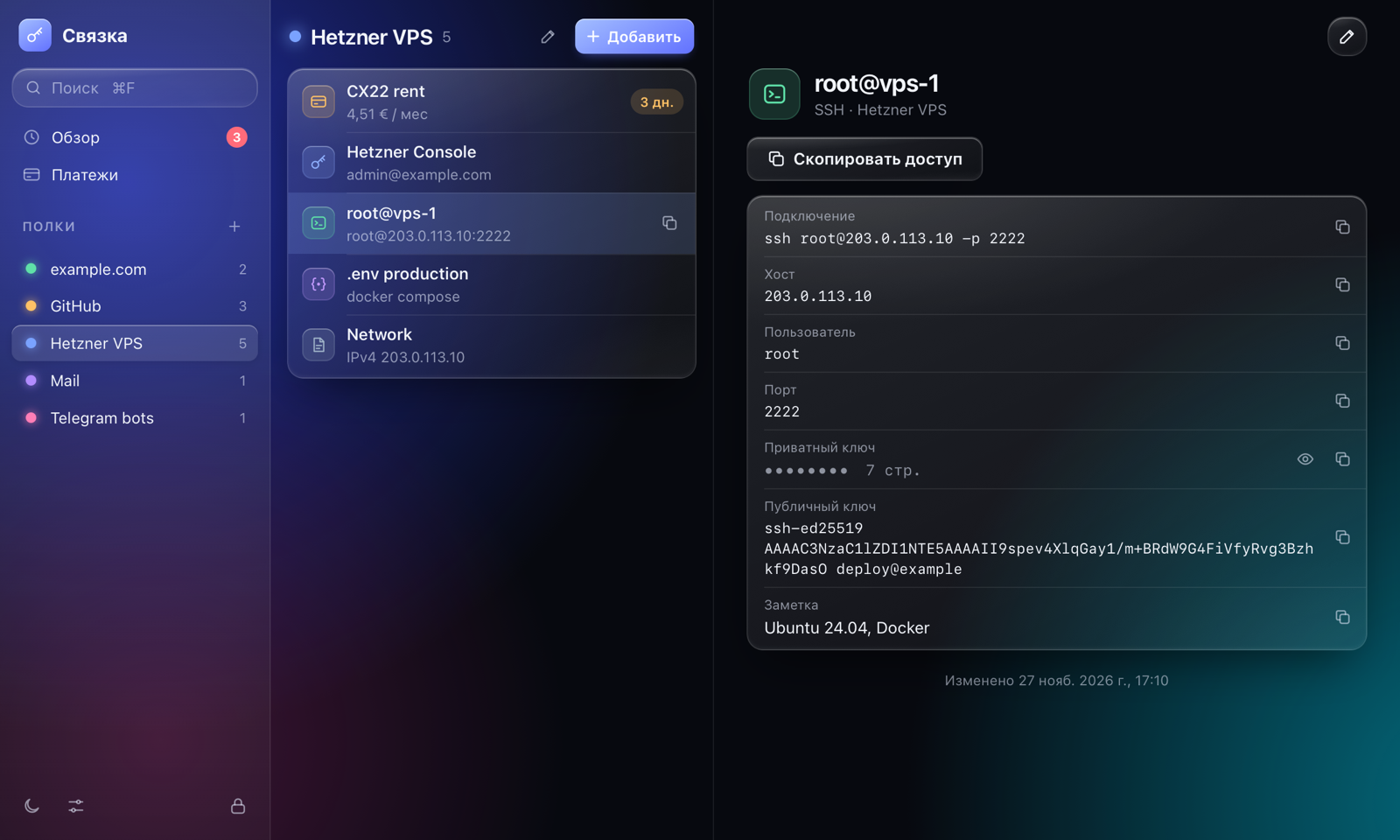
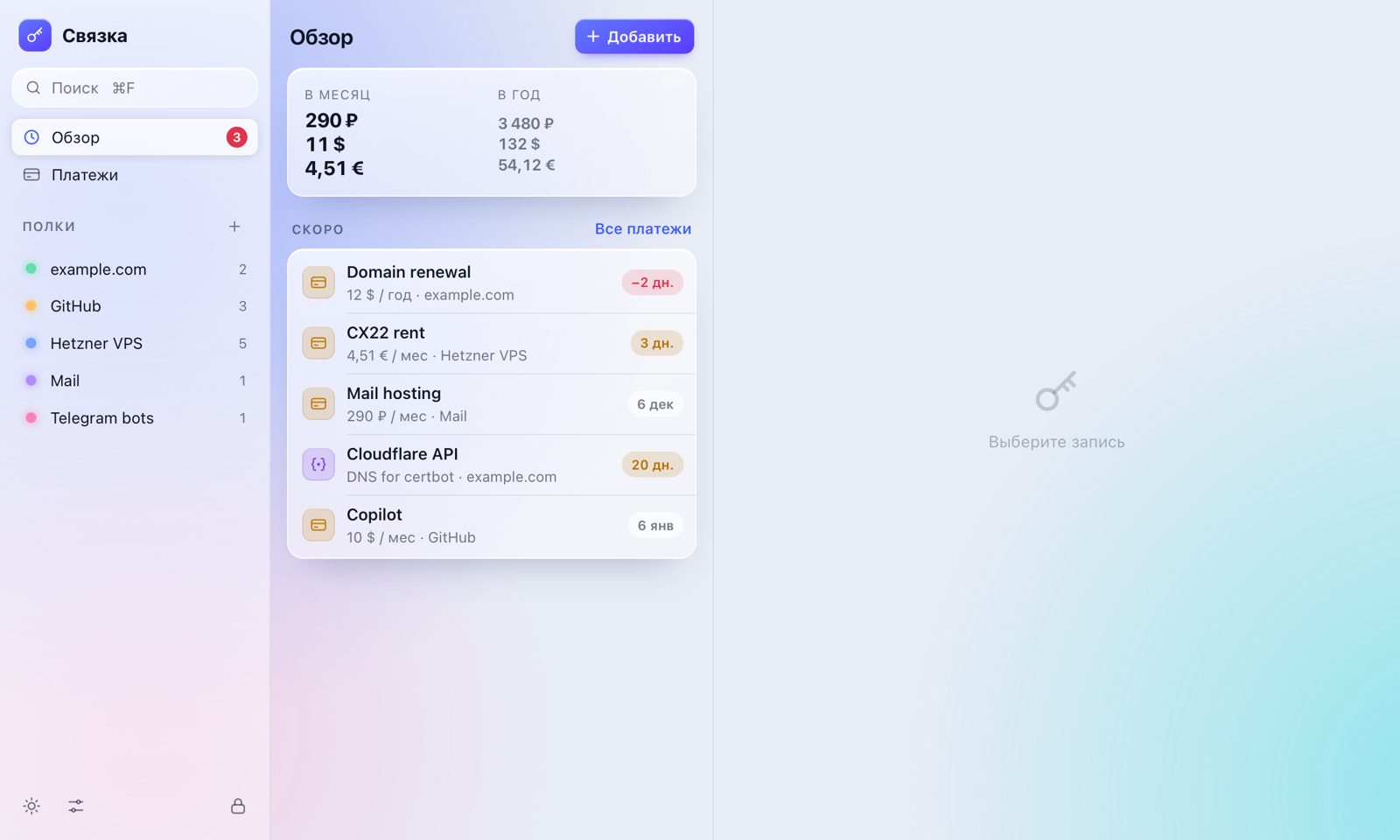
Coding agents like Claude Code and Codex constantly need SSH keys, API tokens, .env files and passwords.
Usually they end up pasted into the chat, left in project files, or scattered across notes.
Svyazka keeps them in one encrypted vault on your computer and gives agents a way to use them without reading them:
svyazka ssh "prod/root@vps" -- 'docker ps'                 # key goes to ssh-agent for 15 min, never to disk
svyazka run "my-app/.env prod" -- docker compose up -d     # secrets become env vars of that process only
svyazka add token "Cloudflare API" --shelf my-app --value ask   # you type the value in a macOS dialog
If a command prints a secret, it is replaced with •••. Revealing a value (svyazka get) requires your Touch ID or Windows Hello.
Every access is logged with who did it — you, Claude or Codex.
Features
- Desktop app —
Связка.appon macOS, a Start-menu app on Windows (Edge app window),svyazka uion Linux. Shelves (one per project or server), passwords, SSH keys, tokens, notes, upcoming payments for
servers, domains and subscriptions. Three-pane layout, dark and light themes, ⌘F / ⌘N / ⌘L. svyazkaCLI + agent — the key stays in memory likessh-agent, auto-locks after 30 min idle.- Unlock with Touch ID / Windows Hello — type the master password once; after that the app and the agents open
Svyazka with your fingerprint (svyazka config quick-unlock offto disable). - Built for agents — a skill for Claude Code and Codex, plus a standing rule: any new secret goes into Svyazka
immediately. Generated a DB password, created a deploy key, received a token — the agent saves it and tells you where. - No server, no account — AES-256-GCM, key derived from your master password (PBKDF2-SHA256, 600k iterations).
The vault is a single file,~/.svyazka/vault.json. - Backup and multiple computers —
svyazka syncwrites an encrypted copy to a folder (iCloud Drive / OneDrive by default)
and merges changes from your other computers. - Works over SSH too — with no GUI session, passwords and confirmations are asked in the terminal.
Install
Nothing to install first: macOS 13+, Windows 10/11 or Linux (x64 / arm64).
If Node.js 20+ is missing, the installer downloads it from nodejs.org (checksum-verified) into ~/.svyazka/node —
a private copy for Svyazka only. On a Mac the Touch ID helper and the app come prebuilt in the release, so Xcode and
its Command Line Tools are not needed.
macOS / Linux — one line in Terminal:
curl -fsSL https://github.com/rdm9x/svyazka/releases/latest/download/install.sh | sh
Windows — PowerShell:
irm https://github.com/rdm9x/svyazka/releases/latest/download/install.ps1 -OutFile $env:TEMP\svyazka-install.ps1
powershell -ExecutionPolicy Bypass -File $env:TEMP\svyazka-install.ps1
Then create the vault: svyazka init (a dialog asks for the master password). Running the installer again updates
Svyazka; the vault is never touched.
Or let your agent do it. Download the latest release, unzip, open Claude Code (or Codex) in the folder and say:
Install Svyazka following AGENT_INSTALL.md
It installs everything, creates your vault, connects Codex if present and offers to move your
existing keys from ~/.ssh and .env files — without printing their values.
From a git clone: sh install.sh (macOS / Linux) or powershell -ExecutionPolicy Bypass -File install.ps1 (Windows).
A clone has no prebuilt Mac programs, so there they are compiled — that needs Command Line Tools (xcode-select --install).
Optional extras: OpenSSH client for svyazka ssh on Windows (Windows Hello recommended); on Linux zenity for dialogs
and wl-copy/xclip for the clipboard.
The installer adds a short block to ~/.claude/CLAUDE.md and ~/.codex/AGENTS.md between<!-- svyazka:begin/end --> markers (the original file is backed up as .bak-svyazka).
Using it
Open Svyazka from Spotlight (Mac) or the Start menu (Windows), or run svyazka ui. In Claude Code or Codex just ask: “connect to the prod server”,
“deploy with the tokens from Svyazka”, “generate a password for the new database”.
| Command | What it does |
|---|---|
svyazka ls [shelf], find <text>, show <item> |
list and search — secrets stay hidden |
svyazka add <type> <title> --shelf S [--field value]… |
add an item. Secrets only via gen, @file, - (stdin) or ask (dialog) — never as plain arguments |
svyazka run <item> [--env NAME=field] -- cmd |
run a command with secrets in its environment; output is redacted |
svyazka ssh <item> [-- cmd], ssh-add <item> |
SSH with a key from the vault |
svyazka get / copy / rm |
reveal, copy to clipboard (cleared after 30 s), delete — Touch ID / Windows Hello required |
svyazka pay, paid <item> |
upcoming payments, mark as paid |
svyazka sync, config sync-dir <folder> |
encrypted backup and merge between your computers |
svyazka import <file> |
a Svyazka backup (merge) or plain JSON in the import format |
svyazka log, status, lock |
audit log, state, lock now |
Item types: password, ssh, token (a value or a whole .env), payment, note. svyazka help for details.
Codex
Codex runs commands in a sandbox that blocks the Svyazka agent socket. The skill tells Codex to ask you to runsvyazka outside the sandbox — approve it (you can allow it permanently).
Security
Read SECURITY.md for the full threat model. In short:
- Protects against: secrets leaking into agent chats, logs, commits and project files; a stolen or copied vault file;
someone reading values off your screen without your fingerprint. - Does not protect against malware running as your user while the vault is unlocked — like
ssh-agent, any process
of yours can talk to the agent. Output redaction is a safety net against accidents, not a sandbox: a determined
program can still exfiltrate a value it was given. - Not audited. Your master password cannot be recovered.
Status
macOS, Windows and Linux. The interface is in Russian (English is next); an MCP server for other agents is planned —
see the changelog. Windows dialogs and Windows Hello are tested by CI only up to the point where a
person has to click — feedback from Windows users is very welcome. Contributions welcome: CONTRIBUTING.md.
Uninstall
$(command -v node || echo ~/.svyazka/node/bin/node) ~/.svyazka/app/cli/agent-rules.mjs remove
rm -f ~/.local/bin/svyazka ~/.claude/skills/svyazka ~/.codex/skills/svyazka
rm -rf ~/Applications/Связка.app ~/.svyazka/app ~/.svyazka/node
Windows: node $HOME\.svyazka\app\cli\agent-rules.mjs remove, then delete ~\.svyazka\app, ~\.svyazka\bin, ~\.svyazka\node,~\.claude\skills\svyazka, ~\.codex\skills\svyazka and the «Связка» Start-menu shortcut.
The vault (~/.svyazka/vault.json) is left in place — delete it only if you have a backup or don't need it.
License
Reviews (0)
Sign in to leave a review.
Leave a reviewNo results found