recallium
Health Gecti
- License — License: NOASSERTION
- Description — Repository has a description
- Active repo — Last push 0 days ago
- Community trust — 24 GitHub stars
Code Gecti
- Code scan — Scanned 6 files during light audit, no dangerous patterns found
Permissions Gecti
- Permissions — No dangerous permissions requested
This MCP server acts as a persistent memory layer for AI developer tools like Cursor and Claude Desktop. It automatically captures and surfaces decisions and patterns across your projects to prevent "AI amnesia."
Security Assessment
Risk Rating: Medium. The tool processes local developer data and project context to build its memory layer. By design, it requires a local Docker installation, executing shell scripts (`.sh` and `.bat` files) to manage containers. These startup scripts bind to local network ports (e.g., `0.0.0.0` and IPv6 `[::]`), actively opening pathways for network requests. The automated code scan identified no dangerous patterns or hardcoded secrets, and the tool does not request inherently dangerous system permissions. However, the repository uses a "NOASSERTION" license, meaning the exact terms of use and liability are legally undefined. Additionally, the Windows installation instructions advise opening system firewall rules, which requires careful user oversight.
Quality Assessment
The project appears to be actively maintained, with its most recent code push occurring today. It has garnered 24 GitHub stars, indicating a small but growing early-adopter community. While the code itself passed a light 6-file security audit cleanly, the "NOASSERTION" license is a significant drawback for enterprise or open-source reuse, as it fails to grant explicit usage, modification, or distribution rights.
Verdict
Use with caution: the automated scan is clean and the tool is actively maintained, but binding to local network ports and modifying firewall rules requires a basic security awareness, while the undefined license may restrict broader adoption.
Recallium is a local, self-hosted universal AI memory system providing a persistent knowledge layer for developer tools (Copilot, Cursor, Claude Desktop). It eliminates "AI amnesia" by automatically capturing, clustering, and surfacing decisions and patterns across all projects. It uses the MCP for universal compatibility and ensures privacy
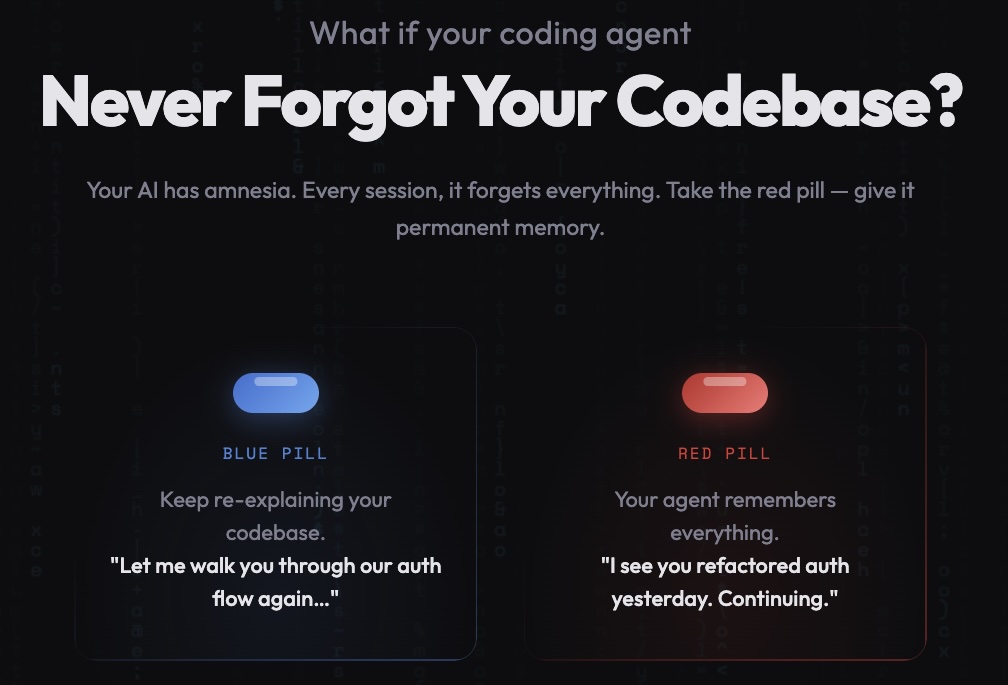
Recallium
Supercharge your AI Agents with persistent memory
Your digital developer twin—Because "Explain Our Setup Again" Gets Old Fast




Quick Start
macOS (30 Seconds)
cd install
chmod +x start-recallium.sh
./start-recallium.sh
That's it! Visit http://localhost:9001 to complete setup.
Linux (30 Seconds)
cd install
chmod +x start-recallium.sh
./start-recallium.sh
Note: The scripts use IPv6 dual-stack binding for Safari compatibility. If you encounter port binding errors on Linux, Docker may not have IPv6 enabled. Either enable IPv6 in Docker (
/etc/docker/daemon.json→"ipv6": true) or edit the script to use0.0.0.0instead of[::]for port bindings.
Visit http://localhost:9001 to complete setup.
Windows (2 Minutes)
Windows requires additional Ollama configuration for Docker connectivity.
Step 1: Configure Ollama (one-time setup)
- Open "Edit the system environment variables" (search in Start menu)
- Click "Environment Variables" → Under "System variables" → Click "New"
- Variable name:
OLLAMA_HOST/ Variable value:0.0.0.0:11434 - Click OK → OK → Restart Ollama
Step 2: Add Firewall Rule (run as Administrator)
netsh advfirewall firewall add rule name="Ollama" dir=in action=allow program="C:\Users\<YOUR_USERNAME>\AppData\Local\Programs\Ollama\ollama.exe" enable=yes profile=private
Step 3: Start Recallium
cd install
start-recallium.bat
The script auto-detects your IP and configures Ollama connectivity. Visit http://localhost:9001 to complete setup.
Alternative: Docker Compose
For more control, use docker-compose directly:
cd install
docker compose --env-file recallium.env pull
docker compose --env-file recallium.env up -d
Magic Command: Once connected, just say "recallium" in your IDE and your AI loads all project context instantly.
Table of Contents
- The Problem
- The Solution
- What You Get
- Installation
- Setup Wizard
- Web Dashboard
- How It Works (with examples)
- What's New in v0.8.285
- Previous Releases
- Complete Feature Set
- 16 MCP Tools
- Pro Tips
- Built-in Help System
The Problem: Your AI Has Amnesia
Everyone's doing it now—vibe coding with AI assistants. That magical flow where you're thinking out loud, the AI gets it, and code just happens.
But here's the catch: Your AI forgets everything. Every conversation starts from zero. Every project feels like explaining yourself to a stranger who forgot your last 47 conversations. Enter **Context-Engineering"
- :repeat: Endless repetition — "Here's how we handle auth..." (for the 50th time)
- :shrug: Context amnesia — AI forgets your patterns, preferences, and hard-won decisions
- :desert_island: Project islands — Learning from one project never benefits another
- :books: Knowledge leakage — That brilliant debugging insight? Gone tomorrow.
The Solution: Your AI's Digital Hippocampus
Recallium is the persistent memory layer your IDE agents desperately need.
Instead of this painful cycle:
You: "Hey AI, remember we use PostgreSQL with..."
You: "Oh, and we prefer functional components..."
You: "Also, we decided against Redis because..."
You get this:
You: "Build auth for the checkout flow"

AI:  "Using your battle-tested pattern from payment-service-v2:
      → JWT with refresh token rotation
      → httpOnly cookies (per your security audit decision)
      → Redis mutex to prevent race conditions (you debugged this for 6 hours)
      → 15min access tokens, 7-day refresh tokens

      Implementing now..."
Your code. Your patterns. Your decisions. Remembered. Connected. Evolved.
What You Get
The Magic Word: recallium
Just say "recallium" in your IDE and watch your AI instantly load:
- Recent session activity and where you left off
- Project briefs, PRDs, and implementation plans
- Pending tasks that need attention
- Global and project-specific rules
One word. Full context. Zero repetition.
Core Features
| Feature | Description |
|---|---|
| One Memory System | Works across Cursor, Claude Desktop/Code, VS Code, Windsurf, JetBrains, Zed—any MCP-compatible tool |
| Cross-Project Intelligence | Lessons learned once → Applied everywhere automatically |
| Document Knowledge Base | Upload PDFs, docs, specs → Your AI understands your system instantly |
| Smart Project Linking | Connect v1 → v2 → v3, share patterns across related projects |
| Zero-Config Memory | Auto-tags, auto-clusters, auto-learns from every interaction |
| Privacy-First | Runs locally, your data never leaves your machine |
| Free Local Option | Use Ollama + built-in embeddings for $0 API costs |
Installation
Complete Installation Guide - Get running in under 2 minutes
TL;DR:
cd install

# Option 1: One-click start (pulls latest, handles cleanup)
./start-recallium.sh      # Linux/macOS
start-recallium.bat       # Windows

# Option 2: Docker Compose (more control)
docker compose --env-file recallium.env pull
docker compose --env-file recallium.env up -d
Then configure your IDE (see install guide) and start coding with persistent memory!
Supported IDEs: Cursor • Claude Desktop • Claude Code • VS Code • Windsurf • Roo Code • Visual Studio 2022 • JetBrains • Zed • Cline • BoltAI • Augment Code • Warp • Amazon Q • AntiGravity • and more...
See install/README.md for detailed setup instructions for your IDE.
Setup Wizard & Provider Configuration
First-time setup takes 2 minutes via the web dashboard at http://localhost:9001
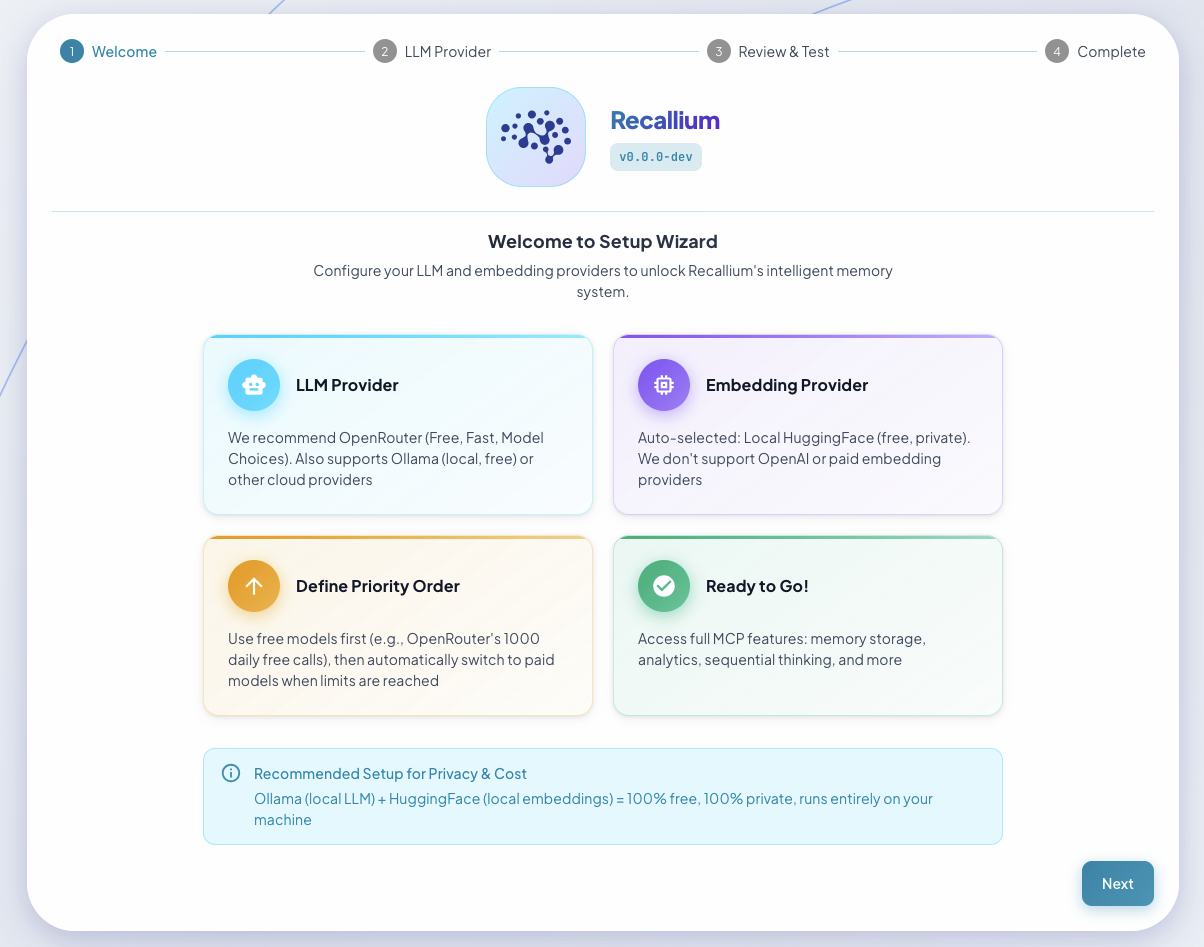
Setup Wizard: Guided configuration for first-time users
Choose Your LLM Provider
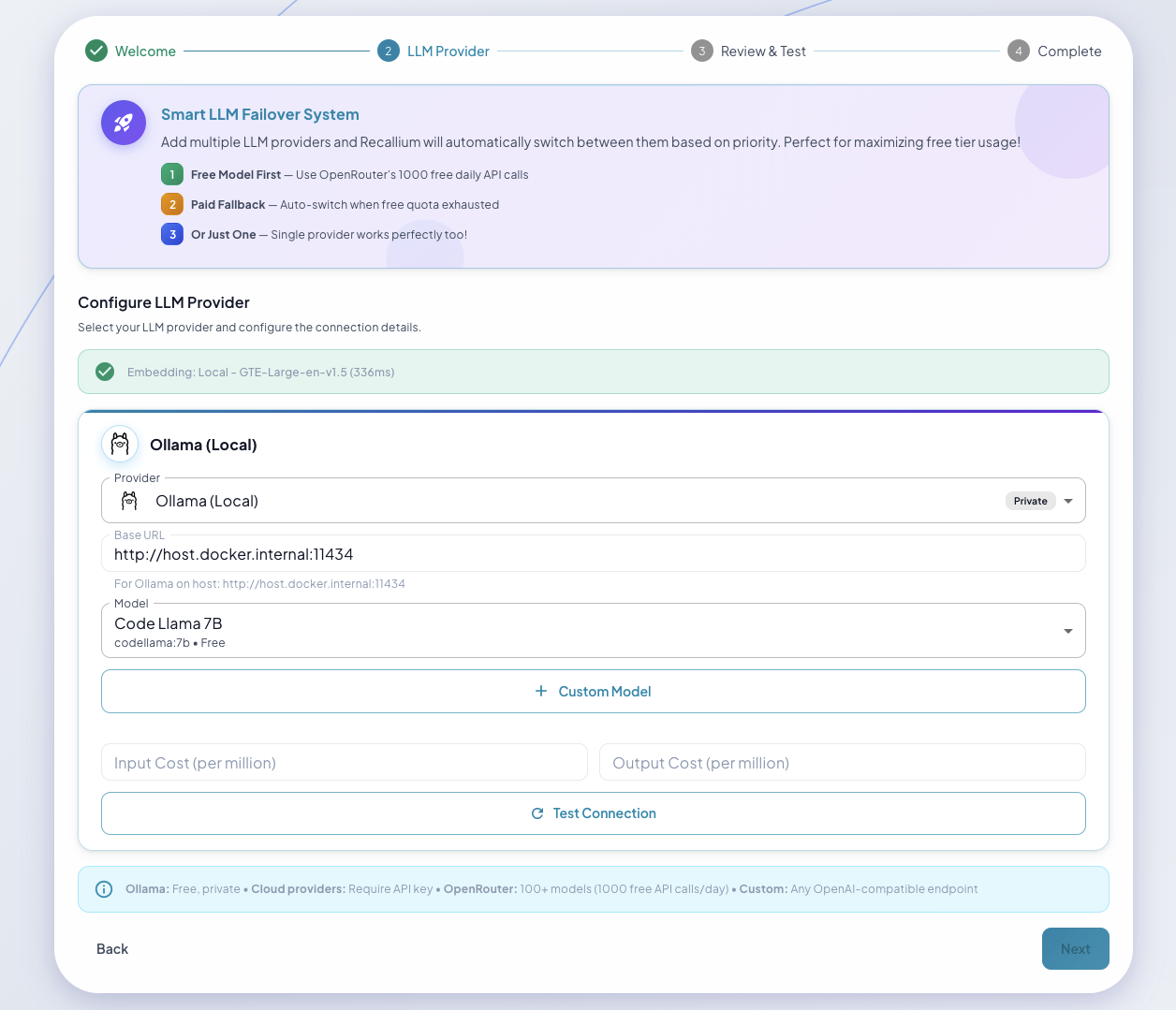
Provider Selection: Choose from Ollama (free), OpenAI, Anthropic, Gemini, or OpenRouter
Recallium works with any LLM provider—use what you already have:
| Provider | Models | Notes |
|---|---|---|
| Anthropic | Claude 3.5 Sonnet, Claude 3 Opus/Sonnet/Haiku | Recommended for best results |
| OpenAI | GPT-4o, GPT-4 Turbo, GPT-3.5 Turbo | Function calling, streaming |
| Google Gemini | Gemini 1.5 Pro, Gemini 1.5 Flash | Multi-modal support |
| Ollama | Llama 3, Mistral, Qwen, any local model | Free, runs locally |
| OpenRouter | 100+ models via single API | Access any model |
Free Local Setup (No API Keys Required)
Want to run completely free and private?
LLM: Ollama (local models like Llama 3, Mistral)
Embeddings: GTE-Large (built-in, runs locally)
Setup Wizard Features
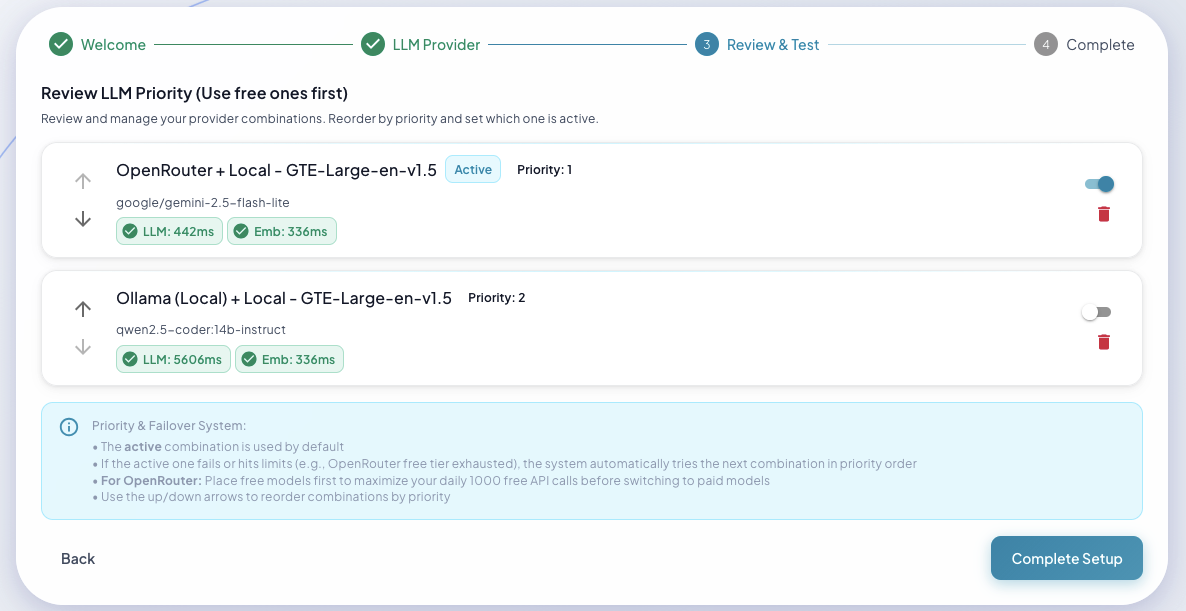
Provider Priority: Set up automatic failover between providers
- Test before you commit — Verify API keys work before saving
- Switch providers anytime — Change LLM providers without losing memories
- Automatic failover — Configure backup providers for reliability
- Secure credential storage — API keys stored in encrypted vault
- Hot reload — Provider changes take effect immediately
Embedding (Free by Default)
Recallium uses GTE-Large (1024 dimensions) for embeddings:
- Runs locally on your machine
- No API costs, no rate limits
- Works on CPU, CUDA, or Apple Silicon (MPS)
Web Dashboard
Access the full-featured UI at http://localhost:9001
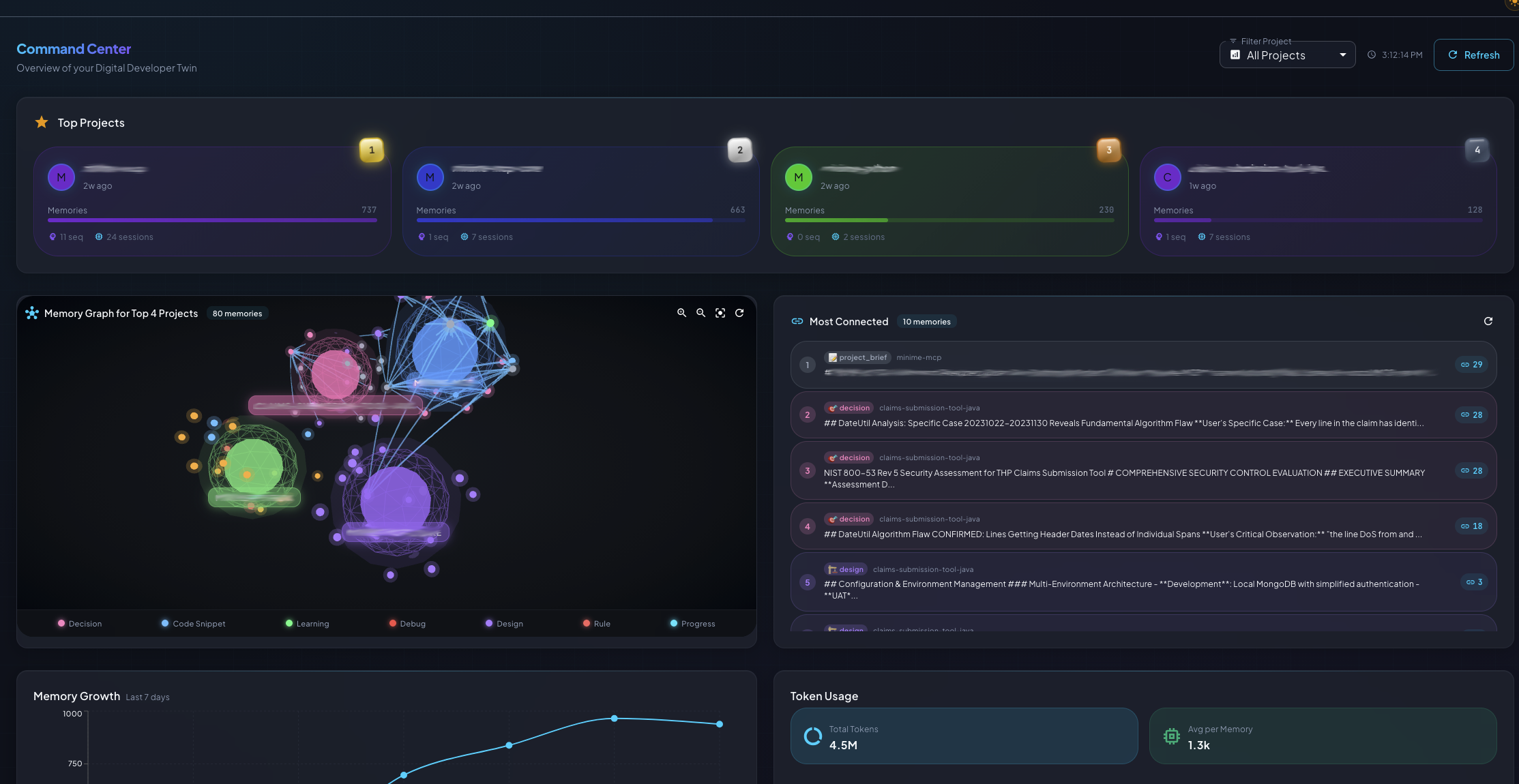
Dashboard: Your command center with system stats, recent activity, and quick insights
18 Feature Pages
| Page | What You Can Do |
|---|---|
| Dashboard | Overview, stats, recent activity, quick insights |
| Memory Explorer | Search, filter, bulk operations, tag management |
| Projects | Briefs, documents, links, timeline, tasks |
| Insights | Pattern analysis, cluster visualization, recommendations |
| Analytics | Token usage, activity trends, cost tracking |
| Documents | Upload PDFs/DOCX, search chunks, manage files |
| Tasks | Create, track, link memories to tasks |
| Memory Graph | Visual relationship mapping between memories |
| Thinking | View reasoning sequences, explore branches |
| Providers | Configure LLM & embedding providers |
| Admin | System logs, configuration, maintenance |
Key Pages Showcase
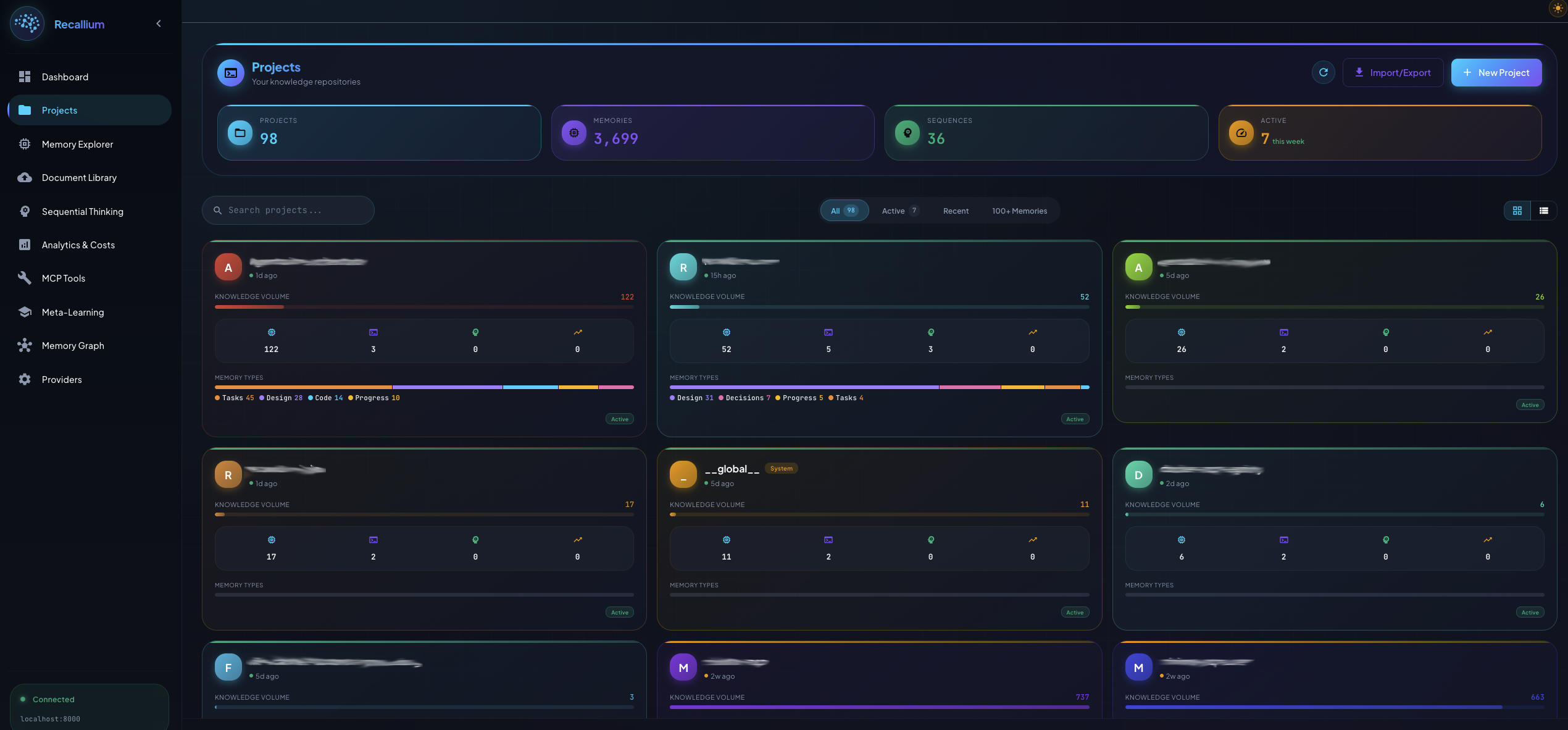
Projects Page: Central hub for managing knowledge repositories with activity indicators, memory counts, and project linking
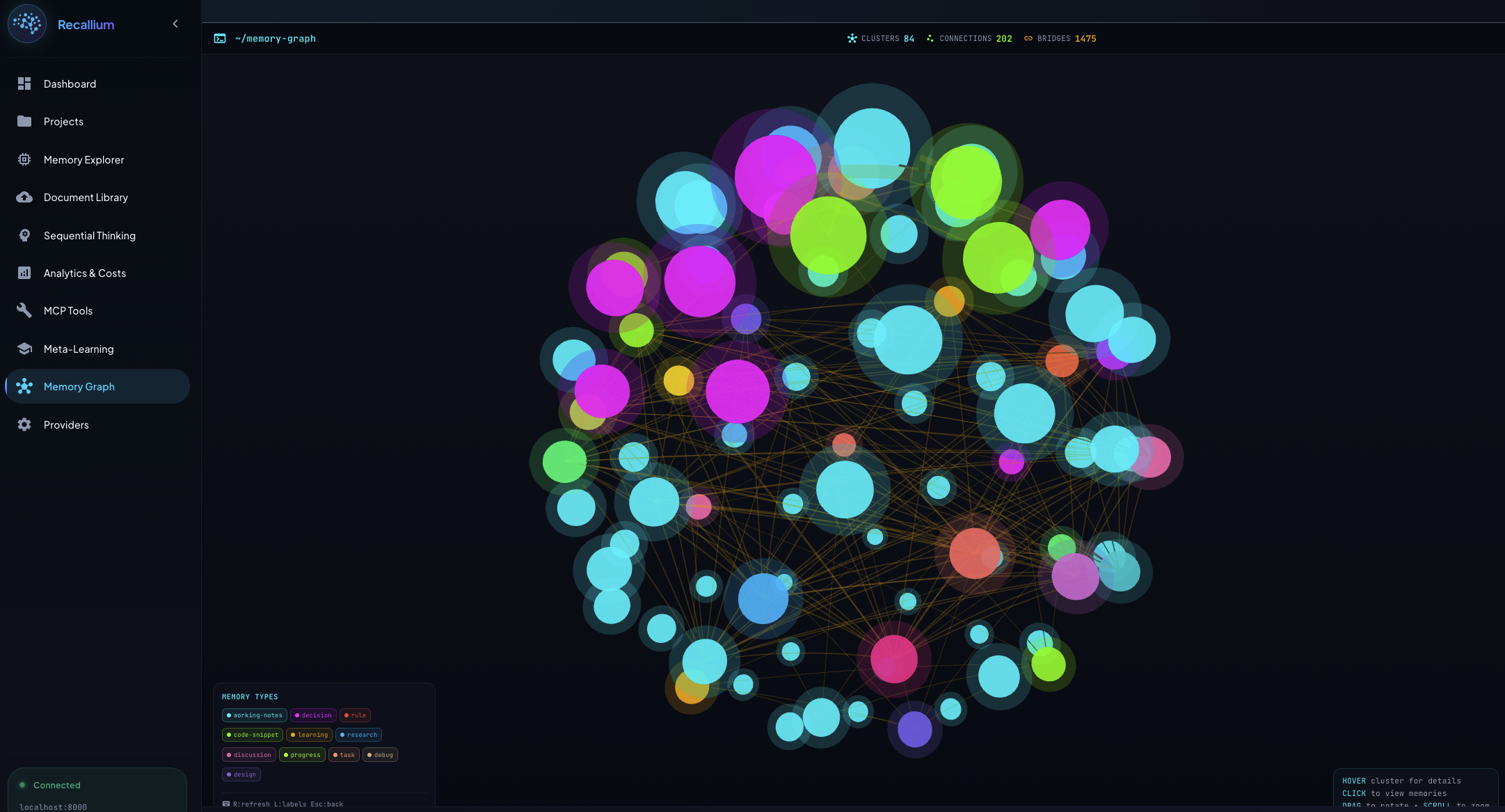
Memory Graph: Interactive force-directed visualization showing relationships between memories, clusters, and tags
How It Works
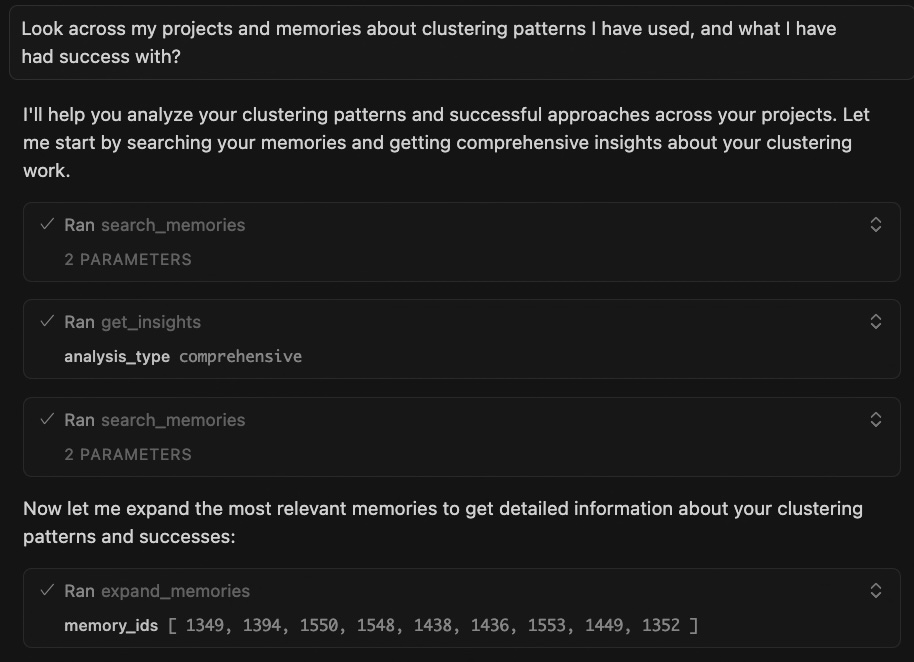
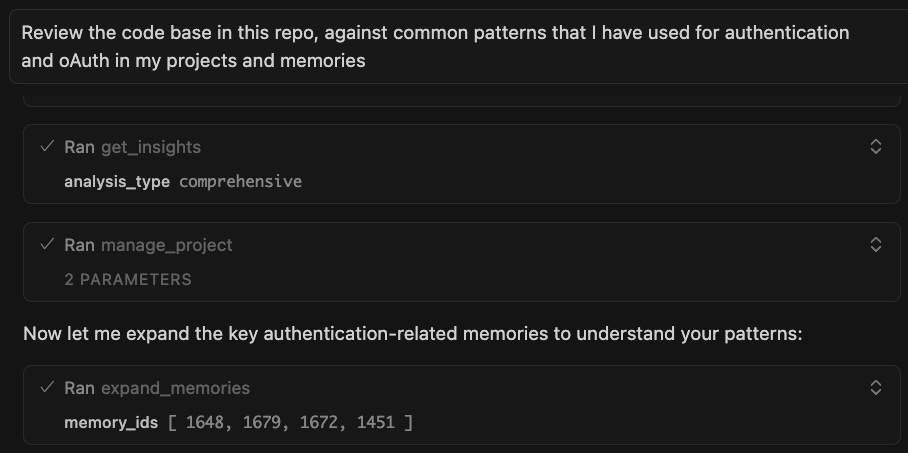
Search Your Memories
You (in Cursor): "Search my memories about authentication patterns"

Cursor: "Found 12 memories across 3 projects:

         payment-service-v2 (2 months ago):
         → JWT with refresh token rotation
         → Redis mutex prevents race conditions
         → You debugged concurrent refresh calls for 6 hours

         user-api-v1 (4 months ago):
         → Security audit: never use localStorage for tokens
         → Team decision: httpOnly cookies only

         admin-dashboard (1 month ago):
         → 15min access tokens, 7-day refresh tokens
         → Auto-refresh 2 minutes before expiry"

You: "Build auth for my checkout flow"

Cursor: [Generates code using YOUR battle-tested patterns]
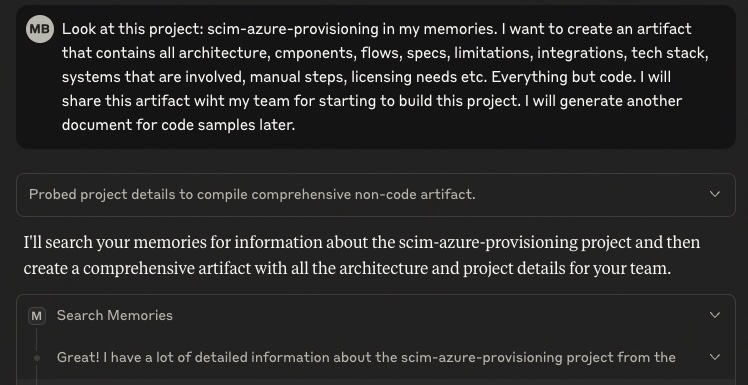
Memory Explorer: Search across all your stored decisions, patterns, and learnings
Get Cross-Project Insights
You (in Claude Desktop): "Get insights on database patterns across my projects"

Claude: "Analyzed 89 memories across 5 projects. Pattern detected:

         You ALWAYS follow this progression:
         1. Start with PostgreSQL (projects: 5/5)
         2. Hit connection pool limits around 10K users (projects: 3/5)
         3. Add PgBouncer to solve it (projects: 3/3 that hit the issue)

         Current project: user-service-v3
         Expected scale: 50K users

         Recommendation: Include PgBouncer from day 1. You'll need it,
         and adding it later caused 2 hours of downtime in admin-api."
Insights Dashboard: Discover patterns, recurring issues, and recommendations across projects
Search Your Documents
You (in Cursor): "Search my documents about webhook security"

Cursor: "Found in 'API Security Guidelines v2.pdf' (uploaded last week):

         Page 47: Webhook Signature Verification
         → MUST use HMAC-SHA256
         → Signature in X-Webhook-Signature header
         → Replay attack protection: 5-minute timestamp window
         → Rate limiting: 100 webhooks/minute per endpoint

         Also found related memory from payment-service-v1:
         → You got burned by missing signature verification
         → Production incident: fake webhook drained test account

         I'll implement webhooks with proper security from the start."
Search Memories AND Documents Together
You (in Claude Desktop): "Search my memories and documents about
                          error handling, include linked projects"

Claude: "Searching across:
         - Current project: ecommerce-api
         - Linked projects: payment-service-v2, order-management
         - Uploaded documents: 3 PDFs, 12 markdown files

         From documents:
         → 'Engineering Standards.pdf': Error codes must follow
           ERR-{DOMAIN}-{CODE} format (e.g., ERR-AUTH-001)

         From payment-service-v2 memories:
         → You built a standardized error response wrapper
         → Includes: error code, message, trace_id, timestamp
         → Logs to Sentry with context

         From order-management memories:
         → You added retry logic with exponential backoff
         → Max 3 retries, 2^n second delays

         I can implement error handling using all these patterns."
Store What Matters
You (in Cursor): "Store a memory: We decided against microservices.
                  Team is too small (3 devs). Maintenance overhead
                  not worth it. Monolith with clear module boundaries
                  instead."

Cursor: "✓ Stored as decision with high importance.
         I'll suggest monolith architecture in future projects."
Link Projects, Learn Everywhere
You: "Link payment-service-v1 to checkout-api as dependency"

You: "Search my memories about Stripe webhooks, include linked projects"

Cursor: "Found context from payment-service-v1:

         Decision (6 months ago):
         → Stripe webhooks need idempotency keys
         → You discovered this after processing same payment twice
         → Solution: Store event IDs in Redis with 24hr TTL

         Bug fix (3 months ago):
         → Race condition with concurrent webhook deliveries
         → Fixed with Redis distributed lock

         Applying both lessons to checkout-api implementation..."
Manage Tasks With Context
You: "Create task: Fix mobile login button not responding"

Cursor: "✓ Task created (ID: task_847)
         Want to link related memories?"

You: "Yes, link to yesterday's auth debugging session"

---

Next day:

You: "Show my tasks"

Cursor: "1 pending task:
         → Fix mobile login button not responding
         → Related: Auth debugging session, JWT refresh race condition

         Should I expand the debugging session memory?"

You: "Yes"

Cursor: "From debugging session:
         → Issue: JWT refresh happens mid-form-submit
         → Button disabled during API call
         → Race condition prevents re-enable
         → Solution discussed: Debounce + optimistic UI

         Ready to implement the fix?"
Upload Documents, Share Knowledge
You (in Claude Desktop): [Uploads "API Documentation v3.pdf" - 10MB]

Claude: "Processing... Done in 28 seconds.

         Created 868 chunks from 247 pages.
         I now understand:
         → OAuth 2.0 implementation (section 3)
         → Rate limiting rules (section 7.2)
         → Webhook signature verification (section 9)
         → Database sharding strategy (section 12)
         → Error code taxonomy (appendix B)

         All stored with semantic search enabled."

---

Later, in Cursor:

You: "Build the OAuth refresh token endpoint"

Cursor: [Generates code matching section 3 of your PDF exactly]
        "Implementation follows your API docs:
         → 15-minute access tokens
         → 7-day refresh tokens
         → Rotation on every refresh
         → httpOnly, Secure, SameSite=Strict cookies"
Documents Page: Upload PDFs, specs, and docs that become instantly searchable by all your AI agents
Resume Where You Left Off
You (starting a new session): "recallium"

Claude: "Welcome back! Loading your context...

         📊 Project: ecommerce-api
         📝 Recent: 12 memories in last 7 days

         Last session (2 days ago):
         → Implemented JWT refresh token rotation
         → Fixed race condition in payment webhook
         → Decision: Using Redis for session storage

         📋 Pending Tasks:
         → Add rate limiting to checkout endpoint
         → Write tests for payment flow

         📜 Active Rules:
         → Always confirm destructive operations
         → Search memories before implementing

         Ready to continue. What would you like to work on?"
Get a Quick Recap
You: "What was I working on last week?"

Claude: "Here's your session recap for ecommerce-api:

         Progress (7 days):
         → 15 memories stored
         → 3 tasks completed, 2 pending
         → Most active: authentication module

         Key Decisions:
         → JWT with 15min access, 7-day refresh tokens
         → Redis for session storage (not Memcached)

         Recent Learnings:
         → Webhook signature verification prevents replay attacks
         → PgBouncer needed at 10K+ concurrent users

         Shall I expand on any of these?"
Keep Memory Clean
You: "Search Redis caching patterns"

Claude: "Found 47 memories from user-service-v1.

         But I also see newer memories showing you migrated
         to Memcached in user-service-v2 last month.

         Should I inactivate the old Redis memories?"

You: "Yes, inactivate them. Reason: migrated to Memcached"

Claude: "✓ Inactivated 47 Redis memories (soft delete, recoverable)
         ✓ Audit trail preserved
         ✓ I'll suggest Memcached patterns by default now

         Your context stays current as your stack evolves."
Memory Management: Update, archive, or restore memories as your stack evolves
What's New in v0.8.285
Palantir BYO-LLM Support
Bring your own LLM with Palantir Foundry AIP:
- Palantir Foundry AIP now supported as a Bring-Your-Own-LLM provider
- Seamlessly integrates with Recallium's multi-provider failover system
- Works with your existing Palantir enterprise deployment
Better Searches
Improved search accuracy and relevance:
- Smarter hybrid search combining semantic, keyword, and tag matching
- Faster results with reduced storage footprint
- More accurate ranking for better discovery
Claude Desktop Extensions Support
Native support for Claude Desktop with Extensions:
- One-click MCP connection at
http://localhost:8001/mcp - Works with 60+ IDEs including VS Code, JetBrains, Neovim, and more
- Seamless integration with Claude Desktop's new Extensions feature
Previous Releases
v0.8.155
Dashboard: Your command center for memories, projects, insights, and analytics
Multi-Provider LLM Support
Use any LLM provider you want—no lock-in:
- 5 Built-in Providers: Anthropic, OpenAI, Google Gemini, Ollama, OpenRouter
- Free Local Option: Ollama + GTE-Large = zero API costs
- Setup Wizard: Test and configure providers via web UI
- Hot Switching: Change providers anytime without losing data
- Automatic Failover: Configure backup providers for reliability
Web Dashboard (18 Pages)
Full-featured UI at http://localhost:9001:
- Memory Explorer with advanced search
- Project management with briefs, docs, timeline
- Insights visualization and pattern analysis
- Analytics with token usage tracking
- Document library with chunk management
- Memory graph visualization
- Provider configuration and testing
6 New MCP Tools
Expanded from 10 to 16 tools:
recallium- Magic summon: load ALL context in one callsession_recap- Resume work with recent activity summaryhelp- 12 topics with progressive disclosurecheck_setup_status- Verify system readinessvalidate_intelligence_usage- Best practices complianceintelligence_health_check- Usage optimization tips
HTTP Transport with Streamable SSE
Direct HTTP connections for modern IDEs—no npm client needed for most tools.
What changed:
- Native HTTP/SSE transport for real-time streaming
- Cursor, VS Code, Claude Code, Windsurf work out of the box
- Optional npm client for command-only IDEs (Claude Desktop, Zed, JetBrains)
- Single unified MCP endpoint:
http://localhost:8001/mcp
Document Upload & RAG System
Turn any PDF, DOCX, or code file into searchable agent knowledge.
What you get:
- Multi-format: PDF, DOCX, Markdown, CSV, Excel, all code files
- Lightning fast: 10MB PDF → searchable in < 30 seconds
- Smart chunking: 1000-token chunks with 128-token overlap
- Hybrid search: Vector similarity + keyword + tag matching
- Zero API costs: YAKE keyword extraction (9s for 868 chunks)
- Upload once: Every IDE agent gets instant access
Real impact:
- Architecture docs → Agent understands your system design
- API specs → Agent generates spec-compliant code
- Security guidelines → Agent follows your security rules
- Past project docs → Agent learns from your history
Project Linking System
Connect projects. Share intelligence. Learn everywhere.
Link types:
dependency- Shared libraries (auth-lib used by 5 projects)parent/child- Version iterations (v1 → v2 → v3)fork- Experimental branches (compare approaches)template- Starter patterns (reusable scaffolds)related- Similar domains (all payment services)
What you get:
- Many-to-many relationships
- Recursive search up to 5 levels deep
- Auto-detection of related projects (finds shared patterns)
- Visibility controls (full access, metadata-only, hidden)
The power:
Project graph:
auth-library-v2 (dependency)
├─ Used by: ecommerce-api
├─ Used by: admin-dashboard
├─ Used by: mobile-backend
└─ Links to: auth-library-v1 (parent)

One lesson learned → Applied to 4 projects automatically
Memory Lifecycle Management
Your patterns evolve. Your memory should too.
Three actions:
update- Modify content, tags, importance, type (partial updates)inactivate- Soft delete with reason (recoverable, audit trail)reactivate- Restore archived memories
What you get:
- Full change history with timestamps
- Reasons for every inactivation
- Prevents knowledge drift as your stack evolves
- Keeps context clean and relevant
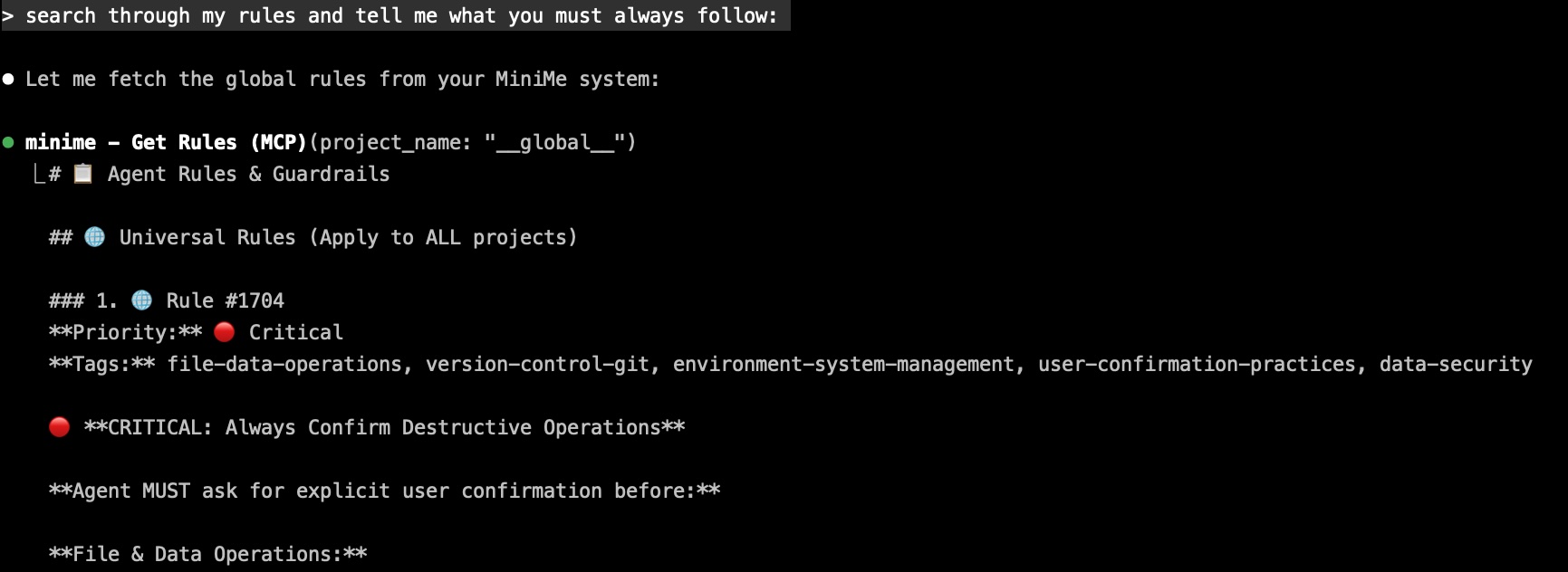
Global Rules System
Set guardrails once. Every IDE agent follows them forever.
How it works:
- Store rules in special
__global__project - Rules auto-load during MCP handshake (before first user message)
- Apply to ALL projects, ALL agents, ALL time
4 default rules included:
Always Confirm Destructive Operations
Ask before deleting files, dropping tables, force-pushing gitNever Implement Fallbacks Without Asking
Report failures, don't substitute silentlyProactively Search Memories Before Implementing
Auto-search for relevant context, past patterns, known issuesLoad Rules on Initialization
Ensure consistent behavior across all sessions
Token Usage Analytics
Know your knowledge costs. Optimize your memory footprint.
Dashboard shows:
- Total tokens across all memories and documents
- Per-project breakdown with memory counts
- Memory type distribution (decisions vs code vs docs)
- Growth trends over time
- Token-efficient vs token-heavy projects
Why it matters:
- Future-ready for OpenAI-compatible pricing
- Identify bloated projects needing cleanup
- Optimize what you store vs what you inactivate
- Understand where your context budget goes
Complete Feature Set
Memory Operations
- store_memory - Save decisions, patterns, learnings, bugs
- search_memories - Semantic + keyword + tag hybrid search
- expand_memories - Progressive disclosure (search IDs → full content)
- modify_memory - Update, inactivate, reactivate with audit trail
Intelligence & Analysis
- get_insights - Cross-project patterns, quality analysis, technical debt
- start_thinking / add_thought - Structured reasoning sequences
- get_rules - Load global and project-specific guardrails
Document Management
- Upload documents - PDF, DOCX, Markdown, CSV, Excel, code files
- Search documents - Hybrid vector + keyword + tag search
- Expand chunks - Get surrounding context (±1 or ±2 chunks)
- Smart chunking - 1000 tokens with 128-token overlap
Project Organization
- manage_project - Briefs, PRDs, implementation plans
- Link projects - Dependencies, forks, parent/child, templates
- manage_tasks - Create, complete, list with linked memories
- Token analytics - Usage tracking per project
Search Capabilities
- 11 memory types - working-notes, decision, rule, code-snippet, learning, research, discussion, progress, task, debug, design
- 3 search modes - semantic (concepts), keyword (exact), hybrid (both)
- File path filtering - Find memories by code file patterns
- Linked project search - Discover context across relationships
- Search target - memories only, documents only, or both
- Recent filtering - Last 30 days only
Technical Highlights
Performance
- 4x larger chunks: 1000 tokens vs 250 (more context per chunk)
- 95% clean splits: <5% mid-sentence breaks (was ~30% in v0.2.5)
- Lightning tags: 9 seconds vs 15-43 minutes (YAKE-only approach)
- Indexed queries: Instant project link traversal
- Thread pooling: Concurrent embedding generation
Architecture
- Three-table RAG: documents (metadata) → chunks (content) → memories (notes)
- Event-driven jobs: Async, non-blocking background processing
- Graph traversal: PostgreSQL recursive CTEs for project relationships
- HTTP/SSE transport: Real-time streaming with Server-Sent Events
- Enterprise foundation: Row-Level Security policies (multi-tenancy ready)
Database Enhancements
document_chunkstable with pgvector embeddingsproject_linkstable for many-to-many relationshipsmemory_audit_logfor complete change history- GIN index on tags for instant tag searches
- JSONB
token_metadatafor analytics - Lifecycle columns:
is_active,inactivated_at,inactivation_reason
16 MCP Tools
Memory Management
- store_memory - Save decisions, patterns, learnings with auto-tagging
- search_memories - Semantic/keyword/hybrid search across memories & docs
- expand_memories - Get full content + surrounding context
- modify_memory - Update, inactivate, reactivate with audit trail
Intelligence & Analysis
- get_insights - Meta-analysis: patterns, quality, technical debt (7 analysis types)
- start_thinking / add_thought - Structured reasoning with branches
- get_rules - Load global and project-specific behavioral rules
Project & Task Management
- projects - Briefs, PRDs, plans, project linking (8 actions)
- tasks - Create, complete, list tasks with linked memories
Session & Context
- session_recap - Resume work summaries, pending tasks, recent activity
- recallium - Magic summon: load ALL project context in one call
System & Help
- help - Interactive guidance with 12 topics and progressive disclosure
- check_setup_status - Verify setup completion and system readiness
- validate_intelligence_usage - Compliance scoring for best practices
- intelligence_health_check - Usage analytics and optimization tips
Pro Tips
Make Your Agent Proactive
The Proactive Context Retrieval global rule makes your agent automatically search memories before implementing. Customize it:
"Store a global rule: When implementing auth, payments, or database
 features, ALWAYS search memories and documents first. Look for:
 past decisions, known bugs, security requirements, and team patterns."
Search Strategically
Semantic search: "authentication patterns" (finds related concepts)
Keyword search: "Redis connection pooling" (exact matches)
File path filter: "src/auth/%" (memories touching auth files)
Linked projects: include_linked_projects: true (cross-project learning)
Search target: "all" (both memories AND documents)
Link Projects for Maximum Intelligence
Best practices:
- Link v1 → v2 as parent/child (learn from mistakes)
- Link shared libraries as dependencies (consistent patterns)
- Link experimental branches as forks (compare approaches)
- Link similar domains as related (discover patterns)
Curate Regularly
Monthly memory audit:
1. Search for outdated patterns (old stack decisions)
2. Inactivate obsolete memories (with clear reasons)
3. Update evolving patterns (keep context current)
4. Tag memories well (improves future search)
Use Progressive Disclosure
Efficient workflow:
1. Search returns memory IDs (fast, low-token overview)
2. Review titles and summaries (decide what's relevant)
3. Expand specific IDs (get full content only when needed)
4. Request context window if needed (±1 or ±2 surrounding chunks)
Built-in Help System
Every agent has access to comprehensive help via the help tool:
You: "help tool-selection"

Agent: "Here's how to choose the right tool:

        Finding information:
        → search_memories - Find specific content by query
        → session_recap - Resume work, see recent activity
        → get_insights - Analyze patterns across projects

        Storing information:
        → store_memory - Save decisions, learnings, code
        → projects - Create briefs, PRDs, plans
        → tasks - Track action items
        ..."
12 Help Topics
| Topic | What You Learn |
|---|---|
overview |
Quick start guide |
setup |
Initial configuration |
workflows |
Common usage patterns |
tool-selection |
Decision trees for choosing tools |
memory-types |
When to use each of 11 types |
search-strategies |
Optimize your searches |
common-mistakes |
Pitfalls to avoid |
session-startup |
Best practices for starting sessions |
agent-types |
IDE vs Chat agent differences |
parameter-triggers |
Word → parameter mapping |
negative-examples |
Before/after mistake examples |
all |
Complete reference (one page) |
Ready to Ship Intelligence
Stop explaining yourself to your IDE agent.
Recallium transforms every session from:
- "Let me explain our setup again..."
- "You know what we're building. Let's go."
Your code. Your patterns. Your decisions.
Remembered. Connected. Evolved.
Supported IDEs: Cursor • Claude Desktop • Claude Code • VS Code • Windsurf • Roo Code • Visual Studio 2022 • JetBrains • Zed • Cline • BoltAI • Augment Code • Warp • Amazon Q • AntiGravity • and more...
Version 0.8.285 | Released March 2026 | Installation Guide
Documentation
- Installation Guide - Complete setup for all IDEs
- GitHub Repository - Source code and issues
- Docker Hub - Official Docker images
Reporting Issues
Recallium Community Version. Contributions welcome!
- Report bugs via GitHub Issues
- Submit feature requests
- Share your use cases and patterns
License
Community Version - See LICENSE file for details
Built with love by developers who are tired of explaining themselves to their AI assistants
Yorumlar (0)
Yorum birakmak icin giris yap.
Yorum birakSonuc bulunamadi