nilbox
Health Pass
- License — License: GPL-3.0
- Description — Repository has a description
- Active repo — Last push 0 days ago
- Community trust — 12 GitHub stars
Code Pass
- Code scan — Scanned 12 files during light audit, no dangerous patterns found
Permissions Pass
- Permissions — No dangerous permissions requested
No AI report is available for this listing yet.
Run AI agents and MCP servers safely on a real VM - Zero exposed keys
A desktop sandbox for running AI agents, MCP servers, and apps you don't fully trust — safely.
Run agents on a dedicated, isolated Linux VM — with real VM isolation and Zero Token Architecture, so your API keys never touch the agent.
What is nilbox · Who It's For · Zero Token · What You Can Run · No Code Changes · Quick Start · Features · Docs





What is nilbox
nilbox is a desktop app for running AI agents and MCP servers safely.
It runs agents and MCP servers on a dedicated Linux VM that is fully isolated from your host OS, and it blocks token leakage at the source with Zero Token Architecture — so your real API keys never touch the agent.
AI agents need shell access, filesystem access, and outbound API calls. Running them in a container on the host kernel isn't real isolation — especially when those agents handle real credentials. nilbox gives every agent a full virtual machine and a host-controlled network instead.
If you wouldn't hand someone your API keys, don't put those keys where their code runs.
Who nilbox Is For
It helps to know which mental model applies to you.
Most sandbox platforms are infrastructure you build on: you're shipping a product that runs AI-generated code from many users at scale, so you reach for a server-side platform with SDKs, container orchestration, resource quotas, and multi-tenant scheduling. You write code against the sandbox.
nilbox is the opposite — it's an app you run agents in, on the machine in front of you. You don't build a platform; you point nilbox at an agent you already have and run it safely. Think of it as a personal, secure home for agents rather than cloud infrastructure for a fleet of them.
You'll likely want nilbox if you are:
- A developer running a coding agent on your own machine — let OpenClaw, Claude Code, or similar work autonomously (even overnight) without risking your API keys or your host OS.
- Someone trying AI agents without a terminal — install agents and MCP servers from the one-click Store; no Linux knowledge required.
- Security-conscious about what you run — evaluate untrusted MCP servers, packages, or binaries inside a disposable VM instead of on your real system.
- Running agents remotely — drive agents from chat (Telegram, Hermes) while they stay sandboxed at home.
You probably don't need nilbox if you're operating a cloud service that spins up thousands of ephemeral sandboxes for many tenants — that's a job for server-side sandbox infrastructure. nilbox is desktop-first and single-operator by design.
Zero Token Architecture
The core idea is simple: never give the real token to the agent in the first place.
Instead of asking "How do we protect the token?", nilbox asks "What if we never give it out at all?"
The limit of traditional approaches — the real token is passed straight to the agent:
# AI agent environment variable
OPENAI_API_KEY=sk-proj-abc1234567890xyz   # real token — stealable
Even inside Docker or a sandbox, a prompt injection or a malicious dependency can read environment variables and exfiltrate the key. There's no way to stop it once the agent holds the real value.
nilbox's approach — the agent only ever sees a fake token whose name and value are identical:
# AI agent environment variable
OPENAI_API_KEY=OPENAI_API_KEY             # just a string — useless to attackers
The real token lives only on the host, where the agent can never see it.
Token substitution flow:
┌───────────┐  OPENAI_API_KEY   ┌─────────┐   sk-proj-real   ┌──────────┐
│ AI Agent  │ ────────────────▶ │ nilbox  │ ───────────────▶ │   LLM    │
└───────────┘                   └─────────┘                  └──────────┘
      ▲                                                             │
      │                         response                           │
      └─────────────────────────────────────────────────────────────┘
The moment the agent makes an API call, the nilbox host proxy intercepts the request and swaps the fake token for the real one — but only for trusted domains. The agent believes it holds a real token and gets a normal response.
Why it's safe even if leaked. If an attacker extracts the token from the agent's environment, all they get is OPENAI_API_KEY — a meaningless string. When malicious code tries to send it to attacker.evil.com, the proxy blocks the domain or forwards only the dummy value. The real token never leaves the host.
The result:
- No key rotation after a compromise — real tokens were never exposed
- No bill shock — per-provider spending limits block runaway usage
- No data leaks — the VM can only reach domains you approve
See Zero Token Architecture for attack scenarios and defense layers.
What You Can Run
nilbox runs any agent, MCP server, or unknown app — unmodified — inside the VM. A few common setups:
- 🤖 OpenClaw — an autonomous AI coding agent that needs OpenAI / Anthropic / GitHub keys plus shell access. Run it with zero exposed keys.
- 🔌 Claude + MCP — bridge VM-hosted MCP servers to Claude Desktop over VSOCK (MCP Bridge).
- 📡 Hermes & Telegram — drive agents remotely via chat integrations.
- 🌐 Playwright / browser automation — run Playwright MCP with Chrome CDP over VSOCK (guide).
- 📦 Any unknown app — try untrusted binaries and packages without risking your host.
You don't need a Mac Mini to run agents. That old laptop sitting at home is all you need — install nilbox and start running AI agents securely today.
No Code Changes — Just Set Env Vars
The only thing you configure is environment variables. You never touch the code you run.
Other sandboxes are libraries: you import an SDK, wrap your logic in its API, and call into it to create a sandbox and execute code. That means the code has to be yours to change — and you take on the SDK as a dependency, rewrite your agent against it, and keep both in sync as each updates.
nilbox works the opposite way. Your agent, MCP server, or app runs completely unmodified inside the VM. It reads environment variables and makes API calls exactly as it would on bare metal; the token swap and isolation happen transparently at the host proxy layer, outside the guest. The only setup is configuring each provider's env vars (e.g. ANTHROPIC_API_KEY=ANTHROPIC_API_KEY) — the values are dummy names, and nilbox substitutes the real tokens on trusted domains only.
Why this matters:
- Run code you can't change — closed-source agents, third-party binaries, and untrusted packages all just work. There's nothing to integrate.
- No SDK, no lock-in — you don't rewrite your agent against a vendor API or carry a dependency that must track upstream releases.
- No maintenance drift — when the agent updates, nothing on your side breaks; the sandbox boundary lives outside the app.
- Isolation that doesn't depend on cooperation — security isn't enforced by the app calling a sandbox API correctly. Even a malicious or buggy app can't opt out of the VM boundary or reach the real tokens.
# Multi-provider setup — the agent only ever sees these names, never the real values
ANTHROPIC_API_KEY=ANTHROPIC_API_KEY
AWS_ACCESS_KEY_ID=AWS_ACCESS_KEY_ID
AWS_SECRET_ACCESS_KEY=AWS_SECRET_ACCESS_KEY
GEMINI_API_KEY=GEMINI_API_KEY
Quick Start
Download
Grab the latest release for your platform from GitHub Releases, install the desktop app, and launch it. On first launch, the managed Linux VM is prepared automatically.
See the Installation guide for step-by-step setup.
Build from Source
Prerequisites: Rust toolchain, Node.js 18+
git clone https://github.com/paiml/nilbox.git
cd nilbox

# Run the desktop app
cd apps/nilbox && npm install && npm run tauri dev
See the Development Guide for full build instructions and release builds.
How It Works
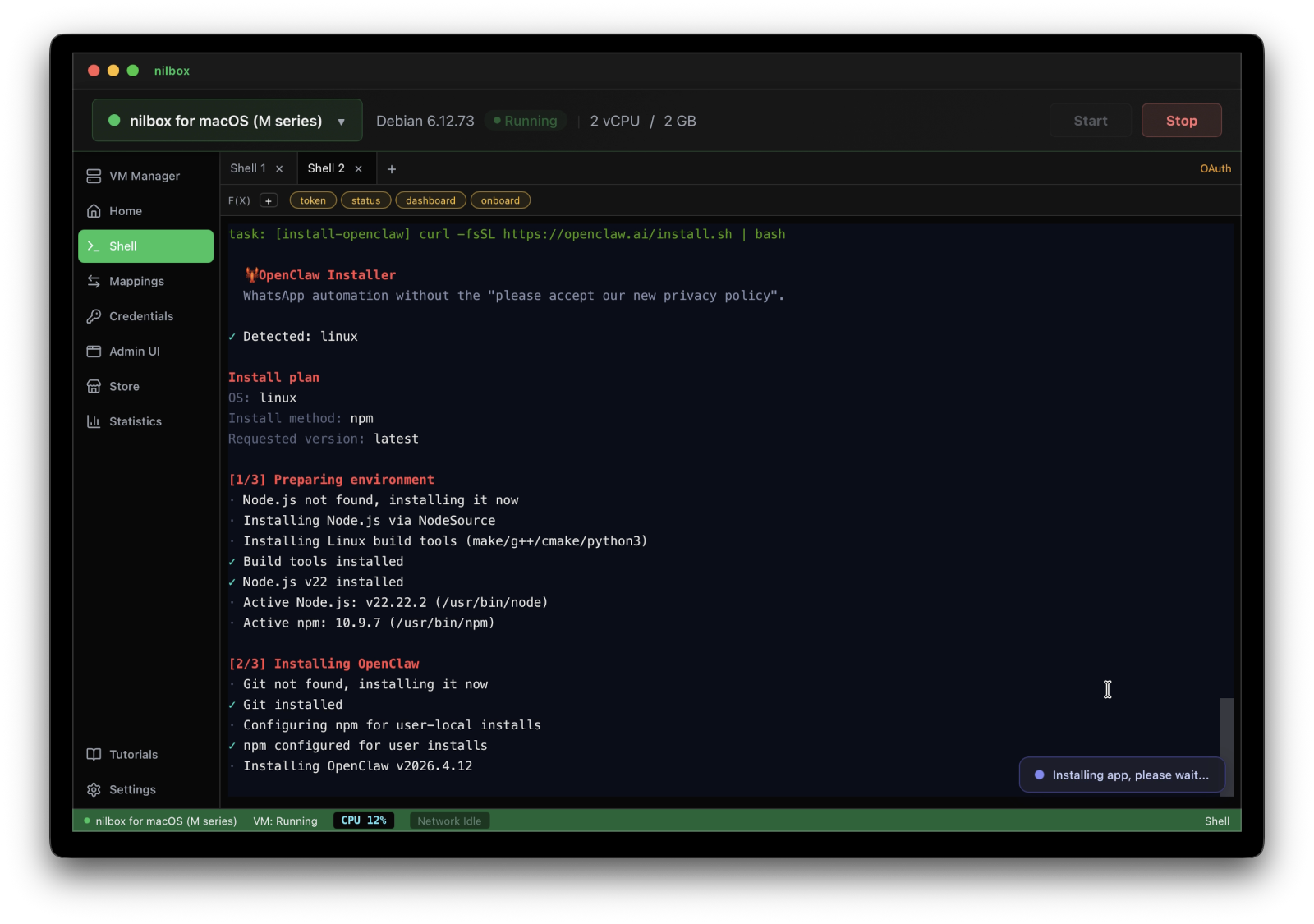
- Start a VM — the desktop app launches a VM via the platform backend (Apple Virtualization.framework on macOS, QEMU on Linux/Windows).
- Guest agent connects — a Rust agent inside the VM establishes a VSOCK channel back to the host.
- AI agent makes an API call — the request goes through the local outbound proxy (
127.0.0.1:8088). - Host proxy intercepts — for trusted domains, the proxy swaps dummy env-var names for real API tokens. For untrusted domains, the dummy value passes through or the request is blocked.
- Response flows back — token usage is extracted and tracked against configurable limits.
Features
Security & Isolation
- Real VM isolation — workloads run in a full virtual machine, not a container on the host kernel
- Zero-token proxy — real API keys never enter the guest; the host proxy swaps tokens in-flight for trusted domains only
- Encrypted KeyStore — SQLCipher + OS keyring (macOS Keychain / Linux secret-service / Windows native)
- Domain Gating — Allow Once / Allow Always / Deny per domain at runtime
- DNS Blocklist — Bloom-filter blocklist for VM outbound traffic
- Auth Delegation — Bearer, AWS SigV4, and Rhai-scripted OAuth out of the box
AI Agent Support
- MCP Bridge — Model Context Protocol bridging between host and VM (stdio + SSE)
- Token Usage Monitoring — per-provider tracking with configurable limits (warn at 80%, block at 95%)
- OAuth Script Engine — pluggable auth via Rhai scripting
VM Management
- Multi-VM — create, start, stop, and monitor multiple VMs
- Integrated Terminal — xterm.js shell into running guests via VSOCK PTY
- Port Mapping — host-to-VM port forwarding, persisted across restarts
- SSH Gateway — host-side SSH access for external tooling
- File Mapping — FUSE-over-VSOCK shared directories
- Disk Resize — resize VM disk images with auto-expand on boot
Ecosystem
- App Store — one-click install for apps and MCP servers inside the VM. Designed for users who aren't comfortable with Linux — no terminal required. If you're already at home on the command line, you can install anything directly via shell without the store.
Why a VM, not a container?
Most agent sandboxes are built for the cloud — they run containers on shared cluster infrastructure and lean on the host kernel for isolation. nilbox takes a different position:
- Real VM, not a shared kernel — each workload gets a full virtual machine, so a container escape on the host kernel isn't on the table.
- Your desktop, not a cluster — nilbox runs on the machine you already own. No Kubernetes, no cloud bill, no infra to operate.
- Keys that never enter the guest — Zero Token Architecture means a compromised agent can't leak credentials it never had, rather than relying on egress filtering alone.
- No SDK to integrate — sandboxes built as libraries require you to wrap your code in their API. nilbox runs existing code unmodified; the only setup is env vars. See No Code Changes.
- No terminal required — the one-click Store lets non-developers install agents and MCP servers safely, while power users still get a full shell.
Documentation
| Document | What's Covered |
|---|---|
| Documentation Site | Introduction, installation, agent setup, and guides (English / 한국어) |
| Development Guide | Project structure, tech stack, platform support, build instructions |
| Contributing | Development setup, code guidelines, PR workflow, reporting issues |
| Zero Token Architecture | Security model details, attack scenarios, defense layers, FAQ |
| VM Image Scripts | Platform-specific Debian image builders and QEMU binary builds |
| OAuth Scripts | Rhai-based OAuth provider definitions for the proxy |
| MCP Bridge | Connecting Claude Desktop to VM-hosted MCP servers |
| Playwright CDP | Running Playwright MCP with Chrome CDP over VSOCK |
| nilbox-vmm | macOS VMM using Apple Virtualization.framework (Swift) |
| nilbox-blocklist | Bloom-filter DNS blocklist — build, update, and query blocklists (OISD, URLhaus) |
Contributing
Contributions are welcome! See CONTRIBUTING.md for development setup, code guidelines, and PR workflow.
License
GNU General Public License v3.0 — see LICENSE.
Built with Tauri · React · rustls · xterm.js · SQLCipher · Rhai
Reviews (0)
Sign in to leave a review.
Leave a reviewNo results found