dynamic-captions
Health Uyari
- License — License: MIT
- Description — Repository has a description
- Active repo — Last push 0 days ago
- Low visibility — Only 8 GitHub stars
Code Basarisiz
- spawnSync — Synchronous process spawning in skills/dynamic-captions/scripts/batch.mjs
- exec() — Shell command execution in skills/dynamic-captions/scripts/fonts.mjs
- spawnSync — Synchronous process spawning in skills/dynamic-captions/scripts/fonts.mjs
- process.env — Environment variable access in skills/dynamic-captions/scripts/fonts.mjs
- network request — Outbound network request in skills/dynamic-captions/scripts/fonts.mjs
- spawnSync — Synchronous process spawning in skills/dynamic-captions/scripts/handwriting-template.mjs
- fs.rmSync — Destructive file system operation in skills/dynamic-captions/scripts/handwriting-template.mjs
- process.env — Environment variable access in skills/dynamic-captions/scripts/handwriting-template.mjs
Permissions Gecti
- Permissions — No dangerous permissions requested
Bu listing icin henuz AI raporu yok.
Give it a video: word-level captions in 10+ styles plus auto-mix (reels boxes, emoji, speech bubbles, messenger chat), a live picker with your own words, 34 free Korean fonts with per-font tracking/width/slant, and per-caption transparent layers for Premiere / Final Cut / DaVinci. Avoids faces and platform-safe areas.
English | 한국어
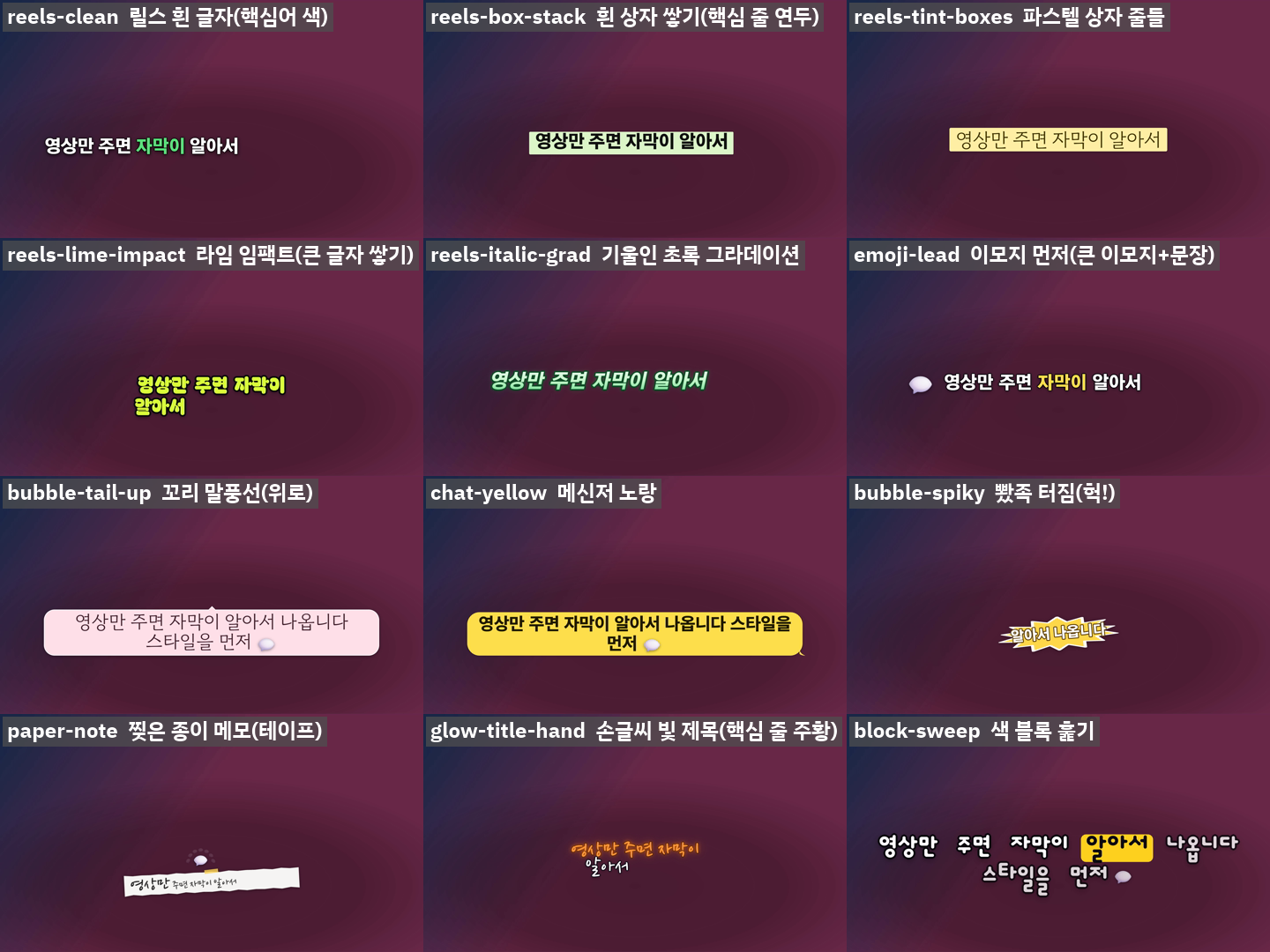



dynamic-captions: automatic captions for your video
You give it a video. It writes the words on the screen, in a style you choose.
That is the whole idea. You do not draw anything or edit a timeline. The tool listens to your video, writes down every spoken word with its time, and shows you the same scene in 10+ caption styles. You pick the one you like, and it gives you a new video with the captions burned in.
It is a "skill" for Claude Code (an AI assistant from Anthropic that runs on your computer). You can use it by chatting with the assistant, or run the commands yourself. Both ways are explained below.
Is this for me?
Yes, if you:
- make Shorts, Reels, TikToks or longer videos and want captions that look good without learning video editing,
- make music videos or lyric videos and want the lyrics to appear on time,
- want captions that stay out of the way: they do not hide faces, and they do not sit where YouTube shows its own subtitles.
What makes it different
- 10+ looks + "mix". Mix changes the look sentence by sentence, so the video does not feel repetitive.
- Captions move around (left, right, top, bottom), but never into the zones where apps put their own buttons or subtitles.
- Faces are avoided. It finds faces and puts captions somewhere else.
- Text is never tiny. If a caption would get too small, it moves to a wider spot.
- Songs: captions pulse gently on the beat, and the chorus (lines that repeat) appears bigger.
- Lyrics are spelled right. Speech recognition often mishears rap. If you have the real lyrics, the tool uses your spelling and the audio's timing. Where the two disagree, it cuts short clips so you can listen to just those spots.
- Fast. Several Chrome windows draw frames at the same time (a 75-second Full HD clip: 197 s → 64 s).
New in 1.4
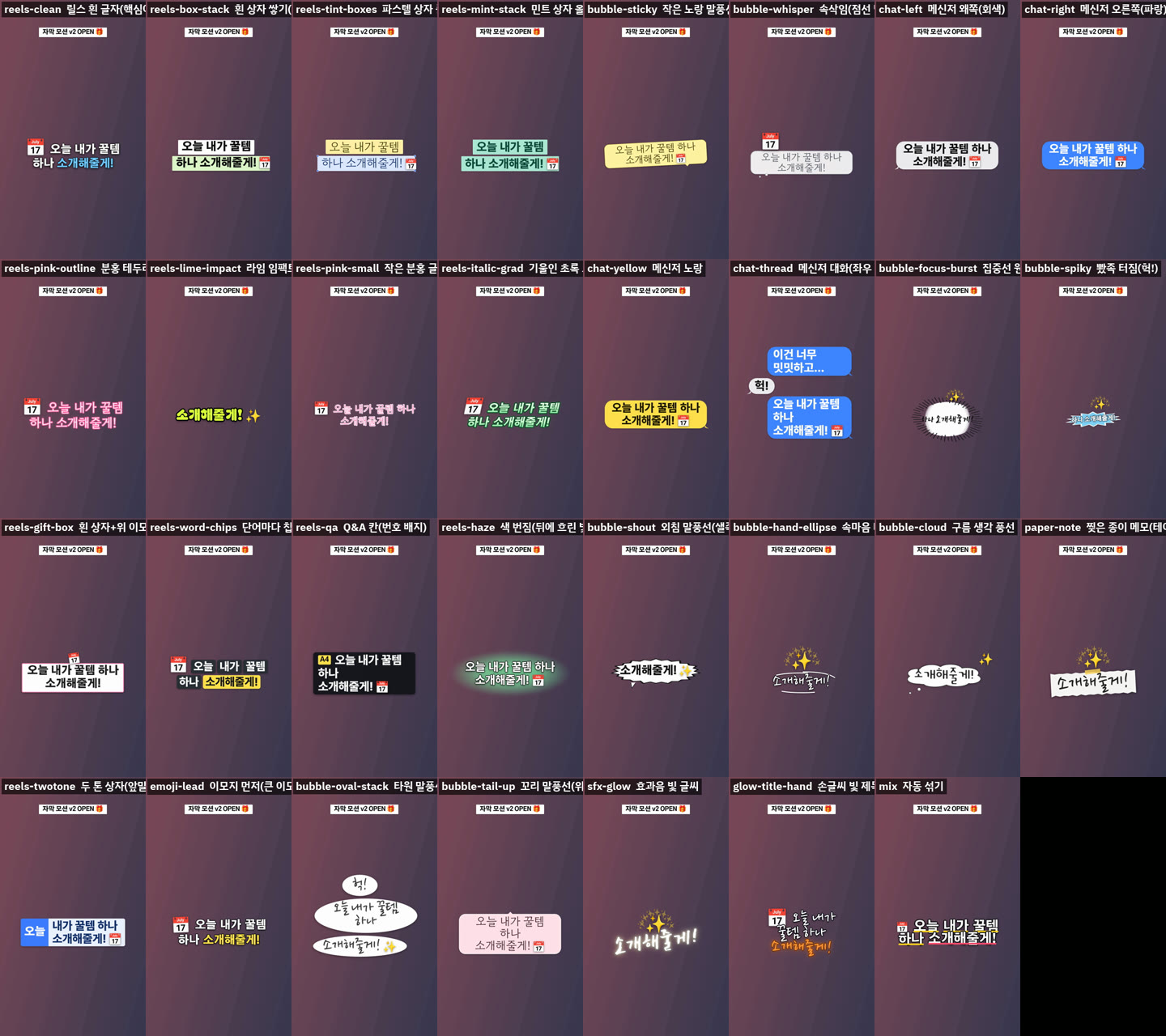
- Reels looks and emoji captions. White text with one coloured key word, rows stacked on white, pastel or mint boxes, a big lime line that slams in, a leaning green gradient, and more. Emoji come from the words (about 330 Korean and English keys: coffee ☕, puppy 🐶, free 🆓) or from the mood of the line (ㅋㅋ 🤣, a question 🤔). Five places (end, top, box corner, burst, in front) and six motions. Off by default; turn on with
--emoji auto. - Speech bubbles and chats. Bubbles with a tail, oval bubbles that pile up, a messenger thread that alternates left and right, a focus-line circle, a spiky burst, a shout, a dotted whisper, a cloud, a hand-drawn loop and a torn paper note with tape.
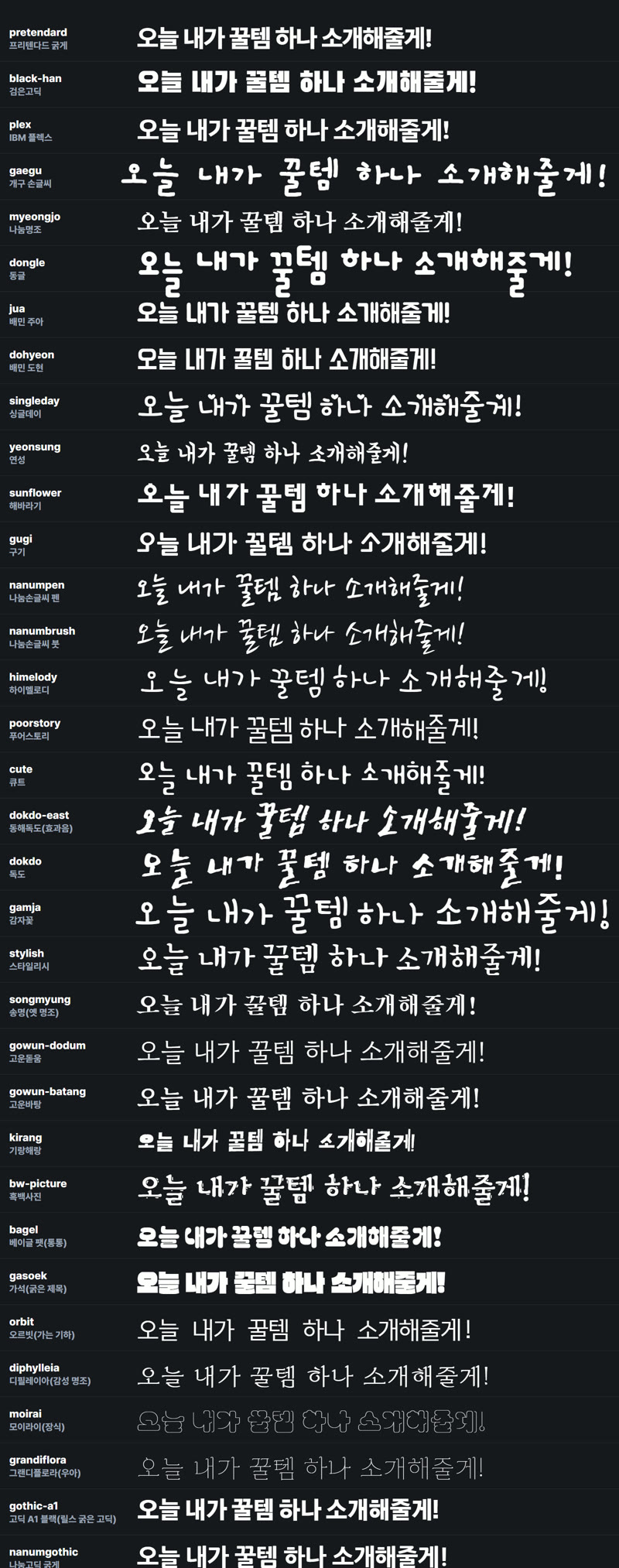
- 34 free Korean fonts (all OFL): pen and brush handwriting, sound-effect lettering, cute hands, soft rounded, black gothic, fat display, serif. Each font has its own size, tracking, width and slant, so
--font nanumpenlooks as big as the others. Override with--tracking,--width,--slant. - Pick with your own words.
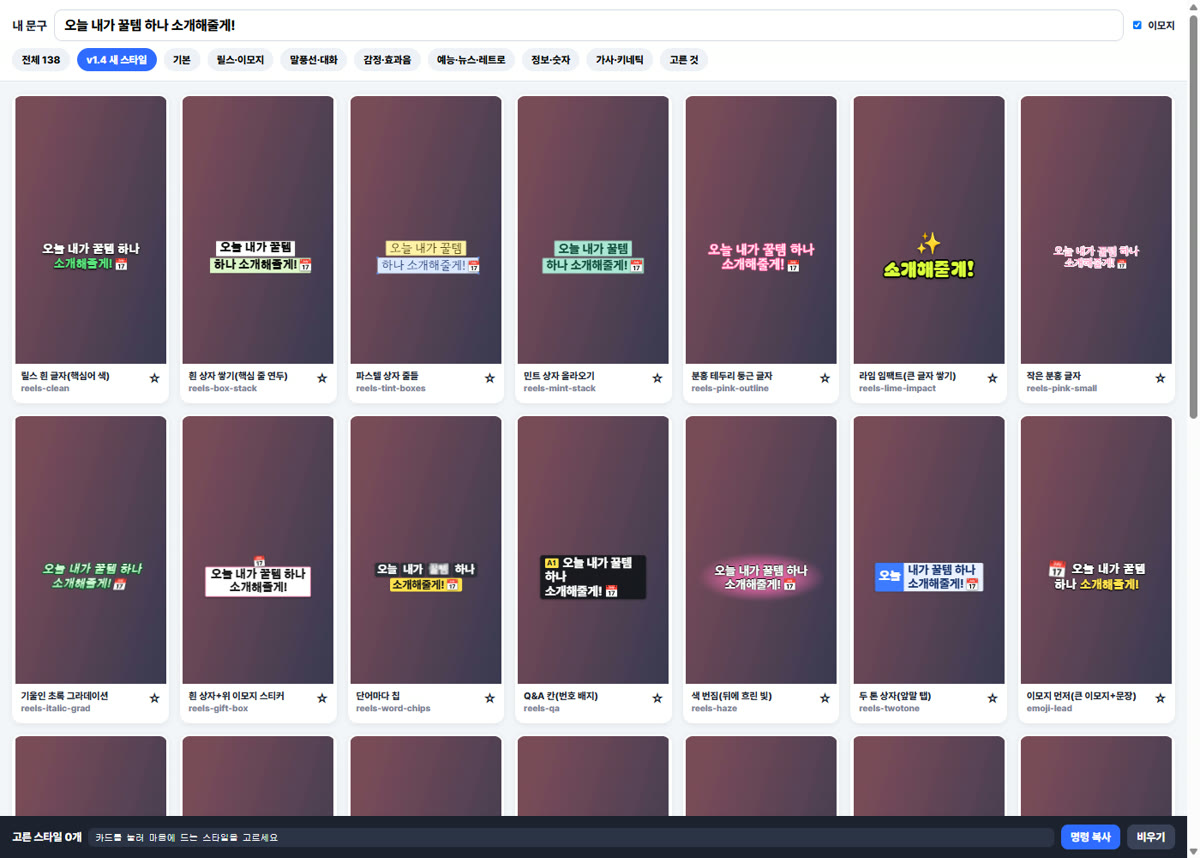
node scripts/picker.mjs <job> --openopens every style as a live card in the browser. Type your line and all cards play it; star the ones you like and copy the command. - Layers for editors. Add
--layerstorender.mjs finaland every caption becomes its own transparent clip at the source frame rate (29.97 stays 29.97), with an XML for Premiere Pro, an FCPXML for Final Cut Pro and DaVinci Resolve, and a CSV timetable. - Looks.
--look reels-pop,cute-vlog,talk-bubble,chat,calm-explainer,variety-show,lyric-moodorkids-storysets the style pool, emoji, fonts and colours at once. A fixed title badge (--title "Title 🎁") is new too.
You need four free programs. If you already have them, skip ahead. Open a terminal (Windows: PowerShell; Mac: Terminal) and type the check command to see if each one is installed.
| Program | What it is for | Check it | How to get it |
|---|---|---|---|
| Node.js 18 or newer | runs the tool's scripts | node -v |
https://nodejs.org (the "LTS" button) |
| ffmpeg | reads and writes video | ffmpeg -version |
Windows: winget install Gyan.FFmpeg · Mac: brew install ffmpeg |
| Google Chrome (or Chromium) | draws the captions | just open Chrome once | https://www.google.com/chrome |
| Python 3.10 or newer | listens to the audio (Whisper) | python --version (on Windows sometimes py --version) |
https://www.python.org |
Then install the Python helpers (one time, takes a few minutes and a few GB because of Whisper):
pip install openai-whisper numpy
pip install librosa                  # optional: beat detection for songs
pip install opencv-python-headless   # optional: face finding
Tip: if you use Claude Code, you can simply say "install everything dynamic-captions needs" and let the assistant do the steps above and tell you what is missing.
An NVIDIA graphics card makes the final step faster, but it is not required.
Install the skill
Easiest: as a Claude Code plugin. Type these two lines in Claude Code:
/plugin marketplace add reedodev/dynamic-captions
/plugin install dynamic-captions@dynamic-captions
Or copy the folder yourself:
git clone https://github.com/reedodev/dynamic-captions.git
cp -r dynamic-captions/skills/dynamic-captions ~/.claude/skills/
Make your first captioned video
Way 1: just ask (recommended for beginners)
Put your video in a folder and tell the assistant, for example:
"Add captions to
my-video.mp4with dynamic-captions. Show me the styles first. The language is English."
"This is a rap song and here are the lyrics (
lyrics.txt). Make lyric captions that avoid the face and follow the beat."
The assistant will transcribe, show you a style sheet (one picture with all the looks), and wait for you to choose. Say something like "number 7" or "the yellow one that highlights the key word". Then it renders the video and tells you where the file is.
Way 2: one command (then pick a style)
This does the listening, the folder and the style sheet for you:
node skills/dynamic-captions/scripts/start.mjs my.mp4 --lang en --out job
It stops when job/preview/overview.png is ready. Open it, choose a style, then run the last command it prints (
ender.mjs final ...). Options you can add: --script lyrics.txt (fix the spelling from your lyrics), --faces (keep captions off faces), --beat (pulse on the beat), --model small (faster).
Way 3: type every step yourself
Replace my.mp4 with your video. Run the commands from the folder where you cloned this project. The first line below is for Mac/Linux; in Windows PowerShell write it as $S = "skills/dynamic-captions/scripts" and leave the other lines as they are.
Step 1: write down the words (the first run downloads about 1.5 GB of speech model, so it is slow once; on a computer without a GPU it can take a few minutes. Add --model small for a faster, less accurate try)
S=skills/dynamic-captions/scripts
python $S/transcribe.py my.mp4 --out words.json --lang en
--lang en = English, ko = Korean, ja = Japanese, and so on. You get words.json: every word with its start and end time.
Step 2: prepare a work folder
node $S/make-captions.mjs --video my.mp4 --words words.json --out job --scale 1.25 --shade 0.4
--scale makes text bigger or smaller. --shade 0.4 puts a soft dark band behind the text so it stays readable on bright pictures.
Step 3: look at the style sheet
node $S/render.mjs preview job
Open job/preview/overview.png. It shows your scene captioned in every style plus "mix". Choose one and note its name (for example block-sweep or mix).
Step 4: make a short sample, then the full video
node $S/render.mjs final job --style mix --range 0,20      # only the first 20 seconds
node $S/render.mjs final job --style mix                   # the whole video
Your video is in job/out/ (named captioned-mix.mp4). Add --alpha if you also want a transparent caption file for your editing program. Add --encoder auto to use your graphics card, --workers 1 if your computer gets slow.
Fonts
Pick a font with --font. 34 free Korean fonts are available (all SIL OFL, fine for commercial videos). The 15 most useful ones come with the skill; get the rest with node scripts/fonts.mjs fetch all. node scripts/fonts.mjs list shows them all and node scripts/fonts.mjs sheet sample.png --text "your line" draws one line in every font. Each font has its own size, tracking, width and slant; override with --tracking -0.04 --width 92 --slant -8.
--font |
Font | Good for |
|---|---|---|
pretendard |
Pretendard ExtraBold | clean sans-serif, the everyday choice |
black-han |
Black Han Sans | big heavy titles, short key words |
plex |
IBM Plex Sans KR Bold | calm sans-serif, explainers |
gaegu |
Gaegu Bold | handwriting feel |
myeongjo |
Nanum Myeongjo ExtraBold | serif, poems and quiet videos |
dongle |
Dongle | round variety-show look (the default when you pick nothing) |
nanumpen / nanumbrush |
Nanum Pen / Brush Script | handwritten captions and titles |
dokdo-east |
East Sea Dokdo | sound words |
gowun-dodum |
Gowun Dodum | soft vlog captions |
gothic-a1 |
Gothic A1 Black | the heavy reels sans |
bagel |
Bagel Fat One | chubby titles |
| 19 more | fonts.mjs list |
cute hands, serif, display ... |
node $S/make-captions.mjs ... --font myeongjo                 # one font for everything
node $S/make-captions.mjs ... --font plex --font-key black-han  # big key words in another font
node $S/make-captions.mjs ... --font "C:\fonts\MyFont.ttf"     # your own .ttf / .otf / .woff2
Letters your font does not have are drawn in Pretendard, so you never see empty boxes. Check the license of any font you did not get from this project: usage rules differ for every font. More in references/fonts.md. Turning your own handwriting into a font: references/handwriting-font.md.
Calm captions for explainers
--style plain shows one white line in a dark rounded box. No color, no word effects. Use it for lessons and tutorials (it is not part of "mix").
The styles in plain words
| Name | What you see |
|---|---|
block-sweep |
a color block slides over each word as it is spoken |
pop-word |
one or two big words pop in at a time |
karaoke-fill |
words fill with color like karaoke |
hero-key |
the most important word comes in big, the rest small |
stack-kinetic |
words of different sizes fly in |
underline-ink |
a calm line is drawn under the spoken word |
glass-card |
text on a dark rounded card, the spoken word lights up |
neon-glow |
words light up like neon, one by one |
lead-big |
small lead-in words, then one big key word |
chip-label |
numbers and names are marked with a yellow chip |
stamp |
the key word is stamped in a red box |
line-rise |
words slide up from a hidden line |
hand-note |
handwriting look for casual videos |
line-focus |
the line sits on a color panel; the spoken word is highlighted |
fill-rise |
outlined letters fill up from the bottom |
impact-wide |
one or two words blown up to fill the width |
news-bar |
a news-style dark bar |
typewriter |
letters appear one by one with a blinking cursor |
wave |
the spoken word's letters bob like a wave |
sway-breeze |
letters sway gently like leaves (relaxed, happy lines) |
jitter-nerve |
letters tremble (urgent, nervous lines) |
heart-thump |
the key word beats like a heart, pink (excited, fluttering lines) |
tilt-wonder |
the line tilts its head, a question mark leans in (questions, puzzled lines) |
jolt-pop |
each word jumps out with a big overshoot (surprise) |
droop-sigh |
letters sag down and turn grey-blue (disappointment) |
boom-shake |
yellow letters slam in and the caption shakes (shock, strong emphasis) |
neon-flicker |
flickers on like a neon tube, then holds (titles on dark footage) |
duo-tight |
small line on top, big line below, tight leading (talking videos) |
rise-lines |
each line rises from behind a hidden edge (like line-rise, per line) (calm explainers) |
num-box |
a box draws itself around the number / key word (prices, dates, clauses) |
chip-pop |
the key word pops out of a centred pill (one key word) |
mask-slide |
words slide up out of a hidden slot (clean editorial look) |
flip-card |
a dark card flips forward in 3D (info lines) |
glitch-split |
colour split and a short jolt, then it settles (tech / game shorts) |
script-write |
hand lettering is written left to right with a pen dot (everyday, warm videos) |
speech-bubble |
a white comic speech bubble pops in (dialogue, variety) |
marker-swipe |
a highlighter is dragged across the key word (explainers) |
bounce-word |
words drop in and bounce (cheerful shorts) |
wobble-outline |
a second outline wobbles around the letters (playful titles) |
grad-shift |
a colour gradient flows through the letters (music, titles) |
chorus-zoom |
the whole line slowly zooms in with a glow (song choruses) |
ink-seal |
a red seal is pressed onto the key word (conclusions) |
stagger-center |
letters spread out from the middle of the word |
split-reveal |
the word opens from its centre line like a curtain |
rubber-stretch |
the word lands stretched and snaps back |
spin-in |
letters spin into place |
blur-focus |
the word comes into focus (0.2 s, never a long blur) |
slot-roll |
letters roll up like a slot machine |
echo-trail |
two coloured ghosts trail behind and catch up |
swing-hang |
the line hangs from a pin and swings to rest |
drop-letters |
letters drop from above one by one |
skew-slide |
words rush in leaning forward, then stand straight |
variety-outline |
thick coloured outline, tilted, pops per word |
alert-bar |
red breaking-news band with a blinking dot |
vhs-retro |
colour fringe, scan lines and a small wobble |
comic-burst |
the key word in a yellow comic starburst |
tape-strip |
each word on a strip of tape |
paper-cut |
words on coloured paper pieces |
sticker-peel |
thick white sticker outline, slapped on |
doodle-circle |
a hand-drawn loop around the key word |
pixel-game |
pixel text appears in steps in a dark box |
retro-shadow |
long stepped 3D shadow |
count-up |
numbers count up to the spoken value (final text is exact) |
check-list |
a check box ticks before the line |
quiz-card |
the key word is covered until it is said |
progress-bar |
a thin bar fills while the line is spoken |
bullet-point |
a bullet pops and the line slides in |
arrow-point |
an arrow points at the key word from the left |
bracket-focus |
corner brackets close in like a focus frame |
price-tag |
the key word hangs on a swinging tag |
search-bar |
the line is typed into a search box |
percent-ring |
a ring gauge fills (to the % if the key word has one) |
mix |
picks a different look for each sentence (a good first choice) |
23 new styles (1.1.0)
Each new style on the same synthetic scene (the 3.7 s moment of the test clip).
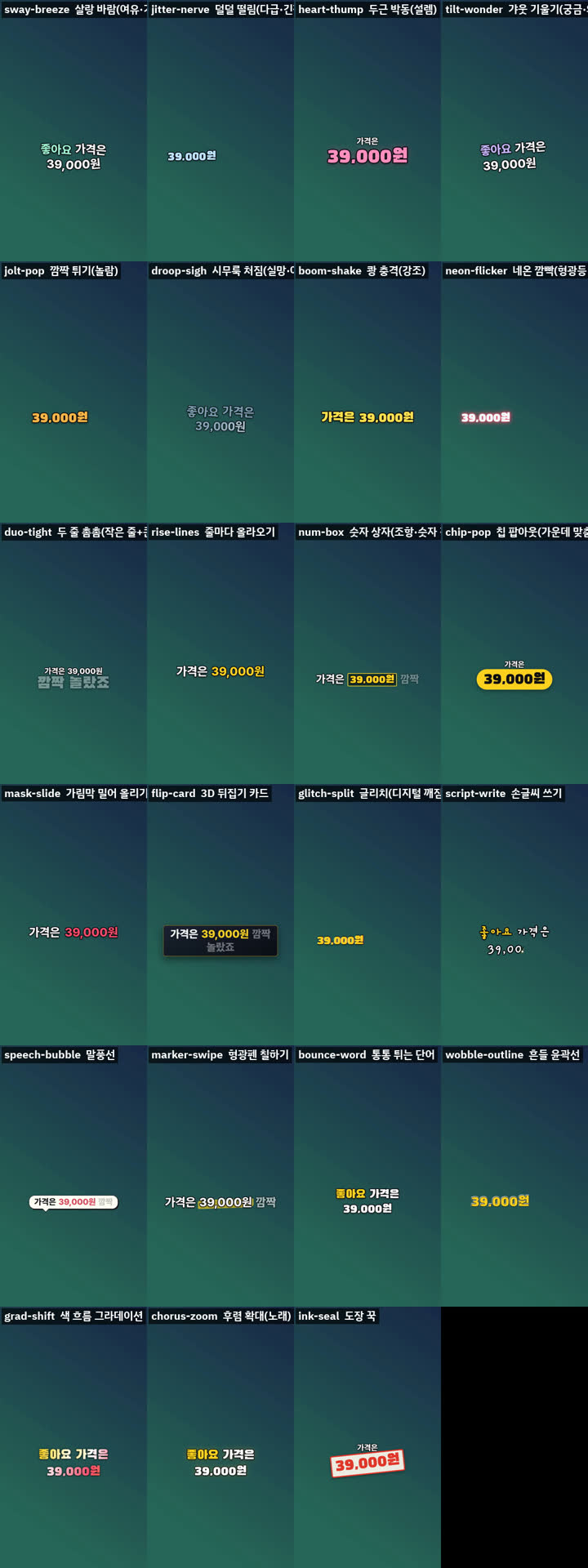
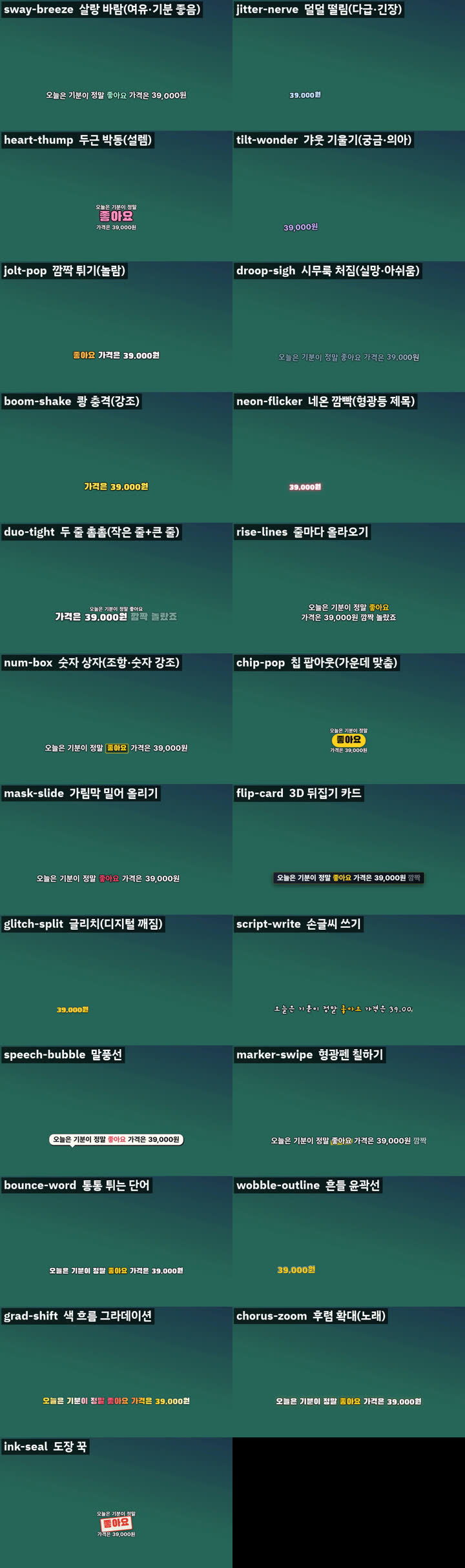
Use the emotion / sound-word motions (sway, tremble, heartbeat, head-tilt, jolt, droop, boom) only 2-4 times per video. mix adds them on emotion words by itself and stops at 4 (--fx-max, turn off with --fx off). Emotion word detection is Korean-only for now.
30 new styles (1.2.0)
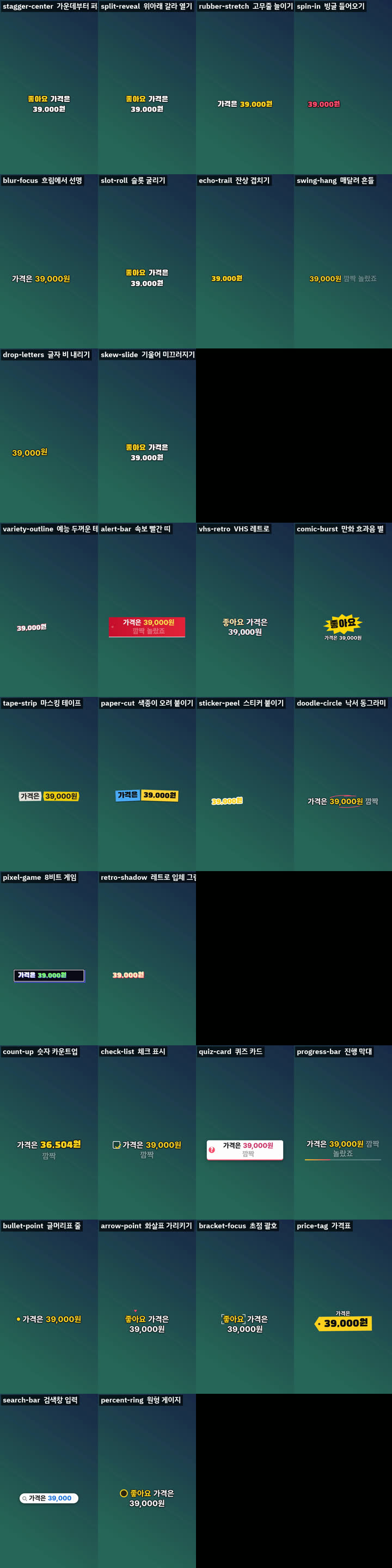
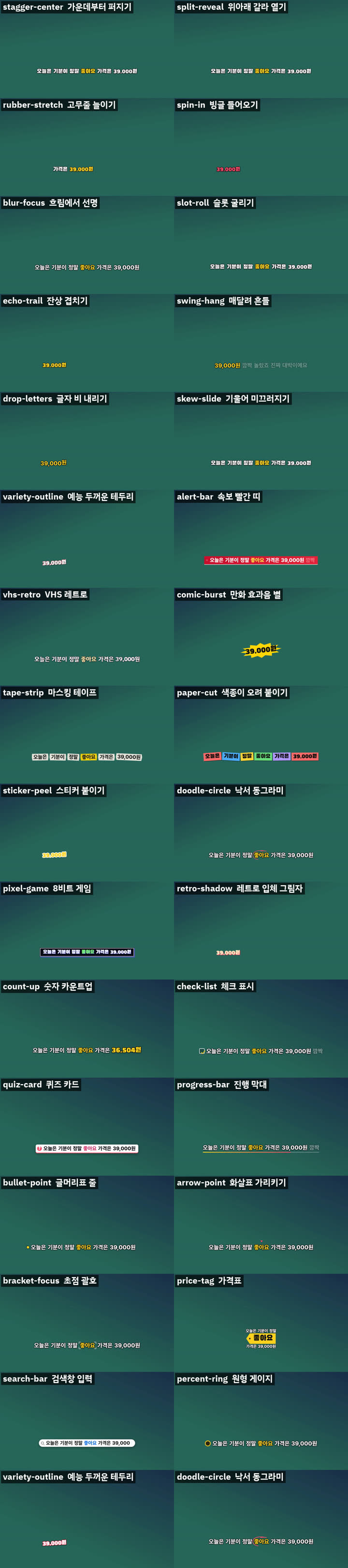
New in 1.2.0
- Subtitle files:
node $S/export-subs.mjs --job jobwritescaptions.srt/.vtt(YouTube caption track) and.ass(karaoke: each word lights up as it is said) - Whole folder:
node $S/batch.mjs videos --lang ko(style sheet for every video) - Presets:
--save-preset brand.json, later--preset brand.json - Moving samples: add
--sampleto start.mjs for 1.8 s clips of the 7 emotion motions - Number pieces joined: "39" + ",000원" from speech recognition becomes "39,000원"
- Hardware encoding:
--encoder autotries Mac videotoolbox, NVIDIA, Intel, AMD (only NVIDIA was tested) - Python found automatically:
PYTHONor"python"inscripts/local.json - Style sheet in pages:
overview.png,overview-2.png... so the text stays readable
Say it in plain words
You do not have to remember options. Tell the assistant what you want:
| You say | What changes |
|---|---|
| "bigger / smaller captions" | --scale 1.4 / --scale 0.9 |
| "keep captions in one place" | --pos fixed or --pos bottom-left |
| "the background is too bright to read" | --shade 0.5 |
| "don't cover the face" | find-faces.py, then --faces faces.json |
| "follow the beat of the song" | detect-beat.py, then --beat beat.json |
| "add emoji / an underline" | --deco emoji,line (off by default) |
| "change the color" | --palette mint (gold, mint, sky, rose, lime) |
| "make it faster" | --workers 4 --encoder auto |
| "I also want a transparent caption file" | --alpha |
| "I will choose the look for each sentence" | --plan plan.json |
| "no emotion effects" / "only twice" | --fx off / --fx-max 2 |
| "tighter two-line captions" | --style duo-tight --line-ratio 0.4 --line-gap 4 |
| "cuts are fast, captions feel slow" | automatic; faster with --speed 0.6 |
Something went wrong?
| What you see | What it means and what to do |
|---|---|
Chrome/Chromium not found |
Install Chrome, or tell the tool where it is: CHROME="C:/path/to/chrome.exe" (Mac/Linux: set the CHROME variable to the path) |
an error that mentions ffmpeg or ENOENT |
ffmpeg is not installed, or its folder is not on your PATH. Install it and open a new terminal |
자막이 안전 구역을 벗어났습니다 ("a caption left its safe area") |
A long sentence does not fit its spot. Make it a little smaller (--scale 1.0) and run make-captions again |
| Words are spelled wrong | Speech recognition made a mistake. Put the real text in a file and use align-script.mjs, or edit words.json |
| Captions cover a face | Run find-faces.py first and add --faces faces.json (check faces.preview.png: green boxes show what it found) |
| The computer freezes while rendering | Use --workers 1 |
Words you may see
- Transcription: writing down what is said, with the time of each word.
- Style sheet (preview): one picture showing your scene in every style, so you can choose before the long render.
- Safe area: places where apps already show something (YouTube subtitles at the bottom, buttons on the side in Shorts and Reels). Captions stay out of them.
- Render: the final step that makes the new video file. It takes a few times the length of the video.
- Transparent caption file (
.mov): only the captions with a see-through background, to place on top of video in your editing program.
Honest limits
- An AI cannot hear. If lyrics or speech match the sound is something you check, using the clips from
listen-check.mjs(about one minute of listening). - Timing for rap and songs is rough, because it comes from Whisper (a word is capped at 1.8 s). There is no forced alignment yet.
- Only front-facing human faces are found. Cartoons, animals and people seen from behind can be missed. Hands, products and bodies are not avoided.
- Whether viewers like a style is not tested. Choose from the style sheet.
- The 1.4 styles, emoji and fonts were tested on synthetic portrait and landscape videos only, not yet on real people or songs.
- For the editor layers only the files were checked (alpha, frame rate, XML structure); they were not opened in Premiere, Final Cut, DaVinci or CapCut.
- Fixed-shape bubbles (spiky burst, focus circle) make long lines small. Use them for one to three words.
- Emoji are picked from a word list, so a match can be off. Fix it with
--emoji-map.
Changes
Tests
node tests/run.mjs checks the skill file and runs everything on a made-up video: captions, the style sheet, a final render, parallel render, spelling alignment, the listening clips, face finding and beat detection. GitHub Actions runs it on every change (see the badge on top). Whisper itself is not part of the test.
Details for developers: SKILL.md (the instructions the assistant follows, written in Korean) and styles.md (how it works, measured numbers).
Credits and inspiration
- Inspired by the lyric typography of JIZURA (MIT).
- No code was copied.
- 15 open-source caption tools whose ideas and numbers were consulted, the libraries used (Whisper, librosa, OpenCV, the YuNet face model) and 4 bundled fonts (SIL OFL) are listed with their licenses in references/sources.md.
Made by
Reedo, a 20-year engineer who keeps handing real work to AI and fixing what breaks. This skill came out of making videos every day.
YouTube @Reedodev · Threads @reedo.dev · GitHub @reedodev
MIT License. The bundled fonts (SIL OFL 1.1) and the YuNet model (MIT) keep their own licenses.
Yorumlar (0)
Yorum birakmak icin giris yap.
Yorum birakSonuc bulunamadi