ProxmoxMCP-Plus
Health Gecti
- License — License: MIT
- Description — Repository has a description
- Active repo — Last push 0 days ago
- Community trust — 132 GitHub stars
Code Gecti
- Code scan — Scanned 12 files during light audit, no dangerous patterns found
Permissions Gecti
- Permissions — No dangerous permissions requested
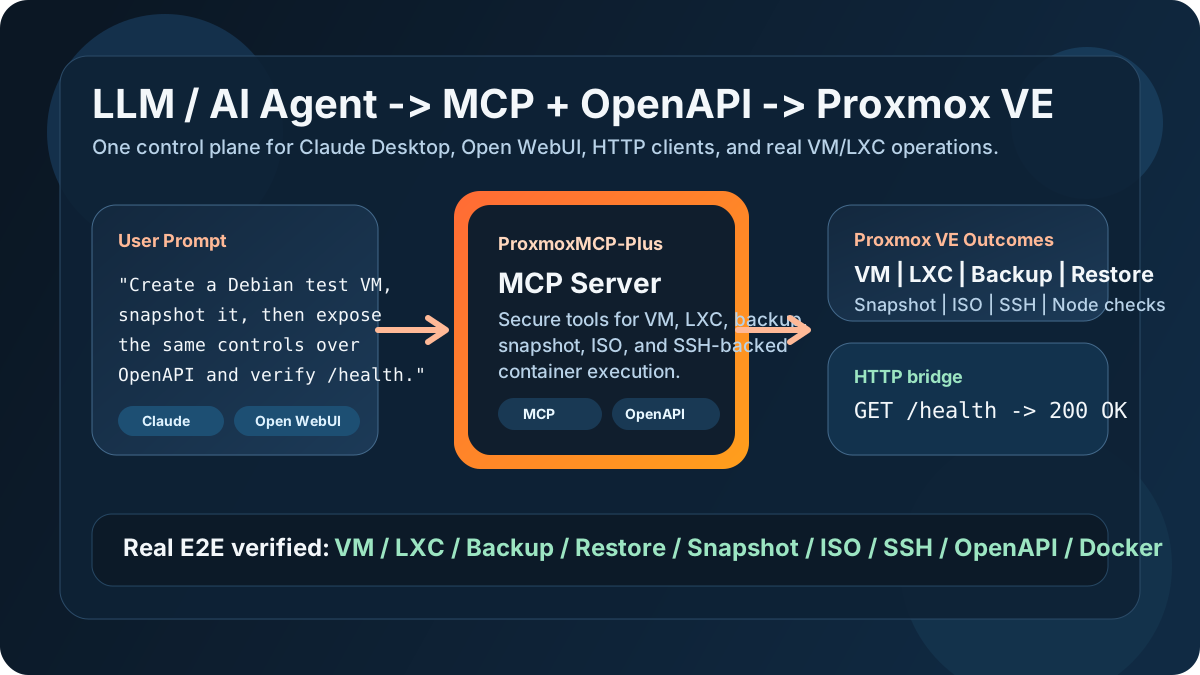
This MCP server acts as a secure control plane, enabling LLMs and AI agents to manage Proxmox VE environments. It handles the creation and management of virtual machines, containers, backups, and snapshots via both MCP tools and standard OpenAPI HTTP endpoints.
Security Assessment
Overall Risk: Medium. The tool is designed to manage critical infrastructure, meaning it inherently accesses highly sensitive data (system configurations, virtual workloads, and hypervisor controls). The developers mention implementing safety guardrails like token auth and command policies, which is excellent. However, giving an AI agent the ability to control infrastructure and execute SSH-backed commands always carries inherent risk. A light code scan found no dangerous patterns, hardcoded secrets, or excessive permissions, but this type of tool still requires strict network isolation and careful API token management on your Proxmox host.
Quality Assessment
Overall Quality: High. The project is under very active development, with its most recent update pushed today. It uses the permissive MIT license and has generated strong early community interest with 132 GitHub stars. The repository is well-documented, includes real end-to-end testing proofs, and appears to be a reliable, professionally structured open-source package.
Verdict
Use with caution. While the code itself is clean and safe to install, the inherent nature of allowing LLMs to execute infrastructure and SSH commands means you must strictly secure and isolate your Proxmox API tokens.
Use MCP and OpenAPI to safely control Proxmox VE VMs, LXCs, backups, and snapshots from LLMs and AI agents.
ProxmoxMCP-Plus

Use MCP and OpenAPI to safely control Proxmox VE VMs, LXCs, backups, snapshots, and ISO workflows from LLMs, AI agents, Claude Desktop, and Open WebUI.




30-second Demo | Real E2E Proof | Install | Scenario Templates | Wiki
Why This Project Exists
Most Proxmox automation stops at raw API calls, one-off scripts, or UI-only workflows.
ProxmoxMCP-Plus gives you:
MCPtools for Claude Desktop, Open WebUI, and other LLM or AI agent workflowsOpenAPIendpoints for HTTP clients, internal tools, and no-code integrationsGuardrailssuch as token auth, command policy, and safer execution pathsReal operator workflowsfor VM, LXC, backup, restore, snapshot, ISO, and SSH-backed container execution
If you want an LLM or AI assistant to do more than just explain Proxmox, this is the missing control plane.
30-second Demo
What a user says in Claude Desktop or Open WebUI:
Create a small Debian test VM on node pve, snapshot it before changes,
and expose the same control surface over OpenAPI so I can verify /health.
What ProxmoxMCP-Plus enables:
- The LLM calls MCP tools to create and start the VM.
- The same server exposes matching OpenAPI endpoints for automation or dashboards.
/healthconfirms the HTTP bridge is alive.- The operator can later snapshot, roll back, back up, or delete the workload from the same interface.
HTTP verification:
curl -f http://localhost:8811/health
curl http://localhost:8811/openapi.json
This is the core pitch in one sentence:
one Proxmox control plane for both LLM-native workflows and standard HTTP/OpenAPI automation.
Real E2E Proof
The strongest claim here is not "has features". It is "the important paths were exercised against a real Proxmox lab".
Latest verified live coverage:
| Capability | Real lab status |
|---|---|
| VM create / start / stop / delete | Verified |
| VM snapshot create / rollback / delete | Verified |
| Backup create / restore | Verified |
| ISO download / delete | Verified |
| LXC create / start / stop / delete | Verified |
| Container SSH-backed command execution | Verified |
| Container authorized_keys update | Verified |
Local OpenAPI /health and schema |
Verified |
Docker image build and /health |
Verified |
Validation entry points in this repo:
pytest -qtests/integration/test_real_contract.pytest_scripts/run_real_e2e.py
Install
Three supported ways to get started:
1. PyPI
pip install proxmox-mcp-plus
2. Docker / GHCR
docker run --rm -p 8811:8811 \
  -v "$(pwd)/proxmox-config/config.json:/app/proxmox-config/config.json:ro" \
  ghcr.io/rekklesna/proxmoxmcp-plus:latest
3. Source
git clone https://github.com/RekklesNA/ProxmoxMCP-Plus.git
cd ProxmoxMCP-Plus
uv venv
uv pip install -e ".[dev]"
Run the MCP server:
python main.py
Run the OpenAPI bridge:
docker compose up -d
Quick Proxmox Setup
Do these before blaming the project:
- Install Proxmox VE from the official guide: Installation Guide
- Create a Proxmox API token and put it in
proxmox-config/config.json: Proxmox VE API - Make sure your node has a bridge such as
vmbr0: Administration Guide - For LXC workflows, ensure at least one template is available or let the live E2E script download one: Linux Container Guide
- For container command execution, add the
sshsection toproxmox-config/config.json - If template or ISO downloads fail, check DNS on the Proxmox host first
Minimal config fields:
proxmox.hostproxmox.portauth.userauth.token_nameauth.token_value
Scenario Templates
Ready-to-copy examples live in examples/.
These examples include:
- plain-language prompts for Claude or Open WebUI
- example OpenAPI requests
- expected operator outcome
Why Share This Instead of Raw Scripts
| Capability | Official Proxmox API | One-off scripts | ProxmoxMCP-Plus |
|---|---|---|---|
| MCP for LLM / AI agents | No | No | Yes |
| OpenAPI bridge | No | Usually no | Yes |
| VM + LXC lifecycle in one interface | Low-level only | Depends | Yes |
| Snapshot / backup / restore workflows | Low-level only | Depends | Yes |
| Container SSH-backed execution | No | Custom only | Yes |
| Command policy / guardrails | No | Rare | Yes |
| Real repo-level E2E coverage | N/A | Rare | Yes |
What You Can Build With It
Claude Desktop + Proxmox: ask an LLM to create a sandbox VM, list nodes, or roll back snapshotsOpen WebUI + homelab: expose Proxmox actions to a self-hosted AI assistantAI infra tools + HTTP: call/openapi.jsonand integrate with dashboards or internal portalsOperator workflows: use one control surface for read-only checks and write operations
Repo Structure
src/proxmox_mcp/: server, tools, config, security, formattingtest_scripts/run_real_e2e.py: live Proxmox, OpenAPI, Docker smoke pathtests/: unit and integration coverageproxmox-config/: example and runtime configexamples/: copy-paste usage templates for LLM and HTTP flows
Release and Distribution
- PyPI package: proxmox-mcp-plus
- GitHub releases: Releases
- GHCR image:
ghcr.io/rekklesna/proxmoxmcp-plus
Current release notes should describe user-visible ability, not generic bugfixes:
- live Proxmox E2E coverage
- container SSH execution path
- Docker OpenAPI
/health - source-vs-installed-package test correctness
Community and Launch
If you want to promote the project instead of just dropping a link, start here:
- Launch post draft
- 20-30 second demo script
- GitHub Discussions
- Reddit:
r/selfhosted,r/homelab,r/Proxmox,r/LocalLLaMA - Hacker News:
Show HN - X / AI infra / MCP circles
Suggested angle:
I built an MCP + OpenAPI server that lets LLMs and AI agents operate real Proxmox VE workflows, and I verified the core paths on a live lab.
Documentation
README is intentionally optimized for fast GitHub conversion. Deep docs live in the wiki:
- Home
- Operator Guide
- Developer Guide
- Security Guide
- Integrations Guide
- API & Tool Reference
- Troubleshooting
- Release & Upgrade Notes
Development
pytest -q
ruff check .
mypy src tests main.py test_scripts/run_real_e2e.py
python -m build
License
Yorumlar (0)
Yorum birakmak icin giris yap.
Yorum birakSonuc bulunamadi