CC-Settings
Health Uyari
- License — License: MIT
- Description — Repository has a description
- Active repo — Last push 0 days ago
- Low visibility — Only 7 GitHub stars
Code Gecti
- Code scan — Scanned 3 files during light audit, no dangerous patterns found
Permissions Gecti
- Permissions — No dangerous permissions requested
Bu listing icin henuz AI raporu yok.
A macOS settings manager app for Claude Code - built with SwiftUI
 CC Settings
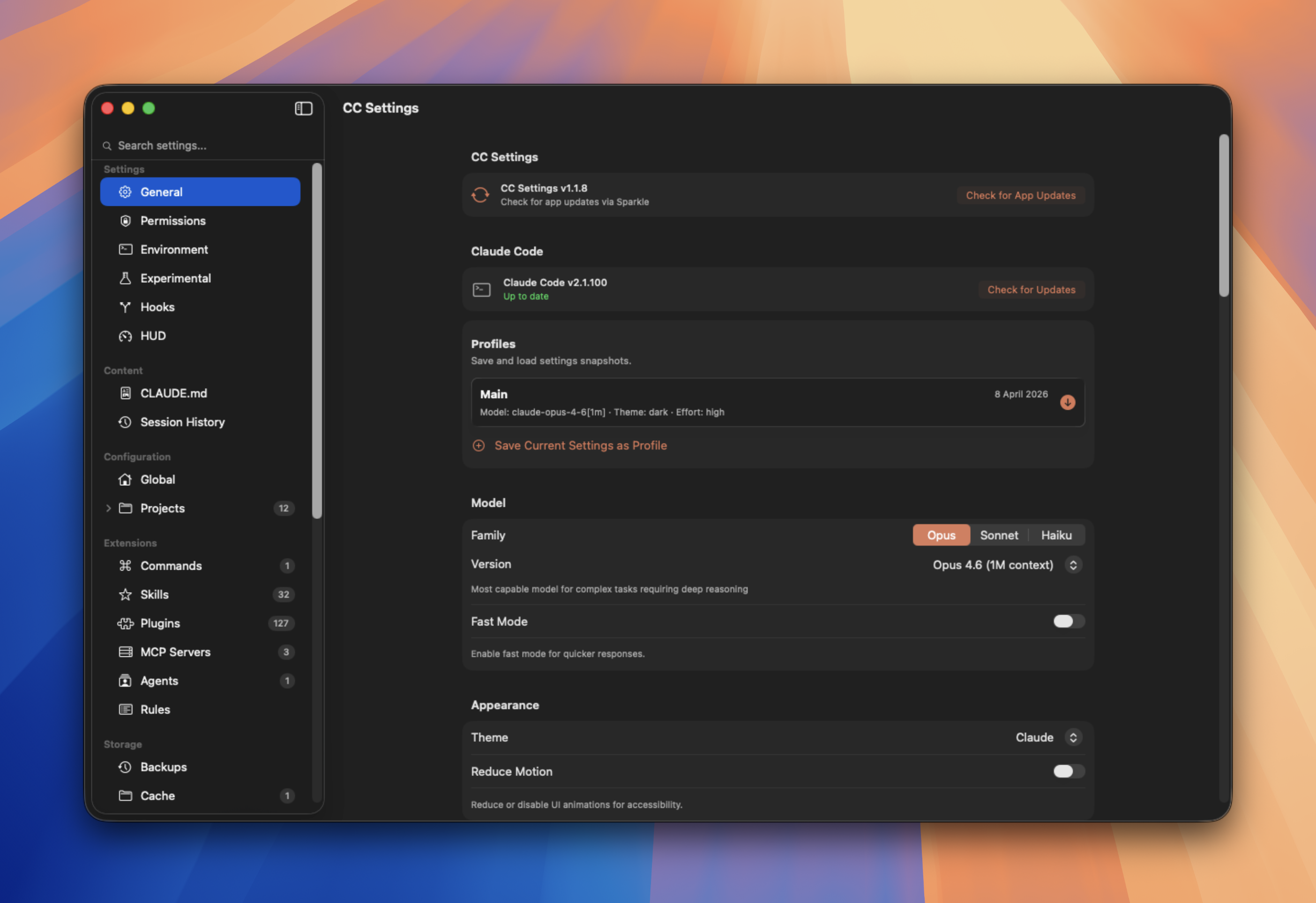
A native macOS app for managing Claude Code configuration.
Settings, profiles, permissions, hooks, MCP servers, sessions, and more — no more hand-editing JSON.




Install
Homebrew
brew install --cask rektoooooo/tap/cc-settings
Update later with brew upgrade --cask cc-settings.
Download
Grab the latest DMG from Releases, open it, and drag CC Settings to your Applications folder. The app is code-signed and notarized by Apple — it opens normally, no Gatekeeper warning.
Build from source
Requires macOS 26.0+, Xcode 16+, and XcodeGen.
git clone https://github.com/Rektoooooo/CC-Settings.git
cd CC-Settings
xcodegen generate
open "CC Settings.xcodeproj"   # Cmd+R to build and run
Why CC Settings?
Claude Code stores its configuration across JSON files, markdown docs, and folders under ~/.claude/. CC Settings gives you a native macOS UI to manage all of it.
- Every change writes only the field you touched — the app never overwrites your other settings
- Instant saves — no save button, changes are picked up by Claude Code on the next prompt
- Settings Profiles — save and load named configuration snapshots
- Per-project overrides — customize model, permissions, hooks, and more per project with inherit/override toggles
- Global search — find any setting instantly across all sections
Features
Settings
| Section | Highlights |
|---|---|
| General | Model family/version picker, profiles, theme, language, effort level, git config, auto-compact, attribution, and more |
| Permissions | Visual permission matrix for all tools, custom pattern rules (e.g. Bash(git push *)), default mode picker |
| Environment | API keys, model overrides, proxy settings, token limits, prompt caching toggles, MCP timeouts |
| Experimental | Extended thinking with budget slider, agent teams, sandbox config (new + legacy), spinner customization, status line |
| Hooks | Pre/Post Tool Use, Prompt Submit, and 20+ other hook types — with matchers, multiple commands, and scope badges |
| HUD | Configure the claude-hud statusline — layout, toggles, thresholds, presets, live ASCII preview |
Profiles
Save your current settings as a named profile and switch between them. Profiles store the full raw JSON, so unknown CLI keys are preserved. Useful for switching between work/personal configs or testing different setups.
Per-Project Settings
Expand any project in the sidebar to access its settings. Each field shows whether it inherits from global or is overridden locally. Toggle "Custom" to override a setting just for that project — toggle it back to remove the override.
Overridable: model, effort level, output style, shell, permissions, hooks, environment variables, sandbox, worktree, and more.
Content
| Section | Highlights |
|---|---|
| CLAUDE.md | Edit global and per-project instructions with source/preview/split view and templates |
| Session History | 3-column browser: projects, sessions, messages with tool calls, thinking blocks, and search |
Extensions
| Section | Highlights |
|---|---|
| Commands | Browse, create, and edit slash commands with frontmatter and markdown body |
| Skills | Browse skills with multi-file viewer (markdown, JSON, code, PDF) |
| Plugins | Browse marketplace plugins, view READMEs, copy install commands |
| MCP Servers | Add/edit/remove servers (stdio, SSE, HTTP) with scope support (global + per-project) |
| Agents | Browse and manage agent configurations |
| Rules | View and edit rules with scope awareness |
Storage & Maintenance
| Section | Highlights |
|---|---|
| Stats | Usage analytics — sessions, tokens, models, tools, daily activity charts, project rankings |
| Cleanup | Storage dashboard with charts, filter by age, bulk-delete old sessions |
| Version Control | Built-in git: status, staging, commits, history, diffs, pull/push |
How It Works
CC Settings reads and writes the same files Claude Code uses:
~/.claude/settings.json          Settings, permissions, hooks, experimental
~/.claude/settings.local.json    Local overrides
~/.claude/CLAUDE.md              Global instructions
~/.claude/commands/*.md          Slash commands
~/.claude/skills/                Skills
~/.claude/plugins/               Plugins + HUD config
~/.claude/profiles/              Settings profiles
~/.claude.json                   MCP servers
<project>/.claude/settings.json  Per-project overrides
<project>/.claude/CLAUDE.md      Per-project instructions
The app uses field-level saves — when you change a toggle, only that specific key is written to the JSON file. All other keys (including ones the app doesn't know about) are preserved. Opening the app never writes anything to disk.
Development
git clone https://github.com/Rektoooooo/CC-Settings.git
cd CC-Settings
brew install xcodegen    # if not installed
xcodegen generate
open "CC Settings.xcodeproj"
project.yml is the source of truth for build config. After modifying it, run xcodegen generate before building. The .xcodeproj is gitignored.
Dependencies
- swift-markdown — Markdown parsing and rendering. Only external dependency.
License
MIT — see LICENSE
Yorumlar (0)
Yorum birakmak icin giris yap.
Yorum birakSonuc bulunamadi