ccm
Health Warn
- License — License: MIT
- Description — Repository has a description
- Active repo — Last push 0 days ago
- Low visibility — Only 6 GitHub stars
Code Warn
- fs module — File system access in .github/workflows/release.yml
Permissions Pass
- Permissions — No dangerous permissions requested
This is a multi-profile manager for Claude Code, acting like a version manager (such as nvm) to let users instantly switch between different accounts (e.g., personal, work, client) without needing to repeatedly log out and log in.
Security Assessment
The overall risk is rated as Low. The tool fundamentally works by managing isolated file system configurations and switching credentials locally. It does not request explicitly dangerous runtime permissions, and the automated rule-based scan found no hardcoded secrets. The only flagged behavior is file system access within the GitHub Actions release workflow, which is an entirely standard and expected practice for packaging and publishing software. The developer has also taken a proactive approach to security by prominently displaying Anthropic's Terms of Service compliance rules, actively warning users against sharing credentials or running parallel sessions on a single account.
Quality Assessment
The project scores highly on engineering quality but low on community visibility. It is licensed under the standard MIT license, ensuring clear usage rights. The codebase appears exceptionally well-maintained for its size, featuring a robust CI/CD pipeline with automated testing, code coverage tracking, and even mutation testing via Stryker. It was updated very recently (within the last day). However, it currently has only 6 GitHub stars, meaning it has not yet been broadly vetted by a large community.
Verdict
Safe to use, though users should be aware it is an early-stage project with limited community adoption.
Multi-profile manager for Claude Code
|
ccmMulti-profile manager for Claude Code Switch between Claude Code accounts instantly. Like |





Manage separate Claude Code profiles for personal, work, and client accounts without repeated logout/login cycles. ccm keeps each profile isolated so switching is immediate and parallel sessions stay clean.
IMPORTANT: Claude Code ToS (Multi-Terminal Use)
[!IMPORTANT]
Mandatory compliance rule for this project
Do not use the same Claude account from multiple terminals at the same time.
We enforce: 1 account = 1 person = 1 active terminal session.
ccmisolates profiles. It does not grant any extra rights under Anthropic terms.- For parallel work, use separate licensed accounts/seats (or API keys under Commercial Terms).
- No credential sharing, no shared account handoff, no "one account used by multiple people".
- This is an intentionally strict project rule to remove ambiguity and reduce compliance risk.
- The CLI also surfaces this via
ccm compliance(alias:ccm tos) and after every successfulccm create.Official basis (as of April 8, 2026):
- Claude Code Legal & Compliance: usage limits for Pro/Max assume ordinary, individual use; Anthropic may enforce auth restrictions without notice.
- Anthropic Consumer Terms: account credentials/API keys must not be shared or made available to others; Anthropic may suspend/terminate for material breach.
- Anthropic Commercial Terms: customer is responsible for all activity under its account.
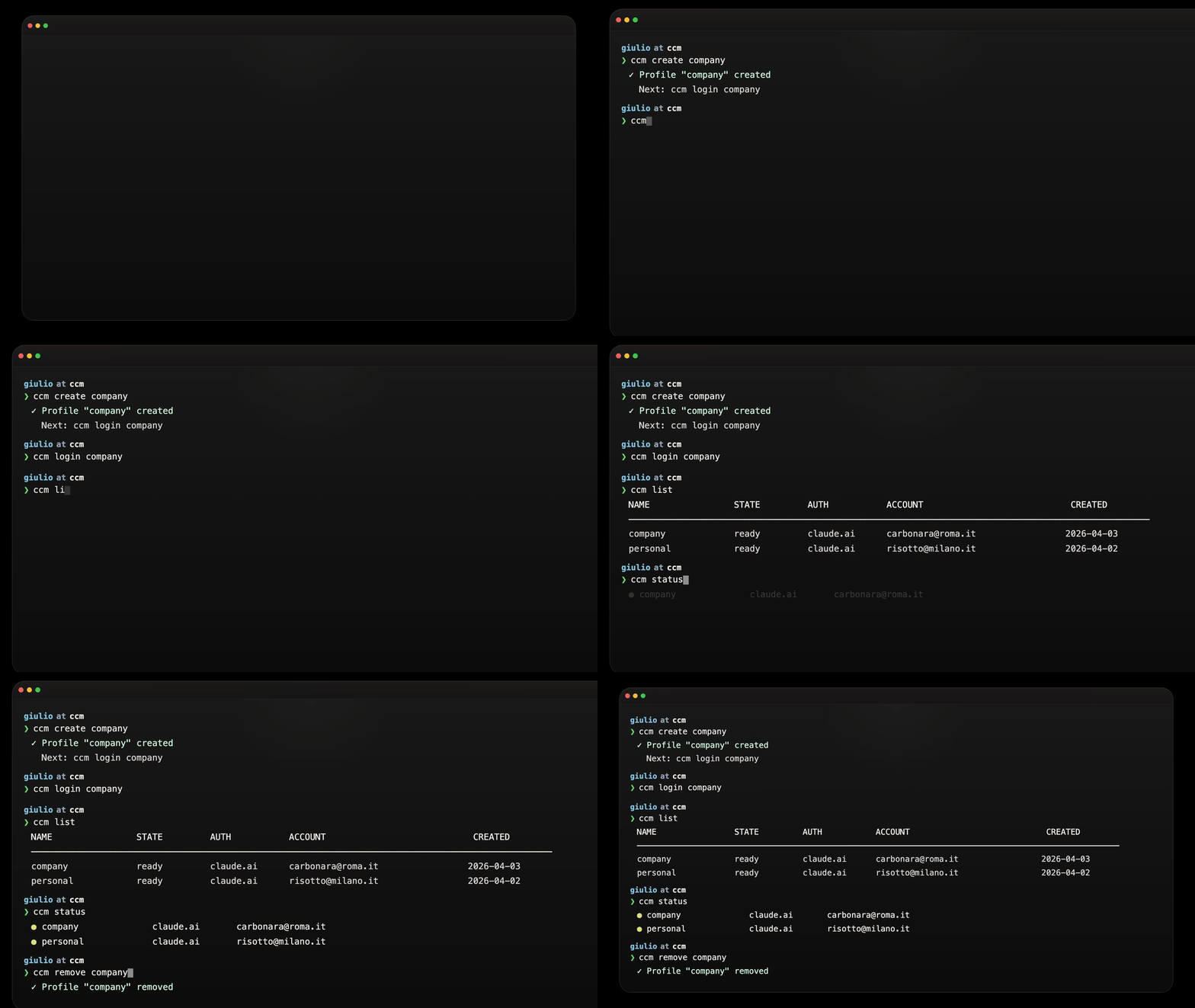
Table of Contents
- Table of Contents
- Why
- Prerequisites
- Install
- Quick Start
- Commands
- Compliance Notice
- Passing Flags and Environment Variables
- Multi-Account Login
- How It Works
- Configuration
- Privacy
- Comparison
- FAQ
- Contributing
- License
Why
Claude Code stores authentication in a single config directory. If you use multiple Anthropic accounts (personal, work, client projects), you need to log out and back in every time you switch. ccm manages isolated profile directories so you can switch instantly — or run multiple accounts simultaneously.
Prerequisites
- Node.js >= 18
- Claude Code installed and available on your
PATH
Install
npm install -g @remeic/ccm
pnpm add -g @remeic/ccm
yarn global add @remeic/ccm
bun add -g @remeic/ccm
brew install remeic/tap/ccm
Homebrew core already ships an unrelated ccm formula, so install this one with the fully qualified tap name.
npx @remeic/ccm <command>
pnpm dlx @remeic/ccm <command>
yarn dlx @remeic/ccm <command>
bunx @remeic/ccm <command>
The installed command remains ccm.
Quick Start
$ ccm create work
✓ Profile "work" created
! Compliance notice
  ccm isolates profiles but does not expand Anthropic usage rights.
  Use each Claude account with one person and one active terminal session.
  Do not share credentials or API keys across users or parallel operators.
  Details: ccm compliance
  Next: ccm login work

$ ccm login work
# Opens Claude auth flow in browser...

$ ccm use work
# Launches Claude Code with the "work" profile
Commands
| Command | Description |
|---|---|
ccm create <name> [-l label] [-b browser] |
Create a profile. -b sets the browser for OAuth |
ccm compliance / ccm tos |
Show the compliance notice, disclaimer, and official sources |
ccm list |
List all profiles with auth status, including drifted entries |
ccm use <name> [-- args] |
Launch Claude Code. Args after -- are passed to Claude |
ccm login <name> [--console] [-b browser] [--url-only] |
Authenticate a profile |
ccm status [name] |
Show auth status and storage state for one or all profiles |
ccm rename <old-name> <new-name> |
Rename a profile (config, directory, and browser wrapper) |
ccm remove <name> [-f] |
Remove a profile. -f skips confirmation |
ccm run <name> -p <prompt> |
Run a prompt non-interactively |
Compliance Notice
Every successful ccm create prints a short compliance warning. Users can re-open the full text at any time with:
ccm compliance
ccm tos
The notice is intentionally conservative:
ccmis a profile-isolation tool, not a license-expansion tool.- This project treats each Claude account as single-user and single-session.
- Shared credentials, shared operators, and parallel use of the same account are out of scope.
- If a team needs parallel access, they should use separate seats/accounts or API-key-based access under applicable Anthropic commercial terms.
- The notice is compliance guidance, not legal advice. Users remain responsible for reviewing Anthropic terms for their exact workflow.
Passing Flags and Environment Variables
Everything after -- in ccm use is forwarded to claude. Env vars from your shell are inherited.
# Pass flags
ccm use work -- --dangerously-skip-permissions

# Env vars + flags
CLAUDE_CODE_EXPERIMENTAL_AGENT_TEAMS=1 ccm use work -- --dangerously-skip-permissions

# Non-interactive with env vars
CLAUDE_CODE_EXPERIMENTAL_AGENT_TEAMS=1 ccm run work -p "explain this codebase"
For combos you use often, set up shell aliases:
# ~/.zshrc or ~/.bashrc
alias cwork='CLAUDE_CODE_EXPERIMENTAL_AGENT_TEAMS=1 ccm use work -- --dangerously-skip-permissions'
alias cpersonal='ccm use personal -- --dangerously-skip-permissions'
Multi-Account Login
Each profile has isolated auth. Claude Code manages credentials in macOS Keychain; ccm stores nothing.
ccm login launches the interactive Claude TUI which supports both auto-redirect (localhost callback) and manual code paste.
Different Browser per Profile
# Specify browser for this login
ccm login work --browser firefox

# Persist browser in the profile
ccm create work --browser "/Applications/Google Chrome.app/Contents/MacOS/Google Chrome"
ccm login work  # always opens Chrome

# Chrome with a specific profile directory
ccm create client --browser "/Applications/Google Chrome.app/Contents/MacOS/Google Chrome --profile-directory=Profile\ 2"
URL-Only Mode
ccm login work --url-only
Suppresses auto-opening a browser. Claude prints the auth URL — copy it, open in whichever browser you want. After ~3 seconds the TUI shows "Paste code here if prompted >" where you paste the code from the browser.
API Key Auth
ccm login work --console
How It Works
Architecture Overview
ccm stores all data under ~/.ccm/:
~/.ccm/
├── config.json              # Profile metadata (name, label, createdAt)
├── browsers/                # Browser wrapper scripts (when browser has args)
└── profiles/
    ├── work/                # Isolated Claude config directory
    └── personal/            # Isolated Claude config directory
Each profile directory acts as a standalone Claude Code config directory. A central config.json tracks metadata. Runtime dependencies are Commander.js for CLI parsing and Zod for schema validation and type inference; everything else uses Node.js built-ins.
Source code follows a clean separation between library logic and CLI wiring:
src/
├── index.ts                 # Entry point — registers all commands
├── types.ts                 # Zod schemas and inferred TypeScript types
├── lib/
│   ├── constants.ts         # Path constants (~/.ccm, profiles dir, config file)
│   ├── config.ts            # Config file I/O with atomic writes
│   ├── profiles.ts          # Profile directory management and validation
│   ├── profile-store.ts     # Reconciled config/filesystem profile view
│   ├── claude.ts            # Claude binary discovery, spawning, auth status
│   ├── compliance.ts        # Centralized compliance notice text and official sources
│   └── browsers.ts          # Browser wrapper generation and validation
└── commands/
    ├── compliance.ts        # Dedicated compliance/TOS command
    ├── create.ts            # Create profile (with rollback on failure)
    ├── list.ts              # List profiles with auth status and drift state
    ├── login.ts             # Authenticate via Claude TUI or --console
    ├── use.ts               # Launch Claude with profile config dir
    ├── status.ts            # Show auth status and drift state
    ├── rename.ts            # Rename profile with atomic rollback
    ├── remove.ts            # Remove profile with staged rollback
    └── run.ts               # Run prompt with specific profile
Profile Isolation
Claude Code reads auth tokens, settings, and project data from whatever directory CLAUDE_CONFIG_DIR points to. ccm exploits this by creating a separate directory per profile and setting this environment variable when spawning Claude:
spawn(claudeBinary, args, {
  env: { ...process.env, CLAUDE_CONFIG_DIR: profileDir },
  stdio: 'inherit',
})
No symlinks, no file copying, no modification of Claude's own config directory. Profiles are fully independent — logging in with one profile does not affect another. You can run multiple profiles simultaneously in different terminals.
Profile Lifecycle
When you create a profile, ccm validates the name, creates the directory, creates a browser wrapper if needed, and writes metadata to config.json. If the config write fails, any partially created on-disk state is rolled back.
flowchart TD
    A["ccm create <name> [-l label]"] --> B{"Validate name
    (a-z, 0-9, -, _; max 64 chars)"}
    B -->|Invalid| ERR1["Exit with error"]
    B -->|Valid| C["Create directory
    ~/.ccm/profiles/<name>/"]
    C -->|Already exists| ERR2["Exit with error"]
    C -->|Created| D{"Write metadata
    to config.json"}
    D -->|Success| E["Profile ready
    ✓ Next: ccm login <name>"]
    D -->|Failure| F["Rollback: remove
    directory and wrapper"]
    F --> ERR3["Exit with error"]
Profile names must match [a-zA-Z0-9_-]+ and cannot exceed 64 characters.
ccm list and ccm status reconcile config.json with ~/.ccm/profiles/ instead of trusting just one source. Each profile is surfaced with one of these states:
ready: config entry and profile directory both existorphaned: directory exists but metadata is missing fromconfig.jsonconfig-only: metadata exists but the profile directory is missing
Launching Claude
Both ccm use and ccm run resolve the profile directory, locate the Claude binary, and spawn it with the isolated config.
flowchart TD
    A["ccm use <name> [-- args]
    ccm run <name> -p <prompt>"] --> B{"Profile
    exists?"}
    B -->|No| ERR["Exit with error"]
    B -->|Yes| C["Resolve profile directory
    ~/.ccm/profiles/<name>/"]
    C --> D["Find Claude binary
    (CLAUDE_BIN or PATH)"]
    D --> E["Spawn claude with
    CLAUDE_CONFIG_DIR=profile_dir"]
    E --> F["Inherit stdio
    Forward exit code"]
use launches an interactive Claude session. Any args after -- are passed through directly. run sends a prompt non-interactively via -p.
Authentication
Login delegates entirely to Claude's own auth flow. OAuth launches the interactive Claude TUI directly; --console uses claude auth login --console. Status checks use claude auth status --json with a 10-second timeout.
sequenceDiagram
    participant User
    participant ccm
    participant Claude

    User->>ccm: ccm login work
    ccm->>ccm: Verify profile exists
    ccm->>Claude: spawn "claude"<br/>CLAUDE_CONFIG_DIR=~/.ccm/profiles/work/
    Claude-->>User: Interactive TUI for OAuth (or --console for API key)
    Note over Claude: Auth tokens stored<br/>in profile directory

    User->>ccm: ccm status work
    ccm->>Claude: spawn "claude auth status --json"<br/>(10s timeout)
    Claude-->>ccm: JSON response
    ccm-->>User: Display: logged in, method, email, org
    Note over ccm: On timeout or error:<br/>reports "unknown" gracefully
The --console flag on login enables API key authentication instead of the browser flow.
Removing Profiles
Removal deletes the config entry, the profile directory, and any browser wrapper script. By default, it asks for confirmation.
To avoid leaving config and filesystem out of sync, removal is staged: ccm temporarily renames on-disk assets, updates config.json, and only then finalizes deletion. If the config update fails, the staged assets are restored.
flowchart TD
    A["ccm remove <name> [-f]"] --> B{"Profile
    exists in config or filesystem?"}
    B -->|No| ERR["Exit with error"]
    B -->|Yes| C{"--force
    flag?"}
    C -->|Yes| E["Stage profile directory
    and browser wrapper"]
    C -->|No| D["Prompt: Remove profile? (y/N)"]
    D -->|N| CANCEL["Cancelled"]
    D -->|y| E
    E --> F["Remove config entry
    if present"]
    F -->|Success| G["Finalize deletion"]
    F -->|Failure| H["Restore staged assets"]
    G --> I["✓ Profile removed"]
Config Persistence
ccm uses an atomic write pattern to prevent config corruption. Data is written to a temporary file, then atomically renamed:
const tmp = `${configFile}.tmp`
writeFileSync(tmp, JSON.stringify(config, null, 2))
renameSync(tmp, configFile)  // Atomic on POSIX filesystems
If the process crashes mid-write, the original config file remains intact. The config schema:
{
  "profiles": {
    "work": {
      "name": "work",
      "label": "Work account",
      "browser": "/path/to/browser",
      "createdAt": "2025-03-15T10:30:00.000Z"
    }
  }
}
On read errors (missing file, malformed JSON, invalid structure), ccm gracefully falls back to a default empty config rather than crashing.
Claude Binary Discovery
ccm locates the Claude binary using the following strategy:
- Check the
CLAUDE_BINenvironment variable (explicit override) - Use
which claude(Unix/macOS) orwhere claude(Windows) to searchPATH - If neither succeeds, exit with a clear installation message
Configuration
| Variable | Description |
|---|---|
CLAUDE_BIN |
Override the path to the Claude binary. Useful if Claude is installed in a non-standard location |
All ccm data is stored in ~/.ccm/. This includes the config file and all profile directories.
Privacy
ccm does not collect, store, or transmit any user data. There is no telemetry, no analytics, no network calls of any kind.
Everything stays on your machine:
- Profile metadata (name, label, creation date) is stored locally in
~/.ccm/config.json - Auth tokens are managed entirely by Claude Code inside each profile directory — ccm never reads or touches them
- No outbound connections — ccm only spawns the local Claude binary, it never contacts any remote server
You can verify this yourself: the runtime dependencies are Commander.js for CLI parsing and Zod for schema validation and type inference, and the CLI still makes zero HTTP requests.
Comparison
| Without ccm | With ccm | |
|---|---|---|
| Switch accounts | claude auth logout then claude auth login |
ccm use work |
| Multiple sessions | Not possible simultaneously | Each profile runs independently |
| Config mixing risk | High — single config directory | None — full isolation |
| Setup per account | Manual every time | One-time create + login |
FAQ
Can I use two profiles at the same time?
Yes. Each profile has its own config directory. Run ccm use work in one terminal and ccm use personal in another — they are fully independent.
Does ccm modify Claude Code itself?
No. ccm only sets the CLAUDE_CONFIG_DIR environment variable when spawning Claude. It never modifies Claude's files or installation.
What happens if I delete ~/.ccm/?
All profiles and their auth tokens are lost. Claude Code itself is unaffected.
Is Windows supported?
ccm uses cross-platform binary discovery (which/where) and standard Node.js filesystem APIs. It works on macOS, Linux, and Windows.
Contributing
Homebrew Releases
Homebrew publication is handled through a dedicated tap, not homebrew/core. After npm publish, the release workflow updates Formula/ccm.rb in the tap repository.
To keep the release PR and changelog accurate, prefer Squash and merge with a Conventional Commit PR title like feat: add profile import command. release-please uses the merged commit on main, so docs: and refactor: changes are typically omitted from Node release notes while feat: and fix: become releasable entries.
Required repository configuration:
HOMEBREW_TAP_GITHUB_TOKEN: GitHub token with write access to the tap repoHOMEBREW_TAP_REPOSITORY: optional repository override, defaults toremeic/homebrew-tap
Generate the formula locally:
bun run homebrew:formula -- --sha256 <npm-tarball-sha256> --output /tmp/ccm.rb
See CONTRIBUTING.md.
License
Reviews (0)
Sign in to leave a review.
Leave a reviewNo results found