OpenPlod
Health Warn
- License — License: MIT
- Description — Repository has a description
- Active repo — Last push 0 days ago
- Low visibility — Only 7 GitHub stars
Code Fail
- process.env — Environment variable access in drizzle.config.ts
- spawnSync — Synchronous process spawning in scripts/build-sidecar.ts
- process.env — Environment variable access in scripts/build-sidecar.ts
- spawnSync — Synchronous process spawning in scripts/check-android-alignment.ts
- process.env — Environment variable access in scripts/check-android-alignment.ts
- process.env — Environment variable access in scripts/check-documents-device-ui.mjs
- network request — Outbound network request in scripts/check-documents-device-ui.mjs
- process.env — Environment variable access in scripts/check-transcript-chat-ui.mjs
- network request — Outbound network request in scripts/check-transcript-chat-ui.mjs
Permissions Pass
- Permissions — No dangerous permissions requested
No AI report is available for this listing yet.
Local-first Plaud Note Pro audio vault. Direct Bluetooth imports, Mistral/Voxtral transcription, Markdown documents, AI chat, REST API and MCP. Tauri macOS app; experimental Android.
OpenPlod
Local-first Plaud Note Pro recording vault, transcription, and Markdown workspace.
Import directly over Bluetooth. Keep your original audio. Turn recordings into structured documents and source-linked AI conversations.






Get started · Plaud connection · Android · Roadmap · API · MCP · Changelog · Sponsor · Report an issue
OpenPlod brings recording, playback, transcription, and export into one desktop-first workspace. The desktop app owns the durable audio vault on macOS, Linux, and Windows; the Android companion pairs over your private network and can extract directly from an enrolled Note Pro. Keep recordings on your Plaud, keep a copy on your computer, and work with transcripts as documents.
[!IMPORTANT]
0.6.0 is an experimental prerelease, not a plug-and-play Plaud replacement. Direct Bluetooth extraction has been verified on one authorized Plaud Note Pro. Other devices and firmware are not established. The recorder still refuses audio until this computer holds a Plaud-minted identity, so authorization is required on every platform. You can use the recording vault, microphone, file imports, transcripts, and documents without a Plaud identity.
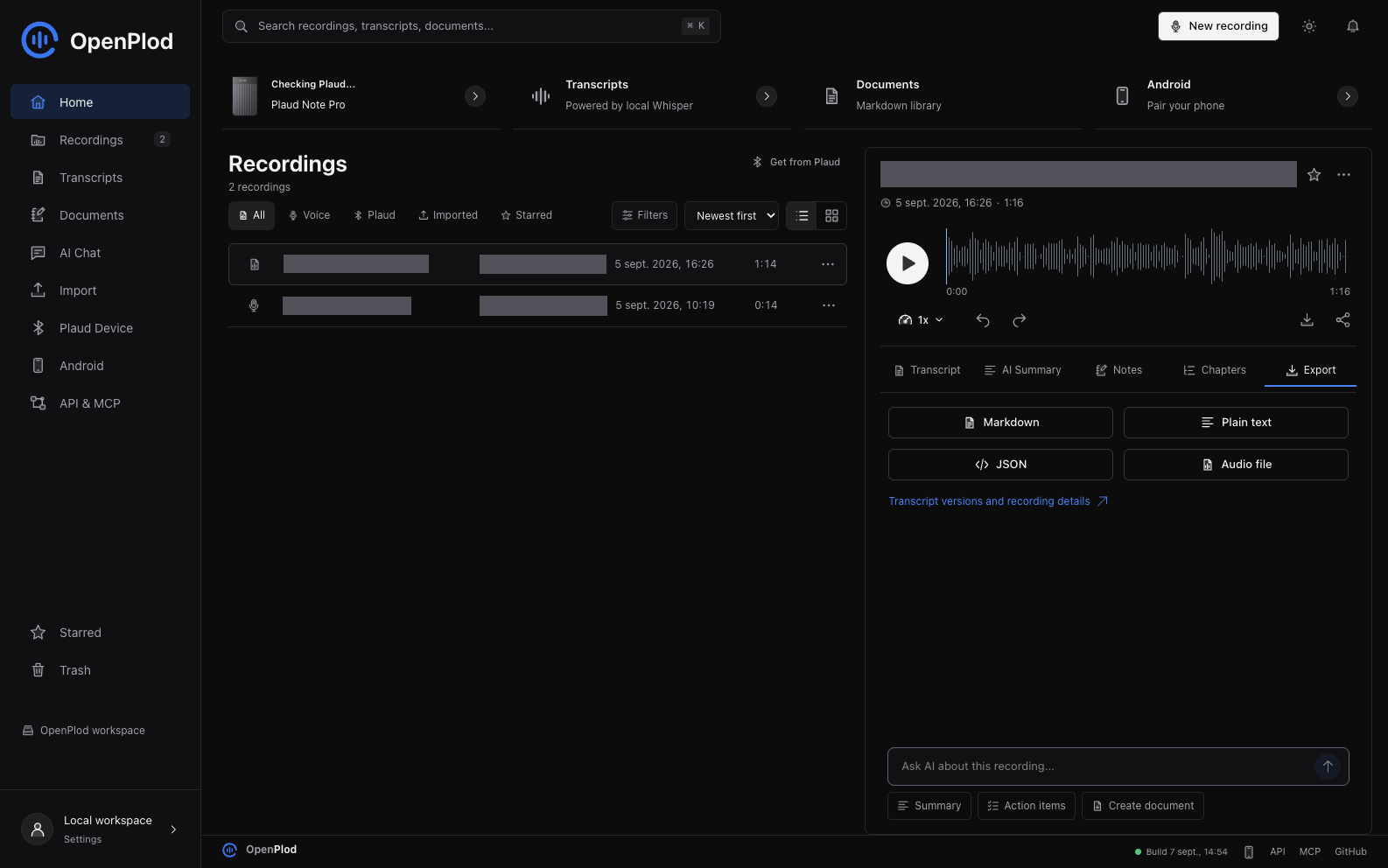
Actual application and local vault, with the Export tab selected. Private recording titles and tags are masked; no mock records or fabricated processing results are shown.
New in 0.6.0
Transcript Studio — a new Studio mode on the recording page, with five tabs:
- Edit — speaker rename/merge, segment split/merge, and find/replace with match-case, whole-word
and per-speaker scoping. Preview before applying; undo restores the previous version. - Versions — a word-level diff that labels each change as your correction, a regeneration, your
own revision, or model output replacing your edit. Promotion never discards the replaced version. - AI cleanup — punctuation, paragraphs, optional filler removal and headings, shown as a diff and
saved only when you accept. Translation is stored as its own lineage and never replaces the original. - Structure — chapters, decisions, action items and open questions, with SRT/VTT subtitles and
Markdown, CSV, JSON and print-ready exports. - Actions — save an instruction once and re-run it on any transcript.
Also: playback following with word-level highlighting where a provider supplies word timings, seven
document templates (notes, meeting minutes, interview, lecture, brief, PRD, follow-up email), and
batch transcription with per-item status, cancellation and retry-failed-only.
What it refuses to do is the point. Models are never allowed to emit a timestamp — they cite a
segment index and the time is read from your own data, so an invented citation produces no link
rather than a convincing-looking time. An unstated owner or due date stays unknown instead of being
guessed. Subtitles are refused, with the reason, when a provider returned no real timing. Nothing is
written on a first click, and a batch tells you what it will run before it runs it.
Not verified: the 0.6.0 exit gate — real-audio acceptance across multiple speakers, French and
English, silence, noise and a long recording — has not been run, and no AI path has been exercised
against a live provider. See the 0.6.0 changelog for the full list.
Previously in 0.5.1
0.5.1 was a platform patch on 0.5.0 that made Bluetooth cross-platform.
- One Bluetooth bridge on every desktop.
plaud-bridge(Rust +btleplug) is now the default on macOS, Linux, and Windows, binding CoreBluetooth, BlueZ, and WinRT under one protocol. The macOS Swift helpers remain only as an opt-in fallback (OPENPLOD_BLE_BACKEND=swift) and are never selected automatically. - Host autodetection. The Plaud page has a "This computer" panel that checks the platform, bridge, adapter power,
ffmpeg/ffprobe, and recorder authorization separately, and names the fix for the platform it is running on. Previously any one of these failing showed the same "Bluetooth scan failed". bun run doctor. The same report from a terminal, with--jsonfor bug reports. It exits non-zero when something blocks direct transfer, so it works as a setup gate.plaud-bridge doctor. A non-scanning host check that reports the backend, adapter, and power state. It succeeds even with no adapter, so the vault renders a diagnosis instead of an error.- Scan reliability. The scan probe now gets the same connect budget as the transfer path. A cold BlueZ cache made the first scan after boot report a healthy recorder as unreachable.
- Linux and Windows packaging.
.deb/.rpmbundles declare their BlueZ, D-Bus, and ffmpeg dependencies, and CI builds and lints the bridge on Linux, macOS, and Windows.
Verified on Linux with real hardware: an authorized Plaud Note Pro (protocol 20) was discovered, connected, and its GATT command service opened on Arch Linux via BlueZ. No new device models or firmware are claimed, and no end-to-end Linux audio download is claimed — that still needs a provisioned identity.
Previously in 0.5.0
- Separate transcription, summary, document, and chat provider settings. Existing Mistral keys are retained.
- OpenAI and AssemblyAI speech adapters; OpenAI, Anthropic, and local Ollama text adapters.
- Per-recording transcription provider/model selection, language detection, supported vocabulary hints, and explicit fallback.
- Local-only processing, persisted jobs, cancellation, known-remote-job resume, and generated transcript provenance.
- Shared reviewed Markdown generation and cited chat, with provider-specific consent labels.
Experimental, not production-accepted: new cloud providers have contract tests but no live acceptance with owner credentials; Ollama was not running on the test Mac. Spending controls, automatic long-audio chunking, complete per-model language catalogs, and production Android acceptance remain unfinished. Large OpenAI files are rejected before upload, not silently truncated. See 0.5 implementation status and the 0.5.0 prerelease.
Plaud compatibility has not expanded: direct extraction was verified only on the documented authorized Note Pro setup. Plaud Note, NotePin, other models, and untested firmware are unverified, not universally supported.
Previously in 0.4.1
- Transcript workspace: compact list and Markdown reader, export menus, editing links, and Mistral document creation.
- AI Chat: collapsible source/history controls, selected-source chips, prompt shortcuts, answer copying, and a cleaner composer with explicit cloud consent.
- Android connections: a dedicated page with a private pairing QR that stays hidden until requested, vault reachability checks, and confirmed unpairing.
- Navigation and reliability: small-screen transcript Back navigation, guarded asynchronous responses, and real-library regression checks.
- Road to 1.0: a phased feature roadmap with additional AI-provider targets and measurable release gates. Provider adapters were added subsequently in the experimental 0.5.0 release.
See the 0.4.1 changelog for validation and limitations.
Previously in 0.4.0
- A consistent workspace: redesigned Recordings, Documents, and Plaud Device pages; original SVG icons; compact toolbars; light/dark themes.
- AI with selected context: choose recordings, ask Mistral questions, follow source references, and export the conversation as Markdown.
- Better audio workflows: reliable loading, playback speed, bookmarks, segment corrections, and tags from a recording's right-click menu.
- A document editor: Markdown formatting, a heading outline, transcript provenance, revision history, folders, and export controls.
- Direct-device improvements: opt-in automatic import, interrupted Bluetooth transfer checkpoints, and an SDK-free Android adapter in the source tree.
- Verifiable Mac updates: a visible build date and an installer that archives duplicate bundles instead of leaving several launchable copies.
See the changelog for validation and remaining limitations.
Road to 1.0.0
The 1.0.0 roadmap expands OpenPlod into a multi-provider transcript and knowledge workspace while keeping original audio safe. The 0.5.0 prerelease delivers an initial implementation with acceptance gates still open; later milestones remain planned:
- 0.5: OpenAI and AssemblyAI speech-to-text, stronger Mistral/Deepgram/local Whisper controls, and separate cloud/local AI choices for transcript analysis.
- 0.6: Transcript Studio with reviewed AI cleanup, translation, version comparison, chapters, reusable document templates, and subtitle exports.
- 0.7: Linked Markdown knowledge, managed Obsidian export, richer source-linked chat, and expanded API/MCP automation.
- 0.8: Resumable Android uploads, offline synchronization, pairing management, and validated direct-device recovery.
- 0.9 -> 1.0: Fresh-owner Plaud onboarding, backup/restore, privacy hardening, performance validation, and signed releases.
Additional transcript-analysis targets include OpenAI, Anthropic, and local Ollama; speech-to-text and text analysis remain separate capabilities. New providers require explicit configuration, consent, and real-data validation. See the provider plan and release gates.
Download
| Platform | Package | Notes |
|---|---|---|
| macOS Apple Silicon | OpenPlod 0.5.0 ZIP | Experimental. Ad-hoc signed, not notarized. Requires external tools for direct Plaud extraction. |
| Android ARM64 | Build instructions | Current source uses a native, SDK-free direct Bluetooth adapter. Development build only; no new public APK release yet. |
| Source | Tagged source and release notes | Includes frontend, backend, native adapters, API, MCP, and tests. |
Download SHA256SUMS.txt from the same release and verify the ZIP with shasum -a 256 -c SHA256SUMS.txt. Extract the archive, move OpenPlod.app to Applications, and open it. macOS may require explicit approval in Privacy & Security because the build is not notarized. Verify the source and checksum before approving it; do not disable Gatekeeper system-wide.
Upgrade safely: quit OpenPlod, back up the full vault, and replace only the application bundle. Do not delete its Application Support directory. Android development updates use an in-place install with the same application ID and signing key; uninstalling first can erase phone-local data.
From Audio to a Document
- Capture or import. Record in OpenPlod, import an audio file, transfer from the paired phone, or use Get from Plaud with an authorized Note Pro.
- Keep a durable copy. OpenPlod stores the audio in the desktop vault before acknowledging a mobile transfer. Direct Plaud imports retain the source session on the device.
- Transcribe. Select a speech provider in Settings or the recording's transcription dialog. Mistral, local whisper.cpp, and Deepgram are joined by experimental OpenAI and AssemblyAI adapters. Processing failure does not delete the recording.
- Create a document. Open a transcript, select Create document, choose structured notes, meeting minutes, or a project brief, and add optional instructions.
- Review and organize. Your selected document provider returns Markdown for review. Saving creates an independent document with source references; move it into a folder, edit it, or restore a prior revision.
- Export or connect. Download Markdown/JSON, send a saved document to a configured destination, or let a trusted MCP client read it.
The source transcript, generated document, and original audio are separate resources. Editing the document does not rewrite the source recording.
What You Can Do
- Get recordings from Plaud. Open Get from Plaud in Library or New Recording, connect, select recordings, and import them. Filter New/Saved, sort by size, cancel the remaining batch, retry, restore a saved item from Trash, or open it in the library.
- Keep your audio. Import files, capture microphone audio, or receive recordings from the paired mobile app. The vault tracks stable recording IDs, content fingerprints, and source provenance.
- Work in Markdown. Browse the Transcripts tab, read and edit documents, inspect generated and manual versions, and export Markdown, plain text, or JSON. Reprocessing adds a generated version without silently replacing a manual edit.
- Organize your notes. Create nested folders in Notes, import Markdown files, edit/preview documents, star notes, restore history, and recover notes from Trash. Use Create document on a transcript to generate structured notes, meeting minutes, or a project brief with your selected document provider, review the Markdown, and save it with source provenance.
- Connect your tools. Use the versioned REST API and read-only-by-default MCP server. Send saved documents to explicitly configured webhook destinations, or export/share Markdown using the native platform controls.
- Listen and organize. Play and seek audio, rename recordings, edit metadata, tags, context, and notes, and use Trash to restore deleted items during the 30-day retention period.
- Choose processing. Configure speech and text providers separately, with explicit fallback and local-only options. See provider support and limits. Optional OpenWhistle forwarding is blocked in local-only mode.
- Use the same workspace on Android. QR pairing, microphone capture, audio share/import, transcript views, and the shared Plaud import dialog are included. Mobile transfers retain local audio until the desktop acknowledges storage.
The shared React interface uses shadcn-style Radix controls, original custom SVG icons, light/dark themes, accessible dialogs, keyboard navigation, a real audio timeline, and reduced-motion support. Recordings, Transcripts, and Documents are separate workspaces rather than competing status tabs.
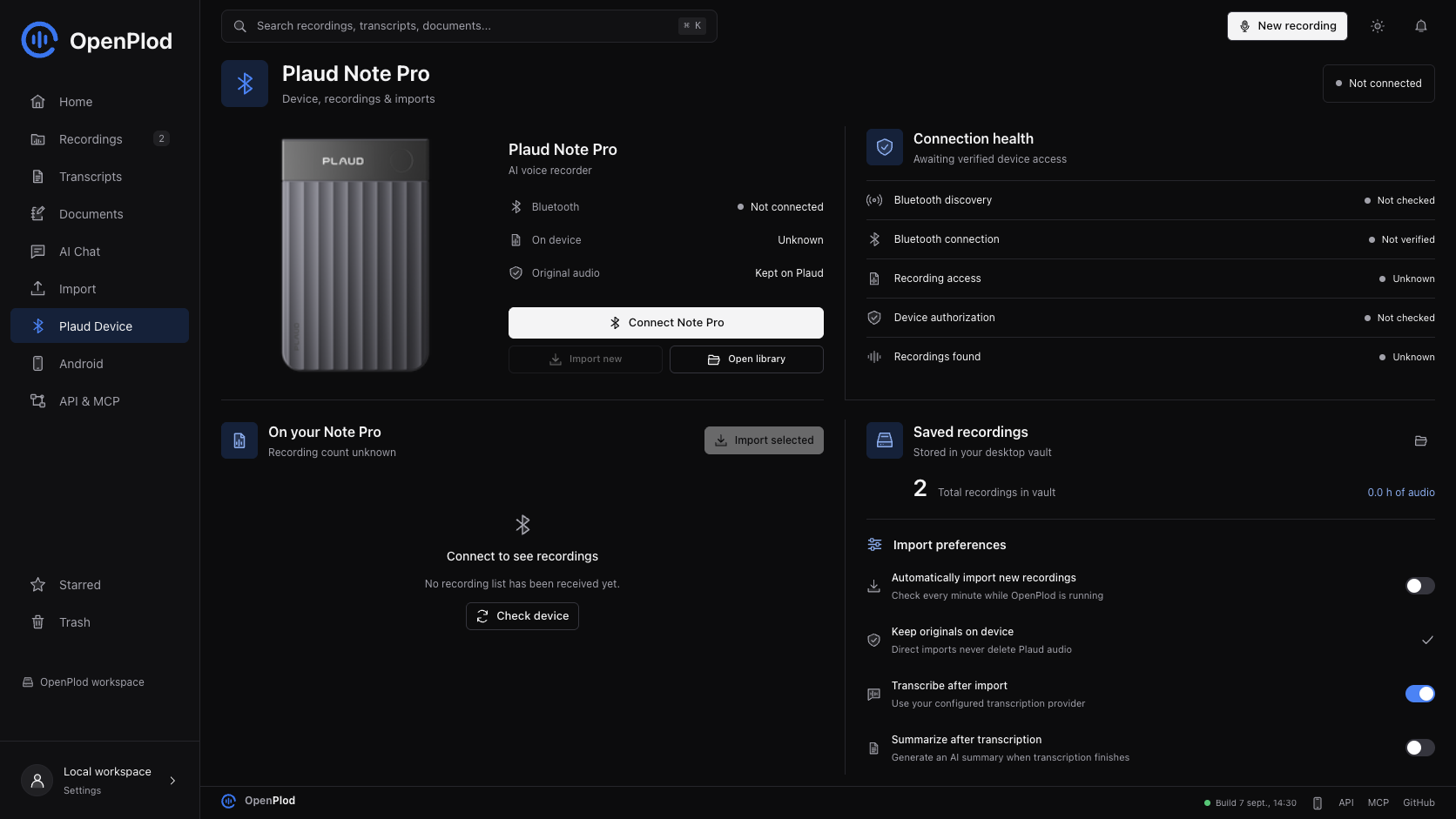
Real local-vault capture. Bluetooth was not connected during this UI check, so device counts are shown as unknown, not invented.
Current Support
| Capability | Status in 0.5.0 (historical hardware evidence unless noted) |
|---|---|
| macOS desktop vault | Built and tested on Apple Silicon |
| Linux desktop vault | Builds and runs on Arch/Omarchy (Hyprland); BLE discovery and connection verified against a real Note Pro over BlueZ |
| Mac / Linux -> Note Pro Bluetooth download | Real recording listed, downloaded, decoded, imported, and played on macOS; the same bridge transport runs on Linux |
| Account-free initial authorization | Not verified; the successful test used existing account authorization for device keys |
| Android -> Note Pro | Direct encrypted Bluetooth listing, download, playable Opus, and source retention verified on one authorized Note Pro |
| Android device authorization | One-time encrypted enrollment approved on the already-authorized Mac; subsequent extraction works without the Mac |
| Android native-library alignment | APK ZIP and ARM64 libraries pass 16 KB alignment checks; runtime on a 16 KB device still unverified |
| Windows desktop vault | The bridge builds for WinRT, but extraction is not verified on hardware |
| iOS direct extraction | Not supported; only the macOS, Linux, and Android clients talk to the device directly |
| Signed store-ready distribution | Not available; Mac ZIP is ad-hoc signed and not notarized |
Get Started
Build the Mac App
Install Bun, Rust, Apple's Xcode Command Line Tools, and the Tauri macOS prerequisites. Direct extraction also needs ffmpeg and ffprobe available to the app process; these are not bundled. Since 0.5.1 the bundled plaud-bridge binary handles CoreBluetooth, so swift is no longer required at runtime.
xcode-select --install
brew install ffmpeg

git clone https://github.com/RemiPelloux/OpenPlod.git
cd OpenPlod
bun install --frozen-lockfile
bun install --cwd web --frozen-lockfile
bun run install:mac --launch
Quit OpenPlod before updating. The installer builds and verifies the app, replaces /Applications/OpenPlod.app, and archives generated duplicate bundles so macOS has one launch target. Recoverable ZIP backups and their manifest are kept in ~/Library/Application Support/OpenPlod-install-archives/; recordings in the vault are not modified. The sidebar and Settings > About OpenPlod show the build date. This build is ad-hoc signed, not notarized. Grant Bluetooth access when macOS asks; microphone capture needs its own permission.
For a build without installation, use bun run tauri:build --bundles app. To install that build without rebuilding, use bun run install:mac --no-build --launch.
The native app starts its own Bun service on port 3487. Do not run a second backend on that port at the same time.
Build the Linux App
The desktop vault and its Bluetooth bridge build on Linux. Install Bun, Rust, the Tauri Linux prerequisites (webkit2gtk-4.1, javascriptcoregtk-4.1, libsoup-3.0, gtk+-3.0, librsvg), plus ffmpeg, ffprobe, bluez, and dbus.
git clone https://github.com/RemiPelloux/OpenPlod.git
cd OpenPlod
bun install --frozen-lockfile
bun install --cwd web --frozen-lockfile
bun run tauri build --no-bundle
./src-tauri/target/release/openplod
bun run build:sidecar compiles both the Bun service and the cross-platform plaud-bridge (Rust + btleplug) into src-tauri/binaries/. At runtime the app points the service at the bridge with OPENPLOD_BLE_BRIDGE; the same binary is used on macOS and Windows. Bluetooth goes through BlueZ, so the user must be able to reach the system bus (a normal desktop session already can).
Check Your Setup
Direct transfer needs five separate things to be true. bun run doctor checks each one and names the fix for your platform:
bun run doctor          # readable report; exits non-zero when something blocks transfer
bun run doctor --json   # same report as JSON, for bug reports
bun run device:doctor   # the bridge's own host check, without the vault
bun run device:scan     # scan for an advertising recorder
OpenPlod host check — linux x64 (7.2.3-arch1-3)
Bluetooth backend: bluez · bridge: native
Adapter: hci0 (usb:v1D6Bp0246d0557)

  ok  Desktop platform: linux x64 — Bluetooth via bluez.
  ok  Bluetooth bridge: plaud-bridge found at src-tauri/plaud-bridge/target/release/plaud-bridge.
  ok  Bluetooth adapter: Bluetooth adapter is available and powered on.
  ok  Audio tools: ffmpeg and ffprobe are installed.
 !!  Recorder authorization: No recorder identity at data/plaud-device.json.
       → Authorize this recorder with a Plaud sign-in token on the Plaud connection page.
The desktop app shows the same report in the This computer panel on the Plaud page, and GET /api/plaud/environment returns it as JSON.
Get Recordings From Plaud
- Authorize the Note Pro for this computer. The current adapter reads a private
plaud-device.jsonfrom the vault directory; see device authorization. - Wake the Plaud and keep it near your computer. Disconnect other clients that may be holding its Bluetooth connection.
- Open Library or New Recording, then Get from Plaud.
- Select Connect to read the actual device list. A failed or unavailable query is an error, not a claim that there are zero recordings.
- Select completed recordings and choose Import. Progress counts completed recordings, not transferred bytes.
- Open the saved recording to play it, edit its details, transcribe it, or export a document.
Audio travels directly from the device over Bluetooth. The verified extraction did not download audio from Plaud's cloud or transfer it through a phone. The adapter checks transfer framing, size, authenticated decryption, decoded Ogg integrity, and playable duration. It preserves device bytes and decoded audio alongside an M4A playback copy, then checks that the source session is still listed on the Plaud. The device's transfer-tail checksum is retained but its algorithm is not yet validated.
The extraction command set excludes force-clear, ownership reset, and device-file deletion. The folder-import setting for deleting source files is separate from direct Bluetooth imports.
Device Authorization
The successful hardware test used the device owner's existing binding credential and signed identity. Bluetooth discovery alone does not grant recording access.
The private identity contains the peripheral identifier, device serial, binding token, signed authorization, and RSA key pair. Its default location is platform-specific:
~/Library/Application Support/com.openplod.vault/plaud-device.json   # macOS
~/.local/share/com.openplod.vault/plaud-device.json                  # Linux
%APPDATA%/com.openplod.vault/plaud-device.json                       # Windows
The file must be private to the current user with permissions 0600. For a source-run backend, OPENPLOD_DEVICE_IDENTITY can select an absolute path. The identity is portable: on Linux and Windows the bridge matches the recorder by its advertised Plaud service or name when the stored identifier is a CoreBluetooth UUID that does not appear in the platform's own address space. No identity, account password, embedded vendor secret, or APK is distributed in this repository. Generating a random token or using Android developer credentials does not provision this desktop identity.
Fresh-install limitation: obtaining this identity is not yet a supported in-app onboarding flow. Until that is implemented, a new user can use the recording vault and file imports but should not expect plug-and-play Plaud extraction. Do not reset or rebind a device to work around authorization errors.
Transcription and Exports
In Settings > AI providers, select speech and text providers separately, then choose Save AI. Cloud fallback is disabled by default; selecting a fallback authorizes that additional audio destination. Local only blocks cloud speech, text analysis, and OpenWhistle forwarding. In-flight cloud requests may already have been received and billed; cancel their jobs separately.
| Provider | Runs where | Setup |
|---|---|---|
| Mistral Voxtral | Mistral cloud | API key in Settings or MISTRAL_API_KEY |
| whisper.cpp | Your computer | Install whisper.cpp and configure its model; see adapter |
| Deepgram | Deepgram cloud | API key; supports speaker diarization |
| OpenAI transcription | OpenAI cloud | OPENAI_API_KEY; maximum 25 MB; experimental, live acceptance pending |
| AssemblyAI | AssemblyAI cloud | ASSEMBLYAI_API_KEY; asynchronous polling; experimental, live acceptance pending |
| Summaries/documents/chat | Selected Mistral, OpenAI, Anthropic, or local Ollama | Separate provider/model for each task; see provider setup |
Create document uses the selected document provider, optional writing instructions, and a review step before saving. Summaries, documents, and chat share one adapter layer. Legacy LLM_BASE_URL, LLM_MODEL, and LLM_API_KEY are no longer read: choose a supported analysis provider in Settings before running summaries. Cloud transcription sends audio; generation and analysis send transcript text. Neither is part of downloading audio off the Plaud.
Open a recording or the Transcripts tab to preview Markdown, edit a transcript, inspect version history, or export Markdown, text, JSON, and library audio. The selected transcript version is included in document exports. For direct Plaud imports, library audio is the M4A playback copy; byte-for-byte device originals live separately under recordings/originals/.
Android Companion
The current development source uses native Android Bluetooth GATT and the verified desktop protocol, without the proprietary Plaud SDK. A real Note Pro returned two sessions; a 6.86-second recording was downloaded, decrypted, retained locally, and played on Android. The source session remained on the device. This is evidence for the tested device/firmware, not universal compatibility.
- Keep the desktop app open and put both devices on a trusted private network.
- Open desktop Settings to display the pairing QR code.
- Scan it in the Android app. Manual address/token entry is a fallback.
- On the phone's Plaud tab, request device authorization. Compare the short code and approve it in the Mac's Devices screen. The existing owner identity is encrypted to the phone's key and stored using Android Keystore. No rebinding or reset occurs.
- Disconnect other Plaud clients, wake the Note Pro beside the phone, and select Get from Plaud. After enrollment, Bluetooth extraction and local playback do not need the Mac online. The desktop-backed library, transcripts, and AI still need the paired Mac.
Mobile-to-desktop uploads verify fingerprints and retain phone audio until durable acknowledgement. Interrupted network uploads retry the whole file; byte-offset mobile-to-vault resumption is not implemented. Direct Bluetooth downloads retain partial bytes and resume by offset. Android preserves encrypted device bytes and the decoded original separately, then creates a playback-only Ogg by selecting unchanged Opus pages from Plaud's mixed audio/metadata container.
Optional automatic import runs as a visible Android foreground service while enabled. Desktop automatic import waits for a stable session size before downloading. Both avoid already-imported source IDs and leave originals on the Plaud. Android battery restrictions and process termination can stop background monitoring; unattended restart/boot recovery remains a roadmap item.
To build Android, install JDK 17, Android SDK 36, Android NDK, and the Tauri mobile prerequisites. Configure JAVA_HOME, ANDROID_HOME, and ANDROID_NDK_HOME for your installation. The verified build used NDK 28.2.13676358.
bun run tauri android build --debug --target aarch64 --apk --ci
bun run check:android
The debug APK is produced under src-tauri/gen/android/app/build/outputs/apk/universal/debug/. Current builds do not fetch or package plaud-sdk.aar; the old fetch script remains historical tooling only. The new APK contains one ARM64 native library, with verified 16 KB ZIP and ELF alignment. Fresh-owner provisioning still requires a valid existing owner identity; do not reset device ownership as a workaround.
Recording AI and Playback
The AI tab accepts up to 12 selected recordings with saved transcripts. After explicit consent, the selected chat provider answers using only that selected context. Answers are saved with provider/model provenance, activity stages, exact-quote source references, transcript version IDs, and timestamp links where available. Open previous conversations or export answers as Markdown. Oversized context, missing credentials, invalid citations, and deleted sources produce errors instead of placeholder answers.
Recording detail includes 0.75x to 2x playback, timestamp bookmarks, and segment corrections with speaker-label editing. Corrections create a new user-edited transcript version and preserve supplied timing; generated versions remain separate. Untimed text is never presented with fabricated timestamps.
API and MCP
OpenPlod is both a local application and an automation endpoint. The backend remains the single owner of persisted documents; clients do not open the SQLite database directly.
| Interface | Use it for | Default boundary |
|---|---|---|
| REST API | Folder/document CRUD, revisions, transcript access, generation, exports, and configured delivery | Authenticated /api/v1 on the desktop service |
| MCP server | Let an assistant browse notes, folders, transcripts, and version history | Local stdio, read-only by default |
| MCP write opt-in | Create/edit/move notes and folders; confirmed Trash and restore | OPENPLOD_MCP_WRITE=1; no purge, device reset, or external delivery tools |
| Webhook destinations | Send saved Markdown into your own automation receiver | Owner-configured HTTPS destinations and explicit confirmation |
For an MCP client installed on the same Mac, configure:
{
  "mcpServers": {
    "openplod": {
      "command": "/absolute/path/to/bun",
      "args": ["/absolute/path/to/OpenPlod/src/mcp/index.ts"],
      "env": { "OPENPLOD_URL": "http://127.0.0.1:3487" }
    }
  }
}
Keep OpenPlod running. On macOS, MCP reads the private pairing-token file automatically; do not paste that token into public configuration. Ask your assistant to find documents, compare decisions, or read a transcript. Its model provider may receive the requested text, so choose the client deliberately. See the complete MCP setup and tool list.
Data and Privacy
The native Mac vault is stored at:
~/Library/Application Support/com.openplod.vault/
  openplod.db              Recording metadata, transcripts, versions, settings
  recordings/             Library audio
    originals/            Direct-import originals and provenance
  pairing-token           Private desktop/mobile pairing credential
  plaud-device.json       Private desktop device identity, when provisioned
- Back up the entire vault, not just the app bundle. Quit OpenPlod before making a filesystem copy so SQLite and audio are consistent. Never delete the vault to upgrade the app.
- Local storage is not encrypted by OpenPlod. Protect your OS account, use FileVault where appropriate, and secure backups. API keys are stored locally; Settings returns only whether a key is configured.
- Keep the service private. The native app listens on the LAN for pairing and protects
/apiwith its token. LAN HTTP is not end-to-end encrypted. Do not port-forward it or expose it to the public internet; use a trusted network or a separately secured tunnel. - Trash is not device deletion. Library records can be restored for 30 days. Expired-trash cleanup runs when the backend starts. Original-sidecar cleanup and cross-peer deletion propagation still need hardening; do not treat purge as certified secure erasure.
- Do not publish private artifacts. Credentials, pairing QR codes, vault databases, recordings, SDK binaries, APK snapshots, and local investigation notes are excluded from the source publication.
Development
The shared frontend is React, TypeScript, Tailwind CSS, Radix UI, and an original SVG icon set. Tauri supplies the native shell. The backend uses Bun, Hono, Drizzle, and SQLite. The Mac transport uses Swift/CoreBluetooth, native RSA, and ChaCha20-Poly1305 session encryption.
web/src/                 Shared recording, transcript, settings, and import UI
src/api/                 Recording, mobile, Plaud, and transcript endpoints
src/library/             Durable imports, provenance, versions, forwarding
src/sync/                Bluetooth protocol, transport, audio, folder adapters
src/transcription/       Mistral, Whisper, Deepgram, OpenAI, AssemblyAI adapters
src/ai/                  Shared settings, capabilities, and text adapters
src-tauri/               Native shell and platform integrations
scripts/                 Swift bridge, SDK fetch, build and alignment checks
For browser development, quit the native app first, then use two terminals:
# Terminal 1: backend at http://127.0.0.1:3487
bun run dev

# Terminal 2: UI at http://127.0.0.1:5173, proxying /api to the backend
bun run dev:web
The source-run backend defaults to loopback and ./data; unlike the native app, it does not automatically configure a pairing token. Set OPENPLOD_PAIRING_TOKEN before binding it to other interfaces. Use .env.example as a reference and keep actual credentials in an ignored .env file. For native development, run bun run tauri:dev instead of the two-terminal setup.
Docker is available for the web vault and file-based imports via docker compose up --build at http://localhost:3456. Docker on macOS does not provide the native CoreBluetooth extraction route. Its default published port is not a public deployment configuration; restrict access before running it on a shared host.
Quality Checks
bun test
bun run typecheck
bun run --cwd web lint
bun run build
bun run tauri:build --bundles app

# After an Android APK build, with ANDROID_HOME configured:
bun run check:android
The 0.5.0 validation run passed 122 Bun tests (1,076 assertions), backend type checking, frontend lint/build, the macOS build, and the Android ARM64 debug build with 16 KB APK/ELF alignment checks. Tests cover protocol framing/encryption/replay handling, transfer checkpoints, authorization envelopes, recording retention, transcript versions, provider contracts/privacy/recovery, AI source boundaries, organizer revisions, MCP access controls, custom SVGs, and audio-loading failures. Fixtures and test doubles are confined to automated tests; production does not fabricate recordings or AI output.
Browser checks use an isolated snapshot of a real local library, not mock API responses. The 0.5.0 checks covered playback, painted-waveform checks, exports, tags, navigation, transcript/chat flows at 320-1440 px, and provider settings persistence, local-only controls, and per-recording consent at 320/390/1440 px. Earlier recording/document checks also covered formatting, outline navigation, and reduced motion up to 1672 px. Native launch and physical-phone installation were not repeated for 0.5.0. No real webhook destination was contacted. UI checks are not device-transfer or provider-generation acceptance.
Earlier live Mistral acceptance used an actual Plaud transcript: generation events, structured French Markdown preview, explicit save, provider/model provenance, and unchanged source transcript passed. Earlier Android hardware acceptance verified direct extraction on one enrolled Note Pro; its SDK-free build passed ZIP/ELF alignment checks. These are historical observations, not fresh provider/hardware acceptance for 0.5.0. New-provider live acceptance remains pending. No Android APK is distributed in this release.
Hardware evidence is separate: one approximately 76-second Note Pro recording was downloaded directly on Mac, decoded, imported, and played, and its source session was still present. This does not establish compatibility across devices or replace interrupted-transfer and fresh-install acceptance. The final installed-phone touch-flow check remains incomplete. See ROADMAP.md for outstanding gates.
Troubleshooting
| Symptom | Check |
|---|---|
| Plaud is visible but recordings are unavailable | Presence is not authorization. Confirm the private identity, Bluetooth permission, and that another client is not holding the device. |
| "Authorize this Note Pro on this Mac" | Desktop identity provisioning is incomplete; Android developer credentials are a different route. |
| Audio verification or conversion fails | Ensure ffmpeg and ffprobe are accessible to the app process. Finder and terminal environments may differ. Keep the source on the Plaud. |
| Phone cannot reach the vault | Keep the Mac app open, check the local address/firewall, use the same private network, and rescan the pairing QR. |
| Transcription fails | Check the selected engine and credentials. A saved recording is retained independently of processing success. |
| Startup cannot reach the local service | Check for another process on port 3487. Do not run native and development backends together. |
| Android reports a 16 KB alignment error | Rebuild current sources and run bun run check:android; older APKs used an incompatible native encoder. |
| Several OpenPlod copies or an old-looking interface | Open /Applications/OpenPlod.app and check Settings > About OpenPlod. Use bun run install:mac for source updates; it verifies the new app and archives generated duplicates. |
Contributing
Open an issue with your OS, app version, device model/firmware, reproducible steps, and redacted errors. Clearly distinguish fixtures from actual hardware tests. Do not attach passwords, device identities, private audio, pairing QR codes, or proprietary app files. Keep changes focused and run relevant checks before opening a pull request.
See CONTRIBUTING.md for the development checklist and SECURITY.md for private vulnerability reporting. The most useful contributions now are fresh-install desktop authorization, real-device transfer recovery, data-retention hardening, and physical Android acceptance. See the roadmap for concrete exit criteria.
Sponsor and Support
OpenPlod is maintained by Remi Pelloux. Sponsor the work directly through the maintainer's verified GitHub Sponsors page:
Sponsor Remi Pelloux on GitHub
Support helps fund test devices, Mac/Android compatibility work, fresh-install onboarding, and signed distribution. Sponsorship does not imply a paid feature tier or a response-time commitment. For collaboration, use the contact channels on Remi's profile. You can also help by starring the repository, documenting reproducible bugs, testing upgrades with backed-up audio, or contributing focused fixes.
FAQ
Do I need the official Plaud app to download audio? The verified desktop transfer itself runs directly over Bluetooth, without a phone relay or cloud audio download. Initial device keys still came from existing owner authorization; self-service provisioning is not implemented.
Will importing remove the recording from my Plaud? The direct extraction command set does not delete device sessions. The tested source session remained listed after import. Folder-source cleanup is a separate configurable workflow.
Is everything local? Audio retention and the organizer are local. Cloud providers receive audio or transcript text when selected. Choose Local only for Whisper.cpp transcription and local Ollama text processing. Both require separately installed local models; remote Ollama models are excluded.
Can I use Obsidian? Export Markdown and place it in your Obsidian vault. OpenPlod's folders live in SQLite; there is no automatic bidirectional Obsidian-folder sync.
Can the phone replace the Mac for Plaud extraction? Yes, for the tested authorized Note Pro, after one-time encrypted enrollment from the Mac. Audio then travels directly from Plaud to Android. The desktop vault, transcript processing, and AI workspace still use the paired Mac.
Can I expose the API publicly? Not with the default LAN configuration. Use a deliberately secured HTTPS deployment and review authentication, storage, and access controls first.
Credits and Licensing
Original OpenPlod contributions are licensed under the MIT License, including the custom SVG icon set and original brand artwork. Read LICENSING.md for the scope: dependencies, vendor photographs, and trademarks retain their own terms.
OpenPlod builds on jddavenportOpen/openplaud. Its upstream README declares MIT, but the inherited repository does not include a standalone license file. Upstream authorship and history are preserved; the new OpenPlod license does not independently resolve the missing upstream notice or relicense third-party material.
The previous experimental Android adapter referenced the Plaud developer SDK. The current direct adapter does not package that SDK. See third-party notices for historical and current dependency boundaries.
OpenPlod is an independent project, not affiliated with or endorsed by Plaud. Product names and trademarks belong to their respective owners.
Reviews (0)
Sign in to leave a review.
Leave a reviewNo results found