job-hunt-skills
Health Uyari
- License — License: MIT
- Description — Repository has a description
- Active repo — Last push 0 days ago
- Low visibility — Only 6 GitHub stars
Code Gecti
- Code scan — Scanned 12 files during light audit, no dangerous patterns found
Permissions Gecti
- Permissions — No dangerous permissions requested
Bu listing icin henuz AI raporu yok.
AI-assisted skills for a practical job search — resume tailoring, cover letters, company research, interview prep, LinkedIn, and proof assets. Installs as a Claude Code/Cowork plugin.
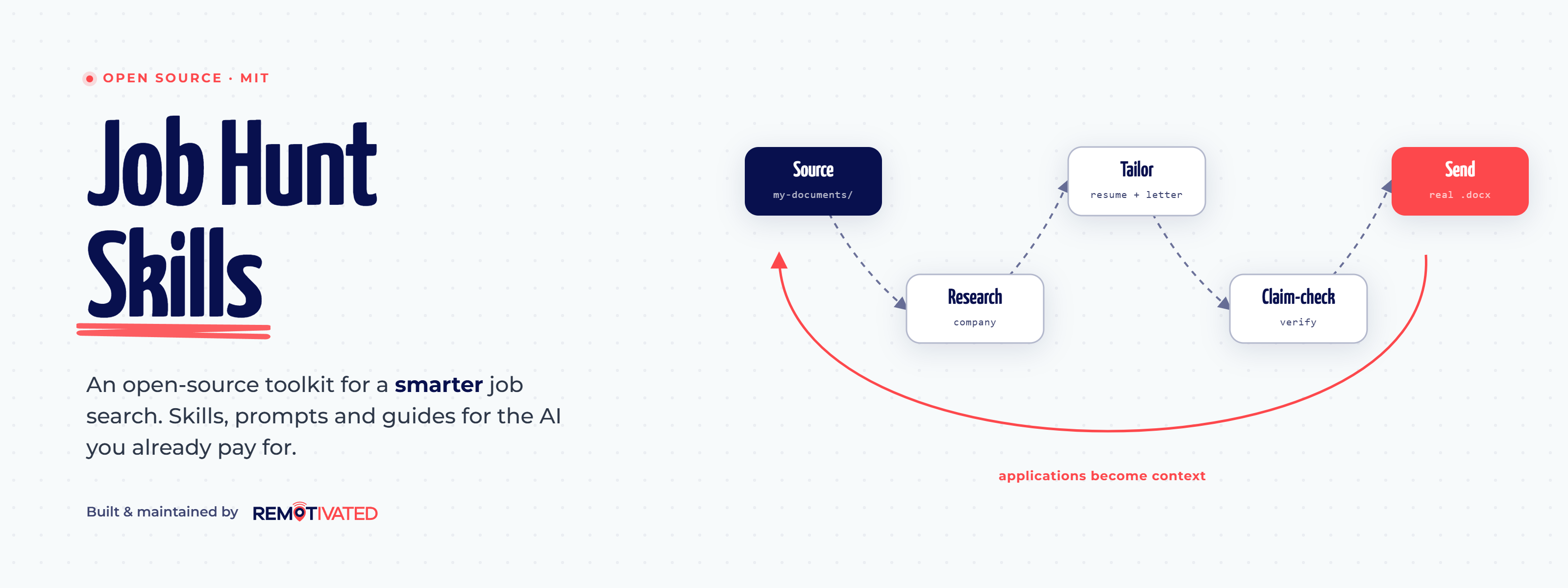
Job Hunt Skills



Practical AI-assisted skills, prompts, guides, and templates to give you an edge in your job search. Open source and free — designed to work with the AI subscription you already pay for.
Most paid "AI for job seekers" tools optimize for volume: auto-applying at scale, filling applications with LLM hallucinations and AI slop. Job Hunt Skills takes the opposite approach. It helps you turn real experience into stronger resumes, cover letters, company research, interview prep, LinkedIn copy, and proof assets — using Codex, Claude Code, Cowork, ChatGPT, Gemini, or any LLM you already have access to. Simple enough to use as a prompt library, structured enough to run as your full job search system, and strict about not inventing claims.
It also compounds. Every verified bullet, story, or proof point you confirm during one application is offered for capture into your canonical files, so each tailoring starts from richer source material than the last.
Contents
- Start Here — pick your install path
- What You Can Do
- How The Workflow Fits Together
- New To Codex, Claude Code, Cowork, Plugins, Or Skills?
- Use The Codex Plugin
- Use The Claude Code Plugin
- Use The Cowork Plugin
- Start With These Skills
- Use The Prompts
- Read The Guides
- Example Outputs
- Real Submission-Ready Files
- Repository Map
- Philosophy
- Contributing
Start Here
Choose the path that matches how you want to work.
| Path | Best for | First action |
|---|---|---|
| Codex plugin | You want guided skills in Codex CLI or the ChatGPT desktop app with local file access. | Install the plugin, open your job-search folder, then ask Help me get started. |
| Claude Code plugin | You are comfortable opening a terminal and want Claude to read and write local job-search files. | Install the plugin, then ask Help me get started. |
| Cowork plugin | You want the same guided workflows in Claude Desktop without living in the terminal. | Install the plugin in Cowork, choose a local folder, then ask Help me get started. |
| Prompt library | You want to use ChatGPT, Gemini, Claude.ai, or another LLM without plugin access. | Jump to Use The Prompts or open prompts/README.md. |
| Manual clone | You want to inspect the repo, run scripts, or use Claude Code from a local checkout. | See the clone fallback and start Claude Code from the repo folder. |
After installation, Getting Started walks through the first useful week: build one source work document, research one real company, tailor one application, and prepare for one interview.
What You Can Do
- Build resumes and CVs with an interactive interview or enhance your existing one
- Tailor per-role applications without inflating claims.
- Research companies and roles before spending serious time applying.
- Prep for interviews and track them through to offer.
- Sharpen LinkedIn headline, About, and Experience sections.
- Show your work with case studies and proof assets.
- Verify every claim before you hit send.
- Grow your canonical evidence base — verified facts and stories from each application feed back into your source files, so the next one starts ahead.
How The Workflow Fits Together
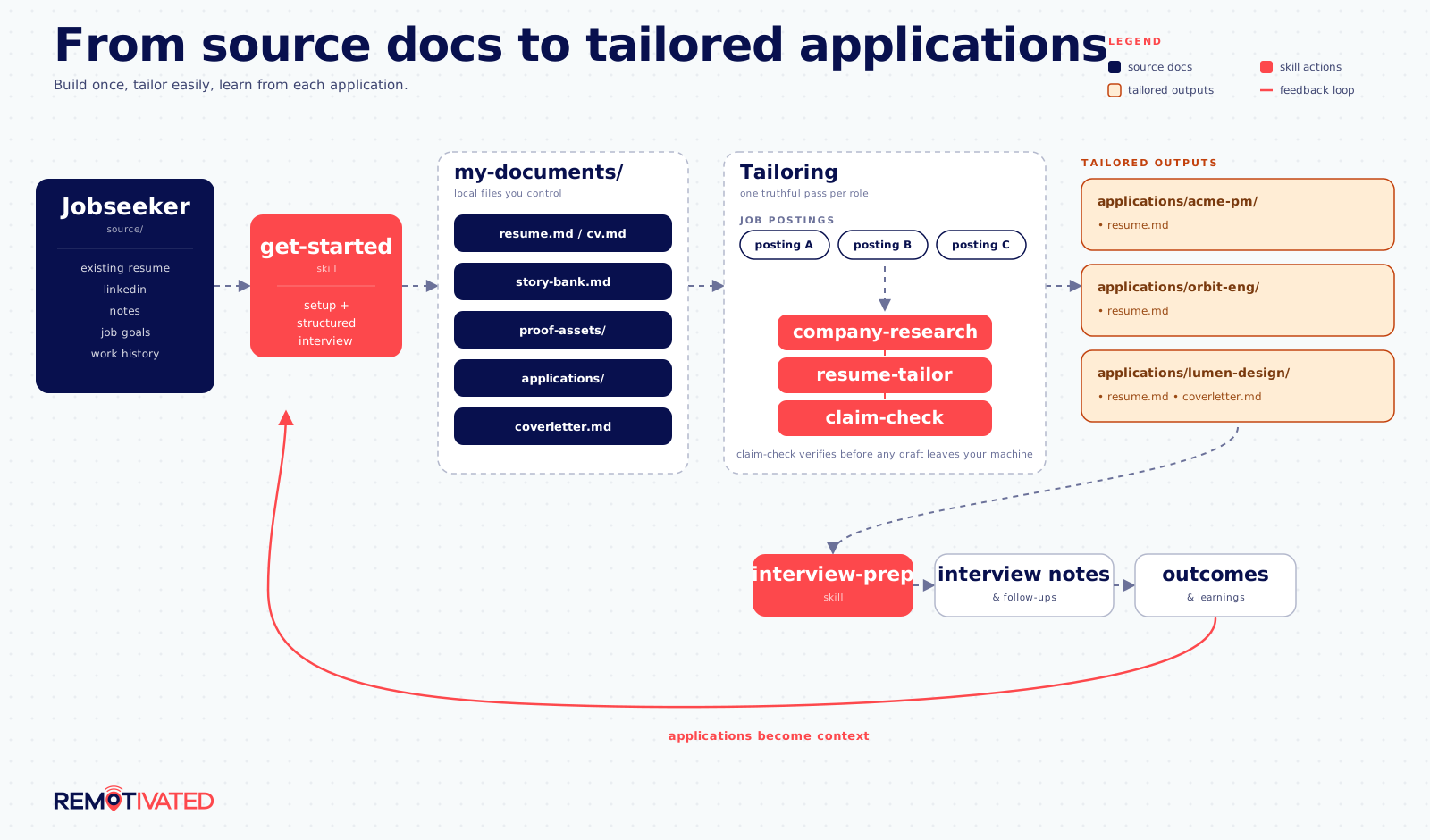
The main workflow is intentionally simple:
- Build a source resume or CV that captures the real story in depth.
- Save proof points, constraints, preferences, and applications in local files.
- Research a company before deciding whether to spend serious time applying.
- Tailor a resume and (and cover letter if required) for each role.
- Claim-check the final materials against canonical docs to keep your LLM honest.
- Prepare for interviews using the same source material, story bank, and company research.
- Track interviews, follow-ups, offers, and negotiation notes.
Everything else in the repo supports that loop.
After each tailoring run, the skills offer to capture meaningfully new facts you verified during that application into your source resume, story bank, or proof assets. The more you use it, the less work each application takes as your past resumes build the context for your future ones.
New To Codex, Claude Code, Cowork, Plugins, Or Skills?
You do not need to understand the internals to use this repo, but these terms help:
- Codex is OpenAI's coding and file-working agent, available in Codex CLI, the Codex IDE extension, and the ChatGPT desktop app.
- Claude Code is Anthropic's terminal-based agent. You open a folder, start
claude, and ask it to work with files in that folder. - Cowork is the Claude Desktop agentic workspace. It uses a graphical app instead of a terminal and can work on local files you choose to share.
- Plugins are installable bundles of agent capabilities. This plugin packages the job-search workflows in this repo.
- Agent Skills are focused workflows such as
resume-builder,company-research, andclaim-check. An agent can select one from your request, or you can invoke one explicitly.
The practical difference from a normal chat is file access. With Codex, Claude Code, or Cowork, the skills can keep your source documents, story bank, reports, and application folders together in a local workspace. With prompt-only use, you paste the relevant material yourself and manually verify the output.
Use The Codex Plugin
Use this path if you want Job Hunt Skills in Codex CLI or Codex in the ChatGPT desktop app.
Prerequisites:
- A current Codex installation with plugin support.
- A folder where you want your job-search files to live.
Add the repository marketplace and install the plugin:
codex plugin marketplace add Remotivated/job-hunt-skills
codex plugin add job-hunt-skills@remotivated
Open or cd into your chosen job-search folder before starting Codex. Then use a plain-language request:
Help me get started.
For explicit invocation, choose the installed skill from Codex's skill selector or use:
$job-hunt-skills:get-started
Codex CLI works directly from the folder you opened. In the ChatGPT desktop app, make your chosen folder available with the app's current folder/workspace control before asking a skill to save anything. Job Hunt Skills stores resumes, applications, reports, and notes under that folder's my-documents/; it does not upload them to a service operated by this repository.
If the plugin or a newly updated skill does not appear, start a new Codex session. To refresh a marketplace snapshot after an update:
codex plugin marketplace upgrade remotivated
Use The Claude Code Plugin
Use this path if you want a terminal workflow and local markdown files.
Prerequisites:
- Claude Code installed.
- A Claude plan that supports plugins and skills.
- A folder where you want your job-search workspace to live.
Start Claude Code in that folder:
claude
Then run these commands inside Claude Code:
/plugin marketplace add Remotivated/job-hunt-skills
/plugin install job-hunt-skills@remotivated
/reload-plugins
Start with a plain-language request:
Help me get started.
If you prefer explicit commands, use /job-hunt-skills:get-started. The plugin also includes quick slash commands such as /job-hunt-skills:resume-builder and /job-hunt-skills:cover-letter.
Clone fallback:
git clone https://github.com/Remotivated/job-hunt-skills.git
cd job-hunt-skills
claude
Use The Cowork Plugin
Use this path if you want the guided workflows in Claude Desktop. Cowork users on any paid plan (Pro, Max, Team, Enterprise) can install the plugin via custom upload:
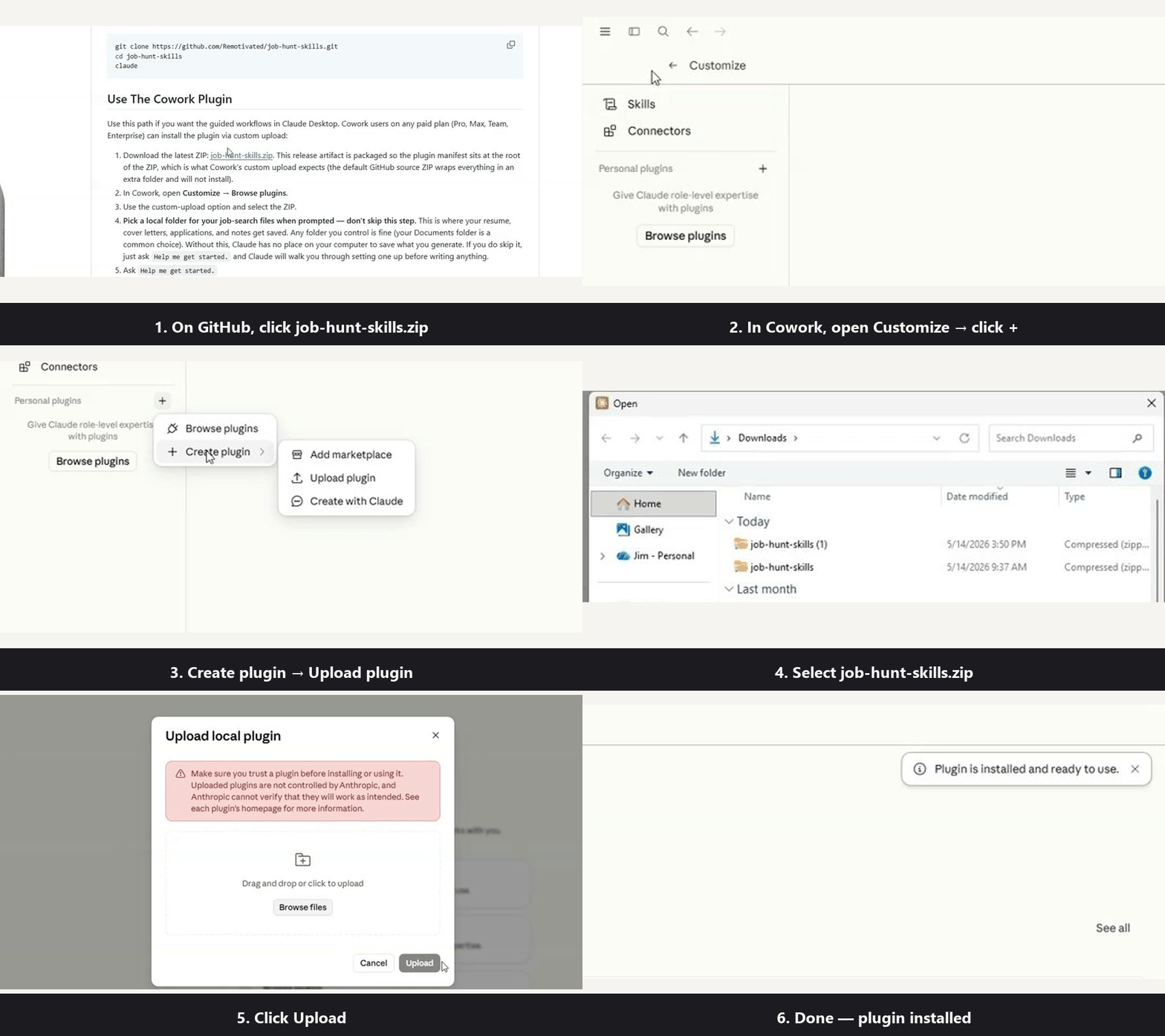
- Download the latest ZIP: job-hunt-skills.zip. This release artifact is packaged so the plugin manifest sits at the root of the ZIP, which is what Cowork's custom upload expects (the default GitHub source ZIP wraps everything in an extra folder and will not install).
- In Cowork, open Customize → Browse plugins.
- Use the custom-upload option and select the ZIP.
- Pick a local folder for your job-search files when prompted — don't skip this step. This is where your resume, cover letters, applications, and notes get saved. Any folder you control is fine (your Documents folder is a common choice). Without this, Claude has no place on your computer to save what you generate. If you do skip it, just ask
Help me get started.and Claude will walk you through setting one up before writing anything. - Ask
Help me get started.
Cowork is best when you want the agent to work through a multi-step task while keeping progress visible. Your Claude plan and Anthropic account govern model usage; this repo itself does not run a hosted service or collect your job-search files.
Start With These Skills
| Skill | Use it when... |
|---|---|
| get-started | You are new and want the fastest path to a first draft. |
| resume-builder | You want to build or update a resume/CV-format work document. |
| resume-tailor | You have a specific job posting and want targeted materials. |
| company-research | You want to decide whether a company or role is worth your time. |
| cover-letter | You only need a specific cover letter. |
Once you have traction, add interviewing to manage interview-stage notes, interview-coach for deep prep, and resume-auditor for a harder critique.
Optional Skills
| Skill | What it does |
|---|---|
| resume-auditor | Gives direct resume feedback instead of generic praise. |
| interview-coach | Builds an interview prep brief from your actual experience. |
| interviewing | Tracks interview stages, notes, and follow-ups. |
| linkedin-optimizer | Audits and rewrites LinkedIn sections. |
| proof-asset-creator | Helps turn experience into case studies and portfolio proof. |
| claim-check | Checks final materials for unsupported or inflated claims. |
Use The Prompts
If you use ChatGPT, Gemini, Claude.ai, or another LLM without plugins, start with the copy/paste prompts in prompts/. No installation, no local files — each one is built to deliver something useful in its first response.
| Prompt | Use it when... |
|---|---|
| resume-audit | You want the 30-second hiring-manager read: verdict, scorecard, worst bullets rewritten. |
| resume-tailor | You found a real posting and want a repositioned resume plus a pre-send checklist. |
| company-research | You want a verdict and graded report card before spending hours on an application. |
| interview-prep | You want the make-or-break questions, then a live mock interviewer. |
| resume-builder | You need a source resume or UK/EU CV built by interview, not by form. |
| cover-letter | You need one letter that leads with proof and couldn't be sent anywhere else. |
| linkedin-audit | You want a five-second credibility read of your headline, then a guided profile audit. |
| proof-asset | You want a case study or portfolio piece that shows how you think. |
| claim-check | You are about to hit send and want the truth pass first. |
Every prompt refuses to invent metrics, tools, or experience — when a stronger output would need a fact you didn't provide, you get a question instead of a fabrication. The last word is yours: treat each prompt's verification list as a blocker, not a suggestion.
Read The Guides
The guides explain the methodology behind the skills and prompts.
| Guide | What it covers |
|---|---|
| Resume Philosophy | Outcomes, angles, and honest tailoring. |
| ATS Myths | What ATS systems do and do not do. |
| Company Research | A practical employer vetting process. |
| Remote Job Market | Why remote roles need sharper targeting. |
| Interview Framework | How to prepare and what to ask back. |
| Networking | A low-cringe relationship-building rhythm. |
| Proof Assets | How to show evidence beyond a resume. |
| Negotiation | How to handle offers and tradeoffs. |
| Sustainable Search | Weekly pacing that does not burn you out. |
Example Outputs
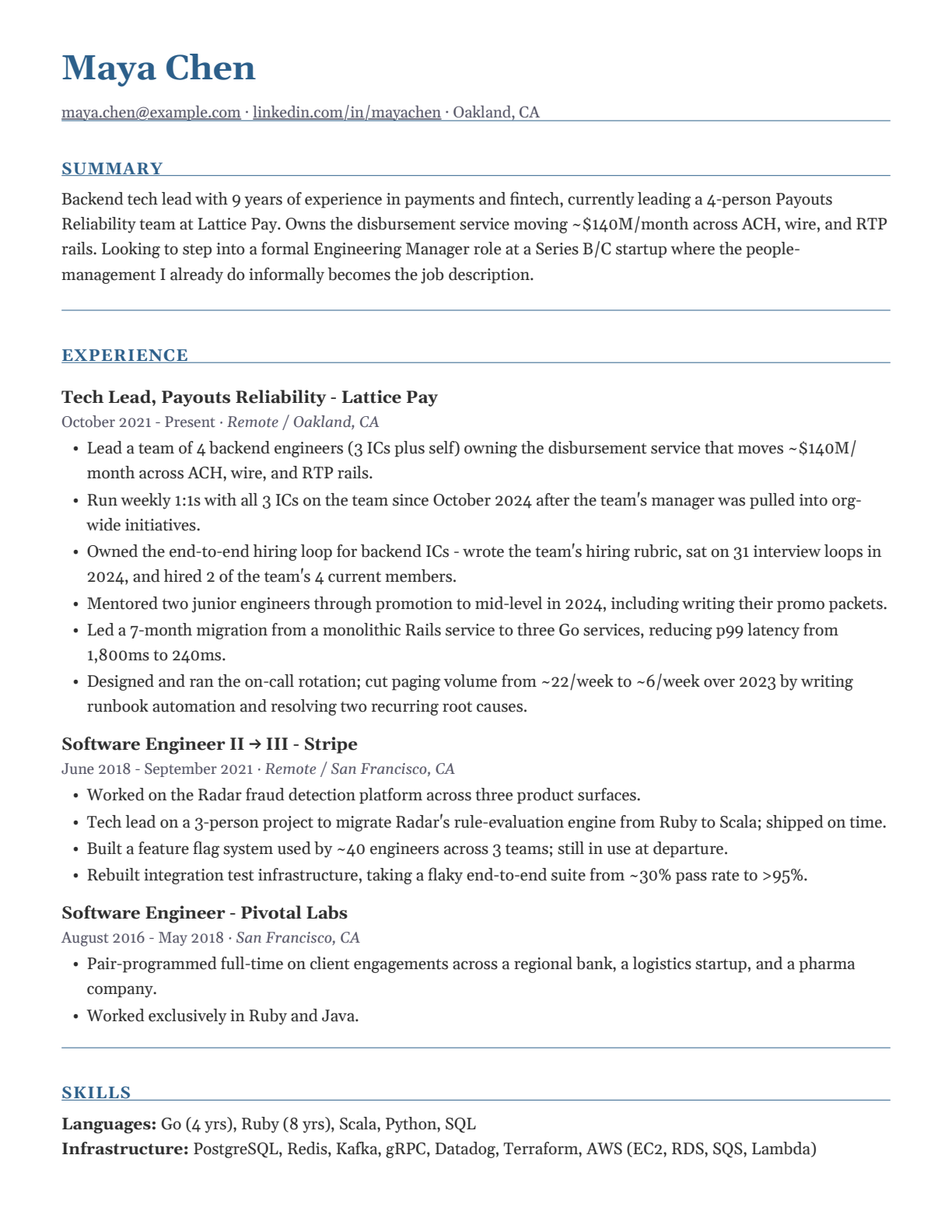
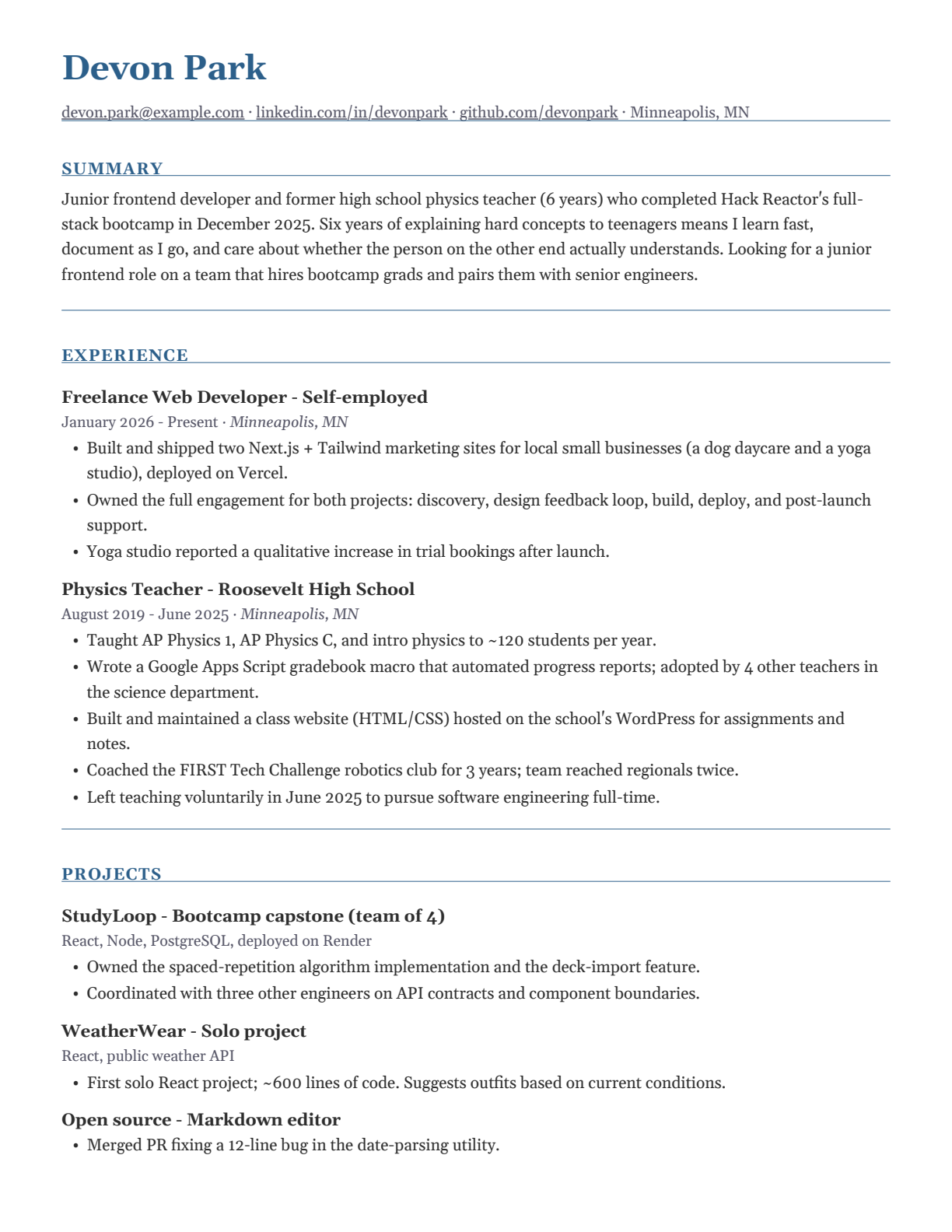
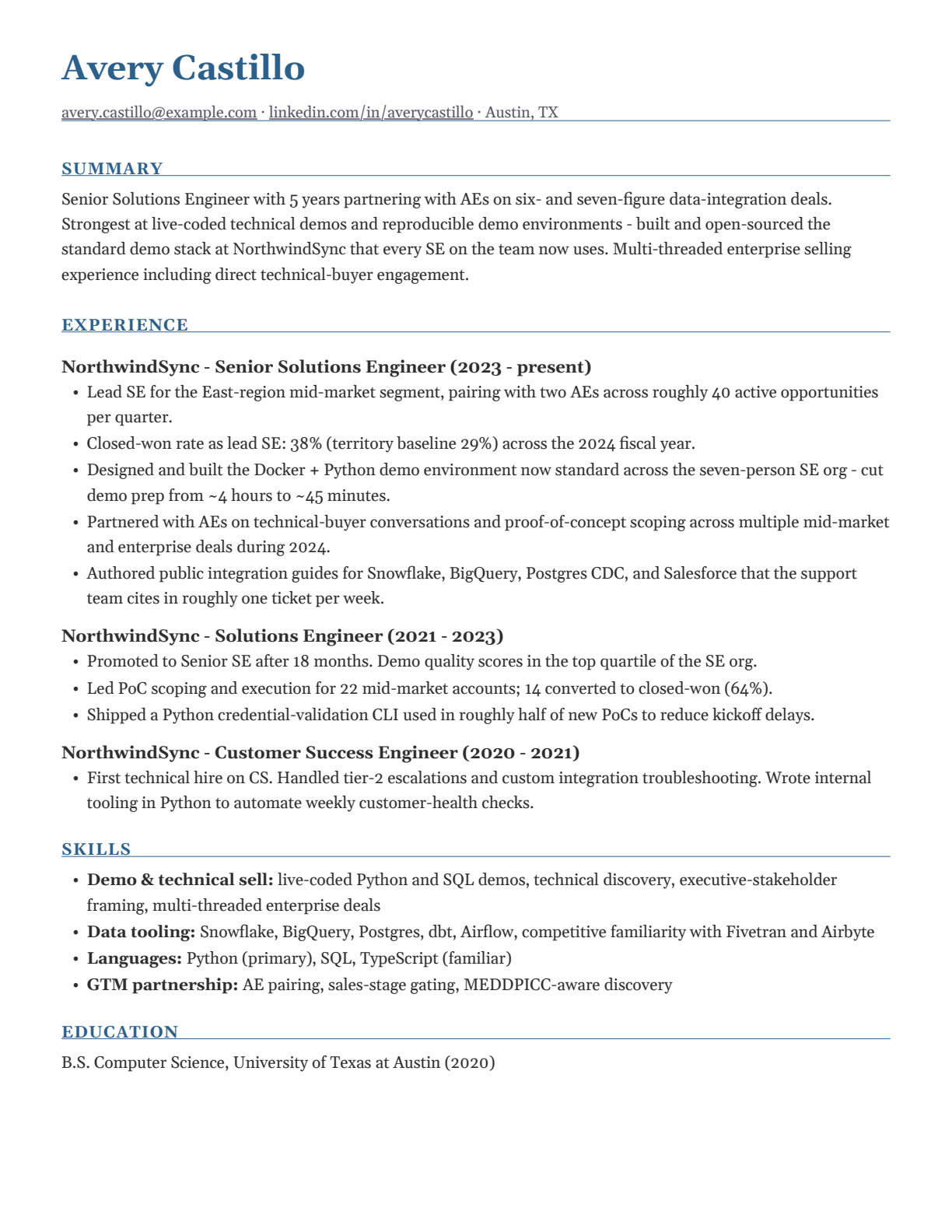
Senior backend tech lead | Bootcamp grad and former teacher | Senior solutions engineer — all US resumes.
Source markdown and rendered PDFs for each example live in examples/. All three are synthetic personas, generated end-to-end through the same pipeline real users get.
Real Submission-Ready Files
Most AI job-search tools stop at copy-paste output. This one produces real files you can attach. The skills save markdown first, then scripts/export-documents.mjs renders resumes, CVs, and cover letters to .docx, .pdf, and a .html preview next to each input. All JavaScript dependencies ship bundled in the repo — Node is the only requirement, with no npm install step.
node scripts/export-documents.mjs my-documents/resume.md my-documents/coverletter.md
Output scales with what's installed, and each step up is an unlock:
- Nothing installed — the markdown is submission-ready, and the skills can still write the
.htmlpreview fromtemplates/preview-template.html. The HTML mirrors page geometry, so you can open it in any browser to eyeball formatting. - Node — adds the
.docxand a.pdffrom the built-in renderer, fonts embedded. - Node + Typst (
brew install typst/winget install --id Typst.Typst/snap install typst) — the.pdfis typeset by Typst from a vendored template instead. One PDF per document, always.
PDFs embed the vendored Gelasio fonts (SIL OFL, metric-compatible with Georgia), so the same bytes render identically everywhere; DOCX and HTML use Georgia. DOCX and PDF remain canonical for submission.
Repository Map
| Path | What it contains |
|---|---|
| skills/ | Shared Codex, Claude Code, and Cowork skills. |
| prompts/ | Copy/paste prompts for any LLM. |
| guides/ | Job-search methodology and decision support. |
| templates/ | Resume, CV, and cover letter scaffolds. |
| examples/ | Synthetic sample outputs with rendered files. |
| scripts/ | Export and quality-check scripts. |
Philosophy
- Write for humans first. ATS compatibility is clean formatting, not magic.
- Tailor the argument, not the facts.
- Research companies before spending serious time applying.
- Use the AI you already pay for. No new subscriptions, no auto-apply middleman.
- AI should sharpen your thinking, not replace your judgment.
- Nothing earned is lost. Verified evidence from every application flows back into your canonical files, so the system gets better the more you use it.
Contributing
Contributions are welcome. See CONTRIBUTING.md.
License
MIT. See LICENSE for details.
Yorumlar (0)
Yorum birakmak icin giris yap.
Yorum birakSonuc bulunamadi