reemoat
Health Gecti
- License — License: AGPL-3.0
- Description — Repository has a description
- Active repo — Last push 0 days ago
- Community trust — 16 GitHub stars
Code Basarisiz
- rm -rf — Recursive force deletion command in deploy/agents.sh
- exec() — Shell command execution in deploy/backup.sh
- process.env — Environment variable access in deploy/backup.sh
- rm -rf — Recursive force deletion command in deploy/bootstrap.sh
- fs module — File system access in deploy/bootstrap.sh
Permissions Gecti
- Permissions — No dangerous permissions requested
Bu listing icin henuz AI raporu yok.
Self-hosted remote control for Claude Code, Codex, OpenCode, Kimi Code and Grok Build: run coding agents on your own machines and supervise them from anywhere, end-to-end encrypted.

Reemoat
Your agents work. You sleep.
Run Claude Code, Codex, OpenCode, Kimi Code, Grok Build and Cursor on your own machines,
and supervise them from your laptop or your phone. Self-hosted, end-to-end encrypted.



Download · Website · Self-host · Why it is built this way
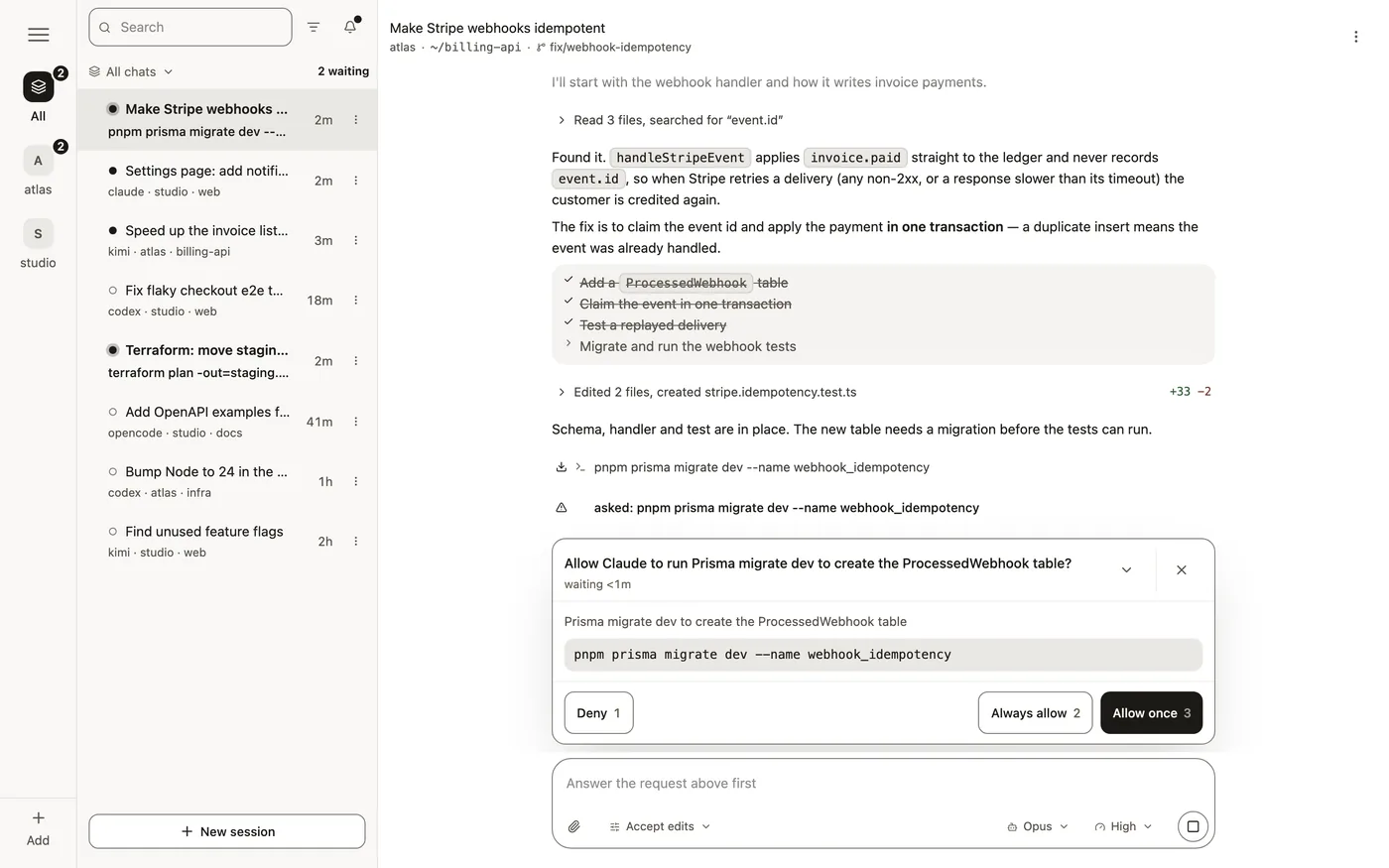

What it does
- Six agents in one app. Claude Code, Codex, OpenCode, Kimi Code, Grok Build
and Cursor, each signed in with the account you already have or pointed at a provider
such as OpenRouter. A plugin can add any other agent that speaks
ACP. - Agents talk to each other. A session can message another one, on the same
machine or on another of yours and whatever harness each runs, so Codex can hand
a task to Claude Code and get the answer back. A message wakes an idle session or
reaches a busy one mid-turn, so nothing waits or polls, and@nicknamein the
message box points your agent at another session. Between machines the messages
are end-to-end encrypted. - From anywhere. Start a session from bed, approve a command from a train, read
what it did over breakfast. Close the lid or drop to LTE: the daemon is the source
of truth, and the agent never notices you left. - Several at once. Every session gets its own git worktree, so agents working
in parallel each have their own copy of the code. - On your hardware, with your keys. Agents run on machines you own, with your
files and your git. The app talks to each machine end-to-end encrypted, and the
relay in between forwards bytes it holds no key for. - Nothing to rent. The daemon, the control plane and the relay are all in this
repository, and none of it needs an account on reemoat.com.
There is no sandbox: an agent runs as your own user, with your files, credentials
and network, exactly as it does when you start it in your own terminal.
Download
Every build is on the latest release.
| File | What you get | |
|---|---|---|
| macOS | Reemoat-<version>-macos-arm64.app.zip (Apple silicon) or …-macos-x64.app.zip (Intel) |
The app, plus a daemon for this Mac: agents run on it as soon as you sign in |
| Android | Reemoat-<version>-android.apk |
The app |
| Windows | Reemoat-<version>-windows-x64-setup.exe |
The app |
| Linux | Reemoat-<version>-linux-x64.AppImage or .deb |
The app. A Linux machine runs agents through the installer |
The macOS and Windows builds are not signed yet, so the system warns the first
time. On a Mac, move Reemoat to Applications and runxattr -dr com.apple.quarantine /Applications/Reemoat.app once, or allow it under
System Settings → Privacy & Security. On Windows, choose More info → Run anyway.
Get started
- Open the app. Its first screen offers the hosted control plane at
app.reemoat.com; the pencil beside it points the app at your own instead. - Sign in, or create an account. On a Mac,
the app then sets this computer up as your first machine. - Set up an agent. Open Settings → Machines → your machine → Agents, and choose
Set up from an agent's menu. The app installs it with the vendor's own
installer, then walks you through signing in, with no terminal on the machine. - Start a session. Then install the app on your phone, sign in to the same
account, and follow it from there.
Add a server
On any machine you want agents to run on, such as a Linux server, a box under the
desk or a Mac without the app:
curl -fsSL https://github.com/rends-east/reemoat/releases/latest/download/install.sh | sh
It asks which control plane to join and who you are there (sign in, sign up, or
paste a key), then installs the daemon, adds the machine and starts it. Nothing
needs sudo or Docker, nothing is written to your shell profile, and no port is
opened: the machine dials out to the relay. The daemon and its checkout live under~/.reemoat and ~/srv/reemoat. The command downloads from this repository and
joins nothing until you name a control plane, with --url https://your-control-plane
or the answer to its first question.
No agent is installed with the daemon; each one arrives when somebody presses
Set up in the app. --install-agents claude,codex installs them on the way in,
for a machine nobody will press anything on. --agent-source npm takes them from
your npm mirror instead of the vendors' hosts, for a machine behind a firewall.--uninstall takes the daemon off again and deletes none of your data. A control
plane you already run prints its own copy of this command, with its address in it,
under Settings → Machines. deploy/README.md has every flag.
Run it all yourself
Every piece runs on hardware you own: the daemon on your machines, the control plane
and the relay in a container on a box of your own. deploy/install.sh control-plane
is the whole of it, and the fleet it makes answers to nobody but you. Point the app
at it with the pencil on its first screen.
The control plane at app.reemoat.com is one instance of this code, run by the
author for people who want the phone screen without a box to run. GET /v1/instance
names the repository and the version it is running, which is the AGPL section 13
offer.
How it works
Three pieces, and you can run all of them yourself.
- The daemon owns the sessions. It spawns
claude,codex,kimi,opencode,grokorcursor-agentover ACP,
normalizes all six into one event stream, and exposes them over HTTP and WebSocket. It runs on
your machine, as you. A plugin can add more — any ACP program, and any inference
endpoint to point one at — and it lands in the same lists. Every agent that takes
MCP over HTTP is also handed areemoatserver with two tools,list_agentsandsend_message, which is how agents reach each other, on one machine or across
the relay. - The control plane issues identity and relays requests. It holds the accounts,
the machines and the grants, and it signs the short-lived capabilities the app
spends. It runs in a container, on a box of its own. - The app supervises the fleet. One screen, shaped around one question: does
anything anywhere need me?
The app is a native binary (packages/native, a Tauri window aroundpackages/web) with the whole interface compiled into it, so the server it talks
to serves it no JavaScript and cannot replace any. It keeps the session in the
operating system's credential store and holds the device key that opens an
encrypted channel to each machine — the one thing a browser tab could not do, and
the reason there is no browser version. On its own computer it reaches the daemon
over loopback rather than out to the relay and back. What an instance does serve to
a browser is the gate: sign-up, the mailed confirmation, reset and verify
screens, the legal documents, and the page that hands you the app. docs/NATIVE.md
has the prerequisites and what is not built.
   you, anywhere             one box you run              machines you own
  ───────────────           ─────────────────            ──────────────────

                       ┌──────────────────────┐
  ┌──────────────┐     │    control plane     │   accounts, machines, grants
  │              ├────►│                      │   mints a short-lived token
  │   the app    │◄────┤  /v1/*               │   whose `aud` is one machine
  │ on a desktop │     └──────────────────────┘
  │ or a phone   │                                ┌─────────────────────────┐
  │              │     ┌──────────────────────┐   │  daemon   m_ab12        │
  │  now holds   │     │        relay         │   │                         │
  │  a token     ├────►│                      ╞═══╡    claude   worktree A  │
  │  for m_ab12  │     │  verifies it, checks │   │    codex    worktree B  │
  └──────────────┘     │  the grant, then     │   └─────────────────────────┘
                       │  picks the tunnel    │
                       │  named by `aud`      │   ┌─────────────────────────┐
                       │                      ╞═══╡  daemon   m_cd34        │
                       └──────────────────────┘   │                         │
                                                  │    kimi     worktree C  │
                                                  └─────────────────────────┘
Documentation
CLAUDE.md |
The rules as they stand — what you need in order to change the code |
.claude/rules/ |
The same, per area, loaded when you open a file it covers |
docs/API.md |
The HTTP surface of both services — 134 routes, what each is for, and the conventions every one of them answers in |
docs/PLUGINS.md |
Writing a plugin: the manifest, the host API, the drawing vocabulary, and what a plugin is trusted with |
docs/NATIVE.md |
The native app: building it, the prerequisites per platform, what signing and notarization would take, and what is deliberately not built |
docs/RELEASING.md |
Where the version is written down, when it moves, and what a tag does that a push does not |
docs/DECISIONS.md |
Why any of it is that way. 1133 entries, question → decision, with the measurement behind each and the alternatives that were tried and taken back out |
deploy/README.md |
The deployment surface in full |
deploy/RELAYS.md |
Running more than one relay, and the order of operations |
CHANGELOG.md |
What changed in each release, and what a 0.x minor is allowed to break |
SECURITY.md |
What is known and accepted, what is in scope, and how to report privately |
License
AGPL-3.0-only. Third-party licenses, and the one dependency that is not open
source, are in THIRD-PARTY.md.
The Terms of Use, Acceptable Use Policy and Privacy Policy inpackages/web/src/legal/ are one operator's terms rather than this software's,
and they are adapted from texts under CC BY 4.0 and CC0. If you run your own control
plane, replace the OPERATOR block in packages/web/src/legal/operator.ts and read
them: serving them unchanged names a
party your users have never dealt with. Nothing in them restricts any right this
license grants you.
Yorumlar (0)
Yorum birakmak icin giris yap.
Yorum birakSonuc bulunamadi