super-prototyping
Health Warn
- License — License: Apache-2.0
- Description — Repository has a description
- Active repo — Last push 0 days ago
- Low visibility — Only 5 GitHub stars
Code Fail
- exec() — Shell command execution in canvas/src/canvasLibrary.ts
Permissions Pass
- Permissions — No dangerous permissions requested
No AI report is available for this listing yet.
Copy any app's UI, prototype your own — as plain HTML artboards on a local canvas. No design tool, no build step. Every color and metric traced to a measurement.
super-prototyping
A workspace for rebuilding and designing product UI as self-contained HTML
artboards on a local tldraw canvas, with the measuring toolkit and the agent
skills that drive the work.
The point of it is a replica you can defend. Every colour and every metric on a
cloned board traces back to a measurement of the source capture, and the
capture itself is parked on the canvas directly under the replica, so the two
are one glance apart rather than one memory apart.
How you use it: clone the repo, start the canvas, then hand Claude Code your
screenshots and ask for the clone-prototype skill. It grids the capture,
samples it region by region, writes one measured token block, generates every
board from a single gen.py, then re-renders those boards and diffs them
against the capture until the numbers hold. new-ui-mock does the same for
screens that have no reference to measure. Both write .html files intomockups/canvases/<board>/, and the canvas picks them up as shapes with no
registry, no build step and no design tool.
Five worked examples
Five of the ten app folders in mockups/canvases/. That folder's ownREADME.md lists them all. Each is a real clone-prototype run, rebuilt
from measured samples with the evidence recorded for every token. Open any
of them with ?canvas=<slug>; the address follows whichever page is open, so
the URL in the bar is always the link to share.
duolingo-ios, eight screens that are mostly picture
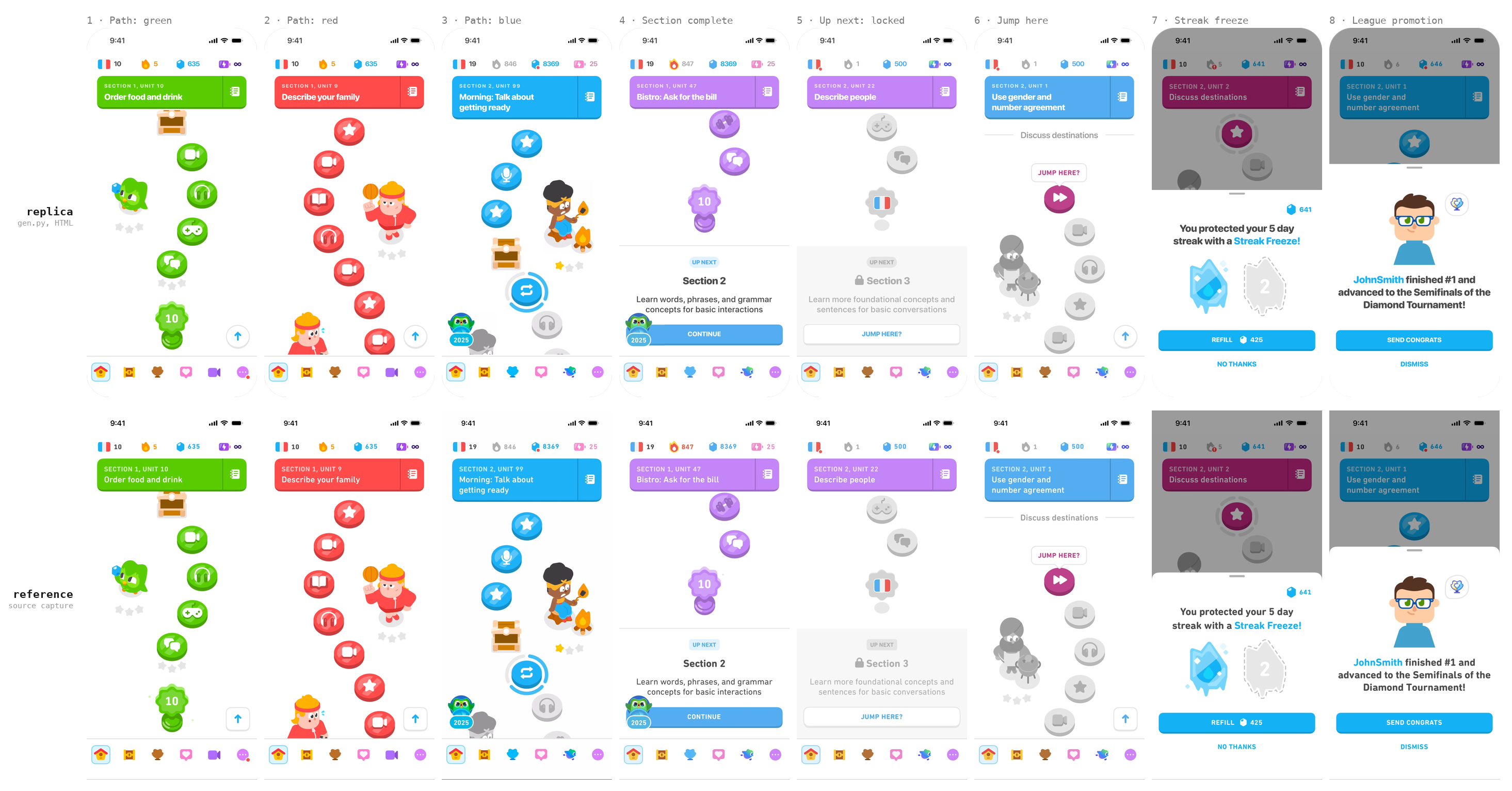
Replica on top, its source capture directly below it. The captures are
cropped to the same 393 × 852 screen and masked to the same 52pt corner
radius, so the two rows line up pixel for pixel. Six screens of the learning
path and the two modal sheets.
luma-ios, twelve screens and the process behind them
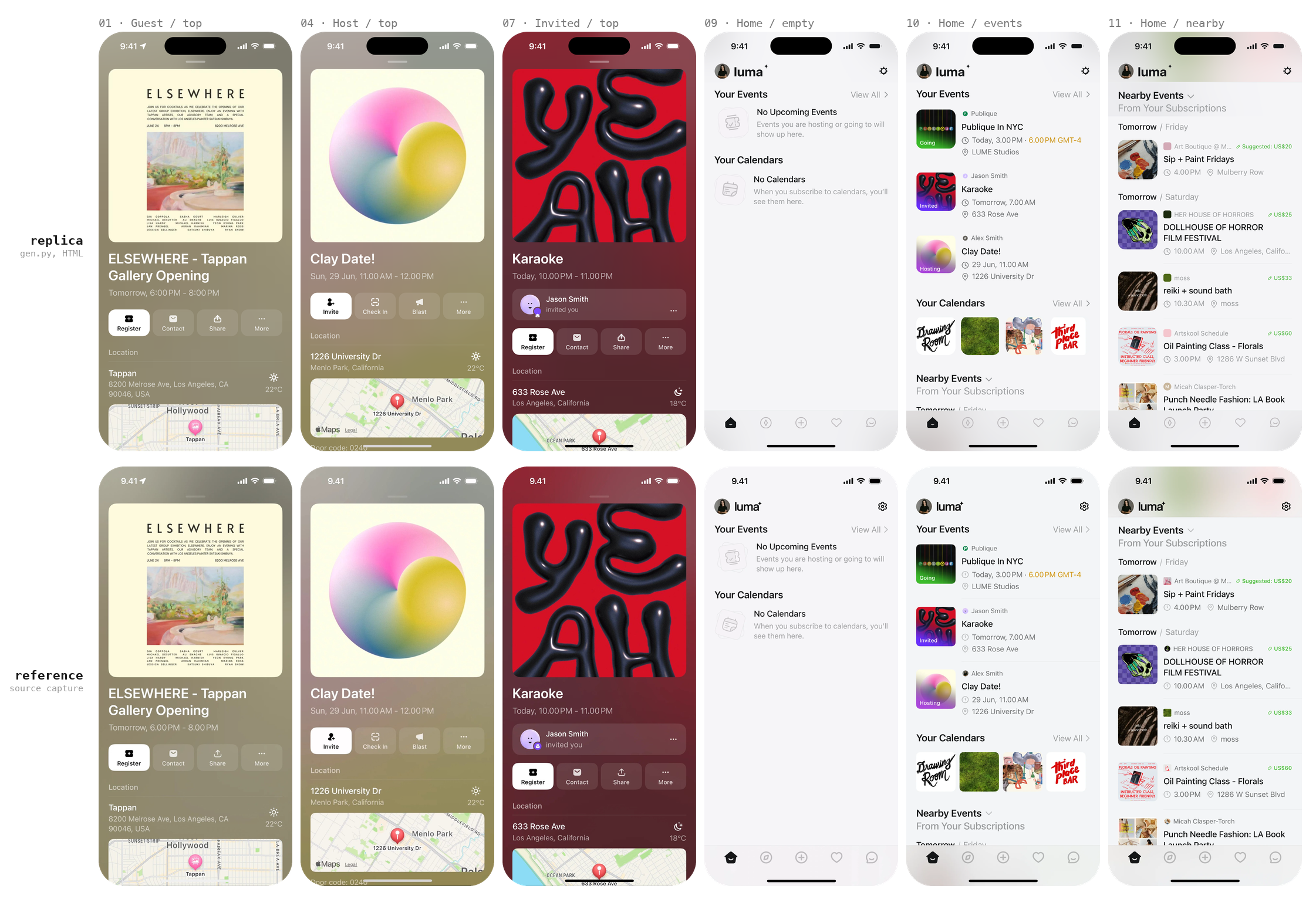
Six of the twelve. The replica draws a Dynamic Island the capture does not
have: the source composites it out, the iOS frame spec draws it, and this run
keeps the frame and excludes the top 56pt from its numbers.
notion-ios, six screens
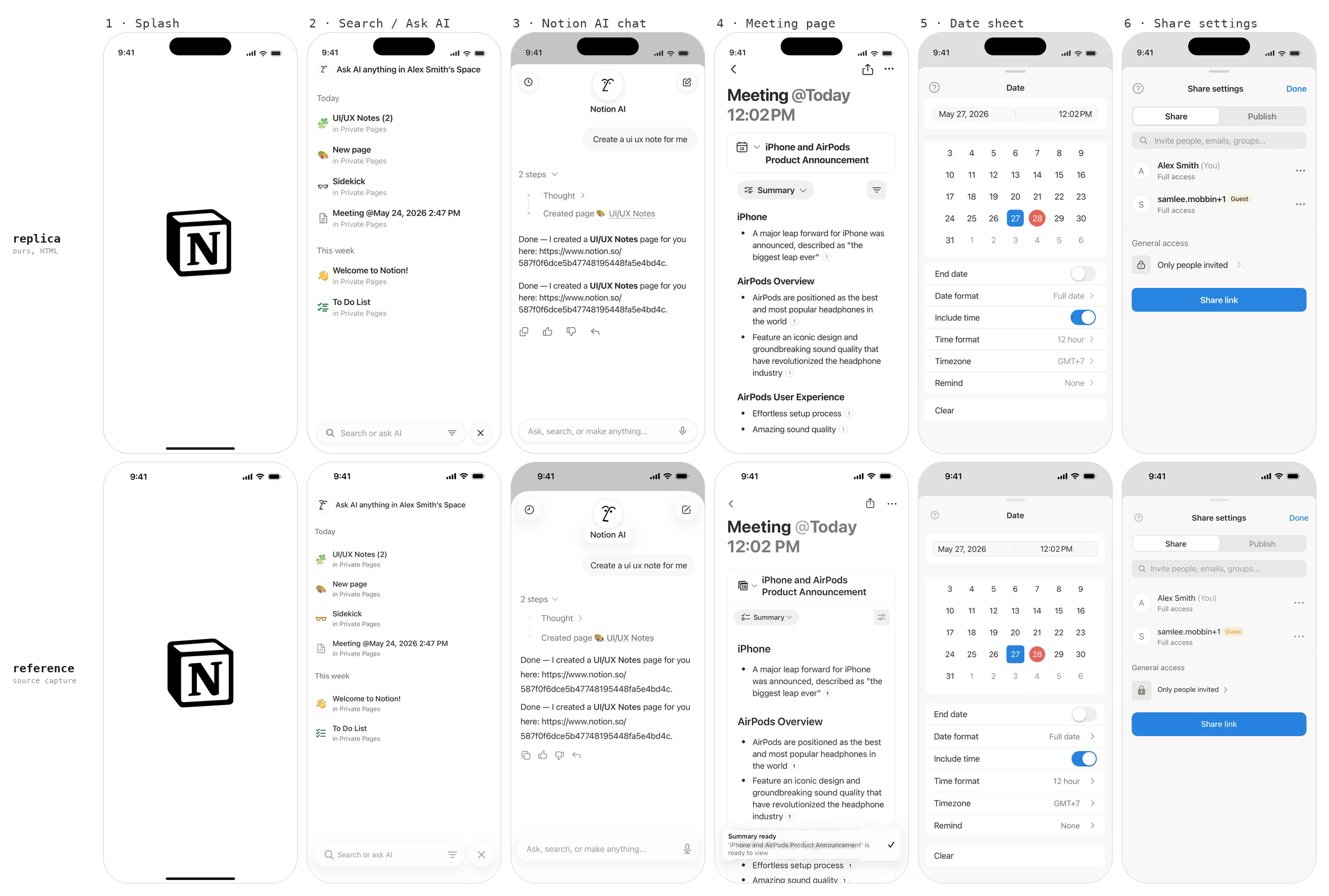
Replica on top, its source capture directly below it. @3x captures, same
crop and same scale.
claude-ios, fifteen screens across four flows
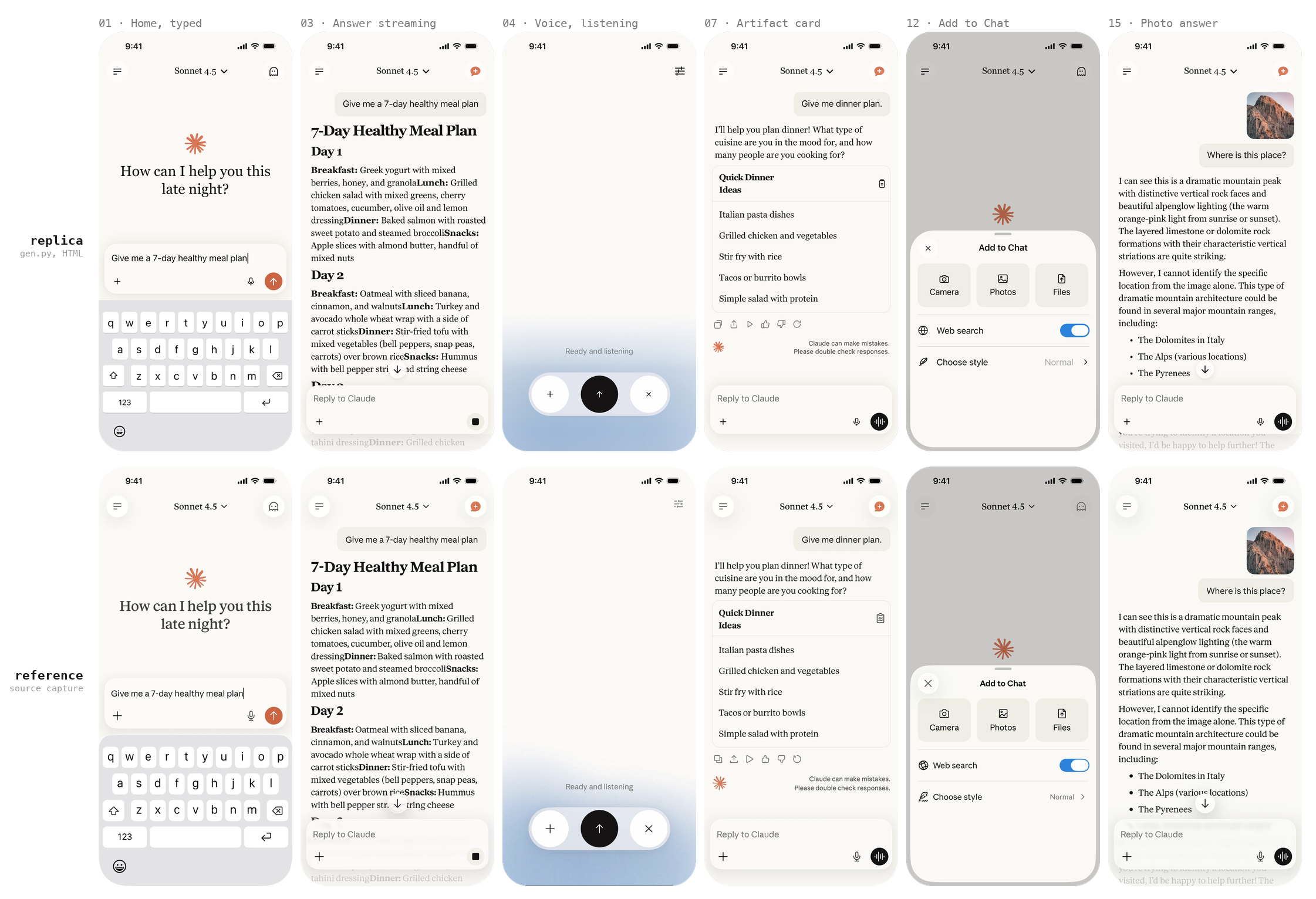
Six of the fifteen. Home, a streaming answer, voice mode, an artifact card,
the Add to Chat sheet and a photo answer. The serif answer column is set in
Georgia standing in for Tiempos, matched on cap height and about 11% wider.
raycast-ios, eleven screens across three flows
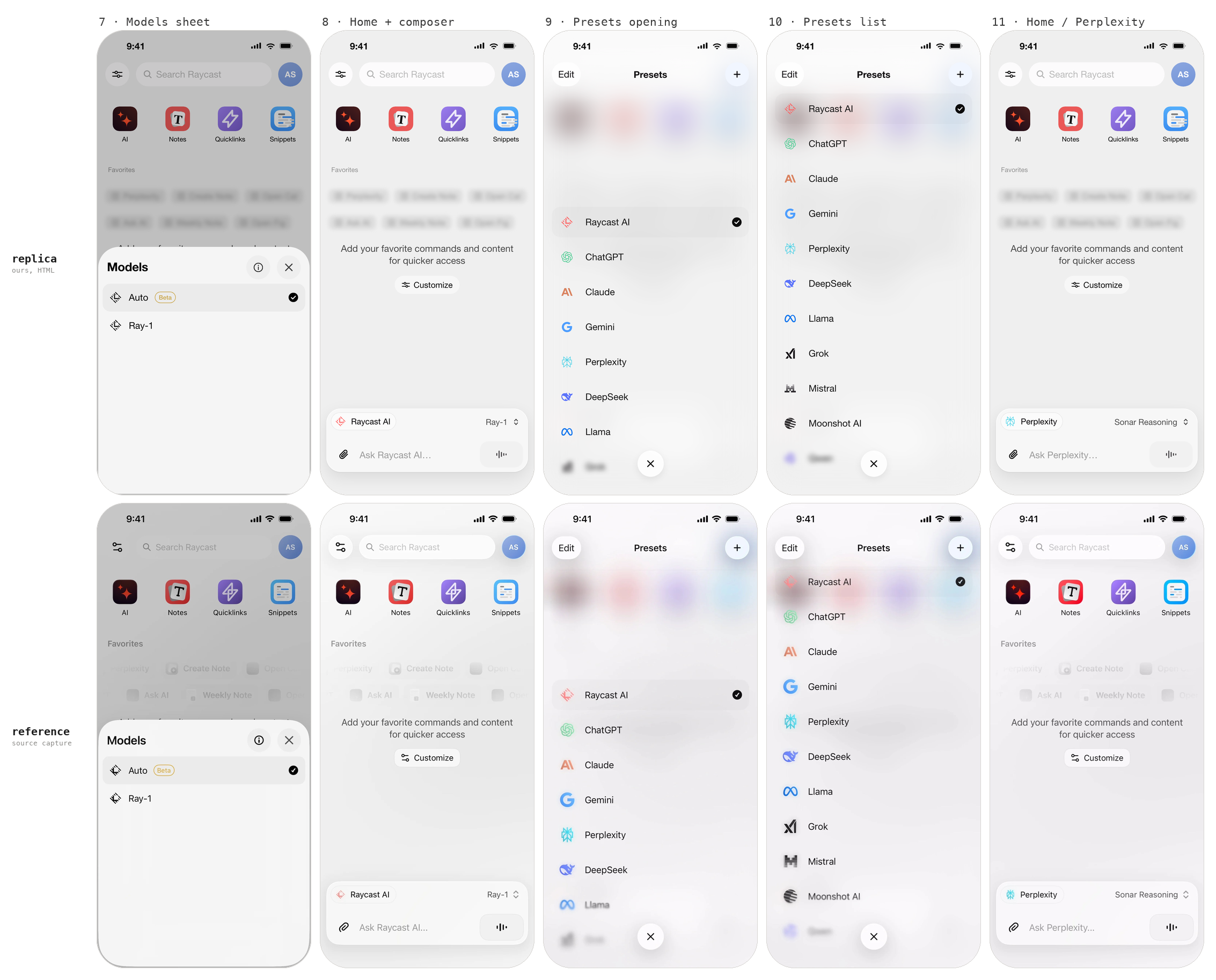
Replica on top, source capture directly below it. Same crop, same scale, so
the two rows line up pixel for pixel. The Models sheet and Presets flows; the
six "Ask AI" screens are on the same board.
Start a project from this repo
git clone --depth 1 https://github.com/ReScienceLab/super-prototyping.git my-product-design
cd my-product-design && rm -rf .git && git init
cd canvas && bun install --frozen-lockfile
Every folder under mockups/canvases/ ships with it. Start your own fromtemplates/, then delete the example folders you do not need:
cp -r mockups/canvases/templates mockups/canvases/<slug>
python3 mockups/canvases/<slug>/gen.py
Run the canvas
cd canvas
bun run dev -- --host 127.0.0.1 --port 5173 --strictPort
Open the URL Vite prints; deep-link a board with ?canvas=<slug>. The bottom
toolbar carries a styles-panel toggle alongside tldraw's own tools; the top
bar carries a force-relayout button. Press it after editing a layout.json.
The workflow
Three skills, in .agents/skills/ (symlinked from .claude/skills/, so
Claude Code picks them up):
| Skill | Use it for |
|---|---|
| clone-prototype | Copying a real app's screens. Grid the reference, sample colours visually, name the type face, derive one measured token block, generate the artboards, verify by re-rendering, park the reference underneath. |
| new-ui-mock | Designing new screens with no reference, built on existing tokens, including the empty/loading/error states and side-by-side proposals. |
| prototype-canvas | Running and operating the canvas: boards, layout.json, the window.snapCanvas bridge, annotated-screenshot review, the force-refresh. |
The rule the whole thing is built around: every colour and every metric in
a cloned artboard traces to a measurement. Grid the reference image, look
at it, name the element, then write the token. Values that "look about
right" are how a replica quietly stops being one.
clone-prototype, phase by phase
Never skip ahead. Sampling before tokens, tokens before HTML.
| Phase | What actually happens | Looks like |
|---|---|---|
| 0 Collect references |
Save every capture to a scratch dir first, because image caches rotate mid-task. Record the capture scale once, in px per design pt, and cross-check it against height. A 0.76 px/pt strip cannot settle thin ink, so get one native @3x capture of any screen in the same app. Out: p1.png … pN.png, and one number: 300 / 393 = 0.7634. |
 One settings row, both scales. The divider survives only one of them. |
| 1a Grid, then look |
refkit grid p4.png -o g04.png --zoom 3 --minor 10 --major 50 draws a labelled grid onto the pixels. Then you read g04.png as an image and name the element each region belongs to before measuring anything. Coordinates picked blind produce numbers with no element attached, and those are the ones that land in the wrong token. Gutters, row pitch, insets and radii come off the same red labels.Out: a named region list, in design pt. |
 Cyan every 10pt, red every 50. The preset rows land 64 apart. Read, not guessed. |
| 1b Sample, region by region |
refkit sample p4.png 76 646 132 668 --pt 3 runs a census over one named region; --pt keeps both halves in design pt, so you type the numbers you just read off the red labels. Which line of the census you believe depends on what you pointed at:• page, card, sheet → flat fills. A pixel equal to all four neighbours is a real fill, not an antialiased edge • badge, dot, brand mark → all pixels, top entry, on a core-only crop; too small to have a flat interior • text → ink core, the darkest few percent. The mode of a text region is its background: 93% of that Mistral box is #F2F2F2• pitch, edges, radii → bands / bbox / scan• 1pt divider or border → refkit hairline instead; a hairline never reaches full coverage in a downscaled capture, so solve it from the ink deficit rather than picking it. A solve within ~2 of the page background means the real UI has no divider there.Out: a token table with an evidence column. No evidence, no token. |
 Three named regions, three techniques, one crop of the Presets list. The label's own census is 93% background. The ink is the darkest 2%. |
| 1c Name the face |
refkit font ref.png 17.3 139 78.7 152 Libraries --pt 3 --fonts brand/ renders that word in every candidate face and ranks the glyph shapes at a common cap height. A closed set of ~20 faces already on disk is the right problem: the published classifiers solve a 3,000-class Google-Fonts one and so structurally cannot answer SF Pro. Under a 0.05 top-two margin it reports no call rather than naming a lookalike.Out: the one token nothing else could measure: --x-font, with evidence. Why not a model. |
 One word, two candidate sets. Slack ships Lato, which is not a system face, so the left column refuses, and --fonts turns it into an answer. |
| 2 Design system |
One :root block: the measured font stack, colour ramp, radii per component class, composite font: shorthands, geometry constants. Built as the first artboard, because it is the contract every screen is checked against.Out: 00-design-tokens.html. |
 Every swatch carries its hex and the element it was sampled from. |
| 3a One generator |
A single gen.py emits every screen, inlining that :root byte-identically. Artboards are output, never source. Hand-edit one and the next run reverts it.Out: NN-<slug>.html × N, layout.json. |
 Four boards out of one script. 478 × 980 each, self-contained, no shared stylesheet. |
| 3b Source the artwork |
Every picture already on the capture is cropped out of the capture at its own measured box, keyed by id in a crops.json the generator reads: cut() writes assets/art/<id>.png, art() places the <img> back at the same pt numbers, so an asset cannot drift from where it was measured and a box correction is one edit rather than two. A crop is the reference's own pixels, so it scores Δ 0 by construction, and that is the whole argument for preferring it. Generate only what no capture contains, and when you do, hand the model the answer's geometry: pack the assets into a grid, each in its own cell at the size and position it must come back at, so it upscales in place instead of composing. That is worth 18.41 → 3.96 on the same six assets. tools/artgen.py runs it end to end and scores each asset against the crop it came from. Density is free (77 assets in one call beat 6); native size is not, so anything under ~128px stays CSS or SVG.Out: crops.json and a committed assets/art/. |
 One asset, four ways to get it. Generated alone it is a good drawing and a bad measurement; generated in a grid it is 4.6× closer and still not the crop. |
| 4 Verify by rendering |
shoot --crop-phone --check-overflow renders and de-frames, diff --regions puts your fill next to the reference's, tokens audits the :root. Fan the looking out, one read-only subagent per screen, and keep a single writer for the generator.Out: a Δ per region, in numbers. |
 Two boards, one token apart. Nothing to see; six values to fix. |
| 5 Park the reference |
Each source capture goes into its own ref-NN-*.html as a data: URI, listed as a third layout.json row in the same order as the replicas. Rows lay out at index × (w + gap), so item N lands under item N.Out: every replica sits directly above its source. |
 Both rows as the canvas renders them. The reference artboard is the raw capture plus its attribution line. No bezel, nothing redrawn. |
The loop is 1a → 4 → 1a. A diff that disagrees sends you back to the grid, not
to the CSS. A correction you have not re-rendered is not a correction.
Constraints on every artboard
Boards render in <iframe srcDoc sandbox="">:
- Fully self-contained: no external CSS, JS, fonts or images.
data:URIs
and inline SVG only. - The shape box is 478 × 980; overflow is silently clipped.
- iPhone frame is 393 × 852 pt at 1pt = 1px (54px status bar, 125 × 36
Dynamic Island, 139 × 5 home indicator).
See mockups/canvases/README.md for layout.json rows and captions.
Toolkit
tools/refkit.py needs pillow and numpy; shoot needs Google Chrome.
python3 tools/refkit.py grid ref.png -o grid.png --zoom 3   # overlay to read by eye
python3 tools/refkit.py sample ref.png 40 120 300 160 --pt 3 # fills, modes, ink core
python3 tools/refkit.py bands ref.png 30 120 60 780 --pt 3   # ink bands and their pitch
python3 tools/refkit.py scan ref.png col 196 380 410 --pt 3  # colour runs -> exact edge
python3 tools/refkit.py hairline ref.png 40 200 300 204 --bg FFFFFF --scale 0.7634
python3 tools/refkit.py font ref.png 17 139 79 152 Libraries --pt 3 \
    --fonts ./brand-fonts                                   # name the type face
python3 tools/refkit.py shoot mockups/canvases/my-app/*.html -o mine \
    --scale 3 --crop-phone --check-overflow                  # render, de-frame, fail if clipped
python3 tools/refkit.py diff mine/01.png ref.png --pt 3 -o d.png   # side by side + numbers
python3 tools/refkit.py tokens mockups/canvases/my-app       # one :root, no undefined var()
python3 tools/test_refkit.py                                 # self-check
Verify
cd canvas && bun run lint && bun run test && bun run build
Licence
This repo is Apache-2.0 (see LICENSE).
The tldraw SDK it depends on is not. tldraw ships under the
tldraw licence: free
to use with the tldraw watermark visible, paid business licence to remove it.
Apache-2.0 here covers this repo's own code only. Anyone running the canvas
is bound by tldraw's terms, and the watermark must stay.
Reviews (0)
Sign in to leave a review.
Leave a reviewNo results found