Rev2D
Health Uyari
- License — License: MIT
- Description — Repository has a description
- Active repo — Last push 0 days ago
- Low visibility — Only 6 GitHub stars
Code Uyari
- process.env — Environment variable access in bin/rev2d.js
- network request — Outbound network request in editor/src/ai/client.ts
Permissions Gecti
- Permissions — No dangerous permissions requested
Bu listing icin henuz AI raporu yok.
Live2D/Spine-style 2D rigging & animation, built for AI agents. A rig is one JSON file; a deterministic headless renderer, a CLI and an MCP server (16 tools) let an agent author, render, measure and fix it, and a live web editor lets the AI see and drive what you are looking at.
Rev2D
Live2D/Spine-style 2D rigging & animation — built for AI agents
English · 한국어





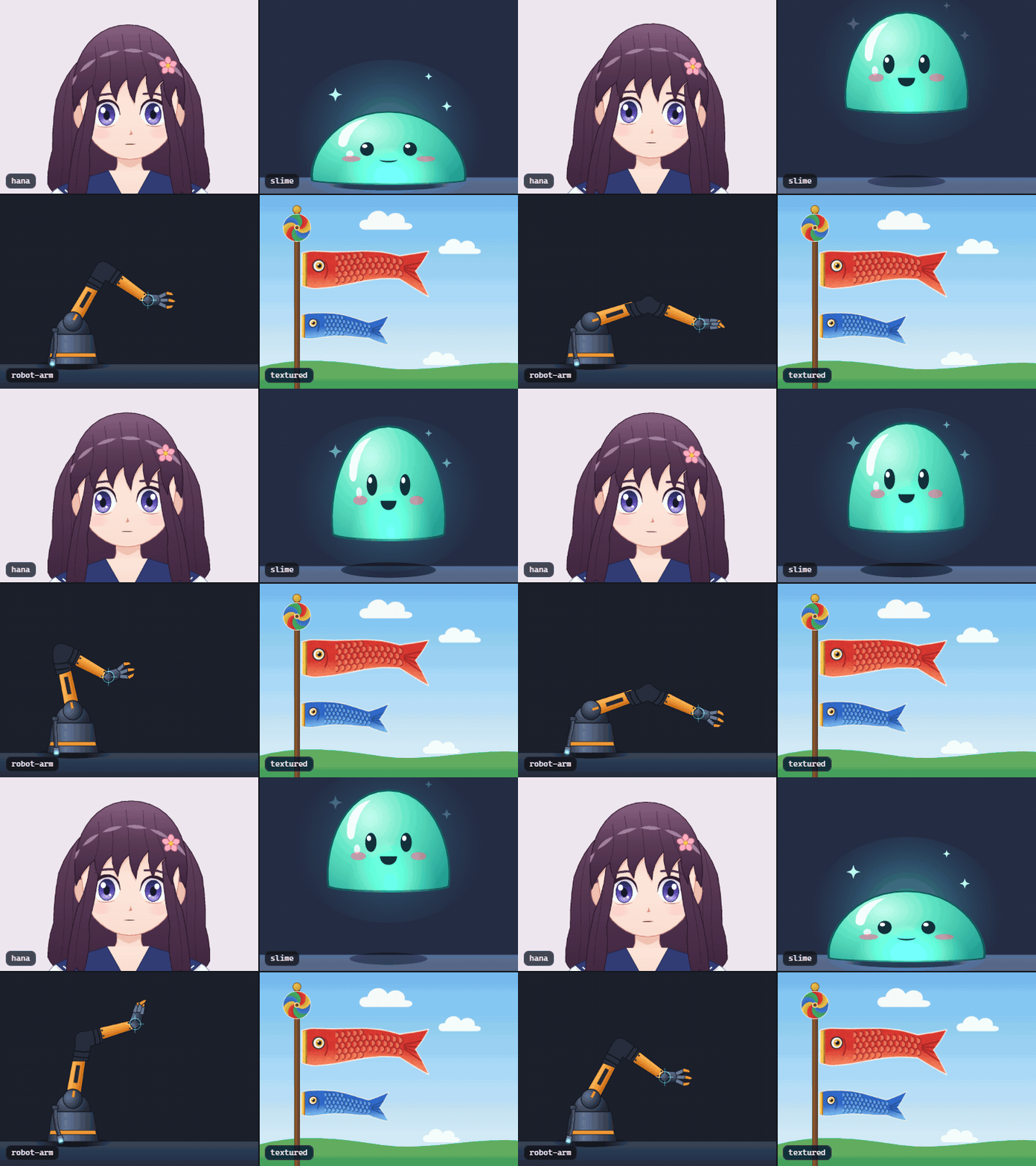
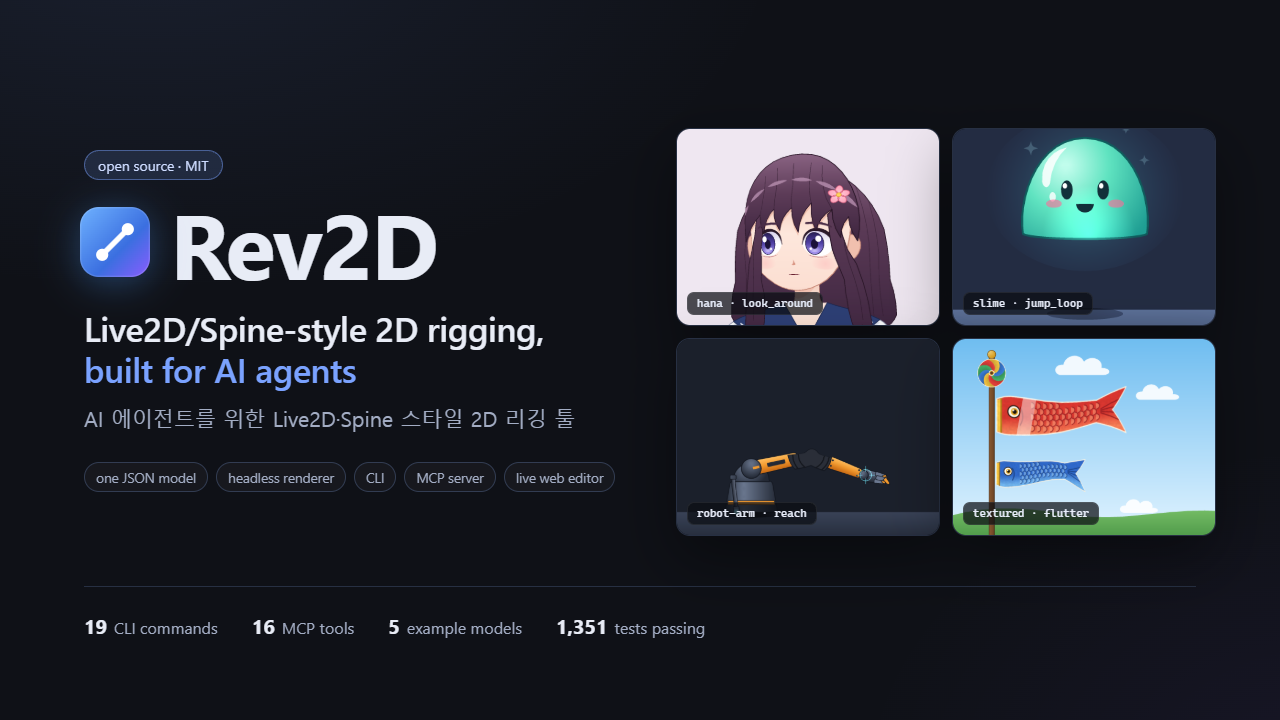
▶ Watch the 1-minute demo · English headlines, Korean captions
What is Rev2D?
- A rig is one JSON file. Parameters, bones, warp deformers, parts, keyform bindings, IK,
physics and layered animations live in one*.r2d.json, addressed by id, in canvas pixels. You
can diff it, review it and generate it. - A deterministic, headless renderer. Pure TypeScript with no GPU and no browser: the same
model and inputs always give the same pixels. It renders debug overlays, contact sheets, GIFs and
PNG sequences. - Tools an agent can drive. A 35-command CLI with
--jsonoutput, atomic and validated edit
operations, and an MCP server with 18 tools that return renders as images. The whole workflow is
in How AI agents use Rev2D. - An avatar from one illustration. Give it one picture: landmarks placed by an agent (or by
you, with handles) turn it into a model that blinks, talks, turns its head, breathes and sways its
hair. See Avatar from one illustration. - Spine and Live2D files in and out. Spine skeletons import as models and models export to
Spine runtimes; Live2D motions, expressions and physics move both ways. See
Spine and Live2D interop. - A live editor for the human. A React + WebGL2 editor reloads every change the
AI writes, and the AI can see and drive the view you are looking at. It can also run Codex or
Claude Code itself, in its AI panel.
How AI agents use Rev2D
Rigging tools are built for a mouse and a pair of eyes. Rev2D keeps the concepts of Live2D and
Spine and makes each step readable, writable and checkable by a program, so an agent can build a
rig and prove it works before it says it is done.
In one line: write the JSON, check it with renders and numbers, fix it with ops, check again. No
human has to look at the pixels for it: the agent sees its results in renders and sheets and
measures them with inspect and analyze.
An agent connects in one of three ways:
| Way in | Use it for | Start here |
|---|---|---|
| MCP server | Claude Code, Claude Desktop and other MCP clients | Connect Claude Code, 18 tools |
| CLI | Any agent with a shell | --json on every command; the guide is AGENTS.md |
| Editor bridge | Working together while a human watches in the editor | rev2d edit, then rev2d editor ... commands or the MCP rev2d_editor_* tools |
The loop
  ┌──► validate ──► render ──► sheet ──► inspect / analyze ──┐
  │    pointers     overlays   sweeps    exact numbers:       │
  │    + hints      + notes    overview  IK, physics, seams   │
  └───────────────── fix with atomic ops ◄────────────────────┘
Examples below write rev2d for node bin/rev2d.js (or npx rev2d inside the checkout).
| Step | CLI | MCP tool | What the agent gets |
|---|---|---|---|
| 1. Author | rev2d new hero.r2d.json --template hana, or write the JSON directly |
rev2d_create_model |
a valid starting rig (blank, empty or one of 5 examples) |
| 2. Validate | rev2d validate hero.r2d.json --json |
rev2d_validate |
every problem with a JSON pointer, a stable code and a fix hint |
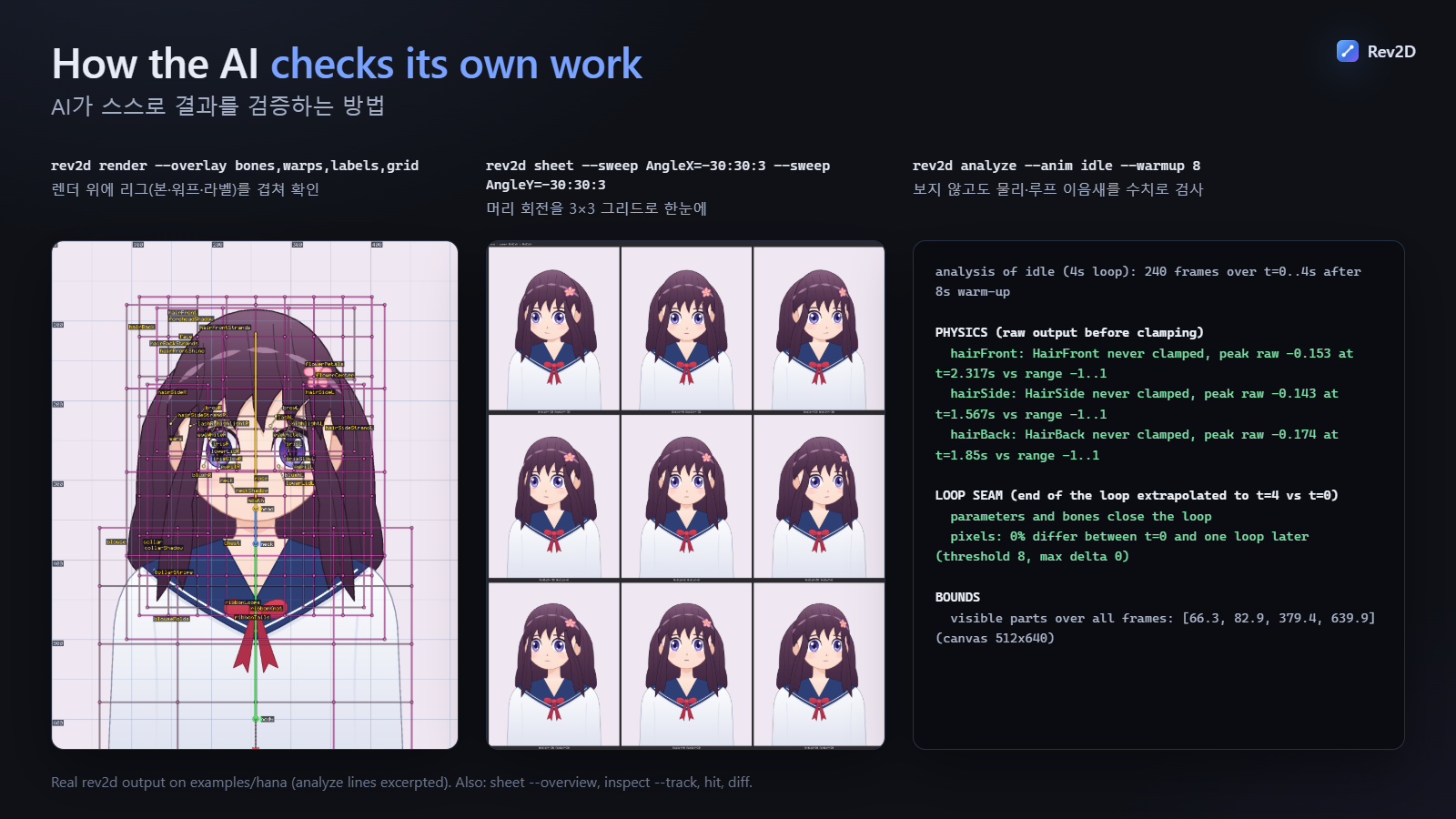
| 3. Look | rev2d render hero.r2d.json -o out/look.png --overlay bones,warps,labels,grid |
rev2d_render |
a PNG, plus notes when something looks wrong (IK out of reach, physics clamped, parts off-canvas) |
| 4. Sweep | rev2d sheet hero.r2d.json -o out/turn.png --sweep AngleX=-30:30:3 --sweep AngleY=30,0,-30 (or --overview, --anim idle) |
rev2d_sheet |
a parameter range, every parameter, or an animation in one captioned image |
| 5. Measure | rev2d inspect hero.r2d.json --param AngleX=30 --part mouth --json, rev2d analyze hero.r2d.json --anim idle --warmup 8 |
rev2d_inspect, rev2d_analyze |
bone transforms, part bounds, IK reach, physics clamping and loop seams as numbers |
| 6. Fix | rev2d ops hero.r2d.json edits.json --dry-run, then without --dry-run |
rev2d_apply_ops |
a per-op report; nothing is written unless the whole batch applies and validates |
$ node bin/rev2d.js new blob.r2d.json
created blob.r2d.json from template "blank" (512x512; 0 errors, 0 warnings)

$ node bin/rev2d.js ops blob.r2d.json --op '{"op":"add","kind":"parameter","value":{"id":"EyeOpen","min":0,"max":1,"default":1}}' --op '{"op":"bind","target":"part:eye.shape.ry","params":["EyeOpen"],"keys":[{"at":[0],"value":2},{"at":[1],"value":26}]}'
applied 2 ops on blob.r2d.json
  ok  #0  --op #1  add   added parameter "EyeOpen" as /parameters/2 (range 0..1, default 1)
  ok  #1  --op #2  bind  added binding part:eye.shape.ry ← [EyeOpen] as /bindings/3 (2 keyforms)
wrote blob.r2d.json

$ node bin/rev2d.js validate blob.r2d.json
ok    blob.r2d.json  (0 errors, 0 warnings)

$ node bin/rev2d.js sheet blob.r2d.json -o out/blink.png --sweep EyeOpen=0:1:3 --sweep Lean=-1,0,1 --scale 0.5
wrote out/blink.png (800x848, 9 cells, 3 per row, cell viewBox 0,0,512,512, scale 0.5)
cells: EyeOpen=0,0.5,1 x Lean=-1,0,1

$ node bin/rev2d.js inspect blob.r2d.json --param EyeOpen=0 --part eye --json
{
  "time": 0,
  "params": { "Lean": 0, "Squash": 0, "EyeOpen": 0 },
  "drawOrder": ["body", "eye"],
  "properties": { "part:eye.shape.ry": 2 },
  "events": [],
  "ik": [],
  "physics": [],
  "parts": [
    {
      "id": "eye",
      "visible": true,
      "opacity": 1,
      "z": 1,
      "bounds": [241, 235, 30, 4],
      "center": [256, 237]
    }
  ]
}

$ node bin/rev2d.js analyze blob.r2d.json --anim idle
analysis of idle (2s loop): 120 frames over t=0..2s

PARAMETERS (min..max over the frames, [range])
  Lean  -0.5..0.5  [-1..1]
  Squash  0..0.4  [0..1]  reaches min
  constant: EyeOpen=1

LOOP SEAM (end of the loop extrapolated to t=2 vs t=0)
  parameters and bones close the loop
  pixels: 0% differ between t=0 and one loop later (threshold 8, max delta 0)

BOUNDS
  visible parts over all frames: [112.9, 126.5, 286.2, 259] (canvas 512x512)
The closed eye is 4 px tall (bounds is x, y, w, h), the sweep sheet shows it at every lean, and
the idle loop closes. Only the "next steps" lines that new prints are left out.
Connect Claude Code (or any MCP client)
claude mcp add rev2d -- node /absolute/path/to/Rev2D/bin/rev2d.js mcp
Add --scope project to share it through the project's .mcp.json:
{
  "mcpServers": {
    "rev2d": {
      "command": "node",
      "args": ["/absolute/path/to/Rev2D/bin/rev2d.js", "mcp"]
    }
  }
}
Any client that starts stdio servers (Claude Desktop, other MCP clients) uses the same command. On
Windows, write the path with forward slashes (C:/Users/me/Rev2D/bin/rev2d.js). Ask the agent to
call rev2d_guide first. Without MCP, any agent with a shell can drive the CLI instead: every
command has --json, and AGENTS.md is the agent's guide.
| Group | Tool | Purpose |
|---|---|---|
| Learn | rev2d_guide |
Quickstart for AI authors: conventions, workflow, address grammar, recipes. Call first. |
rev2d_schema |
JSON Schema of the model, or of one part of it (Part, Binding, Physics, ...) |
|
rev2d_docs |
The bundled docs: spec, ops, cli, mcp, recipes, interop, avatar, architecture, examples, agents | |
| Check | rev2d_validate |
Diagnostics with JSON pointers, stable codes and fix hints |
rev2d_info |
Outline: parameters and what they drive, bone tree, warps, parts, bindings, IK, physics, animations | |
| See | rev2d_render |
One pose as an inline PNG, with overlays, IK reach and warning notes |
rev2d_sheet |
One captioned grid: an animation over time, 1–2 parameter sweeps, or an overview of every parameter | |
rev2d_diff_images |
Pixel diff of two PNGs, with the differences drawn in red | |
| Measure | rev2d_inspect |
Exact numbers for a pose or a series of times: bones, part bounds, IK, physics, mapped points, track tables |
rev2d_analyze |
A whole animation checked at 60 fps: ranges, physics clamping, IK snap risk, events, loop seam | |
rev2d_hit_test |
Which parts cover a canvas point, top-most first | |
| Edit | rev2d_apply_ops |
Atomic, validated edits by id (16 ops: add, bind, bind_warp, follow, recolor, compose, ...) |
rev2d_create_model |
A new model from blank, empty or an example template |
|
| Editor bridge | rev2d_editor_state |
What the human sees: open model, workspace, pose, time, layers, selection, view |
rev2d_editor_command |
Drive the editor: open a file, set parameters, play, seek, select, overlays, focus, message | |
rev2d_editor_screenshot |
A PNG of exactly what the human sees |
Arguments and results for every tool: docs/MCP.md.
The live editor bridge: the AI works in the window you are watching
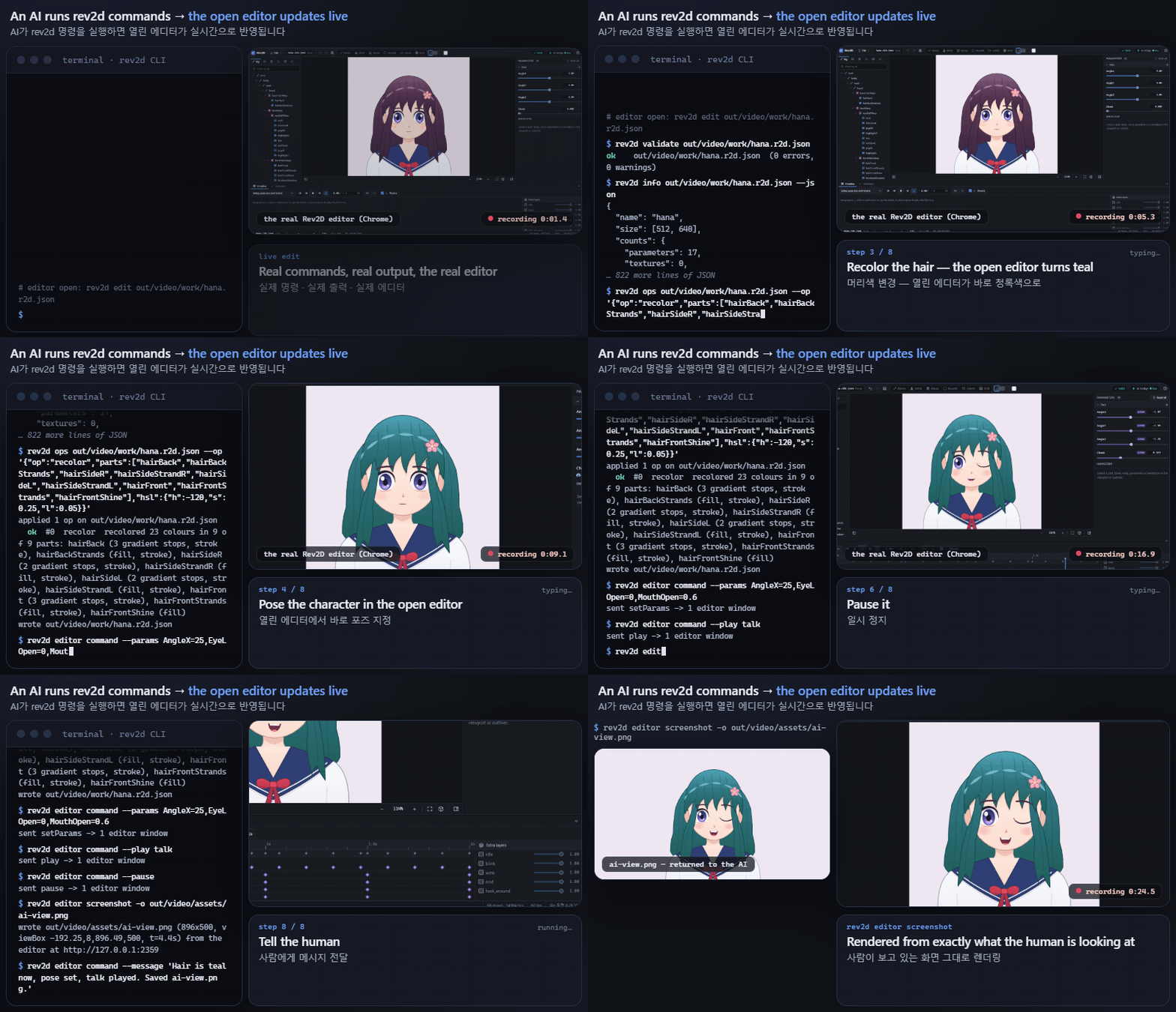
The human opens the editor; the agent edits the file and drives the view from its own terminal (or
over MCP). These are the commands from the demo:
# the human
rev2d edit hero.r2d.json                       # http://127.0.0.1:4777

# the agent
rev2d ops hero.r2d.json --op '{"op":"recolor","parts":["hairBack","hairBackStrands","hairSideR","hairSideStrandR","hairSideL","hairSideStrandL","hairFront","hairFrontStrands","hairFrontShine"],"hsl":{"h":-120,"s":0.25,"l":0.05}}'
rev2d editor command --params AngleX=25,EyeLOpen=0,MouthOpen=0.6
rev2d editor command --play talk
rev2d editor screenshot -o out/seen.png        # a render of exactly what the human sees
rev2d editor state                             # open model, parameters, time, layers, selection, view
rev2d editor command --message "Hair is teal now, pose set, talk played."
rev2d editor command --open models/cat.r2d.json   # switch the editor to another model in its workspace
- The AI sees what you see:
editor state(parameters including the editor's own physics
results and the sliders you pinned, time, animation layers, selection, visible region) andeditor screenshot(rendered by the same renderer asrev2d render). - The AI drives the view: parameters, play / pause / seek, animation layers, selection,
overlays, focus, messages, and which file is open. - No lost edits. If the agent writes the file while you have unsaved edits, your next save is
refused (HTTP 409) and you choose to reload its version or overwrite it.
Try these prompts
Make a cat mascot with rev2d: a head turn, a blink and tail physics. Verify it with sheets and
analyze.
Create
cat.r2d.jsonfrom the blank template and give it a blink: anEyeOpenparameter bound
to the eye, and a 0.4 sblinkanimation. Before you say it's done, show me a sweep sheet, an
animation sheet and theinspectnumbers for the closed eye.
I have the editor open on
hana.r2d.json. Make her hair teal, turn her head to AngleX 25 and
playtalkso I can watch, then take a screenshot of what I see and tell me what changed.
Put a small hat on hana that stays on her head when she turns (use the
followop). Prove it
with an AngleX × AngleY sheet andinspect --pointnumbers for the hat's anchor.
Analyze every animation in
robot-arm.r2d.jsonfor IK reach, physics clamping and loop seams.
Fix what you find with ops, and show me before/after sheets.
Turn
my-character.pnginto an avatar with therev2d avatar ...commands (readrev2d docs avatarfirst).
Show me the review sheets and tell me which landmarks you are least sure about.
Why it works
Diagnostics an agent can act on. Each problem names the exact place in the file, a stable code
and the fix. This is real output for a model with two typos:
$ rev2d validate blob.r2d.json
FAIL  blob.r2d.json
  error   /parts/0/parent     unknown-parent  unknown parent "bodyWarpp" (must be a bone or warp id)  → did you mean "bodyWarp"?
  error   /bindings/1/target  invalid-target  bone has no property "scaleYY"  → did you mean "scaleY"?
  2 errors, 0 warnings
Deterministic renders. No GPU, no browser, no clock, no randomness: the same model and inputs
give byte-identical PNGs and GIFs (the test suite checks this). A before/after rev2d diff means
something, and a render is evidence rather than a guess.
Numbers, not just pixels. Looking is expensive and vague; numbers are cheap and exact.AngleX > 0 should turn the face toward the screen right, and inspect confirms it: at--param AngleX=30 the mouth center of the hana example moves from [256, 321.9] to[286.9, 322]. analyze reads a whole animation without watching it. On hana's idle loop it
reports that no hair physics output is ever clamped, that the loop seam is 0% different, and which
parts leave the canvas.
Avatar from one illustration
Rigging a character usually starts with a layered drawing. Rev2D can also start from one flat
picture, ideally a front-facing bust on a transparent background. Someone places landmarks on it
(the head, the eyes, the mouth, the hair strands, the body), and Rev2D cuts the picture into layers
along them, fills in what was behind each layer, and generates an ordinary Rev2D model. The model
blinks, talks, turns and tilts its head, breathes and sways its hair, and it comes with physics,
six animations (idle, blink, talk, nod, look_around, sweep) and review sheets.
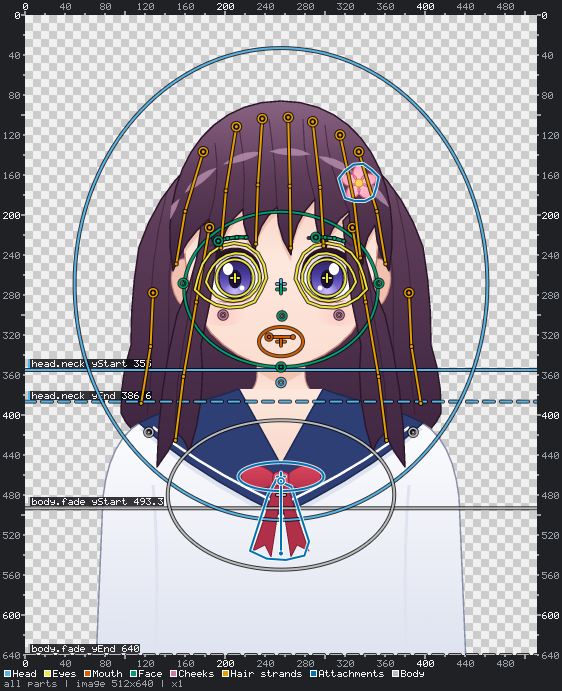
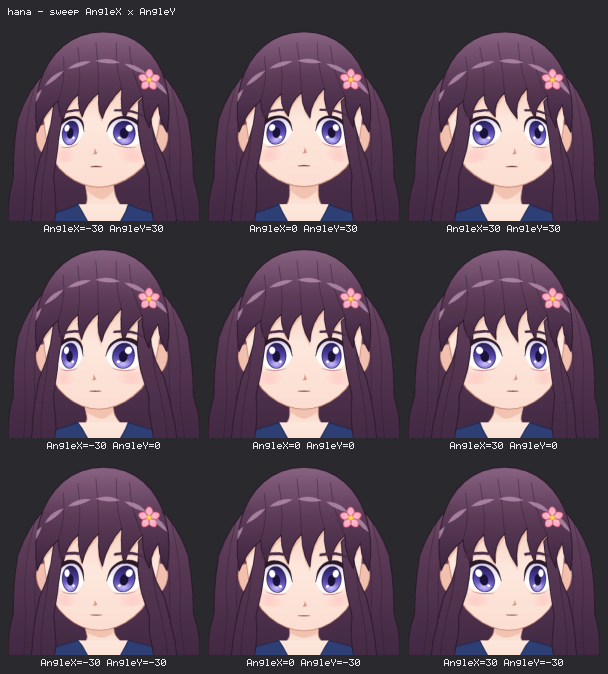
rev2d avatar new picture.png avatars/hana          # project: source.png + a draft avatar.json
rev2d avatar vision-check make avatars/hana/work/vision   # can the agent read coordinates? (then: score)
rev2d avatar grid avatars/hana --region 180,220,260,280   # source-pixel grids to read landmarks from
rev2d avatar validate avatars/hana                 # what is missing or wrong, with hints
rev2d avatar overlay avatars/hana --part eyes.imageLeft --zoom   # the landmarks on the picture
rev2d avatar build avatars/hana                    # layers + avatars/hana/hana.r2d.json, checked for folds
rev2d avatar poses avatars/hana                    # review sheets: poses, turn, eyes, mouth
An agent repeats validate, overlay, build and poses until the sheets look right: closed eyes
without a trace of the iris, a turn and a tilt that neither tear the picture nor cut the chin, hair
that sways while the face stays still. Closed eyes and mouth shapes can also be drawn by an
image generator (rev2d avatar variants request|import|status, only with the owner's consent);
Rev2D checks each drawing and uses it in place of the mesh deformation. Text in kana, Hangul or romaji
becomes lip-sync motion on MouthOpen / MouthForm. Projects from Mesh Avatar Studio, the
open-source (MIT) tool that inspired this workflow, import with rev2d avatar import-mas; Rev2D's
builder is its own implementation. Only use pictures you made or may use. Rev2D itself uploads
nothing; an AI task you start sends the picture to that AI provider (and, for drawn variants, to its
image generator).
In the editor, rev2d edit avatars/hana opens the project in Avatar mode: the illustration
with a handle on every landmark, a list of the parts with their problems, and a live preview with
Pose, Lip Sync and Selected pages that follows every drag. A new avatar starts from the start
screen or File > New Avatar from Illustration…: drop a PNG, then let the AI place the landmarks or
place them yourself. Save writes avatar.json and recompiles the preview; when an outline that cuts
the layers moved, a banner offers Save and Rebuild Layers. The Drawn Variants section lists every
closed-eye and mouth variant with a thumbnail and its state, lets an AI draw them (Draw with AI…,
after it says that the illustration goes to the provider's image generator) and imports drawings
you made yourself. The full guide (every landmark, the
generated parameters, drawn variants, lip sync, common problems) is
docs/AVATAR.md, also as rev2d docs avatar.
The editor
rev2d edit opens a web editor (React 19 + WebGL2) at http://127.0.0.1:4777. It evaluates models
with the same core as the CLI. Its look follows iOS and iPadOS: the canvas fills the window, the
controls float above it on translucent rounded panels, there is one blue tint, and it comes in light
and dark (or follows the system). The interface speaks English, Korean and Japanese, following the
browser language (docs/DESIGN-SYSTEM.md).
| Modes | Rig for models (below) and Avatar for avatar projects (above); the toolbar switches between them once a project has a built model. |
| AI panel | The sparkles button: Codex or Claude Code works on the open model or avatar while you watch (below). |
| Live reload | Changes on disk from the AI, the CLI or a text editor show up at once. Edits made in the editor are written back to the same file. |
| Parameters | Sliders by group (the outliner search filters them too). Pin a physics output to hold it; double-click a slider to reset it. |
| Viewport | Zoom and pan, click to select parts and bone joints, overlays for bones, mesh, warps, bounds, labels and grid (B M W X L G), and hide parts in the preview (H). |
| Timeline & layers | Play, loop, speed, physics on/off, keys per track, and extra animation layers with weight, add, start and once. |
| Outliner & inspector | Rig tree, parts in draw order, warps, parameters, animations, bindings, IK and physics. Edit any object as JSON (Ctrl+Enter applies it), and watch live IK and physics diagnostics. |
| Problems & undo | Validation diagnostics as you edit; undo and redo for inspector edits. |
| File menu | New… (Alt+N), New Avatar from Illustration…, Open… (Ctrl+O), Open Recent, Save (Ctrl+S), Save As… (Ctrl+Shift+S), Import from computer… (or drop a model .json with its PNGs, or a Spine export), Import Live2D motions…, Download copy, Export PNG of the view, Export to ▸ Spine… / Live2D motions…, Reload from disk, Close. |
| Start screen | New model, Avatar from an Illustration, Open, Import, recent files, and example cards (hana, robot arm, slime, textured, minimal) that copy an example into your workspace and leave the original untouched. |
| Safety | An edit is saved as you make it. If a write fails (an invalid model, a conflict, a deleted file), the editor keeps your version and asks Save / Don't save / Cancel before New, Open, Import, Close or Reload replaces it. |
| Workspace | The editor works inside one folder: rev2d edit [model or dir] --root <dir> (default: the model's folder, else the current one). It opens, creates, saves and imports only there and refuses paths outside it, including through symlinks. Without a model it starts on the start screen. |
Press ? in the editor for every shortcut.
The AI panel
The editor can run a coding agent itself. Open the AI panel (the sparkles button), pick Codex
or Claude Code, and type a request or pick a suggestion: the agent works in the workspace, and
the panel shows its messages, the commands it runs, the files it changes and its to-do list, with
Stop and follow-up messages. The model or avatar it writes reloads at once. Avatar mode uses the
same panel for "Let AI Place Them" and "Ask AI to Fix This Part".
- Requirements: the Codex CLI (
npm install -g @openai/codex, thencodex login) or Claude Code
(runclaudeonce and sign in), installed and logged in on this computer. The agent runs with
your login of that CLI. - Local only: the agent endpoints exist only while the editor listens on a loopback address (the
default). With--hostthey are off unless you add--allow-agent, which lets every machine that
reaches the port start runs with your login. - Protected: every request needs a per-server token that a foreign web page cannot send; the
agent works inside the workspace with a read-only or workspace-write sandbox, and image generation
(Codex) stays off unless you switch on Allow Image Generation. - Windows and Codex: if Codex cannot start commands (its "elevated" sandbox is not set up), the
panel offers a one-click switch to the unelevated sandbox; the same setting isrev2d edit --agent-codex-sandbox unelevated.
Protocol, security model and troubleshooting: docs/AGENT-BRIDGE.md.
Live2D and Spine concepts in Rev2D
| Concept | From | In Rev2D |
|---|---|---|
| Parameters | Live2D | Named scalars with a range, default and group. Bindings, animations and physics share them. |
| Warp deformers | Live2D | cols × rows lattices, nestable, parented to bones or warps. bind_warp generates pseudo-3D head turns from yaw/pitch. |
| Rotation deformers / bones | Live2D / Spine | Bone hierarchy with local x, y, rotation, scale and length |
| Keyform bindings | Live2D | 1–3 parameters per binding on a full keyform grid, multilinear or step interpolation. Bindings on one property add up. |
| Shape keys / deform | Live2D / Spine | Keyforms for SVG path morphs, polygon points, mesh vertices and ellipse/rect fields |
| IK constraints | Spine | One-bone aim and two-bone IK with mix, bend direction, softness and stretch |
| Weighted meshes (skinning) | Spine | Linear blend skinning with automatic or explicit weights |
| Physics | Live2D | Pendulum chains at a fixed 60 Hz: inputs (x, y, angle) drive output parameters |
| Clipping masks, blend modes | both | mask / maskInvert (geometry and texture alpha); normal, add, multiply, screen |
| Draw order | both | z then array order; z can be bound and animated |
| Animations & layering | both | Tracks on parameters or any property, eases incl. smooth and cubic-bezier, add/override layers, once one-shots, events; compose bakes a layer stack |
| Textures | both | PNG textures, atlas crops as image grids, textured meshes with UVs |
Format details: docs/SPEC.md. Which example uses which technique: examples/README.md.
Spine and Live2D interop
Rev2D reads and writes the public JSON formats of Spine and Live2D Cubism. Every conversion comes with
a report that lists each feature it approximated or dropped, with a stable code, where it was
found and a hint, so nothing is lost without you knowing.
| Import | Export | |
|---|---|---|
| Spine (3.8 – 4.2 JSON + atlas + PNG pages) | a new Rev2D model: bones, textured and weighted meshes, image sequences, clipping, IK, skins, every animation; shear, inheritance modes and transform constraints are emulated, path / physics constraints and two-color tint are reported | skeleton JSON + atlas + pages for Spine runtimes; parameters, warps, physics and IK are baked into the animations |
| Live2D motion3 / exp3 / physics3 / cdi3 / model3 JSON | motions, expressions, physics and names, into an existing model (as validated ops) | motions, physics, names and a partial model3.json for a Live2D model with the same parameters |
node bin/rev2d.js import spine spineboy/spineboy-pro.json -o models/spineboy.r2d.json
node bin/rev2d.js export spine hero.r2d.json -o out/hero-spine
node bin/rev2d.js export live2d hero.r2d.json -o out/hero-live2d --anim wave
node bin/rev2d.js import live2d Hiyori/hiyori.model3.json --into hero.r2d.json --dry-run
The same conversions are MCP tools (rev2d_import, rev2d_export) and editor commands (File >
Import from computer takes a Spine export; File > Import Live2D motions…; File > Export to).
The Live2D .moc3 model is not supported. It is a proprietary, undocumented binary. You can move
motions, expressions, physics and display names between a Live2D model and a Rev2D model with the
same parameter ids, but not the Live2D model's art or deformers. In practice an AI can author a motion
on a Rev2D model such as hana (Live2D standard parameters), check it with renders and numbers,
export it as a .motion3.json, and you play it on your Live2D model in Cubism Viewer or an SDK app.
Support matrix, coordinate conversion, the parameter map and step-by-step workflows:
docs/INTEROP.md.
Quick start
Requirements: Node 22+ and git.
git clone https://github.com/RevStudio/Rev2D.git && cd Rev2D
npm install

node bin/rev2d.js new hero.r2d.json --template hana     # templates: blank (default), empty, minimal, hana, robot-arm, slime, textured
node bin/rev2d.js validate hero.r2d.json
node bin/rev2d.js render hero.r2d.json -o out/hero.png --overlay bones,warps,labels
node bin/rev2d.js sheet hero.r2d.json -o out/params.png --overview --scale 0.25
node bin/rev2d.js sheet hero.r2d.json -o out/turn.png --sweep AngleX=-30:30:3 --sweep AngleY=30,0,-30 --scale 0.5
node bin/rev2d.js analyze hero.r2d.json --anim idle --warmup 8
node bin/rev2d.js edit hero.r2d.json                    # live editor at http://127.0.0.1:4777
In a checkout the CLI runs the TypeScript sources directly (no build step). The editor UI is served
from dist/editor after npm run editor:build, or compiled on the fly by Vite when there is no
build. If port 4777 is taken, add --port 0 to pick a free one. rev2d help <command> lists every
flag, and docs/CLI.md documents every command and its --json output.
Conventions. Coordinates are canvas pixels with the origin top-left and +y down. Angles are
degrees, positive = clockwise. Standard parameters follow Live2D names and signs: AngleX > 0
turns toward the screen right, AngleY > 0 looks up, and L in an id means the character's
left, which is on the screen right.
Examples
Five models ship as templates (rev2d new my.r2d.json --template <name>). All images below are CLI
output.
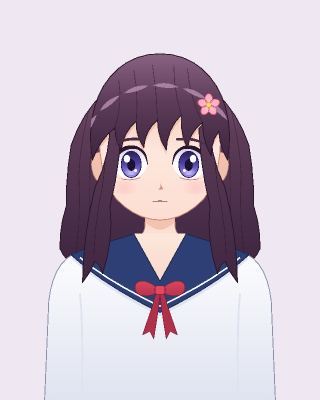 hana: a Live2D-style bust made only of vector parts, with path-morph eyes and mouth, iris masks and hair physics |
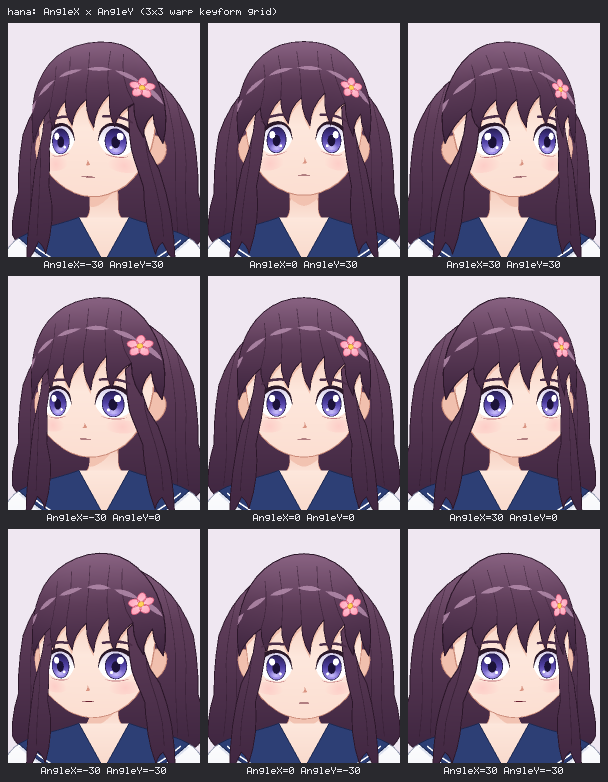 hana, head turn: the 3×3 AngleX × AngleY warp keyform grid, in one sheet call |
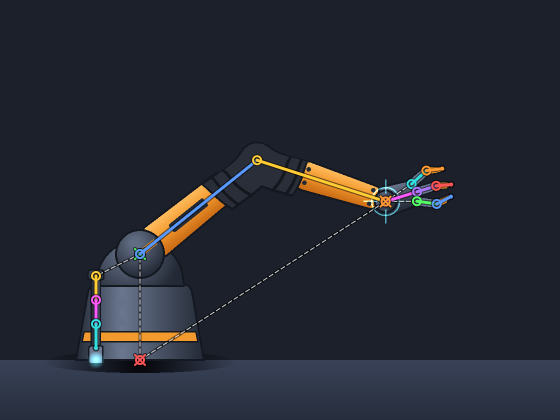 robot-arm: a Spine-style skeleton with two-bone IK (softness), a skinned boot and cable, and cable physics |
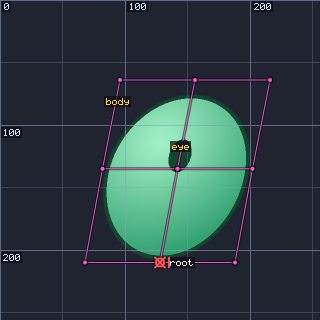 minimal: the smallest complete rig, shown with warp, bone, label and grid overlays |
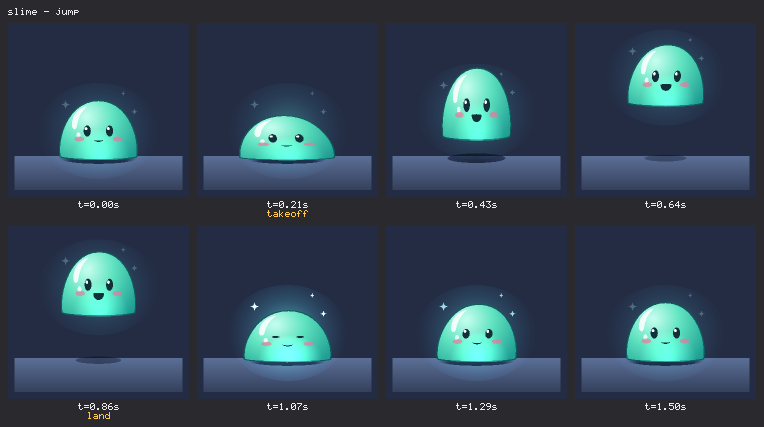 slime: squash & stretch with warp keyforms, blend modes, and takeoff / land events captioned under their frames |
textured (the koinobori in the demo) shows PNG atlas crops bent by warps, a textured mesh with
UVs and a texture-alpha mask. Details and a feature matrix: examples/README.md.
Documentation
| Document | What it covers |
|---|---|
| AGENTS.md | The guide for AI agents: mental model, the verify loop, diagnostics, addresses, common mistakes, MCP tools, and developing Rev2D |
| docs/SPEC.md | The model format and evaluation semantics (authoritative) |
| docs/CLI.md | Every command, flag, exit code and --json shape |
| docs/OPS.md | The 16 edit operations, reference handling and the bind_warp math |
| docs/MCP.md | MCP setup, the 18 tools, the editor bridge and troubleshooting |
| docs/INTEROP.md | Spine and Live2D import / export: support matrix, coordinates, parameter map, workflows, limitations |
| docs/AVATAR.md | An avatar from one illustration: the workflow step by step, every landmark, the generated model, drawn variants, lip sync, Avatar mode, common problems |
| docs/RECIPES.md | 22 copy-paste rig recipes with the commands that verify them, all run by the test suite |
| docs/ARCHITECTURE.md | Pipeline, modules, data contracts, determinism, the editor protocol and UI, the avatar builder |
| docs/AGENT-BRIDGE.md | Codex and Claude Code inside the editor: protocol, security model, task templates, troubleshooting |
| docs/DESIGN-SYSTEM.md | The editor's iOS-inspired design language: principles, tokens, components, accessibility |
| examples/README.md | The five example models and the techniques each one shows |
| llms.txt | An index for LLM tools |
The tool serves the same docs offline: rev2d docs <spec|ops|cli|mcp|agents|recipes|interop|avatar|architecture|examples>,
or MCP rev2d_docs.
Status and roadmap
Rev2D is at v0.1. The format (version 1), the CLI, the MCP tools and the editor work and are
covered by 2,600+ tests, but they may still change before 1.0. There is no npm release yet: run it
from a checkout.
New since the first release: avatars from one illustration (with drawn variants, lip sync from text
and Avatar mode in the editor), the in-app AI panel, and the redesigned editor in English, Korean and
Japanese. The avatar builder works best on front-facing busts; how well it does on a given picture
is decided by the review sheets, and it is still being tuned.
Rev2D does not replace Live2D Cubism or Spine for production pipelines. It is a text-first toolkit
for AI-assisted authoring and experiments. Some ideas we may explore (not promises):
- Importing layered artwork (PSD / Photoshop) as parts
- Runtimes for game engines and the web (Unity, Godot, a small web player)
- Lip sync in the CLI and the editor from audio files (the library already reads WAV loudness)
- MCP tools for the avatar workflow
- More constraints: longer IK chains, transform and path constraints
Ideas and use cases are welcome in the issues.
Development
npm test                    # the full vitest suite (2,600+ tests)
npm run typecheck           # tsc --noEmit -p tsconfig.json
npm run editor:dev          # editor UI with hot reload; proxies /api to rev2d edit on :4777
npm run editor:build        # build the editor UI into dist/editor (served by rev2d edit)
npm run build               # compile src/ to dist/ and build the editor UI (what the package ships)
npx tsx scripts/build-examples.ts   # regenerate examples/ from their builders
The editor end-to-end tests use playwright-core with an installed Google Chrome. They skip, with a
reason, when the UI is not built or Chrome is missing.
Demo media. Everything in docs/media is generated from real CLI output, real renders and
screen recordings of the real editor:
node scripts/video/capture-all.mjs   # capture: CLI transcripts, frame sequences, editor recordings -> out/video/assets
node scripts/video/compose.mjs       # compose: docs/media/*.mp4, hero.gif, ai-live-edit.gif, poster.png, verify.png
This needs Google Chrome and ffmpeg/ffprobe on the PATH (on Windows you can instead setFFMPEG_DIR to the folder with ffmpeg.exe). The capture step starts its editors on free ports
with a sandboxed home directory.
Contributing
Issues and pull requests are welcome. Before you open a PR, run npm test, npm run typecheck and,
if you touched editor/, npm run editor:build. The docs are tested too: links, command lines and
recipes are checked by the suite. Module boundaries and where to add a feature are described in
AGENTS.md, Part 2.
License
MIT © 2026 RevStudio
Yorumlar (0)
Yorum birakmak icin giris yap.
Yorum birakSonuc bulunamadi