aios
Health Uyari
- No license — Repository has no license file
- Description — Repository has a description
- Active repo — Last push 0 days ago
- Community trust — 50 GitHub stars
Code Uyari
- process.env — Environment variable access in .github/workflows/release-health-watch.yml
- fs module — File system access in .github/workflows/release-health-watch.yml
- network request — Outbound network request in .github/workflows/release-health-watch.yml
Permissions Gecti
- Permissions — No dangerous permissions requested
Bu listing icin henuz AI raporu yok.
Local-first AI agent bootstrap: Playwright Browser MCP + ContextDB for Codex CLI, Claude Code, Gemini CLI, and OpenCode.
AIOS




Local-first agent harness for
codex,claude,gemini,opencode,hermes, andgrok(Grok Build).
Keep the coding client you already use. Add project memory, adaptive routing, multi-agent collaboration, and verification.
Docs · Quick Start · Workflow Policy · Blog · 中文
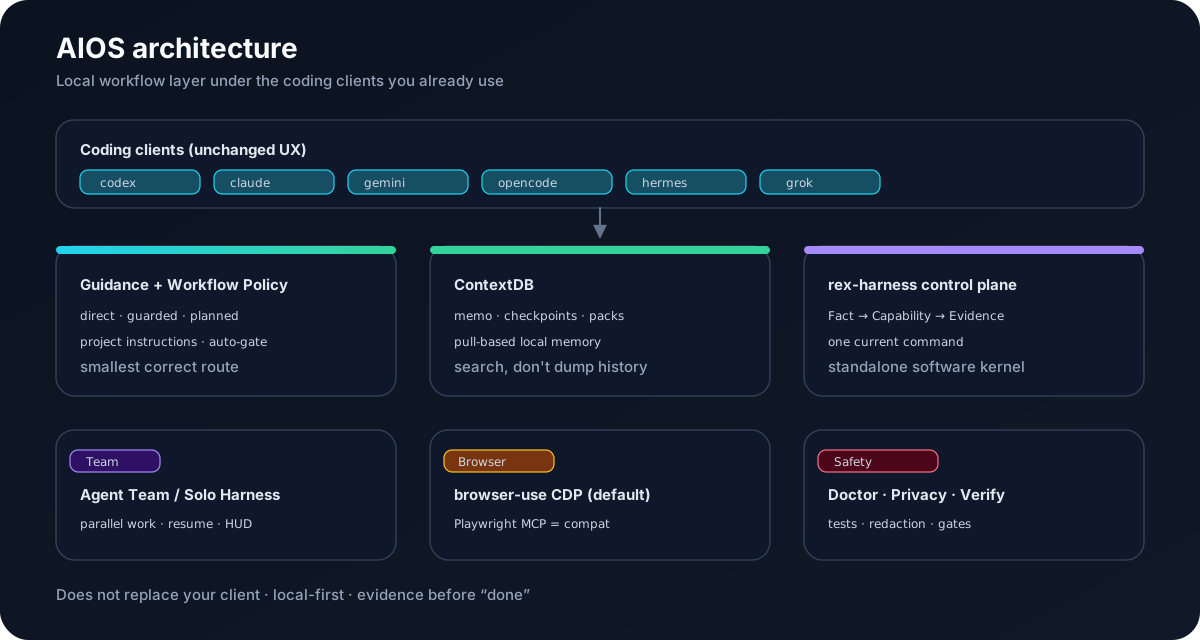
Why AIOS
AIOS brings two ideas together: local engines and agent harnesses.
- Local — the coding engines (Codex, Claude Code, Gemini CLI, OpenCode, Hermes, Grok) run on your machine. AIOS adds local project memory (ContextDB), local token compression (RTK / Caveman / Headroom), and a local browser + privacy guard. Data does not leave the machine.
- Harness — AIOS is an orchestration harness over those engines: adaptive routing (
direct/guarded/planned), parallel agent teams (fan-out / fan-in), resumable long-running loops (aios harness), contract-checked evidence gates, and per-node model tiering. Same building blocks as Graph Engineering — nodes, edges, shared state, failure routing — organized around agents that run local loops.
Bare coding CLIs are great at editing files. They are weaker at:
| Pain with raw CLI | What AIOS adds |
|---|---|
| Context disappears between sessions | ContextDB project memory (memo, checkpoints, searchable packs) |
| Every task feels like the same chat | Workflow Policy: direct / guarded / planned by risk |
| Multi-step work loses the thread | rex-harness control plane + Solo Harness resume |
| Parallel agents are ad-hoc | Agent Team with status, HUD, and evidence |
| Tool output floods the model | RTK / Caveman / Headroom local compression boundaries |
| “Done” is a vibe | Doctor, tests, privacy redaction, verification gates |
AIOS does not replace Codex, Claude Code, Gemini CLI, OpenCode, Hermes, or Grok Build. It sits underneath them as a local workflow layer.
Install in 30 seconds
macOS / Linux:
curl -fsSL https://github.com/rexleimo/aios/releases/latest/download/aios-install.sh | bash
source ~/.zshrc   # or ~/.bashrc
aios init --all
aios doctor --native --verbose
Windows PowerShell:
[Net.ServicePointManager]::SecurityProtocol = [Net.SecurityProtocolType]::Tls12
irm https://github.com/rexleimo/aios/releases/latest/download/aios-install.ps1 | iex
. $PROFILE
aios init --all
aios doctor --native --verbose
Run these from a project root when you want project-level guidance and memory.
Unattended install:
node scripts/aios.mjs init --all --yes-compression-tools --yes-headroom-mcp
How it fits together
Your coding client (codex / claude / gemini / opencode / hermes / grok)
        │
        ▼
  AIOS guidance + Workflow Policy
        │
        ├── ContextDB   local project memory (pull-based)
        ├── rex-harness software control plane (Fact → Capability → Evidence)
        ├── Team / Solo long-running or parallel work
        └── Doctor / Privacy / verification evidence
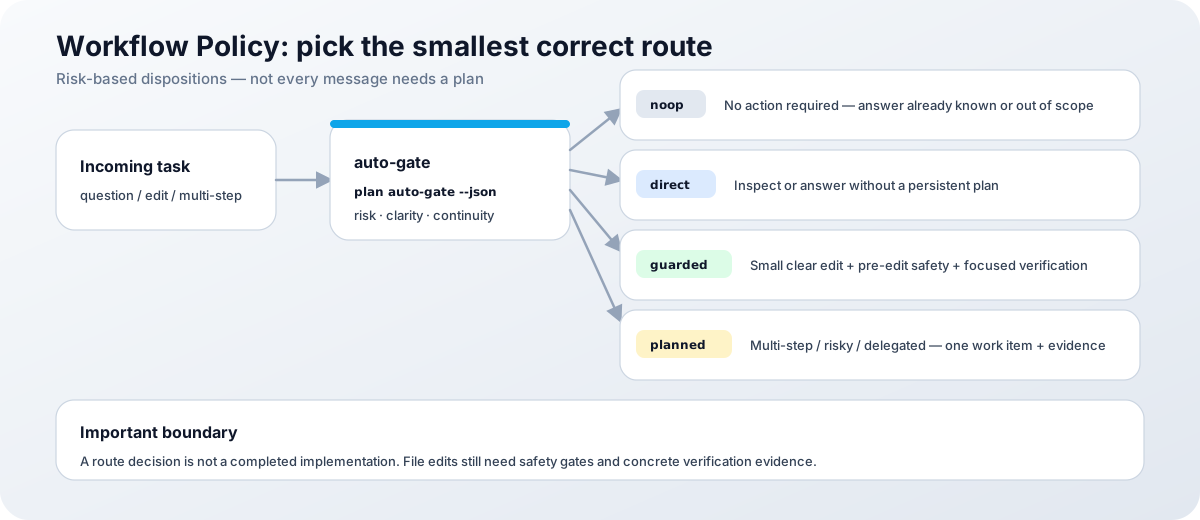
rex-harness is a required planning runtime for AIOS. Release installers already bundle the pinned submodule, so a normal release install does not need a second npm package or MCP service. From source:
git clone --recurse-submodules https://github.com/rexleimo/aios.git
If the clone skipped submodules, aios init / aios setup will try git submodule update --init --recursive -- rex-harness and stop with a clear fix if recovery fails.
Rex is the default workflow for new installs. Superpowers is retired as an AIOS workflow component. See the Rex Workflow Migration guide.
Quick tour
# Initialize project marker + detected client guidance
aios init --all

# Inspect install, native client sync, safety checks
aios doctor --native --verbose

# Save and search a durable project decision
aios memo add "Keep authentication tests strict"
aios memo search "authentication"

# Parallel work or a resumable objective
aios team 3:codex "Review the auth module and update its tests"
aios harness run --objective "Finish the release handoff" --worktree

# Preview adaptive routing without creating a live plan
node scripts/aios.mjs plan auto-gate --task "Refactor the auth module" --dry-run --json
The project marker points clients at .aios/context-db/index.json. ContextDB is pull-based: agents search or recall relevant material instead of receiving the whole history on every prompt.
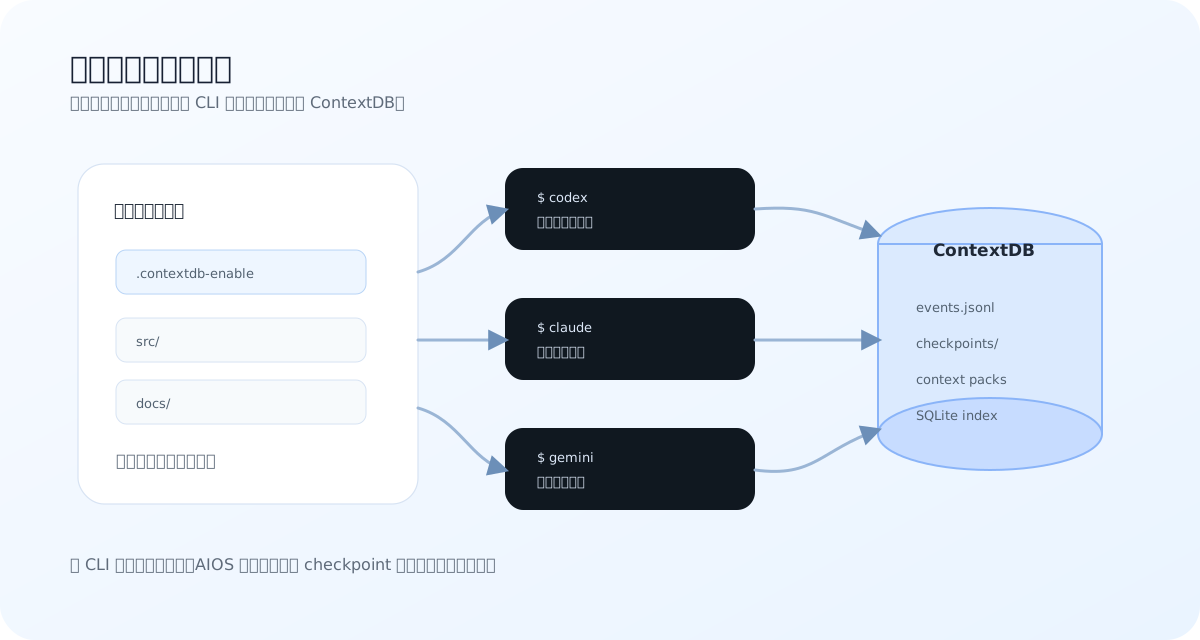
Supported clients
Native or compatibility integrations for:
codex · claude · gemini · opencode · hermes · grok (Grok Build)
Feature depth varies by client. Run aios doctor --native --verbose instead of assuming every route exists everywhere.
Documentation map
| Intent | Start here |
|---|---|
| Install and verify | Quick Start |
| Windows recovery | Windows Guide |
| Choose the right route | Workflow Policy |
| Project memory | ContextDB |
| Token / compression boundaries | Token Intelligence |
| Parallel agents | Agent Team |
| Overnight / resumable work | Solo Harness |
| Commands by intent | Use Cases |
| Runtime layers | Architecture |
| Releases & tutorials | Blog |
Requirements
- Git
- Node.js 24 LTS and npm
- Windows: PowerShell 5.x or 7
- At least one supported coding client
Development
git clone --recurse-submodules https://github.com/rexleimo/aios.git
cd aios
npm run test:scripts
cd mcp-server && npm run typecheck && npm test && npm run build
When a canonical Skill changes, certify and verify training evidence before commit:
node scripts/aios.mjs skill certify --changed --base HEAD --json
node scripts/aios.mjs skill verify-training --changed --base HEAD --json
Subprojects
| Path | Role |
|---|---|
rex-harness/ |
Standalone software-engineering control plane (Fact / Capability / Evidence) |
mcp-server/ |
Legacy Playwright MCP compatibility path; default browser path is browser-use CDP |
License
See CHANGELOG.md for version history and release notes.
Yorumlar (0)
Yorum birakmak icin giris yap.
Yorum birakSonuc bulunamadi