Enterprise-Office-Agent
Health Gecti
- License — License: MIT
- Description — Repository has a description
- Active repo — Last push 0 days ago
- Community trust — 18 GitHub stars
Code Gecti
- Code scan — Scanned 12 files during light audit, no dangerous patterns found
Permissions Gecti
- Permissions — No dangerous permissions requested
Bu listing icin henuz AI raporu yok.
Self-correcting Agentic RAG engine on LangGraph, plus a deterministic Office Agent that routes free-text requests to seven local capabilities — with a thin FastAPI adapter and a React observability workspace.
Enterprise Office Agent


An enterprise AI agent engineering project built with LangGraph. The
repository is organized as two focused, independently reasoned modules: a
self-correcting Enterprise Document Q&A / Agentic RAG engine, and a
deterministic office-workflow agent layer that routes free-text requests to
local capabilities. The design emphasis is engineering discipline — clear module
boundaries, side-effect-free imports, lazy external clients, honest failure
handling, and a fully mocked, CI-safe test suite.
Modules
| Module | Status | What it is |
|---|---|---|
enterprise_rag/ |
✅ Implemented | Enterprise Document Q&A Engine — a self-correcting Agentic RAG (CRAG-style) LangGraph workflow that answers questions from an ingested internal-document knowledge base, with web-search fallback, privacy mode, three quality gates, bounded self-correction, per-run budgets, graceful degradation, and deterministic provenance. Entry point: enterprise_rag.graph.engine.answer_question(). |
office_agent/ |
✅ Implemented — seven capabilities, complete since v1.6.0 | Enterprise Office Agent — a deterministic-by-default intent router over seven capabilities: one Knowledge Q&A adapter over enterprise_rag plus six local mock-data tools. Entry point: office_agent.engine.answer_office_request(). The router and every core tool workflow are deterministic; Knowledge Q&A delegates to the enterprise_rag engine, and two capabilities (Email Summary, Daily Briefing) optionally support a bounded, single-pass LLM assist that is disabled by default and falls back to the deterministic output. |
The two modules stay decoupled: office_agent reaches enterprise_rag only
through a thin Knowledge Q&A adapter, and it never duplicates retrieval,
generation, or graph logic. See structure.md for the module
boundary in detail.
The retrieval layer under enterprise_rag/ shares its design with
Enterprise-Agentic-RAG,
embedded here as the agent's knowledge-retrieval tier rather than maintained as
a separate service.
Product Tour
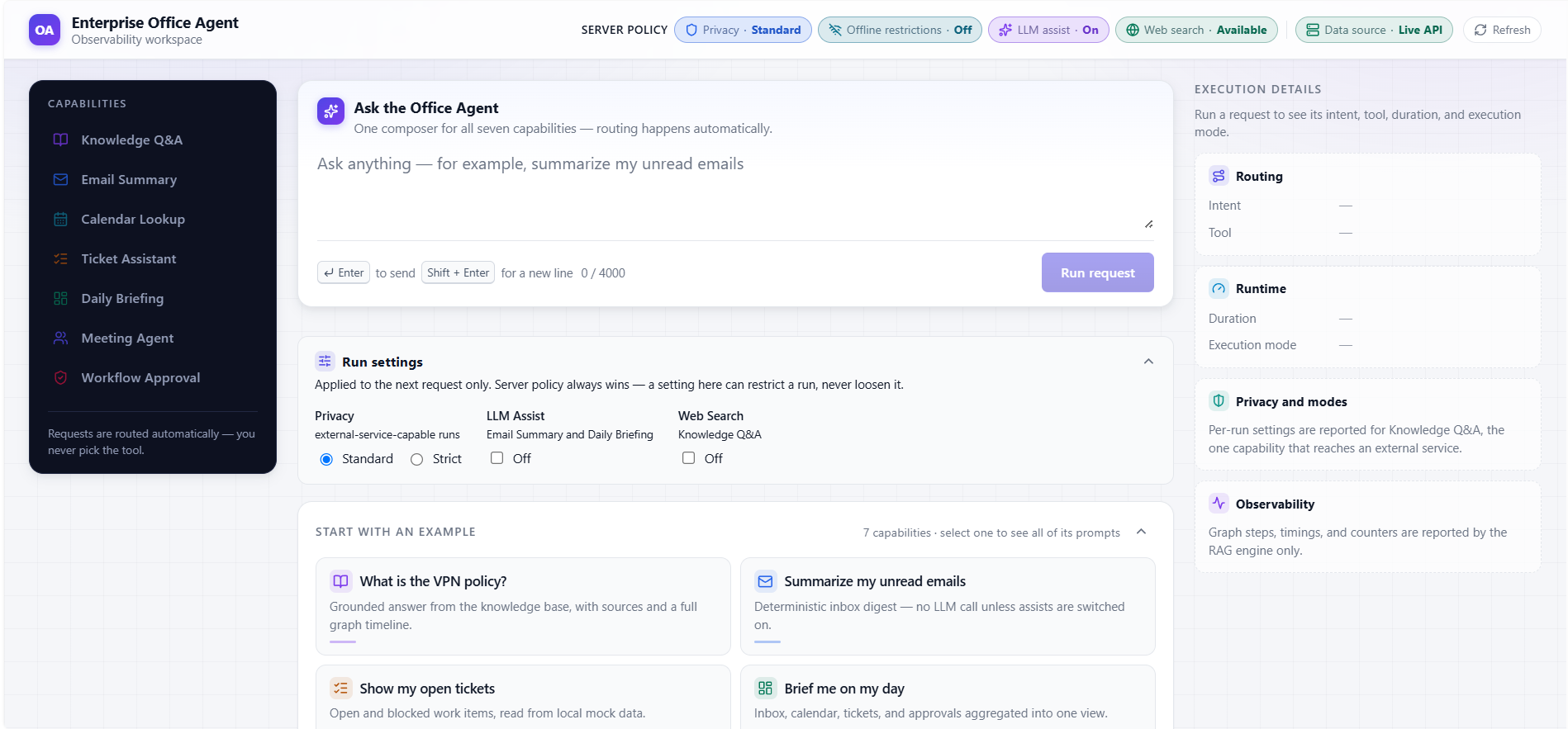
Knowledge Q&A
The workspace shows the routed intent, effective run settings, execution mode,
and the beginning of the grounded response.
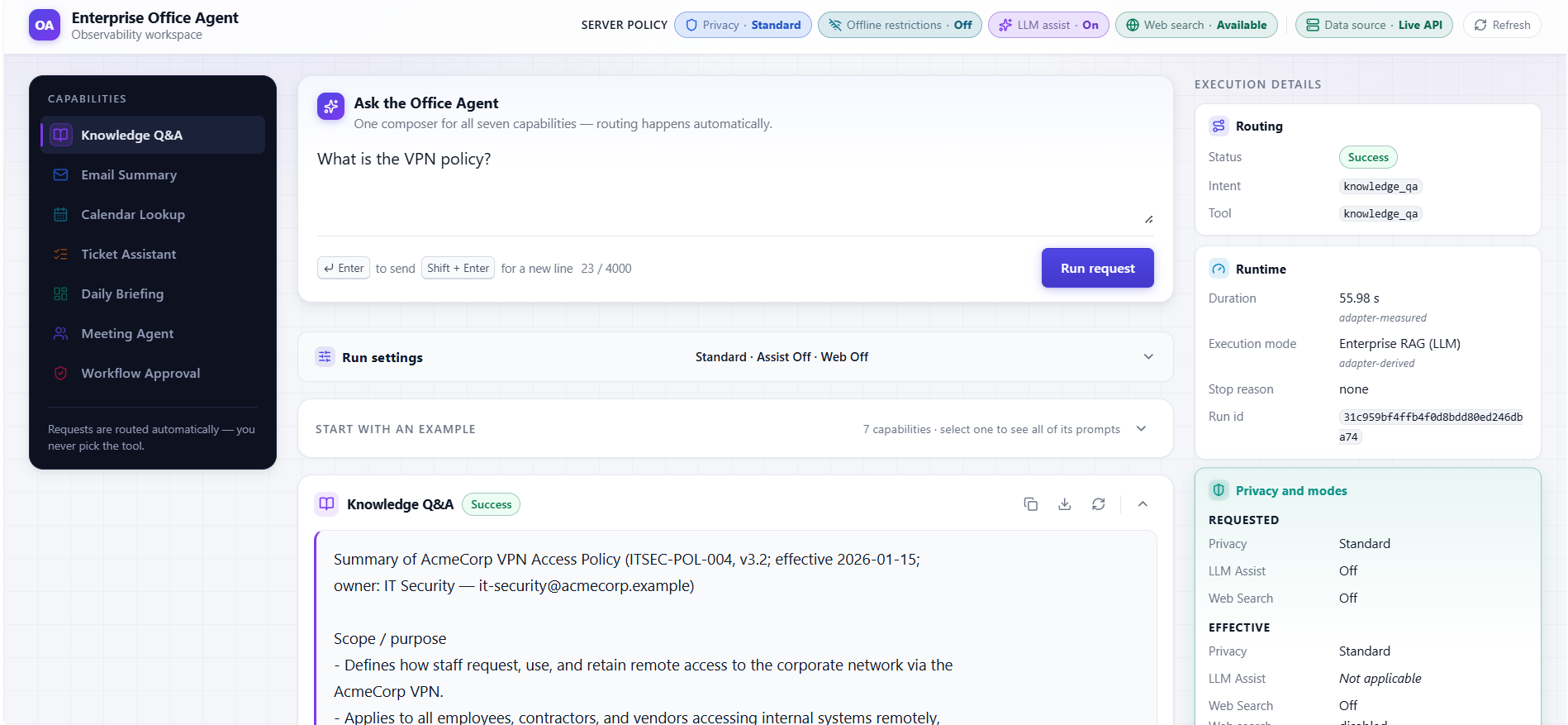
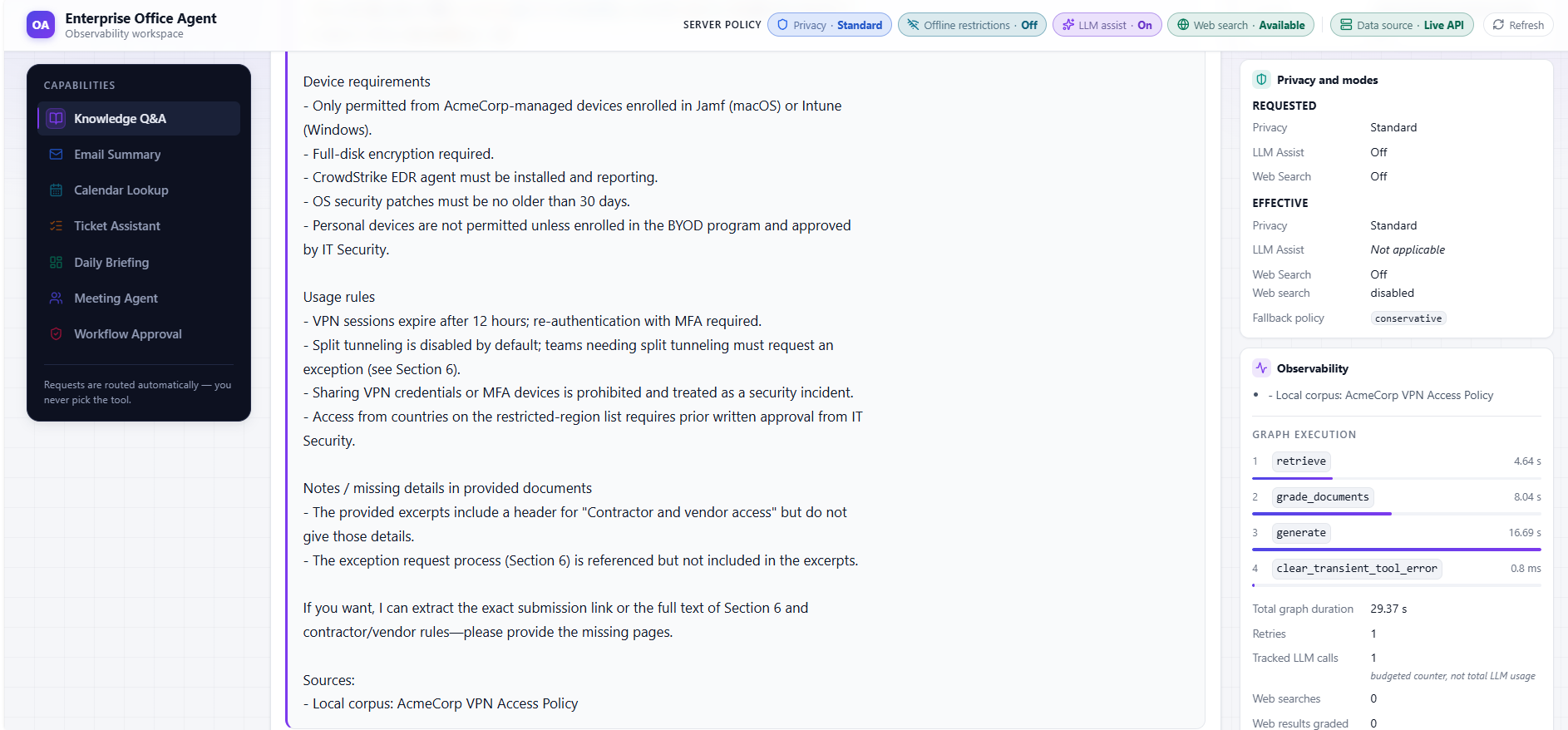
Graph observability
Knowledge Q&A exposes the graph execution path, node timings, retries, tracked
LLM calls, source provenance, and fallback state.
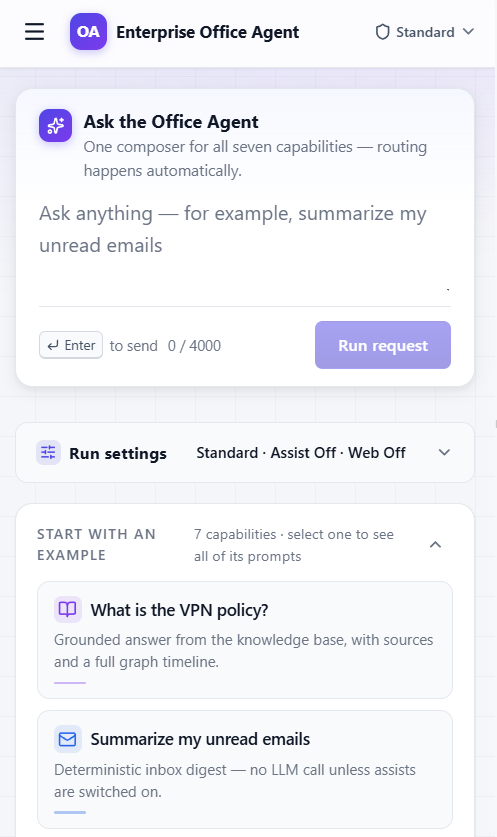
Responsive workspace
The same request workspace adapts to narrow mobile viewports.
What the system does
enterprise_raganswers questions from a curated local knowledge base
(a synthetic AcmeCorp internal-document corpus in Chroma), falling back to web
search (Tavily) when the local corpus is insufficient. Every answer passes
explicit document-relevance, answer-grounding (anti-hallucination), and
answer-usefulness gates; failed gates trigger bounded, input-changing
retries; runs that cannot end with a passing answer record a machine-readablestop_reasonand surface an honest user-facing caveat. SettingWEB_SEARCH_ENABLED=falsedisables web search entirely, so questions never
reach an external search service — they are still sent to OpenAI for
embedding, grading, and generation.office_agentclassifies a free-text request into exactly one intent with
a deterministic keyword router (no LLM routing) and dispatches to one tool.
The seven Office Agent capabilities
| # | Capability | Intent | Release | Backing |
|---|---|---|---|---|
| 1 | Knowledge Q&A | knowledge_qa |
v1.0.0 | Adapter over the real enterprise_rag engine |
| 2 | Email Summary | email_summary |
v1.0.0 | Local mock data |
| 3 | Calendar Lookup | calendar_lookup |
v1.0.0 | Local mock data |
| 4 | Task / Ticket Assistant | ticket_assistant |
v1.0.0 | Local mock data |
| 5 | Daily Briefing | daily_briefing |
v1.0.0 | Aggregates the mock email/calendar/ticket data |
| 6 | Meeting Agent / Meeting Prep | meeting_agent |
v1.5.0 (Phase 6) | Composes the mock calendar/email/ticket data |
| 7 | Workflow / Approval Agent | workflow_approval |
v1.6.0 (Phase 7) | Local mock approval queue + audit log |
Local mock behavior vs. future production integration
Every Office Agent tool except Knowledge Q&A reads static, entirely fictional
AcmeCorp JSON from office_agent/mock_data/. These
data providers are deterministic/mock-backed demonstrations: the mock data is
read-only and anchored to the data, not the system clock, so the tools are
deterministic and CI-safe. "Task creation" and approve/reject decisions are
simulated (computed in the response), never written back. No external service
is ever contacted (no Gmail, Outlook, Google Calendar, Slack, Jira, Linear, Asana,
or Trello). Replacing a mock loader with a real integration is deliberately left as
future production work and is not part of this repository.
The default path is therefore deterministic, but it is not true that no Office
capability other than Knowledge Q&A can call an LLM. Two presentation/synthesis
paths — the Email Summary digest (ADR 017)
and the Daily Briefing narrative (ADR 018)
— may optionally call the external gpt-5-mini model. Both assists are disabled
by default; setting OFFICE_LLM_ENABLED enables both at once, and if an assist is
disabled or fails the tool returns its deterministic result (with an honest caveat
on failure). These assists only re-synthesize already-selected local data into a
richer summary — they gain no action surface and cannot send, approve, mutate,
or execute any office operation. See office_agent/llm_assist/.
Two hierarchical, default-off runtime switches restrict external egress repo-wide
(ADR 019):PRIVACY_MODE disables web search, LangSmith tracing, and both LLM assists while
preserving the OpenAI RAG path, and OFFLINE_MODE additionally disables OpenAI
and every other external service — Knowledge Q&A, ingestion, and the real-model
evals then fail closed with explicit, deterministic behavior, while the local
deterministic Office capabilities keep working.
Repository layout
.
├── main.py                      # Repository-level entry point → launches the Office Agent CLI (office_agent/cli.py)
├── enterprise_rag/              # ✅ Enterprise Document Q&A Engine — see enterprise_rag/README.md
│   ├── README.md                #   Module docs: detailed setup, usage, API, budgets, failure handling
│   ├── ingestion.py             #   KB build: load local Markdown corpus → split → embed → persist to Chroma
│   ├── data/acmecorp_internal_docs/  #   Synthetic AcmeCorp corpus: 6 fictional internal policy/guide documents
│   └── graph/                   #   StateGraph, nodes, chains, engine, config, state, consts, formatting
├── office_agent/                # ✅ Enterprise Office Agent (router + Knowledge Q&A adapter + six local mock tools)
│   ├── README.md                #   Module guide: all seven capabilities, usage, optional LLM assists
│   ├── router.py                #   Deterministic keyword intent router (no LLM)
│   ├── engine.py                #   answer_office_request() entry point + tool dispatch
│   ├── schemas.py               #   Intent constants + typed ToolResult / response dataclasses
│   ├── tools/                   #   knowledge, email, calendar, tickets, briefing, meeting, approvals
│   ├── llm_assist/              #   Isolated boundary for optional, structured, grounded Office LLM assists (default off)
│   └── mock_data/               #   Fictional AcmeCorp JSON (read-only, deterministic)
├── api/                         # ✅ Thin FastAPI adapter over answer_office_request() — GET /api/health, POST /api/agent/run (localhost demo)
├── frontend/                    # ✅ Vite + React + TS observability workspace — see frontend/README.md
├── scripts/demo_office_agent_v1.py  # Local-only Office Agent demo
├── structure.md                 # Architecture deep-dive: full workflow, state machine, module boundaries
├── docs/
│   ├── engineering/             #   Onboarding, testing strategy, release checklist
│   ├── releases/                #   Release notes (office-agent-v1.6.md, office-agent-v1.7.0.md)
│   └── adr/                     #   Architecture Decision Records 001–021 (repo-level; index in docs/adr/README.md)
├── evals/                       # Eval harnesses by module (not in CI): enterprise_rag/ (RAG behavioral eval) + office_agent/llm_assist/ (assist evals)
├── tests/                       # enterprise_rag/{nodes,graph,evals} + office_agent/ + api/ (fully mocked); chains/ + office_agent/integration/ (key-gated)
├── .github/workflows/ci.yml     # CI: mocked suites (incl. tests/api/) + lint + frontend build/test — no API keys
├── pyproject.toml               # uv project config (deps, ruff, mypy, pytest)
└── CLAUDE.md                    # Repo-level guidance for Claude Code
Quickstart
Requires Python ≥ 3.11 and uv. All commands run
from the repository root.
# 1. Clone and enter the repository
git clone https://github.com/rhenus-Q/Enterprise-Office-Agent.git
cd Enterprise-Office-Agent

# 2. Install dependencies (creates .venv from the committed uv.lock). The api group is
#    included because pytest collects tests/api/ (FastAPI/httpx2) and mypy type-checks api/.
uv sync --group dev --group api

# 3. Configure environment variables (only needed for the RAG engine / Knowledge Q&A)
cp .env.example .env   # then edit .env and add your keys

# 4. Build the knowledge base (one-time, before first RAG run)
uv run python -m enterprise_rag.ingestion

# 5. Run the app — main.py launches the Office Agent CLI (the default entry point)
uv run python main.py

# Or run the standalone Enterprise RAG CLI (needs steps 3–4 for Knowledge Q&A)
uv run python -m enterprise_rag.cli
Run the Office Agent
# Interactive Office Agent CLI — deterministic and offline by default (no API
# keys or index required while the optional Office LLM assists are disabled).
# `uv run python main.py` launches the same interface.
uv run python -m office_agent.cli

# Scripted local-only demo (Daily Briefing, Email, Calendar, Tickets/Tasks,
# Meeting Prep, Workflow / Approval, Unknown). Same offline defaults; with
# OFFICE_LLM_ENABLED set, the Daily Briefing and Email Summary requests attempt
# to call OpenAI; without a valid OPENAI_API_KEY they fall back to deterministic
# output with a caveat.
uv run python scripts/demo_office_agent_v1.py

# Also run the Knowledge Q&A example (needs the enterprise_rag setup + API keys).
uv run python scripts/demo_office_agent_v1.py --include-knowledge
Or call it programmatically via office_agent.engine.answer_office_request(...).
See office_agent/README.md for the full
capability list, routing precedence, and example requests.
Observability workspace (web UI)
A single three-pane web workspace (frontend/) exercises
all seven capabilities plus the unknown route through one composer and surfaces
the engines' existing observability — run ids, node paths, per-node timings,
counters, stop reasons, caveats, and privacy-mode state. It talks to a thin
FastAPI adapter (api/) over two endpoints — GET /api/health andPOST /api/agent/run — whose only engine call is answer_office_request(); it
duplicates no routing, formatting, privacy, or fallback logic.
The workspace exposes two clearly separated settings layers:
- Server policy (read-only). The top status badges come from
GET /api/health
and report backend/runtime policy — privacy mode, offline mode, Office LLM
availability, and effective web-search availability. They are informational only;
the frontend cannot weaken server policy. - Run Settings (interactive, per-run). Controls beside the composer — Privacy
(Standard / Strict), LLM Assist (Off / On), Web Search (Off / On) — apply to a
single submitted run via an optionaloptionsobject on the request body. The
backend resolves them against server policy (a request can only restrict, never
enable a prohibited path) and reports the authoritativerequested/effective/applicability/constraintsback asrun_settings. Omittingoptions
preserves the original behavior and returnsrun_settings: null.
It is a localhost-only demo surface — no auth, no database, no deployment
tooling — and every displayed value traces to a named engine field: adapter-measuredduration_ms and adapter-derived execution_mode are labeled as such, the
Knowledge Q&A timeline appears only when the engine reported it (never fabricated),
and effective Run Settings are shown only from the backend. See
ADR 021.
# 1. Start the adapter (localhost only). The deterministic six capabilities and the
#    unknown route need no keys; only a real Knowledge Q&A run reaches the RAG engine.
uv sync --group dev --group api
uv run uvicorn api.app:create_app --factory --host 127.0.0.1 --port 8000

# 2. In another terminal, start the frontend (Vite dev server proxies /api → :8000).
cd frontend
npm install            # or `npm ci` against the committed package-lock.json
npm run dev

# Offline demo without the adapter: run the UI over typed fixtures instead.
#   VITE_API_MODE=mock npm run dev
See frontend/README.md for the full stack, scripts,
mock/http client modes, and the honest-observability principles.
Tests
Ordinary pytest runs are always keys-free: test bootstrap overwritesOFFICE_LLM_ENABLED=false before test-module imports and disables .env loading
for the pytest process. A local .env therefore cannot enable an Office LLM
assist or supply credentials to ordinary tests.
# Fully mocked suites — NO API keys required
uv run python -m pytest tests/enterprise_rag/nodes/ tests/enterprise_rag/graph/ tests/enterprise_rag/evals/ tests/office_agent/ --ignore=tests/office_agent/integration -v

# Additional deterministic CI gates — NO API keys required
uv run pytest tests/test_environment_isolation.py -v
uv run pytest tests/enterprise_rag/chains/test_generation.py -m "not real_model" -v

# Office Agent suite only (fully mocked / deterministic)
uv run python -m pytest tests/office_agent/ --ignore=tests/office_agent/integration -v

# Real-model integration tests — require an exported OPENAI_API_KEY plus this opt-in
# and may incur provider cost. The key alone is not authorization. Setting the
# opt-in inline keeps it scoped to this one command.
RUN_REAL_MODEL_TESTS=1 uv run python -m pytest -m real_model tests/enterprise_rag/chains/ tests/office_agent/integration/ -v

# Whole ordinary suite (real-model tests skip unless explicitly authorized above)
uv run python -m pytest -v
Lint, format, and type checks
uv run ruff check .            # lint
uv run ruff format --check .   # format check (CI mode)
uv run python -m mypy          # type-check the scoped engine-API surface
What does and does not require API keys
| Surface | API keys? |
|---|---|
| Office Agent local mock tools (Email, Calendar, Tickets/Tasks, Daily Briefing, Meeting Prep, Workflow/Approval) | No by default — local mock data, deterministic, and offline while the optional Office LLM assists are disabled. With OFFICE_LLM_ENABLED set, Email Summary and Daily Briefing attempt to call OpenAI; a valid OPENAI_API_KEY is required for the LLM-generated digest or narrative. Without one, they fall back to deterministic output with a caveat. |
tests/enterprise_rag/ (nodes/, graph/, evals/), tests/office_agent/ (excl. integration/), tests/api/, CI |
No — fully mocked; pytest forces the Office assist off and ignores local .env values. |
ruff / mypy |
No |
Knowledge Q&A + enterprise_rag engine (enterprise_rag.cli, the Office Agent's knowledge intent, or the demo --include-knowledge) |
Yes — OPENAI_API_KEY (and TAVILY_API_KEY when web search is enabled) |
Tests marked real_model in tests/enterprise_rag/chains/ + tests/office_agent/integration/, and the full eval run |
Yes — real gpt-5-mini. Pytest requires both RUN_REAL_MODEL_TESTS=1 and an exported OPENAI_API_KEY; otherwise marked tests skip. These tests may incur cost. |
Validation
A dated local validation snapshot (2026-08-04). These are point-in-time
numbers, not a guarantee — re-run the commands above for present totals:
- Office Agent demo: passed (local-only, no keys)
tests/office_agent/: 350 passed- Full suite (
uv run python -m pytest): 1103 passed, 35 skipped — the
skips are the real-model tests, which stay gated behind the explicit opt-in - Frontend (
npm test): 165 passed across 11 files ruff check: passedruff format --check: passed (123 files)mypy: passed (51 source files in the scoped surface)
GitHub Actions CI (.github/workflows/ci.yml) runs
three parallel keys-free jobs on every push and pull request: mocked-tests
(the fully mocked suites including tests/api/, plus the environment-isolation
regression tests and the deterministic generation cases selected withnot real_model), lint (ruff check, ruff format --check, and scopedmypy, now covering api/), and frontend (npm ci, npm run build,npm test, and — after npx playwright install --with-deps chromium —npm run test:responsive on Node 20). The workflow declarespermissions: contents: read, so no job can write to the repository. No job uses
API keys and none performs any deployment step. The tests marked real_model
and the full eval run are deliberately excluded.
Limitations and non-goals
office_agenttools are mock-data-backed, not real integrations. They are
deterministic demonstrations of the routing + tool contract, not a connection
to any mail, calendar, ticketing, or approval system.- No LLM routing in the Office Agent — intent classification is pure keyword
matching by design (fast, offline, reproducible). - Single-turn — neither module carries conversation memory.
- The web workspace is a localhost-only demo surface. A
React observability workspace and a
thin FastAPI adapter ship for local demonstration, but deployment
tooling (Docker, hosting), authentication, persistence, and external
integrations remain explicitly out of scope. The adapter duplicates no engine
logic — it only callsanswer_office_request()(see
ADR 021). - The
enterprise_ragengine's own limitations (single-turn CLI,print-based
logging, sequential grading, prompt-level-only injection defense) are detailed
instructure.md§15.
Documentation
enterprise_rag/README.md— the Enterprise RAG
engine: full setup, usage, configuration, and API reference.structure.md— architecture deep-dive: the full workflow,
state machine, routing, and theenterprise_rag/office_agentmodule boundary.office_agent/README.md— the
dedicated Office Agent demo & usage doc: all seven capabilities, routing
precedence, the programmatic API, and example requests.frontend/README.md— the observability workspace:
stack, scripts, the mock/http client modes, the thin-adapter boundary, and the
honest-observability principles.docs/engineering/onboarding.md— new-engineer
onboarding: repo layout, setup, module boundary, how to add a tool safely, and a
pre-PR checklist.docs/engineering/testing-strategy.md—
the testing strategy: unit / router / dispatch / no-mutation tests, CI-safe
design, and when evals apply.docs/engineering/release-checklist.md—
the release checklist (validation, docs consistency, hygiene, PR/tag steps).docs/ai-workflow.md— the AI-assisted development
workflow: the committed commands, which project rules are enforced as tests,
and why the review reports themselves are not published.docs/releases/office-agent-v1.7.0.md,docs/releases/office-agent-v1.6.md—
release notes.docs/adr/— Architecture Decision Records: why the
code is the way it is. The package refactor that introduced this module layout is
ADR 014;
the original five-capability Office Agent v1 architecture is
ADR 015, and the later Meeting
and Workflow / Approval capability extensions (the current seven-capability
inventory and router precedence) are
ADR 016. The two optional,
default-off Office LLM assists are the Email Summary digest
(ADR 017) and the Daily
Briefing narrative (ADR 018).
The web workspace and thin FastAPI adapter are
ADR 021.
Working in this repository
enterprise_ragis the behavior-stable module. Preserve its graph routing,
prompts, model names, state schema, and test expectations unless a change is
explicitly requested (see CLAUDE.md for the full rules).office_agentuses deterministic routing and local base workflows by default. Keep the router LLM-free (no LLM routing), keep the mock tools local-only and CI-safe, invoke Knowledge Q&A only through the adapter, keep the two optional LLM assists default-off with their byte-for-byte flag-off guarantee, and never regressenterprise_rag.- Both modules follow the same discipline: side-effect-free imports and lazy
@lru_cacheexternal clients.
Contribution guidelines are in CONTRIBUTING.md; security
reporting and the trust boundaries are in SECURITY.md.
AI-assisted development
This project was built primarily with Claude Code,
working against a spec-driven workflow that is itself committed to this
repository. Codex was used for a few isolated
frontend changes. Architectural decisions and reviews were made by a human; the
agent worked inside explicit, version-controlled rules.
CLAUDE.md holds the durable project rules, and.claude/commands/ holds 13 slash commands
covering the spec → plan → implement → review loop plus focused audit passes
(architecture, security, failure modes, test coverage, documentation drift).
Three properties are worth calling out:
- Rules are executable, not prose. The invariants that matter most are
enforced as tests, so a violation fails CI: credentials alone never authorize
a paid model call
(tests/test_environment_isolation.py),
and the module boundary is asserted rather than merely documented — importing
the root entry point must not pull inenterprise_rag
(tests/office_agent/test_cli.py). - Permissions are narrow. Every command declares an explicit
allowed-tools
allowlist — no command gets unrestrictedBash; grants are scoped down toBash(git status:*)andBash(git diff:*). The diff-review command is
additionally forbidden from reading secret-bearing files at all. - Methods are published; findings are not. Specs, plans, and review reports
are written underdocs/roadmap/and gitignored — only the four workflow
templates are tracked. A security-review report is a findings list about this
repository's own code; issues that matter are resolved and then recorded in an
ADR, a test, or Limitations and non-goals.
Full detail: docs/ai-workflow.md.
License
Released under the MIT License.
Yorumlar (0)
Yorum birakmak icin giris yap.
Yorum birakSonuc bulunamadi