Infinite-Loop
Health Warn
- License — License: MIT
- Description — Repository has a description
- Active repo — Last push 0 days ago
- Low visibility — Only 8 GitHub stars
Code Warn
- network request — Outbound network request in app/Workspace.tsx
- process.env — Environment variable access in app/api/audit/route.test.ts
- process.env — Environment variable access in app/api/auth/route.test.ts
- process.env — Environment variable access in app/api/health/route.test.ts
Permissions Pass
- Permissions — No dangerous permissions requested
No AI report is available for this listing yet.
Visual workflow editor that drives Claude Code in a loop until your condition is met. Drag-and-drop canvas with Loop, Branch, and Condition nodes; live token streaming over SSE; JSON-file workflows.

Infinite Loop
Turn one-off AI agent calls into visible, repeatable workflows.
Quickstart • Core concepts • Comparison • Security





What is Infinite Loop?
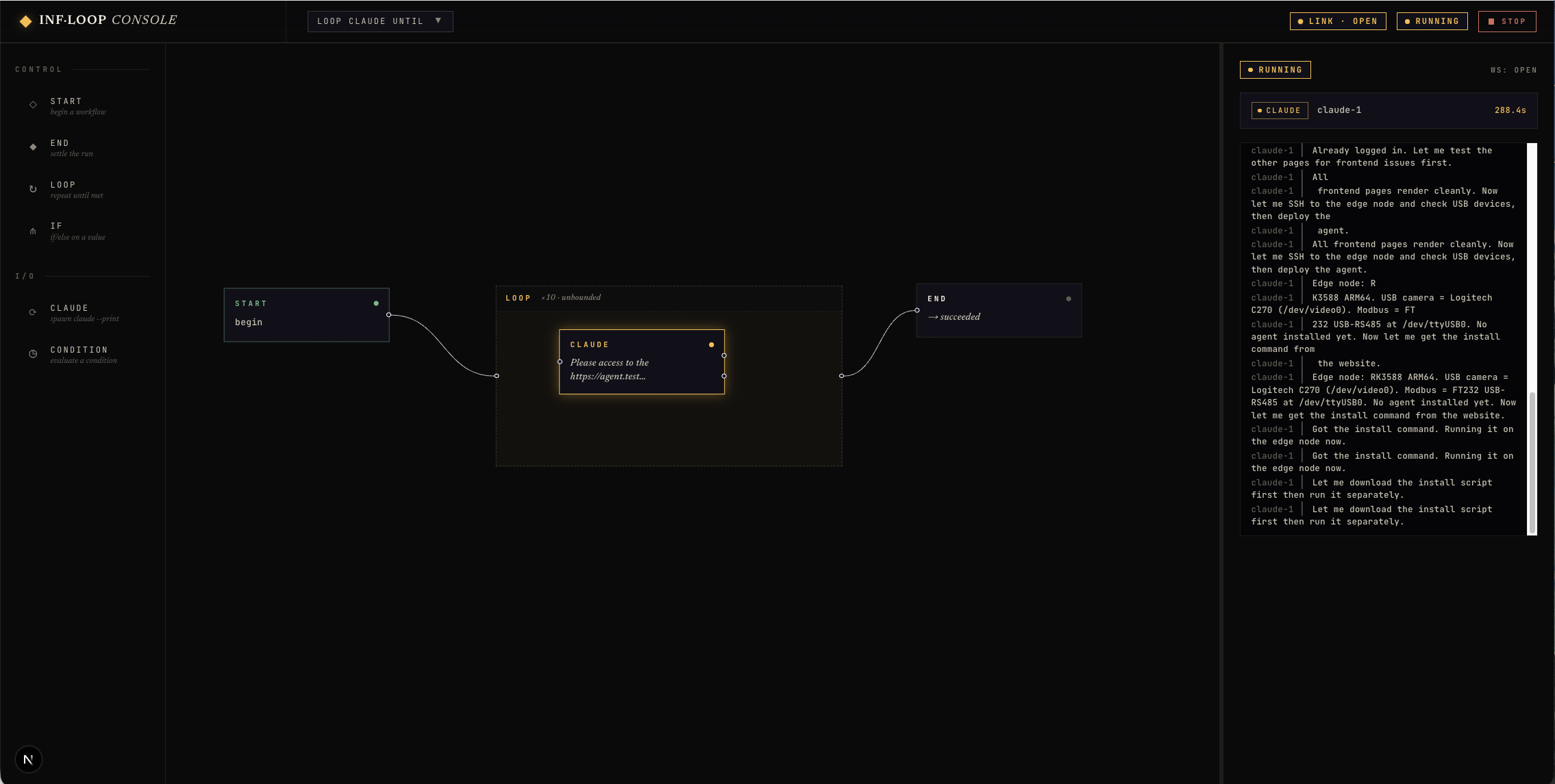
Infinite Loop is a local visual canvas for orchestrating AI agents. You compose workflows out of typed nodes — Agent, Loop, Branch, Parallel, Subworkflow, Judge, Script — and watch every token stream as the model generates it. Workflows are plain JSON files you can version in git, share with a teammate, and trigger from the UI, an MCP client, or a webhook.
Why Infinite Loop
Without orchestration, agent work lives as bash wrappers and one-off transcripts. The pain shows up fast:
- "Loop until the tests pass" becomes a brittle shell script you can't debug.
- "Run three prompts and pick the best" becomes a browser tab full of copy-paste.
- An automation that should fire on a GitHub event ends up running by hand.
- Yesterday's successful run is gone — no transcript, no replay, no diff with today's run.
Infinite Loop fills that gap with one local app: a canvas to compose, a live console to watch, persisted history to replay, and three triggering surfaces (UI / MCP / webhook) so workflows can fire from wherever the work originates.
Quickstart
Requirements: Bun ≥ 1.3. The default Claude provider needs the Claude Code CLI on your PATH (override with INFLOOP_CLAUDE_BIN). Other providers — Codex, Hermes, your own HTTP service — work too; see docs/providers.md.
git clone https://github.com/rhoninl/Infinite-Loop.git
cd Infinite-Loop
bun install
bun run dev
First run:
- Open http://localhost:3000.
- The starter workflow loads automatically.
- Click an Agent node and edit its
promptandcwdin the right panel. - Hit Run in the top bar.
- Watch streaming tokens appear live in the right panel as the agent generates them.
Other scripts: bun run test, bun run typecheck, bun run build, bun run start.
Deploying for a team? A supervised Docker setup — auto-restart, health checks, and a persistent data volume — is documented in docs/deployment.md.
Core concepts
A workflow is a directed graph of typed nodes. Each node writes outputs into a flat scope keyed by node id; downstream nodes reference them with {{node-id.field}} templating.
| Node | What it does |
|---|---|
| Agent | Runs an agent through a provider (Claude, Codex, Hermes, your own). |
| Loop | Repeats its body until a Condition says stop, capped by maxIterations. |
| Condition | sentinel (text match), command (shell exit code), or judge (a second agent grades). |
| Branch | lhs op rhs predicate routing to true / false / error. |
| Parallel | Fans children out — wait-all, race, or quorum:N. |
| Subworkflow | Calls another workflow as a single step with isolated inputs and outputs. |
| Judge | Reads N candidates and picks a winner with structured scoring. |
| Script | Inline TypeScript (Bun) or Python (python3) with typed named inputs. |
| Start / End | Entry and exit. Start declares the workflow's caller-supplied inputs. |
Full reference (handles, output keys, JSON schema): docs/workflow-format.md.
Bring your own agent runner
Agent nodes are provider-agnostic. Three flavors ship today:
- CLI providers —
claude,codex, or any other binary you wrap with a JSON manifest. Token streaming is parsed live for Claude'sstream-jsonformat. - HTTP providers — any OpenAI-compatible endpoint including Hermes, OpenRouter, and vLLM. The manifest declares a base URL, auth (env-var or local-only inline token), and optional
profilesEndpointso Infinite Loop can live-discover the models the server exposes. - Local Hermes connections — manage them visually through the in-app Connections modal. Each connection produces one selectable provider per port/profile, grouped under its own palette section. Secrets live in gitignored
*.hermes.local.jsonfiles.
Drop a new manifest into providers/ and the palette picks it up. Full format: docs/providers.md.
See it run
A real run logged as plain text:
run_started     Loop until condition
node_started    loop-1
node_started    agent-1
agent-1 │ All frontend pages render cleanly. Now
agent-1 │ let me SSH to the edge node and check USB devices…
node_finished   agent-1 → next
node_started    cond-1
condition_checked  cond-1 met:Y matched at index 6
node_finished   cond-1 → met
run_finished    succeeded
Examples — what you can build
- Iterate until tests pass. Loop an agent over a codebase with a
commandcondition runningpytest -q. Stops the moment ground truth says done. - Multi-agent debate. Fan three prompts (idiomatic, contrarian, conservative) out to Claude in parallel; let a Judge node read all three and pick a winner. The shipped Team preset does exactly this — see
workflows/library/team.json. - Self-grading drafts. One agent drafts, a second grades against a rubric, loop until the grade clears a threshold.
- GitHub-driven review. A webhook trigger on
pull_request: openedqueues a review workflow that posts a comment back. - Agents calling Infinite Loop. Expose your workflows as MCP tools so Claude Code, Cursor, Cline, or Zed can call them by name — discovery for free.
How Infinite Loop is different
| Tool | Sweet spot | Where Infinite Loop fits |
|---|---|---|
| Claude Code / Codex | A great single-agent session | Infinite Loop coordinates repeatable, multi-step, multi-agent workflows on top of them |
| n8n / Zapier | SaaS automation between hosted apps | Infinite Loop is local-first and focused on agent runners, scripts, and CLIs |
| LangGraph | Code-defined agent graphs in Python | Infinite Loop is visual, inspectable, and replayable — faster to tweak without editing graph code |
| Dify / Flowise | LLM apps and chatbot flows | Infinite Loop targets developer workflows — CLIs, MCP, webhooks, filesystem checks |
| OpenHands | Autonomous coding tasks | Infinite Loop focuses on orchestration, branching, replay, and external triggers |
Trigger surfaces
Three ways to start a workflow:
- Canvas — click Run in the top bar. If the workflow declares inputs, a modal collects them.
- MCP — every saved workflow is exposed as a tool at
POST /api/mcp. Workflow tools enqueue (non-blocking) and return{ queueId, position }; poll withinfinite_loop_get_run_status. Full guide: docs/mcp.md. - Webhook — wire up triggers visually in the Dispatch view. Generic JSON or GitHub events out of the box; drop a JSON file in
webhook-plugins/to add more. Full guide: docs/webhooks.md.
The engine runs one workflow at a time. Additional MCP calls and webhook hits queue in FIFO order (cap 100); the
/queuepage shows pending items with per-item cancel.
Security model
Infinite Loop can run local agent CLIs, inline TypeScript and Python, and shell commands on your machine. Treat workflows as executable code, and treat the server as a local code-execution surface.
- Default bind is
127.0.0.1(loopback only). Exposing it on the network (HOST=0.0.0.0) requires anINFLOOP_API_TOKEN— or an explicitINFLOOP_ALLOW_INSECURE=1override. INFLOOP_API_TOKENgates the management/MCP API; MCP/API clients pass a bearer token, and the browser UI prompts for it at a login page.- Webhook URLs are credentials. The unguessable
triggerIdin the URL is the only auth — treat URLs like passwords and rotate via the Dispatch UI. - Workflow JSON files are executable code. Review every workflow you import or download before running it. The same goes for files in
providers/,webhook-plugins/, andtriggers/. - Every trust-relevant action is recorded in a durable, append-only audit log — run lifecycle, login attempts, trigger changes, and webhook accept/reject decisions. Read it back with
GET /api/audit. - Webhook ingress and browser login are rate-limited — per trigger and globally — so a leaked trigger URL or a login flood is capped. Tune with
INFLOOP_WEBHOOK_RATE_LIMIT/INFLOOP_LOGIN_RATE_LIMIT. - Do not expose Infinite Loop directly to the public internet. There is still no per-user auth. Put it behind a Cloudflare Tunnel with Access policies, a Tailscale ACL, or a reverse proxy with HTTP auth.
Full posture, recipes, and reporting guidance: docs/security.md.
Contributing
Issues and PRs welcome. The codebase is small — a good way in is to read the original design at specs/workflow-dag-design.md and the engine at lib/server/workflow-engine.ts.
License
MIT © rhoninl
Reviews (0)
Sign in to leave a review.
Leave a reviewNo results found