ward-ai
Health Warn
- License — License: Apache-2.0
- Description — Repository has a description
- Active repo — Last push 0 days ago
- Low visibility — Only 5 GitHub stars
Code Fail
- spawnSync — Synchronous process spawning in compatibility/amp/amp.test.ts
- process.env — Environment variable access in compatibility/amp/amp.test.ts
Permissions Pass
- Permissions — No dangerous permissions requested
No AI report is available for this listing yet.
The quality gate for AI coding agents. Your agent says it's done; Ward checks every edit against your tests, linters and architecture rules, and the agent fixes what fails.

Ward
The quality gate for AI coding agents.
Your agent says it's done. Ward makes sure it is. Define your rules once, share them with your
team, and Ward checks every change against them, from the first edit to production.





Documentation ·
Quick start ·
How it works ·
Report a bug
An agent's change fails a quality check, the agent fixes it, and the fast and pre-push checks pass. (WebM version)
[!NOTE]
Ward is in alpha. Today it supports Java projects built with Maven or Gradle,
TypeScript and JavaScript projects built with npm, pnpm, Yarn, or Bun (including Turborepo
workspaces), Python projects managed with uv, Poetry, or pip, Swift projects built
with SwiftPM or Xcode on macOS (Xcode 26 or newer), and Kotlin and Java Android projects built
with Gradle and the Android Gradle Plugin. Support for more languages is planned. The CLI
and configuration may change before1.0.
| Language | Build tools | Frameworks | Quality tools |
|---|---|---|---|
| Java / Kotlin | Maven, Gradle | Any. Spring Boot, Quarkus, Micronaut, Helidon, Dropwizard, Javalin, and Ktor are labeled when detected | Compiler, JUnit, JaCoCo, Checkstyle, PMD, SpotBugs, PIT, ArchUnit |
| Kotlin / Java for Android | Gradle with the Android Gradle Plugin | Android app and library modules | Android lint, Android unit tests, Android debug unit-test coverage |
| TypeScript | npm, pnpm, Yarn, Bun | Vue, Svelte, Astro, Angular (others are checked with the same gates) | tsc, Vitest / Jest / bun test, ESLint or Biome, Prettier, Stryker, dependency-cruiser |
| JavaScript | npm, pnpm, Yarn, Bun | Same as TypeScript | Same as TypeScript, without tsc |
| Python 3.11–3.14 | uv, Poetry, pip | Django, FastAPI, Flask | Ruff, mypy, pytest, coverage.py, Import Linter, pip-audit, mutmut |
| Swift | SwiftPM, Xcode | Any | swift-format, SwiftLint, swift build, swift test or xcodebuild test, llvm-cov / xccov, Harmonize |
Why Ward?
AI coding agents write code faster than anyone can review it. To keep quality up, you end up
repeating the same rules in every prompt: run the tests, keep methods short, don't add
dependencies, don't break the architecture. That guidance costs tokens and time, and the agent still
forgets.
Ward moves those rules out of your prompts and into your project:
- The rules live in the repository.
ward.tomllists the checks (tests, coverage,
linters such as ESLint, Ruff, or Checkstyle, architecture rules, security scanners, or any
command). - Every agent gets the same feedback. After each edit, Ward runs the fast checks and hands the
exact failure back to the agent, which fixes it on its own. - Stricter checks run later, automatically. Commit, push, and CI each add more checks, so
nothing the agent missed reaches production.
You spend less time guiding the agent and fewer tokens on corrections, because the project itself
tells the agent what "good" means.
How it works
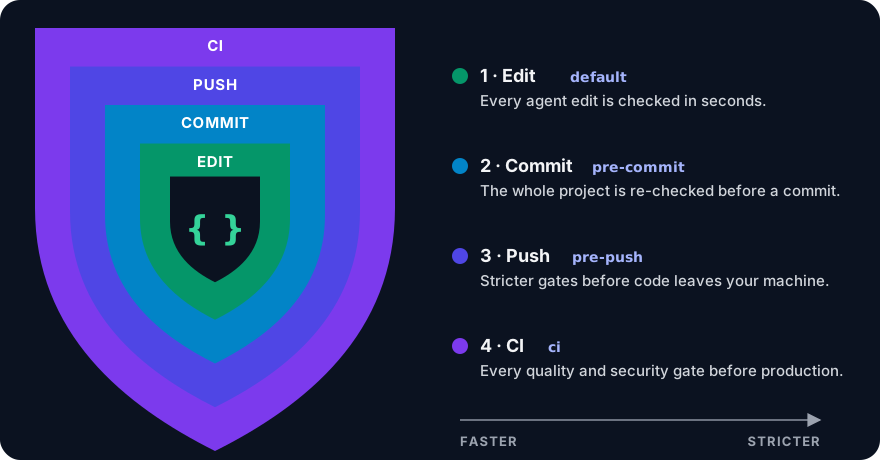
Ward checks your code in four layers. Each layer is a profile in ward.toml. Inner
layers are fast so they can run constantly; outer layers are stricter.
| Layer | Profile | When it runs | What it's for |
|---|---|---|---|
| 1. Edit | default |
After every agent edit, on the edited files | Seconds-fast feedback the agent fixes right away |
| 2. Commit | pre-commit |
Git pre-commit hook |
Re-checks the whole project, in case the agent missed something |
| 3. Push | pre-push |
Git pre-push hook |
Adds compile, tests, coverage, and slower analysis before code leaves your machine |
| 4. CI | ci |
Your CI pipeline | Every quality and security gate before production |
Each layer includes the checks of the layers inside it. ward init generates this layout for you;
move a check between layers by editing its profiles list. Read the
four quality layers guide.
Quick start
Using a coding agent? Paste this prompt into Claude Code, Codex, Cursor, OpenCode, or any other
agent, and it installs Ward and sets it up with you:
Set up Ward (https://github.com/RicardoRB/ward-ai) quality gates in this project.

1. Run `ward --version`. If Ward is missing, ask me first, then install it:
   - Linux, macOS, or Git Bash: curl -fsSL https://raw.githubusercontent.com/RicardoRB/ward-ai/main/install.sh | sh
   - Windows PowerShell: irm https://raw.githubusercontent.com/RicardoRB/ward-ai/main/install.ps1 | iex
2. Read https://raw.githubusercontent.com/RicardoRB/ward-ai/main/skills/ward-init/SKILL.md and follow it
   step by step. Fetch the reference files it links from the same folder.
3. Ask me before changing any file. When setup is done, run `ward check` and show me the result.
Or set it up yourself:
1. Install on Linux, macOS, or Git Bash (see installation for options):
curl -fsSL https://raw.githubusercontent.com/RicardoRB/ward-ai/main/install.sh | sh
On Windows, in PowerShell:
irm https://raw.githubusercontent.com/RicardoRB/ward-ai/main/install.ps1 | iex
2. Set up your project. The wizard asks for a preset, the checks, your coding agent, and the Git
hooks:
cd your-project
ward init
Or in one line, for Claude Code with the standard preset:
ward init --preset standard --integration claude-code --quality-hooks
3. Run the checks yourself, or just let your agent work:
ward check                     # layer 1: fast checks
ward check --profile pre-push  # layer 3: stricter checks
Something not working? Run ward doctor.
Let your agent set it up
You don't need to learn every tool's configuration. Ward ships three
agent skills that set it up
with you. They inspect the project, explain each choice, and change files only after you approve.
| Skill | What it does | Try asking |
|---|---|---|
ward-init |
Chooses the preset, checks, architecture style, agent integration, and Git hooks for this project, then previews the changes with ward init --dry-run |
"Set up Ward quality gates in this project" |
ward-tune |
Fits Checkstyle, PMD, coverage, mutation testing, and ArchUnit rules to your real code. It never weakens a rule without your approval and never adds suppressions | "Tune the Ward rules to this codebase" |
ward-fix |
Fixes the code so failing gates pass, rule by rule, re-running each gate to prove the fix. It never changes rules or adds suppressions | "Fix the Ward findings" |
/plugin marketplace add RicardoRB/ward-ai    # Claude Code
/plugin install ward@ward-ai
npx skills add RicardoRB/ward-ai --skill ward-init ward-tune ward-fix # other agents
Share with your team
Commit the setup and everyone works with the same rules, whatever agent they use:
ward.toml: the checks and which layer runs each one.config/: the rule files for Checkstyle, PMD, SpotBugs, and the other tools.- The agent hooks that
ward initorward integrategenerated, such as.claude/or.opencode/. AGENTS.md(optional,ward init --agent-rules): the rules written for agents to read.
Git doesn't share the commit and push hooks through the repository: they live in .git/hooks/ on
each machine. A one-step setup for teammates is on the roadmap.
In CI, run the outermost layer. The CI/CD guide
has ready-to-copy examples for GitHub Actions, GitLab CI, Jenkins, and more:
ward check --profile ci --format json > ward-report.json
What it checks
| Category | Tools |
|---|---|
| Build and tests | Compiler, JUnit, JaCoCo coverage, PIT mutation testing |
| Code quality | Checkstyle, PMD, SpotBugs, SonarQube, Spotless |
| Architecture | ArchUnit (Layered, Hexagonal, or Clean), Maven Enforcer / Gradle checks |
| Security | Gitleaks, Semgrep, OWASP Dependency-Check, Trivy, OWASP ZAP |
| Compliance | License plugins, japicmp API compatibility |
| TypeScript and JavaScript | tsc, Vitest / Jest / bun test, ESLint, Biome, Prettier, Stryker mutation testing, dependency-cruiser, Semgrep, framework checkers (vue-tsc, svelte-check, astro check, ngc) |
| Python | Ruff (format and lint), mypy, pytest, coverage.py, Import Linter, pip-audit, mutmut mutation testing, manage.py check for Django |
| Swift | swift-format, SwiftLint, swift build, swift test or xcodebuild test, llvm-cov / xccov coverage, Harmonize architecture rules |
| Android | Android lint (lintDebug), Android unit tests (testDebugUnitTest), debug unit-test coverage |
| Anything else | Any command you add to ward.toml |
Ward runs the tools; the rules live in each tool's own configuration. For TypeScript and JavaScript
projects, ward init writes the tools' own config files, such as an ESLint flat config orvitest.config.mjs, and the thresholds sit there too. See Node projects. See
quality gates.
Coding agents: Claude Code, OpenCode, Codex, Cursor, GitHub Copilot CLI, Gemini CLI, Windsurf,
Cline, Factory Droid, and Amp. See integrations.
Documentation
| Topic | Link |
|---|---|
| Getting started | Installation · How it works · Quick start |
| Configuration | ward.toml · Quality gates · Learning |
| Agents | Agent skills · Claude Code · OpenCode · Other agents · Git hooks |
| CI/CD | CI/CD guide · JSON output · Exit codes |
| CLI reference | init · check · integrate · doctor · loop · all commands |
| Project | Architecture · Security |
Project status
Alpha (0.5.0). Runs as a native binary on Linux x86_64, macOS (Apple Silicon and Intel), and
Windows x86_64, or as a JAR on JDK 25. Only the latest release receives fixes. See
CHANGELOG.md for what changed in each release.
Roadmap:
- Support for more languages beyond Java, Kotlin, TypeScript, JavaScript, Python, Swift, and Android
- Shared Git hooks (for example through
core.hooksPath), so teammates get the commit and push
layers without a setup step - Homebrew tap, Scoop and winget packages, and container image
Known limitations: Ward never installs tools; a missing tool is reported as UNAVAILABLE.
Commands run without a shell, but that is not a sandbox (see below).
Development
./mvnw package                                # build target/ward.jar (JDK 25)
./mvnw -Pnative -DskipTests native:compile    # build target/ward (GraalVM 25.5)
./mvnw -q test                                # run all tests
ward check --profile pre-push             # required before every pull request
Contributions are welcome: fork, branch, make sure ward check --profile pre-push passes, and
open a pull request. Start with CONTRIBUTING.md; conventions are in AGENTS.md. Report bugs and request features in
GitHub Issues with your ward --version andward doctor output.
To re-record the demo above, follow the steps at the top of.github/assets/ward-demo.tape.
Security
[!WARNING]
ward.tomlis executable code.ward checkand every agent hook run its commands with
your user's privileges. Do not run Ward on untrusted repositories or pull requests outside a
sandbox.
Report vulnerabilities privately through
GitHub Security Advisories, not
in a public issue. Read the full security model.
License
Apache License 2.0. Third-party notices, including the libraries Ward is built on, are
in NOTICE. The quality tools Ward runs are separate projects under their own licenses
and are not bundled.
Reviews (0)
Sign in to leave a review.
Leave a reviewNo results found