riffsheet
Health Uyari
- License — License: MIT
- Description — Repository has a description
- Active repo — Last push 0 days ago
- Low visibility — Only 7 GitHub stars
Code Gecti
- Code scan — Scanned 12 files during light audit, no dangerous patterns found
Permissions Gecti
- Permissions — No dangerous permissions requested
Bu listing icin henuz AI raporu yok.
Video breakdown for coding agents (Claude Code, Codex): your agent analyzes a short video shot by shot on your own machine, with cut, caption, loudness and word times measured. You get a riffsheet: what happens, why it holds a viewer, what your own version has to keep.

riffsheet
Video breakdown for coding agents: your agent analyzes a short video shot by shot, on your own machine.
Cut times, caption on and off times, loudness and word times are measured; the agent reads laid-out pictures for the rest.
You get a riffsheet: what happens, why it holds a viewer, and what your own version has to keep.
Install · Examples · How accurate it is · Limits · 简体中文
Free, MIT, runs offline with Python and ffmpeg. An agent skill for Claude Code, Codex and other agents that can run commands and read images.
Made by Riffkit. riffsheet needs no account and sends nothing to us.
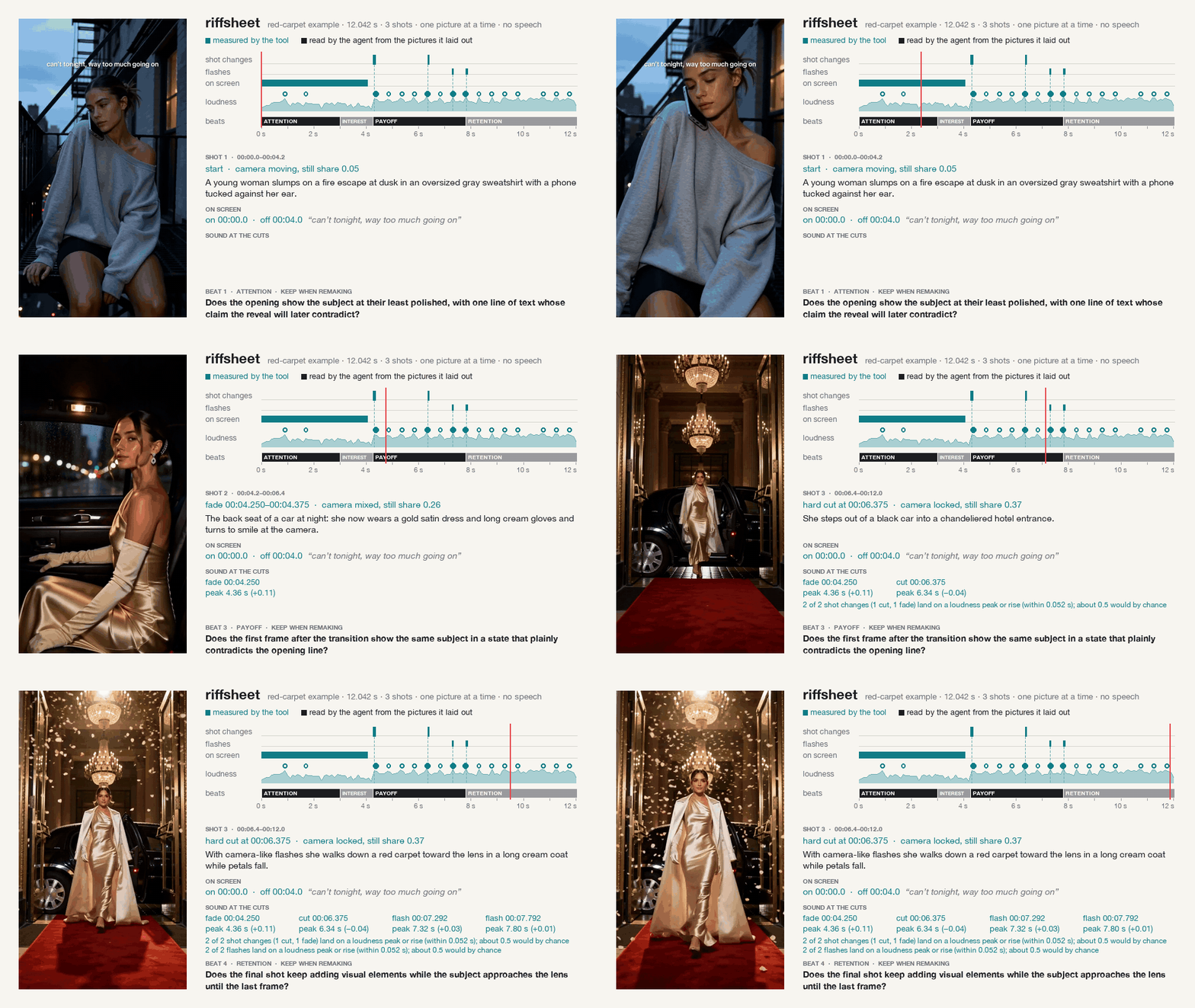
A video of ours, broken down by riffsheet. Full result in examples/red-carpet.
Install
You need ffmpeg 7 or newer and Python 3.9 or newer. Spoken words need a speech recognizer: the tool's own is the optional faster-whisper package and its speech model. When your agent judges that a video's speech matters and the recognizer is not set up, it tells you what it would add and what it costs (download, disk space, time, network), and sets it up only if you say yes (see Requirements).
The skill is the folder skills/riffsheet (SKILL.md, scripts/, references/, schema/); each way below puts that folder alone in your agent's skills folder, without the examples, their pictures and the tests.
1. Tell your agent (Claude Code, Codex, or any agent that runs commands):
Install the riffsheet skill from https://github.com/riffkit/riffsheet, then break down ~/Downloads/clip.mp4
2. Or with the skills command line tool (needs Node): npx skills add riffkit/riffsheet
3. Or in Claude Code, as a plugin: claude plugin marketplace add riffkit/riffsheet, then claude plugin install riffsheet@riffsheet.
4. Or with git: keep the repository anywhere and link its skill folder into your agent's skills folder:
git clone https://github.com/riffkit/riffsheet ~/src/riffsheet
mkdir -p ~/.claude/skills && ln -s ~/src/riffsheet/skills/riffsheet ~/.claude/skills/riffsheet   # Claude Code
mkdir -p ~/.agents/skills && ln -s ~/src/riffsheet/skills/riffsheet ~/.agents/skills/riffsheet   # Codex
git -C ~/src/riffsheet pull updates it. Other agents: keep the repository anywhere and say "Read skills/riffsheet/SKILL.md in the riffsheet folder and follow it."
If you put the whole repository in ~/.claude/skills/riffsheet with git before, move it out and link the skill folder in its place:
mkdir -p ~/src && mv ~/.claude/skills/riffsheet ~/src/riffsheet && git -C ~/src/riffsheet pull && ln -s ~/src/riffsheet/skills/riffsheet ~/.claude/skills/riffsheet
For Codex, the same with ~/.agents/skills. If you had it in both, move one as above; the other is then not needed: set it aside and link the skill folder in its place with mv ~/.agents/skills/riffsheet ~/riffsheet-old && ln -s ~/src/riffsheet/skills/riffsheet ~/.agents/skills/riffsheet, and remove ~/riffsheet-old once the skill works.
Try it
Give your agent a video file and ask in your own words:
Break down this video shot by shot: ~/Downloads/ad.mp4
Why does this TikTok work? I want to make my own version.
Analyze this Reel and list every caption with its timing.
About 4 to 8 minutes later you have riffsheet.md to read and riffsheet.json with every value, and your agent tells you in your own language what it found: one plain line per shot, why the video holds a viewer and what your version has to keep. This is the start of one riffsheet from the examples, an 8-second video spoken in Spanish:
8.042 s · 4 shots · one picture at a time · spoken on camera (es) · 5 spoken lines
Sound and picture (measured times, not what the sound is): 0 of 3 cuts land on a loudness peak or rise (within 0.052 s); about 0.4 would by chance, with 11 peaks and rises in 8.0 s; 4 of 5 caption appearances land on a loudness peak or rise (within 0.052 s); about 0.7 would by chance, with 11 peaks and rises in 8.0 s.
00:02.4–00:04.1 At 00:02.375 a hard cut (checked on frames: no motion blur, nothing covering the lens, no blended, faded or white frame between) changes her clothes while the static, locked eye-level medium-wide framing and the place hold … She now wears an oversized white crew-neck sweatshirt printed with one large photographic red apple across the front over mid-blue skinny jeans. … The main person says on camera at a measured pace, frowning with the finger raised, “holgado con ajustado, no,”.
Keep when remaking. Does each outfit change at a cut together with its rule label, and does at least one verdict break the run of approvals with a visibly different reaction?
Examples
Two first runs by coding agents that had never seen the project, on videos of ours, each with the pictures the agent worked from, the commands it ran and what it was unsure of. Nothing the agents wrote was edited, apart from one time in the red-carpet judgment that named a shot the tool no longer finds (its README says which).
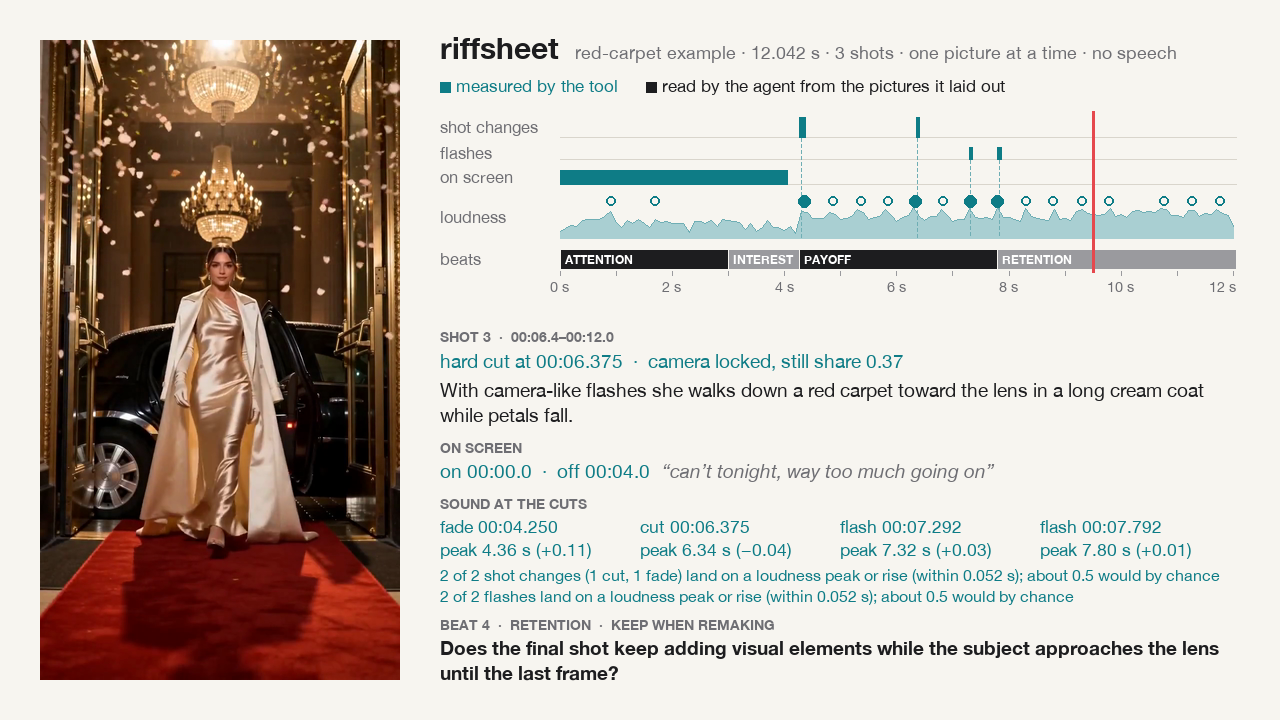 |
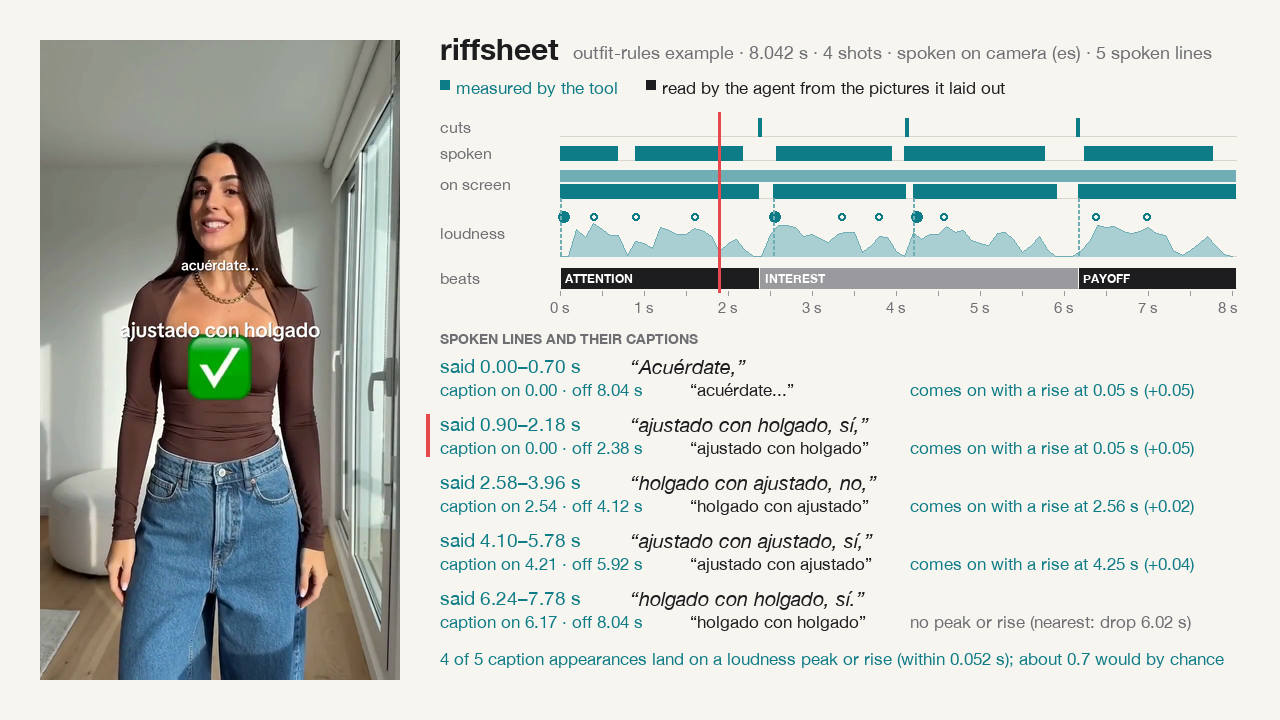 |
| red-carpet: 12 s, edited to music, nobody speaks. Speech recognition heard a phrase in the music; the agent checked her mouth frame by frame and wrote no spoken lines. The tool finds 3 shots, joined by a fade and a hard cut, and two flash frames over one framing that start no shot; both shot changes land on a loudness peak or rise, against about 0.5 by chance, and so do both flashes. | outfit-rules: 8 s, Spanish spoken to camera, captions. 4 shots, 5 spoken lines. 0 of 3 cuts land on a loudness peak or rise, but 4 of 5 caption appearances do. |
What you get
Two files per video, written in English:
riffsheet.md, an account of the video for a person to read: what happens, why it holds a viewer, and then each beat in order, with what is on screen, what is said, what the beat does for the viewer and what a remake has to keep.riffsheet.json, the complete data: every spoken line with its time and pace, every caption with its words, times, position, size and colors, every graphic with its box and times, the people and objects, a time-coded description of each segment, where sound events fall on the shot changes, flashes and caption appearances, and where each value came from. The format is inschema/riffsheet.schema.json.
If you ask for the whole account in your language, the agent also writesriffsheet.zh.md(or.es.md,.ja.mdand so on) from the checkedriffsheet.md: every time and number unchanged, and the spoken lines and on-screen words left in the video's own language.
The line quoted above, in riffsheet.json, with the agent's correction of a misheard word:
{"id": "vs3", "time_range": [2.58, 3.96], "text": "holgado con ajustado, no,",
 "mode": "on_camera_dialogue", "speaker": "protagonist",
 "_src": {"time_range": "measured", "text": "measured"},
 "_pace": {"unit": "words", "count": 4, "per_s": 2.9, "band": "measured", "longest_gap_s": 0.14,
           "pauses_over_0_4s": [], "trend": null},
 "_notes": ["transcript 'olvado' -> 'holgado' (seen in a word-for-word caption)"]}
How it keeps to what is on screen
- Measured where a measurement is possible. Cut times, the frame on which each caption appears and the frame on which it is gone, and whether the camera holds still are measured from the frames; loudness, the time of each spoken word and the pace of each line, from the sound.
- Every value says where it came from: measured by the tool, seen by the agent, heard by the agent (only after it passes the tool's hearing check), inferred, uncertain, established by the agent's own means, or not judged. Where the evidence does not settle a measurement, the tool leaves the value out and says why.
- Every detail points to a close view of its moment. A statement about what people wear and hold, a product or the place has to name a large view of a moment it describes, or be marked uncertain; until then the tool writes no riffsheet. The tool checks that the view exists and shows that moment; matching the words to it is the agent's work.
- It says what it could not judge. Tone of voice, what kind of music plays and anything else the pictures and measurements do not settle are listed as not judged, unless the agent passed the hearing check and heard them.
- It says what did not run, and what came from elsewhere. If speech recognition was not set up, or failed, the riffsheet says under the line under its title that the speech was not transcribed and why; it never reads as a video without speech. A transcript from another recognizer, and any fact the agent established by its own means, is marked as such, and what the tool lacked for the video is listed.
- Nothing to install but ffmpeg. Plain Python, standard library only. No model download is needed; speech recognition is optional.
- It explains why the video works. Beat by beat, what each part does for the viewer, and one test a remake has to pass to keep it.
The procedure the agent follows is references/METHOD.md; each command is described in references/TOOL.md.
How accurate it is
Two tests, run on 2026-11-27 on development builds made before release 0.1.0 (details and method in EVAL.md):
| measure | result |
|---|---|
| statements on ten videos (8 to 45 s; English, Chinese, Korean), each checked against the frames by a separate agent | 649 correct, 23 wrong, 17 missed |
| hard cuts, six videos checked for cuts | 24 of 25 found, no false cut |
| caption on and off times, two videos with frame-by-frame ground truth | exact to the frame |
| a 10.6 s video that played no part in development, scored against 137 facts listed from its frames beforehand | 64 stated exactly, 36 partly, none contradicted |
Measured again on release 0.1.0: the cut finder still found 24 of the 25 hard cuts on those six videos, with no false cut; on a 45-second talking video with 9 jump cuts inside one framing it found 7. Those videos were not available for this release, so the cut figures were not measured again on it; on every clip the tests draw, it finds the same hard cuts and jump cuts as 0.2.0, and it no longer counts a flash over one framing as a cut. The statement counts were not measured again. The checking agents are the same kind of model as the one writing, sound was not scored, and ten videos is a small sample.
What it cannot do
- Hear, by itself. The tool measures loudness, word times, and where sound events fall on the shot changes, flashes and caption appearances, but not what a sound is. Most agents cannot hear either, and then music, tone of voice and sound effects are marked as not judged. An agent whose model takes sound as input can, after it passes the tool's hearing check (a voice saying six random digits, marked by the tool); it then says what the sound is, marked heard by the agent. We verified this path with a hearing model driven by a script, not yet with a full coding agent that can hear. Speech recognition can return words where nobody speaks: the tool flags those the recognizer itself rates as possibly not speech, and the agent checks the mouth and sets them aside (the red-carpet example). Words without the flag can still be music. Without speech recognition there are no spoken lines at all.
- Read text by itself. The tool finds captions and when they change; the agent reads the words from the pictures. Over a picture that holds still, the tool often cannot tell a caption from the picture behind it: it then says which seconds its search for captions that stay up did not cover and why it could not measure a caption's style, and the agent gives its own reading and says so.
- Catch every edit. A jump cut inside one framing is found when a tenth of the picture or more changes in one frame and keeps its colors: 7 of 9 on a 45-second talking video (measured on 0.1.0). Smaller jumps are flagged for the agent or not found, and so is a jump hidden under a flash; a different outfit, person or object faded in over the same background is not detected; a slow dissolve can be missed. A flash is told apart from a change of picture only when the whole change takes two or three frames; a longer one counts as a shot change.
references/TOOL.mdlists every known limit. - Handle long videos well. It is made for clips up to about a minute and was tested on clips of 8 to 45 seconds. A longer video runs with its overview pictures spaced further apart, and past three minutes the tool warns what will be slow.
- Fetch videos from a link. Give it the file.
- Check what the agent tells you in your language. The riffsheet the tool checks is written in English, whatever language you ask in. The agent's account in your language, and a translation if you ask for one, are its own writing, which the tool does not check; where they differ from
riffsheet.md,riffsheet.mdis right. The video can be in any language: its spoken lines and on-screen words are kept as they are.
Time and cost
The tool's own work takes seconds for a short clip. Most of the time is the agent's: five first runs on release 0.1.0 (8 to 45 seconds, the two examples among them) each finished without help in about 4 to 8 minutes, with about 40 commands and 20 images opened for the examples. They were not scored statement by statement. The cost in agent usage comes mostly from the images it opens and the number of steps, so the procedure batches them, and the tool prints each image's size and estimated token cost.
From the sheet to your own version
A riffsheet tells you what each beat does and what your version has to keep. Captions, cards, graphics, timing and the edit can be rebuilt with code (ffmpeg, a script) or in a video editor, from the measured times, boxes and colors. Footage of people, places and products cannot: it needs a camera or a video model.
Riffkit makes that footage from your original video, with a free start. You give Riffkit the video file or a TikTok link, and it analyzes the video itself, sound included. Swap keeps the shots and changes who or what is in them; Adapt keeps what made the video work and tells a new story. Riffkit's own skill tells an agent how to use a riffsheet with it.
The two examples, remade with Swap:
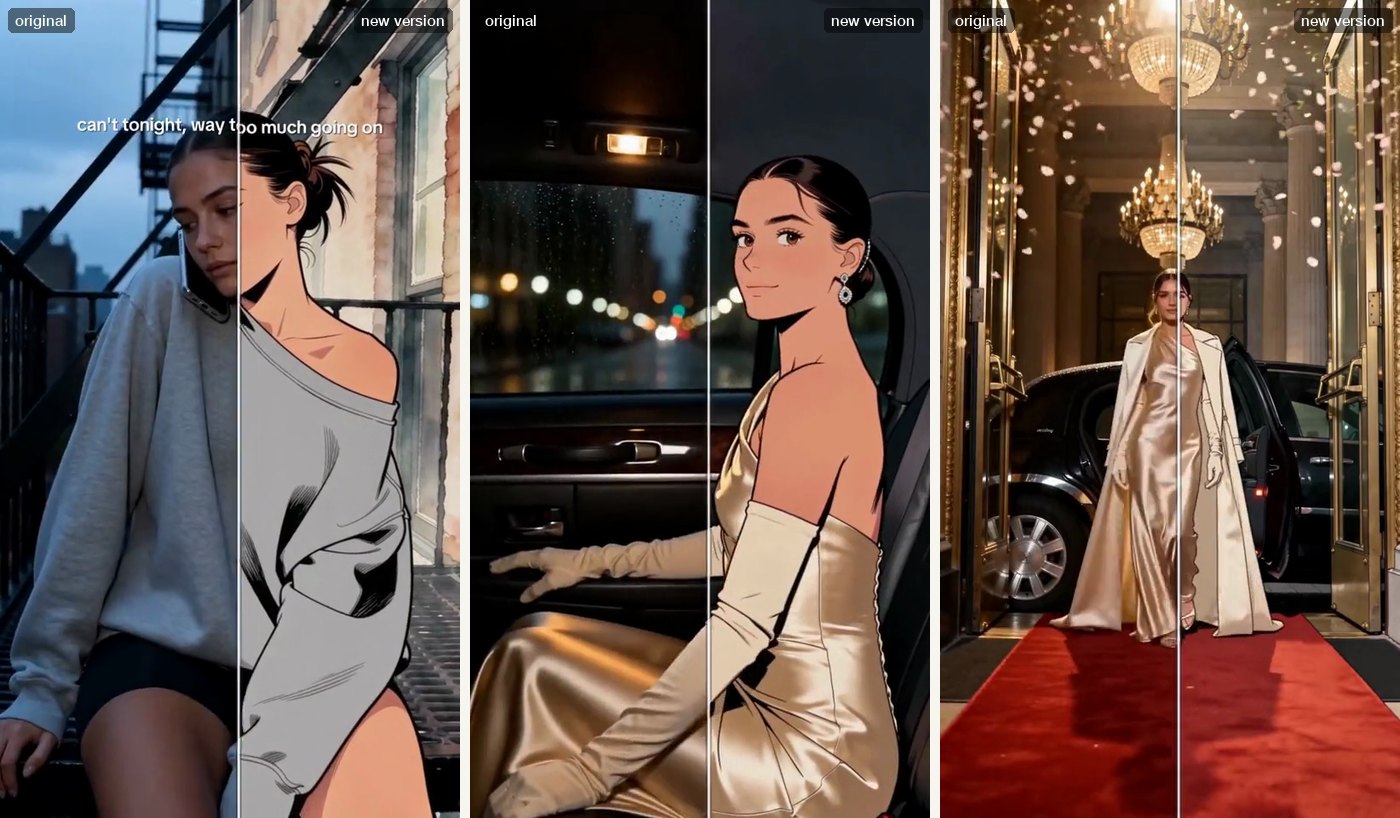 |
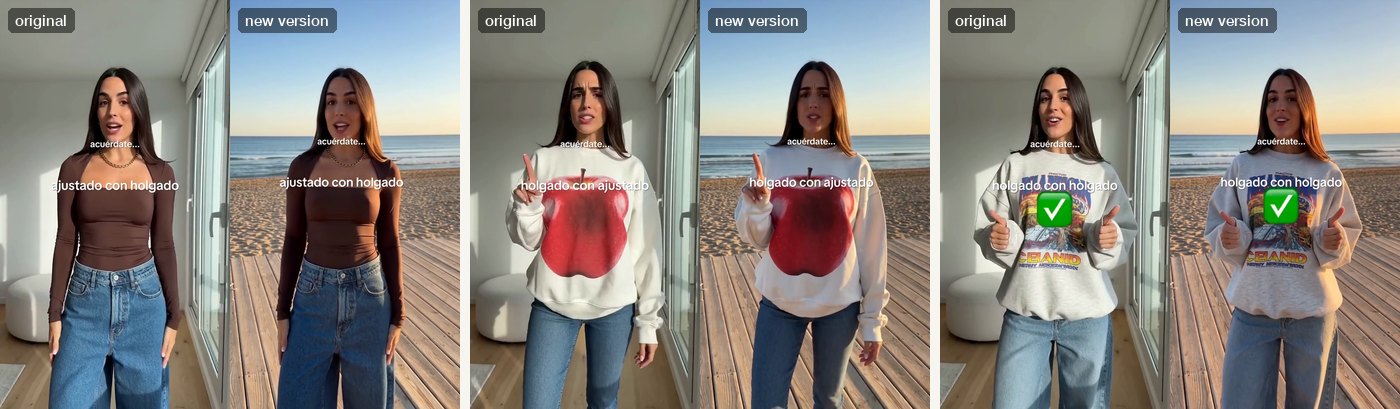 |
| red-carpet as hand-drawn animation. We have this version only as a comparison picture and make no measured claim about it. | outfit-rules on a beach boardwalk. Measured with riffsheet: 2 of 3 cuts and 7 of 10 caption on and off times fall on the same frame as the original's, the rest within two frames (table). |
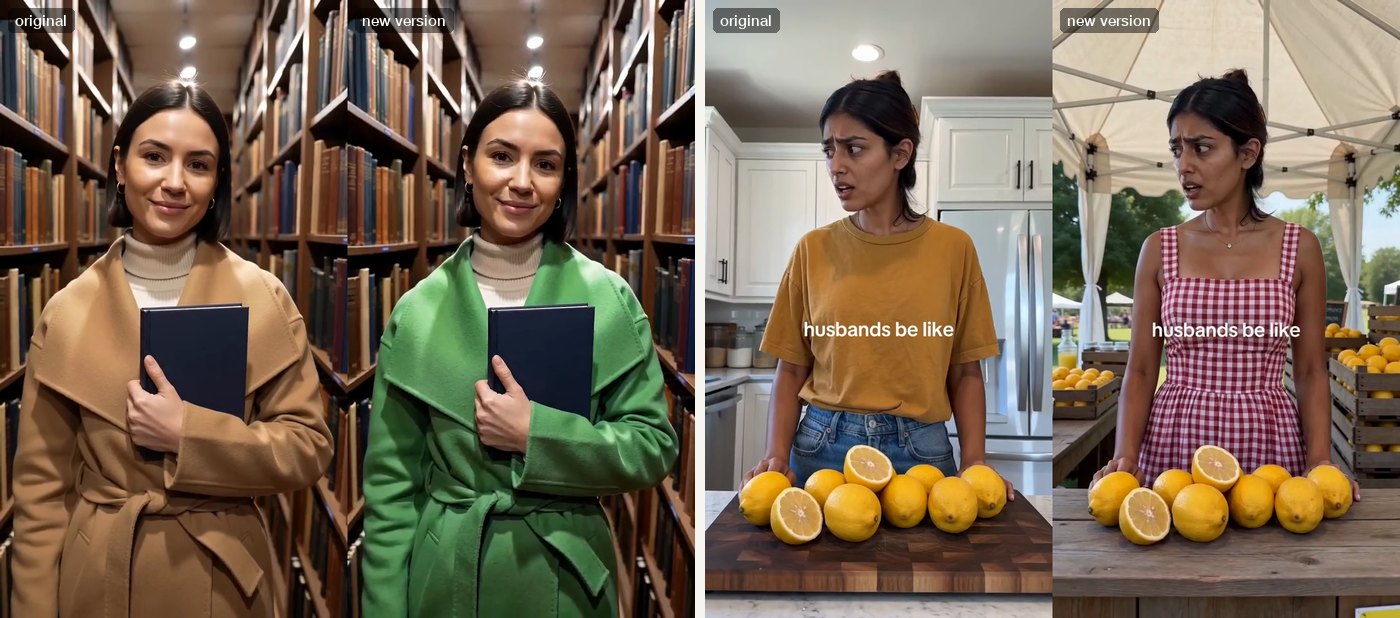
Other things Swap changes, such as a coat's color, or the outfit and the place together:
Privacy
The tool itself uses no network (except the speech-model download you ask for), needs no account and sends nothing to us; the video, the pictures and the results stay in the folders you choose. What your agent sends to its own model provider, and anything else it proposes to use, is between you and the agent, and the agent says so when it asks.
Questions
Does it work offline? The tool does: once the optional speech recognition is set up, it uses no network. Your agent still talks to its own model provider.
Which agents does it work with? Any agent that can run shell commands and open images: Claude Code and Codex find it as a skill; others can be told to read skills/riffsheet/SKILL.md.
Can it take a link? No. Download the video yourself and give the agent the file.
Can I use it to clone a video? It is made for the opposite: it tells you what made a video work, beat by beat, so you can make your own version with your own people, products and story, not a duplicate.
Who makes riffsheet? The team behind Riffkit, a paid service with a free start that makes new video footage from a video you start from. riffsheet is separate: it runs on your machine, needs no account and sends us nothing. The MIT license lets you use it for anything.
Requirements
- ffmpeg and ffprobe, version 7 or newer, built with freetype (the labels on every sheet use its
drawtextfilter), on yourPATH. On Linux, use your package manager (Debian's and Ubuntu's ffmpeg have it). On macOS, Homebrew'sffmpegformula lacks it: installffmpeg-full, which Homebrew keeps out of its ownbinfolder (keg-only), and put itsbinfolder first on yourPATH, as the second line does in the startup file of zsh, the macOS shell; then open a new terminal and start your agent again:brew install ffmpeg-full echo 'export PATH="$(brew --prefix ffmpeg-full)/bin:$PATH"' >> ~/.zshrc - Python 3.9 or newer. The tool itself uses only the standard library.
- For spoken words (optional): a word-timed transcript. The tool's own path is the
faster-whisperpackage and itssmallspeech model; your agent may use another recognizer, or a transcript you supply in the same format, and the riffsheet then says what made it.python3 -I scripts/riffsheet.py check, run in the skill's folder, says whether they are on this machine, what they would cost (the package about 64 MB to download and 207 MB on disk, measured on macOS; the model 486 MB, once) and prints the commands that set them up in a virtual environment of their own,~/.riffsheet/venv, leaving your system Python as it is, and the commands that remove them. The tool never downloads the model on its own:transcribefetches it only with--download, into the usual Hugging Face cache. Your agent asks you before any of this. Without speech recognition the analysis still covers everything visual and says that the speech was not transcribed.
To check an install, change into the skill's folder (skills/riffsheet in the repository) and run python3 -I scripts/riffsheet.py check. The tests are in the repository, not in the skill's folder: in a checkout, they run from its root with RIFFSHEET_REQUIRE_FFMPEG=1 python3 -B -m unittest (they draw their own test clips with ffmpeg; see CONTRIBUTING.md).
Contributing and license
Wrong readings and bugs go to Issues: there is a template for a statement in a riffsheet that is wrong, one for a bug or install problem, and one for something the tool lacked (what you or your agent needed, and what was used instead). How to run the tests and the rules for changes are in CONTRIBUTING.md; changes are listed in CHANGELOG.md.
MIT. See LICENSE.
Yorumlar (0)
Yorum birakmak icin giris yap.
Yorum birakSonuc bulunamadi