dotpals
Health Uyari
- License — License: MIT
- Description — Repository has a description
- Active repo — Last push 0 days ago
- Low visibility — Only 8 GitHub stars
Code Basarisiz
- child_process — Shell command execution capability in .github/workflows/ci.yml
- fs module — File system access in .github/workflows/ci.yml
- spawnSync — Synchronous process spawning in bin/dotpals.js
- process.env — Environment variable access in bin/dotpals.js
- network request — Outbound network request in bin/dotpals.js
- exec() — Shell command execution in bridge/adapters/claude.js
- exec() — Shell command execution in bridge/adapters/codex.js
Permissions Gecti
- Permissions — No dangerous permissions requested
Bu listing icin henuz AI raporu yok.
See what your coding agent actually did. A desktop pal and notch for Claude Code, Codex, Cursor, Gemini CLI and any agent: files changed, commands run and tests checked, in plain words.

dotpals
See what your coding agent actually did.
A small floating pal that watches Claude Code, Codex or any agent and tells you, in plain words, what happened: which files changed, which commands ran, what failed, and what the agent says it did.
npx --allow-git=all github:rikinshah787/dotpals setup
One command on Windows, macOS or Linux. Free, open source, and everything stays on your computer.



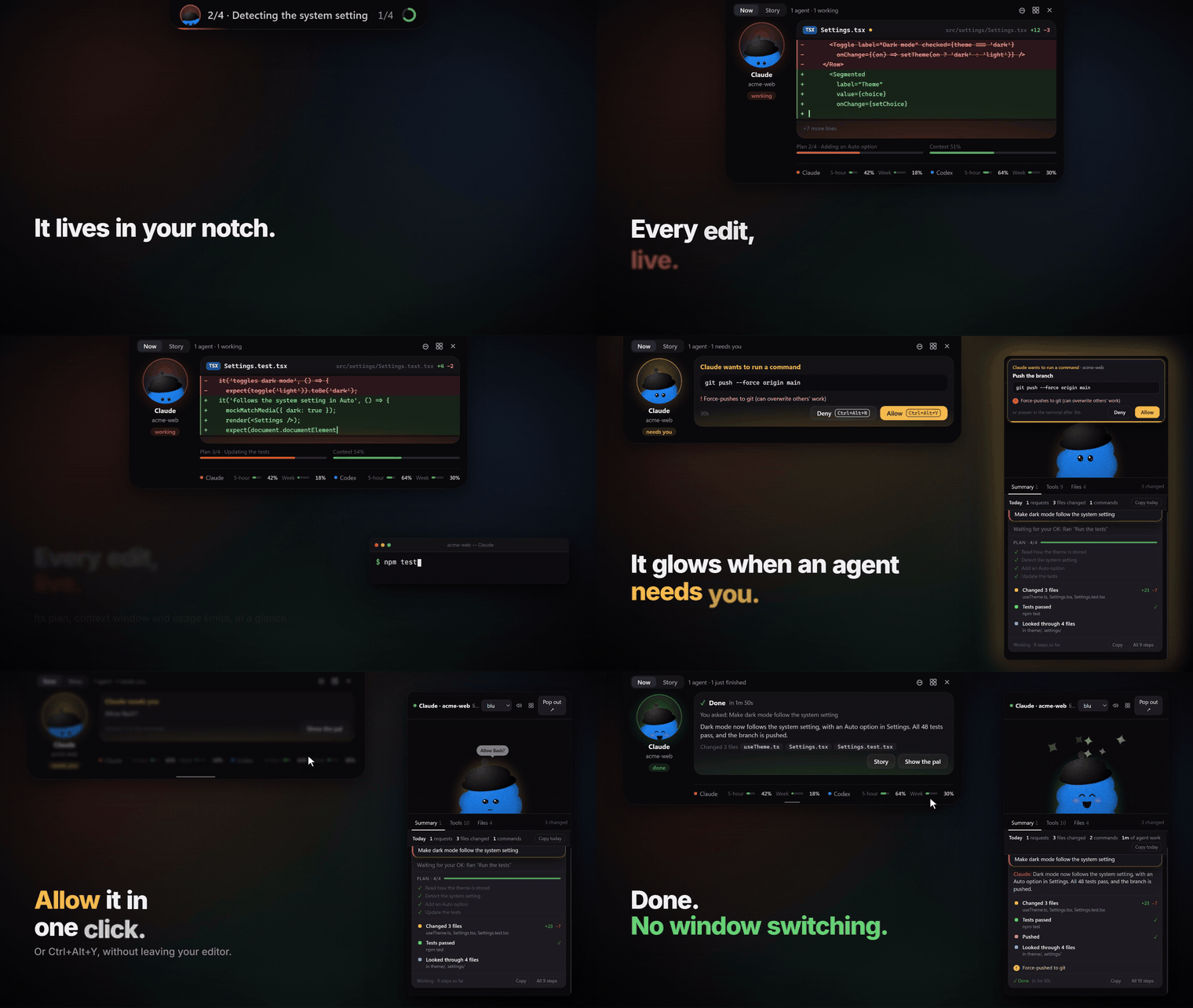
🔊 Watch the launch video with sound (47 s, 1080p) · square cut
Install · Make your own pal · Plug in any agent · What's new
⭐ Star dotpals if your agent ever said "Done!" and you weren't sure · Tell us what's confusing
Why
Coding agents do a lot in a single request. They read dozens of files, edit a handful, run tests, retry and search. The chat scrolls by and the diff is spread across files. dotpals keeps a live, plain-language record next to your editor, so at any moment you can answer:
- What did it change? Every file edited, created or deleted, with the diff one click away.
- What did it run, and did it work? Every command, with its output, duration and ✓ or ✕. A step that failed and was retried says fixed on try 2 or still failing after 3 tries.
- Was the code as it is now tested? "Changed 2 files after the tests passed: not tested since" is impossible to miss, so an old green result doesn't pass for a check of the latest edits.
- What is it doing right now? The pal thinks, works, asks for your OK and celebrates, live.
- What did I get done today? A running tally, and one click copies it as Markdown for a standup or PR.
Features
- The story, not the log: each request reads as a few chapters, such as Changed 5 files +42 −7 · Tests failed twice, then passed · Committed and pushed, instead of hundreds of tool calls. Anything worth a second look is flagged:
.envchanged, a force-push, the same command failing 3 times, two agents editing the same file, or code changed without testing it. - Retries: when a step fails and the agent tries the same thing again, the tries are linked: fixed on try 2, still failing after 3 tries. Click a try to jump to it. On the dashboard, paste a step's ID (
toolu_…) to open it. - Was it tested? One line per session says Tests passed · 48 passed · 7:08 PM, after the last change, Tests passed at 7:08 PM · 3 files changed since or No tests run by the agent, and whether the last commit was tested. Each result says where it came from: the test output's own summary (jest, vitest, mocha, node:test, pytest, go, cargo, dotnet, Maven, Gradle, PHPUnit, RSpec and more), or (exit code only). Zero tests or only skipped ones read as Tests unclear: no tests actually ran, never as passed. Optionally, an unclear result can be double-checked by Laya on your computer (one click sets it up: Settings → Set up Laya, or
dotpals laya; needs Python 3.10+) or TypeSafe's Jev in the cloud (off by default). Only tests the agent ran count. - Simple or Detailed: Simple (the default) sums up each request in one plain sentence, such as Changed billing.ts, the tests passed after one retry, and committed and pushed., plus only the warnings that matter. Detailed shows every chapter, with small steps folded away. Switch in the pal, the notch or the dashboard.
- Setup asks, in the terminal: your pal, the notch, Simple or Detailed, approvals, test double-checks (Off, Local Laya or Cloud Jev, with your key typed hidden) and more. Press Enter for the defaults, or run
setup --yes. - The notch: an island at the top of your screen with every agent, a live diff of the file it's editing, its plan ("2/4 · Detecting the system setting"), its context window and your Claude and Codex usage limits. It opens by itself when an agent needs you, and you can allow or deny from the keyboard. Hide the pal and the notch takes over; – minimizes it, so nothing sits at the top while agents work.
- Context and limits: the pal gets worried as a session's context window fills up and cheers after it compacts. Usage bars show your 5-hour and weekly limits with reset times (for Claude, run
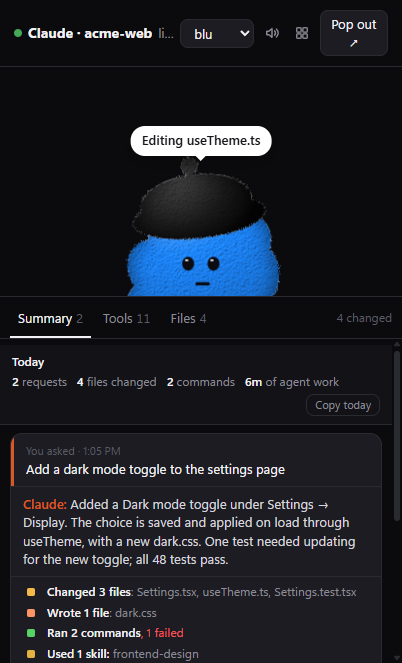
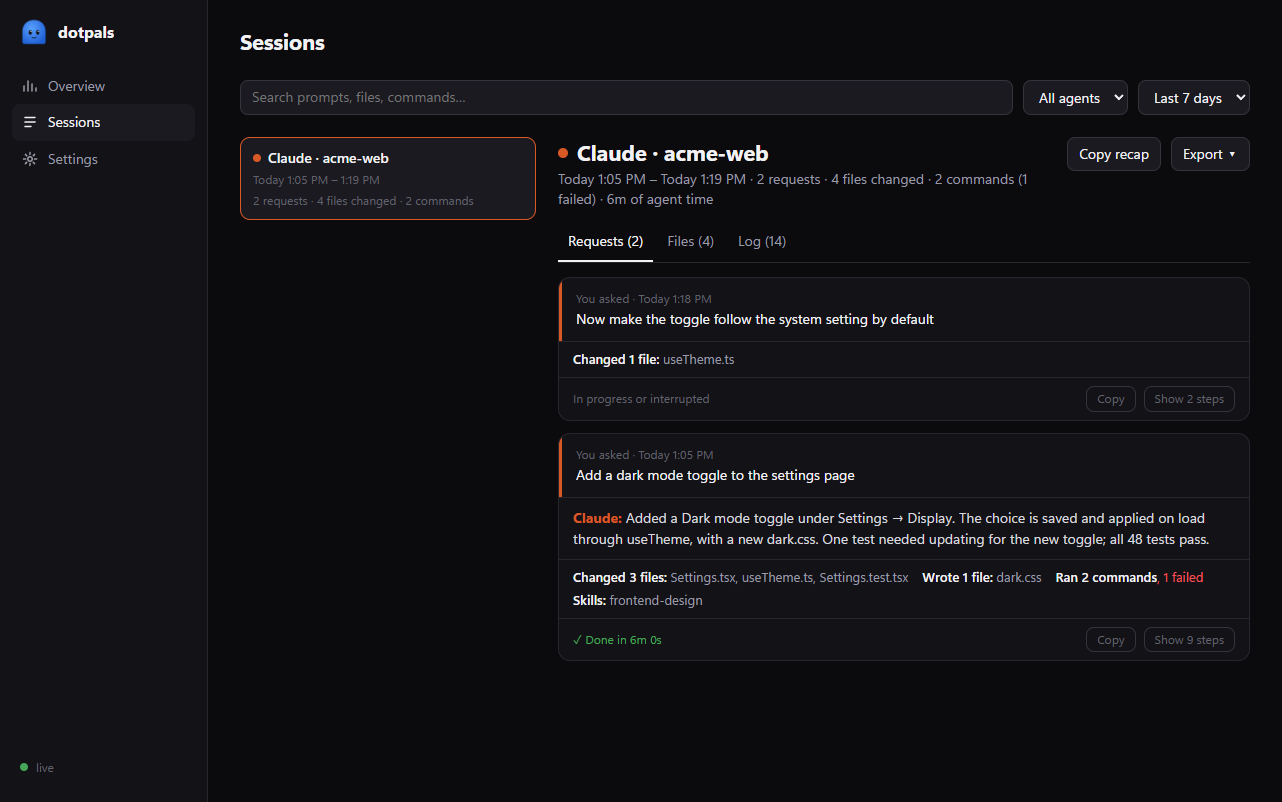
dotpals statuslineonce). - Summary: one card per request, with what you asked, what the agent said it did, and a tally such as Changed 3 files · Ran 5 commands, 1 failed · Used 1 skill. Show steps lists every step as a short sentence.
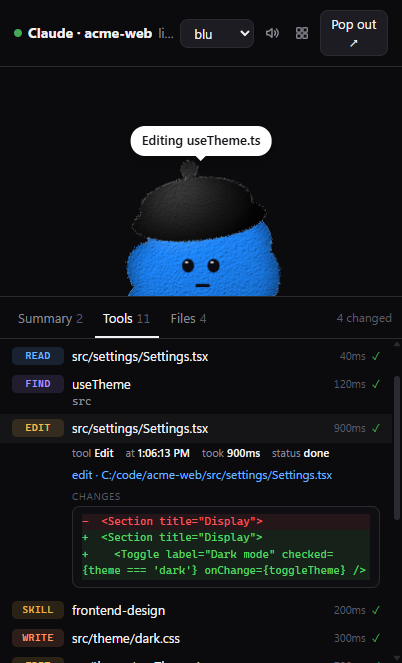
- Tools: every tool call as it happens. Click one to see the exact command and output, or the lines an edit changed.
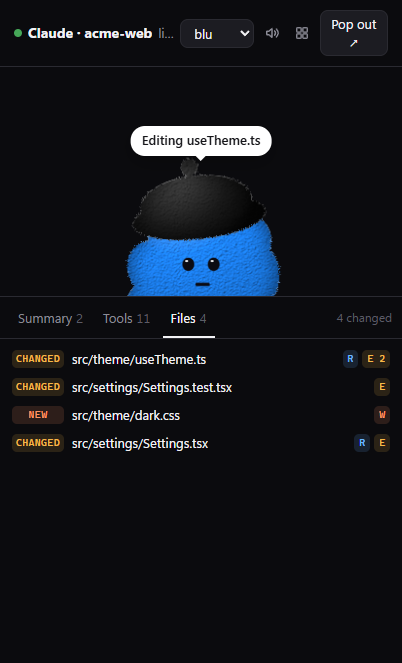
- Files: every file read, changed, created or deleted, with diffs. Click to open it in VS Code.
- Today: requests, files changed, commands run and time the agent spent working. Copy today gives you a ready-made standup note.
- Copy recap: copy any request as Markdown for a PR description or commit message. It keeps ✅ ran successfully, ❌ failed, ❔ unclear and ⚪ not run apart, and every claim carries its evidence: the command, the result it was read from ("48 passed", or the exit code) and the step's ID, which the dashboard's search opens. Quick look-ups like
greparen't counted as failures. - One tab per session: Claude Code and Codex sessions never mix, and the window follows whichever is active.
- Dashboard: every session with its requests, files and full log, with search and export to Markdown or JSON. It also shows requests per day, time by project and a live view of which agents are connected.
- Settings: choose your pal, turn sounds and notifications on or off, and decide how long to keep history (or clear it). Settings are shared by the pal and the dashboard.
- History: survives restarts, kept on your computer in
~/.dotpals/history.json(7 days by default). - Notifications and sounds: a ping when the agent needs your OK, a chime when it's done, and a desktop notification if you've looked away.
- Every session, every agent: all your Claude Code sessions show up, even ones started before dotpals was installed, next to Codex and anything else you plug in. In small mode each agent gets its own pal, with a round bar above them naming each one.
- Make your own pal: pick a body, eyes, something on top, a color and a name. See below.
- A pal with personality: eight ready-made characters that think, work, talk, wait, celebrate and sulk. Drag it anywhere; it stays on top, and clicks on the empty space around it go through to your editor.
The notch
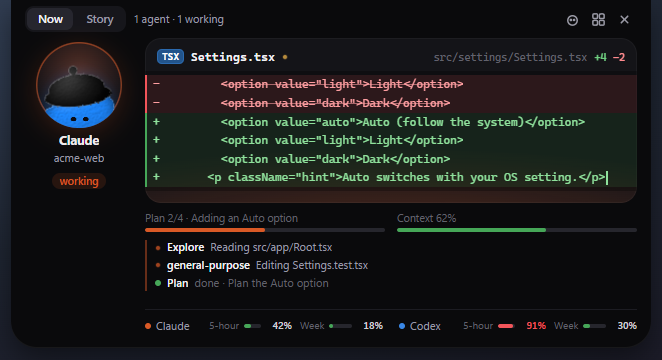
A small island that hangs from the top of your screen. It has four sizes:
- Hidden when nothing is running, or you've been away for 3 minutes: just a thin, invisible strip at the top edge. Hover it and a small island peeks out; rest there a moment and it opens.
- Bar while agents work: a mini pal for each agent, the current step, the plan step ("2/4") and a ring for your highest usage limit. Hover it for about 200 ms, or click, to open. Don't want it there? – in the open notch minimizes it (remembered): it stays hidden while agents work, still opens when one needs you, and the top edge still peeks.
- Open (640 px): the agent in focus as a big pal on the left, one card on the right, a column of mini pals for the other agents, and two tabs:
- Now: a live diff of the file it's editing (or a checklist of its steps), its plan, context window, helpers and your usage limits. When it needs your OK, an approval card with Deny and Allow, or Ctrl+Alt+N and Ctrl+Alt+Y (⌘⌥N and ⌘⌥Y on macOS), which work only while the card is showing. When it's done or fails, a short card says what happened.
- Story: today's totals with Copy today, whether the code was tested since its last change, the plan, helpers, the context window with Copy /compact, what it's been using, a note when two agents changed the same file, and the last few requests as chapters you can expand.
Alerts open it by themselves, one at a time. One that needs you shows even if you've been away, and stays until you answer. Done and error cards close after about 5 and 8 seconds. When you open it yourself, it closes 8 seconds after the pointer leaves (a shrinking line shows the last seconds), or after a quiet minute with the pointer resting on it. Esc closes it while the pointer is over it. Its window lets clicks through everywhere except the island, and the peek never takes a click, so it doesn't get in the way of your browser tabs.
By default it appears when you hide the pal. You can keep it on always or never show it, from the tray or with dotpals notch --auto | --off.
Claude Code shares its usage limits only with a status line command, so run dotpals statusline once to see them. If you already have a status line, it keeps showing yours; dotpals statusline --off puts everything back. Codex's limits come straight from its logs.
Make your own pal
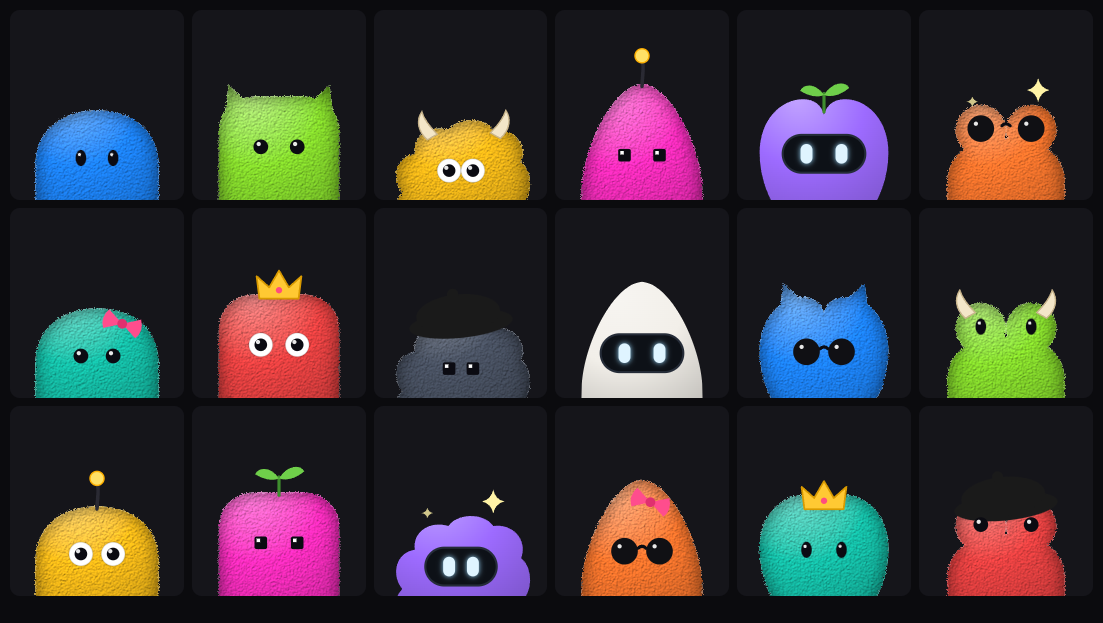
Open the dashboard (▦ on the pal, or dotpals dashboard), go to Settings → Make your own pal, and mix:
- Body: round, boxy, fluffy, pointy, heart or frog
- Eyes: dots, button, googly, pixel, visor or shades
- On top: cat ears, horns, antenna, sprout, sparkle, bow, crown or beret
- Color: any color, fluffy or smooth
- Name: yours to pick
Try it thinking, working and celebrating right there, then Use this pal. The floating pal switches straight away. Surprise me rolls a random one. There are thousands of combinations.
In your own app it's one call: registerCustom({ name: 'Pip', shape: 'bean', eyes: 'googly', top: 'crown', color: '#16c6ae' }), then <dot-pal character="custom">.
Install
One command
npx --allow-git=all github:rikinshah787/dotpals setup
That's all. It:
- installs the desktop pal in
~/.dotpals, and downloads its runtime (Electron, about 100 MB, once), - adds the Claude Code plugin, if Claude Code is installed,
- picks up Codex automatically, if it's installed,
- starts the pal, turns on open when I log in, and opens the dashboard.
--allow-git=all lets npm 12 and newer install straight from GitHub; older npm ignores it. Options: --no-claude (skip the plugin), --no-login (don't start at login) and --no-start. Run it again any time to update.
Only the Claude Code plugin
/plugin marketplace add rikinshah787/dotpals
/plugin install dotpals@dotpals
Restart Claude Code, then run /dotpals:pals. The first time, it offers to download the desktop window's runtime. After that, the pal opens by itself whenever a Claude Code session starts.
Codex
There's nothing to install on the Codex side. dotpals follows Codex's session logs (~/.codex/sessions), so the Codex CLI, IDE extension and app all show up while the pal is running. The one-command setup starts it at login.
Cursor, Gemini CLI, OpenCode and GitHub Copilot CLI
Open the dashboard's Agents page and press Connect on the agent you use. Each card shows whether the agent is installed, whether it's connected, and when its last event arrived.
- Connect adds one small command, or a plugin for OpenCode, to that agent's own config. It backs up the original first, merges instead of overwriting, and leaves a file it can't read untouched.
- Disconnect takes out only what dotpals added.
- Send a test event runs the real command. If it reaches dotpals, a pal says hello.
- The switch on each card turns an agent off without disconnecting it.
The Connect button changes these files:
| Agent | What Connect changes |
|---|---|
| Cursor | ~/.cursor/hooks.json. Cursor reloads it on save |
| Gemini CLI | ~/.gemini/settings.json (Gemini CLI 0.26 or newer, in folders you've trusted) |
| OpenCode | adds ~/.config/opencode/plugins/dotpals.js. Restart OpenCode to load it |
| GitHub Copilot CLI | adds ~/.copilot/hooks/dotpals.json |
Any other agent
Send JSON to the local bridge from your agent loop, a hook script or a wrapper. See Plug in any agent.
Using it
| Ctrl+Alt+P (⌘⌥P on macOS) | Show or hide the pal from anywhere |
| Drag the pal | Move the window; it remembers where you put it |
| ▦ | Open the dashboard: sessions, logs, stats and settings |
| ⤡ | Switch between just the pal and the full view |
| × | Hide to the tray. The tray menu has Dashboard, Just the pal, Notifications, Open when I log in and Quit |
| 🔊 | Sounds on or off |
From a terminal, after setup (or with npx --allow-git=all github:rikinshah787/dotpals <command>):
dotpals start       # open the floating pal
dotpals dashboard   # open the dashboard
dotpals status      # what's running and connected
dotpals bridge      # only the bridge, e.g. on a machine without a desktop; dashboard at http://127.0.0.1:5175/dashboard
Privacy
Everything stays on your machine. The bridge listens only on 127.0.0.1. It reads Claude Code hook events and transcripts and Codex's session logs locally, and it sends nothing anywhere. The one exception is opt-in: if you choose Cloud (Jev) under Settings → Double-check unclear test results, the end of an unclear test run's output is sent to TypeSafe, after removing anything that looks like a password, key, email or IP address. History is a plain JSON file in ~/.dotpals. Set DOTPALS_HISTORY=0 to turn it off, or DOTPALS_CODEX=0 to stop following Codex. See SECURITY.md.
How it works
Claude Code ── hooks + transcripts ┐
Codex ──────── session logs ───────┼──▶  bridge (127.0.0.1:5175)  ──▶  floating pal  (Summary · Tools · Files)
your agent ─── POST /event ────────┘         one activity model          or any browser tab
- Your agents report what they do. Claude Code sends hook events as it works, and dotpals also reads each session's transcript in
~/.claude/projects, so every session shows up, including ones that started before dotpals was installed. Codex writes session logs to~/.codex/sessions, which dotpals follows. Nothing to set up on the Codex side. Any other agent can POST JSON. - A small local server (the bridge) turns that into one activity feed. It runs on
127.0.0.1:5175, only answers your own computer, and keeps history in~/.dotpals. Nothing is sent anywhere. - The pal shows it. The desktop app (Electron, always on top) and the dashboard read the feed live: the pal's mood, the Summary, Tools and Files tabs, stats and history.
Each agent connects through an adapter in bridge/adapters/, and every adapter produces the same activity entries (bridge/activity.js). The pal itself is a dependency-free Web Component that you can also drop into your own app (see below).
Platforms: Windows, macOS and Linux (Node 20+). On macOS the pal lives in the menu bar instead of the Dock. On Linux the small window can't pass clicks through its empty space, because Linux doesn't support it.
Plug in any agent
The bridge is harness-agnostic. Each agent tool connects through an adapter in bridge/adapters/, and every adapter feeds the same activity model (bridge/activity.js).
| Harness | How it connects | Setup |
|---|---|---|
| Claude Code | Hooks for live state (including permission prompts), plus the session transcript, so the history is complete even if the pal opened late | The plugin |
| Codex (CLI, IDE extension, app) | Follows Codex's session logs in ~/.codex/sessions |
None. Keep the pal running (tray: Open when I log in). DOTPALS_CODEX=0 turns it off |
| Cursor (editor and CLI) | Hooks in ~/.cursor/hooks.json: prompts, commands, file edits, MCP calls, replies, stop. Only hooks that watch are used; none of them can approve or block anything |
Connect on the dashboard's Agents page |
| Gemini CLI | Hooks in ~/.gemini/settings.json: prompts, every tool call, permission prompts, replies |
Connect on the Agents page |
| OpenCode | A plugin in ~/.config/opencode/plugins/: prompts, tool calls, permission prompts, the end of each turn |
Connect on the Agents page, then restart OpenCode |
| GitHub Copilot CLI | Hooks in ~/.copilot/hooks/dotpals.json: prompts, tool calls, permission prompts, stop |
Connect on the Agents page |
| Anything else | POST JSON to http://127.0.0.1:5175/event |
A few lines in your agent loop, a hook script or a wrapper. The Agents page has copy-paste snippets for curl, PowerShell, Node, Python and the shell |
Every integration can be switched off on the Agents page, or in ~/.dotpals/config.json with { "agents": { "cursor": false } }. The ids are claude, codex, cursor, gemini, opencode, copilot and generic.
The hook-based integrations run node ~/.dotpals/app/bridge/hook.js <agent>, so Node has to be on your PATH. The command posts to POST /hook?agent=<id>, and the matching module in bridge/adapters/ turns the events into activity. To add another agent, write a module there with the same shape (id, name, detect(), connect(), disconnect(), apply(); see bridge/adapters/index.js) and list it in index.js.
The event format
Send the pal's state, activity rows, or both. Rows with the same id are merged, so you can send a tool call when it starts and again when it finishes:
# a tool call starts…
curl -s localhost:5175/event -d '{
  "session": "run-42", "harness": "my-agent", "label": "my-project",
  "state": "working", "text": "Running tests",
  "activity": { "id": "call-1", "kind": "run", "tool": "shell", "title": "Run the tests",
                "status": "running", "body": { "command": "npm test" } }
}'

# …and finishes
curl -s localhost:5175/event -d '{
  "session": "run-42", "harness": "my-agent", "state": "thinking",
  "activity": { "id": "call-1", "status": "ok", "ms": 5120, "body": { "output": "42 passing" } }
}'

# a file edit, with its diff
curl -s localhost:5175/event -d '{
  "session": "run-42", "harness": "my-agent",
  "activity": { "id": "call-2", "kind": "edit", "tool": "write_file", "title": "src/app.js", "status": "ok",
                "files": [{ "path": "/abs/path/src/app.js", "change": "edit" }],
                "body": { "patch": "-const a = 1;\n+const a = 2;" } }
}'
| Field | Values |
|---|---|
session |
any id; each session gets its own pal and tab |
harness, label |
shown on the tab, e.g. "My-agent · my-project" |
state, text |
the pal's state (see Agent states) and bubble text |
activity.kind |
prompt · read · edit · write · run · search · web · agent · mcp · skill · plan · tool · done · error |
activity.status |
running · waiting · ok · failed · stopped · info |
activity.files |
`[{ path, change: "read" |
activity.body |
{ command?, patch?, output?, args? }, which you see when the row is opened |
Any event the pal already understands (Anthropic, OpenAI or Agent SDK stream events, or { "state", "text" }) works here too. To add a first-class adapter, see bridge/adapters/codex.js. It's a good template for any harness that writes a session log.
Use the pal in your own app
The pal is a dependency-free Web Component, <dot-pal>, for chat UIs, IDE panels and dashboards. Send it your agent's state and it shows thinking dots while the model reasons, a progress bubble while tools run, a talking mouth while text streams, a question bubble when it needs approval, a jump when it's done and a frown when something fails. It works in plain HTML, React, Vue, Svelte, Angular, Electron and VS Code webviews.
Characters
| Id | Pal | Click action |
|---|---|---|
blu |
Blu, a blue cloud in a beret | jump |
hop |
Hop, a green frog | jump |
sunny |
Sunny, a yellow gumdrop in glasses | wiggle |
lovi |
Lovi, a pink heart in sunglasses | love |
muse |
Muse, a violet flame with sparkles | spin |
grok |
Grok, a slate bot with a glowing visor | nod |
nova |
Nova, an orange bot with a light-bulb antenna | jump |
byte |
Byte, a teal cat with pixel eyes | wiggle |
Quick start
<script type="module" src="https://unpkg.com/dotpals"></script>

<dot-pal id="agent" character="grok"></dot-pal>

<script type="module">
  const pal = document.getElementById('agent');
  pal.setState('thinking');
  pal.setState('working', { text: 'Running tests…' });
  pal.setState('done', { text: 'All green!' });
</script>
Or from npm:
npm install dotpals
import 'dotpals';
Agent states
| State | What the pal does |
|---|---|
idle |
breathes, blinks and follows the cursor |
listening |
leans in with wide eyes, for while the user is typing |
thinking |
looks up, shows a bubble with bouncing dots |
working |
busy bob, eyes down, shows a progress bar or your text (e.g. the tool name); after 90 seconds, a sweat drop now and then |
speaking |
mouth moves, for while tokens stream in |
waiting |
hops, then keeps bouncing with wide eyes, shows a ? bubble or your text (e.g. "Allow edit?") |
done |
jumps with a burst of sparkles and happy eyes, then settles back to calm |
error |
jitters, then looks sad and desaturated, with × eyes |
sleeping |
eyes closed, floating zs |
A soft glow behind the pal follows the state (amber while waiting, red on errors, green when done), and moods and moves blend into each other instead of snapping.
You can set a state three ways:
<dot-pal character="muse" state="thinking"></dot-pal>
pal.state = 'speaking';
pal.setState('working', { text: 'web_search' });
Plug into your harness
1. Stream events straight in
connectAgent accepts an EventSource, a WebSocket, any EventTarget, or an async iterable (such as an SDK stream). It maps each event to a state automatically.
import { connectAgent } from 'dotpals';

// Server-Sent Events from your backend
connectAgent(pal, new EventSource('/agent/events'));

// WebSocket
connectAgent(pal, new WebSocket('wss://my-harness/agent'));

// An SDK stream (async iterable), e.g. the Anthropic TypeScript SDK
const stream = client.messages.stream({ model, max_tokens, messages, tools });
connectAgent(pal, stream);
It returns a function that disconnects.
2. Call it from your own event loop
import { agentHandler } from 'dotpals';

const onEvent = agentHandler(pal);

for await (const event of myAgent.run(prompt)) {
  onEvent(event); // unknown events are ignored
  render(event);
}
Events it understands
| Source | Events | State |
|---|---|---|
| Anthropic Messages API (streaming) | message_start |
thinking |
content_block_start with a thinking block |
thinking | |
content_block_start with a tool_use block |
working, with the tool name | |
content_block_start with a text block |
speaking | |
message_stop |
done | |
| Claude Agent SDK | system / init |
thinking |
assistant message with a tool_use |
working, with the tool name | |
assistant message with text |
speaking | |
result |
done, or error if it failed | |
| OpenAI Responses API (streaming) | response.created |
thinking |
response.output_item.added with a function call |
working | |
response.output_text.* |
speaking | |
response.completed |
done | |
response.failed |
error | |
| Generic | { type: 'tool_call' | 'permission_request' | 'error' | … } |
the matching state |
| Your own | { state: 'working', text: 'Deploying…' } |
exactly what you send |
Plain strings work too: 'thinking', or a JSON string of any of the above.
Custom mapping
connectAgent(pal, source, {
  map: (e) => {
    if (e.kind === 'plan') return { state: 'thinking', text: 'Planning…' };
    if (e.kind === 'shell') return { state: 'working', text: `$ ${e.cmd}` };
    return toAgentState(e); // fall back to the built-in mapping
  },
});
Runnable example
npm run example:agent # opens a Server-Sent Events harness on http://localhost:5174
See examples/sse-harness. The server side is about 20 lines. Replace the fake runAgent with your real loop.
More ways to use a pal
// Loading feedback for any promise: thinking, then happy or sad
const data = await pal.during(fetch('/api/save'), { successText: 'Saved!' });

// A form companion: follows the caret, covers its eyes on passwords,
// frowns at invalid fields and cheers on submit
const stop = pal.watch('#login-form');

// Speech bubble
pal.say('Hi! Ask me anything.');

// Show a mood for a moment
pal.flash('surprised', 1500);

// One-shot actions: jump · squish · wiggle · shake · nod · spin · love · hop · jitter · hello · dizzy
await pal.play('love');

// Say hello: rise up from below, squint happily, hop and blink twice
await pal.greet();

// A face for a moment: happy · love · star · wide · closed · dizzy · oops · hey · sweat
await pal.emote('love', 1600);

// Throw particles: heart · sparkle · star · sweat · z, or any text or emoji
pal.burst('sparkle', 8);
Faces and reactions
- Expression eyes: pals swap in happy arcs, closed lids, wide eyes, × ("oops"), spinning spirals, hearts and sparkle-stars to match their mood (happy, sleepy, surprised or waiting, and the error state) or an
emote(). - Reactions: hover and it blinks; rest the mouse on it for 2 seconds and it gets heart eyes; click and it plays its tap action with a "hey" face; click 3 times quickly and it gets dizzy. Each click fires
dotpal-pokewith{ count }.staticturns these off. - Tiny pals: under 48 px a pal becomes an avatar (the
tinyattribute and the read-onlypal.tinyproperty): no fur, bigger eyes, no glow and no particles. - Pointing from outside the page:
DotPal.pointAt(x, y)tells every pal where the cursor is (viewport CSS px), for apps that track it themselves.DotPal.emoteslists every emote.
Attributes
| Attribute | Values | Default |
|---|---|---|
character |
any id from the table above, or a registered name | blu |
state |
idle · listening · thinking · working · speaking · waiting · done · error · sleeping |
idle |
mood |
neutral · happy · sad · surprised · thinking · sleepy · shy · listening · working · speaking · waiting |
neutral |
size |
number (px) or any CSS length | 160px |
color |
any CSS color | the character's color |
idle |
breathe · bounce · float · wobble · sway · none |
breathe |
look |
cursor · none |
cursor |
lean |
none: the body doesn't lean toward the cursor |
leans a little |
static |
boolean: turns off the hover and click reactions | – |
label |
accessible name | the character's name |
tiny |
set by the pal itself while it's smaller than 48 px | – |
A state is the agent lifecycle; each state sets a mood. Use mood directly if you aren't driving an agent.
Events
pal.addEventListener('dotpal-state',  (e) => e.detail); // { state, text }
pal.addEventListener('dotpal-mood',   (e) => e.detail); // { mood }
pal.addEventListener('dotpal-action', (e) => e.detail); // { action }
pal.addEventListener('dotpal-poke',   (e) => e.detail); // { count }: quick clicks in a row
Styling
dot-pal {
  --dp-size: 200px;       /* same as the size attribute */
  --dp-color: hotpink;    /* same as the color attribute */
  --dp-glow: transparent; /* turn off the glow behind the pal */
}

dot-pal::part(bubble) { background: #111; color: #fff; }
dot-pal::part(svg)    { filter: drop-shadow(0 10px 20px rgb(0 0 0 / .4)); }
The parts you can style are root, idle, actor, svg and bubble.
Frameworks
React 19+: import 'dotpals', then <dot-pal character="grok" state={agentState} />.
Vue: set compilerOptions.isCustomElement = (tag) => tag === 'dot-pal'.
TypeScript: types are included, and document.querySelector('dot-pal') is typed as DotPal.
SSR: importing on the server is safe. The element renders once it reaches the browser.
Add your own character
Characters are plain SVG drawn in a 200×200 viewBox. They sit on the bottom edge and "peek" up over it.
import { registerCharacter } from 'dotpals';

registerCharacter('ghost', {
  label: 'Ghost',
  color: '#e8e8ff',
  tap: 'spin',
  look: 6,          // how far the eyes follow the cursor
  mouth: [100, 170], // where mood mouths are drawn
  cheek: 34,         // blush distance from the mouth
  eyes: { at: [[80, 130], [120, 130]], r: 9 }, // where expression eyes go
  render: ({ body }) => ({
    body: `<rect fill="${body}" x="30" y="50" width="140" height="220" rx="70"/>`,
    face: `
      <g class="dp-look">
        <g class="dp-blink"><circle cx="80" cy="130" r="9"/></g>
        <g class="dp-blink"><circle cx="120" cy="130" r="9"/></g>
      </g>`,
  }),
});
- The body is automatically covered in fur and shaded.
- Put
class="dp-blink"on each eye so it blinks and reacts to moods. - Put
class="dp-look"on anything that should follow the cursor. eyes(optional) says where the eyes are, so the pal can swap in expression eyes:at(the two centres),r(their size), and optionallyink(their color),glow(trueor a color) andown(expressions your eyes already do well, e.g.['wide']). While they show, the parts markedclass="dp-eyes"hide (or the.dp-blinkparts). Withouteyes, the eyes just squint for moods.- Let bodies run below
y=200, so jumping reveals more body instead of a flat edge.
You can add actions too, with registerAction('pop', { keyframes, duration, particles }). particles is a shape (heart, sparkle, star, sweat or z, drawn as SVG) or any text or emoji.
Accessibility
- Each pal has
role="img"and anaria-labelthat includes its current mood, for example "Grok (working)". - With
prefers-reduced-motion: reduce, the pal keeps its faces, blinks and state changes, but skips the big moves: idle loops, eye wandering, leaning, particles, the floating zs, state entry moves and the hover, click and dizzy moves. - Speech bubbles are decorative. Keep your own visible status text for screen-reader users.
Documentation
The full guide is at rikinshah787.github.io/dotpals/guide: getting started, every feature, each agent integration, the CLI, configuration and environment variables, the bridge's HTTP API, the <dot-pal> component, privacy and security, and troubleshooting. Its source is in site/guide/ in this repository, so it's also published wherever the site is hosted.
For contributors, docs/ARCHITECTURE.md explains how the pieces fit together: adapters, the bridge, the activity model, the story engine, the desktop app, and how to add an adapter.
Roadmap
- "It's stuck" alerts: a gentle ping when an agent goes in circles (no progress, the same file back and forth, a test that won't pass).
- Morning brief and weekly recap: what your agents did, what's unfinished and what's failing, per project.
- Token use per request, from the agents' own logs.
- More agents: Windsurf, Cline, Aider and others, as each gets a documented way in.
- Signed installers for Windows and macOS, so Node isn't needed.
Ideas and pull requests are welcome. Open an issue to discuss.
Contributing
npm install        # dev only: Electron for the desktop window
npm test           # node --test, no dependencies needed
npm run float      # the desktop pal
npm run dashboard  # the dashboard
npm run dev        # the web component playground on http://localhost:5173
See CONTRIBUTING.md. To support a new agent, add an adapter next to bridge/adapters/codex.js, which is a good template for any agent that writes a session log.
Credits
- Reading test results and double-checking unclear ones builds on claude-referee by Ismail Dasci (MIT): its test-output parsers, redaction rules and "done" question are adapted in
bridge/ui/testout.js,bridge/redact.jsandbridge/checker.js. See THIRD_PARTY_NOTICES. - The optional checkers are Laya by Convai Innovations (runs on your computer; not bundled, dotpals installs it from PyPI when you click Set up Laya) and TypeSafe's Jev, through its MIT-licensed SDK
@typesafe-ai/sdk.
Trademarks
Character names are playful nicknames. dotpals is not affiliated with or endorsed by Anthropic, OpenAI or any other AI company, and the characters are original artwork, not logos.
License
Yorumlar (0)
Yorum birakmak icin giris yap.
Yorum birakSonuc bulunamadi