rimz
Health Uyari
- License — License: MIT
- Description — Repository has a description
- Active repo — Last push 0 days ago
- Low visibility — Only 5 GitHub stars
Code Basarisiz
- rm -rf — Recursive force deletion command in .gitea/workflows/ci-image.yml
- rm -rf — Recursive force deletion command in .gitea/workflows/ci.yml
Permissions Gecti
- Permissions — No dangerous permissions requested
Bu listing icin henuz AI raporu yok.
RimZ is a realtime dashboard and control room for harnessing agentic coding, build on tmux and Zellij.
  ██████╗ ██╗███╗   ███╗  ███████╗
  ██╔══██╗██║████╗ ████║  ╚══███╔╝
 ██████╔╝██║██╔████╔██║    ███╔╝
██╔══██╗██║██║╚██╔╝██║   ███╔╝
  ██║  ██║██║██║ ╚═╝ ██║  ███████╗
  ╚═╝  ╚═╝╚═╝╚═╝     ╚═╝  ╚══════╝
  The control room for your coding agents
agent fleet · harness dashboard · loops · local & remote · tmux & zellij · token insight



Get started · What it does · Status · Everyday moves · Install · Configuration · Agents · Docs · llms.txt
AI agents / LLMs: fetch the live index / full docs blob.
RimZ is a realtime dashboard for harnessing agentic coding: one human and tens of agents working together in one Zellij or tmux room, where everything about every agent reads at a glance. Every agent gets a live card (state, task, context health, live cost), and the sidebar routes your attention to whichever one needs you.
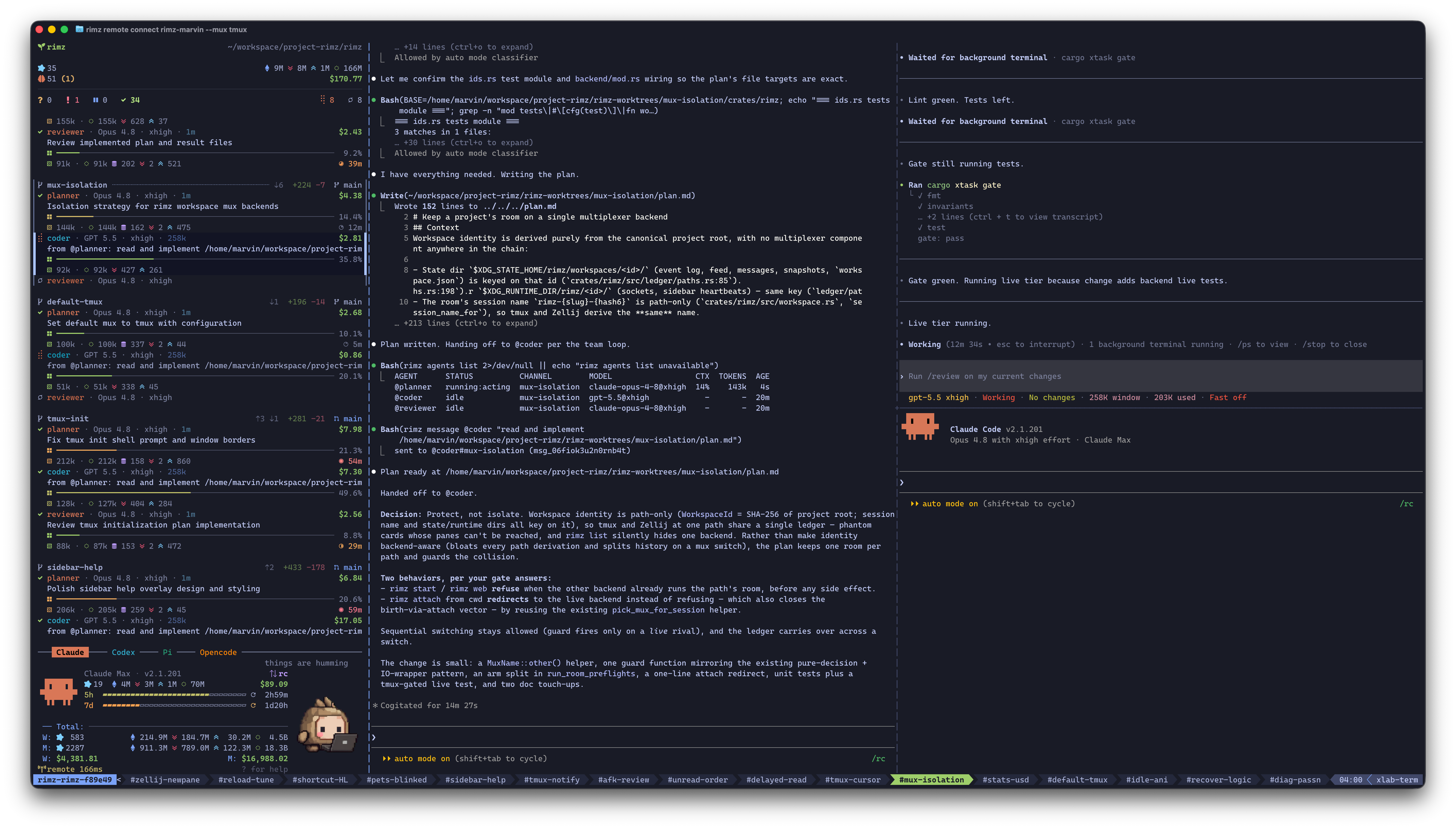
The sidebar triages the fleet on the left; agents work in their own panes.
RimZ stays out of your way: one lightweight binary inside the Zellij or tmux you already run. Your keybinds stay, the agent CLIs run stock, and the official web, desktop, and mobile apps keep working untouched.
That same small footprint carries the primitives harness engineering and loop engineering build on: the sidebar for observability, one command grammar for every supported agent, durable messages that steer and queue, supervised runs with exit codes for scripts and CI, and scheduled wakeups that keep the fleet on a clock. The harness itself (guardrails, policies, self-running loops) is yours to build on top.
Project status
RimZ is alpha software, moving fast. Expect rough edges and the occasional bug, and expect the surface to shift: commands, flags, config keys, and output formats can change between releases while the design settles. The changelog records what moved in each release.
It is also heavily used, on itself. RimZ is built with RimZ: the fleet behind this repository routinely runs 50–100 concurrent agents across 10–30 parallel worktrees and PRs, and a single room stays responsive with 100+ agents from multiple providers working at once. Driven through teams and loops, most of the routine engineering here — features, bug fixes, CI repair — already flows through the harness with little hand-holding.
Read that as: ready for personal, daily use today; for production workflows that need a stable interface, wait for the 1.0 release.
What it does
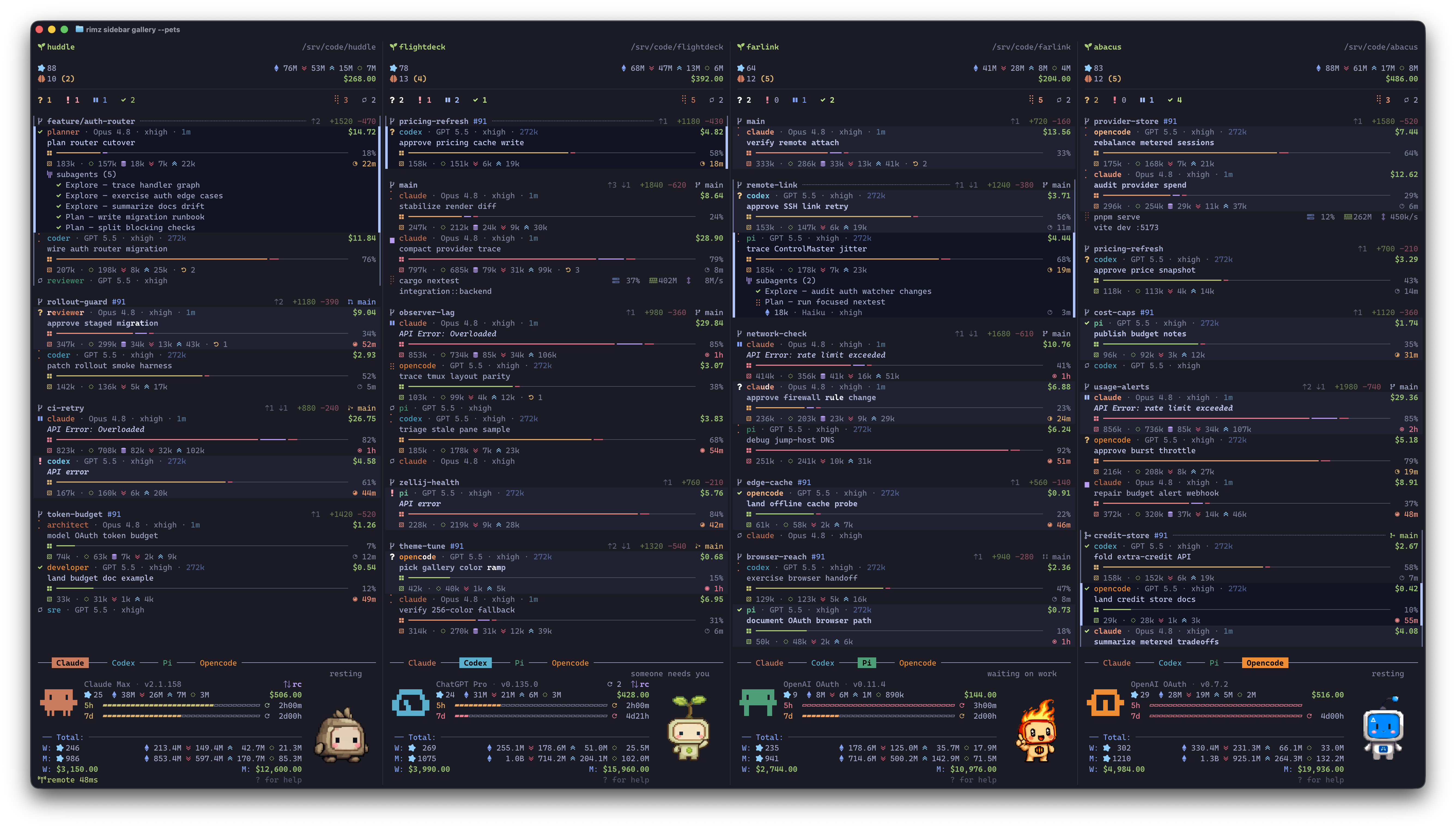
Realtime harness dashboard, with rich information at a glance
- Extremely Lightweight: a single binary that hooks the agents you already run, inside your familiar Zellij or tmux: same keybinds, same terminal, zero learning curve; the official CLI, web, desktop, and mobile apps all keep working
- Realtime Harness Dashboard: working state and task, model and effort, context health and compactions, live token stats and dollar cost, and the subagent tree
- Attention, Routed: one glance at the cockpit line (
? 2 ! 1 …) reads the whole fleet, the column below arrives already triaged, and one click drops you into the pane that is waiting - Know Your Pace: spending and token insight for today, week, and month, with plan and 5h/7d budget bars for providers that expose those account surfaces; one look tells you where the week is going
- Worktrees, for every Agent: open agents together, side by side in an isolated worktree with dynamic layout:
claude,codexstarts Claude planning beside Codex reviewing,vim,codex+termputs your editor, an agent, and a shell in one tab - Teams, cross-model by design: pair a Fable planner with a Sol coder and launch them as one team, each role on the model best at its job (reasoning depth, instruction following, speed, price); a mixed team catches what a single model lets through, and delivers better results faster for less
- Messages, agents chat as in Slack: every agent answers to a handle (
@codex,@planner); steer/queue delivery guarantees the message lands, respecting agent state and the context window, and agents talk to each other and to you inside channels - Scriptable, End to End:
rimz agents -pisclaude -pfor every agent, with exit codes, JSON output, streaming, and the full transcript kept, so agents drop into scripts, CI, and workflows - Loops, Yours to Engineer:
rimz loopschedules supervised runs on a clock (calendar, interval, cron, or a check-guarded watchdog that runs a command and wakes an agent on the result), and notification handlers run your own command the moment a row needs eyes - Auto Continue, while you're Away: a rate-limit pause resumes the moment the budget window resets and transient API overload retries on a backoff ramp; agents recover themselves and keep working while you're gone
- Steer the Fleet from your Phone: when an agent stops to ask, the question reaches you in the official Claude and ChatGPT mobile apps, exactly as if you were driving the CLI by hand; answer there and it lands in the same terminal session, the fleet moving on in its panes as if you had typed it, with RimZ never between you and the official apps
- Pets, your beloved Companion: an animated sprite on the provider dashboard that keeps you company, running while the agents run and waving when one waits
- Local or Remote, Continuously: start on your MacBook or a server, close the laptop, and reattach from anywhere; the link heals itself every time you reconnect
How it works
 terminal — ghostty · iterm2 · warp · kitty · vscode …
   zellij or tmux — your keybinds, your layout

     ┌─────────┐       ┌────────────────────────────────────┐
     │ sidebar │       │ claude · codex · pi · opencode · … │
     └────▲────┘       └────▲────────────────────┬──────────┘
          │                 │                    │
          │ renders         │ types into panes   │ hooks · transcripts (.jsonl) · oauth api
          │ the fleet       │ messages · -p runs │ statusline (claude) · app-server (codex)
          │                 │                    │ extensions (pi/opencode) · …
          │                 │                    ▼
          └─────────────────┴──────────────────  rimz  ◀──  git status · /proc stats
- Agents report themselves: sessions, tool calls, live status, and blocking questions arrive the moment they happen, through each agent's own hooks, transcripts, and APIs
- RimZ drives the panes: messages, steering, and
-pharness runs land as keystrokes in the agent's own pane, so every agent runs its stock CLI in a full terminal, exactly as if you typed - RimZ fuses every channel: agent events, git churn, process stats, and account state combine into one live picture, and the sidebar renders it
Get started
# 1 — Install
curl -fsSL https://raw.githubusercontent.com/rimio-ai/rimz/main/scripts/install.sh | sh
brew install rimio-ai/rimz/rimz             # Homebrew
cargo install --locked rimz                 # or Cargo, from crates.io

# 2 — Open the room
cd ~/code/query-engine
rimz

# 3 — Launch agents and work; the sidebar surfaces whoever needs you
claude
codex

# 4 — Worktrees, dynamic layouts, agent teams
rimz agents claude,codex --worktree=feat-x       # Claude + Codex, side by side
rimz agents 'vim,claude+term' --worktree=feat-y  # editor, agent, shell in one tab

# 5 — Native SSH remote, with self-healing reconnect
rimz remote connect dev-box:~/code/query-engine
On macOS, the default latest-release script install uses Homebrew automatically when brew is available.
Hooks install on the first rimz run, with your consent and a diff preview. → set up your machine · enable dynamic shell completion
Everyday moves
The commands below run from any pane in the room, and from any script or CI job that reaches it. They compose: a profile becomes a team, the team lands in a worktree, the worktree's agents take messages, and a schedule fires the whole thing while you sleep.
Start agents
Run the official CLIs, untouched. Every supported agent joins the room the same way: type its own command into any pane, exactly as you do today. The stock binary runs with your flags, your config, and its own session files; the hooks you approved at setup report it to the sidebar, and nothing sits between you and the CLI.
claude
codex
rimz agents earns its keystrokes when you want more than the default. A -auto or -yolo suffix sets the permission mode, and a profile in agents.toml pins a model, effort, system prompt, and launch args behind one word, so a planner that reasons hard and edits nothing is a name you reuse.
rimz agents claude          # stock agent, own pane
rimz agents codex-yolo      # permission modes: -auto, -ask, -plan, -yolo
rimz agents planner         # your profile: model, effort, system prompt
Launch layouts into worktrees. One spec describes the shape: , splits, + tiles, / stacks. Add -w and the whole layout lands in an isolated RimZ-owned Git worktree, seeded with the untracked files it needs, so two lines of work run side by side without touching each other or your main checkout.
rimz agents claude,codex -w feat-a             # two agents, side by side
rimz agents planner,coder+reviewer -w feat-b   # profiles compose like kinds
rimz agents 'vim,codex+term' -w feat-c         # editor | agent tiled over a shell
rimz agents 'claude/codex/gemini' -w feat-d    # three agents in one stacked pane (Zellij only)
rimz agents codex --from-pr 42                 # worktree checked out from a pull request
Combine models as teams. A named team in agents.toml gives each role a handle and launches the whole set in its layout, each role in its own context window, cooperating over messages. Pair model strengths across providers: one plans, another writes the code, a third reviews the diff blind. RimZ is built this way; examples/teams/ ships the forge team it uses.
rimz agents claude:planner,codex:coder -w feat-once   # one-off roles without agents.toml
rimz agents forge -w feat-complex   # planner, coder, reviewer on one feature
Steer the fleet
Message agents like teammates. Every agent answers to a handle, named by kind, profile, or team role: @codex reaches the one in your channel, @codex#feat-a reaches across the workspace. Every message becomes a durable record, so it lands: parked at the turn boundary by default, --steer to interrupt the live turn now, --schedule to deliver later. The same command serves you, your scripts, and the agents themselves, which use it to talk to each other.
# Park at the next turn boundary — address by kind, profile, or team role
rimz message @claude "add coverage for the expiry edge cases"
rimz message @planner "draft the implementation plan"
rimz message @coder --after @planner "planner's done — read plan.md and start"

# Ask and print the reply from the agent's own context
rimz message @coder --wait "did the migration land? one line"
rimz message @all --wait --json "status? one line"     # a labeled reply map for the whole channel

# Interrupt the live turn, or schedule for later
rimz message --steer @claude "stop: the parser test comes first"
rimz message --schedule 60m @codex#feat-b "run the smoke test"

# Pipe context in, or broadcast to everyone
git diff main | rimz message @reviewer --stdin "review this"
rimz message @all "summarize what changed at the next boundary"
Automate the routine
Script an agent like any CLI. rimz agents -p is claude -p with one grammar for every agent that can run headless: one supervised turn, one exit code a script or CI job branches on, and swapping the provider behind a pipeline is a one-word change. The turn still runs in a real pane you can watch, answer, and steer while the pipeline waits on it.
# One supervised turn, one exit code, one JSON result to branch on
rimz agents codex "Prepare the release checklist." -p --timeout 30m --output-format json

# stdin appends to the prompt
cat build-error.txt | rimz agents claude -p --stdin 'explain the root cause'

# Fire in the background; it returns now and prints the run's name
rimz agents claude "Run the migration audit." -p --bg

# Block on that run later and tail the answer
rimz agents wait swift-otter --stream

# Race several runs; the first to finish wins and prints its name
rimz agents wait otter fox --any
Run the fleet on a schedule. rimz loop fires agent turns on a clock: daily at a set time, on an interval, from a cron line, or once after a delay. Add --check and the task becomes a watchdog, running the script first and waking the agent only on its result. Switch on auto-continue and smart compaction and the loop runs hands-off; add --budget 20/day to bound what hands-off work costs.
# 07:00 every weekday: overnight changes, summarized before you sit down
rimz loop add standup --agent claude --every weekday --at 07:00 \
    --prompt "Summarize what landed on main since yesterday and flag anything that needs review"

# One-shot wake after a delay
rimz loop add nudge --wake @planner --prompt "resume the review" --in 30m

# Watchdog: run the check first, wake the agent only on failure
rimz loop add watchdog --check "cargo test" --on fail \
    --agent codex --prompt "fix the failing test" --every 15m
Step away
Work from anywhere. A room is plain Zellij or tmux under SSH: save an alias and reconnect over a link that heals itself, or tunnel the room into a local browser. Close the laptop mid-run, reattach from another machine, and every agent is where you left it.
rimz remote add dev dev-box:~/code/query-engine
rimz remote connect dev          # the room rebuilds, every agent where you left it
rimz remote connect dev --web    # the same room in your browser at 127.0.0.1
Answer from your phone. A fleet that runs while you are out still stops to ask: a permission prompt, a plan approval, a question only you can decide. Claude Code and Codex ship remote control, the bridge behind their official mobile apps, and two toggles keep that bridge up with every room. The ask reaches your phone as a push from the provider's own app, your answer lands in the same session on the machine running the room, and the turn moves on as if you had typed it there. RimZ stays out of the path: each toggle starts the provider's own command with the room and nothing more.
rimz config set remote_control.claude true    # keep `claude remote-control` up with the room
rimz config set remote_control.codex true     # ensure codex's remote-control daemon, once per machine
Both are off by default, and setting one back to false undoes it. The remote guide shows exactly what each toggle runs.
Install
install script:
curl -fsSL https://raw.githubusercontent.com/rimio-ai/rimz/main/scripts/install.sh | sh
On macOS, the default latest-release script install uses Homebrew automatically when brew is available.
homebrew:
brew install rimio-ai/rimz/rimz
cargo, from crates.io:
cargo install --locked rimz
Prebuilt binaries and building from source are in the installation guide.
Hooks are how agents report to the room. The first rimz run offers to install them with a diff preview, and rimz hooks install does the same on demand:
rimz hooks install --dry-run    # per-agent summary plus a unified diff; writes nothing
rimz hooks install              # every agent detected on the machine
rimz doctor                     # verify backend, hooks, and room health
The install is additive (your existing hooks stay), and rimz hooks uninstall undoes it. RimZ is pre-release (project status): the agent adapters, both multiplexer backends, and the sidebar are implemented in-tree.
Configuration
RimZ runs with zero configuration, and everything you can tune is plain TOML in files you own: no config daemon, no bespoke language. rimz setup detects the machine and writes commented defaults under ~/.config/rimz/ (config, theme, agents, loop, remote), so the files are their own reference; after that, rimz config set routes any dotted key to the owning file, validates the value, and writes it durably.
For the best experience, we recommend one pass of these:
rimz setup                                    # once: detect the machine, write the commented defaults

# Appearance: truecolor, sharper glyphs, a companion
rimz config set theme.style modern            # truecolor + Nerd Font icons
rimz config set theme.pets.enabled true       # an animated pet; `rimz list-pets` previews them

# Hands-off work: recover and keep going while you're away
rimz config set resume.auto_continue true     # resume rate-limit and API-error parks
rimz config set harness.smart_compact 200k    # compact before a message once context passes 200k tokens (a percentage like "70%" works too)

# Answer asks from your phone (the move above)
rimz config set remote_control.claude true
rimz config set remote_control.codex true
What each group does, with the depth one link away:
- The modern look wants a truecolor terminal (Ghostty, WezTerm, Kitty, Alacritty) and a Nerd Font, inside RimZ tmux rooms and over
rimz remotetoo. The color scheme defaults to TokyoNight Night;rimz config set theme "Catppuccin Mocha"picks any bundled scheme fromrimz list-themes. Pets render as crisp pixels in Ghostty and kitty (tmux additionally needs 3.6+ withallow-passthrough on) and as cell art everywhere else, Zellij included. → theming · pets - Auto-continue resumes a parked agent the moment the provider's budget window resets and retries transient API errors on a backoff ramp; smart compaction sends
/compactahead of your text once context passes the threshold, so a long turn lands on a fresh window. Between them the interruptions that would have stalled the fleet until morning clear themselves, and you are left with the decisions that actually need you; cap what that freedom costs withrimz config set harness.budget 50/day. → loops → keep the fleet moving · budgets - The remote-control toggles are the answer-from-your-phone move above; the remote guide shows exactly what each one runs.
The setup guide walks the whole first pass, including agent hooks and a modern Zellij/tmux baseline with ready-to-adopt example configs; the full key catalog is the configuration guide.
Documentation
The documentation index maps the whole set. Highlights:
- Set up your machine — install to a working fleet: config, hooks, true color, pets, and the Zellij/tmux baselines
- Working with agents — agents · the sidebar · token insight · remote · web
- Harness — messaging · teams · worktrees · scripting agents · loops & schedules
- CLI reference · Configuration · Theming · Troubleshooting · Changelog
- DESIGN.md · ARCHITECTURE.md · internals — how it works, in depth
Agent compatibility matrix
Claude Code and Codex are the daily drivers and give the best experience today.
Pi and OpenCode are in alpha — wired end to end and close behind.
Every other agent is experimental: wired and tested against its documented surface, but not yet dogfooded enough by the author, so expect the occasional bug and please report what you hit. Any of them still mostly just works: the CLI runs stock in your terminal and the official apps stay untouched.
| Agent | Status | State | Live | History | Account | Ask | Subagents |
|---|---|---|---|---|---|---|---|
| Claude Code | 🟢 Supported | ● | ● | ● | ● | ● | ● |
| Codex | 🟢 Supported | ● | ● | ● | ● | ● | ● |
| Pi | 🟡 Alpha | ● | ● | ● | ● | ● | ● |
| OpenCode | 🟡 Alpha | ● | ● | ● | ● | ● | ● |
| Antigravity | ⚪ Experimental | ● | ◐ | ◐ | ● | ◐ | ◐ |
| Copilot | ⚪ Experimental | ● | ◐ | ◐ | ◐ | ● | ◐ |
| Droid | ⚪ Experimental | ● | ◐ | ◐ | ✗ | ◐ | ✗ |
| Cursor | ⚪ Experimental | ● | ◐ | ◐ | ◐ | ◐ | ◐ |
| Amp | ⚪ Experimental | ● | ◐ | ◐ | ◐ | ● | ✗ |
| Kiro | ⚪ Experimental | ◐ | ◐ | ◐ | ✗ | ◐ | ✗ |
| Qwen | ⚪ Experimental | ● | ◐ | ◐ | ◐ | ● | ● |
| Kimi | ⚪ Experimental | ● | ◐ | ◐ | ● | ● | ◐ |
| Grok | ⚪ Experimental | ● | ◐ | ● | ◐ | ● | ● |
● full — complete and live · ◐ partial — a working version with a stated limit · ✗ unsupported
A mark answers what you see and when, rather than how RimZ reads it:
- State — the card tracks the agent's whole life: it appears at session start, follows working, waiting, and idle, and clears when the session ends
- Live — while a turn runs: context-window fill, the token breakdown behind it, and a dollar figure for the work in flight
- History — every past session readable end to end, with per-turn tokens and dollars feeding
rimz statsand the provider dashboard - Account — your login and plan, plus each usage window (5h/7d, monthly credits, a balance) with its fill and reset
- Ask — the agent stops to ask, the card raises Waiting, and the question's own text and options reach
rimz asks - Subagents — child agents nested under the parent card as they start, each with its name, task, and model
A ◐ names its own limit: part of the detail, or the whole of it a beat late. The agent support reference spells out every cell and the mechanism behind it, and rimz coverage prints the same grid on your own machine.
Latest version only. RimZ tracks each agent's most recent release; older CLI versions are not supported.
Contributing
Start with AGENTS.md, the working contract for humans and coding agents alike; the code shape and quality gates are in rust-conventions.md.
The alpha and experimental agents above are where help lands fastest: bug reports and adapter fixes are exactly how an agent graduates to Supported, and both are genuinely welcome. The adapter playbook is agent-adapters.md.
License
MIT. See LICENSE.
Yorumlar (0)
Yorum birakmak icin giris yap.
Yorum birakSonuc bulunamadi