luvus
Health Gecti
- License — License: AGPL-3.0
- Description — Repository has a description
- Active repo — Last push 0 days ago
- Community trust — 54 GitHub stars
Code Gecti
- Code scan — Scanned 12 files during light audit, no dangerous patterns found
Permissions Gecti
- Permissions — No dangerous permissions requested
Bu listing icin henuz AI raporu yok.
Mission control for your AI agents
Luvus






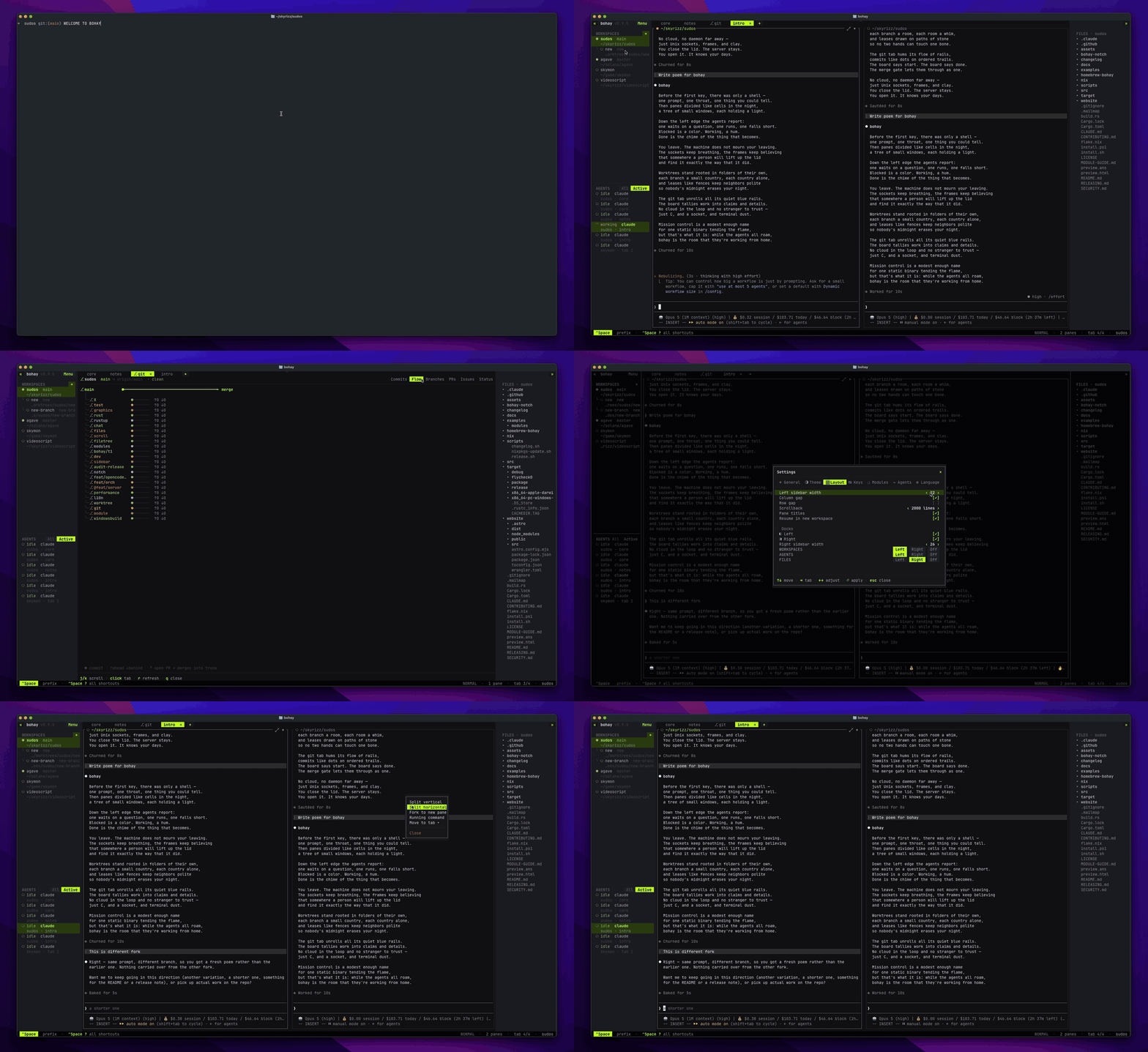
Why luvus?
Working with AI coding agents means juggling terminal windows — one waits for
permission while you watch another think, and a third finished ten minutes ago
without you noticing. luvus puts them all in one place.
- See every agent at once. One sidebar shows what each agent is doing —
blocked · working · done · idle — across every project, andCtrl+Space .
jumps straight to whichever one is waiting on you. Working needs on-screen
proof, so a launching CLI or your own typing never reads as busy. - Never lose a session. Close the terminal and nothing stops. Run
luvus
again and every pane, tab, and layout is back, with each agent's own
conversation resumed automatically — no flags to remember. Fork a session into
a new pane to try a second approach without giving up the first. - Read the files your agents touch. A file tree tinted by git status, and a
fast built-in viewer that marks what changed against your last commit. Open
anything in vim, nano, or your$EDITORwithout leaving the terminal. - Run a team of agents safely. A task board gives each worker its own git
worktree and leases on the files it will touch, then merges finished branches
through a quality gate. - Git without leaving the terminal. Commits, branches, PRs, and issues in a
built-in dashboard, with worktrees as first-class workspaces. - Work from anywhere. Attach to a session over plain SSH — only the cells
that changed cross the wire — and the layout adapts down to a phone screen. - Scriptable and extensible. Every action in the UI is also a CLI command
over a local socket, and modules in any language plug in through a small TOML
manifest. - Make it yours. 15 themes, fully remappable keys, movable sidebar docks, and
a UI in 8 languages.
Ships as a single ~3 MB Rust binary — fast, native, memory measured in
single-digit megabytes.
Install
# macOS (Intel + Apple silicon) / Linux — prebuilt binary, no Rust needed
curl -fsSL https://luvus.dev/install.sh | sh

brew install RizRiyz/luvus/luvus      # Homebrew (also a prebuilt binary)
cargo install luvus                   # build from source (needs Rust 1.88+)
# Windows (PowerShell) — use luvus inside Windows Terminal
irm https://luvus.dev/install.ps1 | iex
Upgrading from Bohay 0.10.2
Stop the old server, install Luvus, then launch it:
bohay server stop
curl -fsSL https://luvus.dev/install.sh | sh
luvus
On first launch, Luvus copies durable state from ~/.bohay/ to ~/.luvus/
without deleting the old directory. Sessions, settings, manifests, modules, and
named sessions carry over; runtime sockets, locks, and managed worktrees are not
duplicated. Existing worktree paths remain valid because the Bohay directory is
left untouched. Keep it until you have verified the migration.
Quick start
luvus          # launch — or reattach to — your session
luvus doctor   # check your setup: git, gh, ssh
Open any folder with Ctrl+Space N (or run luvus inside it), split panes,
and start your agents — luvus recognizes them automatically.
macOS: free the
Ctrl+Spaceprefix under System Settings → Keyboard →
Keyboard Shortcuts → Input Sources (untick Select the previous input source).
Everything is mouse-driven too, so you're never locked out.
Codex skill
Luvus does not install agent instructions by default. Explicitly enable the
Codex skill when you want Codex to inspect and control your local Luvus session:
luvus skill enable codex
Start a new Codex thread after enabling it. See the
Codex skill guide for delegation,
permissions, and production setup.
Supported agents
| Agent | Live status | Session resume | Precise events (hook) |
|---|---|---|---|
| Claude Code | ✓ | ✓ | ✓ |
| GitHub Copilot CLI | ✓ | ✓ | ✓ |
| Codex | ✓ | ✓ | ✓ |
| opencode | ✓ | ✓ | ✓ |
| Kimi | ✓ | ✓ | ✓ |
| Grok | ✓ | ✓ | ✓ |
| Pi | ✓ | ✓ | — |
| Cursor | ✓ | resume command | — |
| Gemini · Aider · Amp · Droid · Qwen · Kiro | ✓ | — | — |
Live status works out of the box for every agent, with no setup.
→ Full guides, keybindings, and the complete CLI reference live at
luvus.dev/docs. Run luvus --help for the compact
overview, luvus help <topic> [command] for focused guidance, orluvus help all for the complete reference.
Development
cargo build            # pure Rust, no C toolchain
cargo test             # unit + off-screen render tests (no tty needed)
cargo run -- --local   # client + server in one process
A headless server owns the panes and renders frames into an off-screen buffer;
a thin client blits them to your terminal; state is pure, driven by one event
loop. Debug builds use ~/.luvus-dev/, so hacking never touches your real session.
Contributions welcome — see CONTRIBUTING.md. Security reports:
SECURITY.md.
License
GNU AGPL v3 (AGPL-3.0-or-later).
luvus is free software: you can redistribute it and/or modify it under the terms of the GNU Affero General Public License. If you run a modified luvus as a network service, the AGPL requires you to offer its source to that service's users. See the LICENSE for the full terms.
Yorumlar (0)
Yorum birakmak icin giris yap.
Yorum birakSonuc bulunamadi