aster
Health Uyari
- License — License: MIT
- Description — Repository has a description
- Active repo — Last push 0 days ago
- Low visibility — Only 5 GitHub stars
Code Basarisiz
- rm -rf — Recursive force deletion command in .github/actions/install-node-dependencies/action.yml
- rm -rf — Recursive force deletion command in .github/actions/prepare-orcad-prebuilds/action.yml
- process.env — Environment variable access in .github/actions/prepare-wayland-clipboard/action.yml
- rm -rf — Recursive force deletion command in .github/actions/prepare-wayland-clipboard/build-or-validate.sh
Permissions Gecti
- Permissions — No dangerous permissions requested
Bu listing icin henuz AI raporu yok.
The agentic development environment for AI researchers — run experiments with coding agents, keep the evidence of every Run, and write the paper beside it.
 Aster
Aster



English · 한국어
The agentic development environment for AI researchers.
Run experiments with coding agents, keep the evidence of every Run, and write the paper beside it — one project, one window.
Download for macOS · Website · How it works · Try the demo
Aster is a desktop app for research done with coding agents. A coding ADE treats the repository as
the unit of work; Aster treats the research project as the unit: the conversations that start
the work, the Experiments and Runs that produce results, the paper that reports them, the papers it
cites, the GPUs it runs on, and the deadline it is aiming for. Claude Code and Codex do the work in
your terminal as usual. Aster records what they actually ran and puts the evidence next to every
number they report.
- Conversation first: Start from a Claude Code or Codex chat. An Experiment groups the results
afterwards; it is not a form to fill in before you can talk to an agent. - Evidence, not assertions: Each Run records what actually ran, each number in the paper points
to the Run behind it, and only you approve what runs next. - Your machines, your files: No Aster account or hosted service. Agents and research records stay
on your computer and the hosts you connect, in plain files inside the project.
How it works
flowchart LR
  you(["You"]) -->|"ask in a chat"| agent["Claude Code / Codex<br/>in Aster"]
  agent -->|"run exec · claim add<br/>proposal add · loop note"| harness["Research harness<br/>node cli.mjs"]
  harness -->|"runs your command,<br/>writes what it observed"| records[(".aster/ in your project<br/>run.json · metrics.jsonl · train.log<br/>code.patch · claims.json · loop.jsonl")]
  records -->|"read live"| app["Aster<br/>Notebook · Runs · Compare<br/>Writing · Claims"]
  app -->|"watch fires: ended · NaN · stall"| agent
  app -->|"approve / reject a proposal"| agent
  you -->|"decide"| app
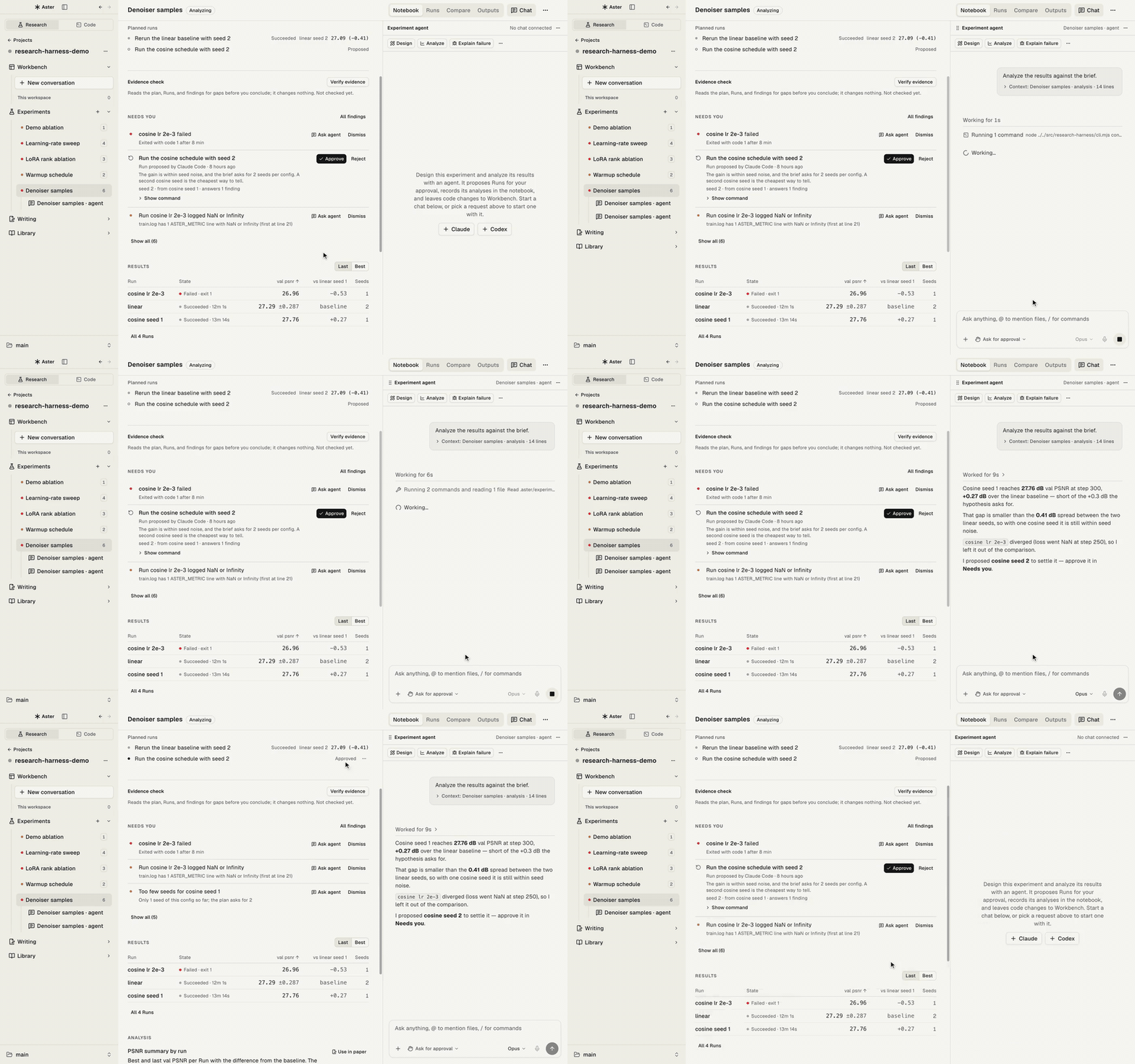
- Ask. You describe the experiment in a Workbench chat or the Experiment agent pane. Aster
attaches the project context (Runs, metrics, open findings) as a compact chip, not a wall of text. - Run through the harness. The agent launches training with
run exec --experiment <slug> -- python train.py .... The harness runs only that command and
records the launch commit, a patch of uncommitted changes, host, argv, and agent session. - Record, don't claim. Metric lines printed by your code (
ASTER_METRIC {...}) stream intometrics.jsonl; stdout and stderr go totrain.log; the exit code decides the Run's state. - Watch.
aster research watchregisters what the agent is waiting for. Aster checks local Runs
every 15 s and SSH Runs every 60 s, and wakes the agent when one fires, so nobody polls. - Decide. The agent records findings with evidence (a metric, log lines, a file) and proposes
the next Run. The proposal shows up in the notebook's Needs you; you approve or reject. - Write. When a number goes into
paper/main.tex, the agent records a claim that ties it to a
Run's metric. Writing shows each claim as verified, stale, mismatched, or missing evidence.
Everything lives in the project as JSON, JSONL, and logs you can read, diff, and commit:
my-project/
  paper/main.tex  paper/references.bib
  .aster/
    project.json                 path map of the project
    claims.json                  manuscript numbers → Run evidence
    experiments/<slug>/
      experiment.json            question, hypothesis, metric, baseline, seeds
      loop.jsonl                 research-loop ledger: hypothesis → Run → result → decision
      proposals.jsonl            next-Run proposals and your decisions
      quality.jsonl              findings with evidence
      analysis.jsonl             analyses and the Runs they used
      runs/<id>/
        run.json  metrics.jsonl  train.log  code.patch  config.json  media.jsonl  artifacts/
    library/papers/
See docs/RESEARCH_PROJECT_LAYOUT.md for the full contract.
Features
Experiments
Every Experiment has a notebook, its Runs, and an agent beside it. Agents propose; you decide what
runs.
Experiment notebook
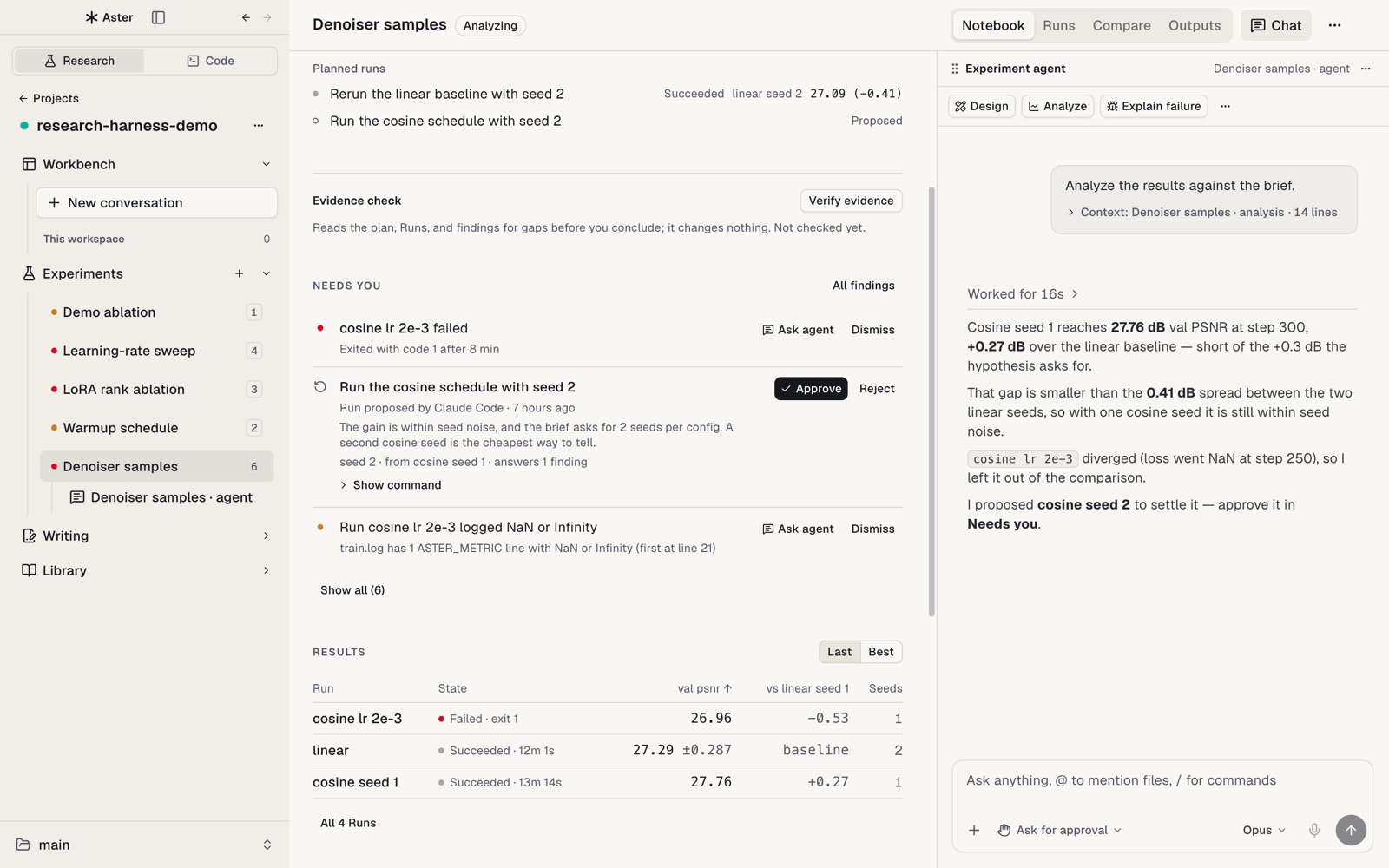
Each Experiment opens on a notebook: plan (question, metric, baseline, seeds), Needs you (failed
Runs, proposals, findings that wait on a decision), results with mean ± spread per configuration,
analyses, and your conclusion. The Experiment agent is docked beside it: ask it to design,
analyze, explain a failure, or propose the next Run.
Runs and Compare
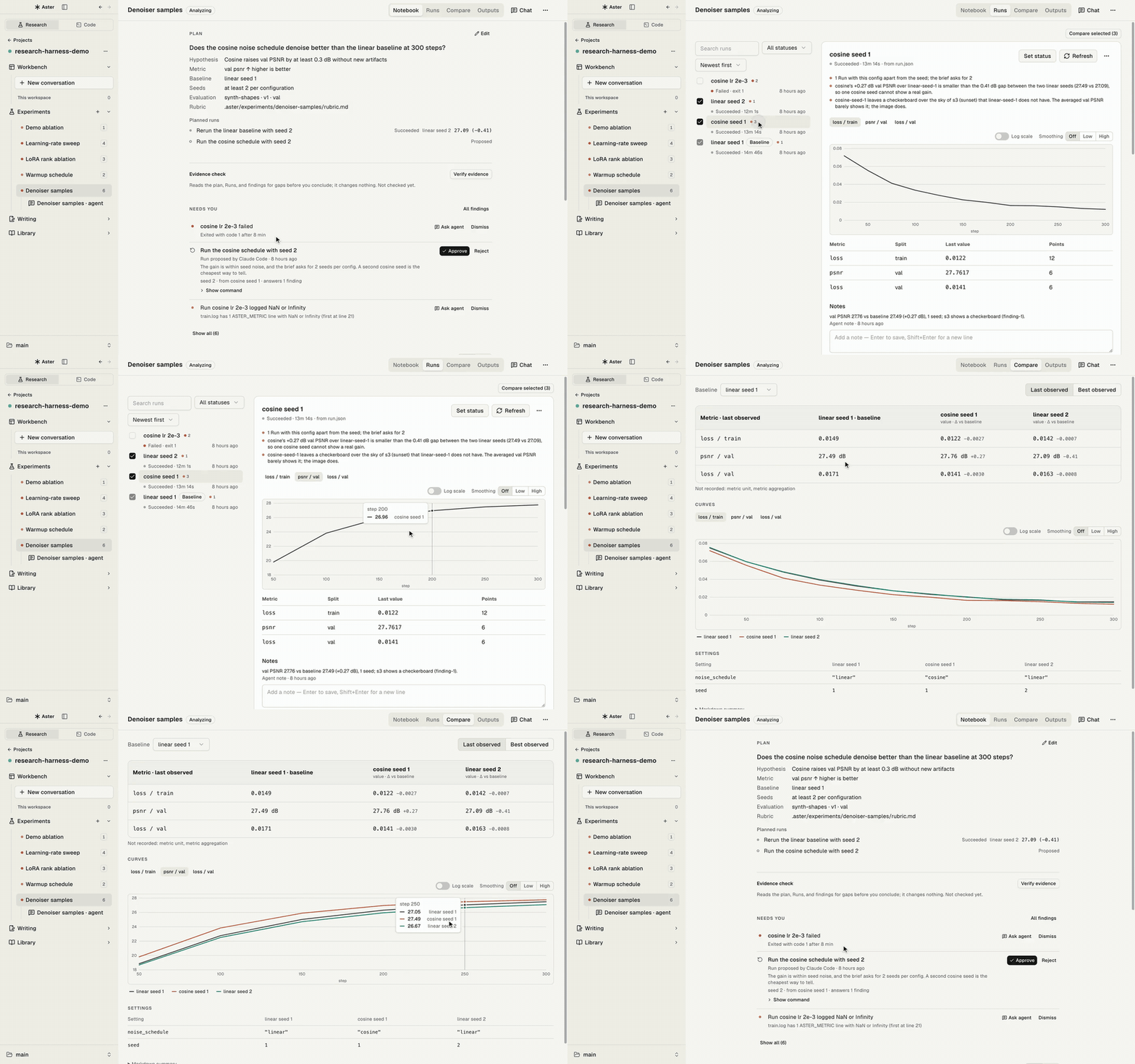
Live metric curves, the log, config, code patch, and media for every Run. Attach existing JSONL or
CSV results, link a SLURM job, or let agents register Runs that Aster picks up on its own. Tick 2–6
Runs and Compare lines them up: differences from the baseline at one precision per column,
mismatched units or evaluation conditions, config differences, and outputs (text or image) matched by
sample ID. Rate samples blind, A/B, and see how your ratings agree with the agent judge.
Research loop
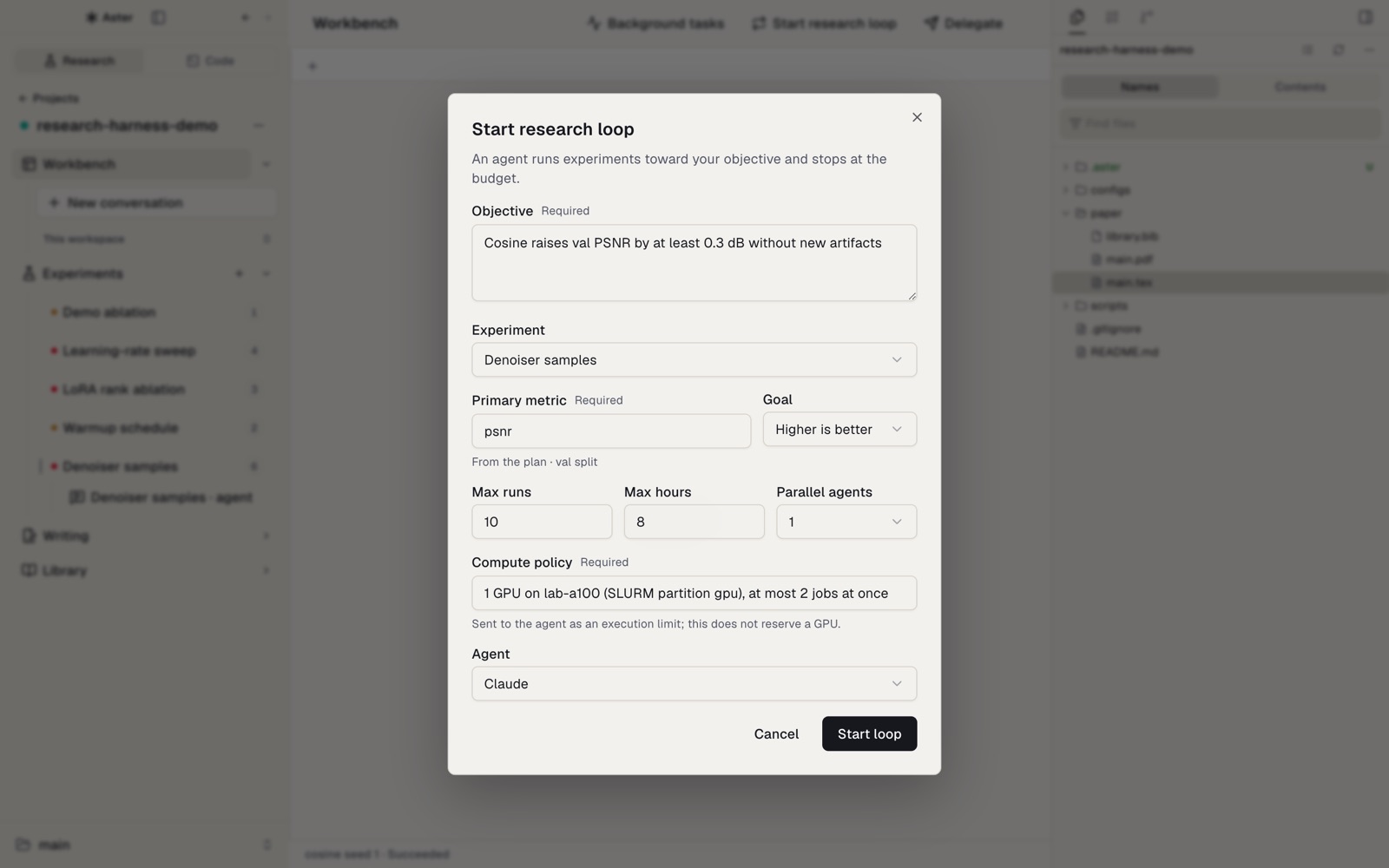
Give an agent an objective, a metric, and a budget of Runs and hours. It writes each hypothesis,
Run, result, and decision to the loop ledger, launches only through the harness, and stops for you
before going over budget or changing the evaluation.
Writing
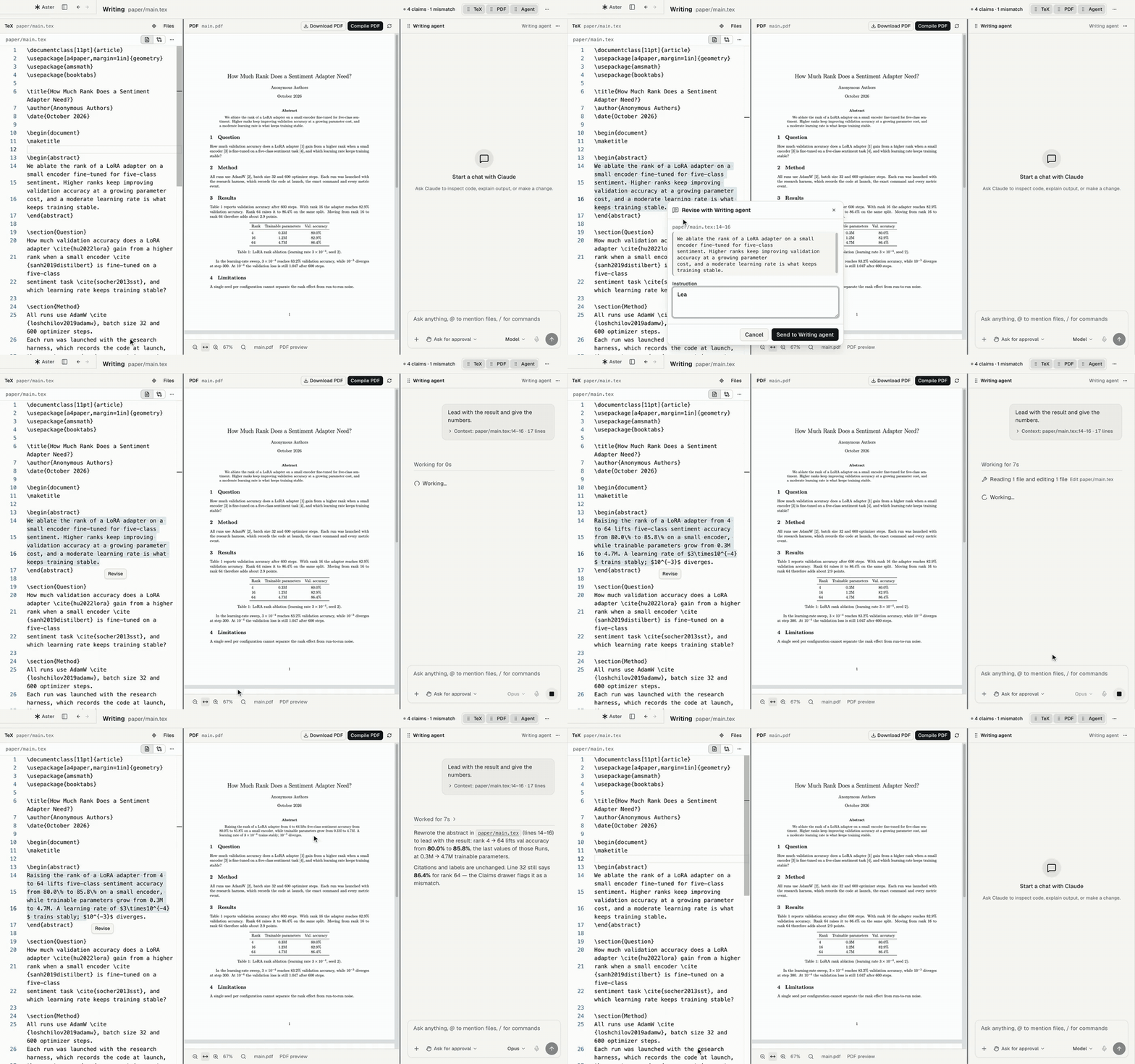
The paper sits beside the Runs it reports, and every number stays tied to the Run it came from.
Revise with the Writing agent
TeX source, the PDF compiled with Tectonic, and a Writing agent side by side, with SyncTeX in both
directions. Select a passage in the TeX or the PDF and choose Revise; the agent edits only that
passage, and Compile PDF shows the result.
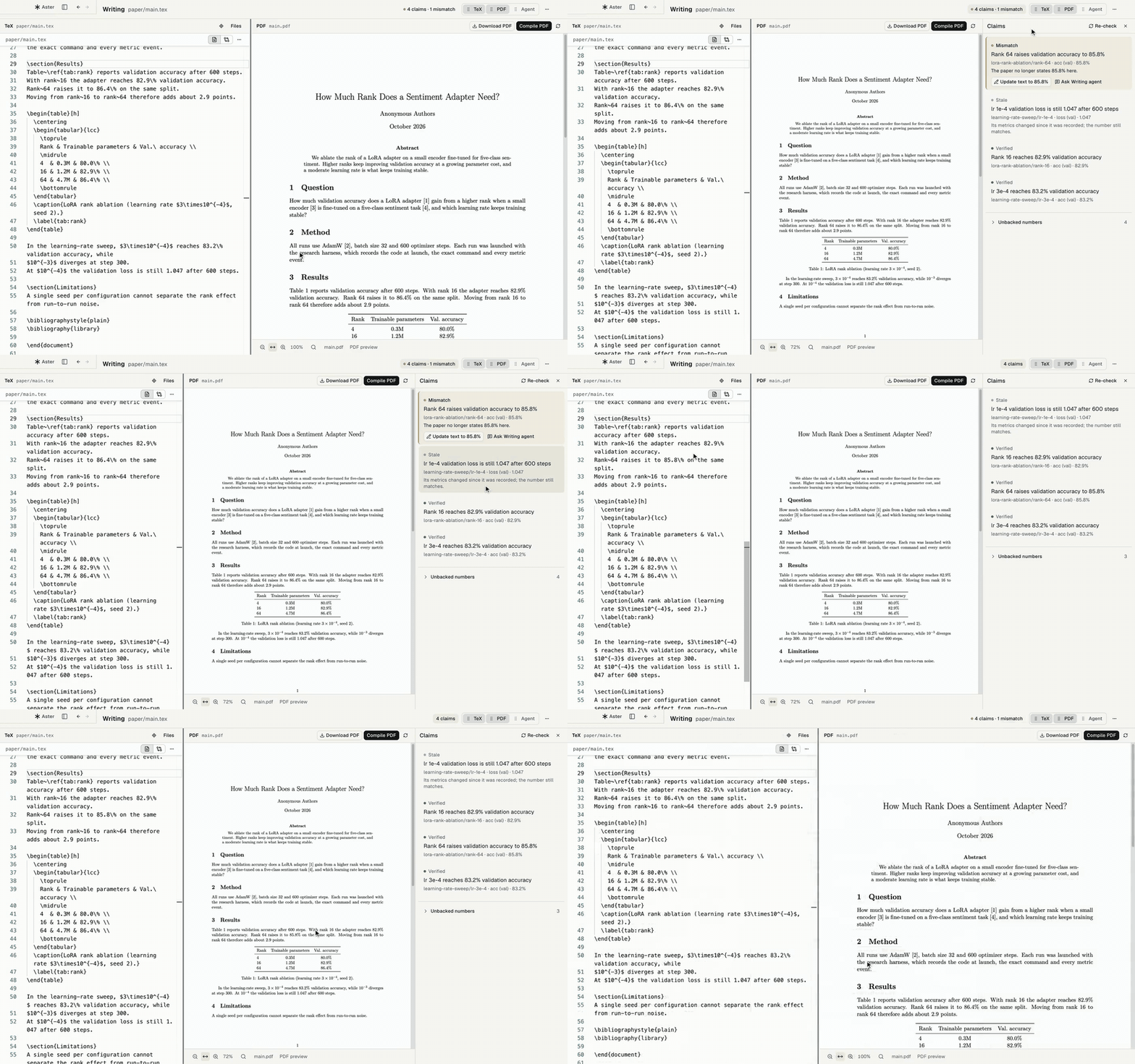
Claims
The Claims drawer checks every number in the paper against the Run it cites and marks it
verified, stale, mismatched, or missing evidence. It lists result-like numbers no Run backs, and
Update text fixes a mismatched number in one click.
Library
The project's papers and PDFs with highlights and notes, arXiv and DOI import, copyable citations,
and a reading agent that summarizes a paper or relates it to your manuscript and code. Drag the
divider to give the PDF or the agent more room.
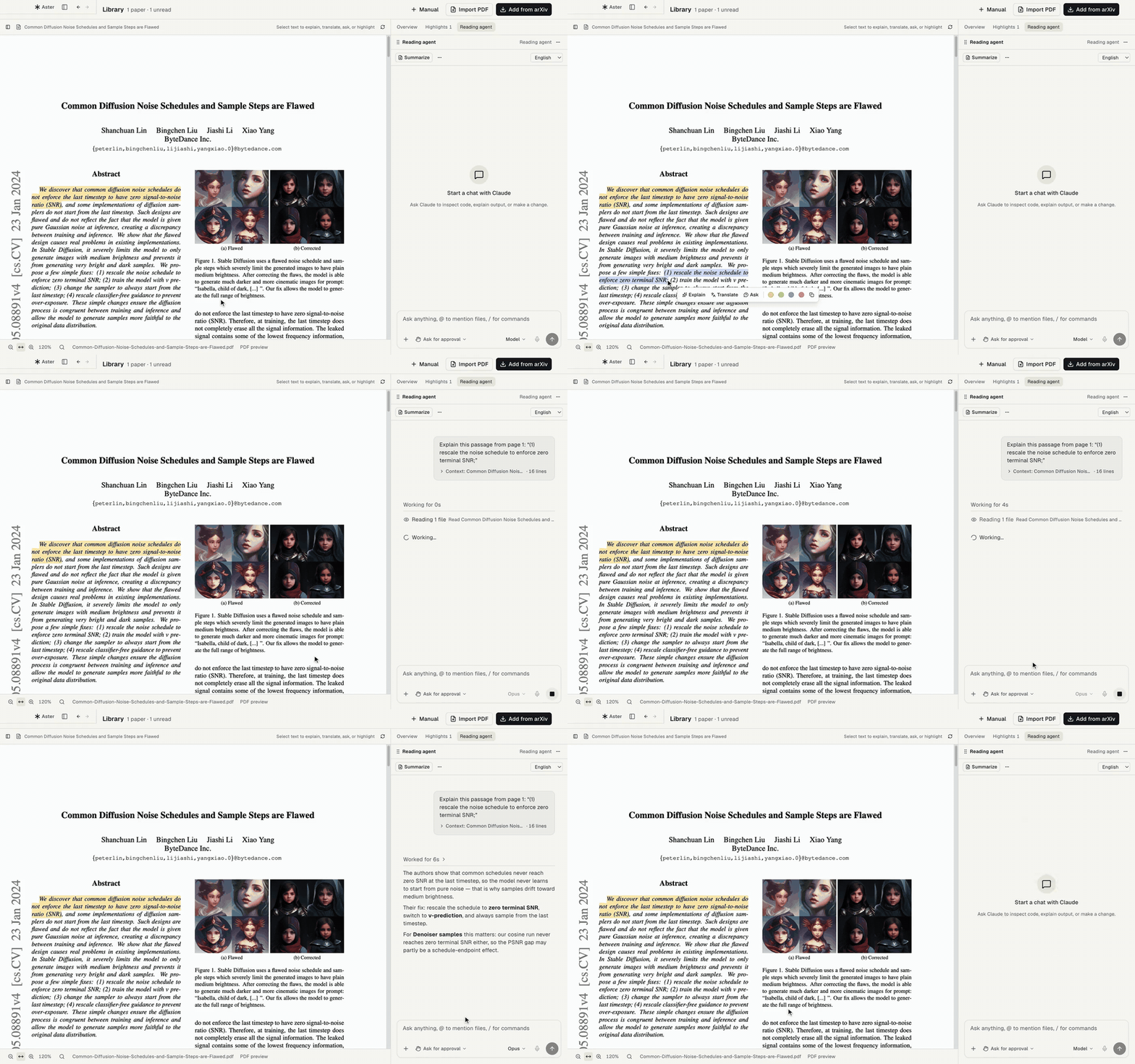
The Library screenshot shows arXiv:2305.08891 by Lin et al., licensed CC BY-SA 4.0.
Phone
Open a server's projects on your phone, even while your Mac is off. The phone runs Aster's web
client in Safari or from the Home Screen, with no App Store, and reaches the server through a relay
you deploy yourself on Cloudflare's Workers Free plan.
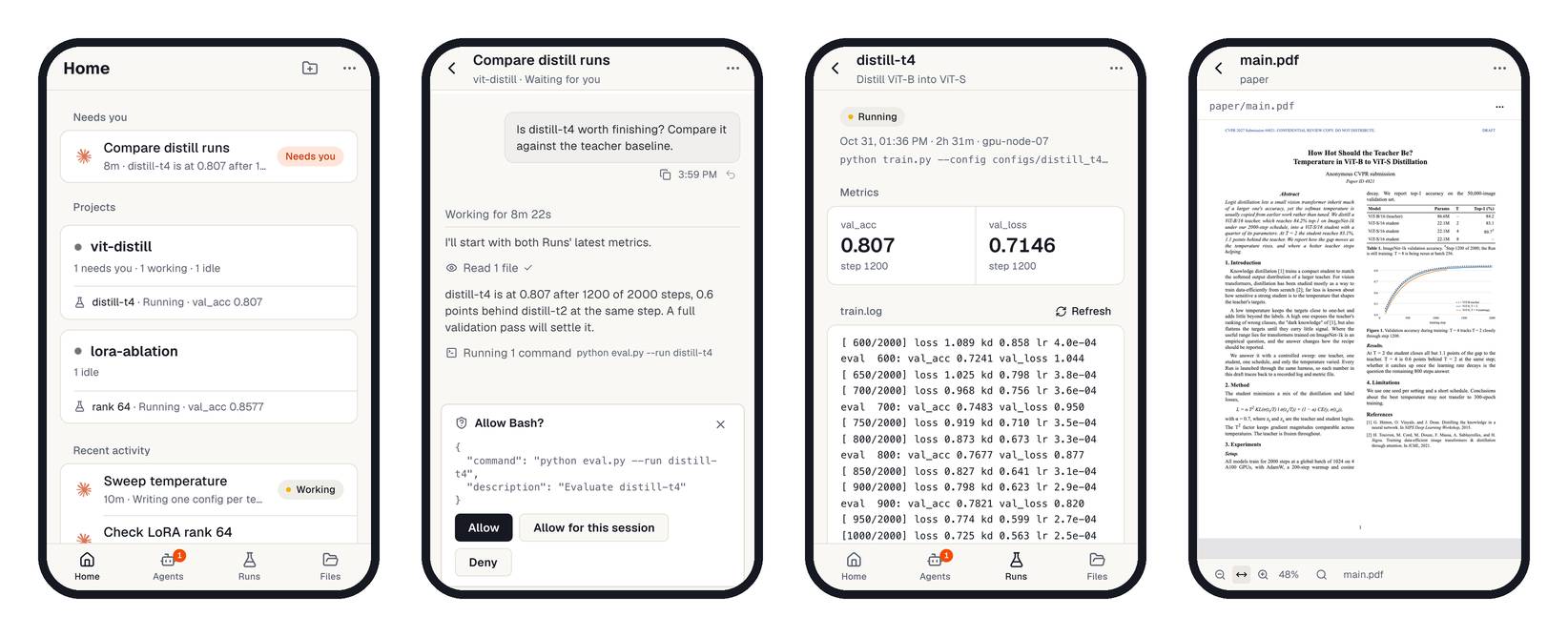
- Home puts agents that need you first, then each project with its newest Run, upcoming
deadlines, and the GPU queue. - Agents lists every chat and terminal on the server, with subagents folded under the agent
that launched them. Chats open as the same native chat as on your Mac, with approval cards and the
same composer; New agent starts one, or a plain shell. Stop an agent from its menu. - Runs lists every Run, running first; a Run opens its latest metrics and the end of its log.
Experiments show their brief and best Run against the baseline. - Files browses the workspace and opens code, Markdown, and PDFs, including the project's papers.
- Notify me (⋯ menu, Home Screen app, iOS 16.4+) alerts you when an agent needs you or a Run
ends, even with the app closed.
To set it up:
- Deploy your relay from
relay/with a free Cloudflare account; no payment
method is needed. The last command prints your relay URL. - In Aster, open Research → Home → Phone, paste the relay URL once, and choose Turn on for
each SSH server. The server keeps the setting and rejoins the relay after restarts. - Choose Phone QR, scan it with the phone camera, and open the link in Safari.
- To keep Aster on the Home Screen, tap Share → Add to Home Screen, open it there, and paste
the link once: copy it from the card on the phone's Home in the browser, or from Copy link on
your Mac.
The pairing link is a credential: anyone with it can open that server, so keep it and the relay URL
private. Phone QR makes a new link and retires earlier links no phone has opened; each server
row lists its paired phones, and Revoke cuts one off. The
setup guide has every step.
Limits: phone access is experimental. It covers SSH servers and hosts runningaster serve --relay; projects that live only on your Mac are not on the phone. Experiment
notebooks, Compare, and the Library page stay in the desktop app. Past the free
plan's daily limits, the relay refuses requests until 00:00 UTC instead of charging.
Others
The GPUs and deadlines around your projects, the coding workspace, and the CLI your agents use.
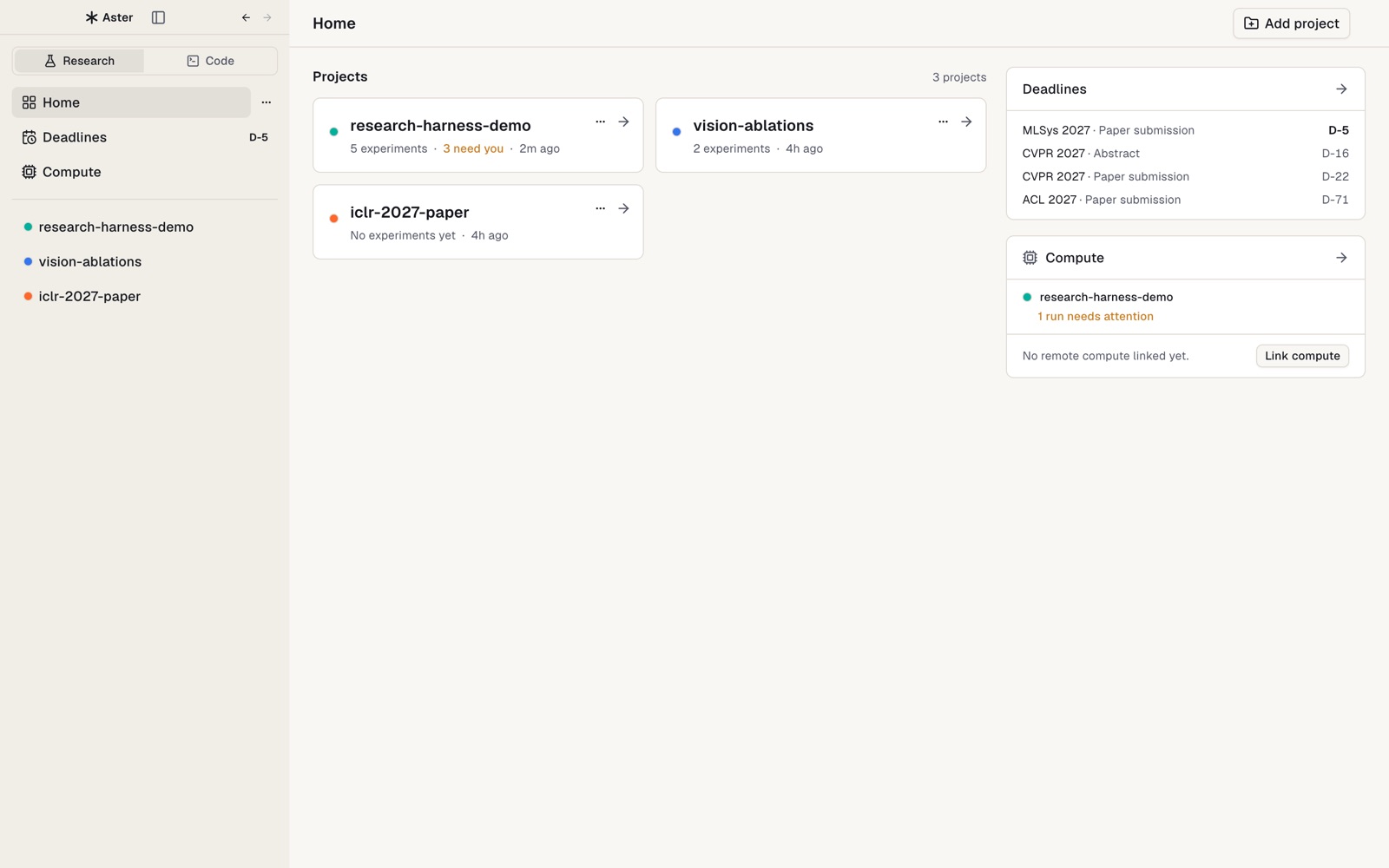
Compute and Deadlines
SSH hosts, GPUs, and SLURM queues across projects, with a GPU budget per host and project: jobs over
budget are submitted held and released in priority order. Conference deadlines from ccfddl and the
Hugging Face AI deadlines catalogs, in your time zone.
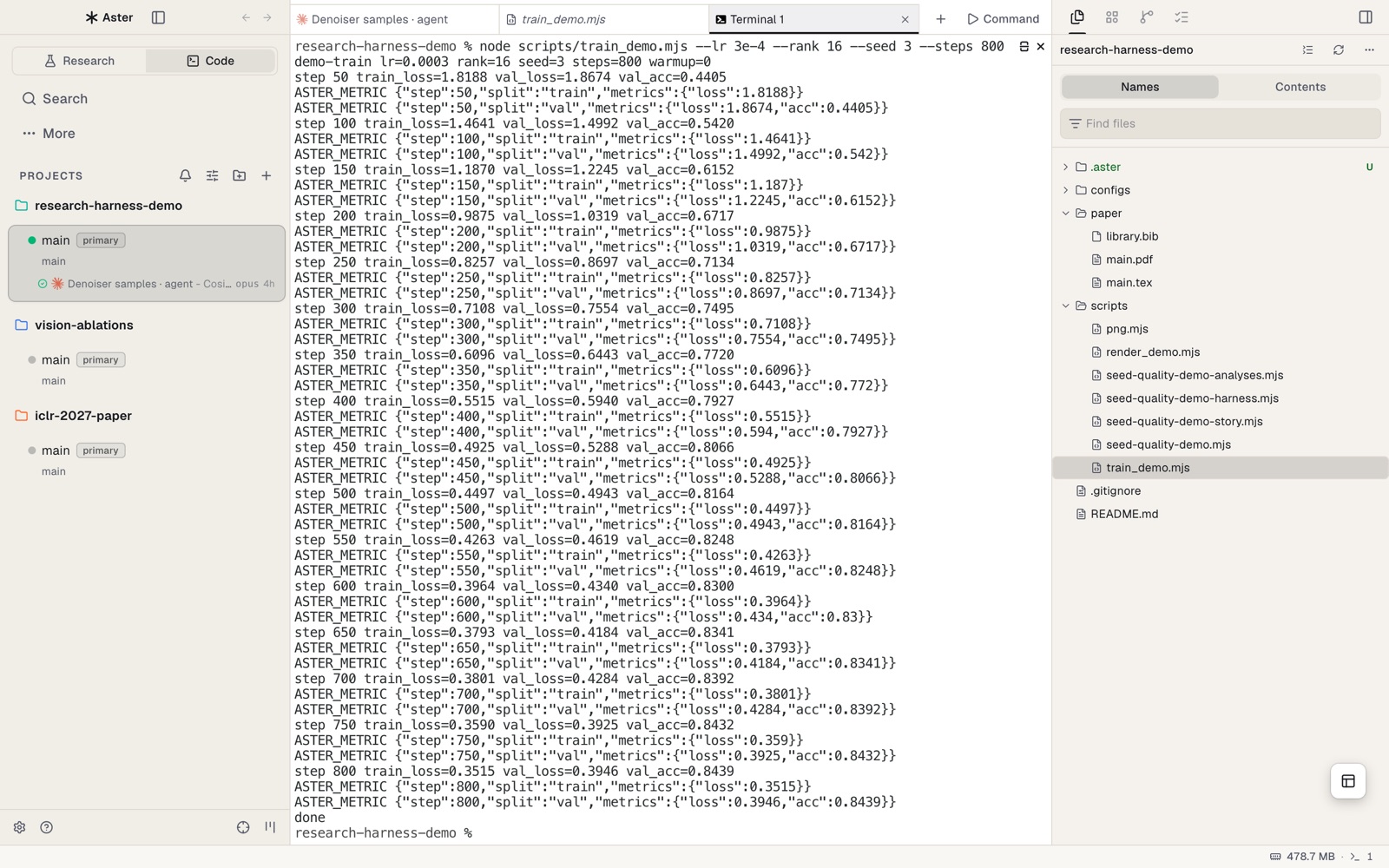
Workbench and Code layout
Chats, terminals, the editor, files, and Git for the project. Switching pages never stops an agent
or terminal. The Research | Code switch flips the sidebar to a worktree-first layout for pure
coding work. Subagents that a coordinator launches fold into one chip beside the tabs, such as
"2 running · 1 waiting", instead of filling the strip; click it to see each one's state and open it.
Research harness
One small CLI for every experiment: agents call it to launch Runs and record claims, and the app
imports the same code, so the agent and the UI agree on what a record means. Aster also installs it
on the SSH hosts it manages, so agents there register Runs the same way. See
Research harness for commands.
Slack: mention a project's Aster bot in an allowed channel and a coordinator agent in that project
picks up the request and answers in the thread; approvals stay in Aster. Setup is indocs/readme/SLACK.md.
Light and dark themes in a monochrome palette, with an accent color you pick in Settings →
Appearance.
Getting started
Install
Download
Aster-mac-arm64.dmgfrom
Releases and drag Aster into
Applications. Requires an Apple Silicon Mac with macOS 12 or later.Builds are signed ad hoc and not notarized yet, so the first open is blocked. Right-click
Aster → Open → Open, or run:xattr -dr com.apple.quarantine /Applications/Aster.appSign in to at least one agent CLI:
Claude Code or
Codex. Any other CLI agent runs in a terminal tab.
Optional: Tectonic on PATH to compile PDFs, and SSH
access to your GPU hosts (with SLURM to submit jobs). Aster keeps its data in~/Library/Application Support/Aster.
Open a research project
- Home → Add project and pick a folder. A project with
.aster/project.json(or an olderresearch/project.json) opens with its Experiments and Runs linked. - New project: create an Experiment, or a manuscript in Writing, and Aster writes
.aster/
andpaper/for you.node $HARNESS initdoes the same from a terminal. Neither overwrites
existing files. - Existing project: in the project's … menu choose Organize with agent in background.
Theaster-research-adoptskill surveys the folder, writes a plan, and reorganizes it on a newaster/research-layoutbranch. It does not merge, push, or delete; code, data, and checkpoints
stay in place.
Try the demo project
examples/research-harness-demo is a synthetic project
that fills every page: five Experiments, a failed Run, a patch from an uncommitted edit, SLURM-linked
Runs, findings, proposals, sample ratings, a research loop, and a manuscript with verified,
mismatched, and stale claims. Add that folder as a project and open Denoiser samples first.
Research harness
The harness is a zero-dependency Node CLI in src/research-harness/
that agents call for every experiment. The app ships the same code as Resources/research-harness
and imports it at runtime, so the agent and the UI always agree on what a record means.aster research harness-path prints the copy that matches the installed app. On an SSH host Aster
manages, it prints the copy Aster installed on that host, and --json also names a Node to run it
with when the host has none.
HARNESS=$(aster research harness-path)

node $HARNESS experiment --name "LoRA r16"                 # .aster/experiments/lora-r16
node $HARNESS run exec --experiment lora-r16 --id seed-42 \
  --metric-def loss:minimize --metric-def acc:maximize:% -- python train.py --lr 3e-4

node $HARNESS claim add --text "LoRA reaches 83.0% validation accuracy" \
  --run lora-r16/seed-42 --metric acc --split val --format percent:1
node $HARNESS claim audit                                  # verified / stale / mismatch / missing-evidence
node $HARNESS verify --experiment lora-r16 --paper --json  # read-only evidence gate
node $HARNESS context                                      # compact project summary for an agent prompt
Print metrics and media from any language; run exec turns these lines into records:
import json

def log_metrics(step, split, **metrics):
    print("ASTER_METRIC " + json.dumps({"step": step, "split": split, "metrics": metrics}), flush=True)

print("ASTER_MEDIA " + json.dumps({"path": "samples/step_1000.png", "step": 1000}), flush=True)
For a job that cannot be wrapped, register it with new-run and report it with run log-metric,run attach-artifact, and run finish. Every command accepts --json; node $HARNESS --help lists
them all, including preflight, check, quality, rate, proposal, and loop.
The rules that keep a record honest (what run exec records, how claims and findings are checked,
who approves) are in src/research-harness/README.md.
Aster CLI
Agents drive the app through the aster command (aster-dev for development builds).
aster research status --run lora-r16/seed-43 --json        # execution, SLURM job, metrics, log tail
aster research watch --run lora-r16/seed-43 --on failed,nan,stall:30 --on 'log:OOM|Traceback'

aster gpu status                                           # your GPU budget on each SLURM host
aster gpu submit --server my-cluster --project my-paper --workdir /scratch/me/my-paper \
  --script scripts/train.sbatch --gpus 2 --link-run lora-r16/seed-43 --dry-run
--link-run ties the job to a Run registered with new-run: the job's output goes to the Run'strain.log, and Aster writes how the job ended into its run.json. Worktree, terminal,
orchestration, and browser commands are listed in aster --help.
Skills
Aster bundles agent skills that teach Claude Code and Codex the workflow above.
| Skill | What it teaches the agent |
|---|---|
aster-research-start |
Set up an Experiment's brief (question, metric, baseline, seeds) before the first Run. |
aster-research-track |
Read context first, launch every experiment with run exec, and record a claim right after writing a result number into the paper. |
aster-research-verify |
Trace Runs, findings, and manuscript numbers to source evidence and report what remains unverified. |
aster-research-loop |
Run a budgeted hypothesis → Run → result → decision loop, with checkpoints before going over budget or changing the evaluation. |
aster-research-adopt |
Move an existing project into the .aster/ layout on a branch, after showing a plan. |
aster-gpu |
Submit SLURM jobs under the project's GPU budget, tie each job to its Run, and sleep until the Run needs attention. |
aster-cli, aster-orchestration |
Drive worktrees, terminals, and the embedded browser, and coordinate several agents. |
Status
Aster 1.0.0 is the first integrated desktop release target. The research flows above are covered by
unit tests and headless Electron tests. Known gaps:
- Apple Silicon macOS builds are signed ad hoc and are not notarized. The app checks GitHub Releases
for updates, but installation still requires downloading and replacing the app manually. - Phone access is experimental and covers SSH servers through each user's own relay; see
Phone. There is no native phone app. - An unsigned Windows x64 preview passed CI packaging, smoke, and research E2E tests; installation
and research work on a user's Windows PC remain unverified. Linux desktop is not published yet. - Writing: the round trip from a selected passage through an agent's edit to a recompiled PDF has not
been verified with a live agent. The first compile on an empty TeX cache downloads packages and can
take minutes. - SSH: range reads of large result files, incremental log cursors, and full log search are incomplete.
- SLURM, GPU budgets, and remote delegation have not been validated end to end on real clusters.
Development
flowchart TB
  subgraph app["Aster desktop (Electron)"]
    renderer["Renderer · React<br/>src/renderer"] <-->|IPC| main["Main process<br/>src/main"]
  end
  main -->|"imports at runtime"| harness["Research harness<br/>src/research-harness"]
  main -->|"PTY"| agents["Agent CLIs<br/>claude · codex"]
  agents -->|"node cli.mjs ..."| harness
  agents -->|"aster research watch<br/>aster gpu submit"| cli["aster CLI<br/>src/cli"]
  cli -->|"runtime RPC"| main
  harness -->|"read / write"| records[(".aster/ in the project")]
  main -->|"read · watch"| records
  main -->|"SSH · SLURM"| hosts["GPU hosts"]
| Path | Contents |
|---|---|
src/main |
Electron main process; research services in src/main/research |
src/renderer |
React UI; research pages in src/renderer/src/features/research |
src/shared |
Types and logic shared across processes, and the product brand |
src/research-harness |
Harness CLI and the research skills (zero dependencies, plain Node ESM) |
src/cli |
The aster CLI |
skills/ |
Agent skills bundled with the app |
examples/ |
The synthetic research demo project |
pnpm install --frozen-lockfile
pnpm dev                     # run the app from source
pnpm tc                      # typecheck
pnpm test                    # unit tests
pnpm lint                    # lint and repository checks
node --test src/research-harness/*.test.mjs
pnpm build:aster:mac         # local macOS package (electron-builder --dir)
Product identity (name, app ID, URL scheme, CLI name, copyright line, and every external link) lives
in src/shared/product-brand.json; build scripts and the app read it
from there. Code conventions are in AGENTS.md and.github/CONTRIBUTING.md.
Acknowledgements
Aster is built on Orca, and its phone relay began as
Paseo's Cloudflare relay. Thank you to both projects.
License
Aster is distributed under the MIT License. Third-party licenses, including Orca's, are inTHIRD_PARTY_NOTICES.md and in the app under Help → Open-Source
Licenses.
Yorumlar (0)
Yorum birakmak icin giris yap.
Yorum birakSonuc bulunamadi