cs2-map-mcp
Health Warn
- License — License: MIT
- Description — Repository has a description
- Active repo — Last push 0 days ago
- Low visibility — Only 5 GitHub stars
Code Pass
- Code scan — Scanned 12 files during light audit, no dangerous patterns found
Permissions Pass
- Permissions — No dangerous permissions requested
No AI report is available for this listing yet.
MCP server that lets AI agents (Claude, Codex) build complete Counter-Strike 2 maps: geometry, materials, lighting, entities, mechanics and scripts. It compiles with Valve's tools, tests the map in CS2 with real input and screenshots, and packs it into its own addon for the Steam Workshop.
CS2 Map MCP — AI that builds Counter-Strike 2 maps






CS2 Map MCP is an MCP server that lets AI agents — Claude Code, Claude Desktop, Codex or any MCP client — build complete Counter-Strike 2 maps: geometry, materials, lighting, entities, gameplay mechanics and cs_script scripts. It writes Source 2 map files into a CS2 addon, compiles them with Valve's own resourcecompiler, loads the map in CS2, plays it with real input, looks at the screenshots and fixes what is wrong. When the map is ready, it packs it into its own addon for the Steam Workshop.
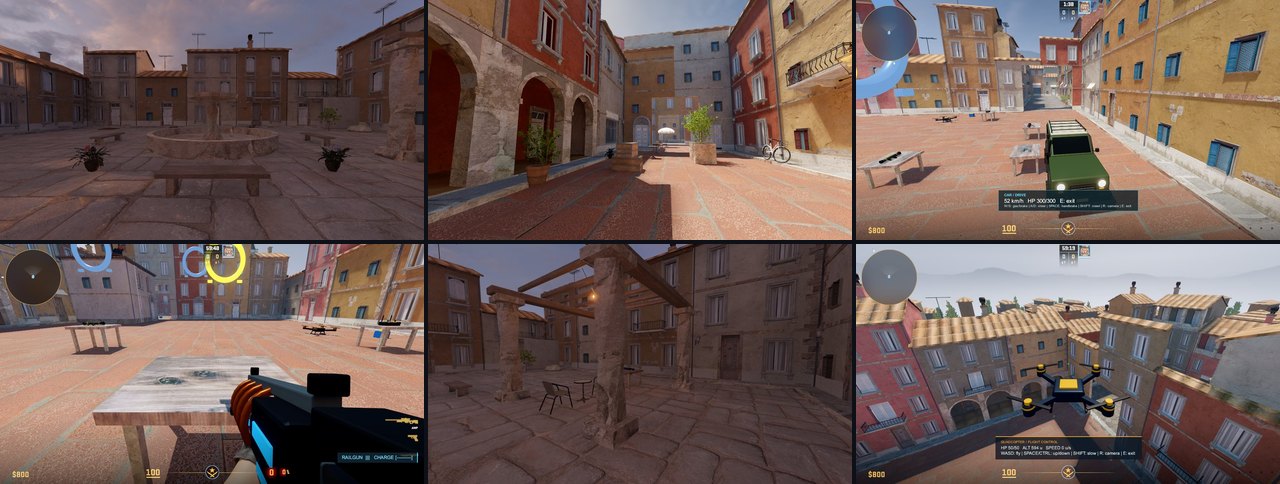
Version 1.0. Every feature below was checked in the real game: built through MCP calls, compiled by Valve's tools, loaded in CS2 and looked at. Base commands cover almost everything a mapper does by hand; the quick generators of houses and streets have one look so far (Inferno-like), other looks come from your own styles.
Contents: Gallery · How it works · Install · Prompts to start · Your maps in CS2 and Hammer · Publish to the Workshop · When something goes wrong · Feedback · What it can do · Tools
Gallery
Unedited in-game screenshots. Every map was built only through MCP tool calls.
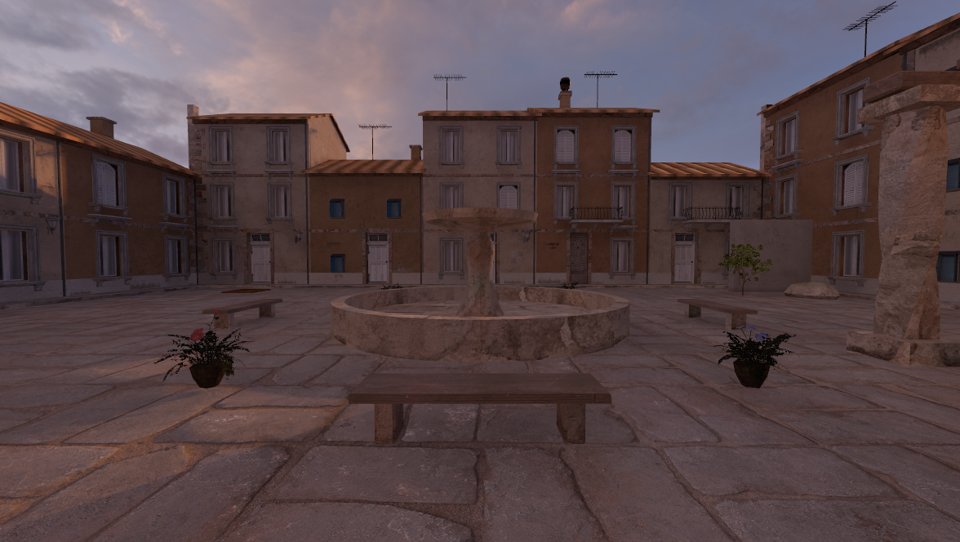
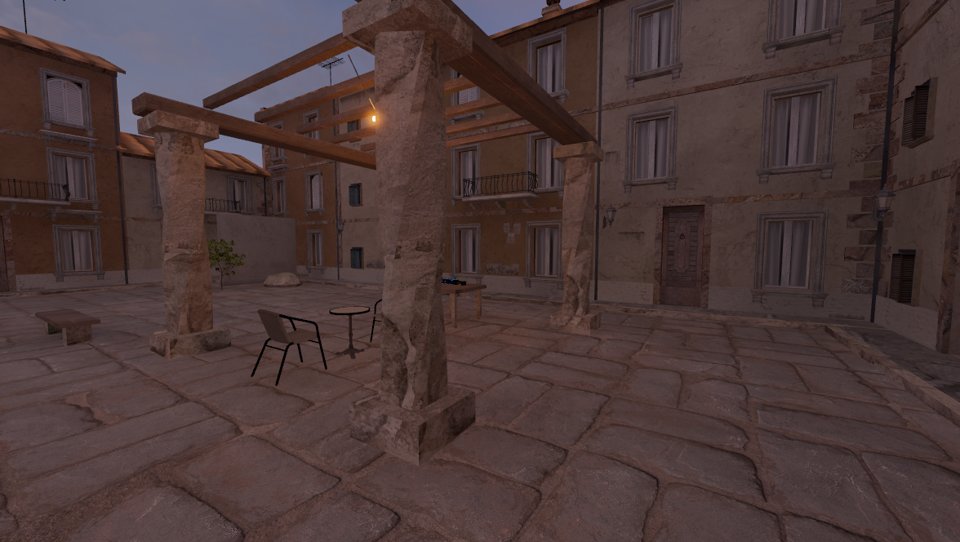
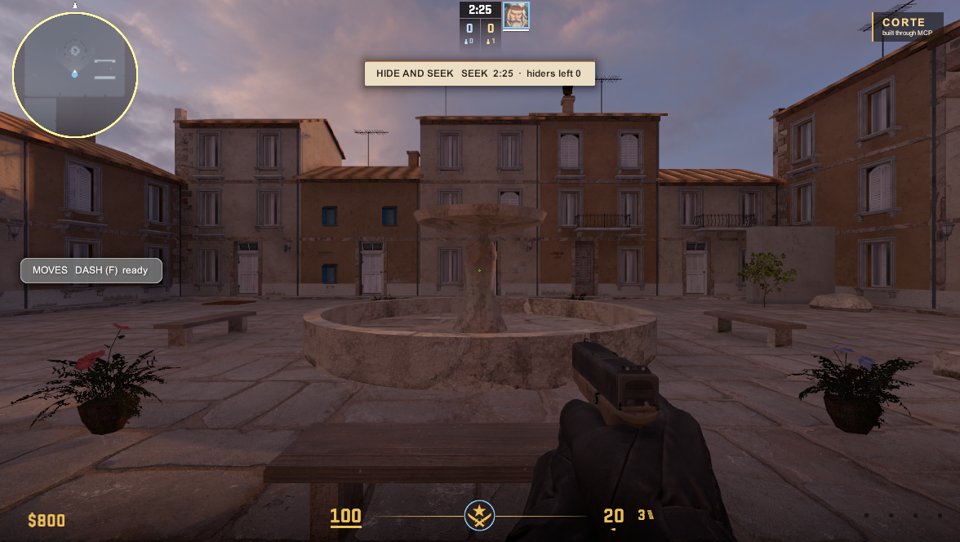
A cozy courtyard with abilities, hide and seek and own UI (p10_showcase, one batch with an own style):
 |
 |
A fountain (revolve), bevelled benches (edit_mesh), house fronts in the own style warm_corte, golden-hour light |
A pergola of twisted stone columns (edit_mesh twist), wooden beams, a café with string lights |
 |
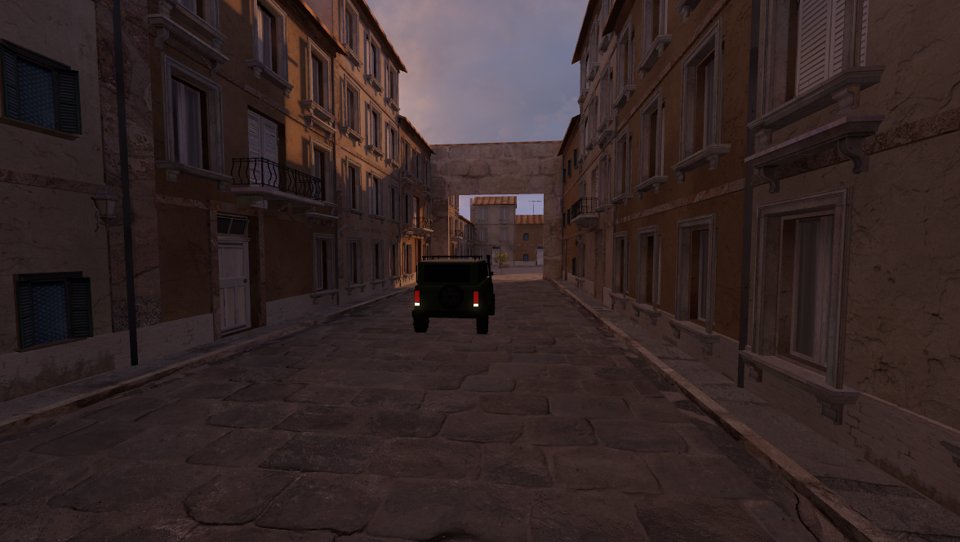 |
| Mid double jump: the ability HUD (glass theme), the hide-and-seek HUD (paper theme) and an own title card | The lane with the drivable car; a teleport from its end leads behind a secret wall |
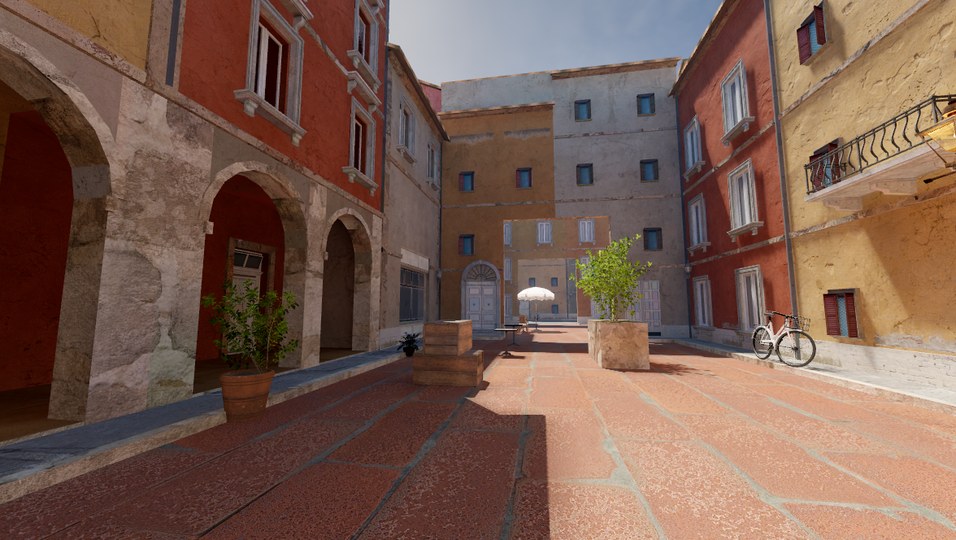
An Inferno-like defuse quarter (p7_quartiere) and outdoor scenes:
 |
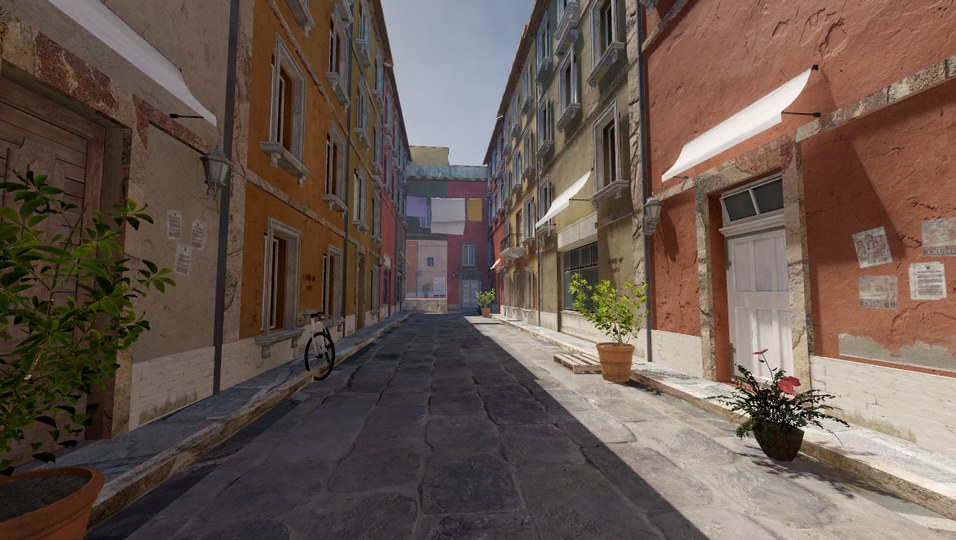 |
| Bomb site A: arcade, red-brick square, potted lemon trees | Mid street: tinted Inferno plaster fronts, wear decals, street life, warm Inferno light |
 |
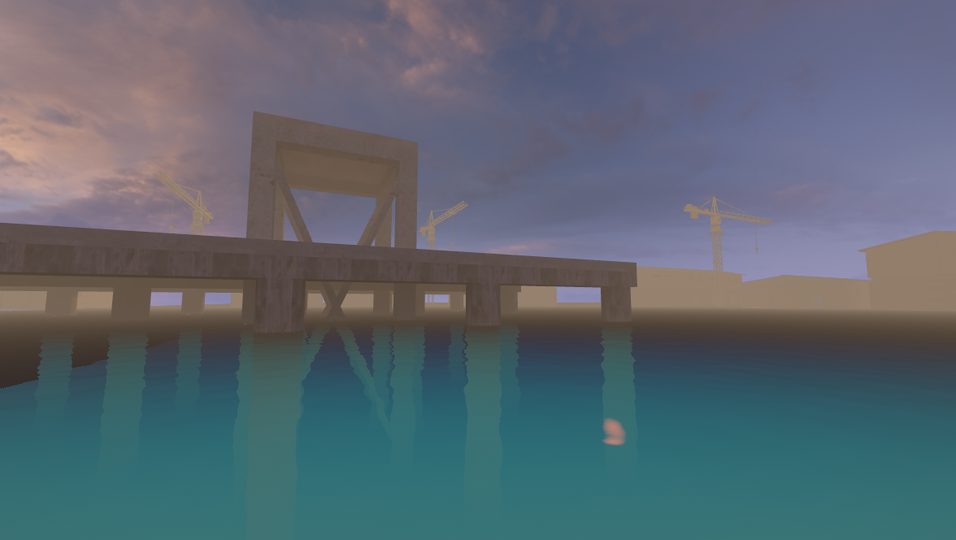 |
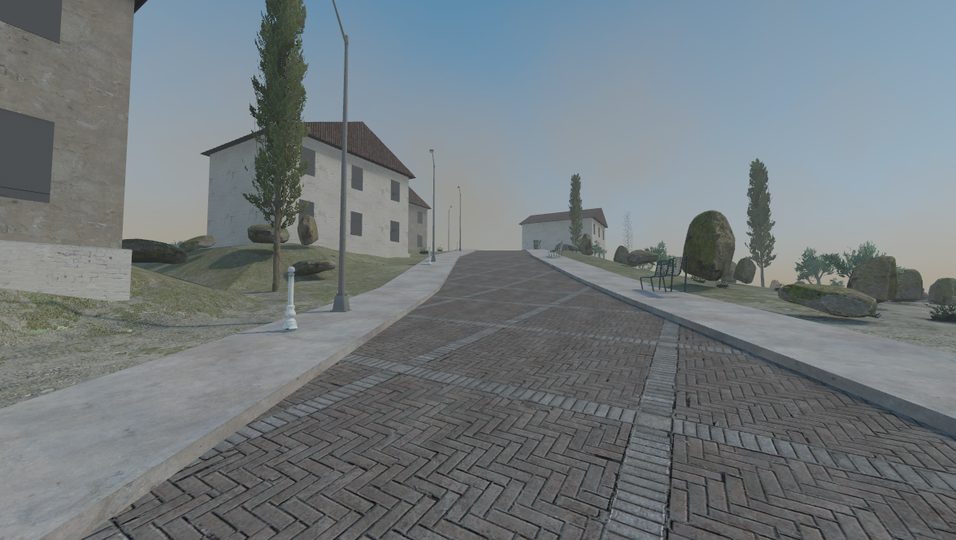
| Street and houses on terrain | Harbor: water to the horizon, pier, backdrop |
Mechanics through code (p8_mechanics, p9_playground):
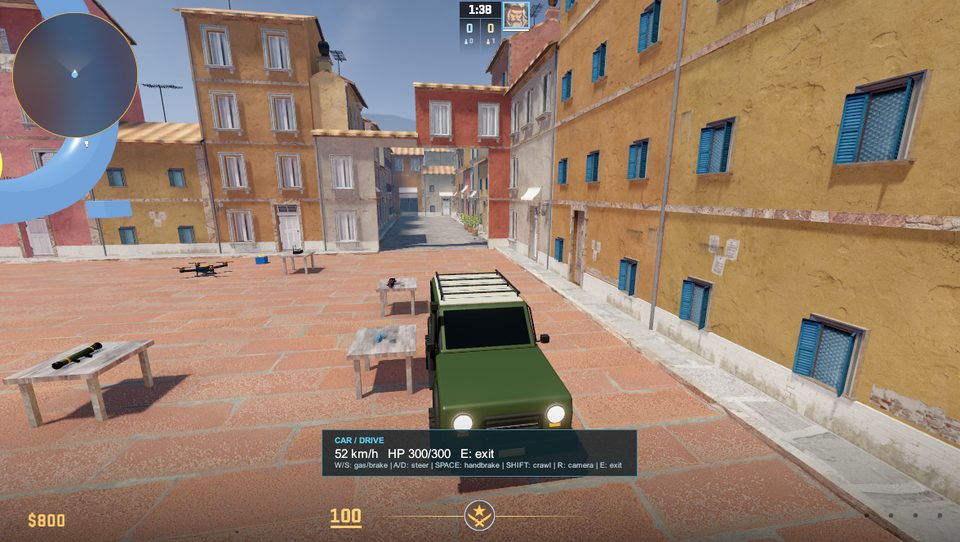 |
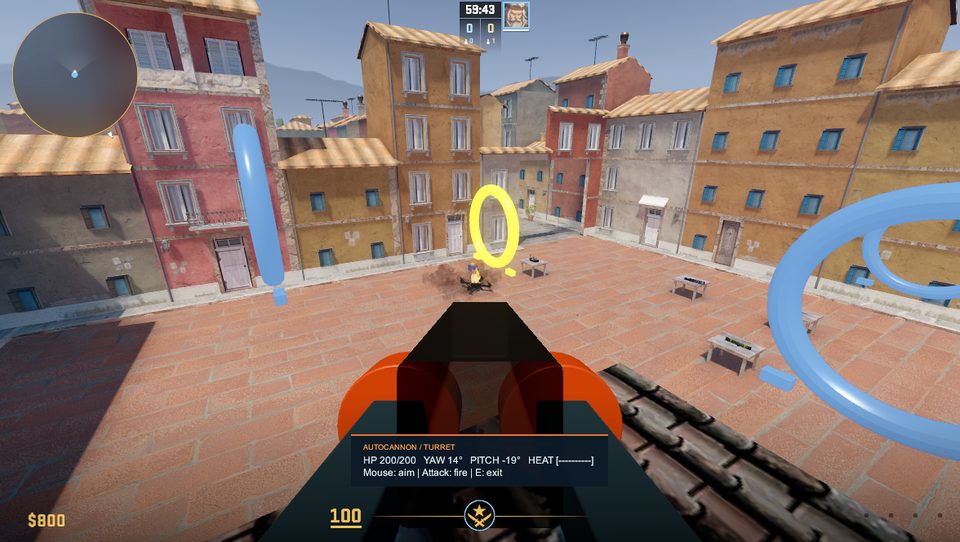 |
| A drivable off-road car: ray-cast suspension takes kerbs, rocks and slopes; speed-sensitive steering, chase and cabin cameras | A turret on a roof shooting the race drone: yaw/pitch limits, overheating, safe exit |
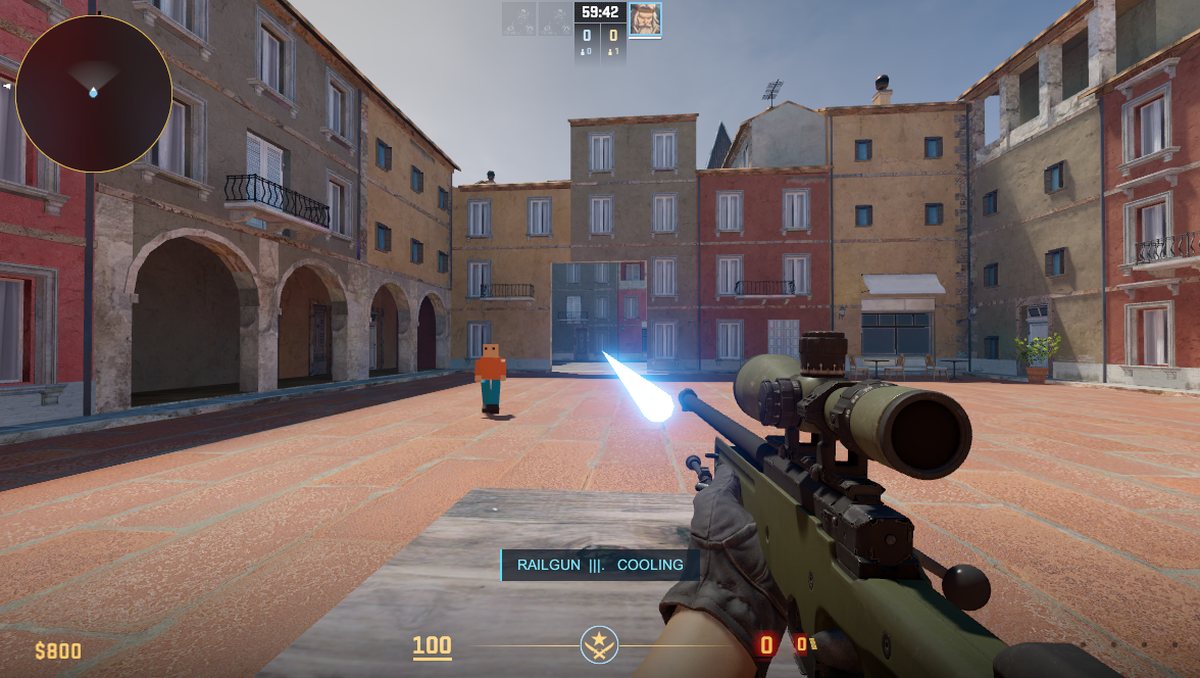 |
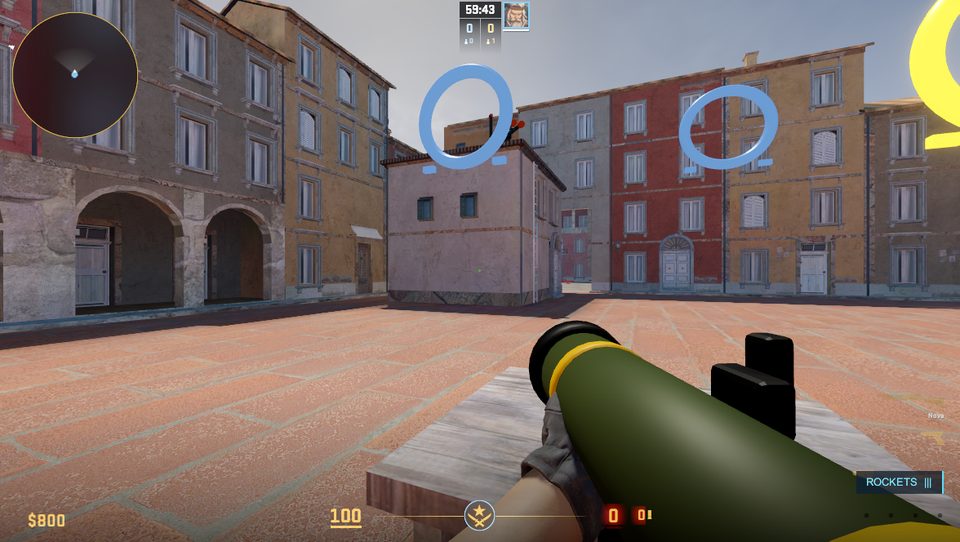 |
| The railgun: hold to charge, it pierces walls across the map, a glowing beam that fades, spring recoil | A rocket launcher on a Nova base: homing rockets that explode (radius, falloff, knockback) |
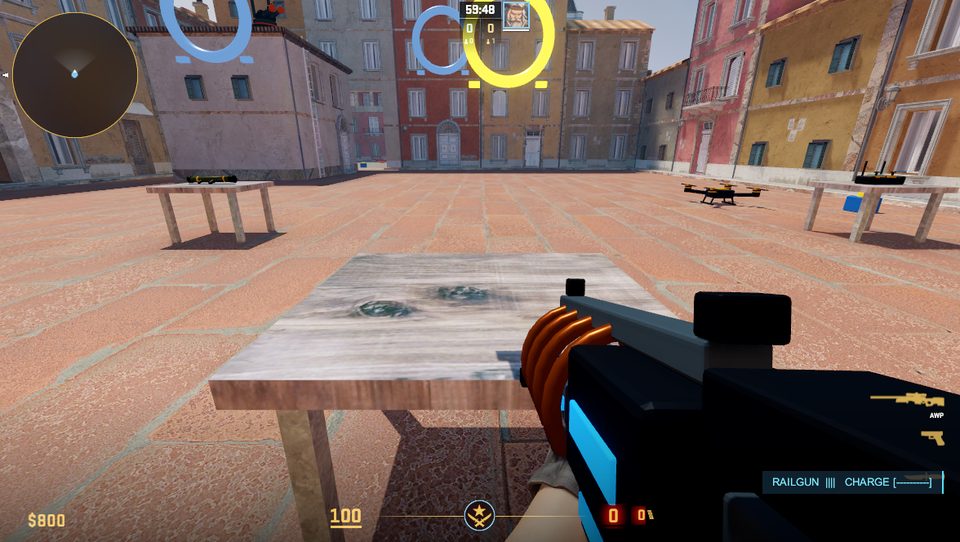 |
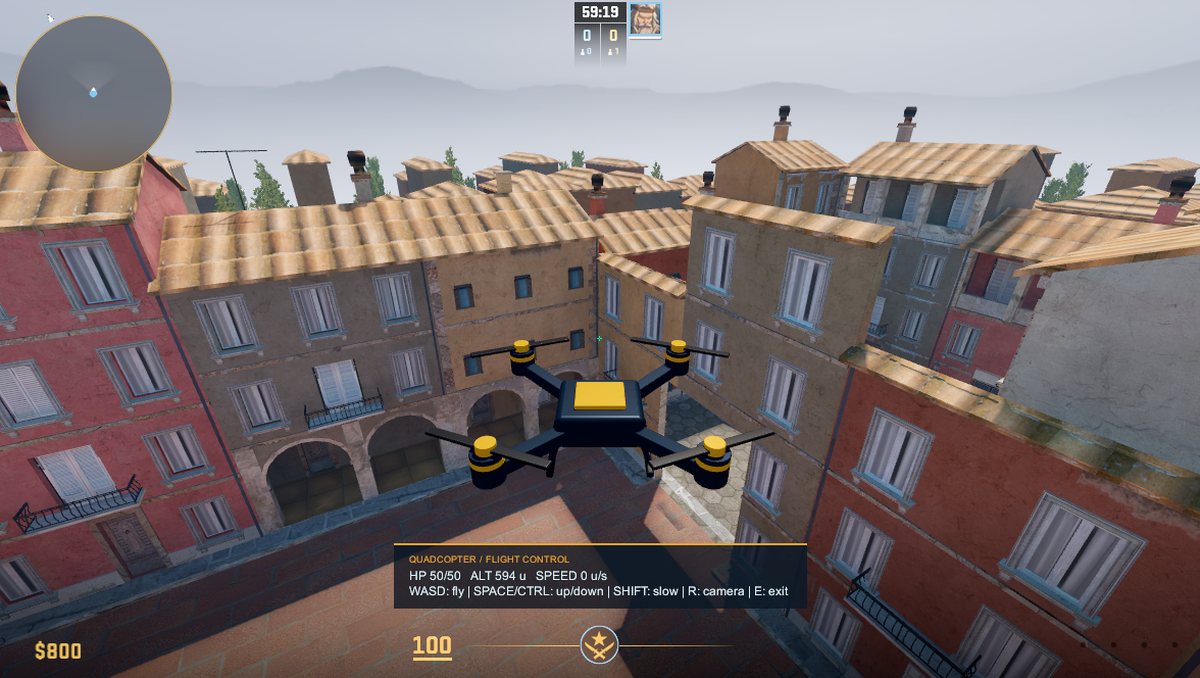 |
| Own weapon models held in the hands: the railgun is built on the AWP's skeleton | A physics drone flown from a remote: 50 HP, exact hitbox, chase camera |
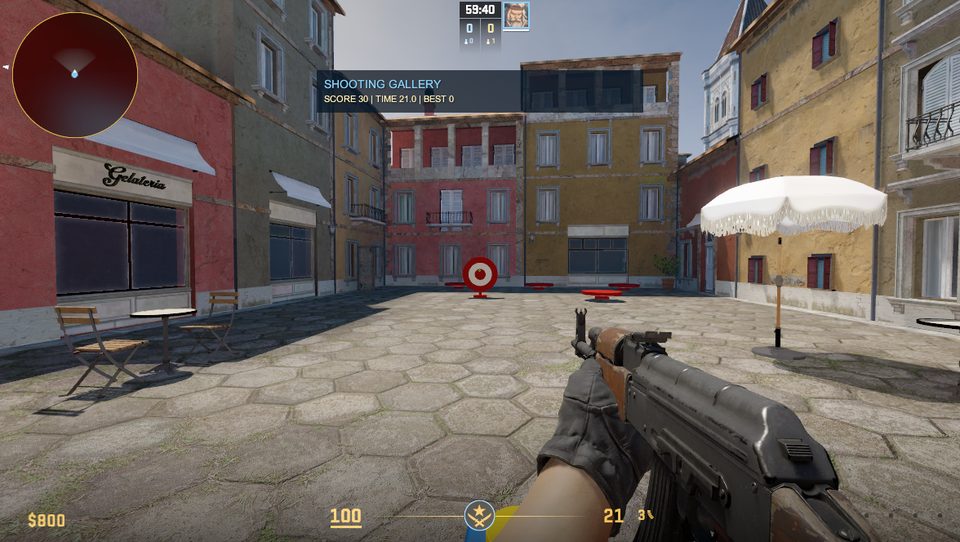 |
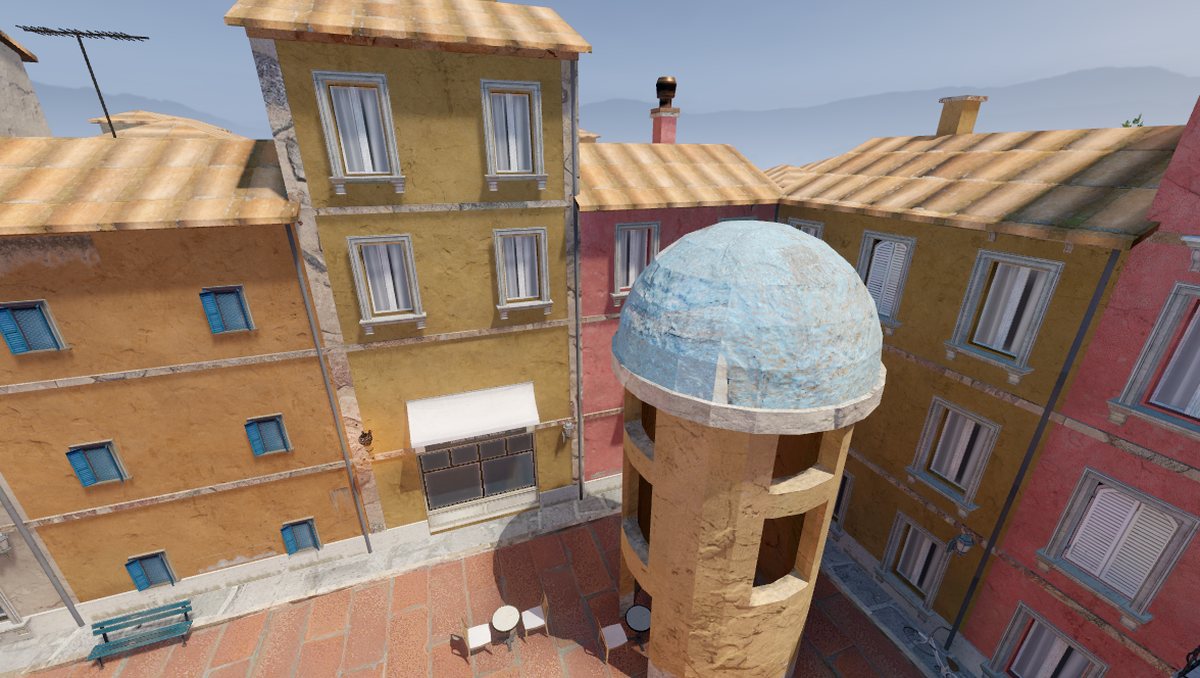 |
| A shooting gallery: pop-up targets, score, time and record on the HUD | A bell tower with a dome and windows from base primitives (revolve, cut, vertex blend) |
How it works
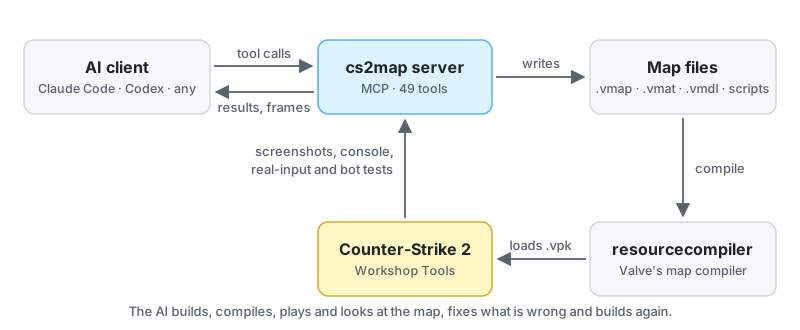
The AI works with files, not with Hammer's UI. It plans the map, edits it in batches of operations, builds it, then checks the result in CS2 (screenshots, real-input scenarios, walking routes, bot matches), fixes what is wrong and builds again. You can open any map in Hammer and edit it by hand at any time.
Install
You need: Windows 10/11 · Counter-Strike 2 with CS2 Workshop Tools (free DLC: Steam → CS2 → Properties → DLC) · Python 3.14 (64-bit) · Blender 4.5 or 5.x (free on Steam; for own models and prop previews) · an MCP client (Claude Code, Claude Desktop, Codex CLI or the Codex app). Optional: Node.js (offline tests of mechanics scripts), Source2Viewer CLI (prop previews; setup offers to download it).
git clone https://github.com/Rmgs123/cs2-map-mcp.git
cd cs2-map-mcp
powershell -ExecutionPolicy Bypass -File .\setup.ps1          # checks everything, shows the plan, changes nothing
powershell -ExecutionPolicy Bypass -File .\setup.ps1 -Apply   # installs and registers the server in your AI clients
setup.ps1 creates the Python environment, finds CS2, Workshop Tools, Blender and Source2Viewer (downloads only after you agree, checked by SHA-256) and registers the cs2map server for Claude Code, Claude Desktop and Codex, backing up each config first. Running it again is safe. Restart your AI client afterwards. An AI agent can do the install for you: ask it to follow docs/INSTALL.md.
Another CS2 path, addon name, Blender path or disk limits: copy config/settings.example.json to config/settings.json and edit it.
Prompts to start
Talk to your AI as you would to a level designer. A few prompts that work well:
Call status and tell me what is missing for CS2 map work.
Build a small 2v2 wingman map in an Italian old-town style: two bomb sites and a mid street.
Compile it, check the timings from both spawns and show me screenshots from above and from each site.
Make a story map: I wake up in a warehouse, find a switch, a door opens and a 60-second timer starts.
Test the whole story with script_test and show me the frames.
Add a drivable car in the yard, a turret on the roof and a rocket launcher on a table. Test each one in the game.
Turn the photos in my/inbox into a "nordic harbour" style, save it, then build a street in that style.
Something looks wrong: run check_map and visual_check, fix everything and show me before/after frames.
The map is done. Prepare it for the Steam Workshop and tell me how to upload it.
If any tool failed or something was missing, write it down with my_notes kind feedback.
Tips: ask for frames from above, from the side and at eye level; ask it to save what it learned (my_notes) so the next chat starts smarter; for big maps work room by room and rebuild often.
Your maps in CS2 and Hammer
- Your maps live in the project addon
mcp_lab(change it inconfig/settings.json): sources in…/Counter-Strike Global Offensive/content/csgo_addons/mcp_lab/maps/, compiled maps in…/game/csgo_addons/mcp_lab/maps/. - The AI starts CS2 Workshop Tools by itself when it needs the game. To open the addon yourself: Steam → Counter-Strike 2 → Launch CS2 Workshop Tools → choose mcp_lab → Launch Tools. From the Asset Browser you can open any map in Hammer.
- Edit a map in Hammer if you like; save and close it before the AI writes it again (it refuses to touch a map with unsaved changes). Every write keeps a backup (
map_backupsrestores one). - Do not use the game window while the AI runs a
script_test: it sends real keys and mouse input.
Publish your map to the Steam Workshop
The project addon holds every map you made, and the Workshop Manager uploads a whole addon. So ask your AI to prepare the release:
- It runs
map_build("<map>", "release"): the map and only the files it uses go into a new addon named like the map, every resource is compiled there, the map gets the final light, a radar and a loading picture. - It checks the release itself in the game (
game_screenshot(map="<map>/<map>")) and gives you the steps fromPUBLISH.md. - You upload it. In CS2 Workshop Tools open the Asset Browser → menu Tools → Tools → Counter-Strike 2 Workshop Manager → New:
- title and description (how to play, the keys of the mechanics);
- preview image: the map's loading picture (16:9, the path is in
PUBLISH.md); - addon folder: the new addon named like the map — not
mcp_lab, which holds every test map; - game mode tags (Classic, Deathmatch, Wingman, Arms Race, Custom) and visibility (Hidden first, then Friends only, then Public);
- Submit. The first upload asks you to accept the Steam Workshop agreement.
After changes, ask your AI for the release again, then select the map in the Workshop Manager and press Re-Upload.
When something goes wrong
- Ask your AI first. It can run
status(CS2, Workshop Tools, Blender, jobs),job_status(build logs),check_map,visual_checkandgame_crash_report(reads CS2's crash dump). - CS2 does not respond (the window says "Not responding" for about 30 s): close it yourself and start CS2 Workshop Tools again. The server never kills the game.
- "one console client at a time": a VConsole window holds the game console; the server closes it, or close it yourself.
- A map is refused: it is open in Hammer with unsaved changes — save or close it.
- More causes and fixes: REPAIR.md. After a CS2 update,
tools\python-env\Scripts\python.exe tools\selfcheck.pybuilds a small map with every mechanic and plays it (report inlogs/).
Feedback
Your AI keeps a short log of real problems it met with this MCP — a tool error it did not cause, a guide that was wrong, a feature it had to build by hand — in my/feedback.md (it stays on your computer). Send that file to the author or paste it into an issue: it is exactly what the next version is built from. Ideas for new features are welcome too.
What it can do
- Maps without Hammer. A lossless VMAP/DMX codec: 22 of 22 Valve maps round-trip byte for byte. Atomic batch edits, a backup before every write, and undo.
- Any shape. Meshes with concave faces and holes, sweeps along paths and arcs, lathe forms, cutting openings, and
edit_mesh— extrude, inset, bevel, subdivide, bend, twist, taper, noise, smooth, mirror on any mesh, with Hammer-like smoothed normals. Per-face material, UV, tint and two-material vertex blending. - Quick builders. Room-and-corridor layouts from a plan; an Inferno-like quarter: paving with sidewalks and stairs, house fronts with depth, arcades and loggias, wear and decals, street life from a prop atlas, the
infernolight, a skyline; cheap districts for huge maps; terrain with streets, water to the horizon, skies. - Your own styles and notes. A local layer
my/(never in git): the AI saves lessons, recipes and your own styles and reads them in the next chat;"style":"my:<name>"restyles the quick builders. Drop photos, models and sounds intomy/inboxand the AI turns them into assets. - Map types. Competitive (defuse, hostage, wingman), story and puzzle, game modes (deathmatch, Arms Race, aim, surf, bhop, kz), hide and seek, sandbox or custom: the type picks the checks and end tests, never limits what you build.
- Sees stock props before placing them.
prop_previewrenders any of the game's ~12 000 models offline in about a second, with a player-size box and the model's front arrow. - Custom models. Blender runs headless from scripts and produces a
.vmdlwith collision: props, environment and weapons (.fbx,.obj,.glb,.blendimports too). Custom player models for CT and T are not supported. - Materials, light, weather, sound. Materials from images or patterns (glass, neon, water, decals, signs); lighting presets, fog, light shafts, fire, rain and snow, lightning; sound events and room ambience.
- Gameplay. Any entity from the game's FGD with correct defaults, triggers and I/O; doors, buttons, elevators, ladders, breakables, physics props;
cs_scriptscripts and stories from JSON. - Mechanics through code. A physics drone, a drivable car, turrets, shooting galleries, races and collect games, animated characters, weapons on any stock base with your own model in the hands and a scripted shot (charge, wall penetration, beams, homing rockets, bursts); 17 player abilities (double jump, dash, blink, jetpack, flight, invisibility, wallhack, shield, jump pads...); hide and seek with prop disguises. Your own mechanics reuse the tested pieces (E to control, cameras, HUD, HP, the shot engine).
- Custom UI. Six HUD themes and per-HUD overrides for every mechanic, own layouts with images and clickable buttons.
- Testing in the game. Background compiles with parsed errors; camera screenshots;
script_testwith real input (E, held keys, aiming, mouse, clicks); walking routes; competitive timings; 5v5 bot matches;check_mapandvisual_check(floating props, props in walls, z-fighting, phantom floors, key conflicts). - Workshop releases. One map in its own clean addon with final light, radar and loading picture, plus upload steps.
- Safety. Writes only to its own addons and the project folder; never touches a map with unsaved changes in Hammer; never kills the game.
The guide the AI reads before working is docs/TOOLS.md; feature areas live in docs/tools/ and are read only when needed, which saves context. Every section says what to take for which task and how to do it by hand when no tool fits.
Tools
49 tools; everything that goes into a map (rooms, meshes, buildings, streets, terrain, lights, entities, vehicles, turrets, mini-games, weapons, abilities, HUDs, stories) is an operation of map_edit.
| Area | Tools |
|---|---|
| Maps | status, read_guide, my_notes, map_create, map_list, map_info, map_edit, map_backups, entity_info, prefab_save, prefab_info |
| Build and checks | map_build, job_status, check_map, visual_check, route_test, playtest, physics_probe |
| Game | game_launch, game_command, game_screenshot, game_reset, game_crash_report, game_stop, script_test |
| Materials and decals | asset_search, material_create, material_variant, material_from_reference, material_preview, decal_create |
| Models and props | model_build, model_preview, model_info, prop_preview, prop_note, actor_build, assets_prepare, kit_info |
| Style and references | style_info, reference_facade, reference_compare |
| Light, sound, scripts, modes | lighting_build, lighting_measure, sound_create, sound_event, script_write, script_api, mode_setup |
Development
tools\python-env\Scripts\python.exe -m tests.run                      # unit tests, a real MCP session, compile tests
tools\python-env\Scripts\python.exe tools\mcp_call.py status '{}'     # call any tool on a fresh server
tools\python-env\Scripts\python.exe tools\selfcheck.py                # after a CS2 update: every mechanic in the game
A feature counts as done only after a real end-to-end check: MCP call → files → resourcecompiler exits cleanly → the map loads in CS2 → screenshots. Rules for agents: AGENTS.md · code layout: docs/ARCHITECTURE.md and docs/specs/ · repairs: REPAIR.md · pull requests: CONTRIBUTING.md · changes: CHANGELOG.md.
License and legal
MIT, see LICENSE. This project is not affiliated with or endorsed by Valve. Counter-Strike 2, Hammer and Source 2 are trademarks of Valve Corporation. The repository contains no game files: the server uses your own CS2 installation.
Reviews (0)
Sign in to leave a review.
Leave a reviewNo results found