Anbot
Health Warn
- License — License: Apache-2.0
- Description — Repository has a description
- Active repo — Last push 0 days ago
- Low visibility — Only 5 GitHub stars
Code Pass
- Code scan — Scanned 12 files during light audit, no dangerous patterns found
Permissions Pass
- Permissions — No dangerous permissions requested
No AI report is available for this listing yet.
Anbot is an open-source, multi-agent Bot team that works in your real folder.
Anbot
English | 中文 · Docs · Vision · Known issues · Contributing



Anbot is an open-source, multi-agent workspace: a team of persistent Bots that works in your real folder. A Main Bot splits the job; specialist Bots pick it up; the team shares memory, group chats and the same workspace. It shows what it understood, who is working, which files changed, and why it counts as done. You can pause, take over the folder yourself, and hand it back.
It ships as a desktop app for Windows, macOS and Linux, a plugin, and a Docker service. Your team, chats, memory, credentials and execution records stay on your own computer.
The first public release, v0.0.1, is on the Releases page. This release ships
Anbot-0.0.1-win-x64.exe(with its.exe.blockmap),Anbot-0.0.1-mac-arm64.zip,Anbot-0.0.1-mac-x64.zipandAnbot-0.0.1-android.apk, pluslatest.ymlandSHA256SUMS.txt(the checksums cover the APK and every desktop package). No Linux package is part of this release: Linux builds from source, see below. There is no installable iOS package in this release. You can also build Anbot from source or install it as a DSH plugin.
Practical reference: 30 task guides cover tasks, integrations, comparisons and FAQ; 3,000 scenario pages cover 100 tasks × 30 team, platform, data, tool and delivery constraints. About Anbot
Key facts
- Open source: Apache 2.0. The app and plugin code are open; presets, skills and the MCP/plugin index are readable and replaceable.
- Shape: a team of persistent Bots: a Main Bot, specialist Bots, group chats and shared memory.
- Multi-agent: Bots message each other, share context and run in parallel; a new Bot in a Git team workspace gets its own worktree.
- Workspace: a real folder. X-Ray, checkpoints, takeover and high-risk approval keep the work visible and recoverable.
- Data: local-first. Teams, chats, memory, credentials and execution records stay on your computer; model requests go to the provider you configure.
What the Bot team does, in practice
Anbot is not one chat window with one assistant. It is a multi-agent team: a Main Bot that splits the job, specialist Bots that pick it up, group chats that share context, and a real workspace where the work lands. The additions below are what make that team usable on a long task:
| When this gets in the way | What the Bot team does about it |
|---|---|
| You cannot tell what the Bot understood | X-Ray shows the objective and constraints, an editable subtask checklist, the actual executor, the model and permissions in force, the context budget, the workspace state and the checkpoints. Chat stays the default; X-Ray is one click away. |
| You need to change the work yourself | Takeover and return waits for the executor to confirm it stopped, refuses new messages while you hold the workspace, and on return checks that it is still the same Session and the same folder. It works for Anbot's own Bots and local agents such as Codex, Claude Code and OpenCode. |
| A long run fails or goes wrong | Checkpoints save the conversation position and the workspace files as a pair. Preview read-only, restore into a new writable workspace, keep the original and later edits, and undo memory writes made after the checkpoint one by one. |
| You do not know what is actually loaded | Runtime probes report the skills, plugins and MCP the Session loaded, the sandbox permissions in force, the route the last request took, and whether a local agent is installed and signed in. If it cannot tell, it says "unverified" instead of guessing. |
| Context pressure is invisible | Context view shows the current pressure, the usable window, check thresholds, and which original records each piece of context came from. |
| Setting up a specialized Bot takes too long | Ten professional presets fill in the role, method, recommended skills, workspace and permission policy, acceptance criteria and delivery format. Every field stays editable. |
| Parallel Bots overwrite each other | Automatic worktrees: a new Bot in a Git team workspace gets its own linked worktree. |
| A command could destroy work | High-risk approval covers recursive deletes, destructive Git operations, pushes, disk commands and privilege elevation; you approve once before it runs. |
| A model fails mid-run | Failure handling retries the failed turn on another model, resumes an interrupted run once after a restart, and pauses for you in X-Ray if it is interrupted again. |
| Skills change without asking | No automatic skills: ordinary conversations and one-off experience do not create or update skills and raise no approval. Only an explicit request starts that flow. |
Three practical workflows
Fix a failing test in a real repository. Point Anbot at the repository and the failing test. X-Ray shows the checklist, the executor and the permissions; save a checkpoint before the run. Anbot works in the real folder, changes the files and shows the diff and the test output as evidence. If the fix is wrong, retry the failed turn on another model or restore the checkpoint.
Take over a half-written document. Ask Anbot to pause. Once the executor confirms it stopped, open the same working folder and edit the file yourself; new messages are refused while you hold it. Hand it back, and Anbot checks that it is the same Session and the same folder before continuing.
Start a code-review Bot in one step. Create a Bot with the code-review preset. It fills the role, method, recommended skills, workspace, permissions, acceptance criteria and delivery format; change any field you want, then run it.
Install
Prerequisites
- Node.js 22.19 or later (Node 24 recommended) and npm 11 or later, plus Git. The app lockfile was generated by npm 11; npm 10 fails
npm ciwith an out-of-sync lockfile error. - macOS: Xcode Command Line Tools (
xcode-select --install). - Linux:
build-essentialandpython3(Debian/Ubuntu:sudo apt-get install build-essential python3). - Windows: Visual Studio Build Tools with the "Desktop development with C++" workload, and Python 3.
Behind a proxy or registry mirror, set npm_config_proxy / npm_config_https_proxy before installing. For the Electron downloads set ELECTRON_MIRROR, and ELECTRON_BUILDER_BINARIES_MIRROR for electron-builder's own tools.
Desktop app (Windows, macOS, Linux)
Prebuilt packages for v0.0.1 are on the latest release: a Windows installer, macOS zips (arm64 and x64), and the Android APK. This release has no Linux package; build it from source with the steps below. No iOS package is published. To build from source:
git clone https://github.com/rml4791lol-lang/Anbot.git
cd Anbot
sh scripts/setup.sh          # install ds-bot, link and app dependencies; generate client.js
(cd app && npm run build && npm run pack)
On Windows use pwsh scripts/setup.ps1 in place of sh scripts/setup.sh.
The result is in app/dist-pack/. The desktop app bundles a pinned DSH, so you do not need DSH first; on first launch it can copy the bot team from an existing DSH.
scripts/setup.sh installs the plugin, phone link and app dependencies from the lockfiles, regenerates ds-bot/client.js and ds-bot/link.js, and checks the committed bundle matches src/client. Re-running it is safe. Use --plugin-only to skip the desktop app's dependencies, or --without-harness to skip the test-only DSH packages.
When you must rebuild the client bundle
ds-bot/client.js and ds-bot/link.js are committed. A Git clone or npm pack install loads them as-is; rebuild only after changing anything under ds-bot/src/client/ or link/src/:
(cd ds-bot && npm run build)
node scripts/build-client.mjs --check   # exits 1 when the committed bundle is stale
The unit tests also fail if client.js is stale. Without a build step you can still run the plugin tests against the committed bundle, or install the plugin into DSH as a tgz.
Signing and Gatekeeper
Building from source needs no certificate. A locally compiled app carries no macOS quarantine attribute, so Gatekeeper does not block it as an unidentified developer. The prebuilt macOS zips are ad-hoc signed (identity -), are not notarized and do not use an Apple Developer account; see Signing and trust. Nothing in this source build signs the app.
As a plugin in DSH
Install DSH and configure at least one model in it; Anbot uses the models from DSH.
git clone https://github.com/rml4791lol-lang/Anbot.git
cd Anbot/ds-bot && npm pack
dsh plugin --profile web add ./ds-bot-*.tgz
Set --profile to the profile you want, for example desktop. In DSH Desktop you can also add the tgz under Plugins and enable it there.
Docker (NAS, Linux server)
See docker/README.md.
Setup
The easiest way to set up other bots and group chats is to talk to your Main Bot.
Settings opens on an Overview console showing items that need attention, your team, recent usage, and quick cards for every area. Press ⌘K / Ctrl+K (or use the top search bar) to jump straight to any setting, bot, group chat, or model. Domains scroll as one page with top anchors:
- General & Appearance (live preview, 8 UI languages, themes, layout and motion)
- Models: Providers · Local agents · Bot models · DeepSeek services
- Team: Bots · Group chats · Scheduled tasks
- Connect: Connectors · IM · Phone · API
- Tools: Computer use · Browser · Capabilities · Secrets
- Usage & About Anbot (includes Feedback)
In the standalone desktop app, you can use your ChatGPT plan for bot models without an OpenAI API key. Under Settings → Models → Providers, open OpenAI (or select it under Add a provider → Known provider) and choose Sign in with ChatGPT. This requires OS-backed secure storage. See Models for how to enable plan usage and choose a model.
Note on web search: Anbot selects its
autosearch provider for the whole profile. If you disableweb-search-auto, select another registered search provider in that profile too. See Web search and the recovery steps.
Features
Browser remote (preview)
Use the phone app's interface in a browser without installing it. On the computer, open Settings → Connect → Phone, enable phone access, show a pairing code, then choose Open in a browser or Copy browser link. You can also paste the pairing link into the web app. The browser pairs as another device over the existing end-to-end encrypted link; remove it from the computer's paired-device list to revoke access.
The Relay Server must serve the web build: run npm ci && npm run export:web in mobile/, then set DSBOT_LINK_WEB_DIR to the absolute mobile/dist directory when starting the Relay Server. Use HTTPS/WSS outside localhost. relay.an520.fun needs this deployment before its browser links work. Browser storage is AES-GCM encrypted with a non-extractable key in IndexedDB, but the browser still runs the Server's page: only use a trusted Server. Sensitive operations require the phone app or computer, and there are no background notifications. See the design and security limits.
Local API & MCP
Other agents on this computer (Claude Desktop, Cursor, Codex, Antigravity, or your own scripts) can call your Bots and group chats through the unified local API gateway. Open Settings → Connect → API, turn it on (off by default, bound to 127.0.0.1:17830), and create scoped, revocable Bearer tokens. Each token is shown once and stored as a salted hash; private Bots stay excluded unless explicitly confirmed per token.
The same local gateway serves versioned /v1/* REST + SSE endpoints, Streamable HTTP MCP (/mcp), an optional OpenAI-compatible adapter (/compat/openai/v1/*), and the ds-bot CLI (ds-bot mcp stdio bridge, ds-bot send, ds-bot event). Existing mcp.json setups and npx -p ds-bot ds-bot-mcp commands migrate automatically. See the design.
Bot
Each bot is a long-lived identity with one continuous conversation—no session lists or manual session switching. When context fills up, Anbot condenses or moves to a fresh part automatically while earlier history stays readable and searchable. Each bot keeps its own saved profile (model, thinking level, instructions, working folder and permission preset), separate from the host's DSH installation profile.
Each bot can have its own working folder and permission preset — just tell the bot when you want to switch folders. A bot that looks after several projects can also get extra folders and work in all of them at once. Your foreground chat stays responsive while a bot works: slow shell commands move to background jobs automatically, and a bot can launch background tasks or hand an in-flight turn to the background when you send a new message. Track progress, answer approvals, send follow-ups or stop tasks from the header island, inspect task transcripts in the details Tasks tab, manage them on mobile, or type /side to ask a side question. Bots also maintain long-term memory, render interactive charts/tables/forms in replies, run scheduled tasks, and can be organized into collapsible sidebar sections.
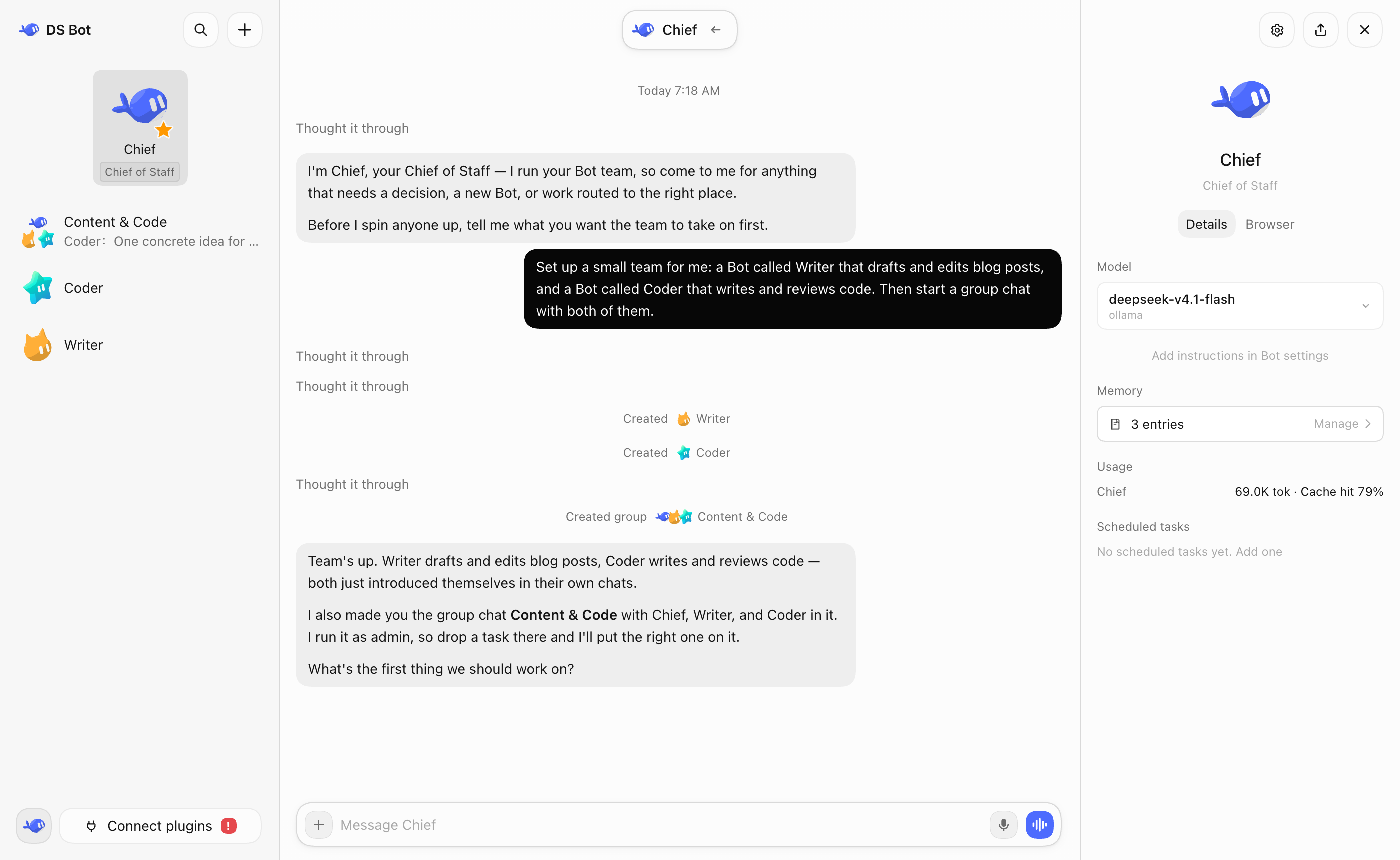
Main bot
The Main Bot is your chief. It has elevated rights to create and manage other bots and group chats (only you delete bots or change Main Bot status). A new team starts with a Main Bot named Chief—talk to it whenever you want to build out your team or ask how something works.
You can rename Chief or change its avatar in Settings → Team → Bots without changing its Main Bot role.
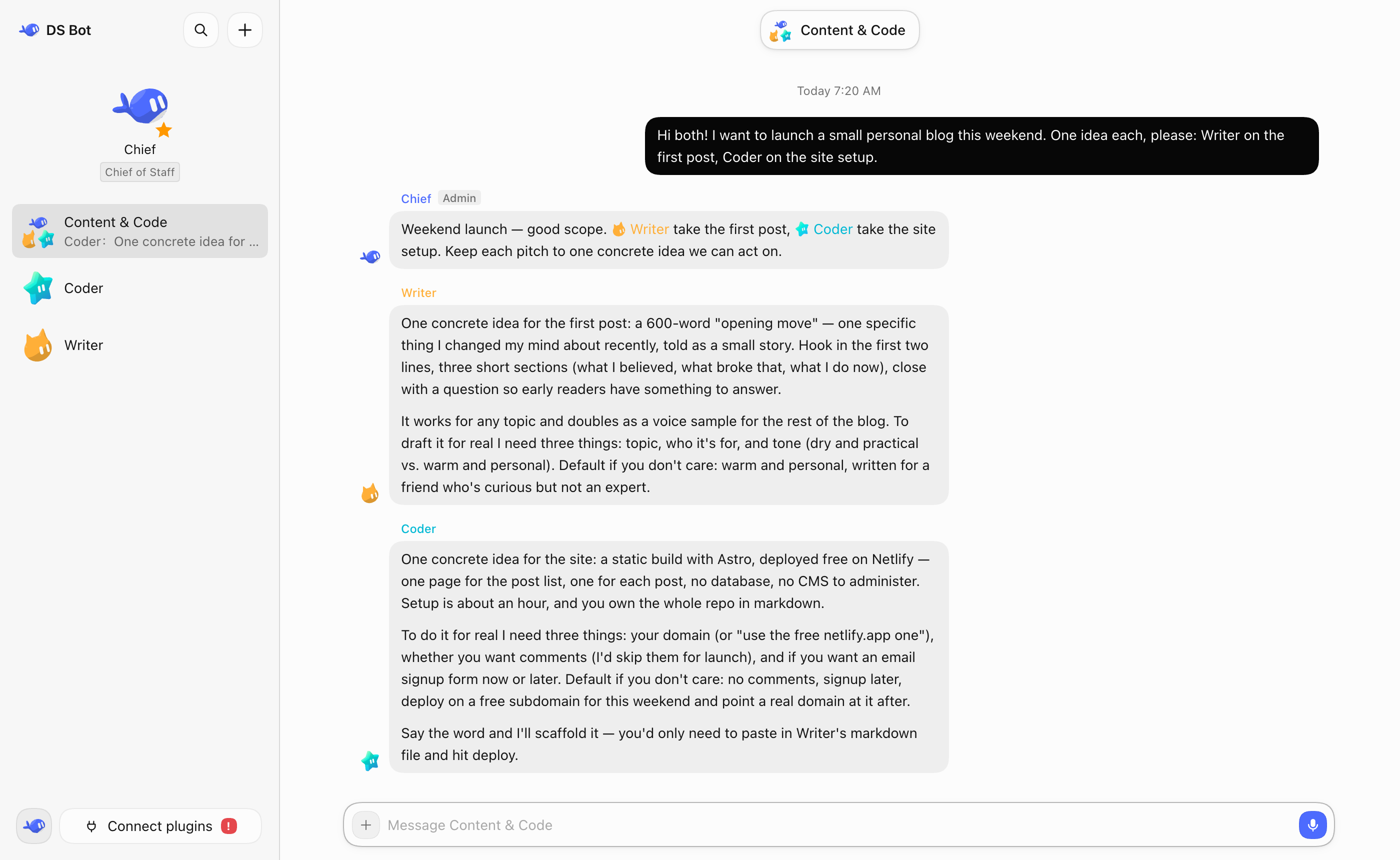
Group chats
Every group chat has an admin that answers your messages by default and delegates to members with @Name, keeping multi-bot costs under control. You can also @ any member directly, or use + → Reference a chat to attach another chat as context.
Select a group in Settings → Team → Group chats to set or remove its avatar. Without a photo, the group shows its members’ avatars.
Members mentioned together run in parallel, report progress, and share a group memory, working folder, shared task board (group_task), and shared todo list (group_todo). For larger projects, a group can run a Goal (/goal): the admin aligns with you on completion criteria, splits the work into stages, and verifies evidence before moving on.
Private bot
Turn on Private in a bot's settings and assign it a separate working folder for sensitive work. Other bots cannot read its folder, memory or chat history, and sending messages out or writing outside its folder requires your approval. Even after deletion, its records and folder stay protected until you release them in Settings.
A private bot cannot be a Main Bot or join group chats. This isolates it from other bots in your team, not as an OS sandbox: shell and network access still apply, and its model provider receives the conversation.
Local agents
Connect coding-agent CLIs already installed on your computer (Claude Code, Codex CLI, Cursor CLI, GitHub Copilot, Devin CLI, OpenCode, Gemini CLI, Antigravity, Kimi CLI, Kilo CLI, and custom CLIs) directly as bots. A local-agent bot uses the CLI's own sign-in, plan, models, tools and context, while still participating in private chats, group chats, handoffs and memory.
Because it uses the CLI's own tools, shared capabilities and connectors in Anbot are not passed into it, and switching between model and local-agent modes starts a fresh conversation part. Only CLIs that reject MCP servers altogether run without team tools. Note that Cursor CLI saves the last chosen model as its own global default (~/.cursor); keep CLI default if you do not want to change your terminal default.
Browser
Each bot has its own isolated browser with separate logins, and in the desktop app can import cookies and supported localStorage from files or local browsers (including Chrome/Edge, Safari, Brave, Arc, Firefox and Zen). For interactive browsing, set browserPlugin to refs, script or task in the DSH profile and restart Anbot; Settings → Tools → Browser explains setup and manages per-site action grants. Posting, uploading, downloading and deleting require approval unless preauthorized; logins, CAPTCHAs and payments hand control back to you.
The embedded browser panel is available in the desktop app and DSH Desktop (not DSH Web); only the desktop app persists panel sign-ins across restarts and supports cookie import.
Computer use
Enable Settings → Tools → Computer use to let bots operate desktop apps within your limits. Set a per-bot access level (view only, background, or foreground) and allowed apps, with an on-screen indicator to pause or take over at any time; sensitive apps such as system settings and password managers are never granted.
All bots share your desktop, so only one bot can hold an app or the foreground pointer at a time. On Windows, Chrome/Electron apps often need foreground and elevated apps cannot be controlled; macOS requires macOS 14+ with Accessibility and Screen Recording permissions; Linux supports X11 (Wayland is limited).
Connectors, capabilities and feature packs
- Settings → Connect → Connectors: Connect GitHub, Gmail, QQ Mail, 163 and other mailboxes, and remote MCP servers (OAuth browser sign-in or static headers/keys), or import configs from Claude Desktop, Cursor and VS Code. Credentials stay in encrypted/protected secrets (
Settings → Tools → Secrets), and outbound emails require confirmation by default. - Settings → Tools → Capabilities: Manage shared MCP servers, skills and packs for the team. Each bot can set an item to Always (loaded every turn), Catalog (listed in a compact index and loaded on demand via
use_pack/drop_pack), or Off. Local commands added by a bot require your approval before they run.
Web search & DeepSeek services
- Web search: The
autoprovider uses the asking conversation's own model route and key (never borrowing another route's key), tries DeepSeek's official Search API on matching routes, and falls back to keyless search. To use DeepSeek's official Search and Fetch APIs across all models, turn on Use the new Web Search API under Plugins → Web search. - DeepSeek services (Settings → Models → DeepSeek services): With a DeepSeek API key in Settings → Models → Providers, you can independently opt into document/image OCR (
read_document), DeepSeek text-to-speech, and DeepSeek dictation for any model. Each switch is off by default and billed to your own API key.
Office files
Bots can create, inspect and edit Word (.docx), PowerPoint (.pptx) and Excel (.xlsx) files directly, and render pages to images to verify layout. The desktop app ships the full offline runtime; DSH Web can inspect and edit existing documents, while creating from scratch and page rendering require the desktop app or DSH Desktop.
Mobile app & browser remote
Control your running bot team from the Android app or a browser over an end-to-end encrypted link (Noise IK)—your computer connects outbound only, with no public IP or open ports. Open Settings → Connect → Phone, enable phone access, and scan the QR code in the mobile app. There is no installable iOS package in this release: iOS needs an Apple Developer account that this repository does not have yet. See mobile/README.md.
For browser remote (preview), pick Open in a browser or Copy browser link on the same pairing screen. Self-hosted relay instructions and security limits are in link/README.md and docs/plans/2026-11-17-web-remote.md.
IM
In Settings → Connect → IM, link any bot or group chat to WeChat, Feishu, DingTalk, WeCom, QQ, Telegram, Discord or Slack. Chat, @ bots in groups, and answer question/approval cards directly from your messaging app while your computer is running.
WeChat supports private chat with the QR-paired account only; WeChat and QQ enforce platform reply windows; WeChat, QQ and DingTalk use numbered replies instead of card buttons; secret cards cannot be submitted from IM apps.
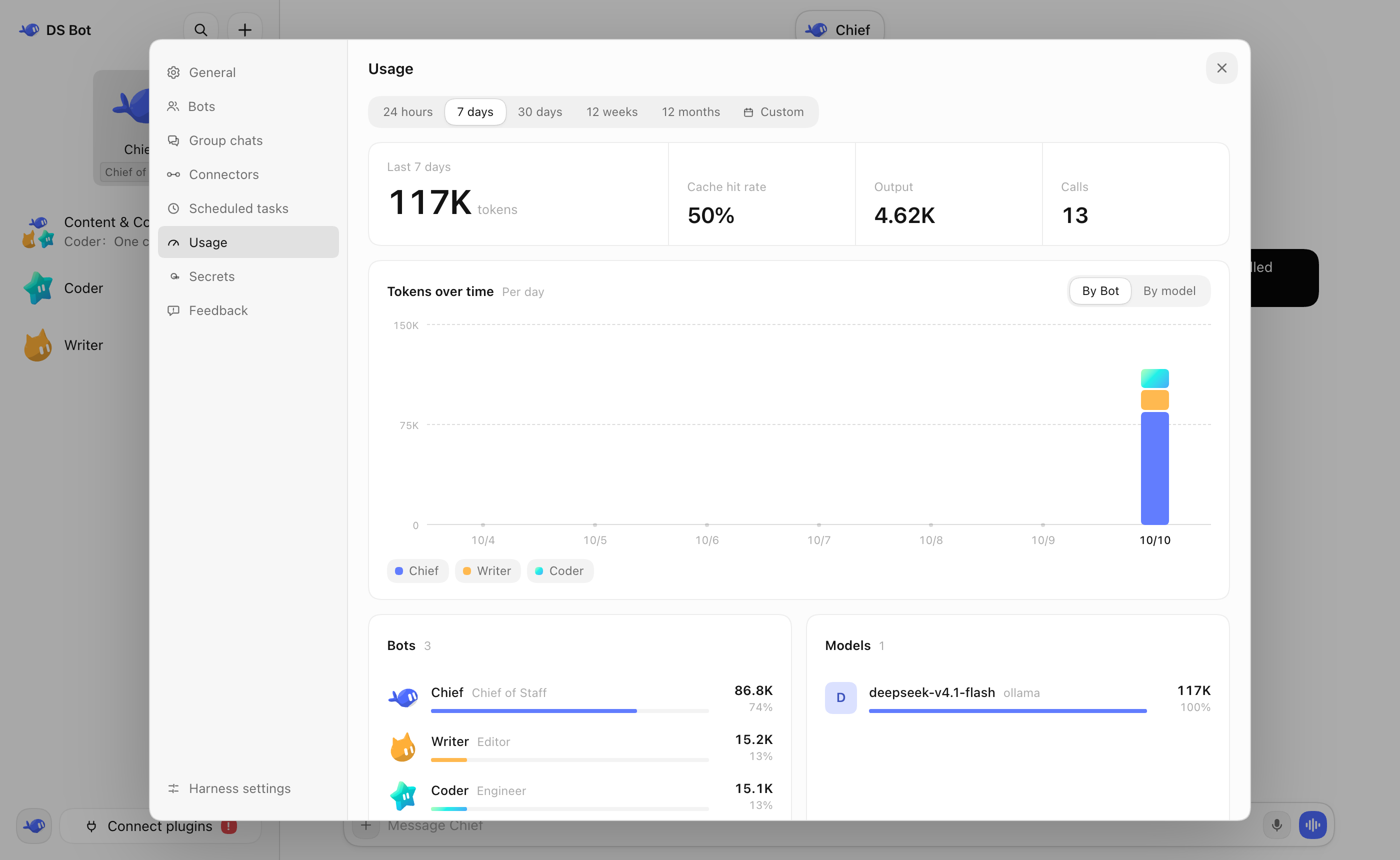
Usage & appearance
In Settings → Usage, track token usage by time range, bot and model. In Settings → Appearance, pick themes, accent colors, bubble or flat message layout with width sliders, interface motion tiers, and avatar animation levels—all with live preview across 8 supported languages.
Data
All data stays on your computer: in the data folder chosen for the desktop app (existing installs keep ~/.ds-bot), or in bot/ and sessions/ inside your DSH home folder (~/.dsh by default) for the plugin. Uninstalling the app or plugin does not delete your data. Anbot does not upload it; model requests go to the model provider you configured.
Not done yet
- Coordination layer: tell the Main Bot a goal and it splits the work, picks bots, prepares workspaces, tracks dependencies and reports acceptance by itself. For now you arrange the delegation.
- Multi-bot workflow view: one picture of every bot's dependencies, progress and approvals.
- Bot forge and self-builder: assemble a new bot by conversation, and let Anbot change its own code.
- Code signing and distribution: v0.0.1 attaches the Windows installer (
Anbot-0.0.1-win-x64.exe), Authenticode-signed on CI with a project self-signed PFX (SHA-256 digest, RFC 3161 timestamp); the certificate is self-signed (CN=Anbot Release Signing), not issued by a commercial CA, so other machines still show an unknown publisher in SmartScreen. macOS zips are ad-hoc signed and not notarized. The Android APK is signed with the upload keystore (v1 JAR + v2 + v3).latest.ymlandSHA256SUMS.txtare attached; the checksums cover the APK and every desktop package. No Linux package orlatest-linux.ymlis attached in this release, so the Linux targets build from source only. There is no installable iOS package in this release: there is no Apple Developer account yet, and no.ipais built or uploaded. The Windows installer updates through electron-updater; macOS does not update itself—after finding a newer release it opens the Releases download page for a manual replace. Per-platform trust states, first-install approval steps and the Android upload key are documented in Signing and trust.
How Anbot compares
Grok Bot is the closest product: both are teams of persistent Bots with memory, group chats and approvals. The difference is ownership. Grok Bot runs its team on computers in SpaceXAI's cloud and is a paid beta; Anbot is Apache 2.0, runs the team in your real folder, and lets you take over.
| Anbot | Grok Bot | Big-tech agents | |
|---|---|---|---|
| Source | Apache 2.0; open code and extension index | Proprietary | Proprietary |
| Shape | Multi-agent team: Main Bot, specialists, group chats | Persistent Bot team | Single agent or vendor subagents |
| Where the work runs | Your real folder, on your desktop, DSH or Docker | Its own cloud computer, 24/7 | Vendor cloud sandbox, or a vendor CLI on your machine |
| Data | Local-first | Cloud | Mostly vendor cloud or account |
| Models | Any DSH provider, including local models | Grok | Vendor models |
| Control | X-Ray, checkpoints, takeover and return | Approvals; the work stays on its cloud computer | Plans and approvals; varies by product |
| Extensions | Open presets, skills, MCP and plugins | Vendor presets and routines | Vendor marketplace or SDK |
| Availability (Nov 2026) | Public v0.0.1 | Paid beta | Paid plans |
Big-tech agents here means OpenAI's agent, Anthropic's Claude Code, Google's Gemini CLI and Microsoft's Copilot agents. They are strong at single-agent execution and deep product integration; the runtime, model and extension surface are vendor-owned. Anbot keeps the code, the model choice and the extension surface open.
These are positioning summaries, not feature-by-feature audits. Check each vendor for current details.
FAQ
What is Anbot?
Anbot is an open-source, multi-agent workspace: a team of persistent Bots that works in your real folder. A Main Bot splits the job, specialist Bots pick it up, and the team shares memory, group chats and the same workspace. It ships as a desktop app, a plugin and a Docker service.
Is Anbot a Grok Bot alternative?
Yes, for people who want a team of persistent Bots without handing the runtime and the workspace to a vendor cloud. Grok Bot is a paid beta running on SpaceXAI's cloud computers; Anbot is Apache 2.0, runs the team in your real folder, and lets you take over. See How Anbot compares.
How does Anbot compare with OpenAI, Anthropic, Google and Microsoft agents?
Those are strong vendor agents with deep product integration. Their runtime, model and extension surface are vendor-owned. Anbot is open source and multi-agent: you choose the model provider, the workspace stays local, and the code and extension index are open. See How Anbot compares.
Does my data leave my computer?
No. Teams, chats, memory, credentials and execution records stay local. Model requests go to the model provider you configure; Anbot does not upload your workspace.
Which models can I use?
The models configured in DSH, including local models through DSH providers. The desktop app can also sign in with a ChatGPT plan for OpenAI models without an API key.
What can I run it on?
The desktop app runs on Windows, macOS and Linux; the plugin runs in DSH Desktop and DSH Web; Docker runs on a NAS or Linux server. v0.0.1 also ships an Android APK; it has no Linux installer or iOS package.
Is Anbot open source?
Yes, under Apache 2.0.
Documentation & development
- Documentation index and architecture map:
docs/README.md - Plugin internals and configuration:
ds-bot/README.md - Desktop app internals and packaging:
app/README.md - Development setup, tests and workflow:
CONTRIBUTING.md - Version history:
CHANGELOG.md - Report security problems privately as described in
SECURITY.md; do not open a public issue.
Acknowledgments
- DeepSeek Harness: Anbot builds on the DSH plugin system, and every Bot runs inside a DSH Session with the tools and model access DSH provides. Model Bots go through DSH's Agent loop and model service; local-agent Bots use their own CLI's tools and model access. Auxiliary model calls (memory tidy, context steward, handoff, side chat, and so on) run outside the Agent loop; web search/fetch and the DeepSeek OCR, TTS and ASR services call those service endpoints directly, so they are not all served by DSH.
- Fei2411 and the DS Bot contributors: Anbot is developed on the basis of DS Bot. It keeps DS Bot's Bot team, group chats, browser, computer use, IM, connectors and Office support, and strengthens two areas on that base: whether execution can be trusted, and whether you can take over.
- esbuild: bundles the plugin's interface code.
- Thanks to these projects for the ideas they published. Anbot learned from their designs and does not contain their code:
- AgentMemoryRepo: the Markdown format of Bot memory: one entry per line with
[key: value]metadata, plus aMEMORY.mdindex that links the topic files. - OpenAI Codex: checkpoints that keep the user's original messages next to the summary, and message anchors for searching earlier chat.
- OpenMausBot: group chat rounds and @mention relays between Bots.
- Hermes Agent and Hermes Bot Mode: one Session per member per group chat, and handoffs that carry the earlier user messages.
- OpenCode, goose, pi and Gemini CLI: when to condense a long conversation, and what a handoff note holds.
- obelisk: searching a Bot's own chat with a SQLite FTS5 index ranked by BM25.
- AgentMemoryRepo: the Markdown format of Bot memory: one entry per line with
- Every person who has tried Anbot, asked questions about it, and reported its bugs.
License
Apache License 2.0. Provided "as is", without any warranty. Third-party code and its license are listed in NOTICE.
Disclaimer
Anbot is an independent community project. It is not an official DeepSeek product, and it is not affiliated with, endorsed by or sponsored by DeepSeek. "DeepSeek", "DeepSeek Harness" and the other names are trademarks of their owners. They are used here only to say what this plugin works with.
Bots use your own model quota, and they read and write files and run commands when you ask them to. Check important actions yourself.
Reviews (0)
Sign in to leave a review.
Leave a reviewNo results found