gmail-labeler
Health Uyari
- License — License: GPL-3.0
- Description — Repository has a description
- Active repo — Last push 0 days ago
- Low visibility — Only 5 GitHub stars
Code Basarisiz
- rm -rf — Recursive force deletion command in scripts/build-skill.sh
Permissions Gecti
- Permissions — No dangerous permissions requested
Bu listing icin henuz AI raporu yok.
Triage Gmail by provider with auto-generated labels and importable filters. Skill for Cursor / Claude Agent.


Gmail Labeler
Triage your Gmail by provider, with importable filters.

⚠️ Important — read before you install
This skill gives an AI agent access to your Gmail. That is powerful and
genuinely risky if you skip the fine print. Please read this section before
connecting your mailbox.What actually happens to your mail
- Your agent (Cursor, Claude, Codex, or similar) uses a Gmail MCP
connector to search threads, read sender, subject, snippet, and often
message body text, and apply or remove labels.- That content may be sent to the LLM provider that powers your agent
(OpenAI, Anthropic, etc.), depending on how your tool is configured. This
repository does not control, host, or see your mail. Only you and your
chosen agent stack do.- The skill is designed not to open attachment contents (PDFs, images,
documents). Filenames may still appear in metadata. Treat every run as
handling private data: receipts, tax notices, health mail, login codes,
and personal correspondence.- The skill can add labels, create labels, and remove the INBOX label
(archive). It does not delete mail, send mail, or mark messages read —
but mis-labelling or archiving something you needed in the inbox is still a
real failure mode. Start withdry_run: true.What this project is — and is not
- Not affiliated with Google or Gmail. Gmail Labeler is an independent
open-source skill (GPL-3.0). Google’s names and products are trademarks of
their respective owners.- Not a hosted service. There is no cloud backend, no account on our
servers, and no telemetry in this repo. Your rules live in local files
(MEMORY.md,provider-rules.md,LOG.md) that you control.- Not professional advice. Use at your own discretion. If your inbox
contains confidential work mail, legal, medical, or government-sensitive
material, consider a dedicated test account, strict MCP permissions, or
manual filters instead.- No warranty. Software is provided as-is. The author is not liable for
misfiled mail, missed bills, or any loss arising from use of this skill.Before your first live run
- Read
SKILL.md→ Security & data access andreferences/email-policy.md.- Run a dry run (
examples/prompts/dry-run.md) and review the plan.- Confirm you trust your MCP package, agent, and model provider
with the mail you put in scope.- Import
gmail-filters.xmlonly after you are happy with the rule table.Support via Buy Me a Coffee is voluntary and does not change any of the
above. It helps maintain the project; it is not a subscription, a hosted
service, or an endorsement of how you configure AI access to your inbox.If this feels like too much access, do not install the skill. Manual Gmail
filters or inbox rules may be a better fit.
About Gmail Labeler
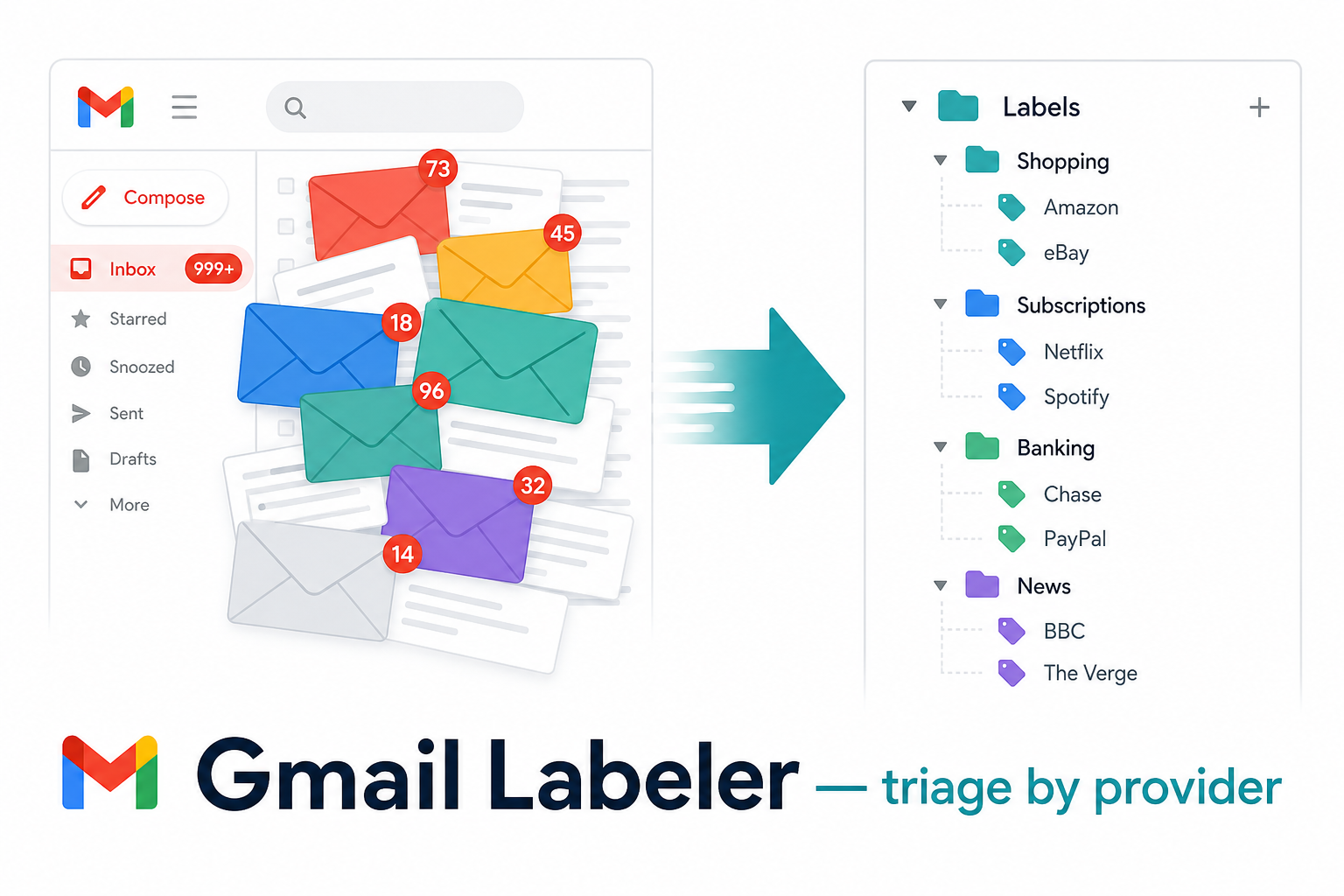
Gmail Labeler is an agent skill for Cursor, Claude, and Codex that files your mail by the company or service that sent it. Newsletters, receipts, subscription renewals, bank alerts, and grocery confirmations each land under a nested label (for example Shopping/Amazon, Subscriptions/Spotify, or Banking/PayPal). What stays in your inbox, by design, is the mail that actually needs you: a bill due this week, a government notice, or a message from a real person.
The skill runs through a Gmail MCP connector. Your agent reads sender addresses, subjects, and snippets, matches them to a label taxonomy you control, and applies labels in bulk. Receipts and account records stay visible. Marketing and digests get labelled and archived so they remain searchable without cluttering the inbox. Nothing is deleted. Attachment filenames can be used for context; attachment contents are never opened.
On the first run, the skill follows the Initial Setup Checklist
(references/initial-setup-checklist.md): master categories first, then mail
analysis, then provider children, then apply. Default lookback_days: 90. Generatesgmail-filters.xml and skips mail that already satisfies the rule. Import filters
once to label older backlog without the agent re-reading every thread. Returning
runs triage inbox only. Personal rules live in local files (MEMORY.md,provider-rules.md, LOG.md) that never leave your machine.
Who this is for
This skill suits you if:
- Your inbox mixes bills, newsletters, order confirmations, and job alerts in one unread pile.
- You already use labels in Gmail (or want to) and prefer filing by provider rather than by date alone.
- You run an AI coding agent with MCP and want repeatable email triage without manual filter setup for every new sender.
- You want a starter rule set (~100 globally recognised brands) that you can customise for your own mailbox.
If you only receive a handful of emails per week and never use labels, manual Gmail filters may be enough. Gmail Labeler pays off when volume is high and senders repeat.
What you get out of the box
| Deliverable | What it does |
|---|---|
SKILL.md |
Step-by-step method the agent follows on every run |
references/provider-rules.template.md |
Starter sender-to-label table across banking, grocery, subscriptions, travel, bills, and more |
references/email-policy.md |
Category actions (keep, archive, notify, skip) and safety rules |
examples/prompts/ |
Copy-paste prompts for first-time setup, weekly inbox triage, backfill, dry runs, fix-wrong-labels |
examples/minimal/ |
10-brand rules file for a quick dry-run |
examples/scheduling/ |
launchd, cron, and GitHub Actions templates for Sunday triage |
scripts/generate_filters.py |
Deterministic gmail-filters.xml generator |
scripts/validate_rules.py |
Lint provider-rules.md before generating filters |
Generated gmail-filters.xml |
One Gmail import to label existing mail and auto-file future mail |
After setup, a typical inbox drops from hundreds of unread threads to a short list of actionable items, with everything else filed under organised labels in the sidebar.
How it works
flowchart TD
  subgraph modes [Run mode]
    FirstRun[FirstTimeSetup]
    Returning[ReturningRun]
    Backfill[BackfillGapFill]
  end

  subgraph params [Parameters]
    Lookback["lookback_days → newer_than:Nd"]
    InboxScope[in:inbox]
    CatchUp["catch_up_days opt-in"]
    DryRun[dry_run no Gmail writes]
  end

  subgraph pipeline [Agent pipeline]
    Load[Load SKILL + rules]
    Search[search_threads]
    Classify[Classify provider]
    SkipGate{Rule satisfied?}
    Apply[label_thread]
    Persist[Update rules + LOG]
  end

  subgraph tools [Scripts]
    GenPy[generate_filters.py]
    FiltersOut[gmail-filters.xml]
  end

  FirstRun --> Lookback --> Load
  Backfill --> Lookback --> Load
  Returning --> InboxScope --> Load
  CatchUp -.-> Load
  Load --> Search --> Classify --> SkipGate
  SkipGate -->|yes| SkipDone[Count skipped]
  SkipGate -->|no| Apply --> Persist
  DryRun -.-> Apply
  Persist --> GenPy --> FiltersOut
  FiltersOut -->|import once| GmailImport[Gmail filters]
First-time setup follows references/initial-setup-checklist.md: Step 1
masters → Step 2 analyse mail → Step 3 provider children → Step 4 apply. Default
90-day lookback. Import filters to handle older mail without a long agent scan.
Returning runs process inbox only with rule-satisfied skip. See VERSION.md.
Core behaviour
- Labels mail by provider. Every recognisable sender gets a nested label (
Shopping/Amazon,Subscriptions/Spotify,Banking/PayPal, and so on). - Keeps records, archives noise. Receipts, bills, and government mail stay in the inbox. Newsletters and promos are labelled then archived.
- Generates importable Gmail filters via
scripts/generate_filters.py— re-import when rules change. - Parameterised lookback. Default three months (
lookback_days: 90). Widen only when you need older history. - Token-efficient by design. Domain dedupe, snippet-only reads, rule-satisfied skip,
max_threadscap — seereferences/token-efficiency.md. - Learns over time. New senders go in
provider-rules.md; precedents inMEMORY.md; every run logged inLOG.md.
What your Gmail looks like after
Before:
INBOX (1,247 unread)
  Spotify Family Plan renewal notice
  TLDR: "5 stories from your day"
  AGL Energy bill is due in 5 days
  Amazon: Your order has shipped
  Booking.com: 30% off your next stay
  ATO: Notice of assessment
  Patreon: Weekly digest from 4 creators
  GitHub: 12 notifications
  ... (1,239 more)
Everything competes with everything. The bill and the tax notice sit next to a sale
promo and a digest.
After:
INBOX (3)
  AGL Energy bill is due in 5 days       (kept, actionable)
  ATO: Notice of assessment              (kept, government record)
  Mum: dinner Sunday?                    (kept, personal)

Labels (sidebar):
  Banking/
    PayPal, Chase, CommBank, Wise, …
  Bills/
    AGL, Telstra, Optus, …
  Government/
    ATO, Services NSW, ImmiAccount, …
  Shopping/
    Amazon, eBay, Apple, IKEA, …
  Subscriptions/
    Spotify, Netflix, Notion, GitHub, …
  News & Ads/                            (auto-archived)
    TLDR, Morning Brew, Substack, …
  Travel/
    Qantas, Booking.com, Airbnb, …
  Health/
    Bupa, Chemist Warehouse, …
  Career/
    LinkedIn, Seek, …
Everything labelled, marketing pre-archived (still searchable, just out of the
way), receipts and bills kept in the inbox as records, and the inbox itself
collapses to the handful of things that actually need you.
Prerequisites
- An AI agent that loads skills and connects to Gmail via MCP:
- Cursor
- Claude (Code / Desktop)
- Codex (OpenAI CLI / agent)
- The Gmail connector must support:
search_threads,list_labels,label_thread,unlabel_thread,create_label(seeSKILL.mdfor details) - Python 3 for
scripts/generate_filters.py(stdlib only)
Gmail MCP setup (about 5 minutes)
- Google Cloud OAuth client — create a Desktop app OAuth client, download JSON keys.
- Save keys to
~/.gmail-mcp/gcp-oauth.keys.json. - Add MCP server to your agent config:
- Cursor:
~/.cursor/mcp.json— package@gongrzhe/server-gmail-autoauth-mcp - Claude Code:
~/.claude/mcp.json(same package)
- Cursor:
- Authenticate:
npx @gongrzhe/server-gmail-autoauth-mcp auth - Reload MCP in your agent and verify with
list_labels.
Security: limit MCP access if your inbox holds confidential mail. Consider a
dedicated Gmail account for automation trials.
Installation
Cursor (per-user skill)
git clone https://github.com/rNLKJA/gmail-labeler.git ~/.cursor/skills/gmail-labeler
Claude Code / Desktop
git clone https://github.com/rNLKJA/gmail-labeler.git ~/.claude/skills/gmail-labeler
Codex (OpenAI CLI)
User-wide (available in every project):
git clone https://github.com/rNLKJA/gmail-labeler.git ~/.codex/skills/gmail-labeler
Or project-scoped (commit into your repo for the team):
git clone https://github.com/rNLKJA/gmail-labeler.git .codex/skills/gmail-labeler
Restart Codex after installing so it picks up the new skill. You can also install
via the built-in skill-installer: "Install the skill from
github.com/rNLKJA/gmail-labeler".
Standalone
Clone anywhere and point your agent's instructions at the SKILL.md path.
Initialise working files
These files hold your personal data and are git-ignored:
cd gmail-labeler
cp MEMORY.template.md MEMORY.md
cp LOG.template.md LOG.md
cp references/provider-rules.template.md references/provider-rules.md
Initial setup checklist
First-time setup always follows this order (full detail inreferences/initial-setup-checklist.md):
| Step | Action |
|---|---|
| 0 | Load MEMORY.md, policy, rules; list_labels |
| 1 | Create master categories (all taxonomy masters by default) |
| 2 | Analyse mail — domain dedupe, classify senders, build label plan |
| 3 | Create provider children (Shopping/Amazon, etc.) |
| 4 | Apply labels + archive noise; keep records in inbox |
| 5–6 | Save rules, generate and import gmail-filters.xml |
Masters exist before any mail analysis. Never create nested labels before their
master parent.
Rebuild install package (optional)
After pulling updates:
./scripts/build-skill.sh
# writes ../email-labeler.skill by default; use --output PATH to override
Parameters
| Parameter | Default | Example scope |
|---|---|---|
lookback_days |
90 (3 months) |
newer_than:90d -in:sent -in:chats -in:draft |
catch_up_days |
7 |
has:nouserlabels newer_than:7d … (opt-in) |
max_threads |
unlimited | Cap pagination (suggest 50 for dry runs) |
dry_run |
true on first scope |
No Gmail mutations when true |
Optional config.yaml — copy from config.yaml.example. Prompt parameters override the file.
Natural language: "last 3 months" → lookback_days: 90. Widen to 365 only if you need a full year.
Try in 10 minutes
cp examples/minimal/provider-rules.minimal.md references/provider-rules.md
python scripts/validate_rules.py references/provider-rules.md
python scripts/generate_filters.py references/provider-rules.md --dry-run --log-summary
Then paste examples/prompts/dry-run.md into your agent with Gmail MCP connected.
Saving tokens
- Keep the default 90-day window for first-time setup — covers most active senders.
- Import
gmail-filters.xmlwith "Apply to existing conversations" so Gmail labels old mail without the agent reading every thread. - Weekly runs use
in:inboxonly — cheap once filters are in place. - Dry run first on any new scope before mutating labels.
- Backfill with
has:nouserlabelsinstead of re-scanning all mail in a date range. - Domain dedupe on first-time setup — classify each sender domain once.
max_threads: 50on dry runs to preview without reading the whole mailbox.
Usage — first run
Paste this into your agent:
Run the gmail-labeler skill in first-time setup mode.
Follow references/initial-setup-checklist.md in order (masters before analysis).
lookback_days: 90
Scope: newer_than:90d -in:sent -in:chats -in:draft
Dry run: true
Goal: Step 1 masters, Step 2 analyse, report Steps 3–4 before applying.
Expected output: checklist status per step, distinct domains, masters (Step 1),
provider children (Step 3), rule-satisfied skip count, confirmation before Gmail
mutations.
See also: examples/prompts/first-time-setup.md, references/initial-setup-checklist.md
Usage — recurring runs
Weekly triage prompt:
Run the gmail-labeler skill in returning-run mode.
Scope: in:inbox -in:sent -in:chats -in:draft
Dry run: false
Skip rule-satisfied threads. Only label gaps.
Inbox-zero: if filters pre-archive everything, zero inbox threads is normal.
Use catch-up only when you ask: has:nouserlabels newer_than:7d …
See also: examples/prompts/weekly-triage.md, examples/prompts/fix-wrong-labels.md
Scheduling (weekly automation)
Three options — pick one:
| Method | File | When |
|---|---|---|
| macOS launchd | examples/scheduling/launchd/com.rNLKJA.gmail-labeler.weekly.plist |
Sundays 09:00 local |
| cron | examples/scheduling/cron/crontab.example |
Sundays 09:00 |
| GitHub Actions | examples/scheduling/github-actions/weekly-triage.yml |
Sundays 09:00 UTC (advanced) |
Each file notes the assumptions it makes (CLI binary, env vars, MCP endpoint).
You need a working agent CLI (cursor-agent, claude, codex, or equivalent) on PATH.
macOS launchd checklist:
- Copy
examples/scheduling/launchd/com.rNLKJA.gmail-labeler.weekly.plistto~/Library/LaunchAgents/. - Replace
REPLACE_MEinStandardOutPath/StandardErrorPathwith your username. - Confirm
cursor-agent(or your CLI) is on PATH for non-interactive runs. - Test manually:
cursor-agent run --skill gmail-labeler --prompt-file ~/.cursor/skills/gmail-labeler/examples/prompts/weekly-triage.md - Load:
launchctl load ~/Library/LaunchAgents/com.rNLKJA.gmail-labeler.weekly.plist - Logs append to
~/Library/Logs/gmail-labeler.log— rotate or truncate periodically.
Troubleshooting
| Symptom | Likely cause | Fix |
|---|---|---|
| OAuth / MCP auth fails | Missing gcp-oauth.keys.json |
Gmail MCP setup |
validate_rules.py errors |
Typo in rules table | Fix Domain / Default / duplicate rows; re-run validator |
| 0 threads on returning run | Filters working; inbox empty | Expected for inbox-zero; use catch-up only when you ask |
| Duplicate filters after re-import | Gmail merges by criteria | Delete old filters in Gmail or diff XML before import |
| Wrong labels on PayPal merchants | One domain, many merchants | Use fix-wrong-labels mode; content_type + subject in rules |
| Generator "no rules parsed" | Empty or malformed table | Ensure | Domain | header and rows before ## Always skip |
| CI / version mismatch | SKILL vs VERSION.md drift | Keep frontmatter version: in sync with VERSION.md |
Optional regional packs
Copy sections from templates/taxonomy-au.md or templates/taxonomy-us.md intoMEMORY.md or references/provider-rules.md when your mailbox is AU- or US-centric.
They are examples only — not loaded automatically.
Files
| File | Purpose |
|---|---|
SKILL.md |
The method — read first by the agent (v1.3.1) |
README.md |
This file |
VERSION.md |
Feature matrix and current version |
CHANGELOG.md |
Release history |
CONTRIBUTING.md |
How to contribute and run local checks |
LICENSE |
GPL-3.0 |
scripts/generate_filters.py |
Rules → gmail-filters.xml + email-receive-rules.md |
scripts/validate_rules.py |
Lint provider rules before generation |
scripts/build-skill.sh |
Rebuild email-labeler.skill zip |
references/run-modes.md |
Run modes, parameters, fix-wrong-labels |
references/initial-setup-checklist.md |
First-time setup checklist (masters before analysis) |
references/token-efficiency.md |
Domain dedupe, max_threads, filter strategy |
references/email-policy.md |
Category actions and safety rules |
references/provider-rules.template.md |
Starter sender→label table (~200 rules) |
templates/taxonomy-au.md |
Optional AU regional taxonomy |
templates/taxonomy-us.md |
Optional US regional taxonomy |
config.yaml.example |
Optional run defaults |
MEMORY.template.md |
Scaffold for account-specific precedents |
LOG.template.md |
Scaffold for run history |
examples/prompts/ |
First-time, weekly, backfill, dry-run, fix-wrong-labels |
examples/minimal/ |
10-brand quickstart rules |
examples/scheduling/ |
launchd, cron, GitHub Actions templates |
Working copies (MEMORY.md, LOG.md, references/provider-rules.md) are
created locally and git-ignored.
Security & privacy
What this skill accesses
This skill reads your email — sender, subject, snippet, body text, label IDs,
and attachment filenames — to decide what label to apply. It does not
download, open, or read attachment contents. It does not send, reply,
forward, or delete mail. It only changes labels (including removing INBOX to
archive).
| Reads | Modifies | |
|---|---|---|
| CAN | Sender, subject, snippet, body, label IDs, attachment filenames | Add labels, remove INBOX, create labels |
| MUST NOT | Attachment contents (PDFs, images, docs) | UNREAD, STARRED, content, recipients; send/reply/delete |
Local personal data
MEMORY.md, LOG.md, and the populated references/provider-rules.md contain
your personal sender list and precedents. They are listed in .gitignore and
never committed. If you fork this repo, keep the same .gitignore.
The skill itself only calls your Gmail MCP connector and writes to local files.
Anything beyond that boundary depends on your chosen MCP and agent runtime.
Customising
- Edit
MEMORY.mdfor account-specific precedents (parent taxonomy, keep/archive
rules, multi-type brand splits). - Edit
references/provider-rules.mdfor your sender→label map (includeMatchfor multi-type brands). - Edit
references/email-policy.mdto adjust category actions. - Regenerate filters after rule changes:
python scripts/validate_rules.py references/provider-rules.md
python scripts/generate_filters.py references/provider-rules.md --output-dir . --log-summary
Re-import gmail-filters.xml in Gmail when the run report or LOG rule count changes.
Contributing
See CONTRIBUTING.md. Issues and pull requests welcome. This project is licensed under GPL-3.0 — if you
build on top of it, your derivative work must also be released under GPL-3.0.
License
GPL-3.0 — Copyright (C) 2026 rNLKJA. See LICENSE.
If you build on top of this repo, your derivative work must also be released under
GPL-3.0.
Support
If this skill saves you time, a coffee helps keep it maintained. Visit buymeacoffee.com/rnlkja or use the Sponsor button on this repo.
Yorumlar (0)
Yorum birakmak icin giris yap.
Yorum birakSonuc bulunamadi