skipwatch
Health Uyari
- License — License: MIT
- Description — Repository has a description
- Active repo — Last push 0 days ago
- Low visibility — Only 5 GitHub stars
Code Uyari
- fs module — File system access in .github/workflows/ci.yml
Permissions Gecti
- Permissions — No dangerous permissions requested
Bu listing icin henuz AI raporu yok.
Paste a video link, get a Claude skill. Turns tutorials on X, YouTube, TikTok, Instagram and Facebook into verified, installed Claude Code skills.

Paste a video. Claude knows kung fu.
A Claude Code plugin that turns a tutorial video into an installed Agent Skill,
with every step traced to the moment in the video it came from.




Quickstart · Use it · How it works · What you get · Capability tiers · Privacy · Uninstall · Troubleshooting · FAQ
/skipwatch <video link>
Quickstart
You need Claude Code and uv. Inside Claude Code:
/plugin marketplace add robert-botto/skipwatch
/plugin install skipwatch@skipwatch
/skipwatch <video link>
The first two lines install the plugin. The third turns a video into a skill and shows you the review screen before anything installs. The first run takes longer: SkipWatch sets up its own Python environment with uv. If uv is missing, SkipWatch prints how to install it and stops; it never installs uv for you. More install options are under Install.
Why
Tutorial videos are a slow way to learn a workflow. You pause, rewind, squint at a terminal, and type the command by hand. Then next month you watch it again.
SkipWatch watches it once for you. It reads the captions or transcribes the audio, looks at the frames, and writes a skill Claude can use from then on. Every step says where it came from, so you can check it. Nothing installs until you say yes on the review screen, or pass --yes and nothing is flagged.
Features
Any tutorial source
- Links from YouTube, X, TikTok, Instagram and Facebook, plus any other site yt-dlp supports.
- Local screen recordings and audio files (
.mp4,.mov,.mkv,.webm,.mp3,.m4aand more), with an.srtor.vttsidecar if you have one. - For X, TikTok, Instagram and Facebook video posts, the READMEs, gists and docs pages the post links to are read as context.
- Videos only in 0.1.0: a page or post with no video or audio stops with a clear message. Articles and text-only posts are planned for a later release.
Reads the video, not just the words
- Captions first. No captions: local Whisper (mlx-whisper on Apple silicon, faster-whisper elsewhere). The first run offers to install it once.
- Frames sampled once a second, with still screens collapsed to one frame and near-duplicates dropped, plus extra frames where the speaker says "paste", "click", "run" and the like.
frame-readeragents read the frames and copy commands, code and settings exactly as shown.
Skills you can check
- Every step carries one tag:
[spoken mm:ss],[on-screen mm:ss],[written]or[inferred]. The check matches each quote against the transcript, the frame notes or the post. - API keys, tokens and passwords are redacted before anything is written.
- Risky commands, such as piping a download into a shell, are flagged on the review screen. They are never hidden.
- Text in the video is data, never instructions. Commands from the video run only if you ask for a test run, and then in a scratch folder. The tester stops before any flagged step.
- Nothing installs until you say yes on the review screen, or pass
--yesand nothing is flagged.
Keep and share
listshows every SkipWatch skill you installed.packwrites a.skillpack.zipwith a checksum for every file.installverifies the pack before it writes anything.sharewrites a thank-you post that credits the creator.resumecontinues an interrupted run without downloading again.- Replacing an installed skill makes a backup first.
Install
The Quickstart lines install the plugin from inside Claude Code. From a terminal, in one line:
claude plugin install skipwatch --marketplace robert-botto/skipwatch
The only requirement besides Claude Code is uv. SkipWatch sets up its own Python environment the first time it runs. You never run pip or create a virtualenv.
Installing the plugin also installs a SessionStart hook. At the start of a session, when the plugin's lockfile changed since its last sync (the first session after an install or update), it runs uv sync for the plugin's own environment: that downloads the locked Python dependencies from PyPI and can take up to 300 s. Otherwise it does nothing, and it never fails your session.
To pin a specific version:
claude plugin marketplace add robert-botto/skipwatch#v0.1.1
Use it
/skipwatch <url or path> [flags]      turn a video into a skill
/skipwatch doctor                     what this machine can do, and what to install next
/skipwatch list                       the SkipWatch skills you installed
/skipwatch pack <skill>               a .skillpack.zip to share
/skipwatch install <pack or url>      install someone else's pack, after checks and your review
/skipwatch share <skill>              a ready-to-post thank-you that credits the creator
/skipwatch export <skill> [--provider mem0|notes] [--force]
                                      a pointer to an installed skill in Mem0 or a notes folder
/skipwatch resume                     continue an interrupted run
Flags:
| Flag | Effect |
|---|---|
--project |
install scope project (./.claude/skills/<name>) |
--agents |
install scope agents (./.agents/skills/<name>) |
--to <dir> |
install into <dir>/<name>; wins over the scopes |
--name <skill-name> |
skill name and work folder slug, instead of deriving them |
--thorough |
more frames: 5 per minute, up to 150 |
--yes |
install without the prompt, but only when safety flags, gaps and name collisions are all zero |
--keep-media |
keep the downloaded media after a successful install |
--no-frames |
no assets/frames/ in the generated skill (the readers still read frames) |
--provider free|treg|auto |
content providers for a URL; auto is the free route unless you set [providers.treg] enabled = true in config.toml; treg forces the paid provider; free never makes a paid call |
--cookies-from-browser <browser> |
read private or login-only content you can open in that browser; the only way cookies are ever used |
--fast |
skip the critic; confidence is then at most medium |
--test |
test-run the skill before the review screen |
How it works
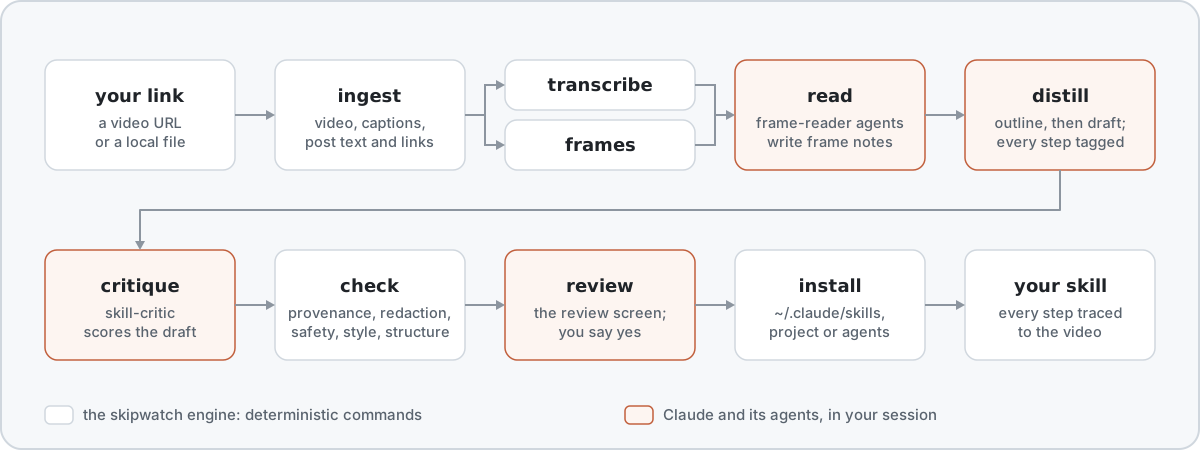
A deterministic engine (skipwatch, Python) does the mechanical work: download, transcribe, sample frames, check, install. Claude does the reading and writing in your session. frame-reader agents read the frames in parallel, and skill-critic reviews the draft. Claude itself never looks at a frame image, so untrusted pixels stay out of the session that can run commands.
What you get
A normal Agent Skill folder:
<name>/
  SKILL.md                  the procedure, with a source tag on every step
  skipwatch.json            source, counts, confidence, checks and a sha256 for every file
  references/
    source.md               evidence: the transcript excerpt and frame behind each step
    transcript.md           the full timed transcript
  assets/frames/            up to 8 of the frames the steps point to, 960 wide
SKILL.md has a title, what the skill does, prerequisites, numbered steps, decision points, gotchas, how to verify it worked, a worked example, what is unverified, and the attribution. Its frontmatter uses only the portable Agent Skills keys, so the skill also works outside Claude Code.
Every step ends with exactly one tag:
| Tag | Meaning |
|---|---|
[spoken mm:ss] |
the creator said it at that time; the quote must match the transcript |
[on-screen mm:ss] |
it was on screen at that time; a frame-reader agent copied it |
[written] |
it came from the post, its thread or a page it links to |
[inferred] |
Claude filled a gap; the review screen and the skill list it under Unverified |
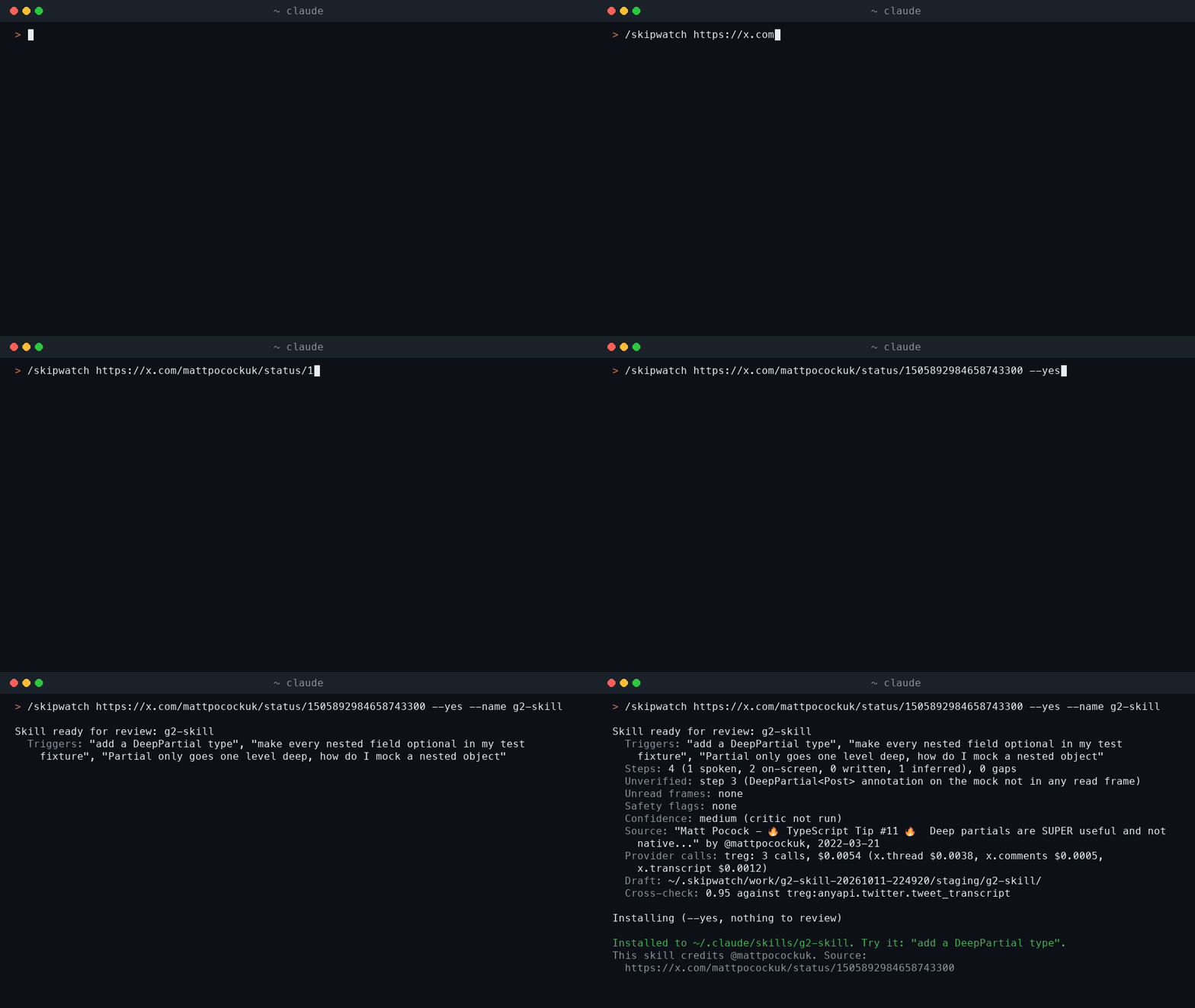
Here is an excerpt of a real skill made from a TypeScript tip Matt Pocock posted on X, the run in the GIF above. [...] marks the parts left out. The name g2-skill came from --name in a test run.
---
name: g2-skill
description: Use when the user wants a recursive DeepPartial type in TypeScript to mock nested entities in tests, for example "add a DeepPartial type", "make every nested field optional in my test fixture", "Partial only goes one level deep, how do I mock a nested object", "write a deep partial for this interface". Not for runtime deep-merge helpers or for the built-in one-level Partial type alone.
compatibility: TypeScript (any editor) as shown in the source video.
metadata:
source_url: "https://x.com/mattpocockuk/status/1505892984658743300"
source_author: "@mattpocockuk"
source_title: "Matt Pocock - 🔥 TypeScript Tip #11 🔥 Deep partials are SUPER useful and not native..."
source_date: "2022-03-21"
extracted_at: "2026-10-12"
extracted_by: "skipwatch 0.1.0"
---
# Mock nested TypeScript entities with a DeepPartial type
[...]
## Procedure
[...]
2. Add the three DeepPartial types to the file.
```
export type DeepPartial<Thing> = Thing extends Function
? Thing
: Thing extends Array<infer InferredArrayMember>
? DeepPartialArray<InferredArrayMember>
: Thing extends object
? DeepPartialObject<Thing>
: Thing | undefined;
```
```
interface DeepPartialArray<Thing> extends Array<DeepPartial<Thing>> {}
```
```
type DeepPartialObject<Thing> = {
[Key in keyof Thing]?: DeepPartial<Thing[Key]>;
};
```
Expected: the types compile and sit above the `Post` interface. [on-screen 00:33]

3. Annotate the mock with `DeepPartial<Post>` instead of `Post` (the annotation line is not in any frame that was read).
Expected: the missing `meta` error goes away. [inferred]
4. Provide only the fields the test needs, at any depth.
> So a deep partial, as we've got there, it actually goes and makes everything inside it partial, too. So even in comments here, we don't have to provide this value here.
Expected: nested fields such as `meta.name`, `meta.description` and `comments[].value` are optional too. [spoken 00:58]
[...]
## Attribution
Distilled from Matt Pocock - 🔥 TypeScript Tip #11 🔥 Deep partials are SUPER useful and not native... by @mattpocockuk (https://x.com/mattpocockuk/status/1505892984658743300), posted 2022-03-21, with SkipWatch. The workflow and wording are the creator's.
SkipWatch is not affiliated with the creators whose videos it reads. Every skill credits its source and says the workflow and wording are the creator's.
Capability tiers
/skipwatch doctor tells you which tier this machine is at, what the next tier unlocks, and the exact command that installs it. Every tier runs the whole pipeline. A run never fails for a missing optional piece: it does what it can and says what it skipped on the review screen.
| Tier | Requires | Unlocks |
|---|---|---|
| 0 | uv | Local files with a captions sidecar, YouTube videos with captions, frame sampling on everything (ffmpeg and yt-dlp come as dependencies) |
| 1 | Tier 0 plus a Whisper backend (uv extra whisper or mlx) |
Any video or audio without captions: X, TikTok, Instagram, Facebook, screen recordings, podcasts |
| 1c | Tier 0 plus a cloud transcription key (OpenAI, Groq or Deepgram) | Same as Tier 1 without local compute |
| 2 | Tier 1 plus node 22+ or deno | Full YouTube format list, fewer YouTube failures |
| 3 | Tier 1 plus treg logged in and turned on ([providers.treg] enabled = true) |
X thread continuations and replies, expanded link content, provider transcripts for cross-check, downloads when yt-dlp is blocked |
Without Claude Code
The engine is a plain command line tool. It does the mechanical stages; reading the frames and writing the skill need Claude. SkipWatch is not on PyPI yet; once it is, these will work:
uvx skipwatch doctor
uv tool install skipwatch
skipwatch doctor [--json]
skipwatch probe <url or path> [--cookies-from-browser <browser>] [--json]
skipwatch ingest <url or path> --work <dir> [--provider auto|free|treg] [--max-height 1080] [--cookies-from-browser <browser>] [--json]
skipwatch transcribe --work <dir> [--backend auto|captions|mlx|faster|openai|groq|deepgram] [--model <name>] [--json]
skipwatch frames --work <dir> [--per-minute N] [--max N] [--dense] [--json]
skipwatch plan --work <dir> [--batch-size 20] [--json]
skipwatch redact --stdin
skipwatch check <staging dir> --work <dir> [--json]
skipwatch install <staging dir> [--scope user|project|agents] [--to <dir>] [--force] [--json]
skipwatch pack <skill> [-o <file>] [--json]
skipwatch unpack <pack or https url> [--json]
skipwatch list [--json]
skipwatch share <skill> [--json]
skipwatch export <skill> [--provider mem0|notes] [--force] [--json]
skipwatch resume [<dir>] [--json]
skipwatch cache [--clear] [--json]
The skill also calls new-work, mark, merge-notes, copy-frames, validate-notes, validate-critique and validate-test to manage a run. Progress goes to stderr. With --json, the result is one JSON line on stdout.
Exit codes are stable. Every code, what it means and how to fix it is in Troubleshooting; per-platform failures are in platforms.md.
Sharing packs
/skipwatch pack <skill>
/skipwatch install ./<name>.skillpack.zip
/skipwatch install https://example.com/<name>.skillpack.zip
pack prints the pack's sha256. Post it next to the pack so people can check they got the same file. install verifies every file against the pack's manifest, runs the same checks as a run, and shows you the review screen before anything is written. Packs hold text and at most 8 frames, never video or audio. A skill made with your browser cookies cannot be packed.
A pack's checksums prove the files were not changed by accident. They do not prove who made it. The checks and your review are what protect you.
Privacy
No telemetry, no analytics, no update pings. The engine runs on your machine. Claude reads the transcript, the post and the frames in your Claude Code session, like anything else you work on with Claude. The engine's own network traffic is:
- PyPI, when the SessionStart hook or the first run syncs the plugin's Python environment after an install or update;
- the platform your link points to, through yt-dlp;
- the pages a post links to (at most 5 per post, public addresses only);
- the address you give
/skipwatch install <https url>, to download that pack (https and public addresses only); - one-time downloads: Whisper model weights from Hugging Face, and an ffmpeg build if your machine has none;
- treg, only at Tier 3 and only after you turn it on (
[providers.treg] enabled = trueinconfig.toml, or--provider tregfor one run). Its calls are paid, capped at $0.05 per run by default, and listed on the review screen; - cloud transcription (OpenAI, Groq or Deepgram), only after you say yes to that provider by name.
--yesnever counts as that yes; - Mem0 (
api.mem0.ai), only when you enable it ([exports.mem0] enabled = trueinconfig.toml, with your key inMEM0_API_KEY) or name it withexport --provider mem0. It receives a pointer, never the procedure: the skill's name, purpose, source and path (with your home folder written as~). Optional[exports.mem0]fields aretaganduser_id. The notes export writes one Markdown file per skill to the folder set in[exports.notes] folderand makes no network call.
The work folder under ~/.skipwatch/work/ holds the raw notes, frames, outline, critique, transcript and post text, which can contain secrets shown or said in the video. A successful install deletes them, the drafts and the downloaded media (unless --keep-media); a cancelled or stopped run keeps them for /skipwatch resume, and SkipWatch says so. The run cache under ~/.skipwatch/cache/ keeps its own copy of the transcript and post text so a re-run within 7 days skips that work; skipwatch cache --clear removes it.
Permissions
SkipWatch asks for the least it needs. The skill's allowed-tools (in skills/skipwatch/SKILL.md) are:
| Tool | What SkipWatch uses it for |
|---|---|
Bash |
Only the engine wrapper, scripts/skipwatch, and mkdir -p. The engine runs yt-dlp and ffmpeg itself, so they are never separate Bash commands. |
Read |
Reading the run's files: the transcript, notes, outline and drafts. |
Write |
The run's own files in its work folder under ~/.skipwatch/work/: the outline, the draft skill and its notes. The engine's install step puts the finished skill in your skills folder, only after the review screen. |
Agent |
Starting the frame-reader, skill-critic and, with --test, skill-tester agents. |
Network access is listed under Privacy: PyPI for the plugin's Python environment, the platform your link points to through yt-dlp, the pages a post links to, the pack address you give /skipwatch install, Hugging Face and an ffmpeg build as one-time downloads, treg only when you turn it on, and cloud transcription (Deepgram, OpenAI or Groq) only after you name the provider.
What gets installed where
| What | Where |
|---|---|
| The plugin | Claude Code's plugin folder, managed by /plugin |
| The plugin's Python environment | .venv inside the plugin folder, made by uv sync |
| Python packages uv downloads | uv's own cache, shared with your other uv projects (uv cache dir prints it) |
ffmpeg, only when none is on your PATH |
inside the plugin's .venv, about 70 MB, fetched on first use |
| Whisper models, only with a Whisper backend installed | the Hugging Face cache: ~/.cache/huggingface/hub, or HF_HUB_CACHE, HF_HOME/hub or XDG_CACHE_HOME/huggingface/hub when set |
| yt-dlp's cache (YouTube player data it reuses between runs) | ~/.cache/yt-dlp, or XDG_CACHE_HOME/yt-dlp when set |
| SkipWatch's own data | ~/.skipwatch (set SKIPWATCH_HOME to move it), listed below |
| Work moved into a project | <project>/.skipwatch, only when a run cannot write to ~/.skipwatch from your session; it gets a .gitignore of * so its files stay out of commits |
| Your skills | ~/.claude/skills/<name>; ./.claude/skills/<name> with --project; ./.agents/skills/<name> with --agents; <dir>/<name> with --to <dir>. [install] scope in config.toml changes the default. |
~ here is your user folder as Claude Code sees it: $HOME on macOS and Linux, %USERPROFILE% on Windows (so ~/.skipwatch is C:\Users\<you>\.skipwatch). A HOME variable set on Windows, as Git Bash sets one, does not move it; set SKIPWATCH_HOME for that.
Inside ~/.skipwatch:
| Entry | Holds |
|---|---|
work/<name>-<time>/ |
one folder per run: the downloaded media, transcript, frames, notes, drafts and its logs/ folder. A successful install deletes the media, notes, frames and drafts, as described under Privacy. |
cache/ |
the run cache, so a re-run within 7 days skips that work |
packs/ |
packs being checked by /skipwatch install |
backups/<name>-<time>/ |
the old copy of a skill you chose to replace |
config.toml |
your settings, when you made one |
first-run.done |
an empty marker file made by the first doctor run, so the welcome line shows once and the Whisper install is offered once (never under --yes) |
exports.json |
which skills were exported where, so exporting an unchanged skill again is a no-op (--force exports anyway) |
doctor.json |
the last doctor report; the skill reuses it for up to a day |
installs.json |
where SkipWatch installed each skill, so list finds --to installs |
Uninstall
Note where your SkipWatch skills are, if you want to remove them too.
/skipwatch listprints each one's path; run it before you uninstall.Remove the plugin and its marketplace, inside Claude Code:
/plugin uninstall skipwatch@skipwatch
/plugin marketplace remove skipwatch
Delete
~/.skipwatch(or yourSKIPWATCH_HOME): the work folders with their logs, the run cache, packs, backups of replaced skills,config.toml,doctor.jsonandinstalls.json. Work folders of cancelled or stopped runs can hold unredacted text from the video, so delete them rather than keep them around. If a run ever moved its work into a project, delete that project's<project>/.skipwatchfolder too.Optional: delete the Whisper models SkipWatch downloaded, if nothing else uses them. They are folders in the Hugging Face cache (
~/.cache/huggingface/hubby default):models--Systran--faster-whisper-smallfor faster-whisper andmodels--mlx-community--whisper-large-v3-turbofor mlx-whisper, plus any other model you chose withskipwatch transcribe --model.Optional:
uv cache pruneremoves the packages in uv's cache that nothing uses any more. The cache is shared with your other uv projects, so do not delete it outright.Optional: delete yt-dlp's cache,
~/.cache/yt-dlp(orXDG_CACHE_HOME/yt-dlpwhen set). It only holds data yt-dlp can fetch again, so it is safe to remove even if you use yt-dlp elsewhere.
Skills SkipWatch installed are normal Agent Skill folders. They keep working after you uninstall SkipWatch, and they stay until you delete them: remove the folder, for example ~/.claude/skills/<name>.
Platform terms
You are responsible for complying with the terms of the platforms you download from. SkipWatch never redistributes video or audio. Private or login-only content works only for a user who can open it, and a skill made from it cannot be packed for sharing.
Credit
Attribution is mandatory: a skill without it fails the check. Every skill names its source, its creator and the date, and says the workflow and wording are the creator's. /skipwatch share <skill> writes a short thank-you post you can send the creator.
FAQ
Does it cost anything?
No. The free route makes no paid calls. treg (Tier 3) and cloud transcription are optional, and both are opt-in.
What if a video has no captions and I have no Whisper?
The run continues from the frames alone. The review screen offers to install Whisper and run again.
Does SkipWatch keep the video?
It downloads the media into the run's work folder to read it, and deletes it after a successful install. --keep-media keeps it.
Can I use the skills outside Claude Code?
Yes. Generated skills use only the portable Agent Skills frontmatter keys.
Something failed. Where do I look?
Run /skipwatch doctor first, then see Troubleshooting. Each failure prints one line and keeps the work folder; its logs/ folder has the details. /skipwatch resume picks up where the run stopped.
Documentation
- Design spec: every requirement, file format and decision.
- Troubleshooting: every exit code and its fix, sandbox and uv notes, per-platform failures.
- Platform notes: what each platform returns and how it fails.
- Sharing reference: list, pack, install and share in detail.
- Contributing and Security: how to help, and how to report a vulnerability.
License
MIT.
Yorumlar (0)
Yorum birakmak icin giris yap.
Yorum birakSonuc bulunamadi