atelier-pipeline
Health Warn
- License — License: Apache-2.0
- Description — Repository has a description
- Active repo — Last push 0 days ago
- Low visibility — Only 6 GitHub stars
Code Pass
- Code scan — Scanned 12 files during light audit, no dangerous patterns found
Permissions Pass
- Permissions — No dangerous permissions requested
No AI report is available for this listing yet.
Multi-agent orchestration plugin for Claude Code — 10 specialized agents, persistent Brain memory, quality gates, continuous QA, wave-based parallel execution, and mechanical enforcement hooks
Atelier Pipeline
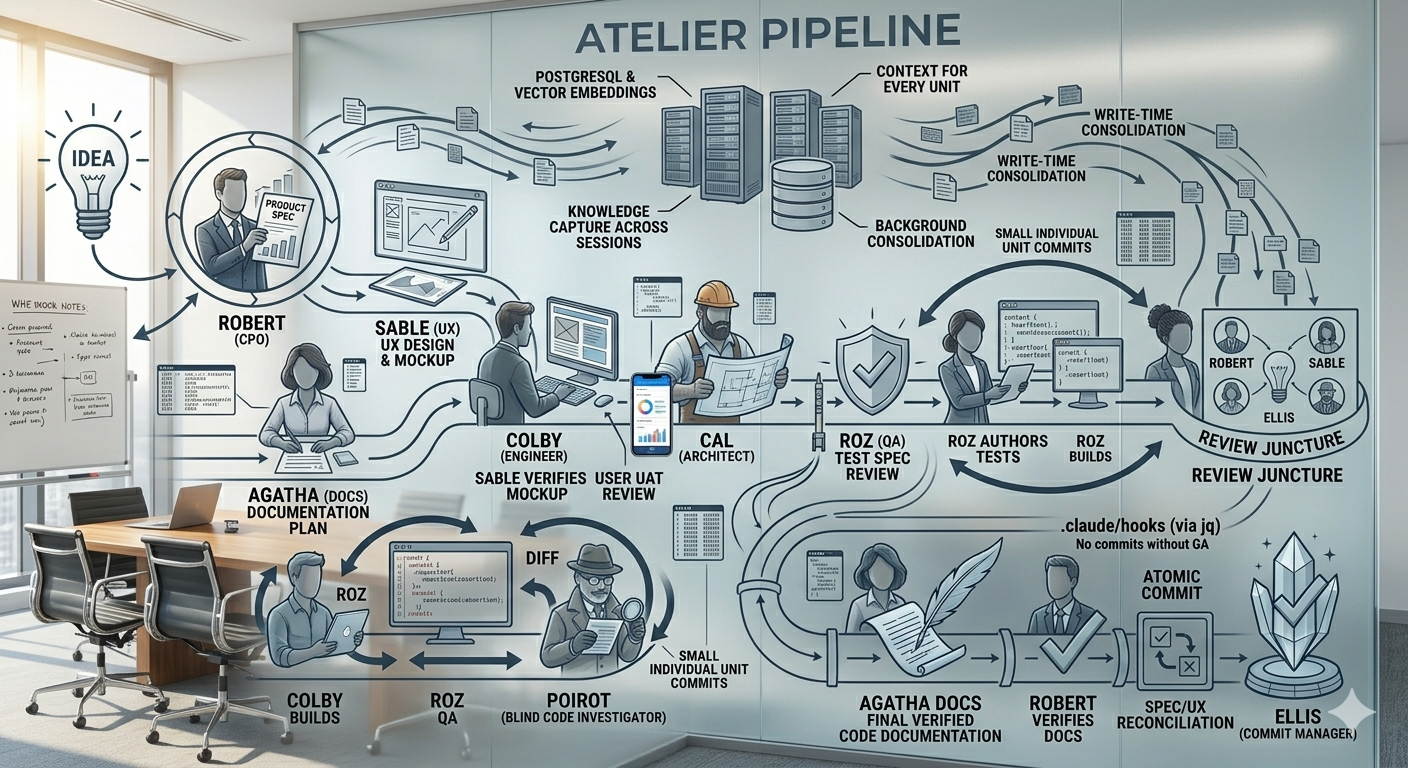
A Claude Code plugin that provides multi-agent orchestration with quality gates, continuous QA, and persistent institutional memory across sessions.
What It Does
Atelier Pipeline has two core systems:
Multi-Agent Orchestration. Eleven specialized agent personas with clear responsibilities, strict boundaries, and independent quality verification. Eva orchestrates, Robert handles product, Sable designs UX, Cal architects, Colby builds, Roz tests, Poirot blind-reviews, Agatha documents, Ellis commits, Distillator compresses, and Sentinel audits security. Custom agents can be added via agent discovery. Specs get written, designs get validated, tests get authored before code, every change passes independent QA, and nothing ships without review.
Atelier Brain. A persistent memory layer backed by PostgreSQL and vector embeddings that gives your agents institutional memory across sessions. Without it, every time you close a terminal you lose the architectural decisions that shaped your implementation, the user corrections that steered scope, the rejected alternatives that explain why you didn't go a different way, and the QA lessons that prevent recurring bugs. The brain captures all of this during pipeline runs and surfaces it automatically when agents need context. It includes write-time conflict detection, TTL-based knowledge decay, and background consolidation that synthesizes raw observations into higher-level insights. The pipeline works without the brain -- but with it, session 12 of a feature build has the same context as session 1.
For full documentation, see the User Guide and Technical Reference.
Getting Started
1. Install the Plugin
Add the marketplace and install:
/plugin marketplace add robertsfeir/atelier-pipeline
/plugin install atelier-pipeline@atelier-pipeline
Restart Claude Code after install.
2. Set Up the Pipeline
Open Claude Code in your project and run:
/pipeline-setup
Claude walks you through project configuration one question at a time:
- Tech stack and framework
- Test commands (lint, typecheck, test suite)
- Source structure and database patterns
- Coverage and complexity thresholds
- Branching strategy
It then installs ~40 files into your project (agent personas, commands, references, enforcement hooks, path-scoped rules, branch lifecycle rules, and state tracking). At the end, it offers optional features: Sentinel security agent, Agent Teams parallel execution, and Atelier Brain persistent memory.
3. Set Up the Brain (optional but recommended)
If you skipped the brain offer during pipeline setup, run it separately:
/brain-setup
The setup asks:
- Personal or shared? Personal config stays local (never committed). Shared config is committed to the repo with
${ENV_VAR}placeholders -- no bare secrets. - Docker, local PostgreSQL, or remote PostgreSQL? Docker is one command (
docker compose up). Local PostgreSQL requires pgvector and ltree extensions. Remote PostgreSQL (RDS, Supabase, etc.) connects to an existing managed database -- setup verifies the connection, checks for required extensions, and applies the schema if needed. - OpenRouter API key. Needed for vector embeddings. Get one at https://openrouter.ai/keys and set
export OPENROUTER_API_KEY="sk-or-..."in your shell profile. - Scope path. A dot-separated namespace like
myorg.myproductthat organizes knowledge.
Setup verifies the connection and confirms:
Brain is live.
  Tools available: 6
  Scope: myorg.myproduct
  Config: personal (~/.claude/plugins/data/atelier-pipeline/brain-config.json)
  Database: Local PostgreSQL (myproject_brain)
Teammate onboarding: If a shared brain config already exists in the repo, /brain-setup detects it automatically and tells the new team member which environment variables to set. No interactive setup needed.
4. Hydrate the Brain (optional)
For existing projects with ADRs, specs, or git history:
/brain-hydrate
Scans your project artifacts, extracts the reasoning behind decisions (not the content itself), and imports it as brain thoughts. Safe to re-run -- duplicate detection prevents re-importing.
5. Start Building
Describe a feature idea, or type /pipeline to start Eva. She sizes the work and routes to the right agent.
Updating the Plugin
Three steps:
Refresh the marketplace and pull the update:
claude plugin marketplace update atelier-pipeline
claude plugin update atelier-pipeline@atelier-pipeline
Restart Claude Code to load the new plugin version.
Re-run
/pipeline-setupto sync the updated templates into your project's.claude/directory. The setup detects existing files and asks whether to merge or replace.
A session-start hook automatically notifies you when your project's pipeline files are outdated. You'll see: "Update available: installed vX.Y.Z, plugin vA.B.C."
Manual Setup (without plugin system)
git clone https://github.com/robertsfeir/atelier-pipeline.git /tmp/atelier-pipeline
Then in Claude Code:
Read /tmp/atelier-pipeline/skills/pipeline-setup/SKILL.md and follow its
instructions to install the pipeline in this project
Skills
The plugin provides four skills:
| Skill | Trigger | Purpose |
|---|---|---|
/pipeline-setup |
"set up the pipeline", "install atelier" | Installs all agent personas, commands, references, and state files into your project |
/pipeline-overview |
"how does the pipeline work", "explain atelier" | Quick reference for the pipeline system, agents, and principles |
/brain-setup |
"set up the brain", "configure brain" | Configures the Atelier Brain persistent memory (Docker, local PostgreSQL, or remote PostgreSQL) |
/brain-hydrate |
"hydrate brain", "seed memory", "import history" | Imports existing project knowledge (ADRs, specs, git history) into the brain |
The Pipeline
Eva sizes every request and runs the right amount of process. A large feature gets the full pipeline; a bug fix gets Colby, Roz, and Ellis.
Full pipeline (Large)
                       Idea
                        |
                   Robert (spec)
                     /      \
              Sable (UX)    Agatha (doc plan)         --- parallel
                     \      /
                  Colby (mockup)
                        |
               Sable verifies mockup                  --- UX acceptance
                        |
                   User UAT review
                        |
              Cal (architecture + test spec)
                        |
                Roz (test spec review)
                        |
                Roz (test authoring)
                        |
    Colby (build) <-> Roz (QA) + Poirot + Sentinel    --- interleaved per ADR step
                        |
    Roz + Poirot + Robert + Sable + Sentinel           --- review juncture (parallel)
                        |
                 Agatha (docs)                         --- against final verified code
                        |
             Robert verifies docs                      --- product acceptance
                        |
         Spec/UX reconciliation (if drift)             --- living artifacts updated
                        |
              Ellis (commit + changelog)               --- one atomic commit
Phase sizing
Not every feature runs every phase. Eva adjusts:
| Size | When | What runs |
|---|---|---|
| Micro | Rename, typo, import fix (≤2 files, mechanical only) | Colby -> test suite -> Ellis |
| Small | Bug fix, <3 files, "quick fix" | Colby -> Roz -> Ellis (+ Agatha if doc impact) |
| Medium | 2-4 ADR steps, typical feature | Robert -> Cal -> Colby/Roz interleaved -> review juncture -> Agatha -> Ellis |
| Large | 5+ ADR steps, new system | Full pipeline above |
What's New in v3.6
Compaction API integration. Server-side context management replaces manual context hygiene. A PreCompact hook (pre-compact.sh) writes a timestamped marker to pipeline-state.md before compaction fires, so Eva can detect and recover from compaction events. Path-scoped rules survive compaction automatically because Claude Code re-injects them from disk on every turn.
Observation masking. Eva's primary within-session context hygiene. Superseded tool outputs are replaced with structured placeholders that include a re-read command. Distillator is now reserved for structured document compression at phase boundaries where lossless preservation of decisions, constraints, and relationships matters.
Context cleanup advisory updated. Eva no longer estimates context usage or counts agent handoffs. For very long pipelines, Eva may suggest a fresh session only if response quality visibly degrades.
What's New in v3.5
Sentinel security agent (opt-in). A Semgrep MCP-backed security audit agent that scans changed files for vulnerabilities, injection risks, and security misconfigurations. Runs in parallel with Roz and Poirot. Enable during /pipeline-setup or set sentinel_enabled: true in pipeline-config.json. Sentinel failure never blocks the pipeline.
Agent Teams (experimental). Parallel wave execution using Claude Code's Agent Teams feature. When enabled, Eva creates Colby Teammate instances that execute independent build units within a wave simultaneously. Two gates must pass: agent_teams_enabled: true in pipeline config and CLAUDE_AGENT_TEAMS=1 in the environment. Falls back to sequential execution transparently when either gate fails.
Security hardening. Word boundary regex in enforcement hooks prevents false-positive blocks.
What's New in v3.4
DoR/DoD warn hook. A SubagentStop hook (warn-dor-dod.sh) warns when Colby or Roz subagent output is missing DoR/DoD sections. Advisory only -- never blocks.
Agent discovery. Eva discovers custom agents at session boot by scanning .claude/agents/ for non-core persona files. Discovered agents are available via explicit name mention and can be routed to automatically after user consent for overlapping domains.
Eva test blocking. enforce-git.sh blocks test commands from the main thread. Roz runs the full test suite, not Eva.
Agents
| Agent | Role | Type |
|---|---|---|
| Eva | Pipeline Orchestrator / DevOps | Skill (main thread) |
| Robert | Chief Product Officer | Skill + Subagent |
| Sable | Senior UI/UX Designer | Skill + Subagent |
| Cal | Senior Software Architect | Skill + Subagent |
| Colby | Senior Software Engineer | Subagent |
| Roz | QA Engineer | Subagent |
| Poirot | Blind Code Investigator | Subagent |
| Agatha | Documentation Specialist | Skill + Subagent |
| Ellis | Commit and Changelog Manager | Subagent |
| Distillator | Compression Engine | Subagent |
| Sentinel | Security Auditor (opt-in) | Subagent |
Skills run in the main Claude Code thread for conversational work. Subagents run in their own context windows for focused execution. Some agents have both modes -- conversational for authoring, subagent for verification. Custom agents can be added via agent discovery without modifying core pipeline files.
Agent Teams (Experimental)
Agent Teams enables parallel wave execution during the Colby build phase. When multiple ADR steps are independent (no shared files), Eva normally executes them sequentially. With Agent Teams enabled, Eva creates Colby Teammate instances that execute those steps simultaneously.
Two gates must pass:
| Gate | Setting | Purpose |
|---|---|---|
| Config gate | "agent_teams_enabled": true in .claude/pipeline-config.json |
Pipeline-level opt-in, set during /pipeline-setup |
| Environment gate | export CLAUDE_AGENT_TEAMS=1 |
Claude Code feature flag that enables the Agent Teams runtime |
Both gates must pass. If either fails, the pipeline falls back to sequential execution with zero behavioral change. Agent Teams affects execution speed, not correctness or quality. All twelve mandatory gates are preserved.
Agent Discovery
Eva discovers custom agents at session boot by scanning .claude/agents/ for non-core persona files. Discovered agents are additive only -- they never replace core agent routing. Core agents always have priority. To route a discovered agent automatically, Eva asks for your consent when it detects domain overlap with a core agent. No-overlap agents are available via explicit name mention (e.g., "ask my-agent about this").
To create a custom agent, paste an agent definition into the chat. Eva recognizes the pattern and offers to convert it into a pipeline-compatible persona file with proper frontmatter, XML tags, and read-only enforcement defaults.
Slash Commands
These are installed into your project by /pipeline-setup:
| Command | Agent | Purpose |
|---|---|---|
/pm |
Robert | Feature discovery and product spec |
/ux |
Sable | UI/UX design and interaction patterns |
/architect |
Cal | Architecture clarification and ADR production |
/debug |
Roz -> Colby -> Roz | Investigation, fix, verification chain |
/pipeline |
Eva | Full pipeline orchestration |
/devops |
Eva | Infrastructure and deployment |
/docs |
Agatha | Documentation planning and writing |
Atelier Brain
The brain is an MCP server with 6 tools that agents use automatically during pipeline runs:
| Tool | Purpose |
|---|---|
agent_capture |
Save a decision, lesson, preference, or correction |
agent_search |
Semantic search across brain thoughts |
atelier_browse |
Paginated browse by type or status |
atelier_stats |
Brain health check (thought count, config, status) |
atelier_relation |
Create typed edges between thoughts (supersedes, contradicts, evolves_from) |
atelier_trace |
Walk relation chains from a thought |
Agents capture thoughts during pipeline runs and search for relevant context before making decisions. Write-time conflict detection catches contradictions (>0.9 similarity = duplicate, 0.7-0.9 = LLM-classified). TTL decay expires stale knowledge per thought type. Background consolidation synthesizes raw observations into reflections.
What Gets Installed
/pipeline-setup installs ~40 files into your project:
your-project/
  .claude/
    rules/                       # Always loaded by Claude Code
      default-persona.md         # Eva orchestrator persona
      agent-system.md            # Orchestration rules, routing, gates
      pipeline-orchestration.md  # Pipeline operations (path-scoped, loads during active pipelines)
      pipeline-models.md         # Model selection tables (path-scoped)
      branch-lifecycle.md        # Branch lifecycle rules (selected strategy variant)
    agents/                      # Loaded when subagents are invoked
      cal.md                     # Architect
      colby.md                   # Engineer
      roz.md                     # QA
      robert.md                  # Product reviewer
      sable.md                   # UX reviewer
      investigator.md            # Poirot (blind investigator)
      distillator.md             # Compression engine
      ellis.md                   # Commit manager
      agatha.md                  # Documentation
      sentinel.md                # Security audit (opt-in)
    commands/                    # Loaded when user types slash command
      pm.md                      # /pm (Robert)
      ux.md                      # /ux (Sable)
      architect.md               # /architect (Cal)
      debug.md                   # /debug (Roz -> Colby -> Roz)
      pipeline.md                # /pipeline (Eva)
      devops.md                  # /devops (Eva)
      docs.md                    # /docs (Agatha)
    references/                  # Loaded by agents on demand
      dor-dod.md                 # Quality framework
      retro-lessons.md           # Shared lessons (starts empty)
      invocation-templates.md    # Subagent invocation examples
      pipeline-operations.md     # Continuous QA, feedback loops, batch mode
      agent-preamble.md          # Shared agent behaviors
      xml-prompt-schema.md       # XML tag vocabulary for persona files
      qa-checks.md               # Roz QA check procedures
      branch-mr-mode.md          # Colby branch/MR procedures
    hooks/                       # Mechanical enforcement (PreToolUse + SubagentStop + PreCompact)
      enforce-paths.sh           # Blocks Write/Edit outside agent's allowed paths
      enforce-sequencing.sh      # Blocks out-of-order agent invocations
      enforce-git.sh             # Blocks git write ops and test commands from main thread
      warn-dor-dod.sh            # Warns on missing DoR/DoD sections (advisory)
      pre-compact.sh             # Compaction marker for pipeline state preservation
      enforcement-config.json    # Project-specific paths and rules
    pipeline-config.json         # Branching strategy, Sentinel, Agent Teams config
    settings.json                # Hook registration
  docs/
    pipeline/                    # Eva reads at session start for recovery
      pipeline-state.md          # Session recovery state
      context-brief.md           # Cross-session context
      error-patterns.md          # Error pattern tracking
      investigation-ledger.md    # Debug hypothesis tracking
      last-qa-report.md          # Roz's most recent QA report
Requires: jq for hook enforcement (brew install jq on macOS, apt install jq on Linux).
Key Principles
- Roz-First TDD. Roz writes tests before Colby builds. Colby cannot modify Roz's assertions.
- Continuous QA. Each ADR step is a work unit with its own test-build-review cycle.
- DoR/DoD. Every agent proves it read upstream artifacts (DoR) and covers all requirements (DoD).
- Twelve mandatory gates. Eva enforces twelve quality gates that are never skipped, covering sequencing, test-before-ship, documentation, and pipeline discipline.
- Six enforcement hooks. Three PreToolUse hooks (path enforcement, sequencing, git ops), one SubagentStop hook (DoR/DoD warnings), one PreCompact hook (compaction marker), and one config file. Behavioral guidance tells agents what to do; hooks ensure they can't do what they shouldn't.
- Information asymmetry. Three parallel reviewers see constrained context to prevent anchoring -- Poirot sees only the diff, Robert sees only the spec, Sable sees only the UX doc. Sentinel sees only the diff and Semgrep scan results.
- Four-layer investigation. Debug flows check Application, Transport, Infrastructure, Environment. Two rejected hypotheses at one layer forces escalation.
- Living artifacts. Specs and UX docs are updated at pipeline end. ADRs are immutable records.
- Retro lessons. Error patterns recurring 3+ times get injected as warnings into future agent prompts.
- One phase per turn. On Medium and Large pipelines, Eva performs one phase transition per response. No silent chaining through multiple phases.
- Loop-breaker. Three consecutive failures on the same task halt the pipeline. Eva presents a Stuck Pipeline Analysis instead of retrying indefinitely.
- Mechanical enforcement. PreToolUse hooks block agents from writing outside their designated paths, enforce pipeline sequencing (no commits without QA), and prevent Eva from running git operations or tests directly.
Customization
During setup, you configure project-specific values:
- Test commands (lint, typecheck, test suite)
- Source structure (where features, components, services live)
- Database/store patterns
- Coverage and complexity thresholds
- Build and deploy commands
- Branching strategy (trunk-based, GitHub Flow, GitLab Flow, GitFlow)
- Sentinel security agent (opt-in)
- Agent Teams parallel execution (opt-in, experimental)
The orchestration patterns and quality gates are stack-agnostic.
Author
Robert Sfeir
License
Apache License 2.0 -- see LICENSE for details.
Reviews (0)
Sign in to leave a review.
Leave a reviewNo results found