factory
Health Uyari
- License — License: MIT
- Description — Repository has a description
- Active repo — Last push 0 days ago
- Low visibility — Only 5 GitHub stars
Code Gecti
- Code scan — Scanned 4 files during light audit, no dangerous patterns found
Permissions Gecti
- Permissions — No dangerous permissions requested
Bu listing icin henuz AI raporu yok.
Factory: a simple software factory on Herdr. Claude Code plans and builds, Codex reviews, Beads remembers, mechanical guardrails decide.
Factory


A simple, lean software factory on Herdr: one task in, one reviewed branch out.
The CLI is factory; fy is the alias used below.
- Claude Code plans (Fable 5.1) and builds (Opus 5.5), each in its own Herdr pane, the
planner's prompt line purple and the builder's cyan. The plan states the design in a few
lines: what changes, responsibilities, interfaces. - Codex reviews (GPT 6 Astra, with web search) in a third pane. Models and their
effort (xhighfor all three) are defaults; knobs change them. - Reviews are dual. The plan is checked by Codex and by the builder who has to
execute it; the build by Codex and by the planner who wrote the plan. Reviewers look
for bugs, missed requirements, shortcuts, security and design problems. Both must approve. - Beads (
bd) is the task queue and the memory: tasks are beads, agents leavebd remembernotes that later runs see, and the database is pushed to the repo's Git
remote so it survives the machine. - Checks are mechanical, not prose. The gate is your repo's own definition of done,
tests and lint and whatever else, and Factory runs it itself. The guardrails are
Factory's own checks on the branch: no suppressions, skipped tests or swallowed errors
added, no code change without a test, no build artifacts, no protected files touched. - You stay in the loop where it counts: the planner may ask you questions, you
approve every plan and every build, and you merge.
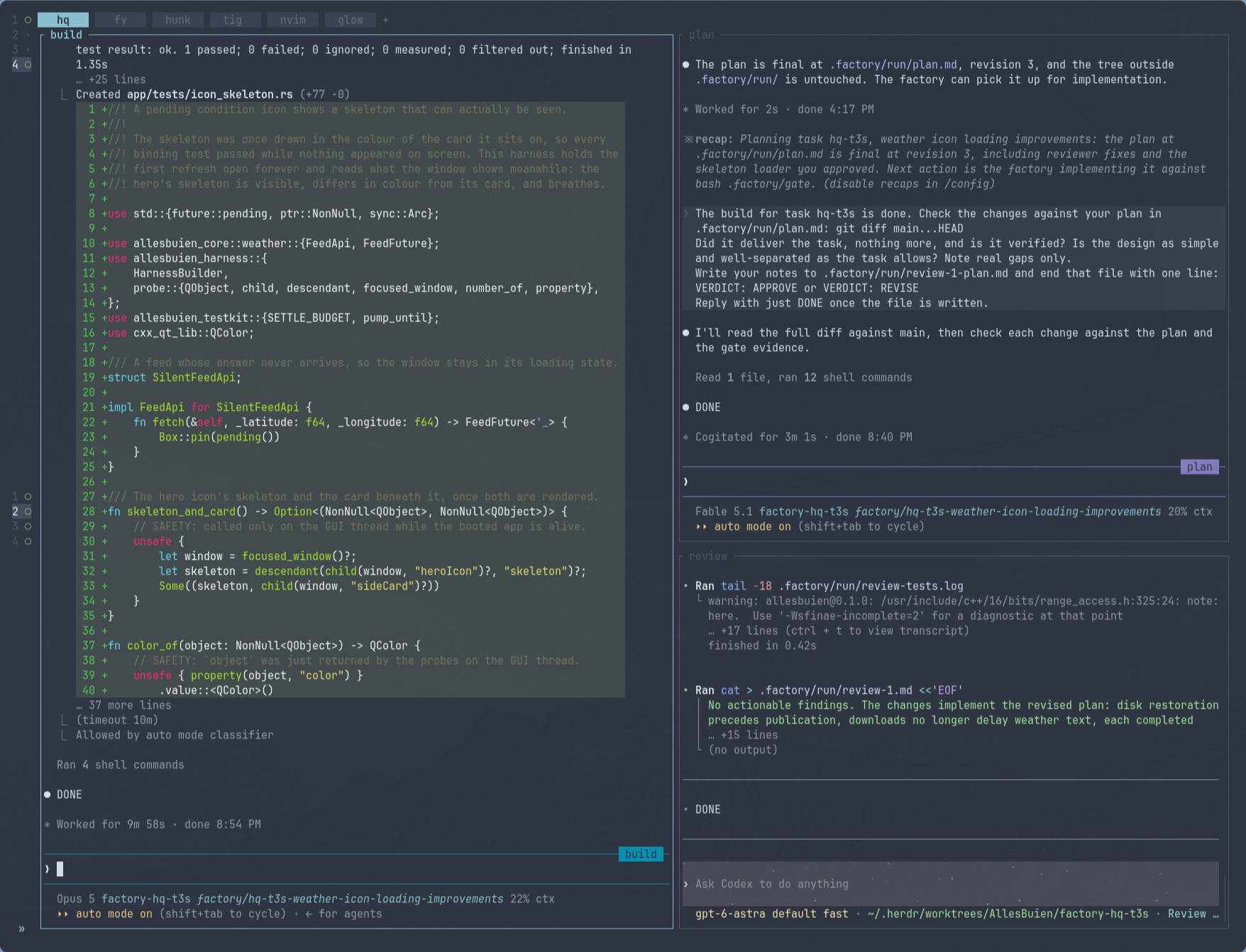
Every task gets its own Git worktree and Herdr workspace, so you can watch or step in.
The agents are your normal claude and codex sessions, so your skills, MCP servers,
hooks, CLAUDE.md and AGENTS.md apply unchanged; Factory adds no instruction files.
Whenever an agent stops for a question or an approval you get a Herdr toast.
How a run goes
- Plan. The planner explores the repo and writes
plan.md. If the task is ambiguous
in a way that changes the design, it asks you first. - Plan review. Codex and the builder each review the plan; the planner revises once
if either objects. - Your approval. Approve, send a note back, or abort.
- Build. The builder implements the plan and commits.
- Gate and guardrails. Factory runs the gate itself and checks the branch.
- Code review. Codex and the planner each review the diff. Anything but two approvals
sends it back to step 4, up toFACTORY_ROUNDStimes. - Your approval. Look at the branch; approve, send a note back for one more round, or
abort. - Done. Memories stored, bead closed, toast sent. With
--prthe branch is rebased
onto the base (the builder resolves conflicts), pushed, a pull request opened, and a
GitHub Copilot review requested and acted on until it is clean or recommends approval.
Merging stays yours;fy cleantidies up afterwards.
How it drives the agents
There is no daemon and no protocol: one foreground Bash process per task talks to Herdr
over its socket CLI. It creates the worktree workspace and panes, starts claude andcodex in them, sends each prompt with herdr agent prompt, and waits on Herdr's agent
lifecycle (working, idle, blocked) rather than parsing screens. Handoffs between
roles are files in the worktree's .factory/run/: the plan, the reviews with a verdict
line, the gate log. Factory never trusts an agent's word for "done": it checks the file
exists, runs the gate itself, and inspects the diff.
Because the state is the worktree plus Beads, the orchestrator is disposable. Kill it or
Ctrl-C it: the agents, worktree and workspace stay, the bead gets a note saying at which
step it was interrupted, and fy run with the bead id resumes: it reopens the workspace,
adopts the three agents still alive in it, and picks up after the last completed
milestone: a reviewed plan waiting for your approval, an approved plan, or an approved
build, reusing an open pull request. --fresh starts over.
Known startup dialogs (trust prompts, Codex's hook review and transcript overlay) are
cleared from the screen automatically, and a pane whose shell swallowed the startup command
gets a Ctrl-C and a retry; a block it does not recognise becomes a toast, and long waits
print a heartbeat every five minutes so a thirty-minute gate is visibly a wait, not a hang.
An agent still working when FACTORY_TURN_TIMEOUT_MS runs out gets you a toast and more
time; only a turn that has stopped working by then fails the run.
Requirements
- Linux with Bash 4 or newer (macOS with a newer Bash and GNU coreutils is untested).
- Herdr, Claude Code
and Codex. - mise, which installs the dev tools and
Beads (bd) frommise.toml;jqandgit;ghfor pull requests.
Status: early. Built and used by one person on Arch Linux; expect rough edges elsewhere.
Install
- Install the requirements above with their own installers, start Herdr once so its
server is up, and log in toclaude,codexand, for pull requests,gh. - Clone and install the tools Factory manages:
git clone [email protected]:robi42/factory.git ~/Projects/factory cd ~/Projects/factory # or wherever you keep repos mise install # just, shfmt, shellcheck, bats, codespell, bd ln -s "$PWD/factory" ~/.local/bin/fy # or any name you like - Make
bdresolve from a fresh login shell, because Claude Code runs its commands from
one:
Anything your gate needs (mise use -g 'ubi:steveyegge/beads[exe=bd]@1.2.2'just, language toolchains) has the same requirement. - Check:
fy doctor. It reports each prerequisite, whether the Herdr server answers, and
whetherbdresolves from a login shell; fix what it marks MISSING and run it again.
Use
# once per repo
fy init    ~/src/app                         # lean bd init, gate detection, AGENTS.md stub

# tasks
fy add     ~/src/app "Add CSV export" "..."  # file work as a bead
fy add     ~/src/app                         # ...or compose title and description in $EDITOR
fy tasks   ~/src/app                         # list open tasks; --all includes closed

# runs
fy next    ~/src/app                         # claim the next ready bead and run it
fy run     ~/src/app "Fix flaky login test"  # a one-off, also filed as a bead
fy queue   ~/src/app                         # work through everything that is ready
fy next    --pr --auto ~/src/app             # open a PR when approved; skip both approvals
fy run     --fresh ~/src/app app-k3x         # rerun from scratch instead of resuming

# while a run waits for you (from any terminal)
fy answer  ~/src/app app-k3x "1. CSV  2. keep the old format"
fy approve ~/src/app app-k3x                 # add --allow-protected when the plan must touch protected files
fy reject  ~/src/app app-k3x "keep it in one module"

# afterwards
fy pr      ~/src/app app-k3x                 # open a PR for a branch a run left behind; needs its builder agent alive
fy clean   ~/src/app                         # drop workspaces, worktrees and branches of merged tasks
fy clean   ~/src/app app-k3x --force         # ...or of one task you abandoned
fy check   <worktree> main                   # gate + guardrails on a branch, no agents
fy sync    ~/src/app                         # pull, then push the Beads database
fy status                                    # live Factory agents in Herdr
Parallel tasks
Run several tasks at once by starting fy next (or fy run) in separate terminals or
Herdr panes. Each task has its own worktree, workspace and agents; fy next claims its
bead atomically, so two starts never pick the same one. fy queue itself is sequential
on purpose: one approval prompt at a time per terminal is enough. Watch for two things when
running in parallel: heavy gates compete for CPU, and branches that touch the same files
get rebased when their pull request is opened, conflicts going to the builder, so the
second one pays for the overlap.
The human gates
Questions. When the planner asks, Factory prints the questions in its terminal and
waits: answer there (finish with a line containing only ., or Ctrl-D) or with fy answer. Up to
three rounds; if the planner still has questions after that, the run stops and you talk
to it in its pane.
Plan approval. Factory prints the plan and waits. Answer in its terminal: a approve,p approve and allow protected paths, r revise with a note, b abort; any other key
asks again. Or from anywhere:fy approve (with --allow-protected for the p case) and fy reject "note". A note
goes to the planner, the plan comes back revised with a short note on what changed and
why, and you are asked again. You can also edit plan.md or talk to the planner in its
pane first; the builder reads the file.--auto skips both approvals for unattended queues. If the run has no terminal it simply
waits for the files.
Build approval. Once the gate, guardrails and both reviewers are happy, Factory prints
the branch's commits and diff stat and waits the same way: a approve, r revise with a
note, b abort, or fy approve and fy reject "note" from anywhere. A note goes to the
builder and costs one more round of gate, guardrails and reviews before you are asked
again. Look at the worktree or talk to the builder in its pane first if you like.
Merge. On approval the bead is closed and you get a toast; the branch, namedfactory/<bead-id>-<title-slug> and checked out under Herdr's worktree directory as<repo>/factory-<bead-id>, is yours to merge. Otherwise the bead stays in progress
with a comment saying why, and the workspace stays open. Once merged (squash merges count
when the pull request shows as merged), fy clean removes the workspace, worktree and
branch and closes the bead.
Pull requests and Copilot
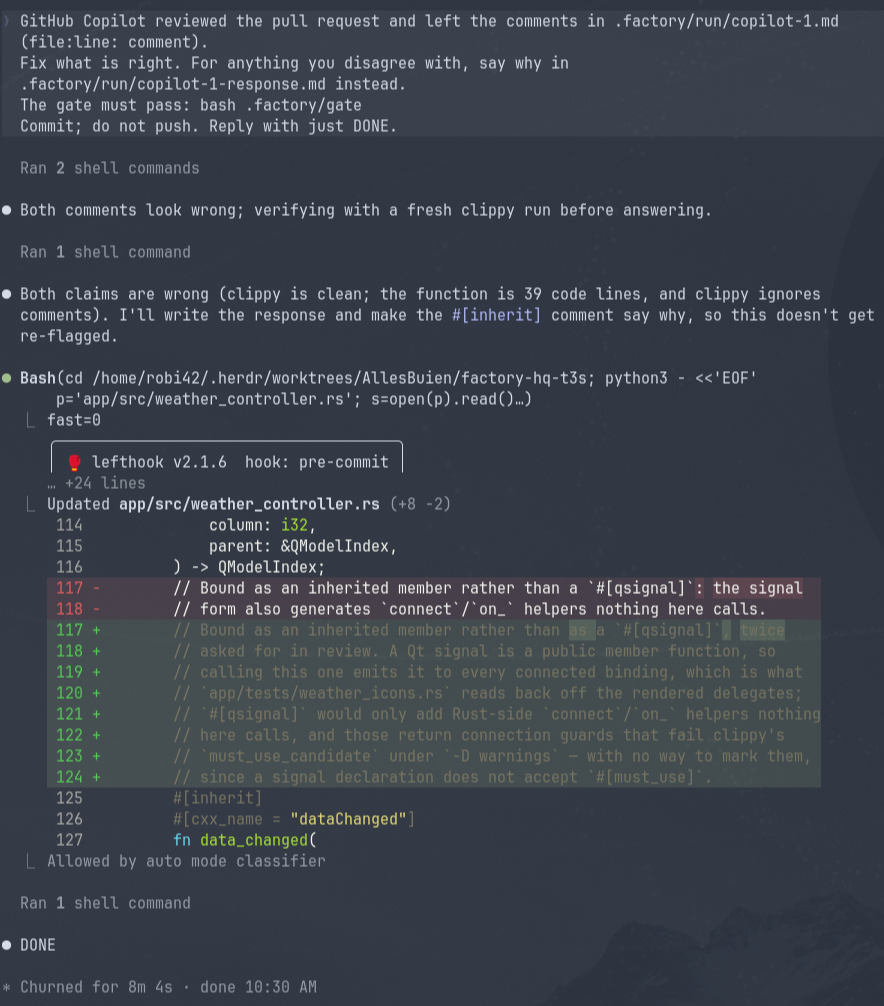
With --pr (or FACTORY_PR=1) an approved branch is first rebased onto the base branch,
the builder resolving any conflicts and the gate and guardrails running again if the
rebase changed anything, then pushed and a pull request opened with gh: the task as
summary, the checks as a list, the plan folded away. By default Factory then requests a
GitHub Copilot code review, hands its comments to the builder,
gates, pushes, posts one summary comment and resolves the threads it addressed, and asks
again, up to FACTORY_COPILOT_ROUNDS times, until a review of the head commit is
clean or recommends approval (its nits left open), or until the builder answers a round
without changing anything. Copilot never approves formally, only in its review text.--no-copilot (or FACTORY_COPILOT=0) turns it off.
Run artifacts
They live in .factory/run/ inside the worktree, ignored by Git: plan.md,questions.md (only when asked), plan-review.md (Codex), plan-review-build.md
(builder), review-N.md (Codex), review-N-plan.md (planner), response-N.md
(builder's pushback), plan-changes.md (what the planner changed after your note),copilot-N.md and copilot-N-response.md (Copilot's comments and the builder's
pushback), gate-N.log.
fy init writes a short AGENTS.md (with CLAUDE.md linking to it) only when a repo
has neither. Keep it to what the code cannot tell a new engineer: how to verify, layout
where not obvious, rules and reasons. Workflow lives in the prompts, not there.
The gate
The gate is your repo's definition of done: the checks the project itself defines, tests,
lint, types, coverage, whatever you would run before merging by hand. It is owned by the
repo and language-specific; Factory only runs it, and never takes an agent's word for it.
It is resolved once per run, in this order, and printed at start:
FACTORY_GATE, any shell command..factory/gatein the repo, run asbash .factory/gate: a committed script, protected
from the agents.fy initwrites one from the repo's convention for you to review.- The repo's own convention, detected:
bin/test,just ci, a Makefileci,check
ortesttarget, or the language default for Cargo, npm, pyproject, Go, Mix, Gradle,
Maven. - Otherwise the run refuses to start and says what to add.
After each build or revision the gate runs in the worktree, output to.factory/run/gate-N.log; exit code zero means pass. On failure the builder gets the
last forty lines and one round to fix, rerun and commit. Guardrails run only after the
gate passes, reviews only after both, and the final close-out checks that a passing gate
log exists for the approved round.
What belongs in a gate
Everything language-specific, and everything you would otherwise have to say in prose:
- Tests, with a coverage threshold if you want coverage enforced. Factory does not
check coverage itself; for instance, a--fail-underin the gate does. - Formatting and lint as errors, not warnings, so a run cannot go green on a nit.
- Type checks and static analysis, including security scanners.
- Custom rules for the shortcuts you have seen agents take in this codebase:
semgrep patterns, "no default values", "no skipped tests", banned constructs. - Architecture tests (ArchUnit, Konsist, dependency-cruiser, pytestarch and the
like) when a module boundary matters. This is where design rules become mechanical. - Fixtures that prove the gate itself fails on bad input. A gate that has never
been seen to go red is a guess.
Three properties matter more than the tool list. The gate must fail loudly or not at
all: a missing tool is a failure, never a skip. It must run the same way locally and in
CI, so the agents cannot pass here and fail there. And it should be fast enough to run
after every build round, or split into a fast part and a full part the way bin/test
and bin/check-fast do in a well-kept repo.
A good starting point
For a new project, AI Guardrails by
Florian Bütow ships copier blueprints for Python, Java, Go, Rust, Kotlin, Scala, Clojure,
Elixir, C++, TypeScript and shell that already contain all of the above behind onejust ci: formatting, lint, type checks, security scan, dependency hygiene, spell check,
custom semgrep rules, coverage thresholds, architecture tests, and a pre-commit hook that
runs the same thing. Factory detects just ci on its own, so a repo scaffolded from a
blueprint needs no gate setup at all, and Factory's own guardrail patterns are adapted
from the same rules. For an existing project, borrowing a blueprint's justfile andconfig/semgrep/ is the quickest way to a strict gate.
Commit hooks are the project's business, not Factory's. Factory installs none and does not
need any, since it runs the gate itself on the committed branch; but a repo's hooks do run
for the builder's commits, because worktrees share them, and fast ones give the builder
feedback before the gate does. Keep them fast and leave the slow checks to the gate.
Factory stays language-agnostic; whatever the gate says is done, is done.
Guardrails
Where the gate asks "does it work", the guardrails ask "was it done honestly". They are
Factory's own checks, language-agnostic and the same for every repo, run on the branch
after the gate passes and before review:
- No added lines matching
guardrails.txt: suppressions such asnoqa,type: ignore,eslint-disable,shellcheck disable; skipped tests;|| true. Adapted from
AI Guardrails. A repo can ship its own.factory/guardrails.txt, which replaces Factory's list for that repo and is protected
like the gate; copy the default and edit it. - A change to code files must also touch a test file (
FACTORY_REQUIRE_TESTS=0to relax). - No committed build artifacts, no uncommitted changes, at least one commit.
- Protected paths untouched:
.factory/gate,.factory/protected,.factory/guardrails.txt,.factory/env, and every glob listed in.factory/protected. A task that legitimately
must change them, such as adding the gate, gets a one-task waiver from you at plan
approval (p, or--allow-protected); the pull request body records it. - The planner must leave the code untouched; a dirty tree after planning is sent back once.
Knobs
| env | default |
|---|---|
FACTORY_PLAN_MODEL |
claude-fable-5-1 |
FACTORY_BUILD_MODEL |
claude-opus-5-5 |
FACTORY_REVIEW_MODEL |
gpt-6-astra |
FACTORY_PLAN_EFFORT |
xhigh (low, medium, high, xhigh, max) |
FACTORY_BUILD_EFFORT |
xhigh (the same levels) |
FACTORY_REVIEW_EFFORT |
xhigh (the same levels, and ultra) |
FACTORY_ROUNDS |
3 build / review rounds |
FACTORY_CLAUDE_PERMISSIONS |
auto (any Claude Code permission mode) |
FACTORY_TURN_TIMEOUT_MS |
3600000 (1 h); a stalled turn fails then, a working one toasts you and goes on |
FACTORY_GATE |
discovered: .factory/gate, then the repo's convention |
FACTORY_REQUIRE_TESTS |
1: code changes must also touch a test file |
FACTORY_APPROVAL |
ask; auto skips both human gates (--auto) |
FACTORY_POLL_SECONDS |
5 seconds between checks for the approve, reject and answer files |
FACTORY_PR |
0; 1 opens a pull request (--pr) |
FACTORY_COPILOT |
1; 0 skips the Copilot review loop (--no-copilot) |
FACTORY_COPILOT_ROUNDS |
3 Copilot review rounds |
FACTORY_COPILOT_WAIT_S |
900 (15 min) per Copilot review |
FACTORY_BD_PUSH |
1: push the Beads database to its sync remote after tasks and adds |
FACTORY_GUARDRAILS |
guardrails.txt next to the script |
FACTORY_FRESH |
0; 1 starts over instead of resuming (--fresh) |
fy help prints the current values.
A repo can commit its own defaults in .factory/env, one FACTORY_NAME=value per line,
blank lines and # comments allowed. The file is parsed, never sourced: values are taken
verbatim, with no quotes and no expansion. Precedence is flags, then the environment, then.factory/env, then the defaults above. Like the gate, the file is protected from the agents.
Optional extras
None required; each was worth it in practice. Anything you install into Claude Code or
Codex applies to every run.
Library docs and GitHub code search, for all agents.
claude plugin install context7@claude-plugins-official
claude mcp add --transport http grep_app https://mcp.grep.app
codex mcp add context7 --url https://mcp.context7.com/mcp
codex mcp add grep_app --url https://mcp.grep.app
Codex runs without approvals in Factory, so give grep.app a pass in ~/.codex/config.toml:
[mcp_servers.grep_app]
url = "https://mcp.grep.app"
default_tools_approval_mode = "approve"
Language servers for the Claude Code agents. One plugin per language you build in,
for instance the ones below; each expects its server binary on the PATH of a fresh login
shell. The official marketplace has more (C/C++, C#, Swift, Lua, PHP).
claude plugin install pyright-lsp@claude-plugins-official        # needs pyright
claude plugin install ruby-lsp@claude-plugins-official           # needs ruby-lsp (gem install ruby-lsp)
claude plugin install typescript-lsp@claude-plugins-official     # needs typescript-language-server
claude plugin install gopls-lsp@claude-plugins-official          # needs gopls
claude plugin install rust-analyzer-lsp@claude-plugins-official  # needs rust-analyzer
claude plugin install kotlin-lsp@claude-plugins-official         # needs kotlin-lsp
claude plugin install metals-lsp@factory-extras                  # Scala; needs metals, see below
claude plugin install jdtls-lsp@claude-plugins-official          # needs jdtls and JAVA_HOME
mise use -g 'npm:pyright' 'npm:typescript-language-server' 'npm:typescript' 'go:golang.org/x/tools/gopls'
jdtls cannot start through a mise java shim; point JAVA_HOME at a real JDK in your
login profile, e.g. export JAVA_HOME="$(mise where java@21)". Scala has no official
plugin, so extras/claude-marketplace in this repo ships metals-lsp: install Metals withcs install metals, register the marketplace once withclaude plugin marketplace add <path to extras/claude-marketplace>, then install as above.
Codex has no language server support; the gate covers that side.
A code graph for large codebases. CodeGraph
indexes a checkout into a local symbol graph that all agents query through one MCP tool,
which saves many file-by-file reads on big repos; on small ones the language servers above
already cover it. codegraph install wires it into both claude and codex. Its index is
per checkout and is not built on its own, so give each Factory worktree one, for instance
from a Claude Code SessionStart hook or the first line of your gate:
[ -d .codegraph ] || codegraph init
GitHub for the Codex reviewer. GitHub's remote MCP server, authenticated with a
token in an environment variable (Herdr panes are non-login shells, so .bashrc):
codex mcp add github --url https://api.githubcopilot.com/mcp/ \
  --bearer-token-env-var CODEX_GITHUB_PERSONAL_ACCESS_TOKEN
The builder side gets the same through claude plugin install github@claude-plugins-official.
Copilot code review needs a Copilot subscription on the GitHub account.
Desktop notifications. Factory's toasts (plan or build ready, questions, blocked,
done) are Herdr notifications, so where they appear is Herdr's [ui.toast] delivery
setting: herdr shows them inside Herdr only, system hands them to the desktop's
notification service so an approval request reaches you on another workspace. Set it in~/.config/herdr/config.toml and apply with herdr server reload-config.
Herdr agent integrations. herdr integration install claude and codex switch
Herdr from screen heuristics to hook-based agent state, which makes idle and blocked
detection more reliable. Factory handles the known startup dialogs either way.
Beads housekeeping. fy init sets beads.role so Beads stops warning; untracking.beads/interactions.jsonl keeps git status quiet.
Rendered Markdown at the prompts. With glow on
your PATH, the plan and the planner's questions are rendered in the terminal instead of
printed as-is. The look is glow's own: its config (glow config) picks the style, a
built-in one or a JSON of your own, for example a Nord one to match your terminal theme.
Why so lean
Factory is a single Bash script of under two thousand lines, and that is the point.
Current models plan, build and review well when given a clear task, a real codebase and
a hard definition of done; what they need from a harness is less than the frameworks of
a year ago assumed. So Factory bets on a few things:
- Short prompts over rulebooks. Each role gets a paragraph: the task, the gate, where
to write. Long instruction files drift, contradict each other, and get skimmed. DHH
reports the same from the other side: the system prompt Anthropic ships for Opus 5
shrank by 80% because the model "was actually being damaged by overly prescriptive
humans". - Mechanical gates over instructions. "Do not skip tests" is a sentence an agent can
ignore; a guardrail that rejects the diff is not. Whatever can be checked, is checked. - Two model families over one. A second reviewer from a different family catches
different mistakes, at the cost of one extra turn. Beyond two, returns diminish and
dialogs multiply. - Your own tools over a toolbox. The agents are plain
claudeandcodexsessions;
every skill, MCP server and hook you already use applies. Factory itself installs
nothing. - Humans at the points that matter. Approving the plan, approving the build, and
merging. Everything in between runs on its own, and every stop becomes a toast. - State in the repo's orbit. Tasks and memories live in Beads beside the code and
travel with the Git remote; run artifacts live in the worktree and disappear with it.
When a step turns out not to pull its weight, it goes. The plan interview, the design
check and the tests-required rule each earned their place on a real task first.
Inspiration
Factory borrows deliberately, and leaves out even more deliberately.
- Oh My OpenAgent showed the value of
distinct roles on distinct models: a planner that interviews, an executor, a plan critic
and a plan consultant before anything is built, and a loop that does not stop until the
work is done. Factory keeps the roles, the interview, the dual plan review and the loop,
and drops the harness around them. - Gas Town and Beads
showed that agents need a work ledger that outlives a session: tasks, comments and
memories in a database beside the code, pushed with it. Factory uses Beads as is and
skips the town. - AI Guardrails showed that the rules
worth having are the ones a machine checks: a strict gate, forbidden patterns, no silent
defaults. Factory's guardrails and its own CI follow that model. - DHH on the Lex Fridman Podcast (#501,
transcript) showed the working style
Factory is built for: state the problem, not the recipe; several models in panes side
by side; agents reviewing pull requests and reporting back; the human reviewing the shape
of everything and the lines of what is critical. Omarchy Quattro shipped that way with
no line written by hand.
Develop
just ci # shfmt, shellcheck, guardrails applied to ourselves, codespell, bats
Commits follow Conventional Commits: feat:,fix:, docs:, test:, chore:, with an optional scope such as docs(readme):.
License
MIT, see LICENSE.
Yorumlar (0)
Yorum birakmak icin giris yap.
Yorum birakSonuc bulunamadi