runout-bar
Health Gecti
- License — License: MIT
- Description — Repository has a description
- Active repo — Last push 0 days ago
- Community trust — 12 GitHub stars
Code Basarisiz
- rm -rf — Recursive force deletion command in scripts/build-app.sh
- rm -rf — Recursive force deletion command in scripts/get.sh
- rm -rf — Recursive force deletion command in scripts/install.sh
Permissions Gecti
- Permissions — No dangerous permissions requested
Bu listing icin henuz AI raporu yok.
macOS menu bar app for Claude and Codex usage through TeamClaude: level bars, pace charts, banked resets, routing and one-click updates


Runout Bar is a macOS menu bar app that shows Claude subscription usage from a local
TeamClaude proxy and Codex rate limits as colored
level bars, with the time your whole pool of accounts runs out, a pace dashboard, routing
controls, banked resets and one-click TeamClaude updates.
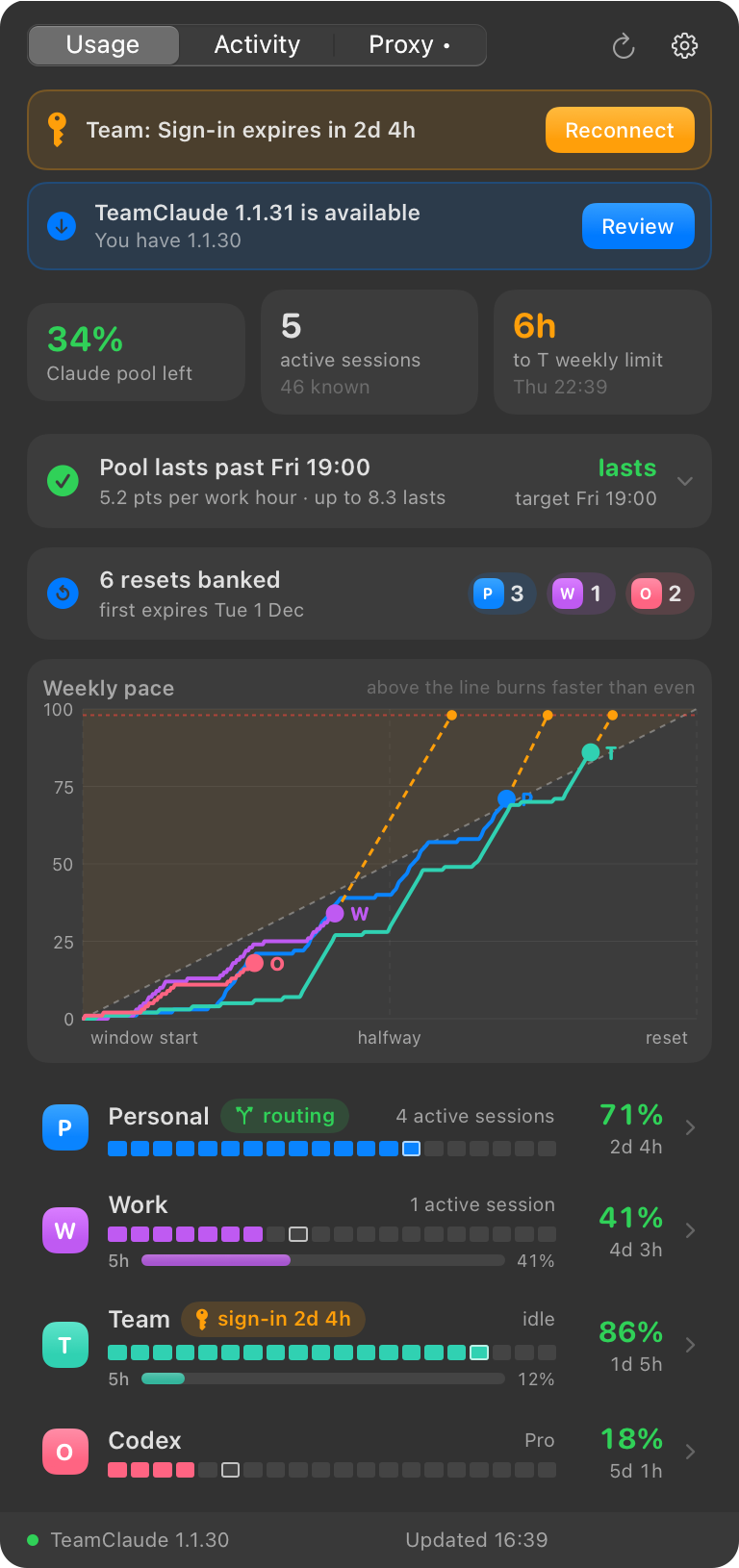
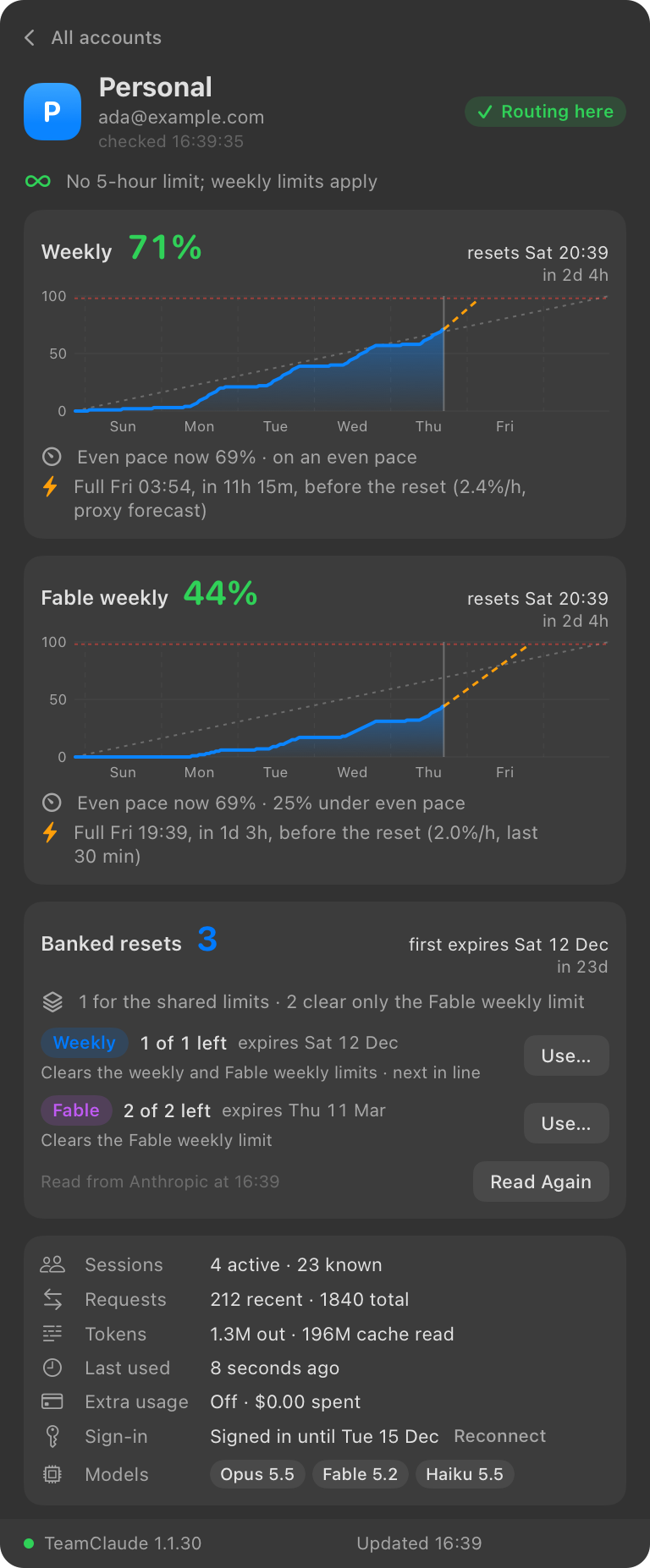
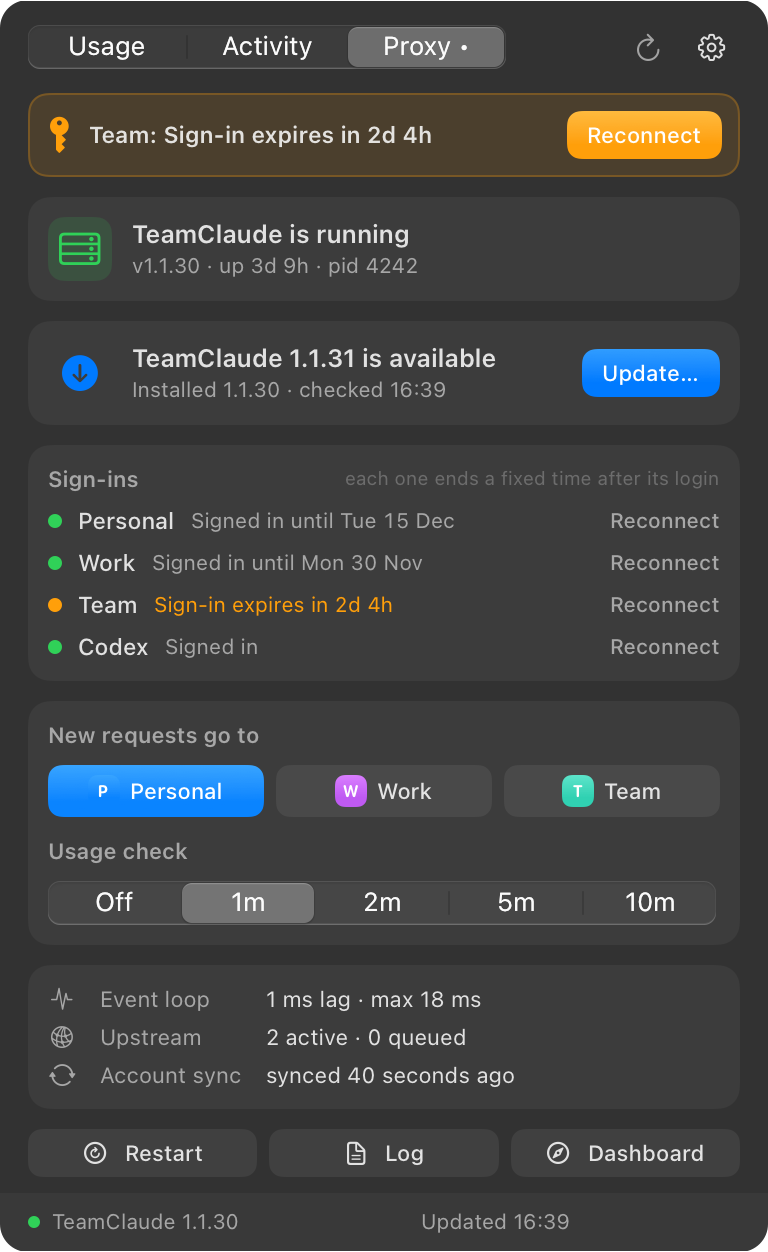
The screenshots show the made-up accounts of demo mode.
Quickstart
You need macOS 15 or later on Apple silicon and
TeamClaude installed with its LaunchAgent. The Codex
CLI is optional, and so is Node, which only the Claude reset button uses.
curl -fsSL https://raw.githubusercontent.com/RobinVivant/runout-bar/main/scripts/get.sh | bash
The script downloads the latest release, checks it against its SHA-256 file and
its signature, copies Runout Bar.app to ~/Applications and opens it. One bar per account
appears in the menu bar; click it for the dashboard. The first launch from an Applications folder
turns on Open at Login. Run the same line again to update.
Version 1.0 was called Usage Bar. The same line updates it: it removes Usage Bar.app, and the
first launch of Runout Bar moves your config, history and settings to the new names.
Download by hand
Download
Runout-Bar-<version>-arm64.zipfrom the
latest release and unzip it.Move
Runout Bar.appto/Applicationsor~/Applications.Open it. macOS blocks the first launch of a copy downloaded with a browser, because the build
is not notarized by Apple: choose Done, open System Settings > Privacy & Security,
scroll to the message about Runout Bar and choose Open Anyway. From a terminal, this does
the same:xattr -dr com.apple.quarantine "/Applications/Runout Bar.app"
If you update from Usage Bar 1.0 by hand, delete Usage Bar.app yourself.
The install script does not hit this block: curl does not mark its downloads as coming from
the internet, so macOS has nothing to check.
Build from source
With a Swift 6 toolchain (Xcode or the Command Line Tools), this builds Runout Bar.app, copies
it to ~/Applications and opens it. A build made on your own Mac opens without the block.
git clone https://github.com/RobinVivant/runout-bar.git
cd runout-bar
scripts/install.sh
Try it without an account
Demo mode runs the app on made-up accounts, without TeamClaude or Codex. It reads neither of
them, saves no history, sends no notifications, and every action answers "Demo data: nothing was
changed".
swift run RunoutBar --demo
What it shows
- Menu bar
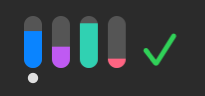 :
one level bar per account, filled to its fullest limit window. Bars turn orange
at 90% and red at 98% (TeamClaude's switch threshold), and grey when a reading is stale. A dot
marks the account that new requests go to, and a warning triangle means the proxy is down.
Beside the bars, the time the whole Claude pool is projected to run out, such asThu 15:40:
green when it lasts past the end of the work week, orange when it runs out before, red when it
runs out today or is out. A green✓means it lasts more than six days. It is hidden while
readings are stale or History is too short. Right click for Refresh, Open Dashboard and Quit. - Usage tab: Claude capacity left, active sessions and the next projected limit; the pool
run-out card with the projected time, the target, the margin and the pace that would last; a weekly
pace chart that compares each account with an even burn through its window and projects where
it lands; the banked resets each account holds; and one row per account. Click a row for its
timeline per window, forecast, banked resets, sessions, requests, tokens and models. Click the
run-out card for what the time is built from: the pace, the budget, the work week and what each
account has left. - Activity tab: weekly usage over 6 hours, 24 hours or 7 days, plus per-account activity and
a token breakdown. - Pointer: point at a chart for the reading at that time, and at a figure for what it is made
of. Whatever lights up under the pointer acts on a click: a line in the pace chart, a stat tile,
a legend entry or an activity card opens its account or tab, and the footer opens the Proxy tab. - Proxy tab: proxy status, the update card, routing (
teamclaude switch), the usage check
interval (teamclaude probe), event loop and upstream health, and Restart, Log and Dashboard
buttons. - Notifications: an account passes 90%, reaches its limit or comes back; every Claude account
is full; the proxy stops responding (two failed reads in a row) or recovers; a new TeamClaude
release is out (once per version). Restarts started from the app do not notify.
Pace uses the proxy's own forecast when it has one, then the rate measured over the last
30 minutes, then the average since the window began.
How it works
- Pool run-out: the pool runs out when every Claude account's weekly window is at
TeamClaude's switch threshold. The app measures the pace over the last two workdays, burns it
during work hours only, and gives each account its capacity back at its own reset. The target
is the end of the work week. See docs/pool-run-out.md. - Banked resets: a banked reset clears an account's limits before their own reset. The app
lists them for Claude and Codex accounts and spends one when you confirm; a spend cannot be
undone. Its calls to Anthropic go through one queue that waits out rate limits and shows the
wait. See docs/banked-resets.md. - TeamClaude updates: the app asks the npm registry for the latest release every 6 hours.
Update… asks for confirmation, installs the release with npm and restarts the proxy. See
docs/teamclaude-updates.md.
Configuration
Everything works without a config file. To name, color and order accounts, create~/.config/runout-bar/config.json, or choose Edit Accounts… in the settings menu to write a
starter file from the current accounts:
{
  "accounts": {
    "[email protected]": { "letter": "P", "label": "Personal", "color": "#0a84ff", "noFiveHourLimit": true },
    "[email protected]": { "letter": "W", "label": "Work", "color": "#bf5af2" },
    "openai": { "letter": "O", "label": "Codex", "color": "#ff6482" }
  },
  "order": ["[email protected]", "[email protected]", "openai"]
}
Account keys are TeamClaude account names; openai is the Codex login. Choose Reload
Accounts after editing.
| Key | Default | Meaning |
|---|---|---|
accounts.<name>.letter, label, color, symbol |
From the name and a palette | Badge letter, display name, #rrggbb color, SF Symbol |
accounts.<name>.noFiveHourLimit |
false |
The account has no 5-hour session window, for example a verified subscription |
order |
Proxy order | Display order of account keys |
teamclaude |
~/.local/bin/teamclaude |
TeamClaude CLI |
teamclaudeInstallDir |
~/.local/share/teamclaude |
npm prefix that holds the proxy |
npm |
/opt/homebrew/bin/npm |
npm used for updates |
node |
/opt/homebrew/bin/node |
Node used to list and spend Claude resets |
proxyService |
com.karpeleslab.teamclaude |
LaunchAgent label to restart |
proxyLog |
~/Library/Logs/teamclaude.log |
Log opened by the Log button |
dashboard |
http://127.0.0.1:3456/teamclaude/dashboard |
Page opened by Dashboard |
codex |
Searched in ~/.local/bin, /opt/homebrew/bin, /usr/local/bin |
Codex CLI; "" hides the Codex row |
workWeek |
{"days": ["Mon", "Tue", "Wed", "Thu", "Fri"], "start": "09:00", "end": "19:00"} |
Work days and hours for the pool run-out; the last day's end is the target |
Without noFiveHourLimit, an account whose 5-hour reading stops updating while its weekly
reading stays fresh drops the old 5-hour value and says "No 5-hour window reported since" in its
detail view.
The settings menu also sets what the menu bar shows (level bars, level bars and percent, or
letters and numbers), whether numbers count used or remaining capacity, the pool run-out time,
notifications, and Open at Login.
What it reads and sends
teamclaude status --jsonevery 60 seconds. The CLI adds the proxy key itself.codex app-server(account/rateLimits/read) about every 2 minutes, andaccount/rateLimitResetCredit/consumewhen you spend a Codex reset.- The npm registry, for the latest TeamClaude version. This is the app's only network call of
its own. - Anthropic's usage and reset endpoints, only when you list or spend a Claude reset. A short Node
script reads one account's token through TeamClaude's config loader and keeps it in its own
process; the app itself never reads TeamClaude's config or credentials. ~/Library/Application Support/RunoutBar/history.json: 8 days of samples for the charts and
pace.~/Library/Application Support/RunoutBar/alerts.json: what was last notified.
There is no telemetry. SECURITY.md says how to report a vulnerability.
To remove the app, choose Quit in its right-click menu, then delete~/Applications/Runout Bar.app, ~/Library/Application Support/RunoutBar and~/.config/runout-bar.
Development
swift test                                            # the RunoutCore test suite
swift run RunoutBar --demo                            # the app on made-up accounts
swift run RunoutBar --snapshot /tmp/runout-bar --demo # every screen in dark and light, as PNG files
scripts/build-app.sh                                  # the release app bundle in build/
Sources/RunoutCore: status and Codex parsing, pace and run-out models, Claude resets and the
API queue, history, alerts, update logic and process helpers. Covered byTests/RunoutCoreTests.Sources/RunoutBar: the status item, popover and SwiftUI views.scripts/: build, install, icon and brand image scripts.docs/: how the projection, the resets and the updates work.
Without --demo, swift run RunoutBar reads your real TeamClaude and Codex, and --snapshot
renders your real accounts.
Contributing
Bug reports and pull requests are welcome. CONTRIBUTING.md covers the setup,
the checks and the guidelines, and the Code of Conduct applies to every
project space.
License
MIT.
Runout Bar is an independent project. It is not affiliated with or endorsed by Anthropic, OpenAI
or the TeamClaude authors.
Yorumlar (0)
Yorum birakmak icin giris yap.
Yorum birakSonuc bulunamadi