copilot-security-instructions
Health Pass
- License — License: Apache-2.0
- Description — Repository has a description
- Active repo — Last push 0 days ago
- Community trust — 39 GitHub stars
Code Warn
- process.env — Environment variable access in src/core/config.js
Permissions Pass
- Permissions — No dangerous permissions requested
This tool provides a comprehensive ruleset, prompts, and an MCP server designed to guide AI coding assistants like GitHub Copilot toward secure coding defaults. It actively blocks risky patterns and reinforces safe security habits across Java, Node.js, C#, and Python projects.
Security Assessment
The overall risk is Low. The repository does not request dangerous permissions, execute shell commands, or make suspicious network requests. There are no hardcoded secrets. The only flagged behavior is standard environment variable access within a configuration file, which is a normal and safe development practice. The tool is intended to read and process text rather than handle sensitive system data.
Quality Assessment
The project is actively maintained, with its most recent code push occurring just today. It is legally clear to use under the permissive Apache-2.0 license. While relatively new and niche, it has garnered 39 GitHub stars, indicating a growing level of community trust and practical usefulness among developers.
Verdict
Safe to use.
✨ A customizable copilot-instructions.md ruleset & prompts to guide GitHub Copilot toward secure coding defaults in Java, Node.js, C# and Python. Blocks risky patterns, teaches safe habits.
🛡️ Copilot Security Instructions

A comprehensive toolkit to guide GitHub Copilot toward secure coding practices. This project includes customizable instructions and security-focused prompts to help development teams identify and mitigate security risks effectively.
Designed for security-conscious teams, this configuration ensures Copilot suggests safer code patterns, avoids common vulnerabilities, and reinforces best practices — all without disrupting your workflow.
🔐 What's Inside
This project offers:
- Secure-by-default guidance for all languages (e.g., input validation, secret handling, safe logging).
- Language-specific secure patterns:
- ☕ Java
- 🟩 Node.js
- 🟦 C#
- 🐍 Python
- "Do Not Suggest" lists to block risky Copilot completions (e.g.,
eval, inline SQL, insecure deserialization). - AI hallucination protections to prevent package spoofing, non-existent APIs, and misinformation risks.
- Mentorship-style tips to help newer engineers build secure coding habits.
- Custom agents & Agent Skills under
agents/andskills/for repeatable AppSec workflows inside Copilot. - An MCP server for seamless integration of these prompts into other projects.
🗂️ Prompt Catalogue
Explore the available prompts and their intended use cases:
These prompt files live under prompts/ in this repo and are intended to be copied into a consuming repository’s .github/prompts/.
Recommended workflow: start with the application-security-orchestrator agent (see agents/application-security-orchestrator.agent.md).
It standardizes intake, then hands off to specialist agents (Analyst/Architect/Engineer) depending on whether you want findings, a threat model, or implemented fixes.
| Prompt | Description | Intended Use |
|---|---|---|
| access-control-and-authorization-architecutre.prompt.md | Review and report on access control / authorization architecture for project. | Perform analysis of the current architecture for access control and authorization within the project. |
| assess-logging.prompt.md | Identify unsafe logging and exposure of sensitive data. | Audit log output for leaks and recommend safer patterns. |
| business-logic-review.prompt.md | Analyze overall business logic flow and decision making. | Map application behavior and critique critical logic paths. |
| check-access-controls.prompt.md | Audit authorization and access control weaknesses. | Ensure RBAC/ABAC enforcement and consistent permission checks. |
| check-for-secrets.prompt.md | Detect hardcoded secrets and credentials. | Locate embedded keys or tokens and suggest secure storage. |
| check-for-unvalidated-genai-acceptances.prompt.md | Find unvalidated AI-generated code or hallucinated assets. | Verify that AI suggestions are real, tested, and documented. |
| add-content-security-policy.prompt.md | Design, implement, and roll out a new Content Security Policy (CSP) safely. | Add CSP to a web app with a deployable policy string, rollout plan, and verification steps. |
| csp-review.prompt.md | Review a web application’s Content-Security-Policy (CSP) for XSS resistance, safe third-party usage, and deployability. | Evaluate an existing CSP policy and recommend hardening + rollout steps. |
| dependency-cve-triage.prompt.md | Triage a known CVE against a project's dependency: explain the exploit, assess reachability and configuration, and produce a structured Dependency Tracker report. | Analyze a specific CVE's impact on local code, determine exploitability, and generate a concise triage report. |
| review-auth-flows.prompt.md | Evaluate authentication logic and session handling. | Review login flows for common risks and best practices. |
| scan-for-insecure-apis.prompt.md | Spot deprecated or insecure API usage. | Replace risky APIs with modern, safer alternatives. |
| secure-code-review.prompt.md | Perform a comprehensive security review of the codebase. | Conduct an end-to-end audit for security issues. |
| threat-model.prompt.md | Produce a lightweight threat model using the 4Q approach with scoped threats, mitigations, and a validation plan. | Threat-model a feature/system or PR diff and generate durable artifacts. |
| validate-input-handling.prompt.md | Check for missing or unsafe input validation. | Evaluate request handling for validation and sanitization gaps. |
🧑💻 Agents
| Agent | Purpose |
|---|---|
| application-security-orchestrator | Standardize intake and route to the right specialist. |
| application-security-analyst | Read-only findings + remediation guidance. |
| application-security-architect | Threat models + guardrails + ADRs. |
| application-security-engineer | Implement fixes + tests with minimal diffs. |
🧩 Skills
| Skill | Intended use |
|---|---|
| secure-code-review | Repeatable security review workflow + findings template. |
| authn-authz-review | Review authentication and authorization controls. |
| input-validation-hardening | Tighten validation boundaries and parsing safety. |
| dependency-cve-triage | CVE reachability + remediation plan workflow. |
| secrets-and-logging-hygiene | Prevent secret leaks and add redaction defaults. |
| genai-acceptance-review | Prevent over-trust and prompt/tool injection risks. |
| threat-model-lite | Lightweight threat modeling with ranked mitigations. |
| secure-fix-validation | Prove fixes work and don’t regress behavior. |
📦 How to Use in a Real Project
Tip for contributors: when adding a file under prompts/, update the Prompt Catalogue table.
Leveraging Static Files
Copy the
copilot-instructions.mdfile into your repo under:.github/copilot-instructions.mdDrop the prompts you want into:
.github/prompts/Open the prompt you wish to run within your IDE
Click the
Run Promptbutton to the top-right of the file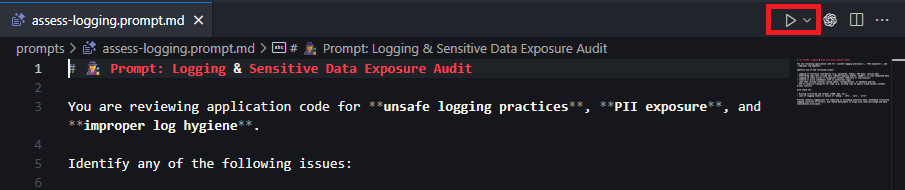
ℹ️ Note: If you don't see the run prompt button; check to make sure the
Chat: Prompt Filesfunctionality is enabled in your settings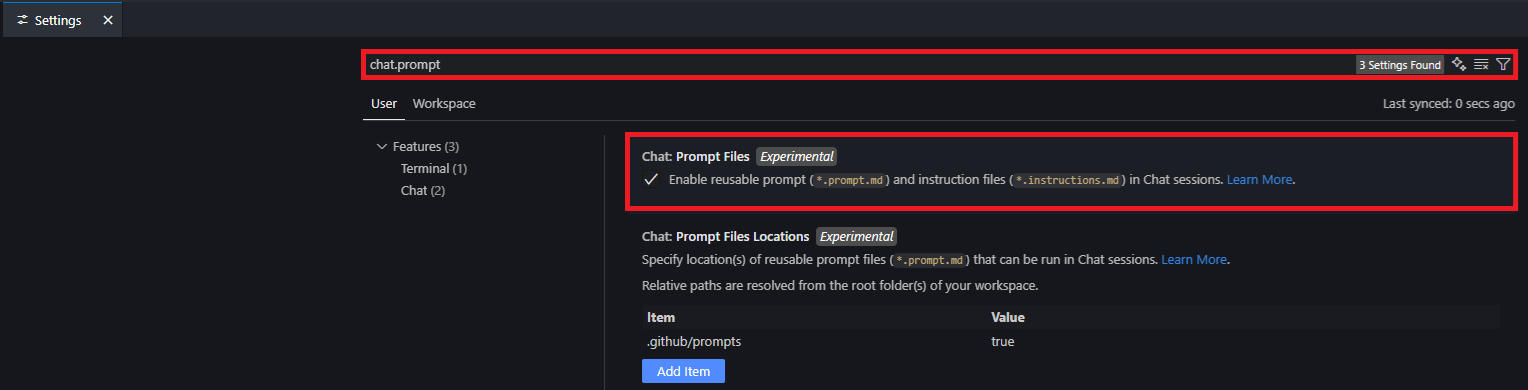
Leveraging the MCP Server
The MCP server simplifies the integration of secure coding prompts into your workflow. Follow these steps:
Run MCP from source
Install dependencies
npm installSetup environment
cp .env.example .envThe MCP server reads configuration from a
.envfile. Customize the following variables as needed:Variable Description Default server.portPort the MCP server listens on. 8080server.sslWhether to use ssl for express server falseserver.ssl.pfxPath to pfx file localhost.pfxserver.ssl.pfx.passphrasePassphrase for pfx file PFX_PASSPHRASEserver.hostnameHostname the server binds to. localhostlogger.transports.console.enabledEnable console logging output. falselogger.transports.console.levelLog level for console output. infologger.transports.amqp.enabledEnable AMQP-based logging. falselogger.transports.amqp.levelLog level for AMQP transport. httplogger.transports.amqp.hostnameHostname of the AMQP broker. localhostlogger.transports.amqp.portPort for the AMQP broker. 5672logger.transports.amqp.usernameUsername for AMQP authentication. guestlogger.transports.amqp.passwordPassword for AMQP authentication. guestlogger.transports.amqp.exchangeExchange name used for AMQP logging. logslogger.transports.amqp.vhostVirtual host for AMQP logging. /logslogger.transports.amqp.heartbeatHeartbeat interval in seconds. 60logger.transports.amqp.localeLocale for the AMQP connection. en_USlogger.transports.amqp.typeAMQP exchange type. directlogger.transports.amqp.durableWhether the AMQP exchange is durable. falseStart the server
npm start
Run MCP in Docker
Build docker container
docker build -t copilot-security-mcp .Run docker container
docker run -d -p 8080:8080 copilot-security-mcp
Configuring VSCode for MCP
Open VSCode and run the
MCP: Open User Configurationcommand.Add the following JSON configuration:
{
   "servers": {
      "copilot-instructions-mcp": {
         "url": "http://localhost:8080/mcp"
      }
   }
}
Save the configuration.
Navigate to the Extensions menu in VSCode.
Locate the
copilot-instructions-mcpserver, click the settings cog, and selectstart server.
Using MCP with GitHub Copilot
Open GitHub Copilot Chat.
Ask it to run any of the prompts against your repository or specific files.
Example:
Please get and run the secure code review prompt.
📚 Languages Supported
- ☕ Java — Spring, Jakarta, JDBC, OWASP Encoder
- 🟩 Node.js — Express,
pg,mongoose,helmet,ajv,zod - 🟦 C# — ASP.NET Core, Razor, ADO.NET, Entity Framework
- 🐍 Python — Flask, Django,
SQLAlchemy,pydantic,Jinja2,bcrypt,cryptography
🛠️ Development
Use these npm scripts to work on the project:
| Command | Description |
|---|---|
npm start |
Launches the MCP server on http://localhost:8080/mcp. |
npm run dev |
Starts the server with live reload via nodemon. |
npm run lint |
Runs ESLint and Markdownlint to verify code and docs. |
npm run lint:fix |
Attempts to automatically fix linting issues. |
Recommended workflow: Run npm run lint (and npm run lint:fix if needed) before committing or opening a PR.
📣 Feedback & Contributions
This project is community-friendly and designed for continuous improvement.
If you have suggestions, feedback, or language rules to contribute — feel free to open an issue or PR.
Let’s make Copilot safer, one suggestion at a time. 🛠️
Disclaimer
This repository, including all instructions, prompts, agents, examples, and related application content,
is provided “AS IS”, without warranties or conditions of any kind, express or implied, including without
limitation warranties of merchantability, fitness for a particular purpose, noninfringement, security,
accuracy, completeness, or regulatory compliance.
Use of this repository is at your own risk. Robotti and its contributors shall not be liable for any claims,
damages, losses, or other liability arising from or related to the use, misuse, or inability to use this
repository or any outputs produced from it.
Reviews (0)
Sign in to leave a review.
Leave a reviewNo results found