orchard
Health Uyari
- License — License: MIT
- Description — Repository has a description
- Active repo — Last push 0 days ago
- Low visibility — Only 6 GitHub stars
Code Gecti
- Code scan — Scanned 12 files during light audit, no dangerous patterns found
Permissions Gecti
- Permissions — No dangerous permissions requested
Bu listing icin henuz AI raporu yok.
Run coding agents (Claude Code, Codex, opencode) in parallel git worktrees, each with its own terminal, shells and lazygit. macOS and Linux app built with Tauri.
Orchard
Run coding agents in parallel git worktrees, on macOS and Linux.
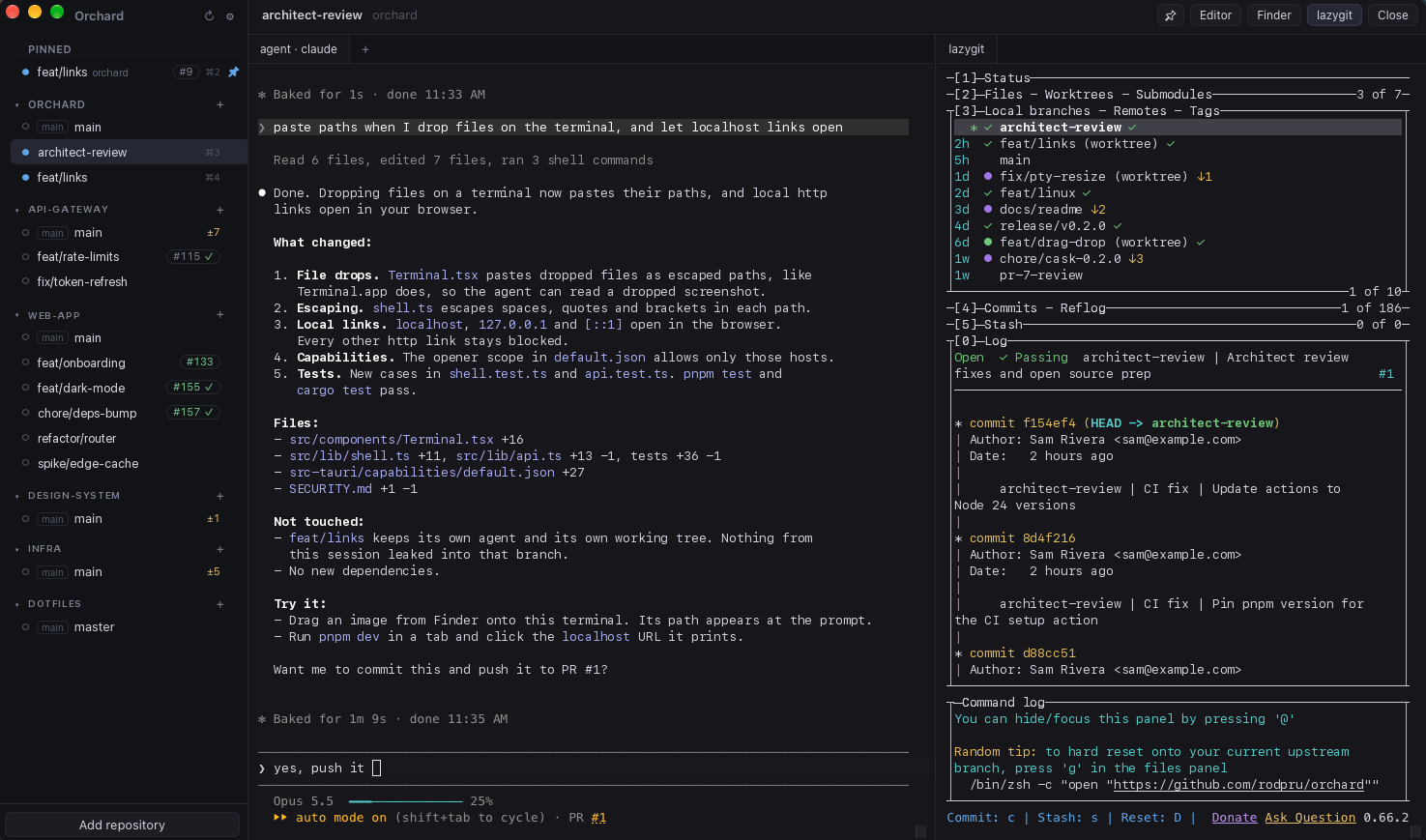
Each task gets its own worktree, and each worktree gets:
- an agent terminal running Claude Code, Codex, opencode or any other CLI;
- extra shells, as tabs;
- a lazygit pane next to it;
- the PR and CI status of its branch, from the
ghCLI.
The sidebar shows which agents are busy, which have new output and which rang the bell. Everything runs locally. Orchard is a desktop app built with Tauri, Rust and React.
Requirements
- macOS, or Linux. The
.debis for Ubuntu 22.04+ and Debian 12+ on x86_64; on other distributions, build from source. - The agent CLI you want to use, for example
claude
The Homebrew cask installs lazygit and gh for you. The .deb recommends both, so apt installs them where your distribution packages them: gh on every supported release, lazygit on Debian 13 and Ubuntu 25.04 or later. Otherwise, install lazygit with Homebrew or from its install guide; if it is missing, the lazygit pane says so. Either way, run gh auth login once.
Install
macOS
brew install --cask rodpru/tap/orchard
Orchard is not notarized by Apple. The cask removes the quarantine flag after install, so macOS opens the app without a Gatekeeper prompt. Install it only if you trust the tap.
Linux (Debian, Ubuntu)
curl -fLO https://github.com/rodpru/orchard/releases/latest/download/orchard_amd64.deb
sudo apt install ./orchard_amd64.deb
This adds Orchard to the application launcher and orchard to your PATH. apt installs WebKitGTK and GTK if they are missing. sudo apt remove orchard uninstalls it.
If the window stays blank, try starting it with WEBKIT_DISABLE_COMPOSITING_MODE=1 orchard. Orchard already turns off WebKitGTK's DMA-BUF renderer, the usual cause on NVIDIA and some Wayland setups.
Build from source
You need Rust (via rustup), Node and pnpm. On Linux you also need the WebKitGTK headers; on Debian or Ubuntu:
sudo apt install build-essential pkg-config libwebkit2gtk-4.1-dev libgtk-3-dev librsvg2-dev libsoup-3.0-dev
For other distributions, see the Tauri prerequisites. Then:
git clone https://github.com/rodpru/orchard.git
cd orchard
pnpm install
pnpm tauri build
On macOS, copy the app with cp -R src-tauri/target/release/bundle/macos/Orchard.app /Applications/; the build also produces a .dmg in src-tauri/target/release/bundle/dmg/. On Linux, install it with sudo apt install ./src-tauri/target/release/bundle/deb/*.deb. On distributions without apt, run the binary src-tauri/target/release/orchard directly.
Updates
Orchard checks GitHub Releases for a new version 30 seconds after launch and every six hours. On macOS it installs the update in the background, and you get it the next time you open Orchard; running agents are never interrupted. On Linux, an Update available button appears in the sidebar and opens the release page; install the new .deb with sudo apt install ./orchard_amd64.deb. The same button appears on macOS when Orchard's folder isn't writable by your user; update with brew upgrade --cask --greedy rodpru/tap/orchard. If a check fails for any reason other than being offline, Settings shows why. To turn this off, untick Update automatically in Settings.
Use
- Click Add repository and pick a git repository.
- Press
⌘N(Linux:Ctrl+Shift+N) to create a worktree. Give it a branch name and, if the branch is new, the base to start from. - The agent starts in the new worktree. Open more shells with
+, and push and open a PR with Create PR. - When the task is done, Remove deletes the worktree. Orchard asks whether to also delete the local branch; it never deletes the remote branch.
Open a worktree from the terminal
The Homebrew cask and the .deb put orchard on your PATH. If you built the macOS app from source, link it yourself:
ln -s /Applications/Orchard.app/Contents/MacOS/orchard /opt/homebrew/bin/orchard
Then:
orchard .
orchard <path> registers the repository that contains <path> and opens its worktree.
Shortcuts
| macOS | Linux | |
|---|---|---|
| New worktree in the current repository | ⌘N |
Ctrl+Shift+N |
| Switch between open worktrees | ⌘1…⌘9 |
Ctrl+Shift+1…9 |
| Copy and paste in a terminal | ⌘C, ⌘V |
Ctrl+Shift+C, Ctrl+Shift+V |
| Newline in agent prompts | Shift+Enter |
Shift+Enter |
Where things live
- Config:
~/Library/Application Support/io.github.rodpru.orchard/config.jsonon macOS,~/.config/io.github.rodpru.orchard/config.jsonon Linux. If it cannot be parsed, it is moved toconfig.json.corrupt-<timestamp>and Orchard starts with defaults. - Terminals: owned by the app, not the window. Closing a tab or a worktree view stops its processes; reloading the window does not. Quitting Orchard stops all of them.
- New worktrees:
<repo>.worktrees/<branch>next to the repository, or<folder>/<repo>/<branch>when a worktree folder is set in Settings.
Develop
pnpm install
pnpm tauri dev
Checks, also run in CI:
pnpm exec tsc --noEmit && pnpm lint && pnpm test
cd src-tauri && cargo fmt --check && cargo clippy --all-targets -- -D warnings && cargo test
IPC types in src/lib/bindings/ are generated from the Rust structs. After changing one, run pnpm gen:types and commit the result.
Security
Orchard runs the commands you configure, by design. See SECURITY.md for details and for how to report a vulnerability.
License
Yorumlar (0)
Yorum birakmak icin giris yap.
Yorum birakSonuc bulunamadi