adr-guard
Health Uyari
- License — License: MIT
- Description — Repository has a description
- Active repo — Last push 0 days ago
- Low visibility — Only 5 GitHub stars
Code Gecti
- Code scan — Scanned 12 files during light audit, no dangerous patterns found
Permissions Gecti
- Permissions — No dangerous permissions requested
Bu listing icin henuz AI raporu yok.
Architecture Decision Records (ADRs) toolkit with .NET CLI, VS Code extension, GitHub Action, MCP server, and architecture governance tools.
ADR Guard







Português (Brasil) · Documentation portal · Markdown documentation · Changelog
Understand architectural decisions. Record the reasoning. Keep the history trustworthy.
ADR Guard is a lightweight .NET command-line tool for creating, validating, reviewing, and indexing Architecture Decision Records (ADRs). It keeps decision documentation consistent in local development and CI without making architectural decisions for your team.
What is an ADR?
An ADR is a short document that explains one consequential software decision: the context that required it, the option selected, and the benefits and costs that follow. ADRs help future contributors understand why a system was shaped a certain way—not only what the code does.
New to the practice? Follow the progressive guide:
What ADR Guard does
- creates offline
ProposedADRs from Minimal, Extended, or constrained Custom templates; - validates canonical structure, filenames, statuses, required sections, links, IDs, and supersession relationships;
- supports separate, opt-in MADR 4.0 validation;
- generates a deterministic Markdown index only after validation succeeds;
- supports Git-aware incremental checks, diagnostic baselines, and JSON/SARIF reports;
- offers opt-in, advisory architecture impact analysis from explicit ADR-to-code mappings;
- verifies opt-in architectural drift and fitness evidence without evaluating MSBuild or treating missing evidence as compliance;
- offers opt-in, human-reviewed AI drafting and technical review with explicit providers and context;
- integrates with GitHub Actions, VS Code, versioned container images, and an optional independently packaged MCP server for compatible agents.
Validation confirms deterministic documentation rules. It does not approve technical merit, authorize a decision, or turn AI output into an accepted architecture.
Install
Install the published .NET Tool from NuGet.org:
dotnet tool install --global RodriOliveira.AdrGuard
adr-guard --version
Update an existing installation with dotnet tool update --global RodriOliveira.AdrGuard. GitHub Packages is also available as an authenticated secondary registry for the CLI. The independent MCP 1.0.0 package is available on NuGet.org; see MCP release distribution for the optional GitHub Packages channel and safe backfill of the existing release. See GitHub Releases or the NuGet badge for the current CLI version.
Quick start
From the root of an existing repository:
adr-guard init . --adr-directory docs/adr --template minimal
adr-guard new docs/adr --title "Use PostgreSQL as the order system of record"
Edit the generated Proposed ADR to replace its guidance with your real context, decision, and balanced consequences. Review it with the people affected by the choice, then run:
adr-guard check docs/adr
adr-guard index docs/adr
check validates the ADR set. index validates again and creates or updates docs/adr/README.md; new does not update the index automatically. Read the first ADR tutorial for the complete workflow.
Choose the right structure
| Option | Use it when | Product boundary |
|---|---|---|
| Minimal | Core context, choice, rationale, and consequences are enough | Generated by new/draft; canonical validation |
| Extended | Options, drivers, risks, or cross-team impact need explicit treatment | Generated by new/draft; canonical validation; not MADR |
| Custom | A team needs additional canonical prompts or sections | One strict local file via --template-file; not arbitrary Markdown |
| MADR 4.0 | The team deliberately uses MADR's external structure | Separately authored; opt-in --adr-format madr-4; no built-in new generator |
See the selection matrix, complete examples, custom template contract, and MADR compatibility guide.
Integrations
| Integration | Use | Guide |
|---|---|---|
| GitHub Action | Validate, index, or explicitly run AI review/architecture impact analysis on supported Linux runners | Consumer guide |
| VS Code | Visual ADR management, architecture/governance workflows, commands, Problems diagnostics, and ADR Explorer through a compatible installed CLI | Extension guide |
| MCP server | Give compatible agents structured, read-only access to ADR discovery, validation, impact, and drift tools | MCP overview |
| Containers | Run the same versioned CLI from GHCR or Docker Hub | Container and supply-chain guide |
| CI reports | Produce text, JSON, or SARIF validation output | Check reports |
| Agent Skills | Give agents portable instructions for human-controlled ADR and CLI workflows | Skills guide |
Release status (verified on 2026-10-18): CLI 1.8.0 is published on NuGet.org and in its GitHub Release. VS Code 1.0.1 is published in the Visual Studio Marketplace; version 1.1.0 remains a source/VSIX candidate. MCP 1.0.0 is published independently on NuGet.org, in its GitHub Release, and in the MCP Registry. See the compatibility matrix for exact component boundaries.
The published ADR Guard for VS Code extension includes the visual ADR list plus guided creation, editing, and settings. These screens require the CLI 1.7.0 form contracts. Extension and CLI versions remain independent.
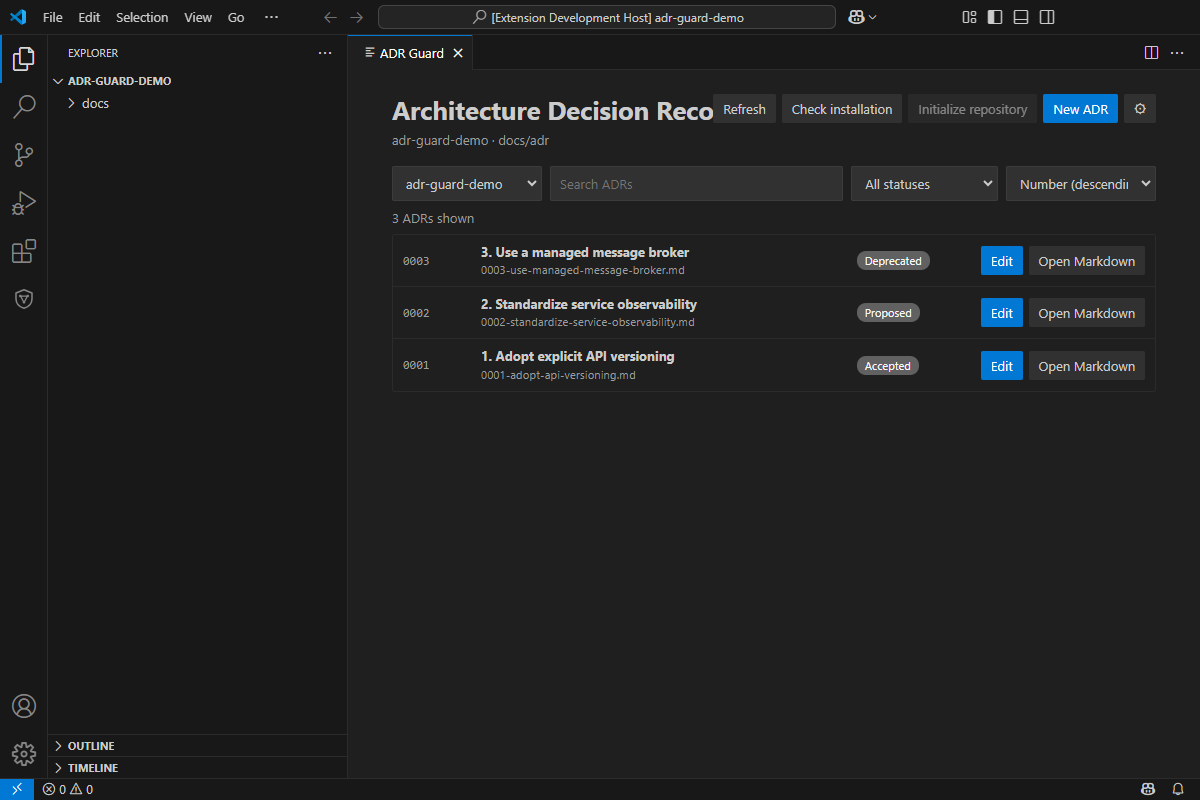
See the extension source and installation guide and the portal's VS Code Visual Guide for the complete interface walkthrough.
Structured ADR creation and editing are implemented for trusted visual clients such as the VS Code extension. A compatible CLI from the 1.7.0 line exposes new <directory> --form and edit <file> --form as versioned JSON stdin/stdout contracts; they are not interactive terminal forms. The traditional new --title workflow remains the human-facing command-line path, including constrained custom templates. See the creation guide, CLI contract reference, and extension guide. Confirm that both the CLI and extension versions providing the visual forms have been published before relying on them.
The GitHub Marketplace Action and Visual Studio Marketplace extension are published. The moving @v1 tag is published and supports check, index, opt-in review since v1.1.6, and opt-in impact since v1.5.0. In v1.6.0, drift is provided through the CLI/direct-container workflow, alongside new and draft; it is not a composite Action mode. The extension does not bundle the CLI.
The independent MCP 1.0.0 release can be installed with dotnet tool install --global RodriOliveira.AdrGuard.Mcp --version 1.0.0. Its authenticated GitHub Packages backfill remains a separate manual distribution step; NuGet.org is the recommended source. See MCP configuration, available tools, VS Code integration, and security and permissions.
Agent Skills (P0 + P1)
Eleven portable Agent Skills cover ADR setup, creation, validation, technical review, lifecycle management, CI setup, when to write ADRs, trade-off analysis, supersession, audits, and team adoption. The skills guide agents in using ADR Guard; they do not install the CLI or make architectural approvals.
npx skills add rodri-oliveira-dev/adr-guard --list
npx skills add rodri-oliveira-dev/adr-guard --skill adr-guard-create --agent codex
The eleven Agent Skills are available on the default branch. See installation, safeguards, and scope to select and install only the workflows you need.
Documentation
- Learn: fundamentals, decision categories, lifecycle, and anti-patterns.
- Use: first ADR tutorial, team adoption, and offline creation.
- Reference: CLI and configuration, compatibility matrix, validation and governance, and full technical index.
- Architecture analysis: impact analysis, architectural drift, diagnostic baselines, and AI review.
- MCP: overview, configuration, tool contracts, and security.
- AI boundaries: CLI review has been published since v1.1.2 and runs explicitly as
adr-guard review; deterministic policy enforcement may return exit code4. See the AI review guide, draft privacy, and review security. - Project architecture: ADR Guard's own generated ADR index.
English is the default documentation language. Brazilian Portuguese pages use .pt-BR.md and are linked from each translated page.
Build and contribute
The project targets .NET 10. To build and test from source:
dotnet restore AdrGuard.slnx
dotnet build AdrGuard.slnx --no-restore
dotnet test AdrGuard.slnx --no-build
Issues and focused pull requests are welcome. Use the issue tracker for proposals and reproducible bugs, SUPPORT.md for support, and SECURITY.md for private vulnerability reporting.
Releases and license
Published artifacts and exact version notes are available in GitHub Releases. Repository release notes remain under docs/releases.
ADR Guard is licensed under the MIT License.
Yorumlar (0)
Yorum birakmak icin giris yap.
Yorum birakSonuc bulunamadi