computer-use-cache
Health Gecti
- License — License: MIT
- Description — Repository has a description
- Active repo — Last push 0 days ago
- Community trust — 33 GitHub stars
Code Basarisiz
- process.env — Environment variable access in bin/computer-use-cache.mjs
- network request — Outbound network request in bin/computer-use-cache.mjs
- process.env — Environment variable access in src/client.mjs
- process.env — Environment variable access in src/server.mjs
- network request — Outbound network request in src/server.mjs
- network request — Outbound network request in test/smoke.mjs
- Hardcoded secret — Potential hardcoded credential in test/smoke.mjs
Permissions Gecti
- Permissions — No dangerous permissions requested
Bu listing icin henuz AI raporu yok.
Drop-in OpenAI-compatible cache that replays repeated computer-use and agent workflows at near-zero cost.
Computer-Use Cache








Stop paying twice for the same computer-use task.
Replay repeated browser, coding, and tool workflows at near-zero cost through a drop-in OpenAI-compatible API.
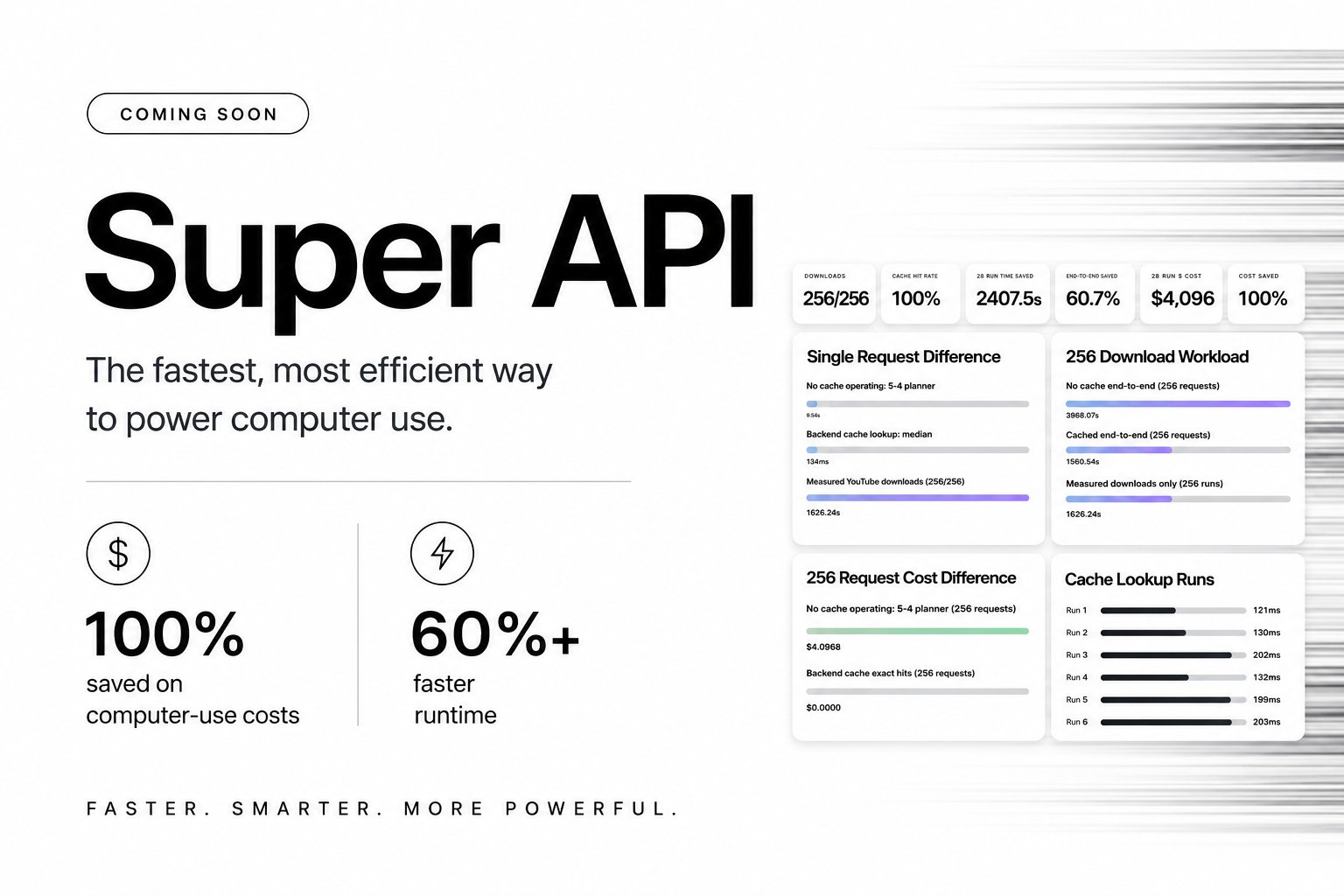
Benchmark preview: 256/256 cache hits, 100% computer-use cost saved, 60%+ faster runtime.
Live demo:
Try the live Super API dashboard
Why This Exists
Computer-Use Cache makes repeatable agent workflows cheap and reliable. Computer-use agents often repeat the same planning, browser, coding, and tool-use prompts. This server sits between your app and any OpenAI-compatible provider, forwards cache misses upstream, stores successful JSON responses, and serves exact repeated requests from cache.
It is intentionally small and provider-neutral. There is no app auth, billing, credits, realtime voice, product state, or custom model catalog logic. Use the npm package for a zero-dependency local proxy, or use the Python server when you want the SQLite implementation.
Features
- Drop-in
baseURLreplacement for OpenAI-compatible clients. - One-command setup for Codex, Claude Code, Cursor, OpenClaw, and Hermes.
npxCLI for agents:computer-use-cache start,install,init,stats,clear, andenv.- Zero-dependency Node proxy packaged for npm.
- Works with OpenRouter by default and OpenAI directly via
UPSTREAM_BASE_URL. - File-backed npm cache or SQLite-backed Python cache with TTL, model allowlists, and denylists.
- Cache hit/miss headers on every response.
- Streaming support for cache hits via Server-Sent Events.
- Request-level cache bypass controls.
- Concrete examples for YouTube downloads, website generation, Browserbase replay, Daytona replay, OpenClaw, and Hermes.
- Docker and Gunicorn-ready deployment.
- MIT licensed.
Quick Start
NPM Agent Tool
Install setup files for your agent, then run a local OpenAI-compatible cache in front of OpenRouter or OpenAI:
export UPSTREAM_BASE_URL=https://openrouter.ai/api/v1
export UPSTREAM_API_KEY=sk-or-v1-your-key-here

npx -y github:rohanarun/computer-use-cache install all
npx -y github:rohanarun/computer-use-cache start
Install one agent at a time:
npx -y github:rohanarun/computer-use-cache install codex
npx -y github:rohanarun/computer-use-cache install claude-code
npx -y github:rohanarun/computer-use-cache install cursor
npx -y github:rohanarun/computer-use-cache install openclaw
npx -y github:rohanarun/computer-use-cache install hermes
Point any OpenAI-compatible agent or SDK at:
export OPENAI_BASE_URL=http://127.0.0.1:8000/v1
export OPENAI_API_KEY=$UPSTREAM_API_KEY
Useful CLI commands:
npx -y github:rohanarun/computer-use-cache install all
npx -y github:rohanarun/computer-use-cache init
npx -y github:rohanarun/computer-use-cache env
npx -y github:rohanarun/computer-use-cache stats
npx -y github:rohanarun/computer-use-cache clear
npx -y github:rohanarun/computer-use-cache doctor
Install locally:
npm i computer-use-cache
computer-use-cache start --port 8000
Paste This Into Any Agent
Use Computer-Use Cache as the OpenAI-compatible base URL for repeatable computer-use, browser, coding, and tool workflows.

Base URL: http://127.0.0.1:8000/v1

Keep deterministic parameters stable when replaying work: model, messages, tools, tool_choice, response_format, temperature, top_p, and seed.
Use cache: false only for private, one-off, or credential-bearing requests.
Never include API keys, passwords, private tokens, or credentials in cached prompts.
Check X-Computer-Use-Cache: HIT, MISS, or BYPASS to understand savings.
Python Server
cd code-model-cache-server

python3 -m venv .venv
source .venv/bin/activate
pip install -r requirements.txt

export UPSTREAM_BASE_URL=https://openrouter.ai/api/v1
export UPSTREAM_API_KEY=sk-or-v1-your-key-here

python server.py
Point any OpenAI-compatible client at:
http://127.0.0.1:8000/v1
The npm and Python servers expose the same OpenAI-compatible routes.
Concrete Workflows
These examples are designed to make cache wins obvious. The first run does the real work. The second run reuses the same model request and should return X-Computer-Use-Cache: HIT.
- YouTube download workflow
- Generated website workflow
- Browserbase replay workflow
- Daytona replay workflow
- OpenClaw and Hermes provider setup
OpenAI SDK Example
import OpenAI from "openai";

const client = new OpenAI({
  baseURL: "http://127.0.0.1:8000/v1",
  apiKey: "local-dev",
});

const result = await client.chat.completions.create({
  model: "openai/gpt-4.1-mini",
  messages: [
    { role: "user", content: "Generate a TypeScript debounce helper." },
  ],
  temperature: 0.2,
});

console.log(result.choices[0].message.content);
JS SDK Helper
import OpenAI from "openai";
import { openAIConfig } from "computer-use-cache";

const client = new OpenAI(openAIConfig({
  baseURL: "http://127.0.0.1:8000/v1",
  apiKey: process.env.UPSTREAM_API_KEY,
}));
If UPSTREAM_API_KEY is configured on the server, client API keys are ignored for upstream forwarding. If it is not configured, the server forwards the incoming Authorization: Bearer ... token upstream.
Curl Example
curl http://127.0.0.1:8000/v1/chat/completions \
  -H "Authorization: Bearer local-dev" \
  -H "Content-Type: application/json" \
  -d '{
    "model": "openai/gpt-4.1-mini",
    "messages": [
      {"role": "user", "content": "Write a tiny Python function that adds two numbers."}
    ],
    "temperature": 0.2
  }'
The first request is a cache miss and gets forwarded upstream. Repeat the exact same request to get a cache hit.
Cache status is returned in headers:
X-Computer-Use-Cache: MISS
X-Computer-Use-Cache-Key: ...
X-Computer-Use-Cache-Store: stored
The legacy X-Code-Model-Cache headers are also returned for compatibility.
Routes
| Method | Route | Description |
|---|---|---|
POST |
/v1/chat/completions |
OpenAI-compatible chat completions. |
POST |
/chat/completions |
Chat completions alias. |
POST |
/api/v1/chat/completions |
Chat completions alias. |
POST |
/api/chat/completions |
Chat completions alias. |
POST |
/v1/completions |
OpenAI-compatible legacy completions. |
POST |
/completions |
Legacy completions alias. |
GET |
/v1/models |
Proxy upstream models. |
GET |
/models |
Models alias. |
GET |
/healthz |
Health check. |
GET |
/cache/stats |
Cache stats. |
POST |
/cache/clear |
Clear cache, optionally protected by CACHE_ADMIN_TOKEN. |
Docker
docker build -t code-model-cache-server .
docker run --rm -p 8000:8000 \
  -e UPSTREAM_BASE_URL=https://openrouter.ai/api/v1 \
  -e UPSTREAM_API_KEY=sk-or-v1-your-key-here \
  -v "$PWD/data:/data" \
  code-model-cache-server
Configuration
| Variable | Default | Description |
|---|---|---|
UPSTREAM_BASE_URL |
https://openrouter.ai/api/v1 |
Upstream OpenAI-compatible base URL. |
UPSTREAM_API_KEY |
empty | Server-side upstream API key. Falls back to OPENROUTER_API_KEY or OPENAI_API_KEY. |
UPSTREAM_TIMEOUT_SECONDS |
180 |
Upstream request timeout. |
HOST |
127.0.0.1 for npm, 0.0.0.0 for Python |
Bind host for local runs. |
PORT |
8000 |
Bind port for local runs. |
CACHE_DIR |
./.computer-use-cache |
NPM package file cache directory. |
CACHE_DB_PATH |
./code_model_cache.sqlite3 |
SQLite cache location. |
CACHE_ENABLED |
1 |
Default cache behavior. Requests can override with "cache": false. |
CACHE_TTL_SECONDS |
2592000 |
Cache entry TTL. Set 0 to disable expiry. |
CACHE_MAX_INPUT_CHARS |
120000 |
Max canonical request size to cache. |
CACHE_MAX_RESPONSE_CHARS |
240000 |
Max response JSON size to cache. |
CACHE_MODEL_ALLOWLIST |
empty | Comma-separated shell-style model patterns. Empty means cache all models. |
CACHE_MODEL_DENYLIST |
empty | Comma-separated shell-style model patterns to never cache. |
CACHE_IGNORE_KEYS |
empty | Extra request body keys to exclude from cache hashing. |
INCLUDE_CACHE_METADATA |
0 |
Adds a code_model_cache object to JSON responses. Headers are always set. |
CACHE_ADMIN_TOKEN |
empty | If set, required for POST /cache/clear. |
OPENROUTER_HTTP_REFERER |
empty | Optional OpenRouter attribution header. |
OPENROUTER_X_TITLE |
empty | Optional OpenRouter attribution header. |
The keys stream, cache, cache_control, and metadata are excluded from cache hashing by default.
Request Cache Controls
Disable caching for one call:
{
  "model": "openai/gpt-4.1-mini",
  "messages": [{ "role": "user", "content": "Do not cache this." }],
  "cache": false
}
You can also use:
{
  "cache_control": { "enabled": false }
}
Or send:
X-Cache-Bypass: true
Cache Key Behavior
The cache key is a SHA-256 hash of a canonical JSON payload containing the request body minus cache-control-only fields:
streamcachecache_controlmetadata- any extra keys listed in
CACHE_IGNORE_KEYS
This means model, messages, tools, tool_choice, response_format, temperature, top_p, max_tokens, seed, provider-specific params, and most other body fields participate in the key.
Requests that appear to contain secrets such as API keys, passwords, access tokens, refresh tokens, or private keys are not cached.
Streaming
For stream: true:
- Cache hits are returned as Server-Sent Events using the cached response text.
- Cache misses are proxied upstream as streams and are not written to cache.
For best cache population, make the first request non-streaming, then repeat it with stream: true if your client requires streaming behavior.
Production Checklist
- Put the service behind HTTPS before exposing it publicly.
- Set
CACHE_ADMIN_TOKENif/cache/clearis reachable outside localhost. - Use a persistent volume for
CACHE_DB_PATH. - Configure allowlists or denylists if only certain models should be cached.
- Monitor
/cache/statsfor hit rate, saved calls, and cache size.
License
MIT. See LICENSE.
Yorumlar (0)
Yorum birakmak icin giris yap.
Yorum birakSonuc bulunamadi