showboard
Health Warn
- License — License: MIT
- Description — Repository has a description
- Active repo — Last push 0 days ago
- Low visibility — Only 5 GitHub stars
Code Warn
- process.env — Environment variable access in bench/run.mjs
- network request — Outbound network request in bench/run.mjs
- process.env — Environment variable access in bench/usage.mjs
Permissions Pass
- Permissions — No dangerous permissions requested
No AI report is available for this listing yet.
Your coding agent answers with dashboards, not paragraphs. An MCP server for Claude Code, Codex, Cursor, Gemini CLI and more: charts and tables from read-only SQL on Postgres, SQLite, Excel or CSV, in your browser, your app or a terminal pane. 2.7× cheaper than Claude Code making the charts itself.

Turn your Excel, CSV and SQL data into dashboards with Claude Code.
Ask a question. Showboard runs read-only queries and draws the charts.
See the SQL behind every chart, and ask a follow-up to explore further.
Explore the demo · Get started · Documentation
English · 简体中文
“Show me my best seller of 2026, and how it compares with last year.”
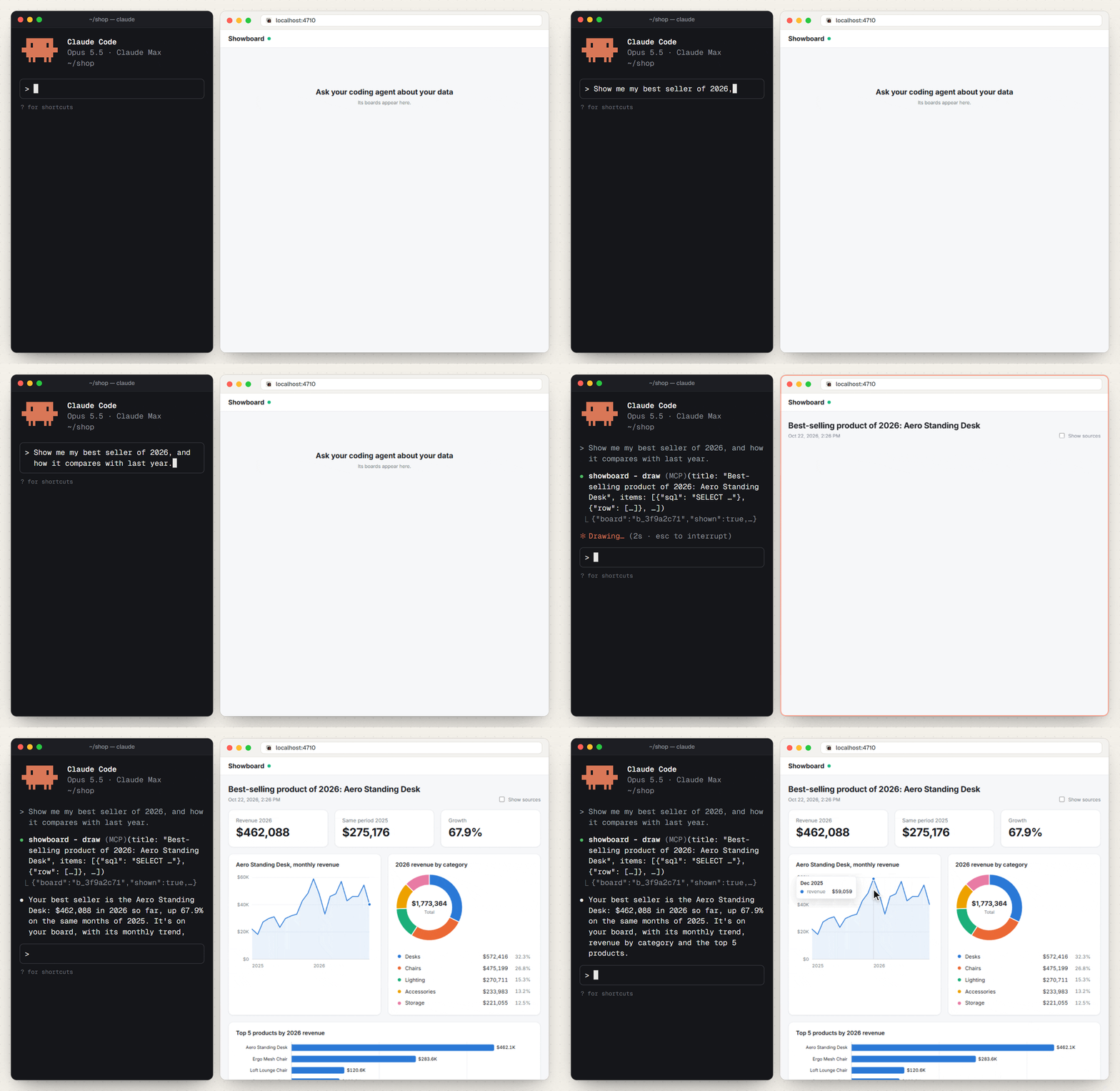
2.7× cheaper · 3.5× fewer output tokens · 3.2× faster
Claude Code with Showboard against Claude Code on its own, on the same questions and the same files. See the benchmark
One question becomes a dashboard of headline numbers, charts and tables,
in your browser, beside your terminal or inside your app.




Open source · MIT licensed · Runs on your computer · Also works with Codex, Cursor and other MCP-compatible agents
Your agent can write charts. Why add Showboard?
Without Showboard, a chart request can become a coding task: read files, calculate results, write a page and wire up charts. Showboard gives your agent a ready-made way to query the data and display the answer.
|
Question to dashboard The agent sends SQL and a short layout. Showboard runs the queries, chooses charts and displays the board. |
Numbers you can check Open the SQL behind a chart. Chart values come from query results, not numbers the agent types into a layout. |
Answers you can reuse Saved recipes redraw a board for new inputs. Saved boards keep a snapshot you can reopen. |
Quick start
You need Node.js 22.13+ and a coding agent. Start with a folder of Excel or CSV files, a SQLite database, or a Postgres connection.
1. In Claude Code, install the plugin:
/plugin install showboard --marketplace rohanbeingsocial/showboard
Choose your data folder or database when prompted. Plugin instructions.
2. Ask about your data:
Which products brought in the most revenue, and how did that change month by month?
3. See the board in a pane beside the chat (type /board to open it) and at http://localhost:4711.
In your project, paste this into your agent:
Set up Showboard in this project: run npx showboard guide and follow it.
The guide walks your agent through setup and checks the connection with showboard doctor. Boards open at http://localhost:4710, or run npx showboard pane in a terminal beside your agent.
For a folder of spreadsheets:
cd my-reports
npx showboard init .
For a database:
npx showboard init --db ./shop.sqlite
Restart your agent in that folder and open http://localhost:4710. Claude Code is the default; add --agent codex,cursor,gemini to configure other agents.
For Postgres credentials, use the SHOWBOARD_DB environment variable instead of putting a password in settings files. See the setup guide.
For the Claude desktop app, download the .mcpb extension from the latest release. Install it through Settings → Extensions → Advanced settings → Install Extension. This path does not require a separate Node.js installation. Desktop instructions.
Just looking? Explore the browser demo before installing.
Start with the data you already have
| Your data | What you can ask |
|---|---|
| A folder of Excel and CSV reports | “Which regions are behind target?” Join orders in a workbook with targets in a CSV. |
| A SQLite or Postgres database | “Show monthly revenue and the top five products.” Query your tables read-only. |
| Your own Node + React app | Put boards inside your app and expose the data sources and actions your agent can use. Integration guide · API reference |
Spreadsheet loading handles title rows, blank rows, total rows, currency strings and common date formats. Each sheet becomes a queryable table; files reload when you save them.
See a dashboard built from Excel and CSV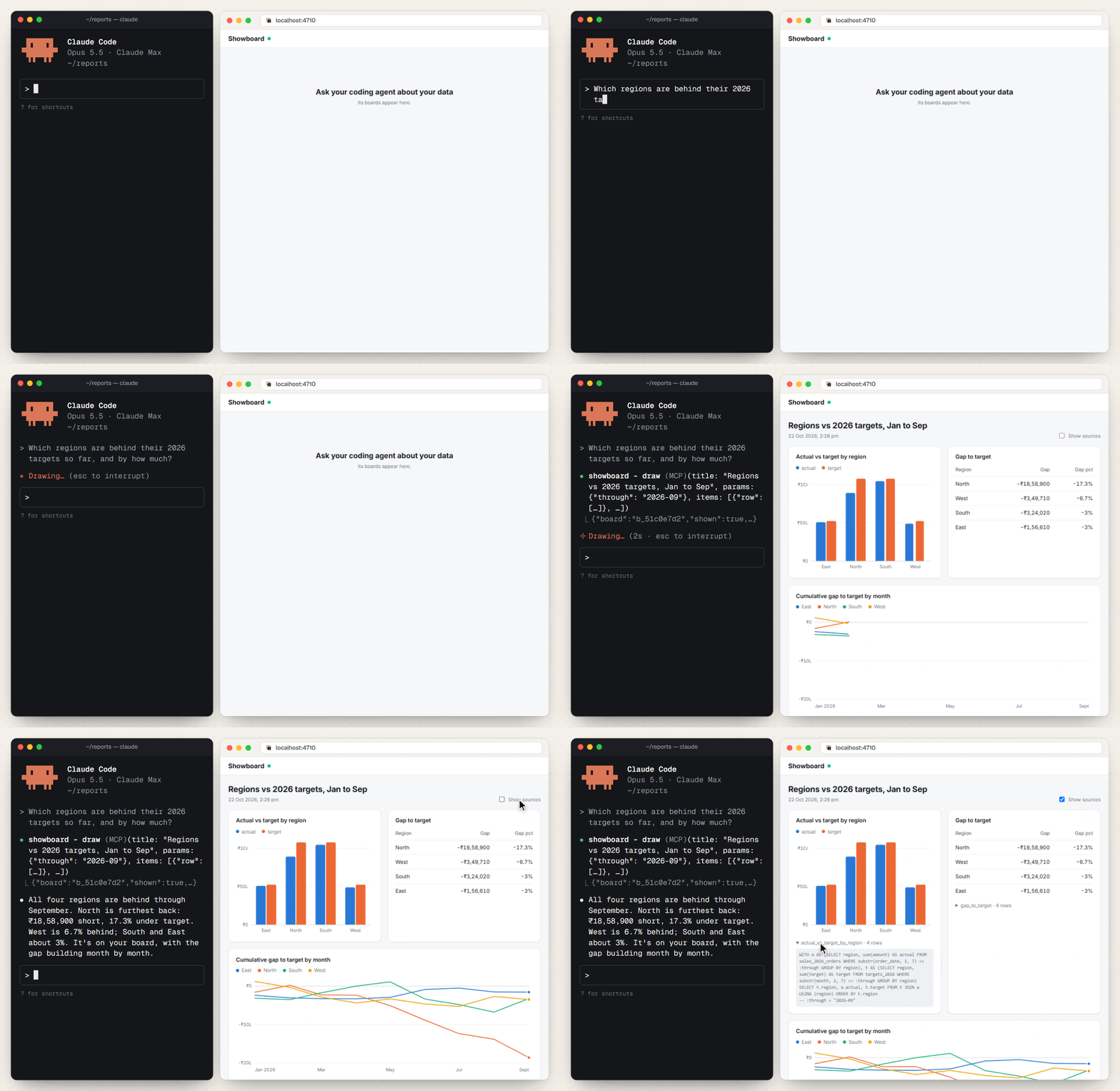
Orders in Excel. Targets in CSV. One question shows the regional gaps and the queries behind them.
In a real app
It works on real data too. Meridian, a private investing app, has Showboard inside. Here Claude Code is asked whether silver rose each time the gold/silver ratio crossed above 90. It reads two years of MCX gold and silver prices from the app's own API and draws one board.
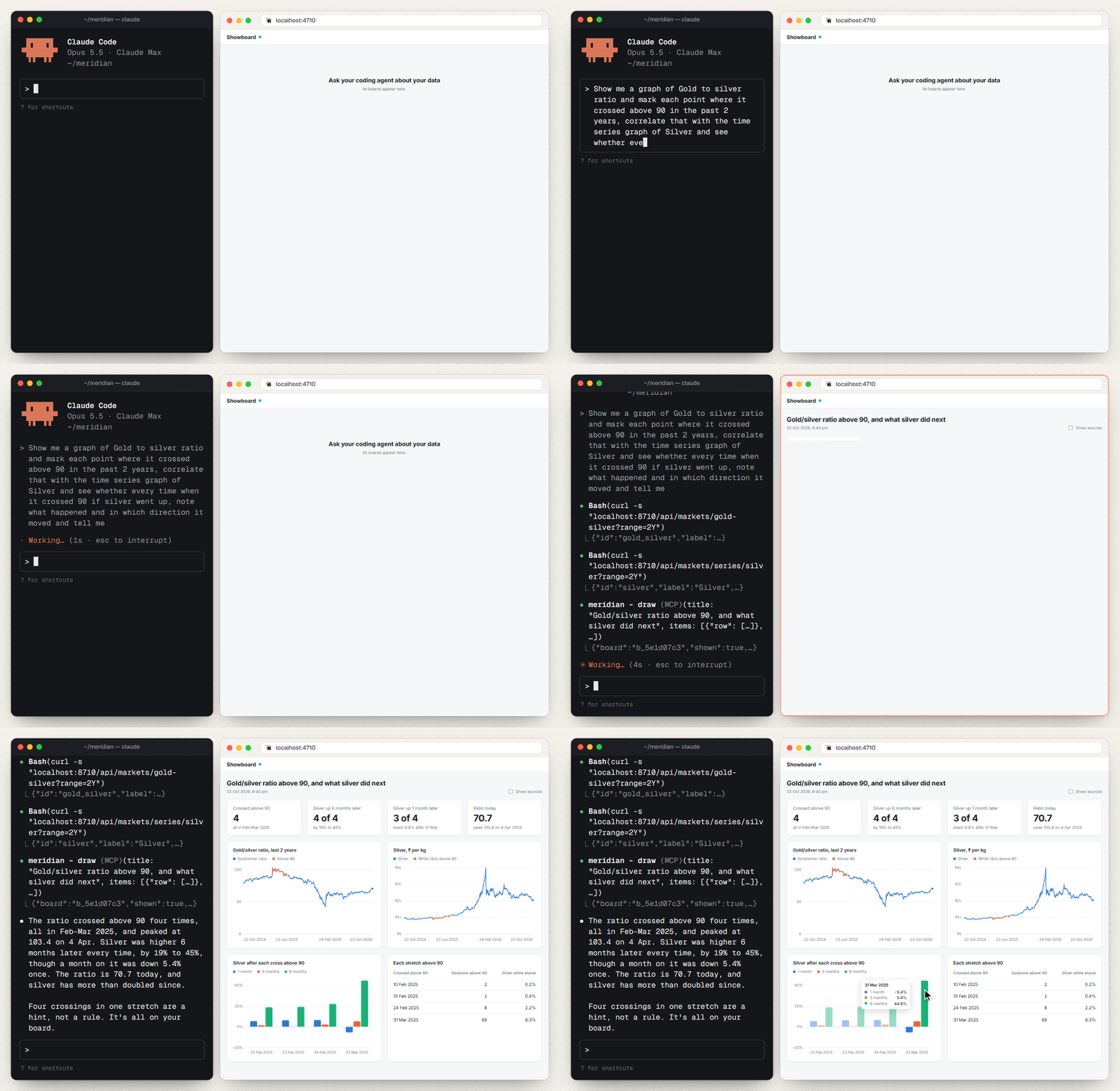
The ratio and silver side by side, each stretch above 90 marked in orange, and silver's moves 1, 3 and 6 months after each cross.
How it works
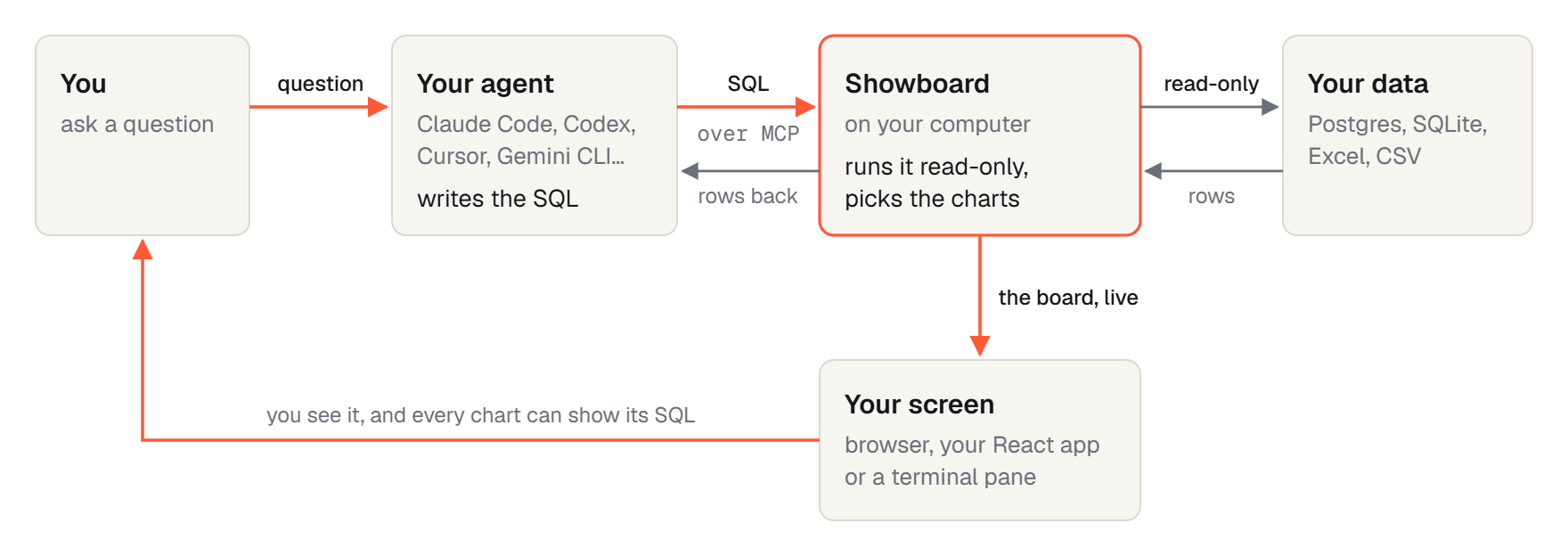
Explore the architecture · See real app and spreadsheet examples
Benchmark
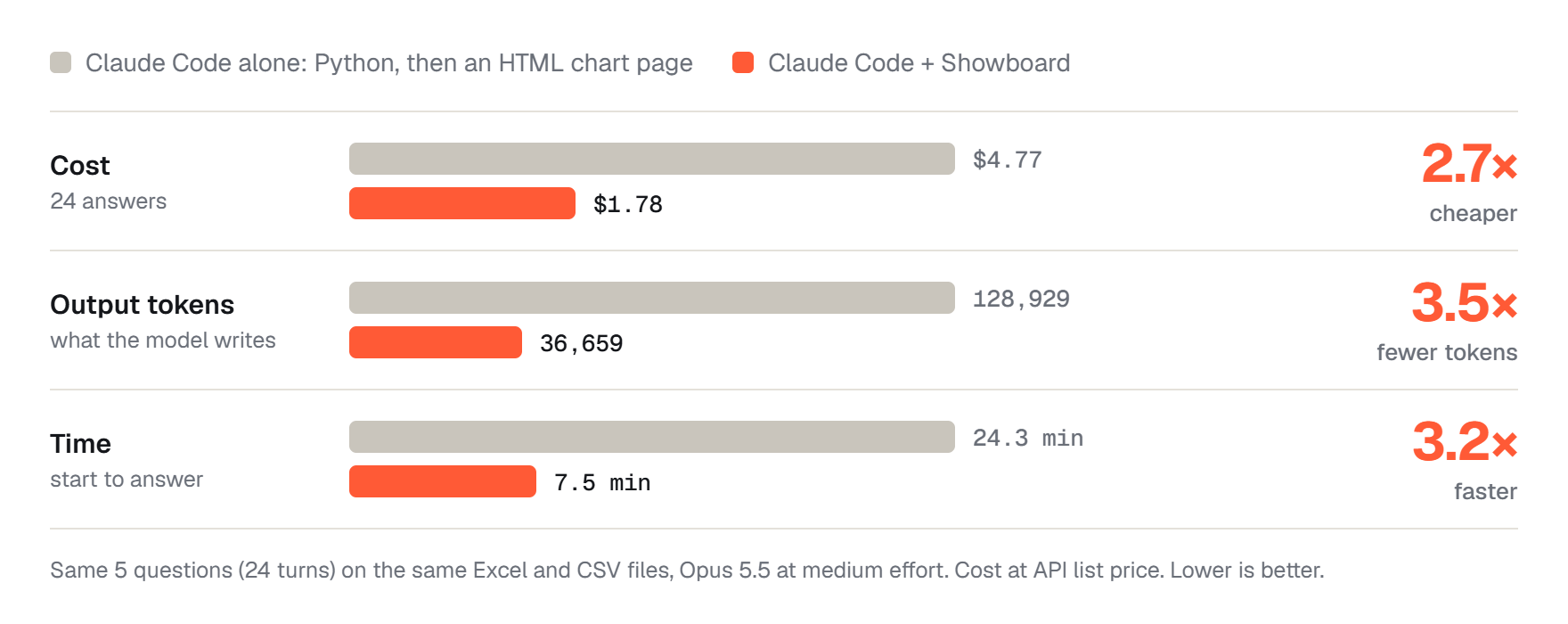
Across 24 answers each way in our Claude Code test, API-priced cost was $1.78 with Showboard vs $4.77 without, and elapsed time was 7.5 vs 24.3 minutes.
This was two runs on one dataset. Other agents have not been benchmarked, and Claude's hand-built pages were more individually designed. These results are evidence for this workload, not a guarantee for yours.
Read the comparison and tradeoffs · Reproduce the benchmark
How it compares
| Claude Dashboards | Anthropic's dashboards on paid Claude plans, built on warehouses such as Snowflake and BigQuery and on connected apps, with the SQL shown on each chart. Showboard is for the files and databases you already have: messy Excel and CSV files with no connector or warehouse, plus Postgres and SQLite. Boards appear in your browser, a terminal pane or your own app, and it is free and MIT licensed. |
| dbt Charts | dbt Labs' open-source charts: SQL plus a YAML layout over CSV, Parquet, DuckDB and warehouses. Showboard reads Excel workbooks directly, and the agent lays out a whole board in one call. |
| Your agent on its own | It can write a script and a page for each chart, and those pages often look better. In our test that cost 2.7× as much and took 3.2× as long, and the numbers live in code you have to read. |
Works with your agent
Showboard is an MCP server. It uses the coding agent and model access you already have.
showboard init --agent can configure Claude Code, Codex, Cursor, Gemini CLI, OpenCode, VS Code, Windsurf, Antigravity and BharatCode.
Claude Code is tested end to end. Setup support for other agents does not mean they have all received the same testing. Agent configuration and testing status.
A few things to know
| Does my data leave my computer? | Showboard runs locally, but query results go back to your agent and its model provider. Use the same judgment you would when giving that agent access to your files. |
| Can it change my data? | Database queries are read-only, and spreadsheet files are only read. Inside your app, the agent can run actions you explicitly register. Use a read-only database role as well. |
| Do I need another model API key? | No additional key is needed for use with your coding agent. A customer-facing integration needs its own model access. |
| Are the answers always right? | Charts use query results, but the agent can still choose the wrong query or draw the wrong conclusion. Inspect the SQL. Boards are snapshots; ask again or run a recipe for fresh data. Queries retain at most 5,000 rows. |
Considering using Showboard?
The documentation covers the details needed to decide whether it fits your workflow:
- Evaluate the fit: capabilities, benchmark methodology, read-only guarantees, limitations and roadmap.
- Set up your agent: installation paths, compatibility, the runnable demo and terminal controls.
- Integrate it into your app: server and React setup, recipes, custom components, actions and data sources.
- Look up the API: options, props, tools, commands and defaults.
Help shape Showboard
Showboard is young, MIT licensed and built with AI assistance, mostly Claude Code. It has a test suite and a reproducible benchmark; real-world feedback is welcome.
Report a problem · Contribute · Read the docs · MIT license
Reviews (0)
Sign in to leave a review.
Leave a reviewNo results found