chewy
Health Uyari
- License — License: MIT
- Description — Repository has a description
- Active repo — Last push 0 days ago
- Low visibility — Only 5 GitHub stars
Code Basarisiz
- rm -rf — Recursive force deletion command in Tools/build-app.sh
Permissions Gecti
- Permissions — No dangerous permissions requested
Bu listing icin henuz AI raporu yok.
macOS menu-bar app that watches your Claude & Codex usage and auto-switches accounts before you hit a rate limit.
Chewy
Never hit a rate limit mid-flow again — a tiny macOS menu-bar app that watches your Claude/Codex usage across accounts and auto-switches the moment you hit your 5-hour limit.
Features
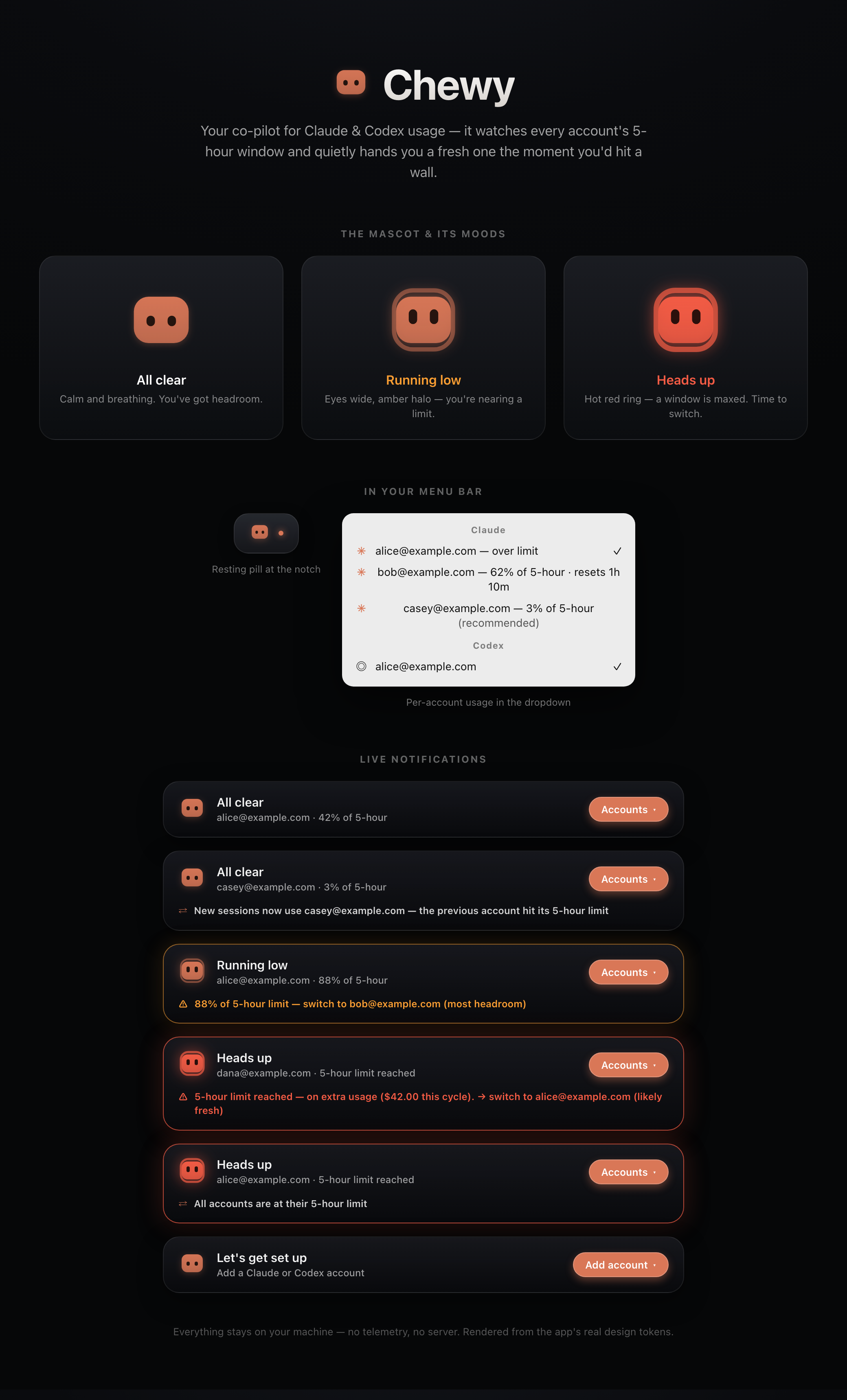
- Usage meter in the menu bar — the mascot shows the active account's 5-hour usage and turns warning/critical before you'd find out the hard way.
- Auto-switch — fires on the 5-hour wall (>95%), a drained weekly budget, or live overage. Picks the best alternative with simulation-tuned scoring (most headroom, reset-aware, weekly-budget tiebreaks); when every account is maxed it rides whichever resets soonest. The policy is regression-guarded by a discrete-event simulator in the test suite.
- Self-healing sign-ins — token rotations and manual
/logins are captured continuously; after every switch the landing account's token is refreshed by delegating to the official CLI (never by touching idle accounts' single-use refresh tokens). A genuinely dead sign-in is escaped automatically and quarantined until you reconnect it. - Per-account usage in the dropdown — every signed-in account with its current 5-hour percentage, a reset countdown, and a marked recommendation.
- Island notifications — a liquid-glass overlay announces switches and warnings, then fully disappears after ~10 seconds without interaction. No Dock icon, no permanent pill, no clutter.
- Table stakes — launch at login, remove account, reconnect in place (no duplicate accounts).
How it works
Claude Code and Codex each read one canonical credential when a new session starts:
- Claude: the
Claude Code-credentialsitem in your login Keychain, plus the identity in~/.claude.json - Codex:
~/.codex/auth.json
Chewy keeps a private, app-owned copy of each account's credential and, on switch, rewrites the canonical locations so new sessions (new terminal tabs, new CLI runs) use the chosen account. Running sessions are untouched — nothing is killed, logged out, or interrupted.
Every write is verified and rolled back on mismatch, captures are identity-attributed (a credential can never land on the wrong account), and token freshness is maintained by delegating refresh to the official claude CLI against its own store — the app never calls the OAuth refresh endpoint itself and never touches an idle account's single-use refresh token.
Privacy
Everything stays on your machine. Tokens live in your login Keychain; account metadata lives in ~/Library/Application Support/Chewy with owner-only permissions. There is no telemetry and no server. The app never calls any endpoint except Anthropic's usage API, over HTTPS, authenticated with your own token — that's how it knows how full your 5-hour window is.
Install
Download (Apple Silicon)
Grab Chewy.zip from the latest release, unzip it, and move Chewy.app to /Applications. It's ad-hoc signed (not notarized — no Apple Developer account), so macOS quarantines the download; clear it and launch:
xattr -dr com.apple.quarantine /Applications/Chewy.app
open /Applications/Chewy.app
It lives in the menu bar — there is no Dock icon.
Build from source
git clone https://github.com/RohitMidha23/chewy.git
cd chewy
./Tools/build-app.sh
Then move dist/Chewy.app to /Applications and right-click → Open the first time.
Requirements: macOS 14+ and the Xcode Command Line Tools (Swift 6 toolchain).
FAQ
Why does macOS show a Keychain prompt on first run?
Chewy reads and writes the same Keychain item Claude Code uses. Click "Always Allow" so you aren't re-prompted. Because the build is ad-hoc signed, a rebuild looks like a new app to the Keychain and may prompt again — just click "Always Allow" once more.
Does switching log me out of anything?
No. Switching only changes which account new sessions pick up. Sessions that are already running keep their credentials and keep working.
Is this against the providers' Terms of Service?
You're using your own accounts' own credentials on your own machine — no sharing, no scraping, no credential extraction beyond what the CLIs themselves store. That said, it relies on undocumented CLI internals and rewrites your real logins locally: read the source and use your own judgment.
License
Yorumlar (0)
Yorum birakmak icin giris yap.
Yorum birakSonuc bulunamadi