roleband
Health Warn
- License — License: Apache-2.0
- Description — Repository has a description
- Active repo — Last push 0 days ago
- Low visibility — Only 5 GitHub stars
Code Pass
- Code scan — Scanned 12 files during light audit, no dangerous patterns found
Permissions Pass
- Permissions — No dangerous permissions requested
No AI report is available for this listing yet.
Free, private job search app for Mac, Linux, and Windows. Fresh roles straight from company careers pages, salary estimates, ghost jobs flagged, and on-device AI that puts the roles that fit you first. Works with Claude and Codex.

RoleBand
Find the right job the day it opens.
RoleBand watches the companies you care about and ranks every opening
by how well it fits you.
Free · Open source · Runs on your computer
🌐 English · Español · 简体中文 · more on the way
Install · How it works · Features · Roadmap · Privacy · Contributing




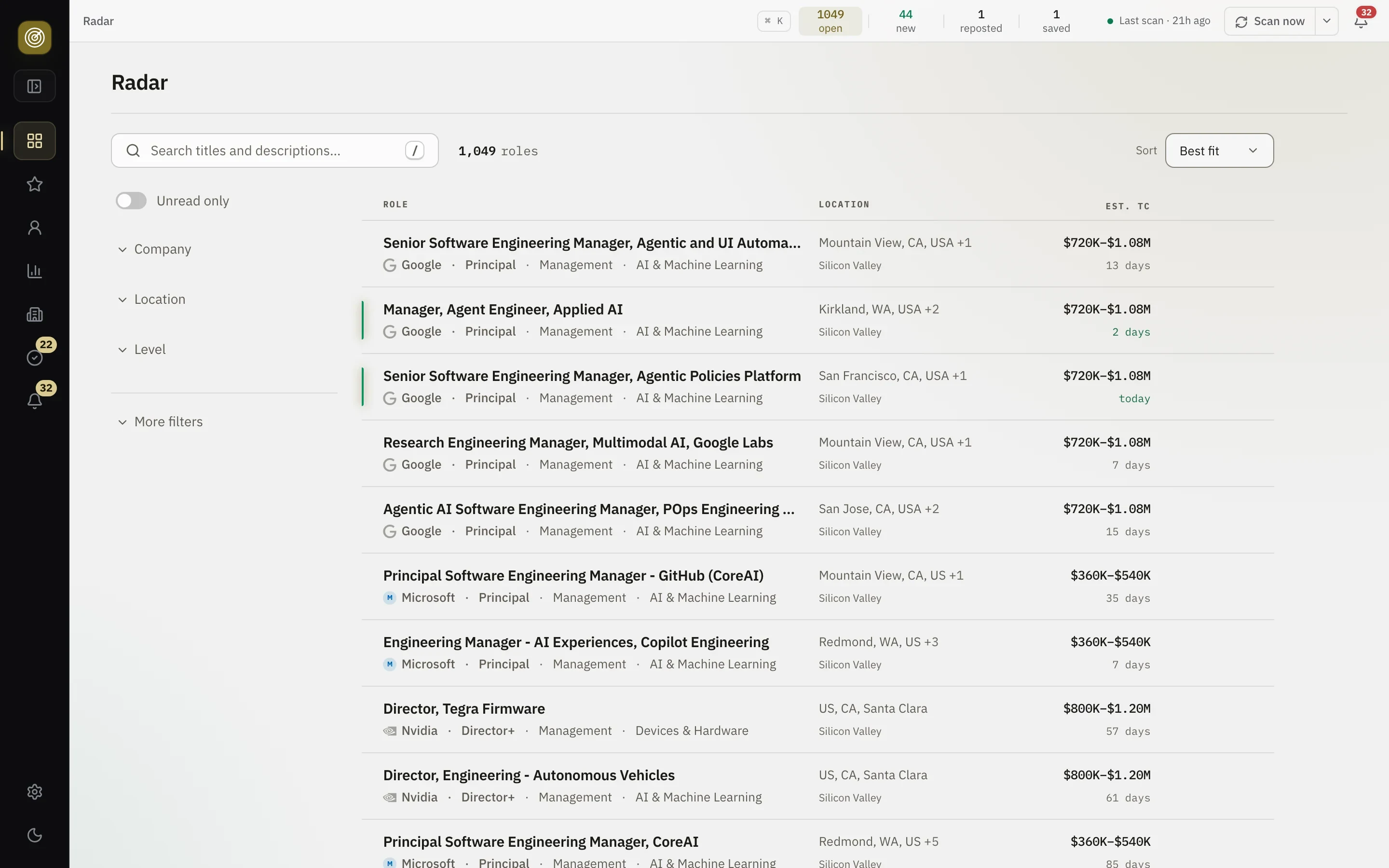
What you get
- Every opening, soon after it appears. RoleBand reads each company's own
careers page on a schedule, so a new role reaches you without searching. - What a role pays, before you apply. Base, equity and total for each role,
estimated when the posting does not say. - Only what fits you. Set your track, seniority, places and pay floor,
describe what you want in your own words, and RoleBand ranks every open role
against it. - A role's whole story. How long it has been open, whether it was reposted,
and when it closed. - It runs itself. Scans happen in the background, and RoleBand tells you
what is new. - In your language. English, Spanish or Chinese.
How it works
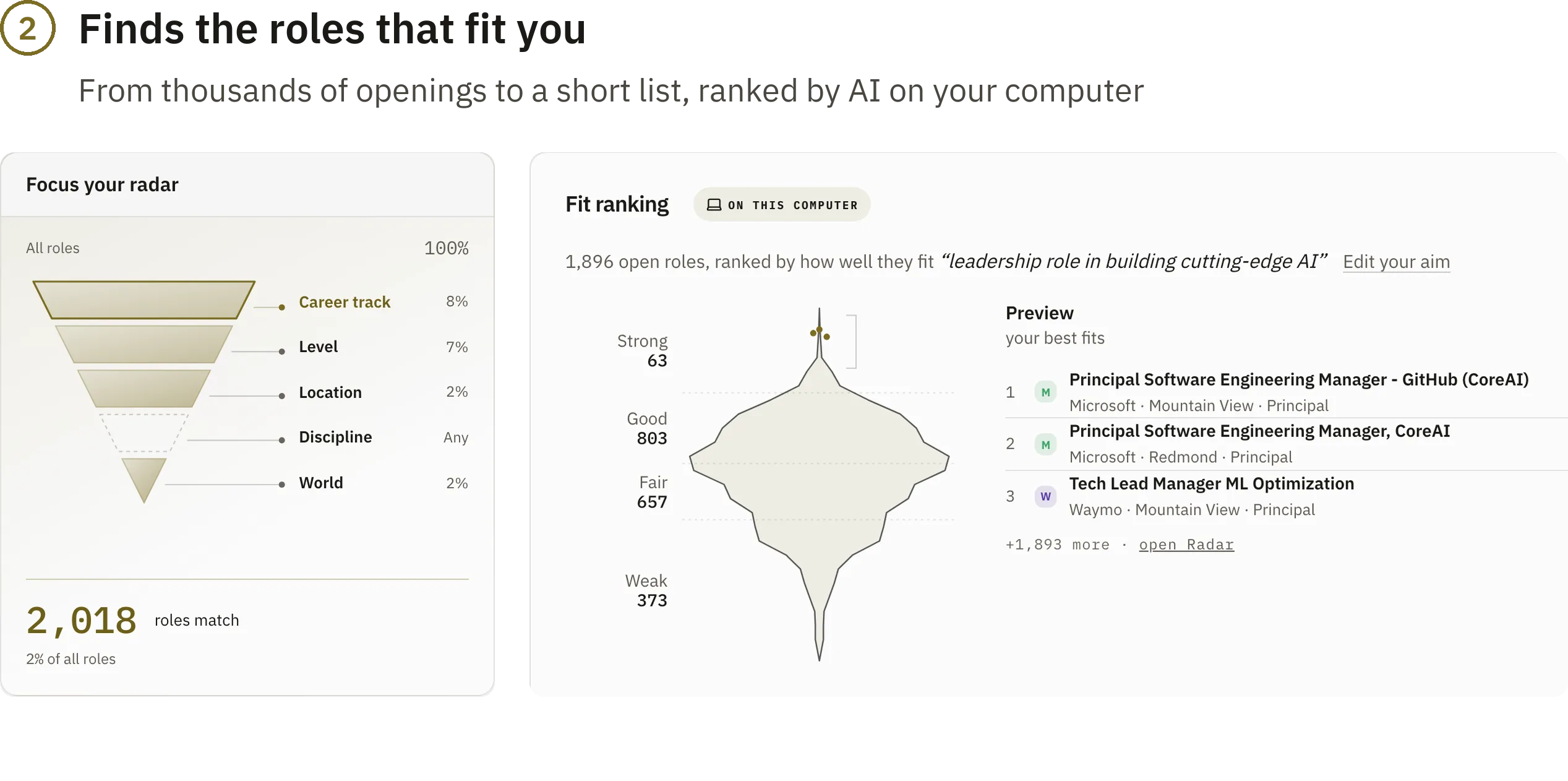

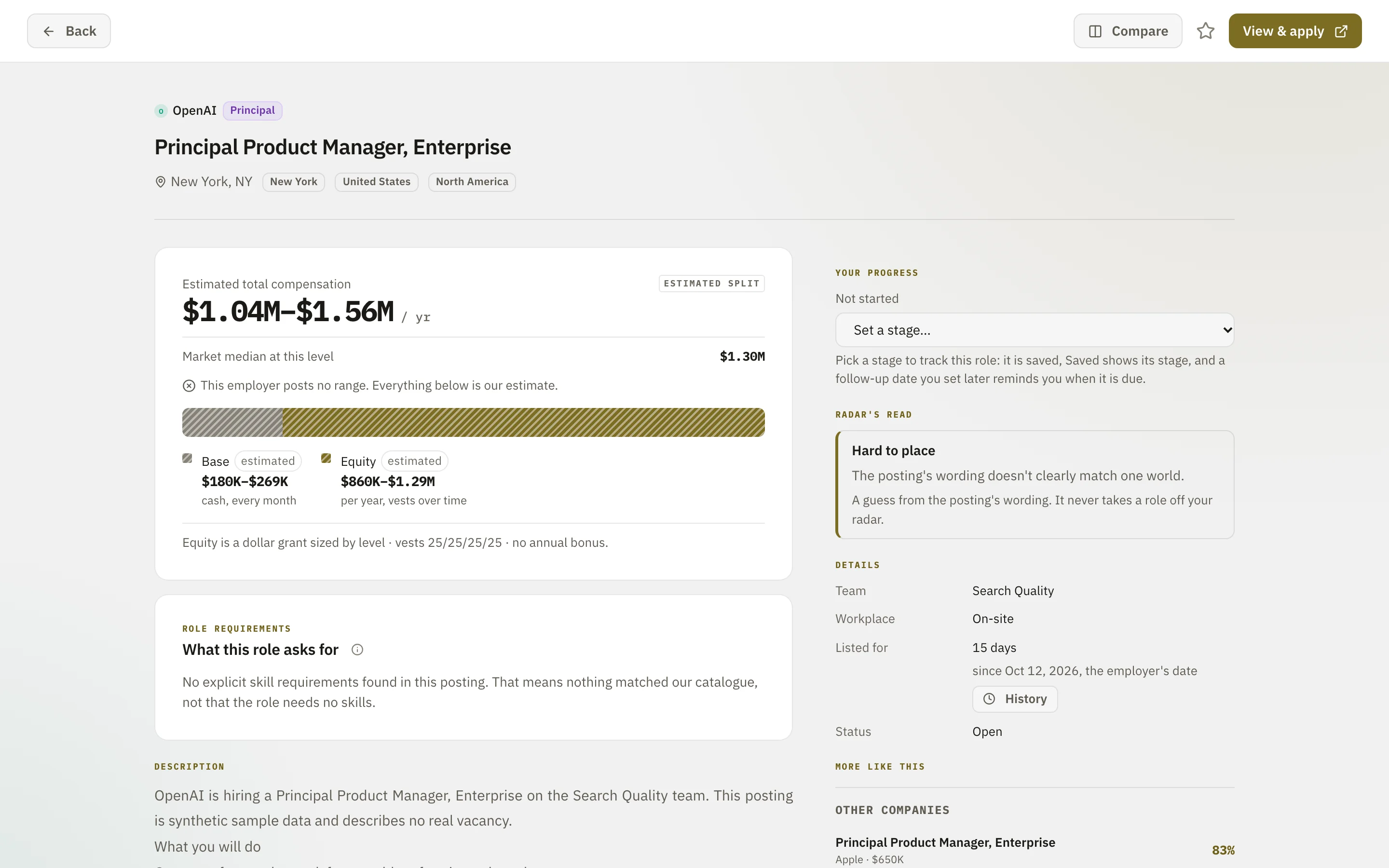
The role page and the scan use generated demo data, not real openings.
The Radar and the ranking pictures come from a real install.
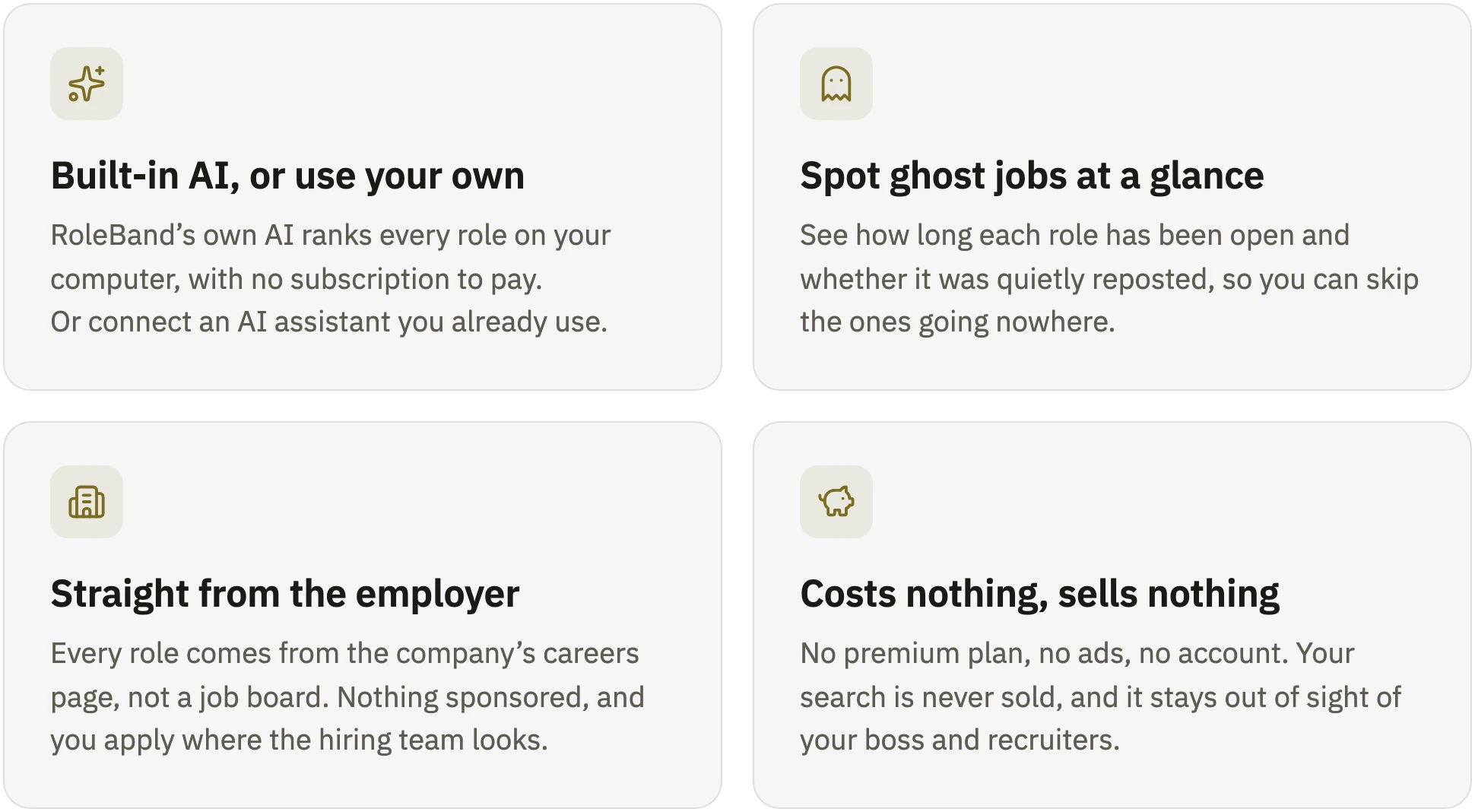
Why RoleBand
What can leave your computer, and when
More features
- Pipeline (coming soon). Track your job applications: where each one
stands, your next step and your upcoming interviews. - Levels across companies. Compare titles side by side, and see what
"Senior" really means at each employer. - Read the market. See which skills are in demand, what each level pays
and who is hiring right now. - Any company, one link. Paste a careers link, and its roles join your
radar. - Alerts that matter. Save a role, and hear when it closes.
And more: works with Claude and Codex · equity in real money · a pay floor
· side-by-side comparison · duplicates grouped · your own AI model or Apple
Intelligence · open pay data.
Roadmap
Follow what comes next on the
public roadmap.
Install
Install on macOS
For Macs with Apple silicon and macOS 14 or later.
- Download
RoleBand-<version>-macOS-arm64.dmgfrom the
latest release. - Open the disk image and follow its Start here guide: drag RoleBand onto
Applications, then open it from Applications. - The first time, macOS stops the app, because it is signed by RoleBand rather
than by Apple. Open System Settings > Privacy & Security, click
Open Anyway for RoleBand, and confirm. You do this once; updates do not
ask again.
RoleBand lives in the menu bar and scans while it runs; choose Open at login
during setup to keep it scanning after a restart. Your data stays on your Mac,
in the .roleband folder in your home folder.
Install on Windows
For Windows 11 PCs with an Intel or AMD processor.
- Download
RoleBand-Setup-<version>.exefrom the
latest release. - Open it. Windows doesn't know RoleBand yet, so it may say Windows
protected your PC. Click More info, then Run anyway. - Click Install, then Yes when Windows asks for permission. This lets
your PC trust RoleBand's signature, so you do it only once; updates do not
ask again.
RoleBand lives in the notification area by the clock and scans while it runs;
choose Start with Windows during setup to keep it scanning after a restart.
Your data stays on your PC, in %LOCALAPPDATA%\RoleBand.
If Smart App Control is on, Windows won't run RoleBand yet. A Microsoft Store
version that works with it is on the way.
Install on Linux
For x86_64. You need Python 3.12, Node 24 or newer, and the en_US.UTF-8
locale (Debian/Ubuntu: sudo apt-get install locales && sudo locale-gen en_US.UTF-8; Fedora/RHEL: sudo dnf install glibc-langpack-en).
git clone https://github.com/roleband/roleband.git
cd roleband
./setup.sh
deploy/build_dashboard.sh
Linux runs RoleBand from this folder; there is no app. From backend/, run.venv/bin/python -m tracker.supervisor run under your own service manager,
then open http://127.0.0.1:8010.
Update or remove
On a Mac, the app looks for a new version once a day when Check
automatically is on, or when you choose Check now in its menu-bar panel.
It offers only a release signed with RoleBand's release key, installs it when
you choose Update, and puts the previous app and your data back if the
update fails. To remove RoleBand, turn off Open at login, quit it from its
menu-bar panel and move it from Applications to the Trash. Your data stays in
the .roleband folder in your home folder; delete that folder to remove it too.
On Windows, the app checks for updates the same way; to check now, open its
Settings from the icon by the clock and choose Check for updates. To remove
RoleBand, open Windows Settings > Apps > Installed apps, choose … next to
RoleBand, then Uninstall.
Your data stays in %LOCALAPPDATA%\RoleBand; delete that folder to remove it
too.
On Linux, run git pull in the roleband folder; RoleBand picks the update
up by itself, and says so when ./setup.sh is needed.
Get involved
- A company missing or wrong? Tell us.
- Want another language? Vote for it or help translate.
- An idea or a bug? Share an idea or report a bug.
Contributing
Everything below is for people who want to build, change or understand RoleBand.
Start with CONTRIBUTING.md, then
docs/development.md: the code map, a walkthrough of one
real sync, and what to run for each kind of change.
RoleBand is a Python/FastAPI backend with an embedded Postgres (backend/) and a
React/Vite dashboard (dashboard/). How it works inside, and the rules a change
must keep: docs/architecture.md. The role page pictures
above are made from the synthetic dataset with npm run screenshots indashboard/.
Quickstart
Prerequisites:
- Python 3.12 exactly (
.python-version) and Node 24 or newer (.nvmrc). - On Linux, the
en_US.UTF-8locale, as in Install on Linux.
There is no database to install: RoleBand ships an embedded Postgres that starts
on first use.
./setup.sh
setup.sh is idempotent. It creates backend/.venv, installs the pinned
dependencies for your platform, starts the embedded database and migrates it,
downloads the embedding model, and installs the dashboard's modules. Add--with-browsers for the Playwright browsers that npm run test:ux needs.
Fill the database with synthetic postings, which contacts nobody:
cd backend
.venv/bin/python -m scripts.seed_synthetic
Or collect real postings with a capped scrape, which reads real employers'
boards:
cd backend
.venv/bin/python -m tracker.daily --max-list 150 --no-hydrate -v
Then start the API and the dashboard, in two shells:
cd backend && .venv/bin/uvicorn tracker.api.app:app --port 8010 --no-proxy-headers
cd dashboard && npm run dev
Open http://localhost:5173. The dashboard proxies /api to the backend.
The seed writes only rows marked SYNTH-, refuses a database holding anything
else, and --clear removes only its own rows. A capped scrape never closes a
posting.
Running a source checkout always-on (macOS)
The downloaded app runs itself. A source checkout on a Mac can run in the
background too:
deploy/install.sh     # build the dashboard, install and start RoleBand in the background
deploy/uninstall.sh   # stop it and remove it; your data stays
install.sh installs one per-user background item that starts on login and
appears in System Settings > General > Login Items as roleband. It runs a
supervisor that:
- serves the API and the built dashboard on http://127.0.0.1:8010,
restarting it if it exits or hangs; - every 10 minutes syncs the companies that are due, one per provider at a time;
- reads the wider company directory, only while you follow it;
- fetches stock prices when you save a key and as the price service's limits allow;
- dumps the database to
data/backups/daily; - picks up an update after
git pullby itself; when an update needs./setup.sh(a migration or a new dependency), the app says so and waits.
cd backend && .venv/bin/python -m tracker.supervisor plan shows what each job
would do now, and why. Logs are in data/logs/. Settings > Schedule shows and
edits when each company is read. install.sh needs the virtualenv ./setup.sh
makes, and refuses to run on any other operating system; elsewhere, run .venv/bin/python -m tracker.supervisor run
under your own service manager.
Building the Mac app
The native app lives in launcher/macos/. Built from a checkout, it is a
menu-bar companion for that checkout's engine. After installing the engine withdeploy/install.sh, build it with Apple's Command Line Tools:
launcher/macos/test-core.sh
launcher/macos/install.sh
The source installer puts it in ~/Applications. Open it in Finder to begin
setup. Quit an existing launcher before replacing it. Setup checks its connection
and offers an optional start-at-login choice.
The launcher and the background engine have separate login settings; quitting
the launcher keeps RoleBand running. It reopens the browser at the registered
address, including a configured port.
The final setup step offers optional update checks, also available in Launcher
preferences. Automatic checks start off; enable the toggle to check automatically.
Check now always runs a single check without changing that setting.
An available release opens a notes preview with instructions for updating the
checkout and rebuilding the launcher; only the downloaded app installs its own
updates.
deploy/install.sh offers this source installation when run interactively with
the Command Line Tools available. Skipping it or a launcher build failure leaves
the engine installed. For unattended installation, ROLEBAND_INSTALL_LAUNCHER=yes
opts in and no skips it; the default skips the optional app without a terminal.
To remove only the launcher, turn off its login setting, quit it and move the app
to Trash. The engine and its data stay installed.
To create a disk image with the Finder installation layout, install the pinned
packaging tools in a separate Python environment (Python 3.10 or newer):
python3 -m venv launcher/macos/.build/packaging-tools
launcher/macos/.build/packaging-tools/bin/python -m pip install --only-binary=:all: --require-hashes -r launcher/macos/packaging-requirements.txt
launcher/macos/build-app.sh
ROLEBAND_PACKAGING_PYTHON="$PWD/launcher/macos/.build/packaging-tools/bin/python" launcher/macos/make-dmg.sh 'launcher/macos/.build/RoleBand Launcher.app' /tmp/RoleBand.dmg
The image includes a first-open guide in English, Spanish and Simplified Chinese.
Set ROLEBAND_LAUNCHER_LANGUAGE=es or zh-Hans when packaging to select its initial
language. These tools are only for packaging; the installed launcher does not need
Python to run.
To export the same offline guide for a download page, runpython3 launcher/macos/Tools/install_guide.py /tmp/roleband-install-guide with a
new output directory. Keep index.html and its assets/ folder together when
hosting or sharing it. The guide uses user-confirmed steps; it cannot inspect
your Mac or approve an app. CI retains this export as macos-install-guide.
The app people download is built differently: launcher/macos/build-bundle.sh
puts the engine, its Python, its database and the built dashboard inside the app.
The mac-launcher workflow tests the app and builds that bundle into an unsigned
release candidate, kept as a CI artifact. Signing happens on the maintainer's
Mac, never in CI: Tools/signing.py seal signs the candidate with RoleBand's
certificate, Tools/release.py prepare verifies it from a clean checkout and
signs the release files with the release key, and Tools/release.py attach
checks them and uploads the image, checksum, metadata and signature to a
published release. attach never replaces an asset already on a release. testing.md
gives the checks for each step.
Platform support
| Platform | Support |
|---|---|
| macOS 14 or later, Apple silicon | Full: the downloadable app, and from source setup, tests and the always-on background item. Apple Intelligence integration is experimental and optional. |
| Windows 11, x64 | The downloadable app. From source, the tests (backend/constraints/windows-x86_64.txt; CI runs here); setup.sh does not run on Windows. |
| Linux x86_64 | Setup, the app and tests (backend/constraints/linux-x86_64.txt; CI runs here). No installer: run python -m tracker.supervisor run under your own service manager. |
| Linux aarch64 | Builds: setup has a dependency lock (backend/constraints/linux-aarch64.txt), but no full run has been tried on this platform. No installer. |
| macOS, Intel | Not supported: the app is built for Apple silicon only, and setup.sh refuses (no dependency lock). |
setup.sh installs only against a committed lock in backend/constraints/
and refuses any platform without one.
Data and privacy
RoleBand keeps its data on your computer. Everything that can leave it, and
when, is listed in SECURITY.md; usage sharing is described in
docs/usage-data.md.
Licence
The code is Apache-2.0: see LICENSE. The datasets (the level atlas and
the benefits dataset, published in
roleband/roleband-data) are CC-BY-4.0,
attributed to "RoleBand contributors". The
country table from mledoze/countries is ODbL-1.0. Every other bundled component
keeps its own licence, listed in docs/third-party.md.
Reviews (0)
Sign in to leave a review.
Leave a reviewNo results found