DPlex
Health Uyari
- License — License: MIT
- Description — Repository has a description
- Active repo — Last push 0 days ago
- Low visibility — Only 9 GitHub stars
Code Gecti
- Code scan — Scanned 12 files during light audit, no dangerous patterns found
Permissions Gecti
- Permissions — No dangerous permissions requested
Bu listing icin henuz AI raporu yok.
Terminal multiplexer for AI-assisted development — manage Copilot CLI, Claude Code, and regular shells across projects in one window.
DPlex
A desktop workspace for the AI CLI sessions you run every day.
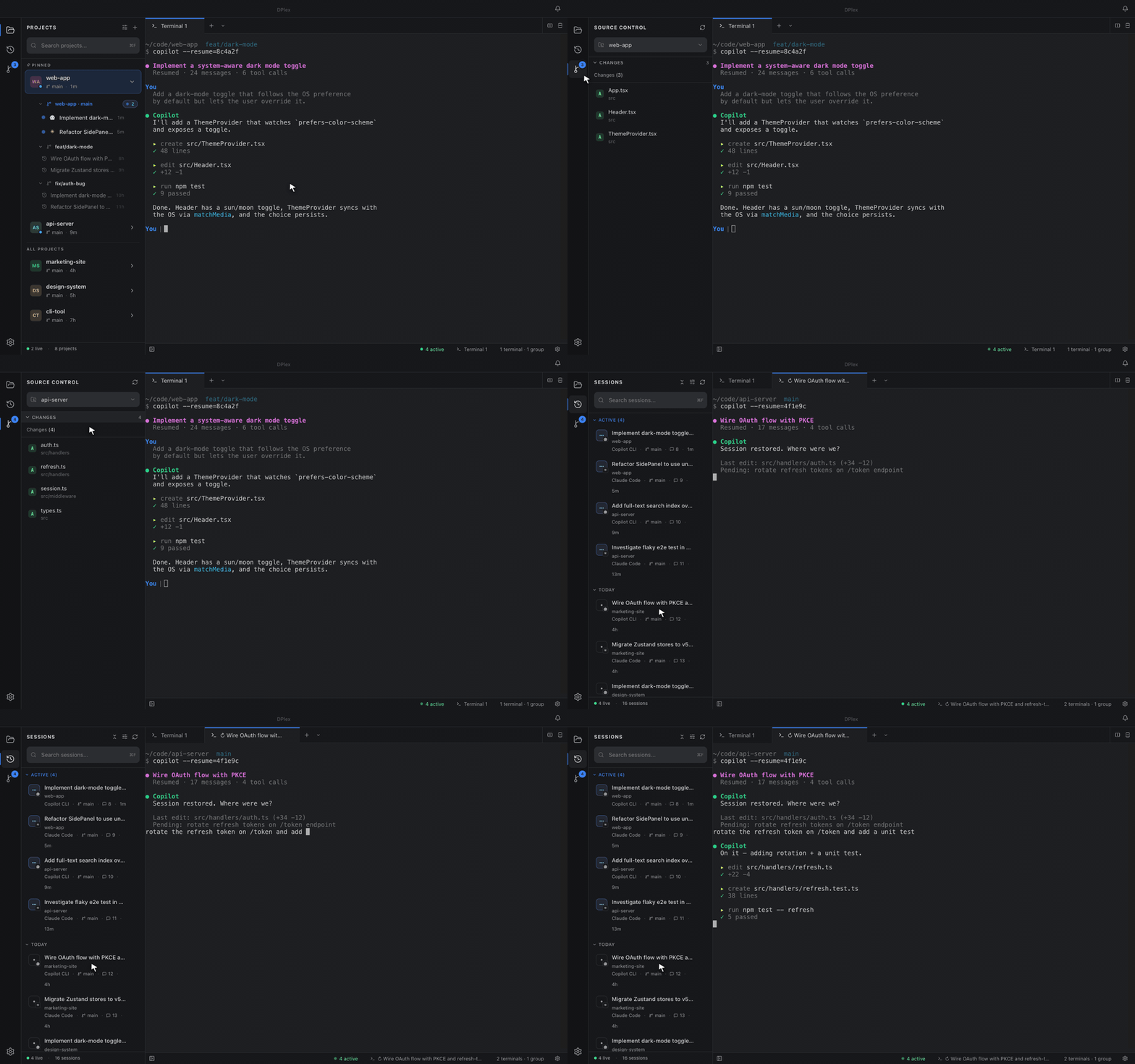
DPlex discovers every Copilot CLI / Claude Code session you've ever started, lets you resume any of them in one click, and auto-restores every open session tab the next time you open the app — splits, order, working directory, and resume command preserved. On top of that: the multiplexer essentials — split panes, tabs, projects, worktrees, and a built-in VSCode-style Source Control view.






Quick install · Features · Screenshots · How DPlex compares · Architecture · Add a provider · Privacy · Contributing
🚧 Pre-1.0. DPlex is functional and used daily by its author, but
APIs, settings layout, and on-disk formats may shift between minor
versions while we feel out the right shape. Please pin your version
and read the CHANGELOG before upgrading.
Why DPlex?
When working with AI CLI tools across multiple projects, you end up with a mess of terminal windows — a Copilot session here, a Claude session there, plus regular shells scattered everywhere, and not a single one of them survives a reboot. DPlex gives you one home for all of it, with AI session management as the headline feature:
- 🗂️ Discover every past session. DPlex reads each provider's data directory and surfaces every Copilot CLI / Claude Code session you've ever started — searchable by name, ID, summary, or workspace.
- ▶️ Resume in one click. Click any past session and it opens in a new tab with the correct resume command and original CWD. No copy-pasting session IDs from
~/.copilot/.... - ⏹️ Close active sessions from the sidebar. Stop running AI sessions without hunting for their terminal — closing a tab fully terminates the underlying process.
- 🗑️ Delete from disk. Remove a session's stored data when you're done, with confirmation.
- ♻️ Auto-restore session tabs across restarts. Quit the app, reopen it tomorrow — every AI session tab snaps back exactly where it was, with the right resume command, CWD, splits, and tab order preserved.
- One window for everything: split panes, tabs, and an activity bar (Projects · Sessions · Source Control).
- Project-aware workflow — group sessions by project, start a new AI session in any folder with one click.
- Worktree-friendly — first-class Git worktree support so concurrent feature work doesn't pollute your main checkout.
- Built-in Source Control — VSCode-style changes view scoped to whichever project (or worktree) you pick.
- No telemetry. No analytics. Read PRIVACY.md — it's a one-page promise, backed by
grep-able source.
Quick install
Note: DPlex binaries are currently unsigned while we wait on
Apple Developer / Windows code-signing certificates. The app is open
source and the build is fully reproducible from source — see
Verify the build below.
macOS
# Apple Silicon
curl -L https://github.com/Ron537/DPlex/releases/latest/download/DPlex-arm64.dmg -o DPlex.dmg
# Intel
curl -L https://github.com/Ron537/DPlex/releases/latest/download/DPlex-x64.dmg -o DPlex.dmg

# Open the DMG, drag DPlex to /Applications, then on first launch:
xattr -dr com.apple.quarantine /Applications/DPlex.app
open /Applications/DPlex.app
The xattr line removes the macOS quarantine flag once you've inspected
the build — equivalent to right-clicking the app and choosing Open,
but cleaner from the terminal.
Windows
Download DPlex-Setup.exe from the Releases page
and run it. SmartScreen will warn you about the unsigned installer —
click More info → Run anyway after verifying the file's SHA-256
matches the value published on the release page.
Invoke-WebRequest -Uri https://github.com/Ron537/DPlex/releases/latest/download/DPlex-Setup.exe -OutFile DPlex-Setup.exe
.\DPlex-Setup.exe
Linux
# AppImage (any distro)
curl -L https://github.com/Ron537/DPlex/releases/latest/download/DPlex.AppImage -o DPlex.AppImage
chmod +x DPlex.AppImage
./DPlex.AppImage

# Debian / Ubuntu
curl -LO https://github.com/Ron537/DPlex/releases/latest/download/DPlex-amd64.deb
sudo dpkg -i DPlex-amd64.deb
Run from source
Requires Node.js 18+ (we develop on 22 LTS) and Git.
git clone https://github.com/Ron537/DPlex.git
cd DPlex
npm install
npm run dev
Build for distribution
npm run build:mac     # macOS .dmg + .zip (arm64 + x64)
npm run build:win     # Windows .exe installer
npm run build:linux   # Linux .AppImage + .deb + .snap
Verify the build
Every release is built from a tagged commit by GitHub Actions. To
reproduce locally:
git checkout v0.9.0          # or whichever release you want
npm ci --ignore-scripts
npm run build
# Compare the SHA-256 of your local build with the release's published checksums.
CI logs and SBOMs are attached to every release.
Screenshots

Projects view. Pinned projects + worktrees + nested AI sessions, one click away. |

Sessions panel. Every Copilot CLI / Claude Code session you've ever started, searchable. Click to resume, right-click to delete from disk. |

Source Control. VSCode-style changes for the selected project — pick any worktree from the dropdown. |

Project picker. Switch the Source Control view to any project or worktree without leaving Git. |

Splits & tabs. Horizontal + vertical splits with multiple AI sessions running side-by-side. |

Worktree defaults. Location pattern, env files, post-create scripts — set once, reused everywhere. |

Notification controls. Per-event toggles, Do Not Disturb, focus-aware suppression. |

Light themes too. GitHub Light, Solarized Light, Quiet Light — terminal palette and UI stay in sync. |
Features
AI session management
The headline feature. DPlex gives you full lifecycle control over the
Copilot CLI / Claude Code sessions you actually work with daily.
- 🗂️ Past-session list. Every session you've ever started, surfaced
in the Sessions activity-bar panel — searchable by name, ID,
summary, or workspace, grouped by recency or by project. - ▶️ One-click resume. Click any past session to reopen it in a new
tab with the correct resume command and original CWD pre-filled. The
re-spawned PTY is matched back to its provider session ID so the
active-session indicator lights up automatically once the AI tool
writes its lock file. - 🟢 Live active-session indicators. Active sessions are detected
via provider lock files (inuse.<PID>.lockfor Copilot, pidfiles for
Claude) with PID liveness checks, so the sidebar always reflects what
is actually running. - ⏹️ Close active sessions from the sidebar. Stop a running AI
session without finding its terminal — closing the tab fully
terminates the underlying process. - 🗑️ Delete sessions from disk. Remove a session's stored history
when you're done with it (with confirmation). - 🧠 Prompt-history viewer. Browse and search the prompts you've
sent in any past session — useful for re-running, copy-pasting, or
remembering what you asked yesterday. - 📌 Recent sessions per project. Each expanded project (and
worktree) lists its last few idle sessions inline, so you can resume
them without leaving the projects panel. - 🧩 Provider-agnostic. Same start / resume / close / delete flow
whether the underlying tool is Copilot CLI, Claude Code, or one you
add yourself — see docs/providers.md.
Workspace persistence (auto-restore on restart)
Close the app today, open it tomorrow — every AI session tab is
back exactly where you left it. This is the feature DPlex was built
around.
- Every AI session tab is restored. Tabs are serialized to
sessions.jsonin the ElectronuserDatadirectory on every natural
lifecycle event and synchronously on quit, so a SIGTERM doesn't lose
state. - Splits and tab order survive too. Horizontal/vertical splits, tab
order within each pane, the active group, and the active tab are all
rebuilt on launch. - Resume command + CWD preserved. Each restored tab is recreated
with its original resume command and working directory. A short retry
loop re-resolves the underlying provider session ID once the AI tool
writes its lock file, so active-session indicators light up
automatically. - History is independent of workspace state. Even after a hard kill
(SIGKILL/OOM) the session history is untouched — every previous
session is still discoverable and resumable from the Sessions panel.
Activity bar — Projects · Sessions · Source Control
- VSCode-style activity bar on the far left. One click jumps between projects, sessions, and git changes.
- Click the active item to collapse the panel for maximum editor space.
- Settings gear at the bottom of the activity bar for quick access.
Multi-provider AI sessions
- Provider-agnostic architecture. Built-in support for GitHub Copilot CLI and Anthropic Claude Code out of the box.
- One interface for all providers. Same start / resume / close flow regardless of the underlying tool.
- Pluggable. Add a provider by implementing one TypeScript interface — see docs/providers.md. PRs welcome.
- Auto-detection. Sessions remember which provider they belong to so resume commands are always correct.
Terminal multiplexer
- Split panes — horizontal and vertical splits with resizable dividers.
- Tabbed interface — multiple terminals per pane, drag tabs between panes.
- Tab reordering — drag and drop within and across groups.
- Drag a tab onto another pane's edge to create a new split right there — handy for putting a freshly-resumed AI session next to the one you already had open.
- Shell selector — pick from auto-detected system shells (bash, zsh, fish, PowerShell, etc.) when opening a new terminal.
Project management
- Project sidebar with active session indicators and Git branch badge.
- One-click AI sessions in any project directory.
- Pinned projects float to the top, with an "All projects" section below.
- Drag-and-drop reordering for projects.
- Quick actions — open terminal, copy path, remove project from the right-click menu.
- Git worktrees — create, manage, remove worktrees per project, with worktree-specific session lists. Worktrees are first-class projects in the sidebar.
Source Control
- Project-scoped changes view — file list for whichever project (or worktree) you've selected.
- Header dropdown to switch projects without leaving Git.
- Single-click preview + double-click promotes to a permanent diff tab (VSCode behavior).
- Live updates via filesystem watchers — changes appear as you save.
Attention inbox
- Notification bell — aggregated inbox surfaces sessions that need you, with an unread badge in the title bar.
- Event kinds — separate signals for waiting for approval, waiting for input, and finished.
- Auto-dismiss on focus — events clear when you focus the relevant tab.
- Configurable cooldown — tune how often a session can re-notify to avoid noise.
- Jump-to-session — click any inbox entry to activate its tab.
Theming
12 built-in themes with matched terminal and UI colors:
- Dark — DPlex, Dark, Midnight, Dracula, Monokai, Nord, Solarized Dark, GitHub Dark.
- Light — DPlex Light, GitHub Light, Solarized Light, Quiet Light.
Keyboard shortcuts
| Shortcut | Action |
|---|---|
⌘T |
New terminal |
⌘W |
Close terminal |
⌘B |
Toggle sidebar |
⌘, |
Open settings |
⌘\ |
Split horizontal |
⌘⇧\ |
Split vertical |
⌘⇧G |
Toggle Source Control view |
⌘F |
Focus side-panel search |
⌘1-9 |
Switch to tab N |
(⌘ = Ctrl on Linux/Windows.)
How DPlex compares
There are great tools in adjacent niches. DPlex isn't trying to replace any of them — it's optimizing for one specific workflow: running multiple AI CLI sessions across multiple projects without losing your place.
| Tool | Niche | Where it differs from DPlex |
|---|---|---|
| tmux / Zellij | Terminal multiplexer, server-side | Powerful but generic; no AI-tool awareness, no project sidebar, no session discovery. |
| Warp | AI-augmented terminal | Beautiful, but the AI is theirs, not the CLI tool you already use. Closed source. |
| iTerm2 / WezTerm | Best-in-class terminal emulators | More polished as terminals; no orchestration of external AI sessions. |
| VS Code terminal panel | Embedded terminals in the IDE | Fine for ad-hoc shells; not designed for managing many concurrent AI sessions across many repos. |
| Wave Terminal | AI-focused terminal | Adjacent vision; broader scope, more opinionated UI. DPlex is narrower and Electron-portable today. |
| Zed / Cursor | AI-native editors | They embed the AI in the editor; DPlex orchestrates the AI you already use from the terminal. |
If your goal is "I want to start a Claude session in repo A today, a Copilot session in repo B tomorrow, find yesterday's sessions whenever I need them, resume any of them in one click, and reopen the app next week with every tab right where I left it" — that's DPlex.
FAQ / Troubleshooting
My AI tool isn't being detected.
Check that the binary is on the same $PATH your default shell sees. DPlex spawns its PTYs via your login shell, so anything missing from ~/.zprofile or ~/.bashrc won't be found.
An AI session shows as inactive even though it's running.
DPlex detects active sessions via the tool's lock files (inuse.<PID>.lock for Copilot, pidfiles for Claude). If the tool's lock format changed in an upstream release, please open an issue with your version + OS — usually a one-line fix in the provider.
My session tabs didn't restore after a crash.
Workspace state is saved on graceful quit and during natural lifecycle events; a hard kill (SIGKILL, OOM) can lose unsaved tabs. The session history is unaffected — your past sessions are still discoverable from the Sessions list.
The app won't open on macOS — "DPlex is damaged" or "from an unidentified developer."
Until proper notarization lands, run:
xattr -dr com.apple.quarantine /Applications/DPlex.app
…or right-click the app and choose Open. macOS remembers your choice after the first launch.
The Windows installer is flagged by SmartScreen.
Until code signing lands: click More info → Run anyway after verifying the SHA-256 matches the release page. The installer is unmodified from CI.
I want feature X / I'd like a provider for tool Y.
Open an issue. For new providers there's a dedicated template — see docs/providers.md if you want to send a PR.
Architecture
DPlex uses electron-vite with three process targets — main (Node), preload (IPC bridge), and renderer (React).
For the deep dive — security posture, state stores, terminal lifecycle, IPC pattern, and provider system — see docs/architecture.md.
Tech stack
| Layer | Technology |
|---|---|
| Framework | Electron 39 |
| Build | electron-vite + Vite 7 |
| Frontend | React 19, TypeScript 5.9 |
| Styling | Tailwind CSS v4 |
| State | Zustand 5 |
| Terminal | xterm.js 6 (with WebGL, fit, web-links addons) |
| PTY | node-pty |
| Icons | lucide-react |
| Packaging | electron-builder + electron-updater |
| Tests | Vitest (unit) + Playwright (e2e + monkey) |
Contributing
Contributions are very welcome. Read CONTRIBUTING.md for the dev setup, conventions, and PR checklist.
The fastest way to expand DPlex's reach is implementing a new provider — see docs/providers.md. Bug reports with reproduction steps are equally valuable.
Looking for something to start with? Browse issues labelled good first issue.
Privacy & security
- No telemetry, ever. Read PRIVACY.md — it's auditable.
- Report security issues privately per SECURITY.md.
License
DPlex is open source under the MIT License.
Yorumlar (0)
Yorum birakmak icin giris yap.
Yorum birakSonuc bulunamadi