agentic-toolbox-mcp
Health Warn
- License — License: MIT
- Description — Repository has a description
- Active repo — Last push 0 days ago
- Low visibility — Only 5 GitHub stars
Code Fail
- rm -rf — Recursive force deletion command in .github/workflows/ci.yml
- rm -rf — Recursive force deletion command in gateway/camoufox-mcp/install-browser.sh
Permissions Pass
- Permissions — No dangerous permissions requested
No AI report is available for this listing yet.
FastMCP gateway for homelab agentic tools: search, fetch (Crawl4AI + Camoufox stealth), doc/PDF/video ingestion, GPU Whisper STT. One endpoint, every agent benefits.
Agentic Toolbox
A self-hosted MCP server that gives your AI agents 27 tools behind one URL: web
search, page reading, a stealth browser, document and PDF conversion, video
metadata and downloads, speech-to-text and text-to-speech. It installs with one
Docker Compose command and needs no accounts or API keys.
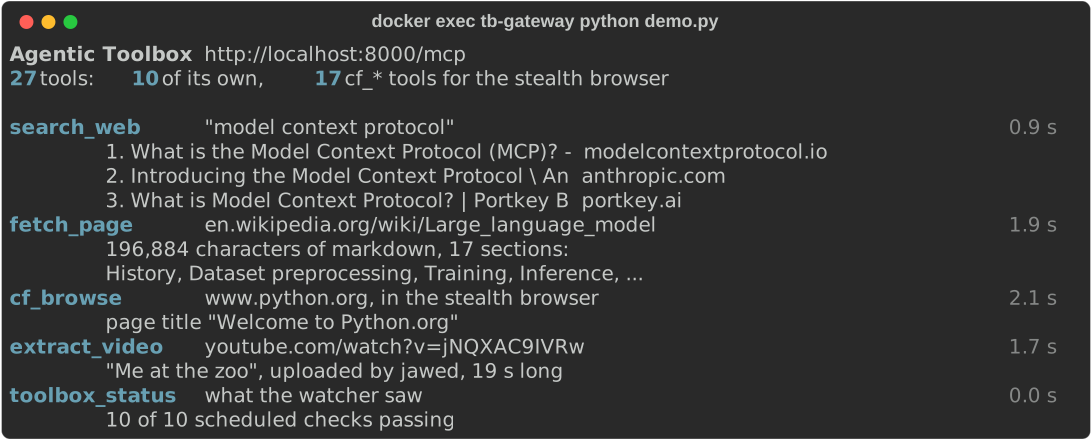
Real output of gateway/demo.py against a fresh install. Run it yourself after installing.
Why use it
- One URL for every agent. Point Claude Code, your own agents and anything else
that speaks MCP at the same endpoint. Add a tool once and every agent that connects
gets it. Nothing to install per agent. - Your agent finds out when a tool is broken. A watcher runs real test jobs on a
schedule: one for each tool excepttoolbox_status(which reports them), and one
for the 17 browser tools, which share a browser. When a call fails, the error tells the agent whether that tool is a known
outage, since when, and which tool to use instead. - It keeps no record of what agents ask. Container logs are off, scratch files
live in RAM, and the caches and audit logs of the services underneath are switched
off. - Rebuilds give you the same toolbox. Base images, every Python and Node
package, and the browser build are pinned to exact versions, and the browser
download is checked against its checksum. - Nothing to sign up for. It runs on your machine. No accounts, no API keys, no
paid service in between.
What your agent gets
| Your agent wants to | Tool | Runs on |
|---|---|---|
| Search the web | search_web |
SearXNG |
| Read a page, JavaScript included | fetch_page |
Crawl4AI |
| Get past bot protection, click, fill forms, take screenshots | cf_browse and 16 more cf_* tools |
Camoufox, a stealth Firefox, through camoufox-mcp |
| Turn a Word, PowerPoint, Excel, HTML or EPUB file into markdown, headings and tables included | convert_document |
MarkItDown |
| Get the text out of a PDF, with table rows kept together | pdf_extract_text |
Stirling-PDF |
| Get a video's title, description and captions | extract_video |
yt-dlp |
| Download the audio or video file itself | download_media |
yt-dlp |
| Transcribe speech | transcribe_audio |
whisper.cpp, on the CPU or an AMD GPU |
| Turn text into speech, or speak in a voice cloned from a short clip | synthesize_speech |
OmniVoice, on the CPU |
| See which tools work right now | toolbox_status, ping |
the built-in watcher |
extract_video, transcribe_audio and download_media work with YouTube and the
other sites yt-dlp supports.
Install
You need an x86-64 machine with Docker and Docker Compose v2 (Linux, or Windows
through WSL 2), at least 55 GB of free disk and 8 GB of RAM. No GPU.
The first build downloads about 5.5 GB. On a 32-thread machine with a fast
connection the toolbox was up 5 minutes after the clone; smaller machines take
longer, mostly for the downloads and the whisper.cpp compile.
git clone https://github.com/Ruashots/agentic-toolbox-mcp.git
cd agentic-toolbox-mcp
docker compose up -d --build
Give it two minutes after that command returns, then see it work:
docker exec tb-gateway python demo.py
The demo makes a few real calls and ends with the watcher's health checks, whose
first round takes about two minutes. To follow those checks as they run:docker logs -f tb-watch.
Connect your agent
The MCP endpoint is http://<this-machine>:8000/mcp, over streamable HTTP. For
Claude Code:
claude mcp add --transport http --scope user toolbox http://<this-machine>:8000/mcp
Start a new Claude Code session and the tools appear as mcp__toolbox__*. Any other
MCP client: add a streamable HTTP server with the same URL.
To help your agent pick the right tool, give it AGENT_HANDOFF.md.
It covers which tool to use when, ready-made workflows and known quirks, and it walks
an agent through connecting itself.
The first run
- The first transcription downloads its Whisper model (148 MB for the default
base.en, up to 3 GB forlarge-v3). They are kept in a Docker volume. - The first speech request downloads the voice model, about 3 GB. Until that is
done,toolbox_statuscan showsynthesize_speechas down. - Once running, the toolbox uses about 4 to 5 GB of RAM, plus about 2.5 GB while
large-v3-turbotranscribes (the biggest models take more). - Files that agents send or ask for are kept on RAM disks, which use memory only
while a file is on them. They can grow, though: up to 4 GB in the gateway (wheredownload_mediaputs the media files it returns) and about 11 GB across all the
containers, more than the 8 GB the toolbox needs to run. On a machine that small,
a very large download can run it out of memory.
whisper.cpp is built with Vulkan, so it can use an AMD GPU. Pass the GPU into the
container with the override file:
docker compose -f docker-compose.yml -f docker-compose.amd-gpu.yml up -d
To make that the default, copy .env.example to .env and uncomment theCOMPOSE_FILE line. If your host's video and render groups have other ids than
44 and 993 (check with stat -c '%g %n' /dev/dri/*), set VIDEO_GID andRENDER_GID there too.
whisper.cpp's Vulkan build has run in production on a Radeon RX 5700 XT. Without
the override, transcription runs on the CPU. NVIDIA GPUs are not set up.
The gateway build downloads the Camoufox browser (1.3 GB) from its official
release and stops unless the file's sha256 matches the pinned one. If that release
ever disappears, or you already have the file, put the same zip in gateway/vendor/
first and the build uses it; see gateway/vendor/README.md.
The rest of the build still downloads its packages.
How your agent finds out a tool is broken
The tb-watch container calls the tools through the same endpoint your agents use,
with fixed test inputs: one check for each tool except toolbox_status, and one
browser check for all the cf_* tools, from every minute to every six hours depending on the tool. A tool
that fails twice in a row is marked down, and one good check marks it up again. A
browser check that only had to wait because the browser was busy (another call, or
an open multi-step session) counts as neither, and agents whose browser call waited
in vain are told the browser is busy, not broken.
Every failing call then ends with a note for the agent. When search is down, an
agent sees:
[toolbox] KNOWN OUTAGE: web search has been failing since 2026-11-19 10:00 UTC.
Retrying will not help until it is fixed. No other search tool here. As a fallback,
fetch_page a search results page (e.g. https://html.duckduckgo.com/html/?q=your+terms).
The toolbox_status tool shows every tool's state at once. The list of checks is in
docs/operations.md.
Security: who can use it
There is no login. Anyone who can reach port 8000 can use every tool. Run it on
a network you trust, and do not expose it to the internet.
What that means in practice:
- The tools fetch any URL they are given, including addresses on your own network,
such as your router's page or other services. Thecf_*browser tools open the
network addresses an agent gives them (10.x, 172.16-31.x, 192.168.x, 100.64-127.x,
fc00::/7 and*.local), and a page on your network can load its own files and
link to other pages there. A page from the internet cannot make the browser send
anything to your network. Loopback (localhost, 127.x) and link-local addresses
stay refused.fetch_page,convert_document,pdf_extract_text,extract_video,download_media,transcribe_audioandsynthesize_speechhave
no such limits. - A page that
fetch_pageopens cannot read other sites through it. Its browser
keeps the normal rule between websites, so a script on a fetched page cannot read
your router's page or the toolbox's own services and send them on.fetch_page
itself still opens any address it is given, on your network or not. convert_document,pdf_extract_textandtranscribe_audioalso accept file
paths, and read them inside the gateway container.- Web pages cannot use the toolbox from a browser. A browser marks every request a
page makes with the page's origin, and the endpoint refuses those with403 Forbidden Origin. MCP clients such as Claude Code send no origin and are not
affected. To use a browser-based MCP client you trust, add its origin to the
gateway'senvironmentindocker-compose.yml, for example- FASTMCP_HTTP_ALLOWED_ORIGINS=["http://localhost:6274"]. - Port 8085 serves Stirling-PDF's own web page, with its login turned off. The
toolbox does not need it: delete the twoportslines understirling-pdfindocker-compose.ymlto close it. - To accept connections from this machine only, change
"8000:8000"to"127.0.0.1:8000:8000"indocker-compose.yml.
Privacy: what it keeps, and what leaves your machine
The toolbox keeps no record of what agents ask for or get back, on disk or in logs:
- Container logs are off for every service. The watcher keeps a small log of its own
test jobs, never of agent requests. - Downloads, uploads, converted files, audio, and the browser's profiles and caches
are kept in RAM and disappear when a container restarts. No core dumps or Java heap
dumps are written, andfetch_page's browser keeps no crash reports. One limit:
when the machine runs short of memory, Linux can move what is in RAM, these files
included, to its swap area on disk. To keep them off disk entirely, run the toolbox
on a machine without swap, or with encrypted swap. - Both browsers start empty for every call:
fetch_pageand thecf_*tools. A
multi-step browser session keeps its cookies until it is closed, or after 10
minutes without a call. - Crawl4AI's page cache, log files and Redis snapshots, Stirling-PDF's audit trail
and analytics, and the access logs of the speech services are all off. - FastMCP's update check and onnxruntime's usage telemetry are off too.
What leaves your machine:
- What your agents ask for. Searches go to search engines through SearXNG, and
pages, videos and files are fetched from their sites. - The watcher's test jobs: a search for "wikipedia" and visits to wikipedia.org and
python.org every 10 minutes, and the details and audio of one 19-second YouTube
video every 6 hours. - Model downloads from Hugging Face, each only the first time it is needed: a
Whisper model the first time it is used, the voice model on the first speech
request, and, if you clone a voice without the clip's transcript, a Whisper model
(about 1.6 GB) for the speech service. Every model is pinned to one version, and
a Whisper model whose checksum does not match is deleted instead of used. Once
the speech models are downloaded, the speech service starts without contacting
Hugging Face. - When SearXNG starts, it downloads the ClearURLs list of tracking parameters
(rules1.clearurls.xyz) and uses it to strip them from result links. - A lookup of your public IP address (api.ipify.org, or a similar service if that
fails) each time the stealth browser starts. Camoufox uses it to match the
browser's time zone and language to your IP. - Firefox's media plugins, which the stealth browser fetches the way stock Firefox
does, each time it starts: it asks Mozilla which versions are current
(aus5.mozilla.org), then downloads OpenH264 from Cisco (ciscobinary.openh264.org)
and Widevine from Google (update.googleapis.com and Google's download servers).
Camoufox leaves this on so that sites cannot tell it apart from stock Firefox.
What websites and search engines record about the requests they receive is outside
the toolbox's control. To debug a service you can turn its log on for a while; see
Debugging without logs.
Your data and backups
There is nothing you need to back up. The toolbox holds no data of yours, and every
Docker volume contains files it downloads or rebuilds on its own:
| Volume | Holds | Size |
|---|---|---|
toolbox_tts-models |
the OmniVoice voice model | about 3 GB |
toolbox_whisper-models |
Whisper models you have used | 148 MB to a few GB |
toolbox_stirling-data |
Stirling-PDF's settings and its user database (two built-in accounts, no record of files) | under 1 MB |
toolbox_tb-health |
the watcher's latest results | a few KB |
Backing up the two model volumes only saves the download next time. For the voice
model:
# Back up
docker run --rm -v toolbox_tts-models:/v:ro -v "$PWD":/backup alpine tar czf /backup/tts-models.tgz -C /v .

# Restore, on a new install, before its first start
docker compose up --no-start --build
docker run --rm -v toolbox_tts-models:/v -v "$PWD":/backup alpine tar xzf /backup/tts-models.tgz -C /v
docker compose up -d
For Whisper models, use whisper-models in place of tts-models. The speech service
loads the restored model as it is, without downloading anything.
docker compose down -v removes the containers and every volume, which deletes the
downloaded models too.
Limits
- x86-64 only. ARM machines, including Apple Silicon Macs, are not supported.
- Speech is slower than real time.
synthesize_speechruns on the CPU and takes
about 3 to 5 times as long as the audio it makes, depending on the CPU (about half
that withsteps=16). Fine for narration and voiceover, not for a live
conversation. - Transcription speed depends on your hardware. Measured on a CPU,
base.en
transcribes about 10 times faster than real time,small.enabout 4 times andlarge-v3-turboabout 1.5 times. A GPU makes the large models practical. - The browser handles one page at a time. Up to 8 more browser calls wait, each
for up to 30 seconds. A multi-step browser session holds the browser until it is
closed, or for 10 minutes without a call, so other browser calls fail while one is
open. - Search results depend on the engines. SearXNG asks bing, yandex, yep and
others; each decides whether to answer automated queries from your network, and
their results vary in quality. When all of them refuse,search_websays so
instead of returning an empty list. - No OCR.
convert_documentandpdf_extract_textread the text in documents.
Scanned pages and images come back without text. - Downloads ride inside the response.
download_mediareturns the file as
base64 and refuses files over 25 MB unless the agent raisesmax_mb.
More
- AGENT_HANDOFF.md: a guide for the agents themselves.
- docs/operations.md: how it fits together, everyday commands,
pinned versions and how to update them, debugging, adding a tool, and lessons
learned the hard way.
Built on
FastMCP, SearXNG,
Crawl4AI, Camoufox,
camoufox-mcp,
camoufox-js,
uBlock Origin,
MarkItDown,
Stirling-PDF,
yt-dlp, whisper.cpp
and OmniVoice. The browser's GeoIP data is
GeoLite2 by MaxMind. Each keeps its own license; the
build downloads them, and this repository does not include their code.
License
MIT. See LICENSE.
Reviews (0)
Sign in to leave a review.
Leave a reviewNo results found