SkillAdam
Health Pass
- License — License: NOASSERTION
- Description — Repository has a description
- Active repo — Last push 0 days ago
- Community trust — 51 GitHub stars
Code Pass
- Code scan — Scanned 12 files during light audit, no dangerous patterns found
Permissions Pass
- Permissions — No dangerous permissions requested
No AI report is available for this listing yet.
SkillAdam: Better Skills for Your AI Agent🚀 Claude Code/Codex/Cursor 插件,一键进化你的skill

SkillAdam: Better Skills for Your AI Agent




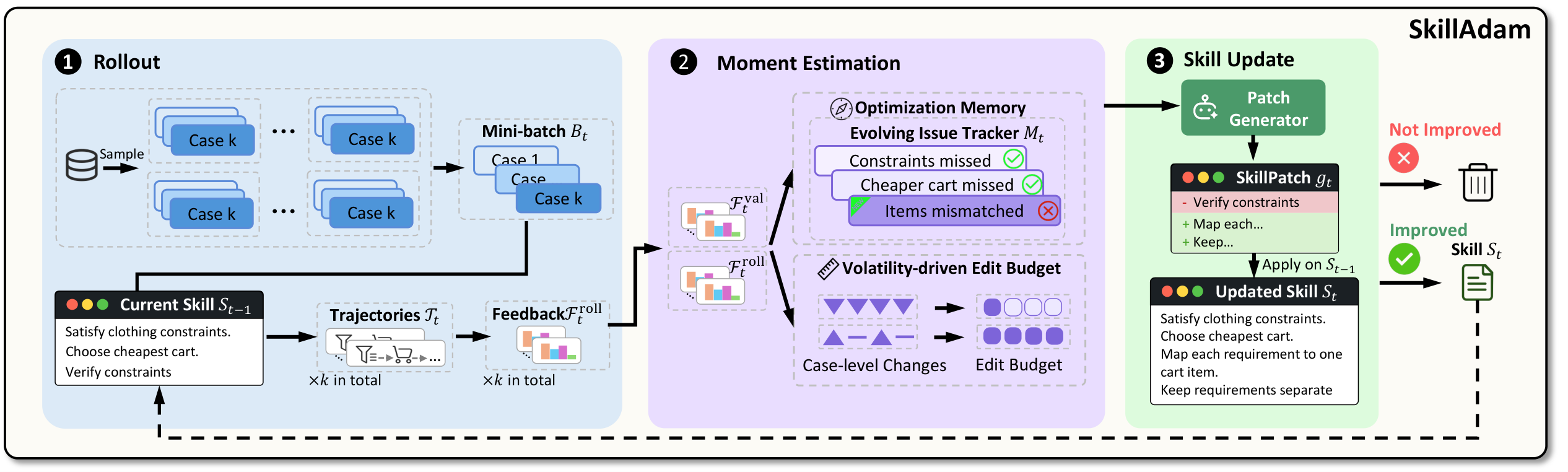
Give SkillAdam a skill and tell it what you want to improve. It tests your SKILL.md on relevant tasks, learns from the results, and checks proposed changes before updating the file.
Supported platforms: Codex · Claude Code · Cursor Agent · GitHub Copilot.
- Improve skills for your workflow. Describe your goal and provide examples of tasks your skill should handle.
- Learn from earlier attempts. Use feedback from previous revisions to guide the next improvement and address recurring mistakes.
- Make measured changes. Adapt the scope of each revision and keep changes that pass evaluation.
- Stay in your preferred agent. Start an optimization in the agent you already use, with the option to review individual edits.
Demo · Quick Start · Usage · Citation
News
- [2026.09.08] Our paper, SkillAdam: Stable and Efficient Skill Evolution for Agents, is now available on arXiv.
- [2026.09] SkillAdam is released with integrations for Codex, Claude Code, Cursor Agent, and GitHub Copilot.
Demo
https://github.com/user-attachments/assets/a15049ee-90b5-4cda-a270-7628a60f76ed
Quick Start
Requirements
- Python 3.10+, with
pipandvenv, and Git. - Your chosen agent's CLI, installed, signed in, and available on your
PATH:codex,claude,cursor-agent, orcopilot. - For Copilot's default VS Code integration, the
codeCLI is also required. For Copilot CLI only, pass--skip-vscode-registrationto its installer.
Cursor requires the Cursor Agent CLI; the desktop app alone is insufficient.
The default setup uses your existing agent sign-in and needs no local GPU, Docker, or separate model API key. Model calls consume your platform account's quota, and skill and task content is sent to the configured model provider.
Installation
Clone this repository:
git clone https://github.com/ruc-datalab/SkillAdam.git
cd SkillAdam
Run one installer for your platform from the repository root:
| Platform | macOS / Linux |
|---|---|
| Codex | ./integrations/codex/install.sh |
| Claude Code | ./integrations/claude-code/install.sh |
| Cursor Agent | ./integrations/cursor/install.sh |
| GitHub Copilot | ./integrations/github-copilot/install.sh |
| Platform | Command |
|---|---|
| Codex | .\integrations\codex\install.ps1 |
| Claude Code | .\integrations\claude-code\install.ps1 |
| Cursor Agent | .\integrations\cursor\install.ps1 |
| GitHub Copilot | .\integrations\github-copilot\install.ps1 |
The installer sets up a dedicated Python environment and registers SkillAdam with your agent. Restart your agent after installation; in VS Code, use Developer: Reload Window.
For more installation options, see the platform guide.
Usage
Improve Your Skill
Open the workspace containing your skill and select skilladam-optimize through your agent's skill picker or invocation mechanism. Give it the skill path and your goal:
Use SkillAdam to optimize /absolute/path/to/SKILL.md for writing concise,
actionable code reviews that catch correctness issues and edge cases.
Your agent prepares relevant tasks and scoring rules. SkillAdam tests the current skill, proposes changes, and evaluates the revised version. By default, proposed edits are selected automatically; your skill file is updated only when the revised version passes validation.
You can make your request more specific by describing a recurring problem or including a task example:
This skill often produces long explanations without a clear recommendation.
Focus on making each review comment identify the problem, explain its impact,
and suggest a concrete fix.
SkillAdam currently optimizes one existing SKILL.md at a time. Include any context needed to evaluate your examples: supporting skill resources and workspace files are not automatically available during test runs. See task guidance for details.
Choose Which Changes to Apply
To review proposed edits yourself, include this in your request:
Before applying changes, show me the proposed edits and let me choose.
You can accept or reject individual edits. SkillAdam then validates the selected changes before updating your skill.
Continue an Interrupted Run
Ask your agent to resume using the same run directory:
Resume the SkillAdam optimization in /absolute/path/to/the/run-directory.
Keep your skill in version control so you can review its history or undo changes.
Citation
If you find SkillAdam useful, please cite our paper:
@misc{li2026skilladam,
  title={SkillAdam: Stable and Efficient Skill Evolution for Agents},
  author={Gaoyuan Li and Meihao Fan and Yizhe Liu and Shaolei Zhang and Ju Fan and Siyi Wang and Jiaheng Hou and Xudong Weng and Honghan Tian and Zang Li},
  year={2026},
  eprint={2609.08944},
  archivePrefix={arXiv},
  primaryClass={cs.AI},
  url={https://arxiv.org/abs/2609.08944}
}
License
SkillAdam is released under the MIT License. Copyright (C) 2026 Tencent. All rights reserved. Third-party attribution is preserved in NOTICE.
Reviews (0)
Sign in to leave a review.
Leave a reviewNo results found