Aivatar-Demo
Health Uyari
- License — License: MIT
- Description — Repository has a description
- Active repo — Last push 0 days ago
- Low visibility — Only 5 GitHub stars
Code Basarisiz
- process.env — Environment variable access in plugins/aivatar-session-bridge/scripts/aivatar-connect.mjs
- process.env — Environment variable access in plugins/aivatar-session-bridge/scripts/aivatar-disconnect.mjs
- process.env — Environment variable access in plugins/aivatar-session-bridge/scripts/aivatar-heartbeat.mjs
- network request — Outbound network request in plugins/aivatar-session-bridge/scripts/aivatar-heartbeat.mjs
- process.env — Environment variable access in plugins/aivatar-session-bridge/scripts/aivatar-status-hook.mjs
- network request — Outbound network request in plugins/aivatar-session-bridge/scripts/aivatar-status-hook.mjs
- process.env — Environment variable access in plugins/aivatar-session-bridge/scripts/aivatar-status.mjs
- network request — Outbound network request in plugins/aivatar-session-bridge/scripts/aivatar-status.mjs
- process.env — Environment variable access in plugins/aivatar-session-bridge/scripts/aivatar-watch.mjs
- network request — Outbound network request in plugins/aivatar-session-bridge/scripts/aivatar-watch.mjs
- os.homedir — User home directory access in plugins/aivatar-session-bridge/scripts/codex-usage.mjs
- process.env — Environment variable access in plugins/aivatar-session-bridge/scripts/codex-usage.mjs
Permissions Gecti
- Permissions — No dangerous permissions requested
Bu listing icin henuz AI raporu yok.
A retro pixel desktop vibe coding buddy for Codex and Claude Code, with live agent status, CLI task launching, and token-powered room customization.
Aivatar
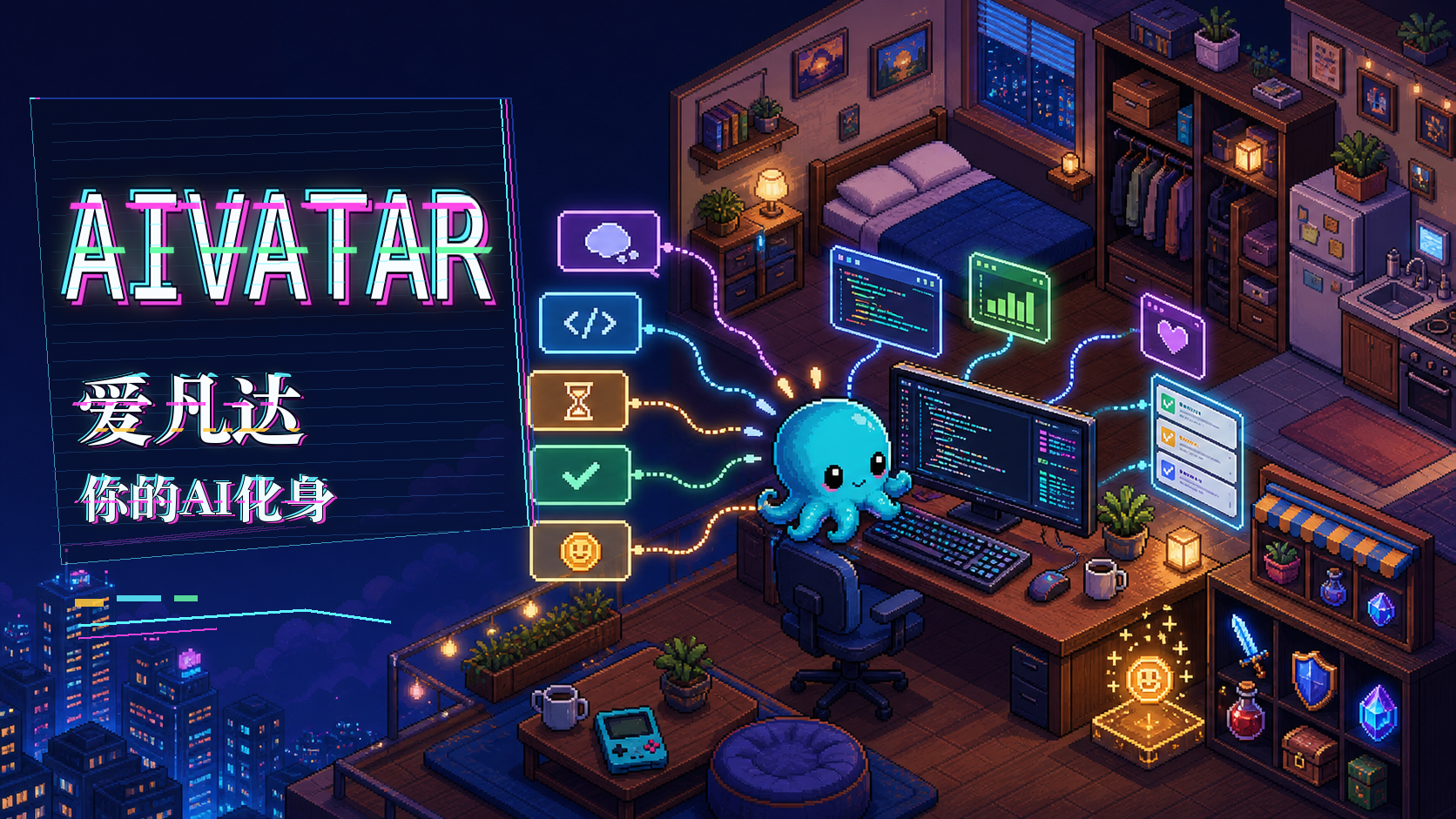
EN | Aivatar is a local-first desktop companion for AI coding agents. It turns Codex, Claude Code, or another agent session into a small pixel-room avatar that reacts to live status, earns bits, grows from completed work, and lets you decorate a personal workspace.
中文 | Aivatar 是一个本地优先的 AI 编程智能体桌面伙伴。它把 Codex、Claude Code 或其他 agent 的会话状态映射成像素房间里的小伙伴行为:思考、编码、等待、报错、完成任务,并通过 bits、成长、背包、商店和房间装修形成一个可互动的工作陪伴系统。
Current status / 当前状态: the app can be built from source. A Windows preview release is being prepared; installer distribution and some release-mode integrations are still being hardened.
Contents / 目录
- User Manual / 用户手册
- UI Showcase / UI 展示
- Developer Manual / 开发者手册
- Agent Status Protocol / Agent 状态协议
- Content Configuration / 内容配置
- Privacy And Local Data / 隐私与本地数据
- Roadmap Notes / 路线图说明
User Manual / 用户手册
What Aivatar Does / Aivatar 能做什么
EN
- Shows a cozy pixel room with bedroom, office, kitchen, furniture, windows, wallpaper, floor styles, and placed items.
- Animates an avatar across behavior states such as idle, exploring, sleeping, interacting, thinking, coding, waiting, error, and success.
- Follows live local agent sessions through a WebSocket bridge.
- Tracks multiple sessions by
agent + sessionId, including current, followed, connected, stale, and idle sessions. - Rewards eligible completed Codex or Claude Code sessions with
bitsbased on reported token usage. - Lets you spend
bitson consumables, decor, furniture skins, windows, wall surfaces, floor surfaces, and room items. - Provides local save slots, avatar naming, JSON/folder save import, and local state persistence.
- Includes a Task Cabinet for launching one-off or scheduled markdown prompt tasks through the selected CLI agent.
- Provides a CLI Launcher for starting connected Codex or Claude Code sessions from the desktop app.
- Includes an Asset Studio entry point, but it is currently marked as in development.
中文
- 展示一个像素风房间,包含卧室、办公区、厨房、家具、窗户、墙纸、地板和可摆放物品。
- 让小伙伴根据状态执行不同动作,例如闲置、探索、睡觉、互动、思考、编码、等待用户、报错和成功。
- 通过本地 WebSocket 桥接实时跟随 agent 会话。
- 按
agent + sessionId跟踪多会话,区分当前、跟随中、已连接、过期和闲置状态。 - 对符合条件的 Codex 或 Claude Code 完成会话,根据上报 token 用量奖励
bits。 - 用
bits购买消耗品、装饰、家具皮肤、窗户、墙面、地板和房间物品。 - 支持本地存档槽、角色命名、JSON/文件夹存档导入和本地状态持久化。
- 提供任务柜,可以把 Markdown prompt 作为一次性或定时任务交给 CLI agent 执行。
- 提供 CLI 启动器,可从桌面应用中启动已连接的 Codex 或 Claude Code 会话。
- 包含素材工坊入口,但当前仍标记为开发中,不应视为完整功能。
Basic Use / 基本使用
EN
- Launch Aivatar.
- Choose an existing local save slot, create a new character room, or import an Aivatar save JSON/folder.
- Use the room directly even without Codex or Claude Code installed.
- Interact with furniture and placed items in the canvas.
- Open Inventory, Shop, and Decor panels to use items, buy supplies, apply furniture skins, change wall/floor surfaces, and move windows or furniture.
- Open Agent Sessions to inspect live sessions, follow a session, disconnect one, or clear stale sessions.
- Use the debug/status tools only when testing behavior or developing integrations.
中文
- 启动 Aivatar。
- 选择已有本地存档,创建新的角色房间,或导入 Aivatar 存档 JSON/文件夹。
- 即使没有安装 Codex 或 Claude Code,也可以独立使用房间、背包、商店、装修和存档功能。
- 在画布中点击家具或摆放物品进行互动。
- 打开背包、商店和装修面板,使用物品、购买道具、应用家具皮肤、更换墙面/地板,以及移动窗户或家具。
- 打开 Agent 会话面板查看实时会话、跟随会话、断开会话或清理过期会话。
- 调试状态工具主要用于测试行为和开发集成,普通使用时不必开启。
UI Showcase / UI 展示
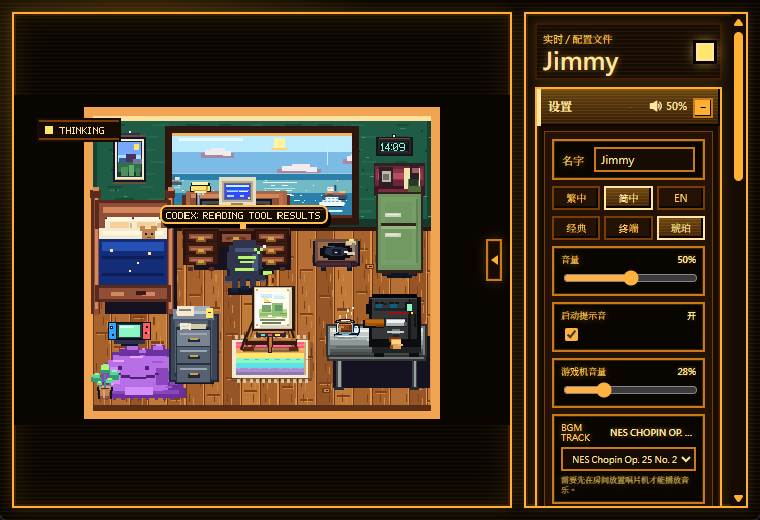
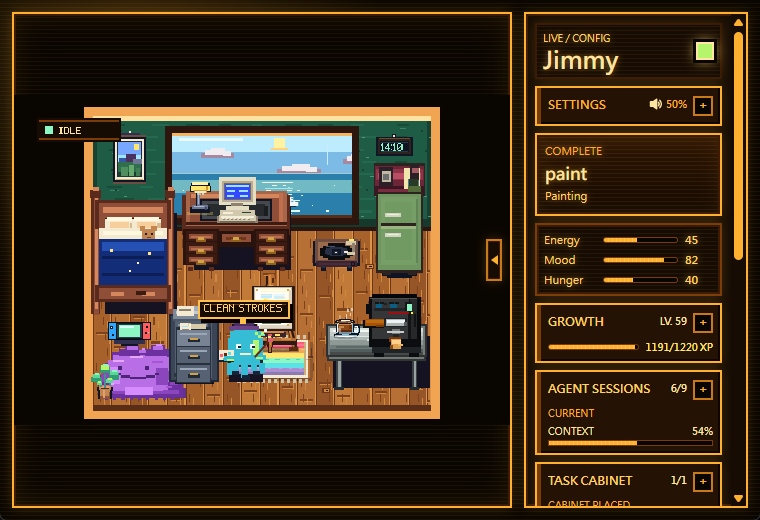
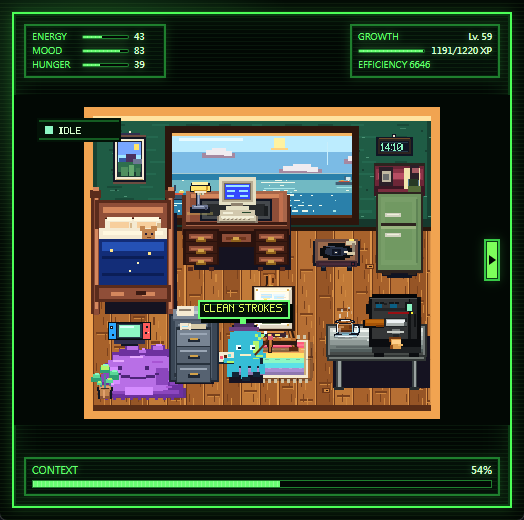
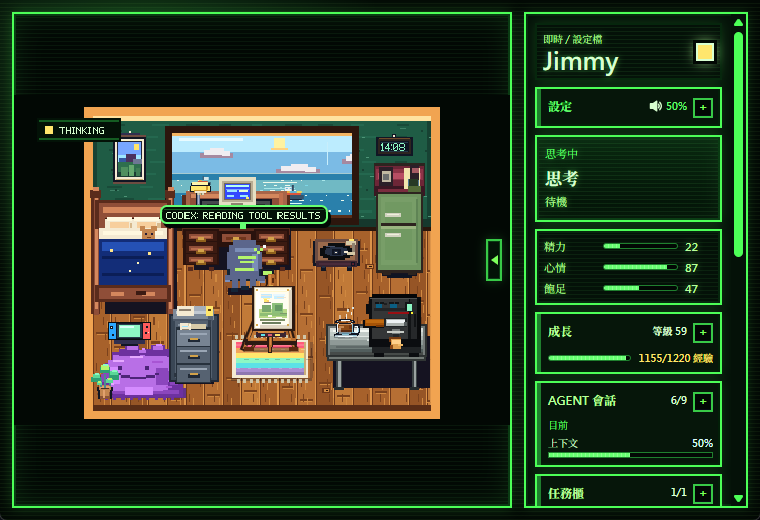
EN | These screenshots show the actual app UI: the pixel room, live agent state, local settings, avatar stats, growth, Agent Sessions, and Task Cabinet panels.
中文 | 以下截图展示真实应用界面:像素房间、实时 agent 状态、本地设置、角色状态、成长、Agent 会话和任务柜面板。
| Main room and settings / 主房间与设置 | Live status panels / 实时状态面板 |
|---|---|
 |
 |
| Compact HUD view / 精简 HUD 展示 | Chinese localized bridge view / 中文本地化桥接展示 |
|---|---|
 |
 |
Agent Integration / Agent 集成使用
EN
Aivatar works without an agent, but live companion behavior needs a local status source.
- For a desktop build, the Tauri app can start the local bridge.
- For web preview or development, run
npm.cmd run status:bridge. - Codex Desktop can connect through the bundled Aivatar session connector.
- Codex CLI and Claude Code CLI can be launched through wrapper scripts when Node.js and the selected CLI are available on
PATH.
Connect the current Codex Desktop session:
npm.cmd run aivatar:session:setup
npm.cmd run aivatar:connect
Disconnect it:
npm.cmd run aivatar:disconnect
中文
Aivatar 不依赖 agent 也能运行,但实时陪伴行为需要一个本地状态来源。
- 桌面版可以由 Tauri 应用启动本地桥接。
- Web 预览或开发时,可以运行
npm.cmd run status:bridge。 - Codex Desktop 可通过仓库内置的 Aivatar session connector 连接。
- 当 Node.js 和对应 CLI 已在
PATH中时,Codex CLI 与 Claude Code CLI 可通过包装脚本启动并被 Aivatar 跟随。
连接当前 Codex Desktop 会话:
npm.cmd run aivatar:session:setup
npm.cmd run aivatar:connect
断开连接:
npm.cmd run aivatar:disconnect
More details / 更多细节: docs/aivatar-session-plugin.md
Task Cabinet / 任务柜
EN
Task Cabinet lets you register Markdown prompt files and dispatch them through the selected CLI Launcher configuration.
- Only
.mdtask paths are accepted. - Each prompt should stay at or below 24,000 characters.
- Aivatar reads the Markdown file once, creates a temporary prompt copy, and does not write back to the source file.
- Tasks can be run once, rerun, or scheduled.
- Schedule conditions include always, only when idle, and after the previous success.
- A File Cabinet item is part of the in-room dispatch fantasy and can be placed as furniture.
中文
任务柜用于登记 Markdown prompt 文件,并通过当前 CLI 启动器配置派发给 agent。
- 只接受
.md任务路径。 - 每个 prompt 建议不超过 24,000 字符。
- Aivatar 只读取 Markdown 文件一次,生成临时 prompt 副本,不会写回源文件。
- 任务可以一次性执行、重新执行或设置排程。
- 排程条件包括永远执行、仅闲置时执行、上次成功后执行。
- File Cabinet 文件柜既是房间家具,也是任务派发的视觉入口。
Rewards, Growth, And Room Economy / 奖励、成长与房间经济
EN
- Completed supported sessions can grant
bits. bitscan be spent on supplies, decor, surfaces, windows, and furniture skins.- Consumables affect avatar stats such as energy, mood, and hunger.
- Aivatar records recent local memory events, growth level, XP, milestones, and trait changes.
- Session learning is ignored when marked high privacy risk.
中文
- 受支持的完成会话可以奖励
bits。 bits可用于购买道具、装饰、墙面/地板、窗户和家具皮肤。- 消耗品会影响小伙伴的能量、心情、饥饿等状态。
- Aivatar 会在本地记录近期事件、成长等级、XP、里程碑和特质变化。
- 如果 session learning 结果标记为高隐私风险,应用会忽略该学习结果。
Developer Manual / 开发者手册
Tech Stack / 技术栈
EN
- Frontend: React 18, TypeScript, Vite.
- Desktop shell: Tauri 2.
- Native bridge and desktop commands: Rust under
src-tauri. - Local agent helpers: Node.js scripts under
scriptsandplugins/aivatar-session-bridge. - Runtime content: JSON config under
public/config/aivatar.config.json, with TypeScript defaults insrc/data/defaultContent.ts.
中文
- 前端:React 18、TypeScript、Vite。
- 桌面壳:Tauri 2。
- 原生桥接和桌面命令:
src-tauri下的 Rust 代码。 - 本地 agent 辅助脚本:
scripts和plugins/aivatar-session-bridge下的 Node.js 脚本。 - 运行时内容:
public/config/aivatar.config.json,并由src/data/defaultContent.ts提供 TypeScript 默认值。
Project Layout / 项目结构
.
├─ src/
│  ├─ App.tsx                         # Main React UI and app state
│  ├─ i18n.ts                         # zh-HK, zh-CN, and English UI text
│  ├─ types.ts                        # Shared app data and protocol types
│  ├─ data/
│  │  ├─ defaultContent.ts             # Built-in room, item, shop, and avatar defaults
│  │  └─ loadContent.ts                # Runtime content loading
│  ├─ game/
│  │  ├─ interactions.ts               # Placement, hit testing, and room interaction rules
│  │  ├─ renderScene.ts                # Pixel canvas rendering
│  │  └─ simulation.ts                 # Avatar simulation and behavior transitions
│  └─ hooks/useCodexStatus.ts          # Bridge connection and status snapshot hook
├─ src-tauri/                          # Tauri app, Rust bridge, local commands
├─ scripts/                            # CLI wrappers, bridge, status sender, learning worker
├─ plugins/aivatar-session-bridge/      # Bundled Codex Desktop session connector
├─ public/config/aivatar.config.json    # Runtime content configuration
├─ public/assets/art/                   # Pixel-art asset provenance and sheets
├─ public/audio/                        # Audio assets and attribution notes
└─ docs/                                # Release and integration docs
Setup / 环境准备
EN
Install dependencies:
npm.cmd install
Use npm.cmd on Windows if PowerShell blocks npm.ps1.
Run the web UI:
npm.cmd run dev
Run as a desktop app:
npm.cmd run tauri dev
Build:
npm.cmd run build
中文
安装依赖:
npm.cmd install
如果 Windows PowerShell 阻止 npm.ps1,请使用 npm.cmd。
运行 Web UI:
npm.cmd run dev
以桌面应用运行:
npm.cmd run tauri dev
构建:
npm.cmd run build
Useful Scripts / 常用脚本
| Script | Purpose | 用途 |
|---|---|---|
npm.cmd run dev |
Start Vite web dev server | 启动 Vite Web 开发服务器 |
npm.cmd run tauri dev |
Start Tauri desktop dev app | 启动 Tauri 桌面开发应用 |
npm.cmd run build |
Type-check and build web assets | 类型检查并构建前端资源 |
npm.cmd run status:bridge |
Start local status bridge | 启动本地状态桥接 |
npm.cmd run status:mock |
Start mock status source | 启动模拟状态源 |
npm.cmd run status:send |
Send one status message | 发送单条状态消息 |
npm.cmd run aivatar:run -- <cmd> |
Wrap a command lifecycle | 包装一个命令生命周期 |
npm.cmd run codex:run |
Start Codex through wrapper | 通过包装器启动 Codex |
npm.cmd run claude:run |
Start Claude Code through wrapper | 通过包装器启动 Claude Code |
npm.cmd run codex:connected |
Start connected Codex runner | 启动已连接的 Codex runner |
npm.cmd run claude:connected |
Start connected Claude Code runner | 启动已连接的 Claude Code runner |
npm.cmd run aivatar:connect |
Connect current Codex Desktop session | 连接当前 Codex Desktop 会话 |
npm.cmd run aivatar:disconnect |
Disconnect current session | 断开当前会话 |
Manual Status Testing / 手动状态测试
EN
Start the bridge:
npm.cmd run status:bridge
Send status updates:
npm.cmd run agent:send -- --agent codex --session codex-demo thinking "Reading project files"
npm.cmd run agent:send -- --agent codex --session codex-demo executing "Applying patch"
npm.cmd run agent:send -- --agent codex --session codex-demo waiting_for_user "Need approval"
npm.cmd run agent:send -- --agent codex --session codex-demo complete "Task finished"
Wrap an arbitrary command:
npm.cmd run aivatar:run -- npm.cmd run build
npm.cmd run aivatar:run -- codex
npm.cmd run agent:run -- --agent claude-code -- claude
中文
启动桥接:
npm.cmd run status:bridge
发送状态更新:
npm.cmd run agent:send -- --agent codex --session codex-demo thinking "Reading project files"
npm.cmd run agent:send -- --agent codex --session codex-demo executing "Applying patch"
npm.cmd run agent:send -- --agent codex --session codex-demo waiting_for_user "Need approval"
npm.cmd run agent:send -- --agent codex --session codex-demo complete "Task finished"
包装任意命令:
npm.cmd run aivatar:run -- npm.cmd run build
npm.cmd run aivatar:run -- codex
npm.cmd run agent:run -- --agent claude-code -- claude
Agent Status Protocol / Agent 状态协议
Endpoints / 端点
EN | Aivatar listens for status snapshots over WebSocket and accepts HTTP status updates through the local bridge.
中文 | Aivatar 通过 WebSocket 接收状态快照,并通过本地桥接的 HTTP 接口接受状态更新。
WebSocket:
ws://127.0.0.1:38987/agent-status
ws://127.0.0.1:38987/codex-status  legacy compatibility

HTTP:
POST http://127.0.0.1:38988/agent-status
GET  http://127.0.0.1:38988/agent-status
POST http://127.0.0.1:38988/codex-status  legacy compatibility
GET  http://127.0.0.1:38988/codex-status   legacy compatibility
GET  http://127.0.0.1:38988/health
Status Message / 状态消息
{
  "agent": "codex | claude-code | aider | cursor | custom",
  "sessionId": "optional session id",
  "status": "idle | thinking | executing | waiting_for_user | error | complete",
  "phase": "optional short phase name",
  "task": "optional current task summary",
  "summary": "optional short bubble text",
  "detail": "optional longer detail",
  "progress": 0,
  "message": "optional display text",
  "severity": "info | warning | error",
  "timestamp": "ISO-8601"
}
Snapshot Shape / 快照结构
{
  "type": "aivatar.status.snapshot",
  "currentStatus": {},
  "sessions": [],
  "activeSessionKey": "optional active agent:sessionId",
  "connectedSessionKey": "optional connected agent:sessionId",
  "currentSessionKey": "optional current agent:sessionId",
  "timestamp": "ISO-8601"
}
EN | The bridge keeps the latest status per agent + sessionId and broadcasts session snapshots. Old single-status payloads remain supported for compatibility.
中文 | 桥接会按 agent + sessionId 保存最新状态并广播会话快照。旧版单状态消息仍被兼容。
Content Configuration / 内容配置
EN
Aivatar loads runtime content from:
public/config/aivatar.config.json
If loading fails, it falls back to src/data/defaultContent.ts. The content model includes:
- avatar name and sprite reference
- room theme, zones, furniture, windows, wall surfaces, and floor surfaces
- starter inventory and placed items
- item definitions, item prices, effects, unlock levels, placement rules, and furniture skins
- shop inventory and currency
- starter pet stats and wallet
中文
Aivatar 会从以下位置加载运行时内容:
public/config/aivatar.config.json
如果加载失败,会回退到 src/data/defaultContent.ts。内容模型包括:
- avatar 名字和 sprite 引用
- 房间主题、区域、家具、窗户、墙面和地板
- 初始背包和已摆放物品
- 物品定义、价格、效果、解锁等级、摆放规则和家具皮肤
- 商店库存和货币
- 初始宠物状态和钱包
Privacy And Local Data / 隐私与本地数据
EN
Aivatar is designed around same-machine local integration.
- The bridge listens on
127.0.0.1by default. - Local saves are stored on the user's machine.
- Depending on enabled integrations, Aivatar may read local Codex Desktop session metadata, rollout JSONL activity, Claude Code hook/status payloads, selected Markdown task files, and local save data.
- Task Cabinet reads selected Markdown files into temporary prompt copies and does not write back to source files.
- Operational files may be written under the system temp directory, including bridge state, session helper records, avatar state snapshots, task prompt copies, and learning context digests.
- Review local session files, saves, temp files, and logs before sharing them.
Disable session learning:
$env:AIVATAR_LEARNING_ENABLED = "0"
Security reporting: see SECURITY.md.
中文
Aivatar 的集成边界是同一台机器上的本地通信。
- 桥接默认监听
127.0.0.1。 - 本地存档保存在用户机器上。
- 根据启用的集成,Aivatar 可能读取本地 Codex Desktop 会话元数据、rollout JSONL 活动、Claude Code hook/status payload、用户选择的 Markdown 任务文件和本地存档数据。
- 任务柜会把选中的 Markdown 文件读取为临时 prompt 副本,不会写回源文件。
- 运行文件可能写入系统临时目录,包括桥接状态、session helper 记录、avatar 状态快照、任务 prompt 副本和 learning context 摘要。
- 分享本地会话文件、存档、临时文件或日志前,应先自行审查。
关闭 session learning:
$env:AIVATAR_LEARNING_ENABLED = "0"
安全问题报告请见 SECURITY.md。
Assets And Attribution / 资源与署名
EN | Bundled asset provenance is tracked in ATTRIBUTIONS.md, public/audio/README.md, and public/assets/art/README.md. The README banner was generated for this repository and saved at docs/assets/aivatar-readme-hero.png.
中文 | 内置资源来源记录在 ATTRIBUTIONS.md、public/audio/README.md 和 public/assets/art/README.md。README 顶部宣传图是为本仓库生成的,保存于 docs/assets/aivatar-readme-hero.png。
Roadmap Notes / 路线图说明
EN
Current release-prep limitations:
- The Windows preview release path is still being hardened.
- Codex Desktop connector and connected CLI runner scripts are bundled as resources, but connected CLI launch still requires Node.js and the requested agent CLI on
PATH. - Native bridge support exists for local status, basic Codex Desktop session discovery, rollout watching, token-usage rewards, and local heuristic session learning.
- A fully Rust-native connected runner and provider-backed release-mode learning remain future hardening work.
- macOS and Linux packaging are planned after the Windows preview path is stable.
中文
当前发布准备阶段的限制:
- Windows 预览版发布路径仍在加固。
- Codex Desktop connector 和 connected CLI runner 脚本已作为资源打包,但 connected CLI 启动仍需要 Node.js 和目标 agent CLI 位于
PATH中。 - 本地状态、基础 Codex Desktop 会话发现、rollout watching、token 用量奖励、本地启发式 session learning 已有原生桥接预览实现。
- 完全 Rust-native 的 connected runner 和面向发布模式的 provider-backed learning 仍是后续加固工作。
- macOS 和 Linux 打包计划在 Windows 预览路径稳定后推进。
License / 许可证
See LICENSE.
Yorumlar (0)
Yorum birakmak icin giris yap.
Yorum birakSonuc bulunamadi