modx3-mcp
Health Warn
- License — License: MIT
- Description — Repository has a description
- Active repo — Last push 0 days ago
- Low visibility — Only 6 GitHub stars
Code Pass
- Code scan — Scanned 12 files during light audit, no dangerous patterns found
Permissions Pass
- Permissions — No dangerous permissions requested
No AI report is available for this listing yet.
MCP server and MODX Revolution 2.8.x / 3.x component for safe AI-agent management, with a shared modular runtime, backups, audit hooks, and dependency analysis
MODX MCP
English · Русский · Español · Deutsch · Français · Українська · Қазақша · Nederlands · Polski
Documentation in 9 languages / Документация на 9 языках
MODX MCP is an MCP server (Model Context Protocol) and component line for MODX Revolution 2.8.x and 3.x. It lets AI agents work through MODX objects, processors, permissions and relations instead of treating a site as only a database and a set of files.
MODX MCP does not try to give AI the widest possible access to a website. It tries to give AI the right access to MODX.
The project is based on the original modxMCP, created by dampilov94. The current codebase grew out of the MODX 3 port and now uses one shared modular runtime with platform adapters for MODX 2 and MODX 3.
MODX MCP 1.2.7 · MODX Revolution 2.8.x / 3.x · 199 server actions (198 public MCP tools) · MIT
The repository name
modx3-mcp, Node package name, and existing technical identifiers are retained for backward compatibility. The product name shown in documentation and the MODX manager is now MODX MCP.
MODX MCP interface
Manager UI languages: Russian, English, Spanish, German, French, Ukrainian, Kazakh (Cyrillic), Dutch and Polish (ru, en, es, de, fr, uk, kk, nl, pl).
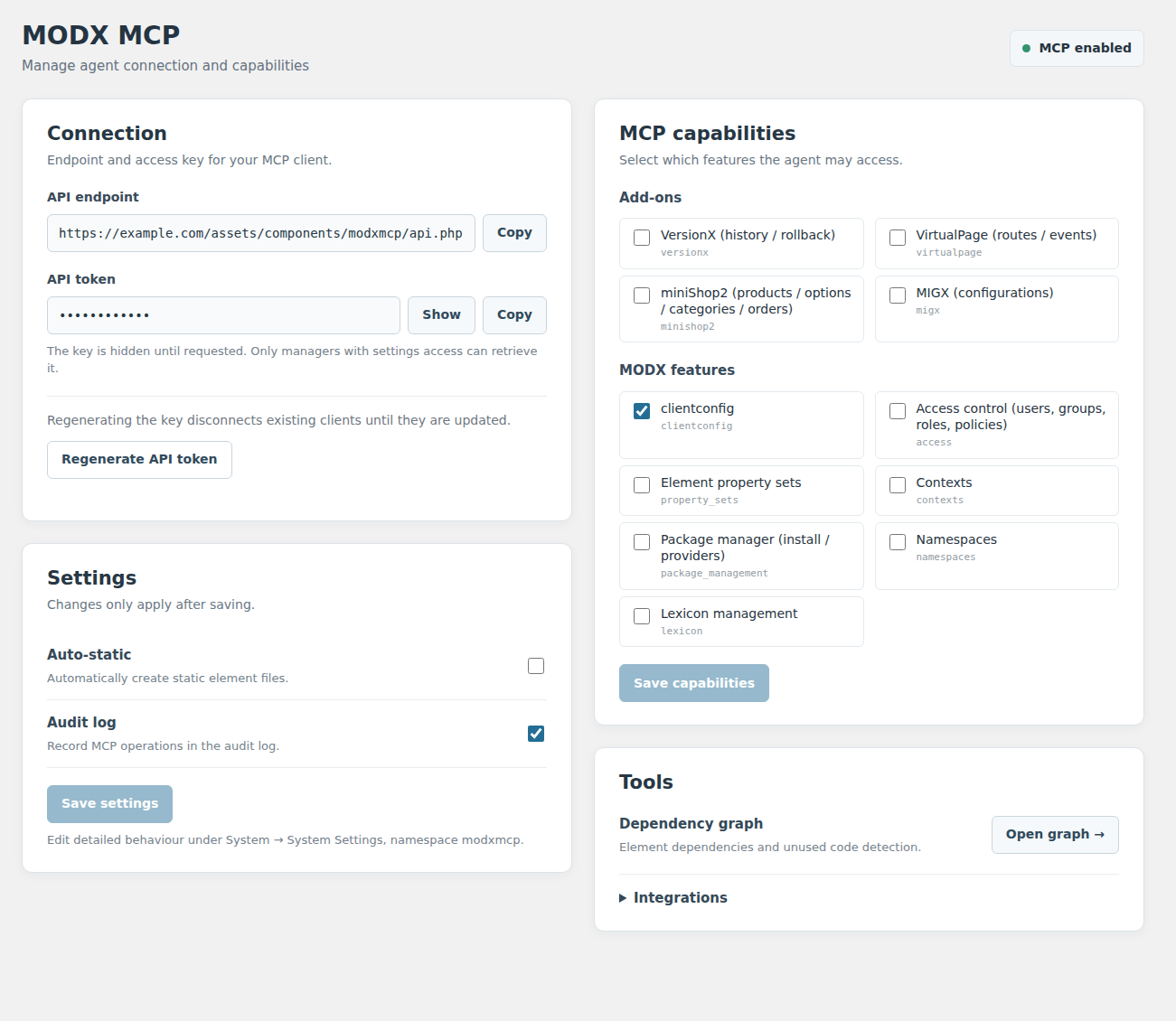
Use the manager dashboard to review the API endpoint, manage token access, configure settings, and control available MCP capabilities. The separate dependency graph shows relationships between MODX elements, broken references, and potentially unused code.
Manager dashboard
Dependency graph
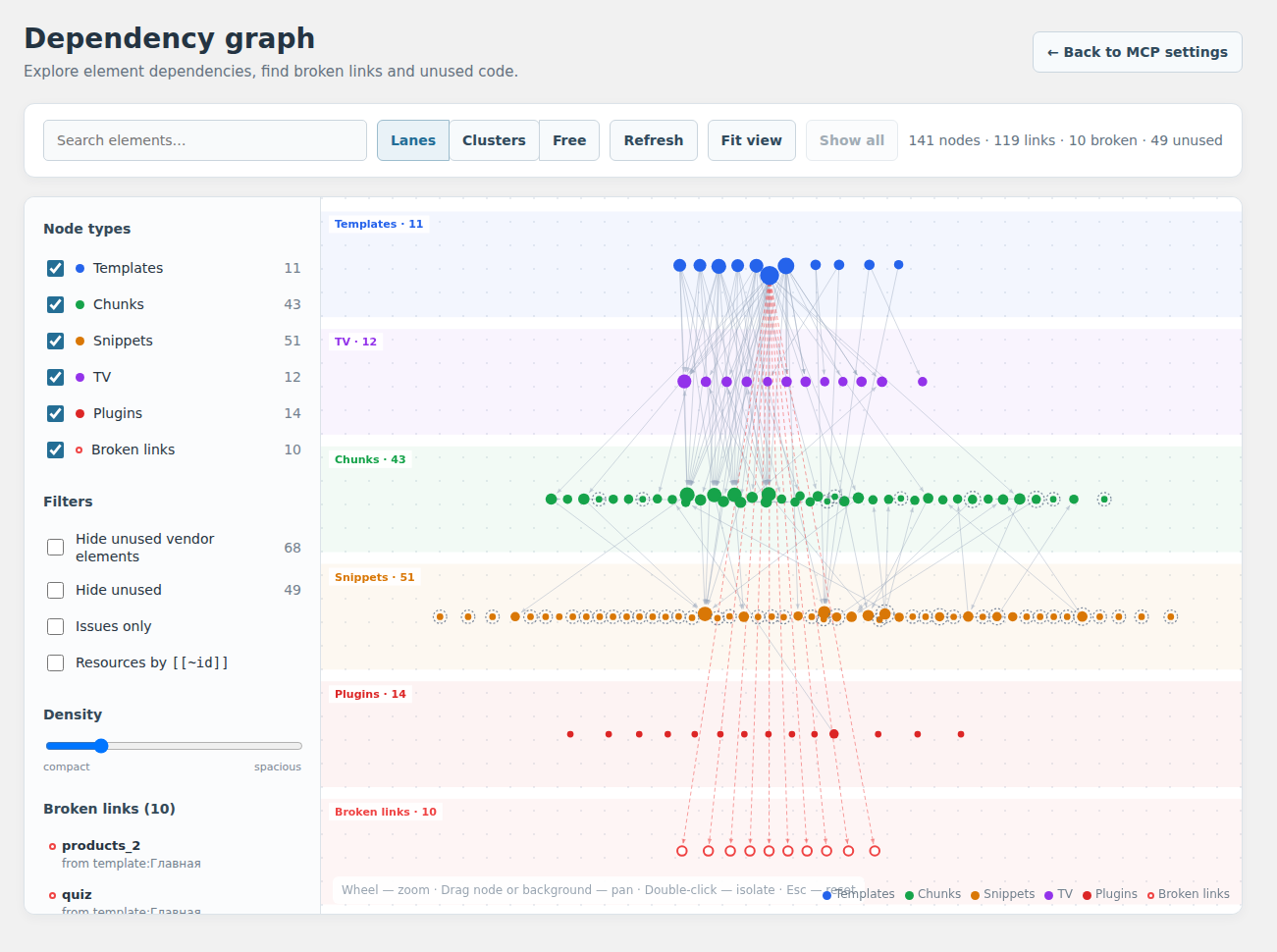
Documentation illustrations rendered from the component UI and test-site graph data. The API hostname is an example and the token is fully masked. The graph screenshot uses English-localized labels for documentation; the graph uses localized strings from the selected manager language. Images are not evidence of a specific MCP client being connected.
Documentation
| Purpose | English | Русский |
|---|---|---|
| Install and connect | Installation and setup | Установка |
| Explore all features | Capabilities and tools | Возможности |
| Build integrations | API reference: 198 tools | Справочник API |
| Deploy safely | Security and trust model | Безопасность |
| System settings | All 16 system settings | Все 16 настроек |
Additional references: development, build architecture, validation status.
The idea
Giving an AI agent normal server access means it can edit files, run SQL queries, and execute commands. For MODX, that is not enough. A large part of a MODX site lives in resources, templates, chunks, snippets, TVs, system settings, relations between objects, and data managed by installed extras.
MODX MCP gives the agent a dedicated management layer that works with these things as MODX objects. The agent can:
- find resources, templates, chunks, snippets, plugins, and TVs;
- Manage MODX element categories: create, rename, nest, move, safely delete, and assign to chunks, snippets, templates, TVs and plugins.
- inspect dependencies and where elements are used;
- create, update, and delete MODX objects through controlled operations;
- work with system settings, media sources, and supported extras;
- preview potentially dangerous operations before applying them;
- create safety backups before changes;
- keep read operations separate from write operations;
- send information about completed changes to an external audit log.
The main goal is to make AI work with MODX more predictable, reviewable, and reversible.
Who is it for?
MODX MCP is mainly useful for:
- MODX developers and integrators who use AI agents in daily work;
- agencies and teams that maintain several MODX projects;
- owners of complex MODX sites who want controlled AI access to the CMS;
- developers of their own agent systems who need more than generic file, SSH, or database access.
Why MODX MCP is designed this way
MODX MCP was not built as a demo showing that an LLM can be connected to a CMS. It was built as a practical tool for working with real websites.
The main risk with an AI agent is not whether it can change a file or a record. The real question is whether it understands the consequences. On a live MODX site, elements rarely exist in isolation. One shared chunk may be used by dozens of resources and templates, a TV may be part of the logic of several sections, and a system setting may affect an entire component.
That is why MODX MCP focuses not only on executing commands, but also on context: dependencies, previews, backups, limits for dangerous operations, and auditing.
The goal is not to make the agent all-powerful. The goal is to give it enough context and enough limits so it is less likely to make dangerous decisions blindly.
Compatible MCP clients
The Node.js part of MODX MCP uses the standard stdio transport and works with MCP hosts that can start a local MCP server. No separate agent orchestration service is required. See Installation and setup.
Common AI mistakes when working with a CMS
| Common problem | What can happen | What MODX MCP does |
|---|---|---|
| Changing an element without checking where it is used | A shared chunk, snippet, or TV affects several parts of the site | Lets the agent inspect dependencies and usage |
| Editing the database directly | MODX logic may be bypassed, relations may break, or cache state may become incorrect | Provides dedicated operations for MODX objects |
| Deleting an "unused" object without checking | A hidden dependency is discovered only after part of the site breaks | Helps inspect relations and possible impact before deletion |
| Overwriting settings during an update | API tokens or site-specific values are lost | Preserves existing settings during reinstall and upgrade |
| Several changes running at the same time | One process may overwrite the result of another | Uses locking for write operations |
| Failure during a component upgrade | The component may be left only partly updated | Prepares the new file tree separately and restores the previous one on failure |
| Giving the agent too much access | A mistake affects more objects than necessary | Lets you disable and restrict capability groups |
| No action history | It becomes difficult to understand what the agent actually changed | Supports an external operation log and audit data |
How this approach is different
MODX MCP does not replace SSH, SQL, or file access. It solves a different problem: it gives AI an interface where MODX objects still keep their meaning.
| Approach | What the agent gets | Main limitation |
|---|---|---|
| SSH and shell access | Broad access to the server and system commands | Wide permissions, but little understanding of CMS structure |
| Direct SQL access | Read and write access to database tables | Bypasses application logic and gives little context about object relations |
| Generic file MCP | Access to source code and the file system | A large part of MODX structure is not stored in files |
| Generic database MCP | Access to tables and queries | Tables do not explain MODX object semantics to the agent |
| MODX MCP | Dedicated operations for MODX entities and their relations | The agent is limited to capabilities explicitly implemented and allowed by the server |
MODX MCP deliberately does not give AI arbitrary access to the whole server. Instead, it gives the agent a narrower but more meaningful interface: a resource stays a resource, a chunk stays a chunk, a TV stays a TV, and dependencies between them can be inspected before a change is made.
Example task
For example, you can ask an agent:
"Increase the price of products in a specific category by 100. First find where the price is stored, check which objects will be affected, and only then make the changes."
Instead of editing database tables directly, the agent can use MODX MCP to inspect the project structure, identify the right entities, review related objects, perform the change through available operations, and record the result.
Features
The server side of MODX MCP exposes more than 180 operations, which the client presents as specialised MCP tools.
It supports:
- resources and the site tree;
- templates, chunks, and snippets;
- plugins and events;
- TVs and TV values;
- categories and system settings;
- namespaces;
- media sources and files;
- user groups and access control;
- property sets and contexts;
- packages, extras, and lexicons;
- MIGX, miniShop2, VersionX, and VirtualPage.
Individual capability groups can be disabled in the component settings.
Dependency analysis
One of the key features of MODX MCP is a dependency graph for site elements.

MODX MCP dependency graph in the MODX manager: relations between templates, chunks, snippets, TVs, and plugins, plus detected broken references and unused elements.
The agent can find:
- which chunks and snippets are used by a template;
- which TVs are assigned to templates;
- which elements call other elements;
- where a specific element is used;
- references to elements that do not exist;
- elements that are likely no longer used;
- which parts of the site may be affected by a change.
The graph is available through MCP and also as a dedicated screen in the MODX manager. This is especially useful on larger projects, where changing one element may affect several different sections of the site.
Safety mechanisms
MODX MCP is designed not only for reading data, but also for real work on live websites. Depending on the operation, it supports:
- automatic safety backups before changes;
- previewing changes without applying them;
- extra confirmation for destructive operations;
- locking of parallel write operations;
- restricting available capability groups;
- separate permission for running arbitrary MODX processors;
- HTTPS required for the API by default;
- safe API-token comparison;
- automatic selection of an active MODX user with
sudopermission; - preservation of existing settings and API token during component upgrades.
Limits and trust model
MODX MCP does not make AI error-free. An LLM can still misunderstand a task, select the wrong object, or suggest an unwanted change.
The component reduces technical risk and gives the agent more context, but it does not replace proper backups, access control, or human review of critical changes. Extra care is recommended for bulk operations, access-control changes, system settings, custom PHP code, and operations provided by third-party extras.
On a production site, it is best to allow only the capability groups that are actually needed.
External audit hook
For integration with your own audit system, the client supports the MODX_MCP_AUDIT_HOOK environment variable.
After a successful write operation, the client can start a configured local program and send JSON to its standard input. The payload includes the MCP tool name, arguments, result, site identifier, actor information, and paths to automatically created safety backups.
The program is started directly, without a shell. If the audit hook is not configured, normal MODX MCP behaviour does not change. If the hook itself fails, an already successful site change is not reported as failed. Read-only operations do not trigger the hook.
Patch 1.2.3 (MODX 2 and MODX 3)
Package-manager installation screens now resolve documentation links on GitHub instead of relative to the MODX manager URL. README/CHANGELOG links and images are rewritten only when embedding transport metadata; the source Markdown is unchanged. The public MCP contract remains 193 server actions / 192 public tools, and normal upgrades preserve the existing API token and settings.
Patch 1.2.2 (MODX 2 and MODX 3)
Historical note about the previous v1.2.2 release.
The v1.2.2 source and its two platform packages introduced 193 server actions (192 public MCP tools), including CAS-safe TV writes and modx_update_element_property. The manager dashboard and dependency graph were redesigned with responsive layouts, larger controls, safe token reveal/copy and in-panel scrolling. MODX 2 has separate compatible manager/processor overlays. Upgrading preserves the existing modxmcp.api_token; you do not need to reconfigure clients unless you deliberately regenerate the token.
See the changelog, installation and validation history for release-specific details.
Compatibility
The shared-source platform line, introduced before v1.2.3, supports both MODX generations:
- MODX Revolution 2.8.x — platform artifact
modx2; - MODX Revolution 3.x — platform artifact
modx3; - Node.js 18 or newer for the local MCP server.
The two MODX generations use the same MCP client, the same public action contract and the same modular runtime. Platform-specific bootstrap, class names and processor routing are isolated behind platform adapters and release overlays.
Version 1.2.1 status:
- all 192/192 server actions are implemented by the modular runtime; v1.2.0 added 10 actions compared with v1.1.0:
get_site_state, ClientConfig CRUD/read operations, and additional access-policy/resource-group read helpers; - the 192-action source contract passes the static architecture, client/server, migration, portability and release-staging checks;
- the published v1.1.0 release was live-validated with the previous 182-action contract on MODX 3.2.4-pl and MODX 2.8.9-pl;
- MODX 3 processor compatibility for the stable line was checked against 3.2.2-pl, 3.2.4-pl and the then-current 3.x branch;
- v1.2.1 is the security patch release. Both platform transport packages passed installation, reinstallation, uninstall/reinstall and endpoint smoke on their MODX 2.8.9-pl and MODX 3.2.4-pl test sites. The full 14-suite MODX 3 regression and 81-action read parity were completed for v1.2.0; they are not claimed as newly rerun for 1.2.1.
See build architecture and validation status for the exact matrix.
Quick start
A minimal working setup is:
- Install the MODX MCP transport package.
- Get the automatically generated API token.
- Configure your MCP client to start MODX MCP.
- Begin with a safe read-only task, for example: "Show me the project structure and the dependencies of template X."
After that, you can move to more complex workflows and enable only the capability groups you actually need.
Install with the MODX transport package
Version-specific MODX Extras documentation: MODX 2.8.x — MODX2MCP 1.2.7 · MODX 3.x — MODX MCP 1.2.7. Russian translations: MODX 2 · MODX 3. These documents provide the platform-specific installation and release notes for the existing Extras catalog listings.
Version 1.2.7 is prepared for two platform-specific transport packages, published in GitHub Release v1.2.7:
- MODX 2.8.x:
modx2mcp-1.2.7-pl.transport.zip; - MODX 3.x:
modx3mcp-1.2.7-pl.transport.zip.
Install only the package that matches the MODX major version. Both packages install the same modxmcp namespace, settings, MCP endpoint and modular action surface.
MODX 2 users upgrading from the previous modxmcp package should perform a clean reinstall. Because the MODX 2 distribution was substantially reworked and now has its own package identity, first fully uninstall the old modxmcp package in Package Manager, then install the matching transport ZIP. Do not keep both package records installed side by side. A full uninstall removes the old modxmcp.* settings and API token, so verify the new settings after installation and update the MCP client token if necessary.
For subsequent reinstalls or upgrades of the new modx2mcp package itself, existing modxmcp.* settings and the API token are preserved.
Version 1.2.7 adds MODX element-category lifecycle management for MODX 2 and 3.
Command-line installation
The source repository defaults to the MODX 3 build. For an explicit platform build, first create a clean release tree.
MODX 3:
python3 _build/prepare-release.py --platform modx3 --output /tmp/modxmcp-modx3
cd /tmp/modxmcp-modx3
MODX_CONFIG_CORE=/full/path/to/config.core.php php _build/install.headless.php
MODX 2:
python3 _build/prepare-release.py --platform modx2 --output /tmp/modxmcp-modx2
cd /tmp/modxmcp-modx2
MODX_CONFIG_CORE=/full/path/to/config.core.php php _build/install.headless.php
The prepared tree contains only the selected platform fallback/bootstrap and no source-only legacy/platform templates.
The installer creates the required settings and manager entries and generates an API token when needed. New files are staged before live directories are replaced; existing settings and tokens are preserved on upgrade.
Configure an MCP client
For a production installation of version 1.2.7, pin the matching published release tag:
{
  "mcpServers": {
    "modx": {
      "command": "npx",
      "args": [
        "-y",
        "github:rumata-estor/modx3-mcp#v1.2.7"
      ],
      "env": {
        "MODX_MCP_SITE_URL": "https://example.com/assets/components/modxmcp/api.php",
        "MODX_MCP_TOKEN": "your-token"
      }
    }
  }
}
The Node.js client is the same for MODX 2 and MODX 3; only the server-side transport package differs.
For development or pre-release testing, use:
github:rumata-estor/modx3-mcp#main
For production sites, pin a published release tag.
Release checks
Before a release, the project checks:
- PHP syntax and Node.js client syntax;
- version consistency across the shared source and both platform build configs;
- the complete client/server contract: 199 actions;
- modular migration coverage: 83/83 reads + 116/116 mutations;
- MODX 2 platform staging and PHP compatibility;
- MODX 3 processor compatibility across 3.2.2-pl, 3.2.4-pl and current 3.x;
- installation portability, secure defaults and platform-specific transport requirements;
- install/reinstall/uninstall smoke cycles on a separate site of the matching MODX major version.
Prepare a platform tree before running a full release smoke for that platform. Never run the destructive release cycle on a production site.
Project origin
MODX MCP is based on the open-source modxMCP project, created by dampilov94.
The original work and attribution are preserved in the project history and license. MODX MCP develops that base into a shared MODX 2/3 platform for practical AI-agent work, with dependency analysis, controlled write operations, backups, auditing and platform-specific adapters.
License and release
The project is distributed under the MIT License. See LICENSE.
Current source version: 1.2.7 (validated transport packages published on GitHub).
Latest published stable release with transport ZIPs: 1.2.7.
The 1.2.7 release targets separate MODX 2 and MODX 3 transport packages and keeps normal upgrade settings/token intact.
MODX MCP can be installed and configured independently using the documentation. In real projects, integration often needs additional work around access permissions, safe workflows, backups, auditing, third-party extras, and the structure of a particular site. This usually requires separate engineering work for the specific project.
Reviews (0)
Sign in to leave a review.
Leave a reviewNo results found