apple-health-analyst
Health Gecti
- License — License: MIT
- Description — Repository has a description
- Active repo — Last push 0 days ago
- Community trust — 36 GitHub stars
Code Gecti
- Code scan — Scanned 12 files during light audit, no dangerous patterns found
Permissions Gecti
- Permissions — No dangerous permissions requested
Bu listing icin henuz AI raporu yok.
Privacy-first Apple Health analyzer — cross-metric insights, behavioral patterns, and health reports. Agent skill for Claude Code, Codex & Cursor.
apple-health-analyst



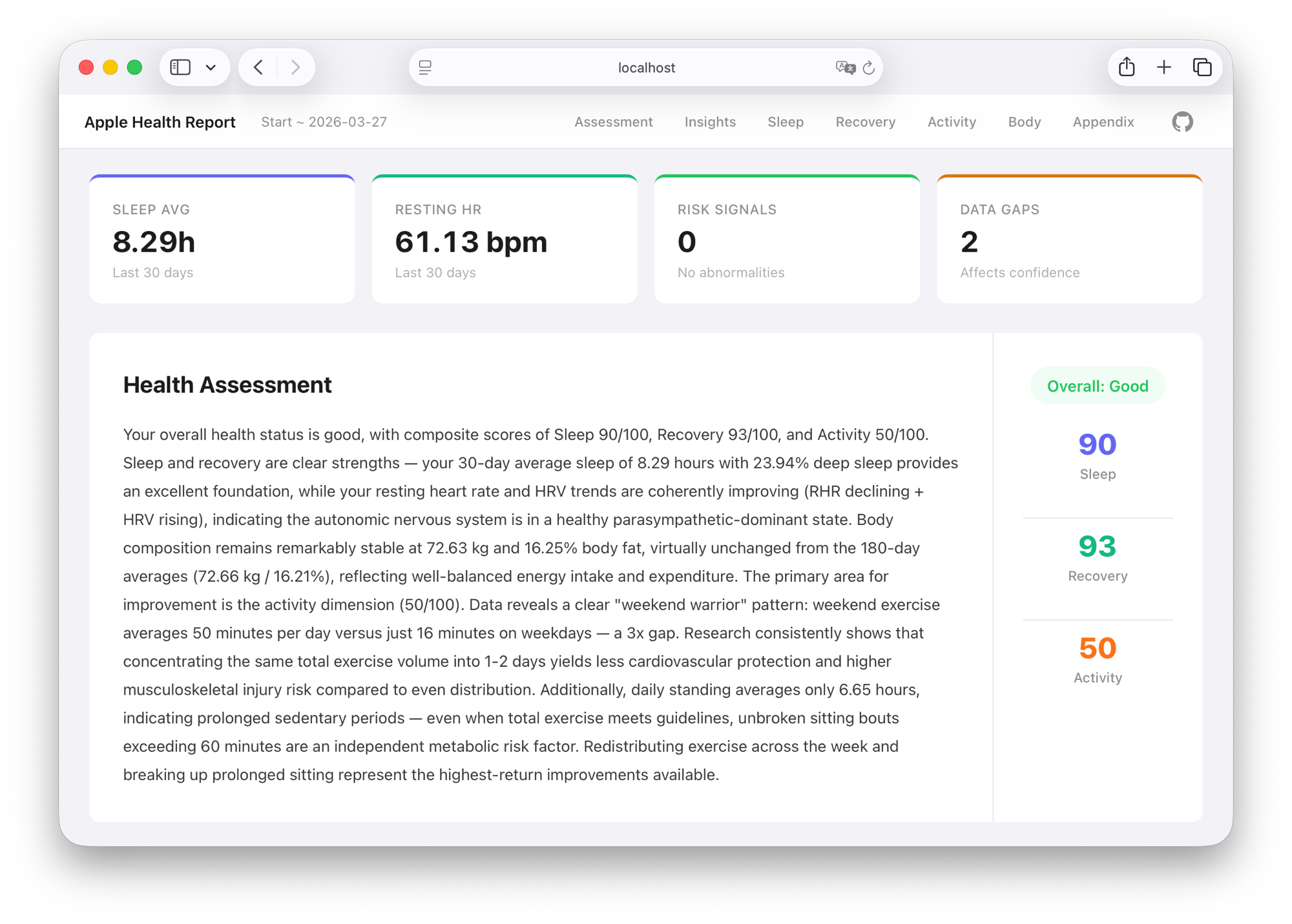
Analyze Apple Health export data locally, generating health reports with cross-metric correlation analysis, behavioral pattern recognition, and composite scoring.
Not a data dashboard — you can already see the data on your phone. This tool's value is interpreting your data like a health advisor: How are sleep and recovery linked? How does schedule regularity affect HRV? Does training load match recovery capacity?
View Sample Report (English) | 中文示例报告
Features
- Cross-metric correlation analysis — Sleep-HRV coupling, training-recovery balance, schedule regularity assessment
- Behavioral pattern detection — Weekend warrior, night owl drift, sleep compensation, recovery deficit
- Composite scoring — Sleep/Recovery/Activity on a 0-100 scale, transparent and explainable algorithm
- Bilingual — Automatically generates Chinese or English reports based on user language
- Privacy first — Runs entirely locally, no external APIs, no data uploads
- Offline HTML report — Single file with inline CSS + SVG charts, just double-click to open
Exporting Apple Health Data
- Open the Health app on your iPhone
- Tap your profile picture (top right)
- Scroll to the bottom and tap Export All Health Data
- Wait for the export to finish (may take a few minutes for large datasets), then choose Save to Files or AirDrop to your computer
- The resulting
Export.zipis the input file for this tool
Official exports may contain multiple XML files. The main analysis input is the XML whose root element is HealthData; export_cda.xml / ClinicalDocument is auxiliary only. The main XML filename is not fixed, may be localized (for example 导出.xml), and some ZIP tools may display that filename as mojibake.
Quick Start
Install the skill with one command (works with Claude Code, Codex, Cursor, and 40+ agents):
npx skills add RuochenLyu/apple-health-analyst
Then chat with your agent:
Analyze my Apple Health export at /path/to/export.zip
The skill activates automatically when you mention Apple Health analysis. You can also invoke it explicitly — /apple-health-analyst in Claude Code, or $apple-health-analyst in Codex.
The agent automatically completes the full prepare → LLM narrative → render pipeline, producing a health-advisor-grade report.
Note: This is an agent skill, not a standalone CLI tool. The
prepareandrendersteps run locally, but the narrative step requires an LLM — so the full workflow must run inside an AI coding agent.
Skill configuration is at .agents/skills/apple-health-analyst/, including role definition, analysis framework, and narrative schema.
Metrics Covered
| Module | Metrics |
|---|---|
| Sleep | Duration, Deep/REM/Core stage %, Bedtime/Wake time, Regularity |
| Recovery | Resting HR, HRV, Blood Oxygen, Respiratory Rate, VO2 Max |
| Activity | Active Energy, Exercise Minutes, Stand Hours, Workout Records |
| Body Composition | Weight, Body Fat % |
CLI
Commands used under the hood by the Codex Skill. Usually no need to run manually.
# 1. prepare: Parse ZIP, generate structured data (--lang en for English, --lang zh for Chinese)
npx apple-health-analyst prepare /path/to/Export.zip --lang en --out ./output
# Outputs summary.json + insights.json

# 2. (Codex reads insights.json, generates report.llm.json)

# 3. render: Produce final report (language auto-detected from insights.json)
npx apple-health-analyst render \
  --insights ./output/insights.json \
  --narrative ./output/report.llm.json \
  --out ./output
# Outputs report.html + report.md + report.llm.json
Limitations
- Does not provide medical diagnoses or treatment recommendations
- Does not analyze ECG waveforms or GPS routes (counts only)
- Step count and distance are not merged across devices
Development
npm run dev -- prepare /path/to/Export.zip --lang en --out ./output  # Dev mode (tsx, no build needed)
npm run build   # Compile
npm test        # Test
Yorumlar (0)
Yorum birakmak icin giris yap.
Yorum birakSonuc bulunamadi