dot-ai-monitor
skill
Basarisiz
Health Uyari
- License — License: MIT
- Description — Repository has a description
- Active repo — Last push 0 days ago
- Low visibility — Only 7 GitHub stars
Code Basarisiz
- child_process — Shell command execution capability in dot_notify.js
- execSync — Synchronous shell command execution in dot_notify.js
- spawnSync — Synchronous process spawning in dot_notify.js
- fs.rmSync — Destructive file system operation in dot_notify.js
- os.homedir — User home directory access in dot_notify.js
- process.env — Environment variable access in dot_notify.js
- fs module — File system access in dot_notify.js
- network request — Outbound network request in dot_notify.js
Permissions Gecti
- Permissions — No dangerous permissions requested
Purpose
This tool displays the real-time working status and token usage of AI coding assistants (like Claude Code and Codex) on a Dot e-ink screen device.
Security Assessment
The security risk is rated as Medium. The tool requires access to sensitive data to function correctly. It accesses the user's home directory (`os.homedir`) and environment variables to read local session logs and retrieve API credentials (like Anthropic OAuth tokens) stored in a `.env` file.
The automated scan flagged several critical code execution warnings, including `child_process`, `execSync`, and `spawnSync`. However, in this specific context, these are standard methods used to implement the required "Hooks" integration, allowing Claude Code to natively trigger the script. The tool does make outbound network requests, but these are strictly to push the screen updates to the Dot device's API and fetch usage data from Anthropic. No hardcoded secrets were found, and the tool does not request dangerous system-level permissions.
Quality Assessment
The repository is very new and currently has low community visibility with only 7 GitHub stars, meaning it has not been extensively vetted by a large audience. However, it is actively maintained (last updated today) and is properly licensed under the permissive MIT license. The provided documentation is thorough and clearly details how to safely configure the environment and API keys.
Verdict
Use with caution. The code appears safe for its intended purpose, but because it handles sensitive OAuth tokens and has low community visibility, developers should inspect the script before running it.
This tool displays the real-time working status and token usage of AI coding assistants (like Claude Code and Codex) on a Dot e-ink screen device.
Security Assessment
The security risk is rated as Medium. The tool requires access to sensitive data to function correctly. It accesses the user's home directory (`os.homedir`) and environment variables to read local session logs and retrieve API credentials (like Anthropic OAuth tokens) stored in a `.env` file.
The automated scan flagged several critical code execution warnings, including `child_process`, `execSync`, and `spawnSync`. However, in this specific context, these are standard methods used to implement the required "Hooks" integration, allowing Claude Code to natively trigger the script. The tool does make outbound network requests, but these are strictly to push the screen updates to the Dot device's API and fetch usage data from Anthropic. No hardcoded secrets were found, and the tool does not request dangerous system-level permissions.
Quality Assessment
The repository is very new and currently has low community visibility with only 7 GitHub stars, meaning it has not been extensively vetted by a large audience. However, it is actively maintained (last updated today) and is properly licensed under the permissive MIT license. The provided documentation is thorough and clearly details how to safely configure the environment and API keys.
Verdict
Use with caution. The code appears safe for its intended purpose, but because it handles sensitive OAuth tokens and has low community visibility, developers should inspect the script before running it.
把 Claude Code / Codex 的工作状态和用量信息显示在 Dot 电子墨水屏上
README.md
dot-ai-monitor
把 AI 编程助手的工作状态和用量信息,显示在 Dot 电子墨水屏 上。
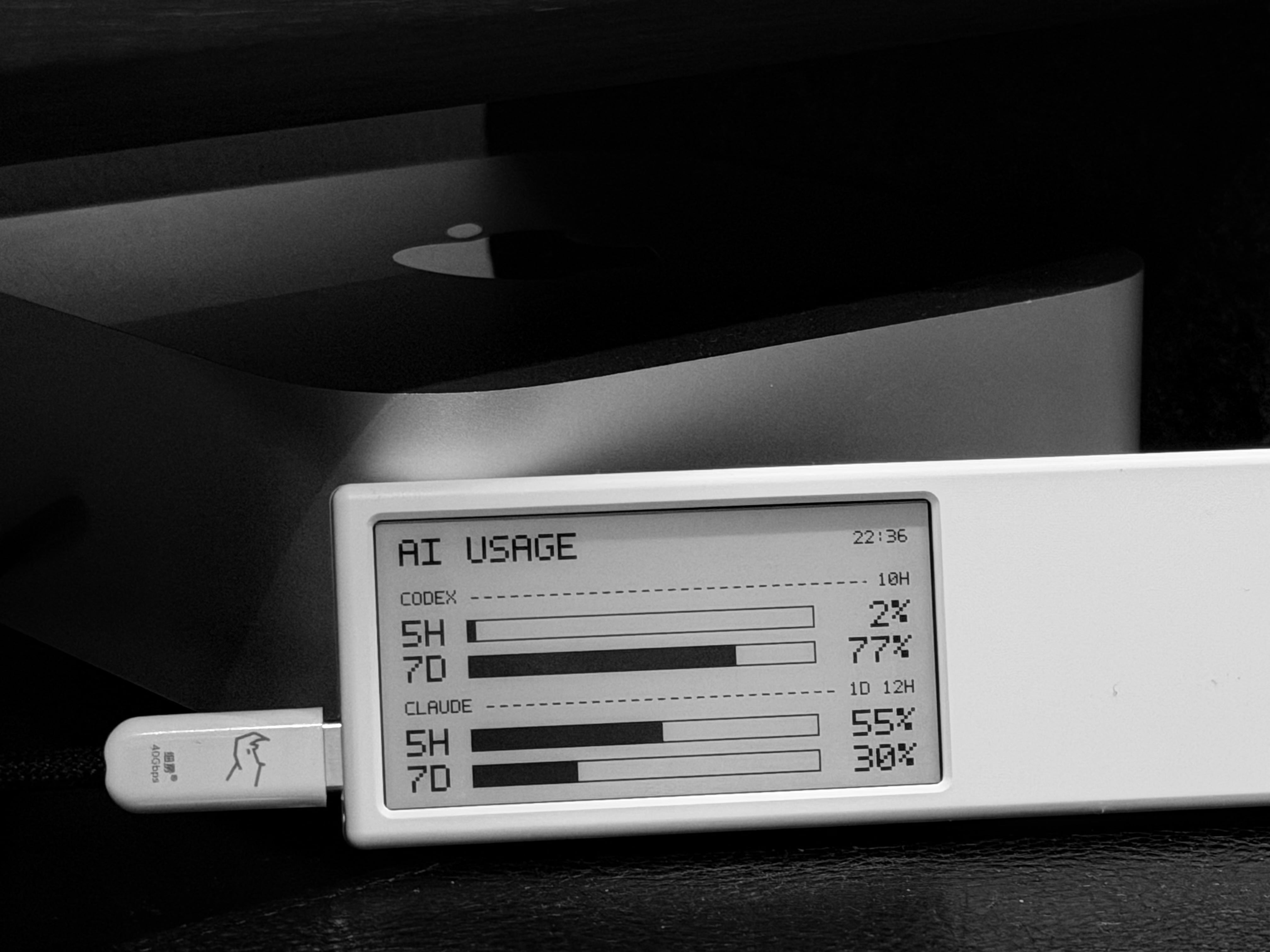
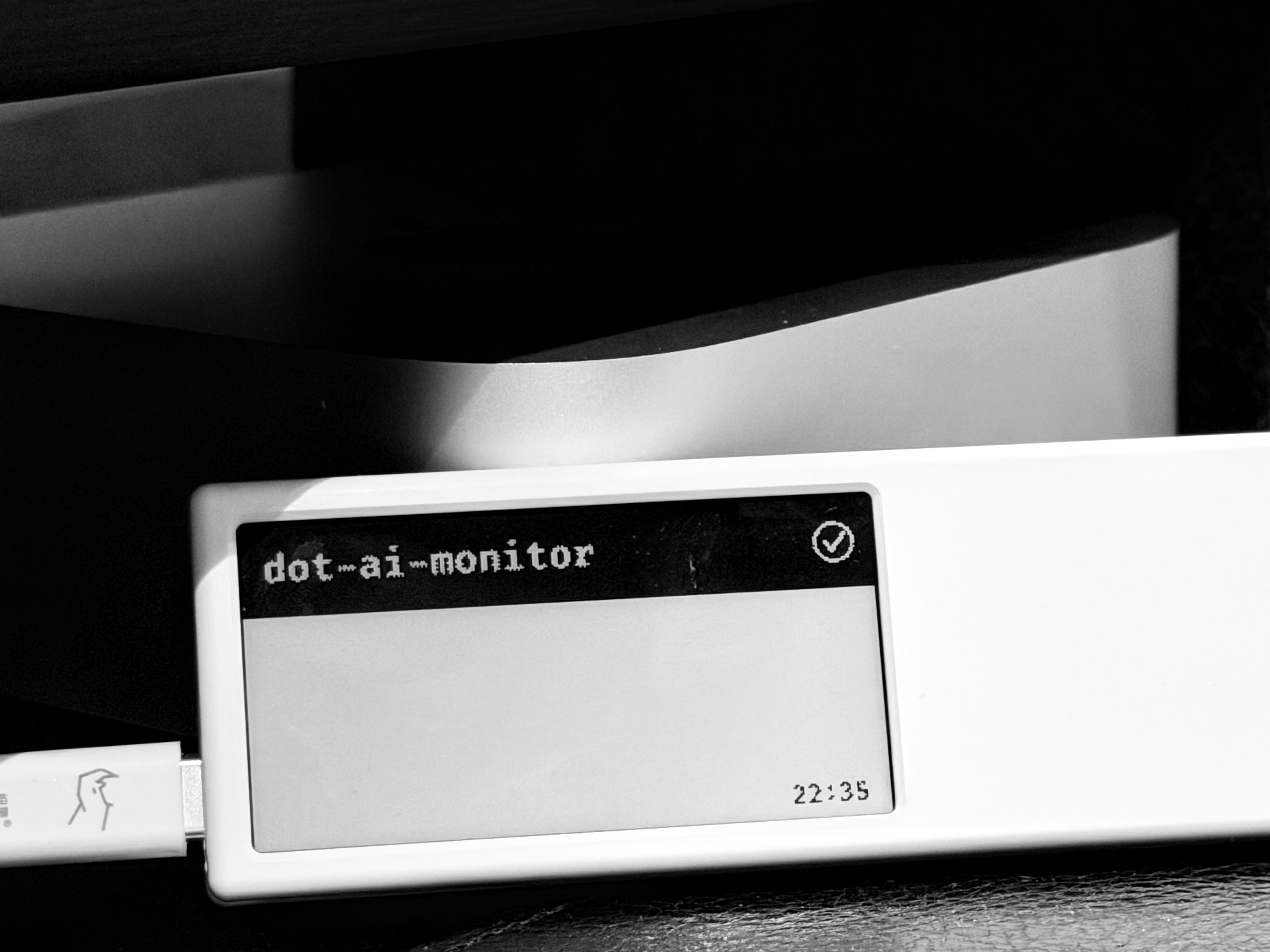
它做什么
- 有活跃会话时 — 实时显示每个 Claude Code 会话的状态(运行中 / 等待权限 / 已完成)
- 空闲时 — 显示 Claude 和 Codex 的 token 用量(5 小时 / 7 天窗口 + 进度条)
- 会话状态通过 Claude Code Hooks 自动推送,用量信息通过 cron 定时刷新;如果设备意外白屏,cron 也会重推当前应显示的页面
会话状态说明
| 屏幕显示 | 含义 |
|---|---|
| 项目名 + 旋转图标 | Claude 正在工作 |
| 项目名 + ! 三角 | Claude 等待你确认权限 |
| 项目名 (反色行) + ✓ | Claude 已完成,等你查看结果 |
最多同时显示 3 个会话。完成/权限状态 3 分钟后自动消失,回到用量显示。
你需要什么
- 一台 Dot 电子墨水屏(接上电源和 Wi-Fi)
- 在 Dot App 内容工坊中添加「图像 API」到设备任务,获取 API Key
- Node.js 18+
- Claude Code CLI(用于会话状态推送)
安装
git clone https://github.com/RuochenLyu/dot-ai-monitor.git
cd dot-ai-monitor
npm install
配置
复制 .env.example 为 .env,填入你的配置:
cp .env.example .env
# === Dot 设备(必填) ===
DOT_API_KEY=dot_app_your_api_key    # Dot App 中获取
DOT_DEVICE_ID=YOUR_DEVICE_ID        # Dot App 中获取
DOT_BASE_URL=https://dot.mindreset.tech  # 默认值,通常不需要改

# === Claude 用量(可选,二选一) ===

# 方式1:Anthropic OAuth Token(推荐)
ANTHROPIC_OAUTH_TOKEN=your_oauth_access_token

# 方式2:自定义 API(兼容 sub2api 等代理)
# CLAUDE_USAGE_API_URL=https://your-api-url.com
# CLAUDE_USAGE_API_KEY=your_api_key
# CLAUDE_USAGE_ACCOUNT_ID=1

# === 其他 ===
TZ=Asia/Shanghai
Codex 用量始终从本地
~/.codex/sessions/自动读取,无需额外配置。
如果不配置 Claude 用量,空闲时 Claude 部分显示为--。
Claude 用量获取方式
| 方式 | 适用场景 | 配置 |
|---|---|---|
| Anthropic OAuth Token | Claude Pro/Max 订阅用户 | 设置 ANTHROPIC_OAUTH_TOKEN |
| 自定义 API | 使用 sub2api 等代理 | 设置 CLAUDE_USAGE_API_URL + CLAUDE_USAGE_API_KEY |
设置 Claude Code Hooks
在 ~/.claude/settings.json 中添加以下内容,将 /path/to 替换为你的实际安装路径:
{
  "hooks": {
    "UserPromptSubmit": [
      { "hooks": [{ "type": "command", "command": "node /path/to/dot_notify.js", "timeout": 5, "async": true }] }
    ],
    "PreToolUse": [
      { "hooks": [{ "type": "command", "command": "node /path/to/dot_notify.js", "timeout": 5, "async": true }] }
    ],
    "Notification": [
      { "matcher": "permission_prompt", "hooks": [{ "type": "command", "command": "node /path/to/dot_notify.js", "timeout": 5, "async": true }] }
    ],
    "Stop": [
      { "hooks": [{ "type": "command", "command": "node /path/to/dot_notify.js", "timeout": 5, "async": true }] }
    ],
    "SessionEnd": [
      { "hooks": [{ "type": "command", "command": "node /path/to/dot_notify.js", "timeout": 5, "async": true }] }
    ]
  }
}
配置完成后,Claude Code 的每次操作都会自动更新 Dot 屏幕。
设置定时用量刷新(可选)
添加 cron 任务,定时重推当前应显示的页面;空闲时显示用量,有活跃会话时则恢复会话状态:
chmod +x dot_usage.sh
crontab -e
添加以下行(每 10 分钟刷新,7:00-23:59):
*/10 7-23 * * * /path/to/dot_usage.sh
测试
# 生成混合状态测试图并推送到 Dot
node dot_notify.js --test mix

# 获取实际用量数据并推送
node dot_notify.js --test usage

# 其他测试场景: all-run, all-done, single
node dot_notify.js --test all-run
项目结构
dot_notify.js      主程序(Hook 事件处理 + 用量显示 + 图像渲染)
dot_usage.sh       cron 入口脚本(自动查找 node 路径,并定时恢复当前显示)
fonts/             内置 FiraCode 字体
assets/            预览图片
.env               你的配置(不会提交到 git)
.cache/            运行时缓存(自动创建)
License
MIT
Yorumlar (0)
Yorum birakmak icin giris yap.
Yorum birakSonuc bulunamadi