tact
Health Gecti
- License — License: MIT
- Description — Repository has a description
- Active repo — Last push 0 days ago
- Community trust — 17 GitHub stars
Code Basarisiz
- process.env — Environment variable access in .github/workflows/scheduled-review.yml
- fs module — File system access in .github/workflows/scheduled-review.yml
- rm -rf — Recursive force deletion command in config.example.toml
- Hardcoded secret — Potential hardcoded credential in config.example.toml
Permissions Gecti
- Permissions — No dangerous permissions requested
Bu listing icin henuz AI raporu yok.
Terminal and desktop AI coding agent in Rust. Multi-turn agent loop, layered context compaction, MCP, sub-agents, eval suite. Self-hosted, no account.
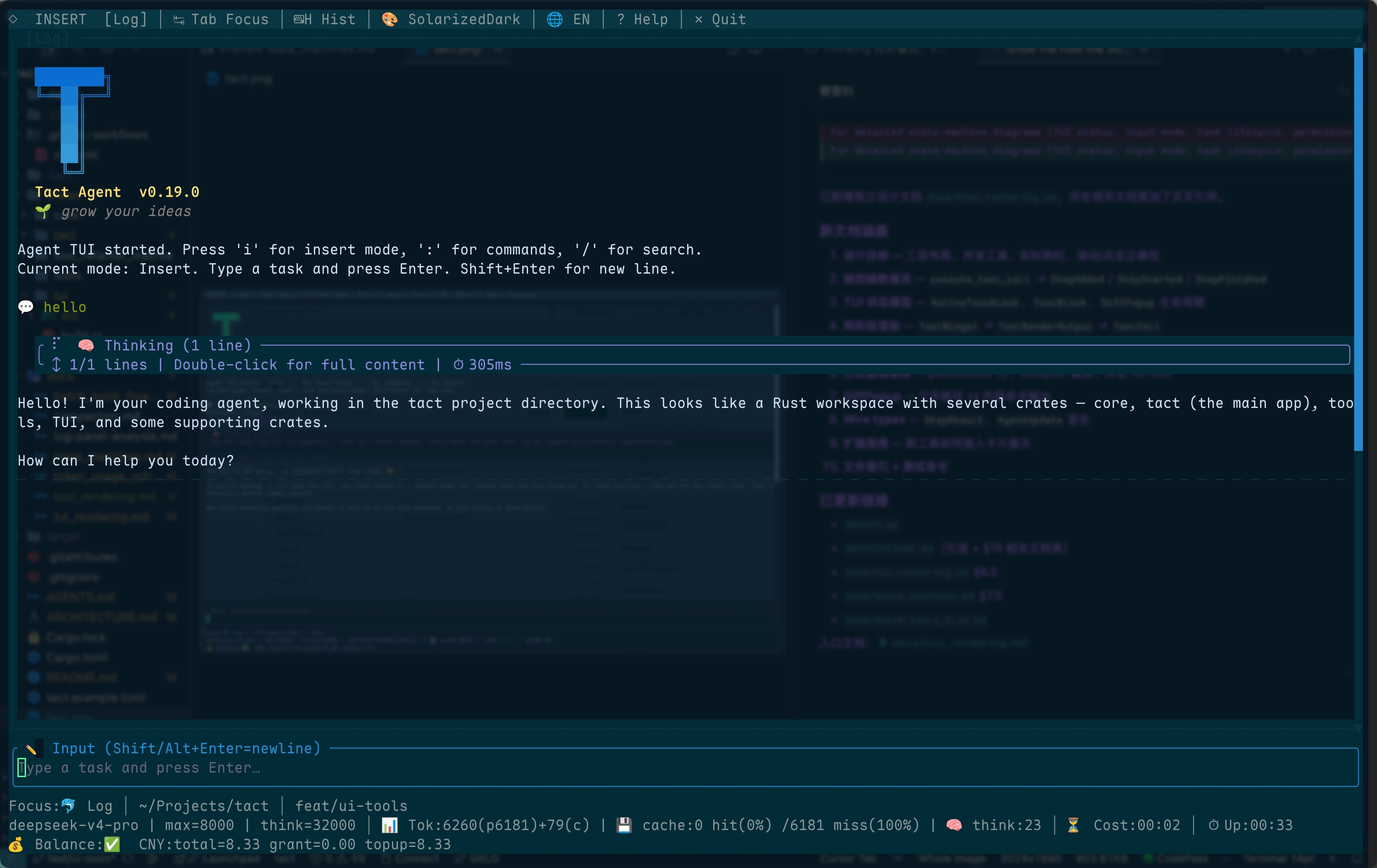
tact
Terminal and native desktop AI coding agent. Built in Rust. MIT licensed.
Quick Start · Features · Architecture · Configuration





What is tact?
tact is an AI coding agent with a terminal UI and a native desktop app. It
reads your codebase, understands your intent, and executes. It edits files,
runs commands, searches code, and coordinates with sub-agents.
- 🦀 Written in Rust — a terminal CLI and native desktop app, with no
Electron or Node.js runtime - 🏠 Self-hosted runtime — Tact has no hosted service and no account. The
only traffic is the model providers, MCP servers, and transcription service
you configure, plus GitHub when you runtact-ui upgrade - 🔓 MIT licensed — open source
- 🧩 Extensible — MCP plugins, custom skills, hooks, and tool macros
$ tact-ui headless "Add a --verbose flag to the CLI and update the README"
That's it. Configure a provider, open a terminal, and prompt.
Why this exists
An agent loop that outlives its context window is a distributed system: it has
partial state, concurrent writers, retries, crashes, and one very expensive
shared resource that runs out.
tact is built by someone who has run that class of system before. Six years
on the backend of Hago (JOYY) — a social product that peaked at 33M MAU and
10M DAU across Indonesia, India, Singapore, Dubai, Brazil, and the US — on
the homepage room recommendation pipeline, community, and social graph. Before
that: PBFT consensus and P2P routing on a DAG blockchain, IM infrastructure
at Echo Music, cloud storage at Kugou and UpYun.
The design decisions here come from that background:
| Agent runtime problem | What a high-traffic backend does instead |
|---|---|
| Context window fills up | Rebuild a projection from the source of truth; keep the cache cheap to discard |
| A tool returns 40k tokens | Page the results, don't inline them — same as pre-slicing Redis results for a hot API |
| A goal crashes mid-flight | Lease-fence the writer so the effect can't apply twice |
| Token cost is invisible | Persist per-call usage, cache hit/miss, and reasoning tokens to local SQLite |
MIT licensed, no account, no hosted service, no telemetry.
Quick Start
1. Install
Linux / macOS
curl -fsSL https://raw.githubusercontent.com/rust-infra/tact/main/scripts/install.sh | bash
Or from a clone:
./scripts/install.sh --from-source
Windows (PowerShell)
irm https://raw.githubusercontent.com/rust-infra/tact/main/scripts/install.ps1 | iex
Or from a clone:
.\scripts\install.ps1 -FromSource
The installer prefers a matching GitHub release asset when one exists, otherwise
builds tact-ui from source (requires Rust 1.99+ / edition 2024; installs
rustup if needed). Pass --from-source / -FromSource to skip the release
download, or --release / -Release to prefer a pre-built binary with source
fallback:
curl -fsSL https://raw.githubusercontent.com/rust-infra/tact/main/scripts/install.sh | bash -s -- --release
Install options:
| Platform | Flag | Meaning |
|---|---|---|
| Unix | --install-dir DIR |
Install location (default: ~/.local/bin) |
| Unix | --system |
Install to /usr/local/bin |
| Unix | --from-source |
Build from source only |
| Unix | --release |
Prefer GitHub release, fall back to source |
| Unix | --release-only |
Require a GitHub release (no source fallback) |
| Unix | --git-ref REF |
Git branch or tag to clone (default: main) |
| Unix | --skip-deps |
Skip OS package and rustup installation |
| Unix | --no-modify-path |
Do not add the install dir to the shell PATH |
| Windows | -InstallDir PATH |
Install location (default: %USERPROFILE%\.local\bin) |
| Windows | -FromSource |
Build from source only |
| Windows | -Release |
Prefer GitHub release, fall back to source |
| Windows | -ReleaseOnly |
Require a GitHub release (no source fallback) |
| Windows | -GitRef REF |
Git branch or tag to clone (default: main) |
| Windows | -SkipDeps |
Skip rustup installation |
| Windows | -NoModifyPath |
Do not add the install dir to the user PATH |
Manual build from source
Linux: install SQLite build dependencies first (required by sqlx / session store).
Building from source requires Rust 1.99+ (edition 2024):
sudo apt-get update
sudo apt-get install -y libsqlite3-dev pkg-config clang libclang-dev
git clone https://github.com/rust-infra/tact.git
cd tact
rustup toolchain install stable   # if needed; rustc >= 1.99
cargo build --release --locked -p tact-ui
./target/release/tact-ui --help
Tact Desktop
tact-desktop is the native GPUI frontend for macOS, Windows, and Linux. It
uses the same tact_host session runtime, project-local SQLite store, command
catalog, Goals, subagents, and extensions as the terminal UI.
cargo run -p tact-desktop
cargo build --release -p tact-desktop
The release workflow also packages tact-ui beside the desktop binary. Windows
and Linux ship matching desktop and CLI binaries. The macOS .app bundle is
signed and notarized only when the repository has the six signing secrets
(MACOS_CERTIFICATE, MACOS_CERTIFICATE_PASSWORD, MACOS_SIGNING_IDENTITY,APPLE_ID, APPLE_TEAM_ID, APPLE_APP_PASSWORD). Without them the release
still ships, with an unsigned bundle: macOS users open it once from the
right-click Open menu, or runxattr -d com.apple.quarantine 'Tact Desktop.app'. A partial set of secrets
fails the release and names the missing ones.
Building the desktop on Linux needs the GPUI platform libraries, which the CLI
does not:
sudo apt-get install -y libasound2-dev libfontconfig1-dev libfreetype6-dev \
  libsqlite3-dev libwayland-dev libx11-dev libxcb1-dev libxcb-render0-dev \
  libxcb-shape0-dev libxcb-xfixes0-dev libxkbcommon-dev \
  libxkbcommon-x11-dev pkg-config
Runtime on Linux also needs a Vulkan driver. The release build targetscrates/tact-ui by default; cargo build alone does not compile the desktop
shell because it pulls gpui into every UI rebuild.
Installing from a local checkout (the crates are not published to crates.io yet):
cargo install --path crates/tact-ui
Binary releases: bump [workspace.package].version in Cargo.toml in the
PR that changes the behaviour. A merge to main whose version is new is tagged
by .github/workflows/tag.yml, which calls release.yml and builds the
binaries for Linux (x86_64 / ARM64), macOS (x86_64 / ARM64), and Windows
(x86_64). A hand-pushed tag that does not match the workspace version is
rejected by scripts/check-release-tag.py, and release.yml builds nothing.
GitHub Actions (.github/workflows/release.yml) uploadstact-ui-v<version>-<target-triple>.tar.gz / .zip,tact-desktop-v<version>-<target-triple>.tar.gz / .zip, and the checksum
manifest.
2. Configure
Create config.toml in your project root (or ~/.tact/config.toml for user-level defaults):
[llm]
provider = "anthropic"   # selects [llm.providers.anthropic]

[llm.providers.anthropic]
model = "claude-sonnet-4-20250514"
api_key = "sk-ant-..."
base_url = "https://api.anthropic.com"  # required for anthropic

[permission]
mode = "default"   # "default" | "plan" | "auto"

[agent]
model_context_window = 200000
snapshot_max_items = 120
micro_compact_enabled = false
memory_enabled = true
notifications_enabled = true

[ui]
theme = "ink"   # dark | light | solarized-dark | solarized-light | gruvbox-dark | nord | retro | kawaii | japanese | brutal | ink | ink-light | claude | claude-dark | auto

[tools]
# Bash wall-clock timeout in seconds (default: 1800; 0 disables timeout)
bash_timeout_secs = 1800
# Bash process niceness (default: 10; 0 disables)
bash_nice = 10
CLI flags override the config file (e.g. --model, --api-key, --theme).
Optional agent settings (config file or CLI):
| Setting | CLI flag | Default | Description |
|---|---|---|---|
snapshot_max_items |
--snapshot-max-items |
120 |
Max entries in the system-prompt Project structure snapshot |
model_context_window |
--model-context-window |
200000 |
Model context window in tokens (80% auto-compact + TUI usage meter) |
micro_compact_enabled |
--no-micro-compact |
false |
Stub old tool results before each LLM call when enabled |
memory_enabled |
none | true |
Inject the MEMORY.md index + memory guidance and register save_memory / load_memory; false disables all four (files are kept) |
auto_memory_directory |
none | derived per repository | Override the memory directory (~/relative expand like skill_dirs) |
skill_dirs |
none | none | Extra skill roots, each holding */SKILL.md; loaded after the built-in roots |
skill_body_auto_inject |
--skill-body-auto-inject |
false |
Put every skill body in every system prompt instead of names and descriptions |
notifications_enabled / --notifications controls desktop notifications and
is macOS-only. Other keys are documented inline inconfig.example.toml: the [goal] run budgets,[agent.subagent] overrides, [voice], [tools].sandbox, [tools].rtk_filter,
and [mcp].
3. Run
# Interactive TUI (default)
tact-ui

# Headless single-shot task
tact-ui headless "Fix all clippy warnings in src/ and run cargo test"

# With specific model
tact-ui --model "claude-sonnet-4-20250514" headless "Refactor the error handling in lib.rs"

# Plan-only mode (review before execution)
tact-ui -m plan headless "Add rate limiting to the API client"
Top-level flags go before the subcommand. tact-ui headless --model m is not
accepted, and the CLI says so rather than silently ignoring the flag.
In the interactive TUI, a / opens the command palette. The built-in commands:
| Command | Does |
|---|---|
/theme |
Choose a color theme (Ctrl+T cycles) |
/model, /model-subagent |
Switch the model for this session, or for sub-agents |
/permission |
Set the permission mode |
/lang |
Toggle the UI language (English / 中文) |
/compact |
Compact the conversation now |
/goal |
Create, inspect, and control durable Goals (see below) |
/tasks-dag |
Show the task dependency graph |
/stats |
Session statistics |
/trajectory |
Open the run's trajectory ledger |
/background |
Background task status |
/balance |
Query the provider account balance (DeepSeek / Kimi) |
/skill |
List, reload, or run a skill |
/plugin, /mcp |
Manage plugins and marketplaces, or MCP servers |
/hooks, /hook-output |
Review command hooks; show or hide their output in the log |
/view-system-prompt |
Show the assembled system prompt |
/save, /history |
Save the log to a file; show task history |
/cancel, /subagent_cancel |
Cancel the running task, or one sub-agent |
/help, /quit |
Help panel; exit |
Persisted sessions can be resumed with --session ID or --resume-last; inspect
recent sessions with --list-sessions. Plugin and marketplace management is also
available without starting the TUI:
tact-ui plugin list
tact-ui plugin install superpowers@claude-plugins-official
tact-ui plugin uninstall superpowers
tact-ui plugin update superpowers
tact-ui plugin marketplace add owner/repository
tact-ui plugin marketplace list
tact-ui plugin reload
MCP servers are managed the same way — no hand-editing mcp.json required:
tact-ui mcp list                       # every configured server + its status
tact-ui mcp get deepwiki               # one server: transport, source, tools
tact-ui mcp add deepwiki --url https://mcp.deepwiki.com/mcp
tact-ui mcp add linear --url https://mcp.linear.app/mcp --oauth
tact-ui mcp add local --command npx --arg -y --arg some-mcp-server
tact-ui mcp login linear               # run the OAuth browser flow
tact-ui mcp logout linear              # delete the stored credentials
tact-ui mcp remove local               # delete the declaration only
add/remove write the project file (.tact/.mcp.json) by default; pass--user for ~/.tact/.mcp.json or --force to replace an existing
declaration. login/logout own the tokens under ~/.tact/mcp/oauth/, andmcp auth remains an alias for mcp login.
Command hooks from a repository, your user directory, or an installed plugin
run only after you approve them:
tact-ui hooks list                     # every hook, and whether it was reviewed
tact-ui hooks trust --all              # approve everything still pending
tact-ui hooks trust --source .tact/hooks.json
tact-ui hooks forget --all             # revoke every approval
Some providers gate OAuth registration on the client name rather than
verifying the client: Figma answers 200 for Codex and 403 for Tact with
an otherwise identical request. Tact therefore registers asmcp.oauth_client_name, default "Codex", so these providers work out of the
box. The trade-off is that the provider — and the OAuth consent screen — sees"Codex"; the name actually used is logged and printed on failure. Set it back
to identify honestly, per config file or per server:
[mcp]
oauth_client_name = "Tact"
Self-upgrade is built in:
tact-ui upgrade --check   # check for a newer release without installing
tact-ui upgrade           # prompt, then upgrade to the newest release binary
tact-ui upgrade --yes     # skip the confirmation prompt
tact-ui upgrade finds the newest GitHub release that ships a binary for your
platform (asset-less tags and pre-releases are skipped), downloads it, verifies
it against the published SHA256SUMS, and atomically replaces the running
executable on macOS/Linux. Track a fork with --repo owner/name (or theTACT_UPGRADE_REPO environment variable). On Windows, re-runscripts/install.ps1 to upgrade.
The automated release workflow intentionally publishes stablevMAJOR.MINOR.PATCH tags only. SemVer prerelease and build-metadata suffixes
are rejected with an explicit error rather than being treated as publishable
desktop releases.
Features
🧠 Intelligent Agent Loop
Multi-turn conversation loop with progressive context management:
- Large-output spill — oversized tool results land on disk with a short preview in context
- Micro-compact (optional) — when enabled, stub old tool results before each LLM call (keep the last 12 intact)
- Full compact — for chat-completions providers, when reported or
estimated tokens hit about 80% ofmodel_context_window, on
prompt-too-long recovery, or through a successfulcompacttool, write a
JSONL transcript, summarize it, and rebuild context from recent user turns
plus a handoff summary. OpenAI Responses uses provider-native compaction.
Responses endpoints without native compaction are unsupported.
The entry path reserves the incoming user turn before push, so a large prompt cannot overflow immediately after append. Failed compact tool calls leave history intact.
Details: book/05_chapter_compact_zh.html, docs/compaction.md.
🔧 Native Tool Set
Forty native tools cover files, shells and background processes, tasks,
sub-agents and teammates, durable Goals, memory and skills, git worktrees, and
user interaction. MCP servers add their own at runtime. The full list is under
Built-in Tools.
In the interactive TUI, a running bash tool shows the last three lines of
output, and a running sub-agent shows its last eight. stdout and stderr merge
in the order Tact observes their pipe reads, with stderr styled as warning
text. Tact does not add a PTY, rewrite commands, or bypass buffering owned by
the command or pipeline. Headless mode remains final-result-only.
Two opt-in switches change what bash runs. [tools].sandbox = true wraps the
shell in bubblewrap on Linux, so third-party code an approved command pulls in
cannot write outside the workspace. [tools].rtk_filter = true pipes output
through rtk when it is on PATH. Both are
off by default. The sandbox has no implementation outside Linux, where enabling
it runs unsandboxed and says so at startup.
🔐 Three Permission Modes
| Mode | Behavior |
|---|---|
default |
Read-only tools run without asking. Writes ask once; high-risk calls ask until an explicit allow covers that exact tool and input. |
plan |
Read-only tools only. Every write and high-risk call is denied. |
auto |
Every capability is auto-approved, high-risk included. The credential scanner still refuses secret reads. |
Read decisions come first: read_file, list_*, get_*, and read-only shell
commands such as git status never prompt. A read whose target is a sensitive
path (.env, a private key) is escalated instead. spawn_subagent is always
high-risk. Allow and deny rules live in ~/.tact/settings.json and<workdir>/.tact/settings.json, keyed on the exact tool and input. [permission]
in config.toml holds only the mode.
🪝 Hooks & Skills
- Pre/Post hooks — intercept tool calls before/after execution. Run linters, format code, log usage. Hooks also fire on session start and end. A hook from
.tact/hooks.json,~/.tact/hooks.json, or an installed plugin is not registered until you approve it withtact-ui hooks trust, so cloning a repository cannot execute anything on its own. Editing an approved command requires approving it again. - Skills —
SKILL.mdplaybooks. Roots load in this order, and a later root wins on a name clash:~/.agents/skills/(Codex compatibility),~/.tact/skills/,<workdir>/.tact/skills/, then any[agent].skill_dirs. The system prompt lists names and descriptions; the full body arrives viaload_skillor a TUI/skill-name.<workdir>/.claude/skillsis not scanned. - Model picker — TUI
/modeluses configuredmodels = [...]first and supplements OpenAI-compatibleopenai,deepseek, andkimiproviders with a cachedGET {base_url}/modelsresult./model-subagentswitches the model sub-agents use. - Voice input — optional microphone recording and transcription via OpenAI, Google Cloud Speech-to-Text, or a local
whisper.cppserver, configured under[voice](macOS-first). Google API-key mode uses synchronous recognition for recordings up to 60 seconds.
🧩 Plugin Marketplace
Tact installs plugins natively. A plugin may ship skills, commands/*.md slash
commands, command hooks, and MCP servers; it needs none of them. The built-inclaude-plugins-official marketplace is available in every installation:
/plugin install superpowers@claude-plugins-official
/superpowers:brainstorming
Add another marketplace with /plugin marketplace add <source>. A source may be a GitHub shorthand such as owner/repository, a Git URL, or a remote marketplace.json URL. Tact derives the marketplace name from the source's final path component; use that name with /plugin marketplace update <name>, /plugin marketplace remove <name>, and /plugin install <plugin>@<name>. Remove a plugin with /plugin uninstall <name> and pull the latest revision with /plugin update <name>.
In the TUI, /plugin list and /plugin marketplace list render as titled tables (one row per plugin or marketplace). /plugin reload refreshes discovered plugin skills, and /plugin uninstall / /plugin update refresh them too so the plugin's skills change immediately.
Tact owns marketplace state, checkouts, and revision-locked plugin caches under ~/.tact/plugins/. From an installed plugin it loads skills/*/SKILL.md, legacy commands/*.md slash commands, declared command hooks, and its MCP servers (mcp.json / .mcp.json at the plugin root, or the manifest's mcpServers). Declarative agents/*.md are not a feature, and LSPs, monitors, and executables are not loaded or run. Installed skills use /plugin:skill (for example /superpowers:brainstorming); standalone skills keep the unprefixed /skill form.
👥 Sub-agents & Team
Spawn isolated sub-agents for parallel work. Coordinate via message-passing
inboxes. Each sub-agent gets a restricted toolset: bash, read_file,write_file, edit_file, and sleep. Use plan_approval /shutdown_request protocols for structured handoffs.
🎯 Durable Goals
A Goal is a long-running objective that survives across turns and sessions,
which a Task is not. Create one with /goal create <objective>, optionally
with criteria after --:
/goal create Ship the next release -- the full test suite passes; the changelog is written
/goal list
/goal show <goal-id>
/goal steer <goal-id> <text>
/goal pause <goal-id> | /goal resume <goal-id> | /goal cancel <goal-id>
/goal accept <goal-id> <text> | /goal archive <goal-id>
The Goal runner drives the agent in bounded activations, each capped by[goal].max_turns (default 500 model calls) and [goal].max_elapsed_secs
(default 600) per run. The agent records progress with goal_checkpoint,
asks questions with goal_request_input, and submits evidence withgoal_propose_completion. When the Goal declares required criteria,
completion is checked against the recorded evidence, not taken on the model's
word; a Goal with no required criteria is self-attested and labelled that way.
See book/28_chapter_goal_zh.html.
📈 Trajectory page
/trajectory opens a ledger of what the current run did: one numbered record
per step, grouped by turn, showing kind, status, duration, input, and output,
with a lane overview above it. It reads the run the way an auditor does, which
scrolling the conversation does not. Detail: docs/design/tui-trajectory.md.
🌳 Git Worktree Isolation
Each task can run in its own git worktree lane. No branch switching, no stash dancing. Agents work in parallel without stepping on each other.
🔌 MCP Support
Native Model Context Protocol client.
Connect a server and Tact exposes its tools, resources, resource templates,
prompts, instructions, and tool-list change notifications.
📡 TUI & Headless
- TUI mode (
tact-ui) — streaming output, syntax-highlighted diffs, interactive permission dialogs - Headless mode (
tact-ui headless) — CI/CD pipelines, scripts, or non-interactive workflows
🖥️ Tact Desktop
tact-desktop is a native GPUI app for macOS, Windows, and Linux over the sametact_host runtime, store, and command catalog as the terminal. It adds a
session sidebar, a chat transcript with grouped tool cards and a multi-file
diff review, Markdown and Mermaid rendering, and five inspector tabs: Run,
Goals, Subagents, Background, Context. An extensions manager covers MCP
servers, skills, plugins, and hook review.
| Shortcut | Does |
|---|---|
Cmd/Ctrl+K |
Command palette (every tact-ui command and setting) |
Cmd/Ctrl+B |
Show or hide the session sidebar |
Cmd/Ctrl+Alt+B |
Show or hide the inspector |
Cmd/Ctrl+1 … 5 |
Switch inspector tab |
Cmd/Ctrl+N |
New session |
Cmd/Ctrl+, |
Settings |
Cmd/Ctrl+Enter |
Submit the composer |
Cmd/Ctrl+. |
Cancel the run |
Cmd/Ctrl+Q |
Quit |
Esc |
Dismiss the current overlay |
secondary is Cmd on macOS and Ctrl elsewhere. The full table lives incrates/desktop/src/keymap.rs.
🖼️ Image attachments (vision)
Reference a workspace image with @path/to.png or . Tact keeps
the reference as a path, not as inline base64: the model calls read_image
when it needs the pixels. read_image compresses the raster under[ui.vision_image] before attaching it (downscale to max_edge, JPEG atjpeg_quality; set compress = false to send the original).
Requires a vision-capable model/endpoint. OpenAI-compatible providers send
images as image_url content parts; text-only models or gateways that only
accept text reject the request (HTTP 400, e.g. unknown variant image_url, expected text). Use a multimodal model (e.g. Claude vision, GPT-4o), or omit
image attachments on text-only models. Tact rejects the turn up front when the
active model is not vision-capable, instead of failing at the API.
💾 Persistent State
Everything that belongs to a project lives in that project. Sessions,
messages, token usage, tasks, Goals, background tasks, and worktree lanes share<project>/.tact/tact.db. Memories live per repository under~/.tact/projects/<slug>/memory/. Plugins, hook approvals, MCP declarations
and OAuth tokens, and user settings persist under ~/.tact/. Pick up where you
left off with --resume-last.
Architecture
Tact is a Cargo workspace, not one binary. The terminal UI and the desktop
shell are two frontends over one shared runtime:
tact-ui (terminal)          tact-desktop (GPUI)
      │                            │
      │                       tact_desktop_core
      └──────────┬─────────────────┘
                 │
             tact_host        session bootstrap, command loop,
                 │            Goal runner, permissions
                 │
                tact          composition root: tool router, MCP client,
                 │            hooks, prompts, compaction, SQLite store
                 │
         tact_agent_core      bounded kernel: AgentKernel::run, one
                 │            activation over injected KernelDeps
                 │
         tact_agent_api       ports: state, model streams, context,
                              tools, gates, transcript and usage sinks
tact_llm is the provider SDK and implements ModelPort: Anthropic, OpenAI
Chat Completions, and OpenAI Responses behind one builder. tact_protocol
carries the host/UI wire types, tact_catalog the shared command catalog,tui and agent_tui_kit the ratatui rendering, and tact_agent_sdk an
optional embeddable facade. The kernel has no SQLite, MCP transport, provider
SDK, or UI dependency; tact injects all of them.
The agent loop:
- Optionally auto-compacts old history (reserving space for the incoming user turn), then appends the turn
- Builds the system prompt from role, guidelines, constraints, memory, and dynamic context
- Micro-compacts old tool results when enabled; auto-compacts again if the window is still over the threshold
- Sends the conversation to the LLM with tool definitions
- Processes streaming responses: text → display, tool calls → execute
- Checks permissions for each tool call
- Runs pre/post hooks on tool execution
- Writes results back to the conversation history; a successful
compacttool then rewrites context - Continues until the model stops requesting tools (or recovery exhausts)
See ARCHITECTURE.md for the crate table, dependency
graph, permission decision order, hook events, and protocol, and the
book for chapter-length walkthroughs (compaction,
recovery, tools, agent loop, Goals, bash sandbox).
Built-in Tools
| Tool | Description |
|---|---|
read_file |
Read file contents with optional offset/limit; default page is 2000 lines / ~25k approx tokens with a PARTIAL continuation marker |
read_image |
Read a workspace image as a model-visible image attachment |
write_file |
Write or overwrite a file |
edit_file |
Replace exact text in a file (first match, or all with replace_all) |
bash |
Run a shell command |
background_run |
Run a command in the background (wait_ms blocks up to 10s for short commands and returns their output) |
check_background |
Check background task status (this session's tasks) |
wait_background |
Wait for a background task to finish, returning as soon as it does |
sleep |
Wait for N milliseconds (not for waiting on background tasks) |
spawn_subagent |
Spawn a sub-agent with fresh context |
check_subagent |
Read a sub-agent's current status |
wait_subagent |
Wait for a sub-agent to finish |
cancel_subagent |
Cancel a running sub-agent |
task_create |
Create a persistent task |
task_get |
Get task details by ID |
task_list |
List all tasks with status |
task_update |
Update task status, owner, dependencies |
spawn_teammate |
Create a named teammate |
list_teammates |
List all teammates |
send_message |
Send a message to a teammate |
broadcast |
Broadcast to all teammates |
read_inbox |
Read teammate inbox |
plan_approval |
Send a plan approval message |
shutdown_request |
Request shutdown |
shutdown_response |
Respond to shutdown request |
save_memory |
Save persistent memory across sessions |
load_memory |
Load a memory by name |
load_skill |
Load a named skill |
compact |
Request conversation summarization (rewrites history only on success) |
worktree_create |
Create a git worktree lane |
worktree_list |
List tracked worktrees |
worktree_status |
Show git status in a worktree |
worktree_run |
Run a command inside a worktree |
worktree_remove |
Remove a tracked worktree lane |
worktree_events |
List worktree lifecycle events |
goal_read |
Read a Goal and its latest run state |
goal_checkpoint |
Record progress and evidence for a Goal |
goal_request_input |
Ask for user input while a Goal is running |
goal_propose_completion |
Submit a Goal completion proposal for verification |
ask_user |
Ask the user (TUI popup; multi_select for checkboxes) |
MCP servers add their own tools at runtime. Tact also exposeslist_mcp_resources, read_mcp_resource, list_mcp_prompts, andget_mcp_prompt for MCP resources and prompt templates.
Configuration
tact reads one config file plus CLI flags (priority: high → low):
CLI args > config.toml
Use --config /path/to/config.toml to point at a specific file instead of auto-discovery.
Config file locations (auto-discovered)
<project>/.tact/config.toml      # project-level
<project>/config.toml             # project-level (alt)
~/.tact/config.toml               # user-level
The first file that exists wins. The files are not merged, so a project config
fully replaces the user-level one. Permission allow/deny rules are separate:
they live in <workdir>/.tact/settings.json and ~/.tact/settings.json, not inconfig.toml.
Full config reference
config.example.toml is the complete, validated
template. The application copies it to ~/.tact/config.toml on first run when
no configuration exists.
[llm]
provider = "anthropic"

[llm.providers.anthropic]
model = "claude-sonnet-4-20250514"
api_key = "sk-ant-..."
base_url = "https://api.anthropic.com"

[permission]
mode = "default"

[ui]
theme = "ink"   # or "auto" for terminal detection
Provider output limits and thinking settings belong to [agent] or the active
provider entry. [llm].max_tokens is not valid and causes startup to fail with
an error that names the replacement key.
CLI flags (override config)
| Flag | Description |
|---|---|
--config |
Path to config file |
--provider |
LLM provider |
--model |
Model name |
--api-key |
API key |
--base-url |
API base URL |
--max-tokens |
Max tokens per LLM call |
--thinking-budget |
Extended thinking budget |
--permission-mode / -m |
Permission mode |
--session ID |
Resume a specific persisted session |
--resume-last |
Resume the most recent session |
--list-sessions |
List recent sessions and exit |
--notifications BOOL |
Enable/disable desktop notifications |
--no-notifications |
Disable desktop notifications |
--model-context-window |
Model context window before auto-compaction |
--theme |
TUI theme |
--snapshot-max-items |
Project structure snapshot size |
--no-micro-compact |
Disable micro-compaction |
--skill-body-auto-inject |
Inject full skill bodies into the system prompt |
--tokio-console |
Enable tokio-console debugging |
Documentation
docs/README.mdmaps every reference page, crate doc,
desktop design note, and historical record.ARCHITECTURE.mdis the crate table, dependency graph,
permission decision order, hook events, protocol, and persistence layout.config.example.tomlis the complete, validated
configuration template.book/index_zh.htmlis the long-form book, in
Chinese, with chapters on the agent loop, compaction, tools, MCP, goals, and
the sandbox.crates/agent_sdk/README.mdandcrates/tact_llm/README.mdcover embedding
the kernel and calling providers directly.
License
MIT — do whatever you want, just keep the copyright notice.
Yorumlar (0)
Yorum birakmak icin giris yap.
Yorum birakSonuc bulunamadi