clideck
Health Gecti
- License — License: MIT
- Description — Repository has a description
- Active repo — Last push 0 days ago
- Community trust — 18 GitHub stars
Code Basarisiz
- network request — Outbound network request in bin/notify-helper.js
- os.homedir — User home directory access in config.js
- fs module — File system access in config.js
- child_process — Shell command execution capability in handlers.js
- os.homedir — User home directory access in handlers.js
- process.env — Environment variable access in handlers.js
- fs module — File system access in handlers.js
- network request — Outbound network request in opencode-plugin/clideck-bridge.js
- os.homedir — User home directory access in paths.js
- fs module — File system access in paths.js
- child_process — Shell command execution capability in plugin-loader.js
- fs module — File system access in plugin-loader.js
Permissions Gecti
- Permissions — No dangerous permissions requested
Bu listing icin henuz AI raporu yok.
A dashboard for running and coordinating multiple AI CLI agents at once.
clideck
Formerly
termix-cli— if you arrived here from an old link, you're in the right place. The project has been renamed to CliDeck. Update your install:npm install -g clideck
Manage your AI agents like WhatsApp chats. Assign roles, let Autopilot route work between them, check in from your phone.
Documentation | Video Demo | Website
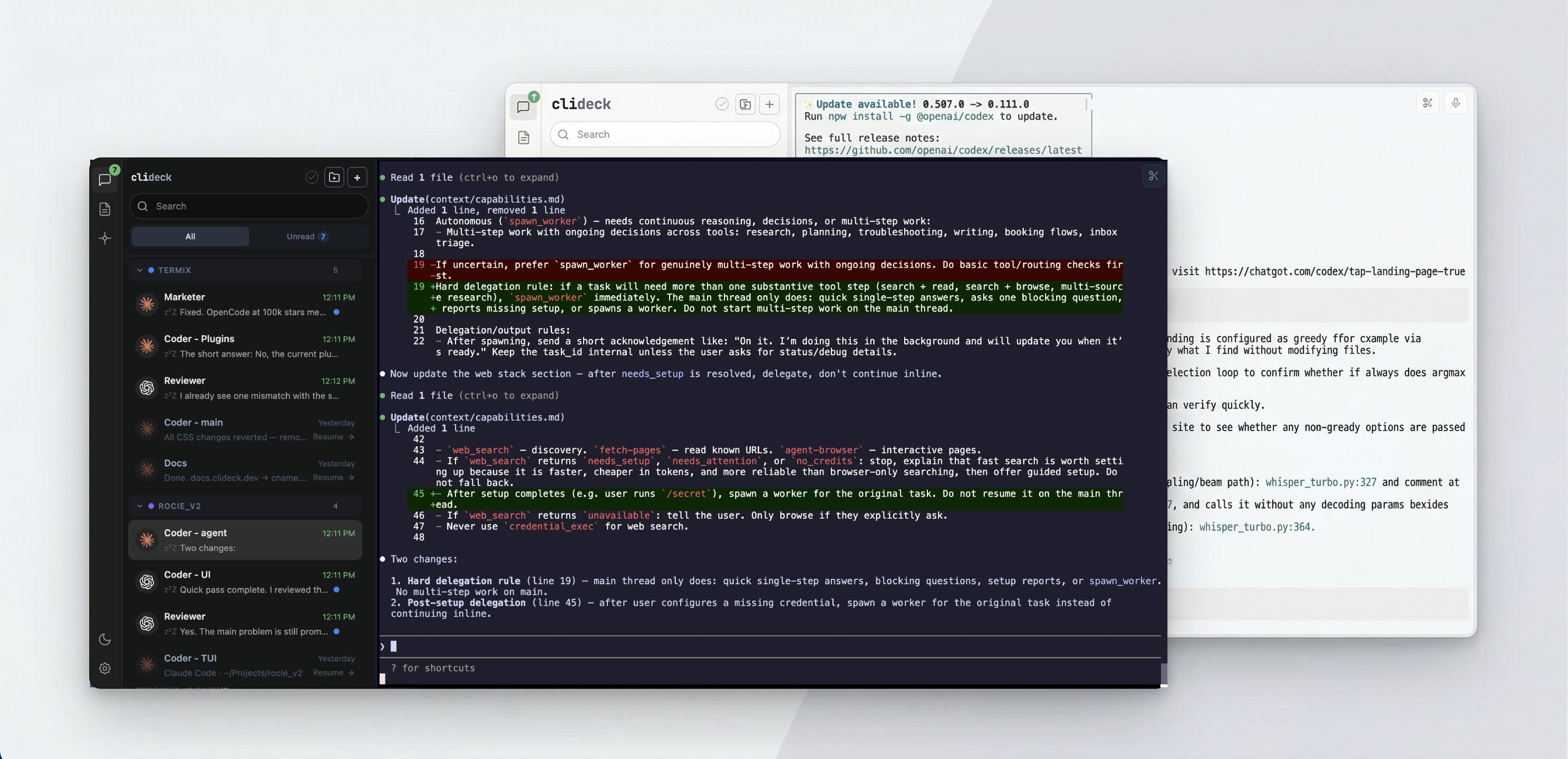
You run Claude Code, Codex, Gemini CLI in separate terminals. You alt-tab between them, forget which one finished, lose sessions when you close the lid.
clideck puts all your agents in one screen — a sidebar with every session, live status, last message preview, and timestamps. Click a session, you're in its terminal. Exactly like switching between chats.
Give each agent a role (Programmer, Reviewer, Product Manager), turn on Autopilot, and walk away — it routes output between agents automatically until the task is done or it needs you. Check progress from your phone with a QR scan.
Native terminals. Your keystrokes go straight to the agent, nothing in between. clideck never reads your prompts or output.
Quick Start
npx clideck
Open http://localhost:4000. Click +, pick an agent and optionally a project and role, start working.
New users get 3 built-in roles (Programmer, Reviewer, Product Manager) and 3 starter prompts in the prompt library.
Or install globally:
npm install -g clideck
clideck
What You Get
- Roles — define reusable agent identities (Programmer, Reviewer, PM) and assign them when creating sessions. Instructions are injected into the agent automatically.
- Autopilot — project-level workflow routing. Watches your role-assigned agents, waits for them to finish, forwards output to the next specialist. Fingerprints each output, tracks handoff history, and guards against repeat loops. Supports 8 LLM providers (Anthropic, OpenAI, Google, Groq, xAI, Mistral, OpenRouter, Cerebras). Notifies you when work is complete or blocked.
- Mobile access — check on your agents from your phone with a QR scan. E2E encrypted.
- Live working/idle status — see which agent is thinking and which is waiting for you, without checking each terminal
- Session resume — close clideck, reopen it tomorrow, pick up where you left off
- Notifications — browser and sound alerts when an agent finishes or needs input
- Message previews — latest output from each agent, right in the sidebar
- Projects — group sessions by project with drag-and-drop
- Search — find any session by name or scroll back through transcript content
- Prompt Library — save reusable prompts, type
//in any terminal to paste them - Plugins — full server + client API with hooks for input, output, status, transcript, and menus. Programmatic session control, toolbar and project actions, session pills, and a settings UI. Ships with Voice Input, Trim Clip, and Autopilot — or build your own.
- 15 themes — dark and light, plus custom theme support
Mobile Access
Start a task on your laptop, walk away, check progress from your phone. See who's working, who's idle, who needs input. Send messages, answer choice menus, browse conversation history, and resume sessions — all from the browser on your phone.
Pair with one QR scan, no account needed. End-to-end encrypted with AES-256-GCM — the relay sees only opaque blobs. Your code never leaves your machines.
Mobile access is provided by clideck-remote, a separate optional package. Install it with npm install -g clideck-remote.
Supported Agents
clideck auto-detects whether each agent is working or idle:
| Agent | Status detection | Setup |
|---|---|---|
| Claude Code | Automatic | Nothing to configure |
| Codex | Automatic | One-click setup in clideck |
| Gemini CLI | Automatic | One-click setup in clideck |
| OpenCode | Via plugin bridge | One-click setup in clideck |
| Shell | I/O activity only | None |
Claude Code works out of the box. Other agents need a one-time setup that clideck walks you through.
How It Works
Each agent runs in a real terminal (PTY) on your machine. clideck receives lightweight status signals via OpenTelemetry — it knows that an agent is working, not what it's working on.
Autopilot routes existing agent output between agents verbatim — it does not rewrite or summarize the routed content.
Everything runs locally. No data is collected, transmitted, or stored outside your machine.
Platform Support
Tested on macOS and Windows. Works in any modern browser. Linux: untested — if you try it, open an issue.
Documentation
Full setup guides, agent configuration, and plugin development:
Acknowledgments
Built with xterm.js.
License
MIT — see LICENSE.
Yorumlar (0)
Yorum birakmak icin giris yap.
Yorum birakSonuc bulunamadi