claude-zellij-whip
Health Uyari
- License — License: MIT
- Description — Repository has a description
- Active repo — Last push 0 days ago
- Low visibility — Only 8 GitHub stars
Code Gecti
- Code scan — Scanned 1 files during light audit, no dangerous patterns found
Permissions Gecti
- Permissions — No dangerous permissions requested
Bu listing icin henuz AI raporu yok.
Smart Claude Code notifications for Zellij with tab/pane focusing
claude-zellij-whip
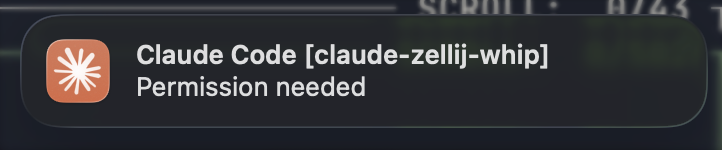
Smart macOS notifications for Claude Code running in Ghostty or WezTerm + Zellij. When you click a notification, it focuses your terminal, navigates to the correct Zellij tab, and focuses the exact pane where Claude Code is waiting.
The Problem
Claude Code's default \a bell notifications don't work properly through Zellij. Even with workarounds like terminal-notifier, clicking notifications doesn't bring you back to the right place.
The Solution
A headless macOS app that:
- Sends notifications via
UNUserNotificationCenter - Captures Zellij context (session, tab, pane) when sending
- On click: focuses Ghostty → navigates to tab → focuses pane
Dependencies
- macOS (uses
UNUserNotificationCenter) - Terminal emulator (one of):
- Zellij terminal multiplexer
- room - Zellij plugin that handles pane focusing via pipe
Configuration
The app can be configured to use different terminal emulators via a config file.
Config file location: ~/.config/claude-zellij-whip/config.toml or config.json
Supported terminals:
ghostty(default, used if config file doesn't exist)weztermiterm2terminal(macOS Terminal.app)alacrittykitty
TOML config (preferred):
terminal = "wezterm"
JSON config:
{
  "terminal": "wezterm"
}
Default behavior: If no config file exists, the app defaults to ghostty. TOML is checked first, then JSON.
Installation
1. Install the room plugin
# Clone and build
git clone https://github.com/rvcas/room
cd room
cargo build --release

# Copy to Zellij plugins
mkdir -p ~/.config/zellij/plugins
cp target/wasm32-wasip1/release/room.wasm ~/.config/zellij/plugins/
Make sure room is loaded in your Zellij session (via layout or config).
2. Build and install ClaudeZellijWhip
git clone https://github.com/rvcas/claude-zellij-whip
cd claude-zellij-whip
make install
The app will be installed to ~/Applications/ClaudeZellijWhip.app.
Code Signing (Optional)
By default, the app is ad-hoc signed. To sign with your Apple Developer ID:
# Find your identity
security find-identity -v -p codesigning

# Set it in the Makefile or pass it directly
make install SIGNING_IDENTITY="Apple Development: Your Name (XXXXXXXXXX)"
Usage
Manual test
open ~/Applications/ClaudeZellijWhip.app --args notify \
  --title "Claude Code" \
  --message "Test notification" \
  --folder "my-project"
Claude Code hooks
Add to ~/.claude/settings.json (see hooks documentation):
{
  "hooks": {
    "Notification": [
      {
        "matcher": "idle_prompt",
        "hooks": [{
          "type": "command",
          "command": "open ~/Applications/ClaudeZellijWhip.app --args notify --title 'Claude Code' --message 'Waiting for your input' --folder ${CLAUDE_PROJECT_DIR##*/}"
        }]
      },
      {
        "matcher": "permission_prompt",
        "hooks": [{
          "type": "command",
          "command": "open ~/Applications/ClaudeZellijWhip.app --args notify --title 'Claude Code' --message 'Permission needed' --folder ${CLAUDE_PROJECT_DIR##*/}"
        }]
      }
    ]
  }
}
The --folder parameter appends the project folder name to the notification title (e.g., "Claude Code [my-project]"), using the CLAUDE_PROJECT_DIR environment variable provided by Claude Code.
How It Works
Claude Code Hook
    ↓
open ClaudeZellijWhip.app --args notify --message "..."
    ↓
App captures: $ZELLIJ_SESSION_NAME, $ZELLIJ_PANE_ID, current tab name
    ↓
Shows macOS notification (with context in userInfo)
    ↓
User clicks notification
    ↓
App loads config and activates configured terminal (Ghostty or WezTerm)
    ↓
App runs: zellij --session <session> action go-to-tab-name <tab>
    ↓
App runs: zellij --session <session> pipe --plugin file:~/.config/zellij/plugins/room.wasm --name focus-pane -- <pane_id>
    ↓
room plugin calls focus_terminal_pane(pane_id)
Project Structure
claude-zellij-whip/
├── Sources/
│   ├── main.swift              # Entry point, mode detection
│   ├── AppDelegate.swift       # Notification click handling
│   ├── NotificationSender.swift # Notification creation
│   ├── FocusManager.swift      # Terminal/Zellij focus logic
│   ├── Config.swift            # Configuration loading
│   └── ZellijContext.swift     # Tab name extraction
├── Resources/
│   ├── Info.plist              # App bundle config (LSUIElement)
│   └── AppIcon.icns            # App icon (shows in notifications)
├── Package.swift
└── Makefile
Makefile Targets
make build- Debug buildmake release- Release buildmake install- Build, bundle, sign, and install to ~/Applicationsmake uninstall- Remove the appmake clean- Clean build artifactsmake list-identities- Show available code signing identities
License
MIT
Yorumlar (0)
Yorum birakmak icin giris yap.
Yorum birakSonuc bulunamadi